126. Coverage Utilities
126.1 Traffic scenarios
126.1.1 traverse_junction()
As shown in Figure 1, a vehicle's traversal of a junction can be decomposed into three sub-phases:
- Entering the junction.
- Driving within the junction.
- Exiting the junction.
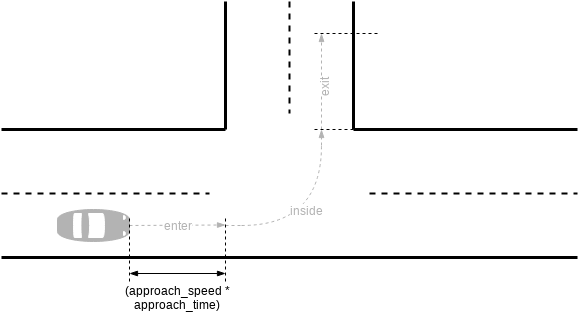
vehicle.traverse_junction() is a ready-made scenario that accomplishes just that:
import "$FTX_PACKAGES/common/osc/utils/av_utility_scenarios.osc"

extend top.main:
    a_car: vehicle
    do a_car.traverse_junction()
Executed as above, Foretify chooses a junction, creates a path that enters and exits that junction, and moves a_car along that path.
| Configuration | Type | Range | Description |
|---|---|---|---|
| path | path_over_junction | The junction to traverse. | |
| direction | direction | The direction to traverse the junction (straight, right, left, …). | |
| approach_speed | speed | [30..80]kph | The speed upon entering the junction. |
| approach_time | time | 2s | The time until the car enters the junction. |
| meters_pass_by | uint | [10..20] | Meters to drive after exiting junction. |
For example, a_car enters the junction at a speed of 45kph and turns left:
do a_car.traverse_junction(approach_speed: 45kph, direction: left)
In this context, direction is used to randomly pick an exiting segment relative to the entering segment. For example, in Figure 1, direction is left and corresponds to any segment within a [250..290] degree interval, measured anti-clock wise, starting from the entering segment. See section Predefined AV enumerated types in the OSC2 LRM for more details.
126.1.2 traverse_highway_junction()
Entering and exiting a highway requires traversing a special kind of road junction, complete with ramps that allow traffic to pass through the junction without interruption, as shown in Figure 2.
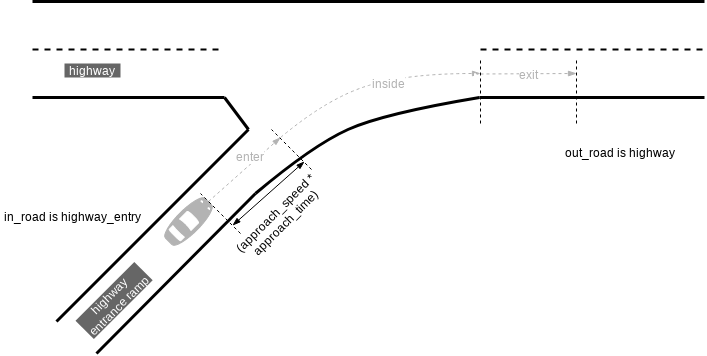
Figure 2 Car entering a highway
vehicle.traverse_highway_junction() is similar to vehicle.traverse_junction(). You specify where a vehicle starts the scenario (for example, driving on a highway or just entering) and where it ends (on highway or an exit ramp).
import "$FTX_PACKAGES/common/osc/utils/av_utility_scenarios.osc"

extend top.main:
    a_car: vehicle
    a_junction: highway_junction
    a_in_road: highway_entry
    a_out_road: highway
    do a_car.traverse_highway_junction(a_junction, in_road: a_in_road, out_road: a_out_road)
| Configuration | Type | Range | Description |
|---|---|---|---|
| j | highway_junction | The highway junction to traverse. | |
| in_road | highway_base | Should be constrained to a highway or highway_entry element. | |
| out_road | road_element | Should be constrained to a highway or highway_exit. | |
| approach_speed | speed | [50..200]kph | The speed upon entering the junction. |
| approach_time | time | 2s | The time until the car enters the junction. |
126.2 Coverage utilities
126.2.1 sut_behavior_coverage()
You can attach this modifier to any scenario, as shown in this example.
extend sut.to_side_on_curve:
    sut_behavior_coverage(sub_scenario: p1_sut)
The following table shows the coverage items collected by sut_behavior_coverage().
| Item | Unit / Type | Range | Description |
|---|---|---|---|
| sut_lane_shifts_while_sub_scenario | int | [0..5] | How many times the SUT has shifted lanes. |
| sut_collision_while_sub_scenario | bool | false, true | Whether the SUT has collided. |
| sut_stopped_while_sub_scenario | bool | false, true | Whether the SUT has stopped. |
| sut_min_ttc_while_sub_scenario | s | [0..3], every=0.1 | Minimum time-to-collision. |
| sut_side_on_collision_while_sub_scenario | av_car_side | front, front_left, ... | The SUT's' side on collision at minimum TTC. |
| other_vehicle_side_on_collision_while_sub_scenario | av_car_side | front, front_left, ... | The other vehicle's side on collision at minimum TTC. |
| [sut_side_on_collision_while_sub_scenario, other_vehicle_side_on_collision_while_sub_scenario] | Upon collision at minimum TTC, cross the SUT's and other vehicle's sides. This will show, for example if they collided front to back, side to side, and so on. | ||
| sut_speed_on_collision_while_sub_scenario | kph | [0..200], every=10 | The SUT's speed on collision at minimum TTC in kph. |
| sut_rel_speed_to_other_vehicle_on_collision_while_sub_scenario | kph | [-190..190], every=5 | The relative speed on collision at minimum TTC |
| sut_acceleration_on_collision_while_sub_scenario | mpsps | [-20..7] | The SUT's acceleration on collision at minimum TTC in meter/second**2. |
| sut_max_acceleration_while_sub_scenario | mpsps | [0..7] | The SUT's maximum acceleration in meter/second**2. |
| sut_max_braking_while_sub_scenario | mpsps | [0..20] | The SUT's maximum deceleration in meter/second**2. |
| sut_max_jerk_while_sub_scenario | mpspsps | [-20..20] | The SUT's max_deceleration in meter/second**3. |
The following table shows the KPIs collected by sut_behavior_coverage().
| Item | Unit / Type | Range | Description |
|---|---|---|---|
| sut_min_time_headway_to_nearest_vehicle_while_sub_scenario | s | [0..3], every=0.1 | Min time headway. |
| sut_min_lon_distance_from_nearest_vehicle_while_sub_scenario | meter | range: [0..200] | Min longitudinal distance between the SUT and the nearest vehicle to it in meter. |
| sut_min_lat_distance_from_nearest_car_while_sub_scenario | meter | range: [0..200] | Min lateral distance between the SUT and the nearest vehicle to it in meter. |
Notes:
- TTC-related items (sut_min_ttc and _on_collision) are sampled provided that the SUT was on a collision course with another car.
-
Coverage items exist in the scope of the enclosing scenario and their names are suffixed as follows:
- If sub_scenario is not specified, then the suffix is _self.
- If a label is passed, then the suffix is that label.
126.2.2 cover_distance_speed()
You can attach this modifier to any scenario, as shown in this example.
extend sut.lead_vehicle_and_stop:
    cover_distance_speed(other_vehicle: lead_vehicle,
        at: end, distance_lower_range: 0,
        distance_upper_range: 200, distance_unit: m, distance_every: 10,
        rel_speed_upper_range: 1, rel_speed_lower_range: -50,
        abs_speed_lower_range: 0, abs_speed_upper_range: 150)
The following table shows the parameters for cover_distance_speed().
| Item | Type | Range | Description |
|---|---|---|---|
| other_vehicle | vehicle | The other vehicle. | |
| at | av_sample_kind | The event upon which the parameters are sampled. | |
| plan | bool | false | Whether to sample planned values. |
| phase | any_scenario | null | When plan=true, planned values are sampled from this field. |
| distance_lower_range | int | 0 | The lower range for distance-related coverage items. |
| distance_upper_range | int | 1500 | The upper range for distance-related coverage items. |
| distance_unit | length | cm | The distance unit. |
| distance_every | uint | 50 | The sub-ranges for distance-related coverage items. |
| abs_speed_lower_range | int | 10 | The lower range for absolute speed-related coverage items. |
| abs_speed_upper_range | int | 200 | The upper range for absolute speed-related coverage items. |
| abs_speed_unit | speed | kph | The unit for absolute speed-related coverage items. |
| abs_speed_every | uint | 10 | The sub-ranges for absolute speed-related coverage items. |
| rel_speed_lower_range | int | -190 | The lower range for relative speed-related coverage items. |
| rel_speed_upper_range | int | 190 | The upper range for relative speed-related coverage items. |
| rel_speed_unit | speed | kph | The unit for relative speed-related coverage items. |
| rel_speed_every | uint | 5 | The sub-ranges for relative speed-related coverage items. |
The following table shows the metric items collected by cover_distance_speed().
| Item | Type | Range | Description |
|---|---|---|---|
| planned_sut_rel_dist_to_other_vehicle_at | Planned: How far ahead is the other vehicle relative to the SUT at (phase).(at) (in (distance_unit)) | ||
| planned_sut_speed_at | Planned: Speed of the SUT at (phase).(at) (in (abs_speed_unit)) | ||
| planned_other_vehicle_rel_speed_to_sut_at | Planned: Speed of the other vehicle relative to the SUT at (phase).(at) (in (rel_speed_unit)) | ||
| sut_rel_dist_to_other_vehicle_at | How far ahead is the other vehicle relative to the SUT at (phase).(at) (in (distance_unit)) | ||
| sut_speed_at | Speed of the SUT at (phase).(at) (in (abs_speed_unit)) | ||
| other_vehicle_rel_speed_to_sut_at | Speed of the other vehicle relative to the SUT at (phase).(at) (in (rel_speed_unit)) |
126.2.3 cover_convoy_same_path()
You can attach this modifier to any scenario, as shown in this example.
extend sut.slow_neighbors:
    cover_convoy_same_path(convoy: [car1, car2, car3])
The following table shows the metric items collected by cover_convoy_same_path().
| Item | Type | Range | Description |
|---|---|---|---|
| passed_convoy_cars_by_dut_at_end | int | [-5..5] | Number of cars passed, not passed. |
| dut_rel_position_to_convoy_at_start | relative_positioning | SAME, LEFT, RIGHT | |
| dut_rel_position_to_convoy_at_end | relative_positioning | SAME, LEFT, RIGHT |
126.2.4 traverse_junction_scenario_coverage()
You can attach this modifier to any scenario using a traverse_junction scenario, as shown in this example.
extend sut.merge_at_highway_entry:
    traverse_junction_scenario_coverage(other_car: car1,
        dut_in_road: dut_in_road,
        dut_junction: dut_junction,
        dut_out_road: dut_out_road,
        other_car_in_road: car1_in_road,
        other_car_out_road: car1_out_road,
        other_car_junction: car1_junction)
The following table shows the coverage items collected by traverse_junction_scenario_coverage().
| Item | Unit / Type | Range | Description |
|---|---|---|---|
| dut_speed_when_entering_junction | kph | [0..200] | Speed of the SUT when entering the junction. |
| dut_speed_when_exiting_junction | kph | [0..200] | Speed of the SUT when exiting the junction. |
| dut_acceleration_when_entering_junction | mpsps | [-20..20] | Acceleration of the SUT when entering the junction. |
| dut_acceleration_when_exiting_junction | mpsps | [-20..20] | Acceleration of the SUT when exiting the junction. |
| <other_car>_speed_when_entering_junction | kph | [0..200] | Speed of the other car when entering the junction. |
| <other_car>_speed_when_exiting_junction | kph | [0..200] | Speed of the other car when exiting the junction. |
| <other_car>_acceleration_when_entering_junction | mpsps | [-20..20] | Acceleration of the other car when entering the junction. |
| <other_car>_acceleration_when_exiting_junction | mpsps | [-20..20] | Acceleration of the other car when exiting the junction. |
| dut_enter_to_<other_car>_enter_offset | second | [-2..2] | Difference between the time the SUT enters the junction and the time other car enters junction. Negative value means the other car was already in the junction when the SUT entered. |
| dut_exit_to_<other_car>_exit_duration | second | [-2..2] | Difference between the time the SUT exits the junction and the time other car exits the junction. Negative value means the other car was already outside the junction when the SUT exited. |
| dut_dist_to_entry_on_<other_car>_enter | meter | [-500..500] | SUT's distance to merge point when the other enters junction (meter). Negative value means the SUT was already in the junction when other car entered. |
| <other_car>_dist_to_entry_on_dut_enter | meter | [-500..500] | Other car distance to merge point when the SUT enters junction (meter). Negative value means the other car was already in the junction when the SUT entered. |
126.3 Traffic rules utilities
126.3.1 sut_at_stop_sign_check_cov()
You can attach this utility to any scenario as shown:
extend sut.sut_approach_stop_sign:
    stop_for_stop_sign_check_failure_severity: issue_severity with:
        keep(default it == error)

    sut_at_stop_sign_check_cov(
        issue_severity: stop_for_stop_sign_check_failure_severity)
126.3.2 sut_at_yield_check_cov()
You can attach this utility to any scenario as shown:
extend sut.lead_vehicle_and_slow_junction:
      dut_at_yield_check_severity: issue_severity with:
          keep(default it == error)

      dut_at_yield_check_cov(
          interceptor: car2,
          sut_junction: dut_path.junction,
          interceptor_junction: car2_path.junction,
          sut_at_yield_check_severity: dut_at_yield_check_severity,
          interceptor_min_allowed_deceleration: interceptor_min_allowed_deceleration_when_dut_at_yield)