87. Auto Steer Optimizer
The Auto Steer Optimizer (ASO) is an optimization tool that helps validation engineers increase coverage of the output parameter space. Due to the fact that the output space cannot be targeted directly, heuristics are required to efficiently cover it. The purpose of the ASO is to efficiently cover the output space by prioritizing tests that are more likely to hit uncovered regions in the output space.
87.1 Methodology
This document outlines the recommended methodology for using Foretellix optimizers. The accompanying diagram provides a concise overview of the prescribed flow and methodology that we advise our users to adopt. The ASO focuses on the last two building blocks: "Heterogeneous Coverage Maximization" and "Output-Coverage Maximization". These two blocks are described in the subsequent sections of this document.
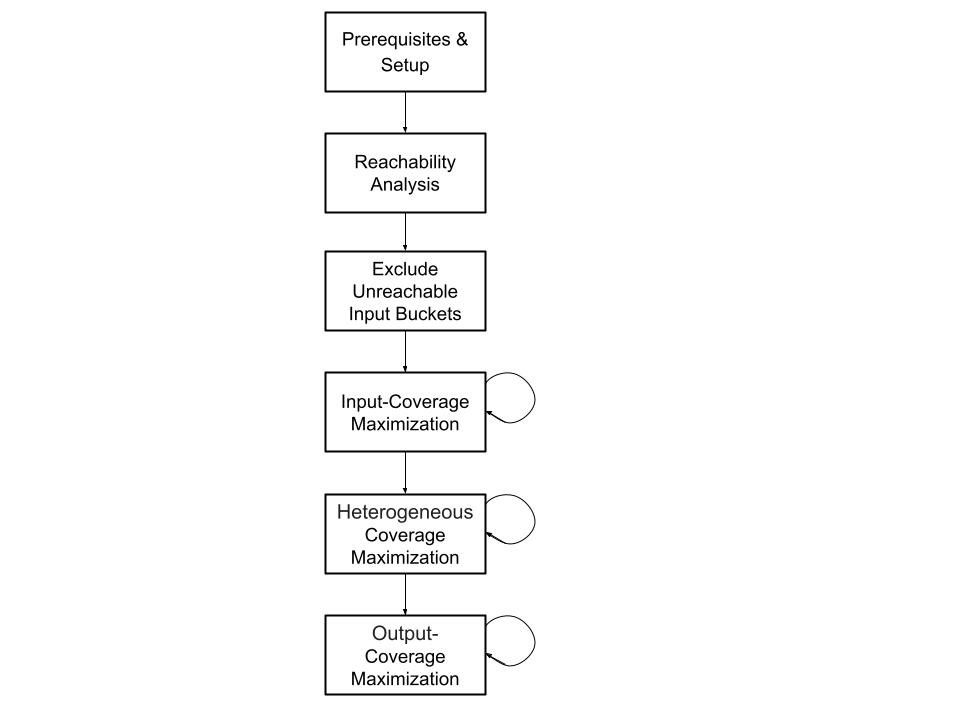
It is recommended to run the ASO after the Input Coverage Optimizer (ICO) reachability and coverage maximization processes are completed (see the ICO documentation). When the output space remains largely uncovered following the ASO execution, it is recommended to run unconstrained random runs and add them to the workspace to ensure a better starting point for the ASO, utilizing more meaningful information and not only information about the input parameters.
87.1.1 Output Coverage Maximization
87.1.1.1 Motivation
Activating the ASO is strategic in order to achieve comprehensive coverage of the output space which is composed of many items that cannot be explicitly controlled. As opposed to the ICO, which focuses on targeting input parameters and crosses that include input parameters, the ASO is designed to optimize the coverage of the output space. The ASO works by prioritizing tests that are more likely to hit uncovered regions in the output space.
87.2 Key terms for the Auto Steer Optimizer
Following are key concepts introduced with the ASO.
- Test suite
- A group of tests run together in Foretify Manager, previously termed regression.
- Test Suite Manager (TSM)
- A high-level configurable management component that enables easily defining, scheduling, and running test suites in various ways. Any specific implementation of a TSM implements a specific behavior out of a wide range of possibilities. There is no definite list of options, but some examples are optimizers and TSMs that execute other TSMs by some fixed order or logic.
- Bucket
- The smallest Verification and Validation (V&V) goal element representing a value or a range of values that are to be covered. The intersection of multiple buckets of different input and/or output parameters can create a cross bucket. For every bucket, the number of hits is recorded and if it matches or exceeds the target, it is considered covered. A bucket can be discarded from the V&V goals by excluding it.
- Cover items
- Cover items are a construct that defines the V&V goals. Cover items can either be regular buckets or cross buckets. The progress in the process of filling the buckets is accumulated into a coverage grade.
- Workspace
- A Foretify Manager construct that aggregates results from multiple test suites, including the coverage grade.
87.3 Execute Auto Steer Optimizer
Given existing results in a workspace, the ASO generates sets of previously executed tests, according to the flags and arguments described in the following section.
Note
Currently you can only execute the ASO using the command line and not yet using the Foretify Manager UI.
The execution command for the ASO on Linux machines is:
$ ./optimizer_main steer <path/to/configuration>
To learn about all flags and arguments of the ASO, you can use the 'help' of the ASO execution command:
$ ./optimizer_main steer -h
The following flags and arguments can be set in an optimizer_config.json file that appears in the positional arguments
section below, or overridden by a command-line argument (see the example for an optimizer config file).
Some arguments can be specified either on the command line or in the config file as noted in the argument lists below.
[optimizer_config]- Optimizer config file (full path). (Command line only)
--host [HOST]- Foretify Manager host, for example, 12.34.56.78. (Command line and config file)
--port [PORT]- Foretify Manager port, for example, 8080. (Command line and config file)
--login [LOGIN]- Foretify Manager login/user. (Command line and config file)
--workspace_id [WORKSPACE_ID]- The ID of the workspace. Used for accessing the VPlan structure and the relevant covered/uncovered buckets. It can be found in the URL of the workspace. (Command line and config file)
--threshold [THRESHOLD]- A number between 0 and 100. If the percentage of grade improvement falls below this value, the ASO terminates. At least one of 'threshold' and 'max_iterations' should be supplied. If not supplied, the optimizer will run until max_iterations is reached. (Command line and config file)
--max_iterations [MAX_ITERATIONS]- A positive integer specifying the maximum number of iterations to be dispatched. At least one of 'threshold' and 'max_iterations' should be supplied. If not supplied, the optimizer will run until the minimal coverage progression required by the threshold is not met. (Command line and config file)
--local_work_directory [LOCAL_WORK_DIRECTORY]- A path to an existing local directory where data can be stored for running iterations. (Command line and config file)
--remote_work_directory [REMOTE_WORK_DIRECTORY]- A path to an existing remote directory where data can be stored for running iterations. (Command line and config file)
--https [HTTPS]- Whether to use HTTPS for the connection. Default is false. (Command line and config file)
--strategy [STRATEGY]- Defines the manner in which iteration runs are chosen. Default is 'iterative_greedy'. Another option is 'basic'. (Command line and config file)
--vplan_targets [VPLAN_TARGETS]- A VPlan path or list of VPlan paths pointing to items, groups, structs or sections to be targeted by the ASO (partial paths accepted), e.g., ['all.sut.lead_vehicle_and_slow.start.*', 'all.sut.lead_vehicle_and_slow.end.inputs_crossed_with_outputs']. This will target the item 'inputs_crossed_with_outputs' under the 'end' group in 'sut.lead_vehicle_and_slow' struct in the 'all' section, and all the items under the 'start' group in 'sut.lead_vehicle_and_slow' struct in the 'all' section. (command line and config file)
--runs [RUNS]- A positive integer specifying the number of runs to dispatch in each iteration. Default is 100 runs per iteration. (Command line and config file)
--analytics_directory [ANALYTICS_DIRECTORY]- Indicates to the ASO where to dump the analytics files. Example:
<analytics_directory>/auto_steer_checkpoint_<iteration_number>.pickle. Default is ".". (Command line and config file) --verbosity [VERBOSITY]- Controls the verbosity level. Options are 'off' (no prints), 'info' (general progression prints), and 'debug' (extra information prints). Default is 'info'. (Command line and config file)
--test_suite_name [TEST_SUITE_NAME]- The name of the test suite to be used for the optimization. The name will be ASO_test_suite_
. By default, the field will remain empty and the test suite will be named ASO_test_suite . (Command line and config file) -h, --help- Optimizer's User Interface help.
Notes
- Server - Required arguments are
--hostAND--portAND--login - Test suite execution - Required arguments are:
--workspace_id - Stopping criteria - Requires any of the following:
--thresholdOR--max_iterations - Working directory - Requires one of the following:
--local_work_directoryOR--remote_work_directory
87.3.1 Example
For Linux users:
$ ./optimizer_main steer autosteer_config.json
This command executes the ASO with the optimizer config, autosteer_config.json. All other arguments are in the config file (see example below).
If a required parameter is not mentioned, an error is raised.
Following is an example of an optimizer config file, autosteer_config.json:
{
  "host": "12.34.56.78",
  "port" : "8080",
  "login": "my_user",

  "workspace_id": "a1b2c3d4e5f6g7h8i9j0",
  "max_iterations": 12,

  "local_work_directory": "my/work/dir"
}
Following is a more elaborate example showing more options:
{
  "host": "12.34.56.78",
  "port" : "8080",
  "login": "my_user",

  "workspace_id": "a1b2c3d4e5f6g7h8i9j0",
  "vplan_targets": "the.path.to.a.vplan.section.struct.group.or.item",

  "max_iterations": 12,
   "threshold": 0.1,

  "runs": 132,
  "verbosity": "info",
  "strategy": "iterative_greedy",

  "analytics_directory": "my/analytics/dir",
  "local_work_directory": "my/work/dir"
}
If a flag is passed using both the command line and the config file, the config file flag is ignored.
For Linux users:
$ ./optimizer_main steer autosteer_config.json –port 9090
In this case, port 9090 is used, ignoring the value 8080 in the config file.
87.4 License
In order to use the ASO, you must have a valid license. The license is provided by Foretellix and is required in order to run the optimizer. Each run dispatched by the optimizer consumes 1 optimizer license and 1 runtime license. With 1 optimizer and 1 runtime license, the user can launch a Foretify test suite with serial executions by using the optimizer.
87.5 Modes of Operation
The ASO has two different operation strategies: Basic, Iterative-greedy, and MAB.
87.5.1 Basic strategy
In the basic strategy, the contribution of each test is calculated based on the number of uncovered buckets it hits, ignoring the effect of other tests in the same test suite. The contribution is then scaled by the number of runs for the test in the test suite, and the average duration for a run. The ASO then assigns weights proportional to the scaled contributions and executes the tests based on the calculated weights. This process is repeated until the stopping criteria are met.
- Straightforward and easily explainable.
- Leads to more balanced test distribution.
Note
Failed runs are still considered when calculating the average duration, typically leading to a longer average duration.
--strategy basic
87.5.2 Iterative-greedy strategy
In the iterative-greedy strategy, the contribution of each test is calculated similarly to the basic strategy, but then, the tests are chosen iteratively based on their contribution, taking into account the contribution of other tests previously chosen in the current ASO iteration. The ASO again assigns weights proportional to the calculated contribution of each test and executes the tests based on the calculated weights. This process is repeated until the stopping criteria are met.
- Takes into account the effect of other tests in the same test suite.
- Leads to fewer overhead of runs with low benefit.
Note
Failed runs are still considered when calculating the average duration, typically leading to a longer average duration.
--strategy iterative-greedy
87.5.3 MAB strategy
In the Multi-Armed Bandit (MAB) strategy, the contribution of each test is calculated based on the Thompson sampling method with an underlying normal-gamma conjugate function. The ASO assigns weights based on the probability of a test to contribute more than any other test to the coverage. The ASO then executes the tests based on the calculated weights. This process is repeated until the stopping criteria are met.
- Theory-based statistical method.
- Leads to fewer overhead of runs with low benefit.
- Inherent exploration mechanism.
Note
Failed runs are still considered when calculating the average duration, typically leading to a longer average duration.
--strategy MAB
87.5.3.1 Exploration
By default, 5% of the runs are chosen with the goal of exploration. The runs chosen for exploration are not chosen randomly. Rather, the tests that were run the least number of times are chosen, to improve the certainty in their assessed contribution. When the MAB strategy is chosen, exploration is being performed based on a single statistical model and has no explicit exploration fraction.
87.6 Analytics
During the execution of the ASO, checkpoint files are saved in the analytics directory. These files contain the state of
the ASO at the end of each iteration. The files are saved in the following format:
<analytics_directory>/auto_steer_checkpoint_<iteration_number>.pickle. The files have a consistent structure and can be
used to analyze execution and results.
The checkpoint files contain the following fields:
| Field | Type | Description |
|---|---|---|
| max_iterations | int | None | The maximum number of iterations |
| runs | int | The number of runs per iteration |
| threshold | float | The threshold for stopping the ASO |
| ws_id | str | The workspace ID |
| analytics_dir | str | The directory where the analytics files are saved |
| vplan_paths | List[str] | None | The VPlan paths to be targeted by the ASO |
| host | str | The Foretify Manager host |
| port | str | The Foretify Manager port |
| test_to_params | Dict[int, Dict[str, str]] | A mapping from test ID to the parameters of the test. The parameter names are the keys in the inner dictionaries and their request is the value in a string format. |
| iter_num | int | The iteration number |
| INFO | bool | Indicates that the verbosity level is set to INFO (also True when DEBUG is True) |
| DEBUG | bool | Indicates that the verbosity level is set to DEBUG |
| iteration_results | Dict[str, Any] | Additional information about the execution, see table below |
| strategy | Dict[str, Any] | The strategy used by the ASO, see table below |
The iteration_results field contains the following sub-fields:
| Field | Type | Description |
|---|---|---|
| grades | List[float] | The grade of the workspace after each iteration, the first element is the initial grade |
| test_dists | Dict[int, List[int]] | A mapping between test ids and the number of runs in every iteration |
| test_durations | List[Dict[int, float]] | List of dictionaries, one for each iteration. Each dictionary maps test ids to their cumulative duration in that iteration |
| test_fman_ids | List[Dict[int, List[str]] | List of dictionaries, one for each iteration. Each dictionary maps test ids to their Foretify Manager run ids |
| reg_ids | List[List[str]] | List of lists of Foretify Manager test suite ids, one for each iteration |
| test_runs_in_ws | List[str] | List of run ids executed in the current iteration |
The strategy field contains the following sub-fields:
| Field | Type | Description |
|---|---|---|
| name | str | The name of the strategy |
| scale_by_duration | bool | Whether the contribution of a test is scaled by its duration or just number of tests |
| timeline_point_id | str | The timeline point id in the workspace |
| vplan_paths | List[str] | None | The VPlan paths to be targeted by the ASO |
| ws_id | str | The workspace ID |