208. Foretellix tool installation
Two installation architectures for Foretellix tools are possible:
- Scalable: uses an HPC architecture (a scalable cloud or computer farm together with a job management system) to run concurrent simulations, with multiple users on multiple computing nodes.
- Local: run simulations locally, with multiple users on a single computing node.
The local installation is identical to its scalable counterpart, except that everything is installed on one machine (except perhaps the license server).
208.1 Scalable installation
A scalable installation is one that allows limitless scaling of the project's execution capacity and analysis capacity.
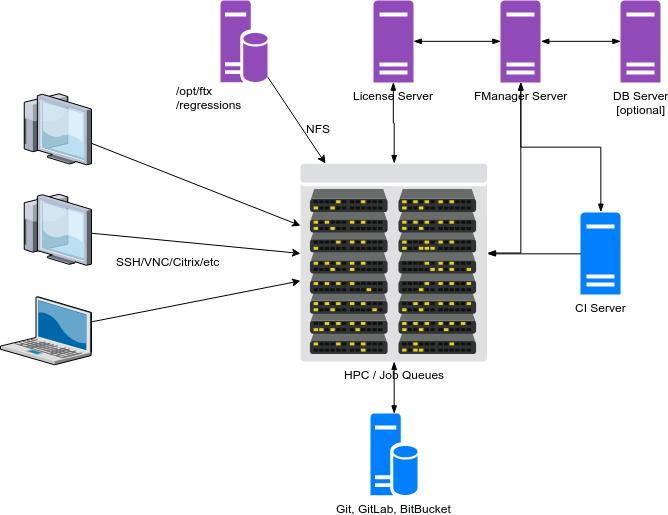
The NFS server contains application installation folders and shares them with the HPC and the Foretify Manager server as follows:
- /opt/foretellix contains all application installations, with RX rights for all users.
- /regressions is a folder shared with RWX rights for all users.
The Foretify Manager server runs on its dedicated computer/instance. The required database(s) may be serviced by the same server or a different one.
The license server provides licenses to Foretify Manager and to simulations that run in HPC.
Users connect to HPC using SSH/VNC to LSF machines or to a Citrix-like desktop, depending on the HPC environment setup.
From a security perspective, you should take care:
- To open the appropriate ports required by each app.
- To open the Foretify Manager port through VPN if that is required by the management.
208.2 Local installation
All applications are installed locally on an Application Server or, optionally, on an NFS server, under /opt/foretellix, for example. This architecture lets you run only a limited number of concurrent simulations, so it is not scalable. It is recommended for either very small projects such as workshops or in the early stages of a project when the infrastructure is not yet prepared.
On the Application Server there are different accounts for each user. Users connect from a thin-client/laptop through VNC/SSH to the Application Server.
The license server provides licenses through the license server port defined in the license file. The license server can run on a dedicated server or on the Application Server.
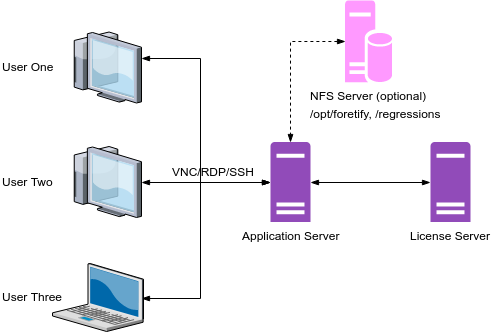
The Application Server could be served by an NFS server, which could make a subsequent transition to a scalable architecture easier.
All Foretify-related applications are recommended to be placed under a single folder, for example /opt/foretellix.
Optionally a regression folder (e.g. /regressions) could be shared between users to allow them to view and analyze each others' regressions.
Multiple users can run simulations/regressions on the Application Server if its CPU&RAM resources are scaled accordingly by two factors:
- The number of concurrent users: at least 2 CPU cores and 4GB-RAM for each user.
- The number of concurrent runs: at least 1 CPU core and 4GB-RAM for each simulation.
208.3 Installation order
We suggest installing the Foretellix applications in the following order:
- License servers
- Foretify
- Foretify Manager
The assumption is that simulators or execution platform connectors are already installed.
208.4 Foretellix tools installation kits download
Installation kits come in the form of a tar- or zip-file. These can be downloaded from a dedicated site (e.g. sftp, http etc). Ask your assigned Foretellix AEs to provide or point you to the appropriate download site.
208.5 3rd party applications
The installation guides for required 3rd party applications are provided and maintained by the 3rd party. Foretellix installation guides provide only the minimum required version of the 3rd party app and will point you to a site where you can download the application itself and/or the documentation.
208.6 Tools versions disclaimer
Keep in mind that tool versions and tar-files names are subject to change. Always consult Foretellix about the correct application versions to download.