197. Foretify SUT integration process
197.1 Introduction to the integration process
In order for Foretify to validate the SUT, Foretify must be integrated with the SUT Verification and Validation (V&V) environment. The V&V environment includes the SUT and the simulator, at a minimum, and may include additional components as well.
In the integrated environment:
- The Simulator Support Package (SSP) bridges between the Foretify API and the simulator API.
- The SUT Support Package (DSP) bridges between the Foretify API and the SUT.
See the Execution Platform overview for an introduction to these packages.
The main functionality of the SSP and DSP is depicted in the following diagram:
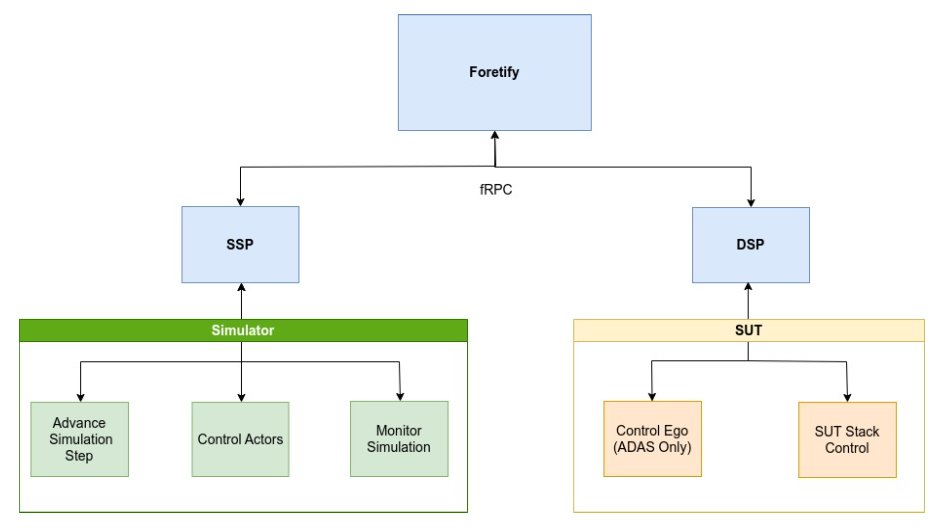
Foretify, via the SSP, orchestrates the actors in the scenario and monitors their state on each simulation step. Via the DSP, Foretify controls the ego, when necessary, and monitors the SUT behavior on each simulation step.
In this context, orchestration implies that Foretify will calculate and create a plan for each actor in order for the scenario to play out successfully. Then on each simulation step, Foretify monitors the state of all actors. It may provide updated trajectories if a deviation from the plan is detected in an attempt to ensure that the intent of the scenario is achieved. For instance, in a cut-in scenario, the cut-in vehicle needs to pass the ego and cut into the ego’s lane in front of the ego; however, if the ego speed is higher than the planned/expected speed, Foretify will accelerate the cut-in NPC vehicle in an attempt to overtake the ego and perform the cut-in. Without this, the scenario would not play out successfully.
Foretify is already integrated with some of the leading simulators in the industry such as Carmaker, Carla, and VTD.
Since every customer has its own SUT, every new customer engagement requires at least SUT integration. In case the customer is working with a proprietary simulator or a simulator that is not integrated yet with Foretify, a simulator integration is also required.
SUT integration implies writing a specific DSP for translating the Foretify SUT/Ego requests to the appropriate SUT stack APIs.
Simulator integration implies writing a specific SSP for translating the Foretify simulator requests to the appropriate simulator APIs.
197.2 Foretify integration steps
As a prerequisite for the integration with Foretify, the SUT should already be integrated with the simulator. The typical integration steps are described in the following sections.
197.2.1 Step 1. Connecting the simulator with Foretify
The first step is to connect the simulator with Foretify. If the simulator is already supported, the connection is done via the specific simulator SSP. Alternatively, a new simulator-specific SSP implementation is required for the simulator integration.
197.2.2 Step 2. Calibration
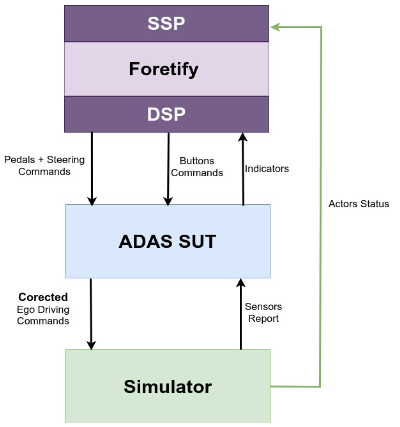
To mimic a human driver, Foretify issues driving commands with pedals (throttle and brake) and steering values when dynamically driving a vehicle. This form of dynamic driving method requires a calibration process. Each calibrated vehicle has a dynamic controller configuration file with the specific vehicle calibration values.
Typically Foretify provides at least one calibrated vehicle for each supported simulator that can be used out of the box for dynamic driving.
If the ego car is not already calibrated, a calibration process for the ego car is required to enable Foretify to dynamically drive the vehicle.
In the calibration process, a dynamic controller config file is created and tuned specifically to the ego car’s physical attributes so that the ego responds to Foretify dynamic driving (pedals and steering) requests in a smooth and expected way.
Note
Calibrating the ego is not required in cases where Foretify will never need to drive the ego, such as with autonomous vehicles.
197.2.3 Step 3. Completing the SSP integration
Foretify integration with the simulator is completed when Foretify is able to execute and orchestrate scenarios. This implies that all NPCs (all scenario actors that are not the ego) are controlled by Foretify. Additionally, when Foretify is expected to drive the ego, pending simulator support, Foretify should be able to drive the ego dynamically or kinematically, depending on the simulator and customer needs—dynamically, by providing the simulator pedals and steering requests for the ego and kinematically, by providing the simulator with the expected ego map position at the end of each simulation cycle.
197.2.4 Step 4. Foretify integration with the SUT
It is possible for Foretify to drive the ego via the SSP; however, the DSP is used by Foretify to communicate with the SUT. This communication includes sending signals to the SUT, such as activating and/or deactivating an ADAS function, and reading SUT signals of interest, such as an ADAS function’s state.
When Foretify is required to drive the ego during a scenario execution and Foretify is using the DSP to communicate with the SUT, Foretify sends dynamic driving (pedals and steering) commands to the SUT.
See also the SUT DSP integration documentation.
197.2.5 Step 5. Writing drive interface for every SUT ADAS function
The SUT drive interface is required for activating and deactivating the SUT ADAS functions. The SUT drive interface also monitors the SUT functions' behavior by tracking the signals of interest and the KPIs specific to the SUT functions.
Autonomous vehicle (AV) SUTs typically do not require function activation; however, signal monitoring is relevant for both AV SUTs and ADAS SUTs.
Each SUT ADAS function requires a specific drive interface implementation for enabling, activating and deactivating the function and monitoring the specific function signals of interest and KPIs.
A function drive interface includes OSC2 configuration and cpp implementation files.
Foretify activates ADAS functions in a generic way, such as press_ACC_main_button(), press_ACC_set_button() and press_ACC_cancel_button(). A drive interface for an SUT function can implement all of the three button functions. Implementing the three functions is not mandatory. Only buttons that are supported by the specific SUT function are required. For example, AEB functionality typically is activated automatically and cannot be deactivated. In that case, the button functions are not implemented.
In general, for ADAS function XYZ, the implementation of each of the three methods (press_XYZ_main_button(), press_XYZ_set_button() and press_XYZ_cancel_button()) provide the DSP with the information of which signals need to be set and the appropriate value for each signal in order to switch the ADAS function XYZ to the requested operation mode. The DSP, in turn, manipulates the SUT to set the signals with the provided values to set the ADAS function XYZ in the requested operation mode.
In order for the ADAS function XYZ drive interface to monitor the specific function signals of interest and the KPIs, the drive interface requests the DSP to track those signals. The DSP monitors the requested signals. Foretify monitors the functions' signals of interest and the KPI values on every simulation step via the drive interface parse_ego_info() method.
197.3 SUT DSP integration
Foretify communicates with the SUT via the DSP. The DSP bridges between the Foretify requests API to the SUT API. Since every customer develops its own SUT, every customer engagement requires writing a new DSP to the specific customer SUT.
The following diagram depicts the expected call flow for orchestrating the ego during a scenario execution:
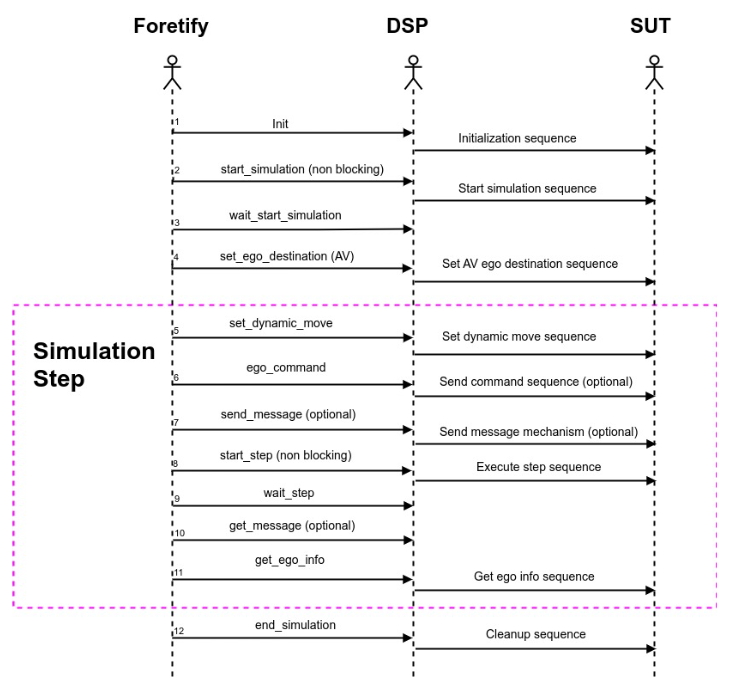
Foretify APIs are known and the infrastructure for handling the Foretify calls is implemented. The DSP SUT integration process is to communicate with the SUT and invoke the appropriate SUT APIs for fulfilling the received Foretify request.
The DSP is expected to activate the SUT APIs to fulfill the tasks described in the following sections.
197.3.1 Common functionality for ADAS and AV SUTs
Following are the common functions for ADAS and AV SUTs:
- Launch the SUT. (optional)
- Initialize the SUT.
- Tick the SUT to start its simulation step.
- Monitor the SUT status and behavior—collect data on the SUT functions' operation mode status and the SUT-defined KPIs
- End simulation.
- Terminate the SUT. (optional)
197.3.2 Specific ADAS SUTs required functionality
Following are functions required for ADAS SUTs:
- Activation (and deactivation) of ADAS functions
- Dynamic driving commands (pedals and steering)
197.3.3 Specific AV SUTs required functionality
Following is the function required for AV SUTs:
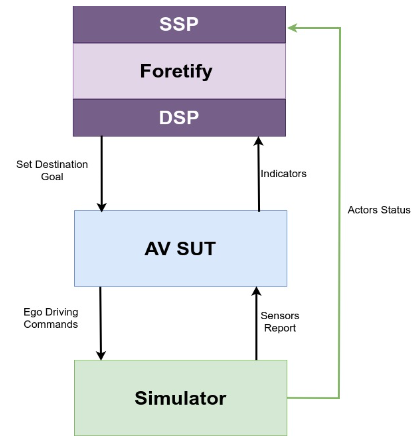
- Providing the SUT a list of waypoints leading to the scenario destination goal
197.4 Communication and data flow diagrams
The following diagram depicts the communication and data flow between Foretify and an AV SUT during scenario execution:
The following diagram depicts the communication and data flow between Foretify and an ADAS SUT during scenario execution: