93. Run Test Scenarios
With the environment set up, use the test scripts to run the ESR Kit. Review each script to understand its inputs and outputs. The provided default drive_logs examples will work without modification. The purpose of these tests is to demonstrate that each step can be run individually. Each step of the evaluation pipeline requires input in its own format, and generates output in a format according to the next step.
93.1 Test Case 1: ROI extraction, Suburban
While parsing requires custom-built parsers for each log format, the Preprocessing step represents the first step with a standardized input in the form of Object Lists written as binary Protobuf (.pb) files. One instance of preprocessing is the extraction of Regions Of Interest (ROI), which will be run in this test case.
Input
- Directory with Object Lists:
$ESR_KIT_DRIVE_LOGS/object_lists/suburban_odd/M499_FTX_suburban
Output
- Summary of command input/outputs is printed to the terminal.
- Directory with preprocessed Object Lists:
$ESR_KIT_WORK_DIR/roi
93.1.1 Run the Preprocessing Step
The script for running ROI extraction is found in ref_kit/flow/1_preprocess/generate_roi.sh. It is necessary to specify the input directory which contains the Object Lists:
# From within ref_kit/flow/1_preprocess
./generate_roi.sh --input=$ESR_KIT_DRIVE_LOGS/object_lists/suburban_odd/M499_FTX_suburban
By default, this script uses ref_kit/flow/1_preprocess/config/roi_config.yaml to configure how ROI extraction will be done. This is the required configuration for the current test. It is possible, however, to give an alternative configuration via the --config flag. For example, if taking the Pandaset Object Lists as input, a more adequate configuration is provided:
# From within ref_kit/flow/1_preprocess
./generate_roi.sh \
    --input=$ESR_KIT_DRIVE_LOGS/object_lists/suburban_odd/pandaset \
    --config=./config/roi_pandaset_config.yaml
93.1.1.1 Example Success Output
[INFO] object list refiner:  Logger is active with level INFO, file name is: 2025_08_21__12_45_10.log
By using this Tool you accept the latest Foretellix EULA which can be found under (...)
[INFO] object list refiner:  Reading object list
[INFO] object list refiner:  [DenoiserCore] Filter objects before denoising process
[INFO] object list refiner:  [DenoiserCore] Denoising object list...
[INFO] object list refiner:  [DenoiserCore] Filter invalid objects
[INFO] object list refiner:  [DenoiserCore] Filter objects after denoising process
[INFO] object list refiner:  [DenoiserCore] Write output to object list
[INFO] object list refiner:  [Denoiser Report]
[INFO] object list refiner:  =================
[INFO] object list refiner:  Number of objects before filtering: 5
[INFO] object list refiner:  Number of objects after filtering: 5
[INFO] object list refiner:  Filtered objects by size: 0
[INFO] object list refiner:  Filtered objects by distance: 0
[INFO] object list refiner:  Filtered objects by stationary: 0
[INFO] object list refiner:  Filtered objects by id: 0
[INFO] object list refiner:  Filtered objects by type: 0
[INFO] object list refiner:  Filtered objects by short lifespan: 0
[INFO] object list refiner:  Filtered objects by collision: 0
[INFO] object list refiner:  Object list log length: 29.56
[INFO] object list refiner:  Missing frames by kind:

✓ Success: Generated ROI files are located in: $ESR_KIT_WORK_DIR/roi
93.1.1.2 Test Case 1 Success Indicator
After the program has finished, you may verify that there is now a roi folder with one preprocessed Objec List for each input file:
# verify this folder is not empty
ls $ESR_KIT_WORK_DIR/roi
With a populated $ESR_KIT_WORK_DIR/roi directory, it is now possible to run the next step from the evaluation pipeline.
93.2 Test Case 2: Ingestion, Suburban
The goal of this test is to demonstrate how to chain the outputs of each evaluation step. The result of a successful run of Test Case 1 should generate the data that is now required for this step. The Ingestion step consumes Object Lists and outputs Ingested Runs, which are ready for Matching. These runs may be uploaded and visualized via Foretellix Manager
Input
- Directory with preprocessed Object Lists:
$ESR_KIT_WORK_DIR/roi
Output
- Summary of command input/outputs is printed to the terminal.
- Directory with Ingested Runs:
$ESR_KIT_WORK_DIR/ingestion
93.2.1 Run the Ingestion Step
The script for running the ingestion is found in ref_kit/flow/2_ingestion/ingest.sh. It is necessary to specify the input Object List directory as well as the map file used during ingestion:
# From within ref_kit/flow/2_ingestion
./ingest.sh --map $ESR_KIT_DRIVE_LOGS/object_lists/suburban_odd/M499_FTX_suburban/M499_FTX_suburban.xodr \
    --object_list_dir $ESR_KIT_WORK_DIR/roi
The Ingestion step also requires an .osc file to configure ingestion. When omitted, it defaults to $FTX_ESR_KIT_HOME/flow/2_ingestion/config/ingest_extend.osc. This is the required configuration for the current test. If you want to run this step with data originating from $ESR_KIT_WORK_DIR/object_lists/suburban_odd/pandaset, for example, one adequate configuration would be:
# From within ref_kit/flow/2_ingestion
./ingest.sh --map $ESR_KIT_DRIVE_LOGS/object_lists/suburban_odd/pandaset/maps/M748_FTX_ReferenceKit.xodr \
    --object_list_dir $ESR_KIT_WORK_DIR/roi \
    --osc_file ./config/ingest_extend_pandaset.osc
93.2.1.1 Example Success Output
Initializing Foretify runtime...
[INFO] Compilation done, 0 errors and 0 warnings reported

[0.000] [MSP] ROI configuration: file object_list_json_string, ROI ID 1.
[0.000] [MSP] Signals are only supported for 'OpenDRIVE' and 'DEU' country types. '' is not supported
[0.000] [MSP] 212 Potential map anomalies have been detected during map load (Foretify 'verify_map' option checks the loaded map and produces a detailed anomaly report)
[0.000] [MAIN] Using map $ESR_KIT_DRIVE_LOGS/object_lists/suburban_odd/M499_FTX_suburban/M499_FTX_suburban.xodr
Timeline
   1. sut.global_position_x
   2. sut.global_position_y
   3. sut.global_position_z
(...)
  144. plain_object.mfr_model

Checking license...
License check succeeded
Starting new run. Output files will be written to $ESR_KIT_WORK_DIR/ingestion/runs/20250821_170624_232350_ZRMW
[0.000] [INFINIGEN] Generating the test using seed 1...
[0.000] [INFINIGEN] Generating 'top', retry 1
[0.000] [INFINIGEN] Generating 'top__all', retry 1
[0.000] [LOGIQ] LogIQ Adapter: Maximum number of actors per frame is 5,
                maximum number of sedans is 5,
                maximum number of stationary vehicles is 0,
                maximum number of pedestrians is 0,
(...)
[0.000] [MAIN] Executing plan for top.all@1327
(...)
[29.580] [MAIN] Ending the run
[29.580] [MAIN]
[29.580] [RUN_TIME] ----- Run finished - summary: --------------------------------------------------
[29.580] [RUN_TIME] Run folder: $ESR_KIT_WORK_DIR/ingestion/runs/20250821_170624_232350_ZRMW
[29.580] [RUN_TIME] Seed: 1
[29.580] [RUN_TIME] Simulation duration: 29580.0 milliseconds
[29.580] [RUN_TIME] Test passed.
[29.580] [RUN_TIME] Main issue:
Other warning (other):

Run completed
    Foretify log can be found at: $ESR_KIT_WORK_DIR/ingestion/logs/20250821_170543_232350_JQPY.log
Ingestion results folder is $ESR_KIT_WORK_DIR/ingestion/runs/ingest_20250821_170624_232350_ZRMW
✓ Command completed successfully in 62 seconds
93.2.1.2 Test Case 2 Success Indicator
After the program has finished, you may verify that there is now an ingestion folder with one ingestion run for each input Object List:
# verify this folder is not empty
ls $ESR_KIT_WORK_DIR/ingestion
93.3 Test Case 3: Matching, Suburban
The objective of this test is to learn how to configure and perform the Matching step, which consumes the data generated by a successful run of Test Case 2. During matching the Ingested Runs are perused in order to find events that fall under predefined scenarios. These matches become then Intervals that can be visualized via Foretellix Manager
Input
- Directory with Ingested Runs:
$ESR_KIT_WORK_DIR/ingestion
Output
- Summary of command input/outputs is printed to the terminal.
- Directory with Matched Runs:
$ESR_KIT_WORK_DIR/matches
93.3.1 Run the Matching Step
The script for running the matching is found in ref_kit/flow/3_matching/match.sh. It is necessary to specify the input Ingested Runs, the map file to be used during matching and the .osc file defining the scenarios to be matched:
# From within ref_kit/flow/3_matching
./match.sh --ingestion_runs $ESR_KIT_WORK_DIR/ingestion \
    --map_file $ESR_KIT_DRIVE_LOGS/object_lists/suburban_odd/M499_FTX_suburban/M499_FTX_suburban.xodr \
    --evaluation_scenarios $FTX_ESR_KIT_HOME/evaluators/eval_scenarios/scenarios_cpp_non_osc.osc
93.3.1.1 Example Success Output
Starting matching (cpp) process...
Looking for ingestion run directories in: $ESR_KIT_WORK_DIR/ingestion
Found 4 valid ingestion run directory(ies) to process
==========================================
(...)
[0.000] [LOGIQ] Number of match intervals: 2                                                                                     12:16:32 [267/705]
[0.000] [LOGIQ] Found Match Interval: Label=lead_vehicle,  Struct=sut.lead_vehicle, Interval=[20ms - 34160ms], Duration=34140ms, Actors={vehicle_ac
tor:38, sut.car:ego}
[0.000] [LOGIQ] Found Match Interval: Label=follower_vehicle,  Struct=sut.follower_vehicle, Interval=[20ms - 11340ms], Duration=11320ms, Actors={ve
hicle_actor:39, sut.car:ego}
[0.000] [MAIN] Ending the run
[0.000] [MAIN]
[0.000] [RUN_TIME] ----- Run finished - summary: --------------------------------------------------
[0.000] [RUN_TIME] Run folder: $ESR_KIT_WORK_DIR/matches/runs/20251117_151617_42549_RXWK
[0.000] [RUN_TIME] Seed: 1
[0.000] [RUN_TIME] Simulation duration: 0.0 milliseconds
[0.000] [RUN_TIME] Test passed.
[0.000] [RUN_TIME] Main issue: none

Run completed
    Foretify log can be found at: $ESR_KIT_WORK_DIR/matches/logs/20251117_151543_42549_O74G.log
✓ Command completed successfully in 49 seconds
✓ Successfully processed run: ingest_20251114_200017_314920_O4KS
(...)
==========================================
MATCHING (CPP) PROCESS SCOREBOARD
==========================================
Total ingestion runs found: 4
Successfully processed: 4
Failed: 0

✓ Successfully processed runs:
  ✓ $ESR_KIT_WORK_DIR/ingestion/ingest_20251114_200017_314920_O4KS
  ✓ $ESR_KIT_WORK_DIR/ingestion/ingest_20251114_202640_319501_R01V
  ✓ $ESR_KIT_WORK_DIR/ingestion/ingest_20251114_202515_319024_GE79
  ✓ $ESR_KIT_WORK_DIR/ingestion/ingest_20251114_195852_314571_B9DU

✓ Matching (cpp) process completed successfully
93.3.1.2 Test Case 3 Success Indicator
After the program has finished, you may verify that there is now a matches folder with one matched run for each input ingestion run:
# verify this folder is not empty
ls $ESR_KIT_WORK_DIR/matches
93.4 Test Case 4: Post-match, Suburban
The objective of this test is to show how to run the post-matching step. Using this step of the Evaluation pipeline, the resulting Matched Runs from Test Case 3 are subjected to an enhanced evaluation, whereby additional coverage metrics and checkers may be measured.
Input
- Directory with Matched Runs:
$ESR_KIT_WORK_DIR/matches
Output
- Summary of command input/outputs is printed to the terminal.
- Directory with Matched Runs:
$ESR_KIT_WORK_DIR/post_match
93.4.1 Run the Post-matching Step
The script for running post-matching is found in ref_kit/flow/3_matching/pmatch.sh. It requires the following information:
- The directory containing the matched runs to analyze.
- Evaluation library as a post-match adapter.
- Definition of additional metrics and checkers.
- Map file used during matching.
# From within ref_kit/flow/3_matching
./pmatch.sh --matcher-runs-dir $ESR_KIT_WORK_DIR/matches/runs \
    --eval-lib-path $FTX/logiq/src/osc/post_match_adapter.osc \
    --eval-lib-extend-path $FTX_ESR_KIT_HOME/evaluators/eval_scenarios/scenarios_cpp_non_osc.osc  \
    --map-file $ESR_KIT_DRIVE_LOGS/object_lists/suburban_odd/M499_FTX_suburban/M499_FTX_suburban.xodr
93.4.1.1 Example Success Output
[29.560] [RUN_TIME] ----- Run finished - summary: --------------------------------------------------
[29.560] [RUN_TIME] Run folder: $ESR_KIT_WORK_DIR/post_match/runs/20251117_213748_320201_D8AD
[29.560] [RUN_TIME] Seed: 1
[29.560] [RUN_TIME] Simulation duration: 29560.0 milliseconds
[29.560] [RUN_TIME] Test passed.
[29.560] [RUN_TIME] Main issue:
Other warning (other):

Run completed
    Foretify log can be found at: $ESR_KIT_WORK_DIR/post_match/logs/20251117_213605_320201_BE5Z.log
✓ Success: Processed $ESR_KIT_WORK_DIR/matches/runs/20251117_191430_299860_FW7F
Done processing $ESR_KIT_WORK_DIR/matches/runs/20251117_191430_299860_FW7F

Summary:
  ✓ Successful (4):
    - $ESR_KIT_WORK_DIR/matches/runs/20251117_191208_299071_7UBF
    - $ESR_KIT_WORK_DIR/matches/runs/20251117_191258_299318_ZCER
    - $ESR_KIT_WORK_DIR/matches/runs/20251117_191348_299606_QVS3
    - $ESR_KIT_WORK_DIR/matches/runs/20251117_191430_299860_FW7F
  ✓ No failed runs
93.4.1.2 Test Case 4 Success Indicator
After the program has finished, you may verify that there is now a post_match folder with one post-matched run for each input matched run:
# verify this folder is not empty
ls $ESR_KIT_WORK_DIR/post_match
93.5 Test Case 5: Full End-to-End Flow, Suburban using YAML configuration
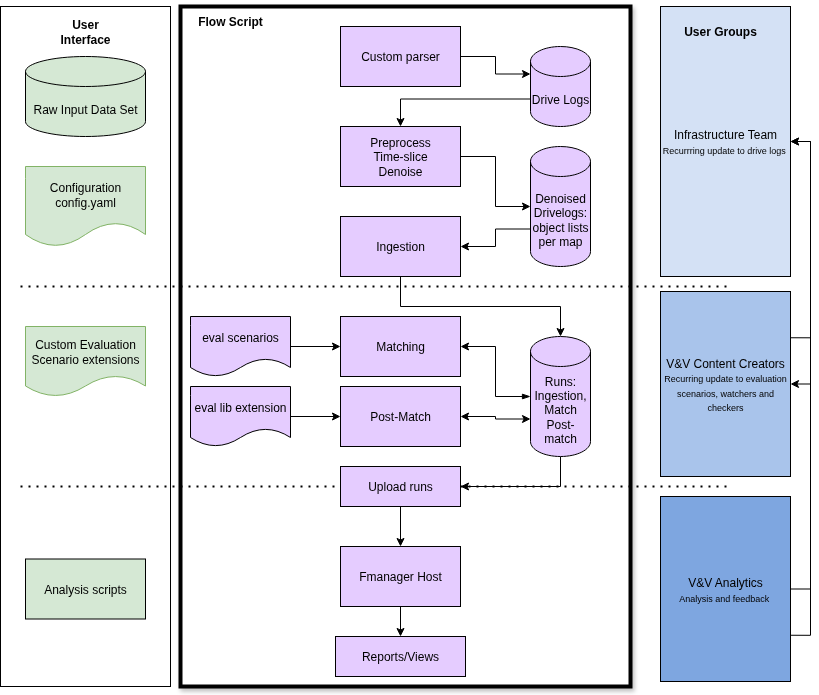
Runs all major stages:
- Task 1: Preprocessing (ROI extraction)
- Task 2: Ingestion
- Task 3: Matching
This test stops before matching and prints instructions for continuing the flow manually. It doesn't perform uploading after matching step, user needs to review, edit upload_esr_runs.sh and run the script to upload results to visualize matches in Foretify Manager.
Output
- Summary of command input/outputs is printed to the terminal.
- Detailed logs are written to:
$ESR_KIT_WORK_DIR/logs/ref_kit_commands_<time_stamp>.log
93.5.1 Run Using the New YAML File
Run the script with the new YAML file you created:
cd flow
./run_eval.sh --config config/suburban_sanity.yaml
93.5.1.1 Test Case 5 Success Indicators
When ./run_eval.sh completes successfully, you should see:
- Summary Report: Command execution summary printed to terminal
- Log Files: Detailed execution logs in
$ESR_KIT_WORK_DIR/logs/ref_kit_commands_<time_stamp>.log - Final Status: "Evaluation steps completed..." message
Review the diagram to correlate steps with the flow.
93.5.1.2 Example Success Output
[2025-07-22 09:55:13] ESR_KIT_DRIVE_LOGS: /regressions/clusters/dev03/shared/logiq/esr_kit/drive_logs
[2025-07-22 09:55:13] ESR_KIT_WORK_DIR: /tmp/results/ref_kit
[2025-07-22 09:55:13] FTX_EVAL_YAML_CONFIG_PARSER_EXE: /home/yjp/ftx/ref_kit/flow/config/bin/eval_yaml_config_parser
[2025-07-22 09:55:13] Using configuration file: config/suburban_sanity.yaml
Wrote eval_config.bash ...
👀 Review the generated config file: /home/yjp/ftx/ref_kit/flow/eval_config.bash
[2025-07-22 09:55:13] Running evaluation with configuration file: config/suburban_sanity.yaml
[2025-07-22 09:55:13] Sourcing config file: /home/yjp/ftx/ref_kit/flow/eval_config.bash
[2025-07-22 09:55:13] Detailed logs can be found here: LOG: /tmp/results/ref_kit/logs/ref_kit_commands_20250722_095513.log
[2025-07-22 09:55:13] Tasks to be executed: roi ingest match
[2025-07-22 09:55:13] Task 1: Generating ROI for object list directory: /home/yjp/drive_logs/object_lists/suburban_odd/M499_FTX_suburban
[2025-07-22 09:55:17] ✓ ROI generation completed
[2025-07-22 09:55:17] Task 2: Running ingestion on object list directory /tmp/results/ref_kit/roi
[2025-07-22 09:56:16] ✓ Ingestion completed, ingested runs are here /tmp/results/ref_kit/ingestion
[2025-07-22 09:56:16] Task 3: Running matching on ingestion results /tmp/results/ref_kit/ingestion
[2025-07-22 09:56:27] ✓ Matching compilation completed, compiled directory is here /tmp/results/ref_kit/matching
[2025-07-22 09:56:48] ✓ Matching completed, matched runs are here /tmp/results/ref_kit/matches
[2025-07-22 09:56:48] ✓ Evaluation tasks completed, LOG: /tmp/results/ref_kit/logs/ref_kit_commands_20250722_095513.log
93.5.2 Common Success Patterns
- No error messages or red X marks (✗)
- All expected output directories contain generated files
- Process completes without hanging or timeout
- Log files show command execution history with timestamps
Important Notes
- Denoising can take a very long time.
- Ingestion takes around 2–3 minutes per object list (total of 1:30 hours in this example).
- If you encounter issues during the uploader task, it may be due to mismatched user IDs between your local Linux user and Fmanager.
- To resolve this, edit the user ID in:
$FTX_ESR_KIT_HOME/flow/upload_esr_runs.sh - You can also change other parameters such as project ID or host settings in that file.
- To resolve this, edit the user ID in:
You're now ready to run evaluations with the ESR Kit using the included sample data or your own drive logs!
93.5.3 Next Steps: Zooming in on the Evaluation Flow Script
Now that you have sanity-tested the flow, the next step is to review the test case. The test case calls the evaluation flow script with various configuration parameters, helping to ensure that the pipeline functions as expected in different scenarios.
93.5.3.1 Key Steps
-
Review Test Case
Examine the test case to understand how the flow script is called and which parameters are passed to it. This will help you understand how different inputs influence the pipeline.
-
Configuration Parameters
The script is configured through specific parameters. By reviewing these configurations, you can fine-tune the evaluation process to suit your project's needs. See Configuring the ref_kit_config.yaml file.
-
Run the Script with Custom Inputs
After reviewing the test case and configuration, you can modify the config file to run with your own inputs. This allows for testing different configurations and edge cases within the flow.
This step helps you understand how the evaluation flow operates, allowing you to experiment with different parameters to further tailor the evaluation to your requirements.