198. Model SSP
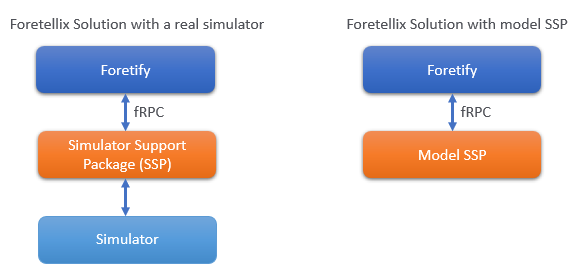
Model SSP is a lightweight mock simulator developed by Foretellix for rapid scenario development and testing. Acting as a substitute for both SSP and simulator components, it enables efficient prototyping and bulk execution of scenarios, as it runs faster than a real simulator and requires fewer resources.
The Foretellix architecture, including both real and mock simulators, is as follows:
198.1 Why Model SSP is faster?
Model SSP does not update actor data like a real simulator (except when using Dynamic control). Instead, it retains the information provided at actor creation and returns it to Foretify upon request. For example, if a scenario includes a cyclist, Foretify requests Model SSP to create the actor with the necessary details. Model SSP stores this data and provides it back when Foretify requests the actor information.
198.2 Model SSP architecture
198.2.1 Model SSP modules
The following image shows the components of Model SSP:
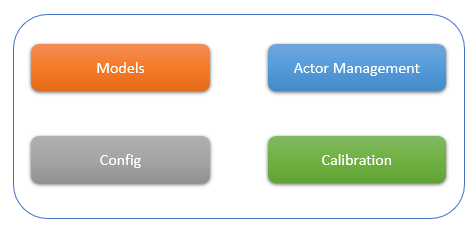
Config: Contains all configurations required to run Model SSP. It includes OpenSCENARIO DSL (OSC) files with definitions for test scenarios. Configurations from a real simulator can also be used by importing OSC files that define resources to be used, such as car and stationary object configurations.
Models: Models implement the fRPC API to provide Foretify with access to simulator features. Each model includes only the necessary features, use different implementations to run tests with different behaviors. The model that is used must be defined when running the Model SSP; however, a dummy model is provided by default.
Calibration Contains OpenSCENARIO DSL files used to calibrate the Foretify Core, which controls actors either kinematically (coordinates) or dynamically (pedals and steering).
Actor Management Handles actor-related requests, such as creating or removing actors and calculating their positions.
198.2.2 Dynamic control in Model SSP
When Foretify controls actors dynamically, Model SSP is capable of responding to control commands and calculate the actors’ updated position, speed, and more.
The Model SSP responds to the control commands through the input parameters throttle, brake, and steering. Throttle and brake affect the vehicle’s acceleration, which changes its velocity and position. Steering affects the angular velocity, which also influences the vehicle’s position.
198.2.2.1 Key components
198.2.2.1.1 Vehicle State variables
- Position:
Vector3(x, y, z)– 3D position in world coordinates - Velocity:
Vector2(x, 0)– Only longitudinal velocity is used (Model SSP limitation) - Heading:
rad_angle– Vehicle’s yaw angle in radians - Angular velocity: Rate of change of heading angle
198.2.2.1.2 Vehicle parameters
self.wheelbase = 0.6 * length – Distance between front and rear axles
self.max_acceleration – Maximum forward acceleration
self.max_wheels_angle – Maximum steering angle
self.brake_deceleration = 30 m/s² – Braking deceleration
self.free_deceleration = 2 m/s² – Natural deceleration when no input is applied
198.2.3 Dynamic calculation
-
Command normalization (
normalize_command)The system accepts control commands in various units and normalizes them for processing:
- Throttle/Brake: Can be given as a percentage (0–1) or force (Newtons)
- Steering: Can be given as a percentage, radians, or torque (Newton-meters)
-
Acceleration calculation (
set_acc_from_throttle_brake)The acceleration is calculated based on throttle and brake inputs:
if brake > 0: self.acceleration = -brake * self.brake_deceleration elif throttle > 0: self.acceleration = throttle * self.max_acceleration else: # Natural deceleration when no input is applied self.acceleration = -math.copysign(self.free_deceleration, self.velocity.x) -
Angular Velocity calculation (
set_angular_velocity_from_steer)This is a core of the vehicle model, determining how steering affects the vehicle’s rotation.
# Convert steering wheel angle to wheel angle
wheels_angle = (steering_wheel_position / MAX_STEERING_WHEEL_ANGLE) * self.max_wheels_angle

# Calculate turning radius using vehicle geometry
turning_radius = self.wheelbase / math.sin(math.radians(wheels_angle))

# Calculate angular velocity
self.angular_velocity = self.velocity.x / turning_radius
The turning radius 𝑅 is derived from vehicle geometry:
𝑅 = 𝐿/sin(𝛿)
Where:
- 𝐿 is the wheelbase.
- 𝛿 is the steering angle.
-
Position update (
calc_new_pos)The vehicle’s position and angle are updated using the following equations:
# Update velocity
self.velocity.x += self.acceleration * self.dt
self.velocity.x = min(self.velocity.x, MAX_LINEAR_VELOCITY)  # Cap at 40 m/s
self.velocity.x = max(0, self.velocity.x)  # No reverse driving

# Update heading
self.rad_angle += self.angular_velocity * self.dt

# Update position using kinematic equations
delta_pos_x = self.velocity.x * math.cos(self.rad_angle) * self.dt
delta_pos_y = self.velocity.x * math.sin(self.rad_angle) * self.dt
self.position.x += delta_pos_x
self.position.y += delta_pos_y
198.3 Execution flow
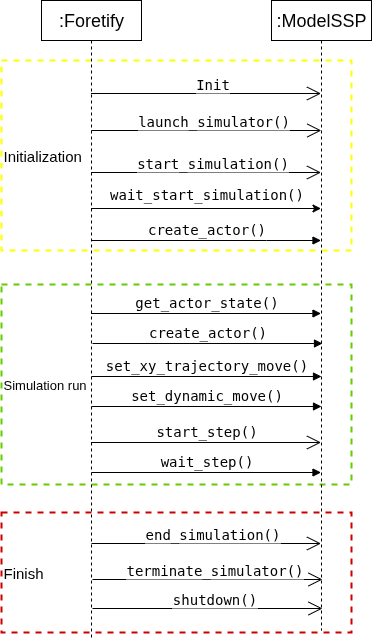
The following image illustrates the execution flow when using Model SSP (some calls are omitted for simplicity).
Note
Whenever Foretify invokes a method from the fRPC API, the SSPService processes the request by calling the corresponding method in the Model class.
198.4 Advantages and limitations
Compared to a real simulator, Model SSP offers the following advantages:
- Lightweight: Configuration and execution are quick.
- Faster development and testing: Enables rapid scenario creation and validation.
However, it also has the following limitations:
- No physics engine running in the background.
- Provides only the object list (no sensor or environment data such as lidar and camera are available).
- Calculations are performed in Dynamic sim without the sophisticated vehicle model.
- Lacks many advanced features available in real simulators.
198.5 Available configurations
198.5.1 Dummy model configuration (model_dummy_config.osc)
Purpose: Used for testing and development without external simulators.
Key features:
- Uses internal dynamic simulation
- Includes preconfigured PID controllers for throttle, brake, and steering
- Calibrated for 20 ms time steps
- Uses Newton-based force units for actuators
- Provides physical API level for traffic lights
198.5.2 CARLA model configurations
Available for multiple CARLA versions:
- CARLA 0.9.12 (
model_carla_0_9_12_config.osc) - CARLA 0.9.13 (
model_carla_0_9_13_config.osc) - CARLA 0.9.15 (
model_carla_0_9_15_config.osc)
Purpose: Uses definitions from the CARLA autonomous driving simulator.
Key features:
- Imports CARLA-specific model, simulation, and driver configurations
- Uses fRPC adapter for communication
- Supports CARLA’s vehicle models and physics
198.5.3 SUMO model configuration (model_sumo_config.osc)
Purpose: Uses definitions from the SUMO traffic simulator.
Key features:
- Leverages SUMO’s traffic simulation capabilities
- Imports SUMO-specific model, simulation, and driver configurations
- Suitable for large-scale traffic scenarios
198.5.4 dSPACE model configuration (model_dspace_config.osc)
Purpose: Uses definitions from the dSPACE simulation platform.
Key features:
- Supports hardware-in-the-loop (HIL) simulation
- Imports dSPACE-specific configurations
- Includes post-plan checks implementation
198.5.5 CarMaker model configuration (model_carmaker_config.osc)
Purpose: Uses definitions from the IPG CarMaker simulation platform.
Key features:
- It is a professional automotive simulation platform
- Imports CarMaker-specific configurations
- Includes base implementation for post-plan checks
198.5.6 DriveSim model configuration (model_drivesim_config.osc)
Purpose: Uses definitions from the DriveSim simulation platform.
Key features:
- Imports DriveSim-specific configurations
- Includes base implementation for post-plan checks
198.5.7 Simian model configuration (model_simian_config.osc)
Purpose: Uses definitions from the Simian simulation platform.
Key features:
- Minimal configuration (only model and simulation configurations)
198.5.8 AISim model configuration (model_aisim_config.osc)
Purpose: Uses definitions from the AISim simulation platform.
Key features:
- Imports AISim-specific configurations
- Uses fRPC adapter for communication
198.6 Using Model SSP
-
Create a Dummy Model Configuration (model_ssp_dummy_config.osc)
# Map support package (MSP) import "$FTX/env/basic/msp/open_drive.osc" # fRPC adapter for Model SSP import "$FTX/env/basic/exe_platforms/model_ssp/config/model_adapter_frpc.osc" # Dummy model configuration import "$FTX/env/basic/exe_platforms/model_ssp/config/dummy/dummy_model_config.osc" # Name the simulator extend sim_info: set simulator_name = "model_ssp_dummy" -
Create a smoke test file (dummy_smoke.osc)
# Config defined above import "$FTX/env/basic/exe_platforms/model_ssp/config/model_ssp_dummy_config.osc" # Set the map to be used extend test_config: set map = "$FTX/smoke/maps/circ_fix.xodr" # Define the test extend top.main: do s: sut.smoke() with: keep(s.r1 == s.r2) # Test scenario scenario sut.smoke: r1: one_way_road r2: one_way_road car1: vehicle do serial(): p0: parallel(overlap:equal): e0: sut.car.drive() with: speed(20kph, run_mode: best_effort) along(r1, at:start) c0: car1.drive() with: speed(20kph, run_mode: best_effort) along(r2, at:start) with: duration([3..6]s, run_mode: best_effort) -
Run the test
foretify --load $FTX/env/basic/exe_platforms/model_ssp/test/dummy_smoke.osc --dlog_frpc trace --run