453. Lane Support System (LSS) introduction
Lane Support Systems (LSS) are a set of ADAS functions which assist the driver in staying safely in lane or performing safe lane changes. The following functions are covered:
Lane Departure Warning (LDW) issues a warning by vibrating the steering wheel or making a buzzing sound when the vehicle strays off its lane.
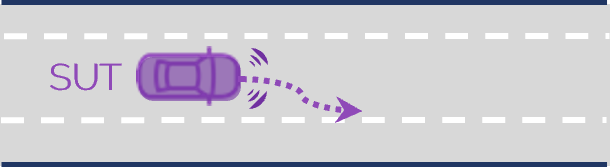
Lane Keep Assist (LKA) applies gentle steering correction when vehicle is veering off its lane. LKA does not automatically center in the lane like the Lane Centering Assist (LCA).

Emergency Lane Keeping (ELK) overrides the steering of the driver in cases where an intended lane change is unsafe due to overtaking or oncoming vehicles in the adjacent lane. ELK is an active safety function similar to AEB and overrides driver actions as final measure to avoid a collision.

LSS Directory Structure
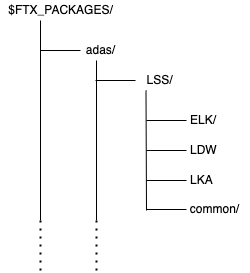
The Lane Support System (LSS) library components are located in $FTX_PACKAGES/adas/LSS as shown in Figure 1.
| Directory/File | Description |
|---|---|
| ELK | A directory containing the components for Emergency Lane Keeping scenarios. |
| LDW | A directory containing the components for Lane Departure Warning scenarios. |
| LKA | A directory containing the components for Lane Keeping Assist scenarios. |
| common | A directory containing the library components shared by ELK, LDW, and LKA. |
The ELK, LDW and LKA directories have the subdirectories described in the following table.
| Directory/File | Description |
|---|---|
| test_suite_definitions | A directory containing CSV files for executing the ELK, LDW, or LKA tests with Frun. |
| example_test_cases | Example test files for running a single test with Foretify. |
| scenarios | A directory containing the OSC2 source files for each scenario. |
| templates | A directory containing the templates used to generate tests to be executed with Frun. |
| vplan | The baseline VPlan for the ELK, LDW, or LKA function. |
The common directory has the subdirectories described in the following table.
| Directory/File | Description |
|---|---|
| lss_config | A directory containing configurations for the base scenarios for the ELK, LDW, and LKA functions. |
| metrics_checks | A directory containing activation coverage related to LSS function. |
| utils | A directory containing files required for integrating user-defined C++ functions with Foretify. |
To run a single test with Foretify:
-
Invoke Foretify with a test file from the example_test_cases directory.
For example:
In this example, the configured simulator is CARLA.$ foretify --load $FTX/packages/adas/LSS/LKA/examples/t_lka_lane_departure.osc \ --load $FTX/packages/adas/LSS/common/lss_config/lss_carla_config.osc \ --run -
Enter quit at the Foretify> prompt after the run completes.
To run a set of tests with FRun:
-
Invoke Frun in batch mode with all the CSV files required for the set of tests that you chose.
For example:
2. Review the regression results in the default work directory:frun --csv $FTX_PACKAGES/adas/LSS/ELK/test_suites/test_suite_definitions/ego_lateral_movement/elk_lane_departure_main.csv \ --csv $FTX_PACKAGES/adas/LSS/ELK/test_suites/test_suite_definitions/ego_lateral_movement/elk_lane_departure.csv \ --csv $FTX_PACKAGES/common/csv/uncontrolled_carla_config.csv --batch~/foretify/sessions/<timestamp>/<timestamp>/
To run all the LSS tests at once:
```bash
frun --file $FTX/packages/adas/LSS/ELK/test_suites/test_suite_definitions/all_elk.txt \
     --file $FTX/packages/adas/LSS/LDW/test_suites/test_suite_definitions/all_ldw.txt \
     --file $FTX/packages/adas/LSS/LKA/test_suites/test_suite_definitions/all_lka.txt \
```