109. Smart Replay introduction
Smart Replay is a Foretellix tool that enables re-simulation of both real-world and synthetic data logs. It allows users to extract realistic scenarios from simulations or data, and re-execute them, either exactly or with behavior modifications, to test, debug, or explore scenario variations. Smart Replay supports continuous evaluation of results, making it a powerful tool for iterative scenario analysis.
109.1 Smart Replay functionality
Smart Replay is integrated into the Foretellix toolchain and consists of two main functionalities:
- Scenario extraction: Create scenarios from real-world logs or simulation runs via Foretify Manager.
- Scenario replay: Re-execute scenarios, either as originally captured or with modifications, using Foretify runtime and Execution Manager.
109.1.1 Installation requirements for Smart Replay
To use the scenario export functionality, you need to install the following components:
- Foretify Manager version 25.08 or later
-
Foretify Manager Python SDK
For detailed SDK installation instructions, see the Installation section in the Foretify Manager API documentation.
109.1.2 Running Smart Replay scenarios
There are multiple ways to execute Smart Replay scenarios:
-
Direct execution in Foretify
Scenarios can be executed directly from the Foretify command line:
foretify --load <path/to/osc> -
Using the Execution Manager
- The extract-and-run functionality of Smart Replay is available starting from version 25.08.
- This capability is accessible through the Execution Manager, which is part of Foretify Manager.
- For more details, refer to the setting up the Execution Manager documentation.
-
Batch execution and automation
- Scenarios can be executed as part of larger test suites through the Execution Manager.
- This approach enables seamless integration into automated testing workflows and CI/CD pipelines, providing scalable scenario regression and continuous validation capabilities.
109.2 High-Level overview of Smart Replay
Smart Replay is integrated into testing and validation workflows, supporting a range of use cases defined by specific user requirements and test configurations. It is implemented on top of core Foretellix components — Foretify Manager, the Evaluation Pipeline, and Foretify — and reuses their infrastructure to address re-simulation and scenario reproducibility challenges efficiently.
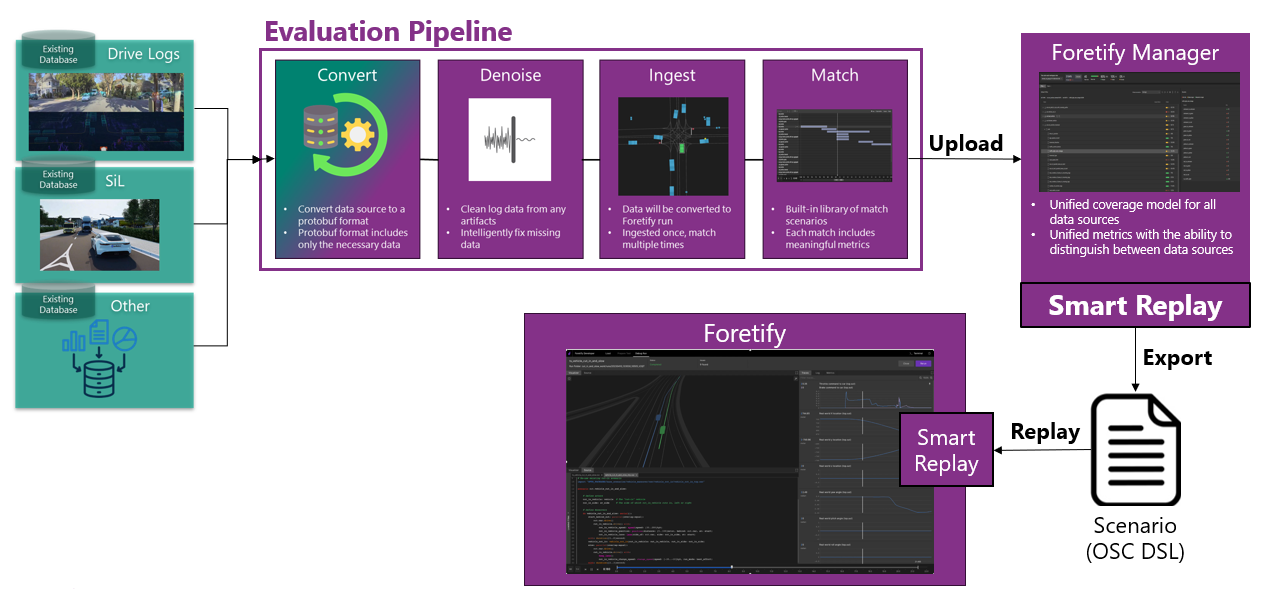
Two common use cases are:
-
Validating and analyzing different versions of the AV software stack (CI/CD Flow)
To ensure continuous validation of the AV software stack across different versions, it's essential to test under consistent conditions. This is achieved by re-simulating the same test scenarios — using either real-world logs or synthetic recordings as inputs — while incrementally updating the AV software.
The process involves executing a predefined set of tests and re-simulating them with each new AV software version to detect regressions or improvements.
-
Re-simulation of real world logs and applying behavioral changes
When real world log data does not fully match an intended test scenario, Smart Replay can modify the behavior of actors in the generated test, based on the original log, to align with the scenario intention.
109.3 Smart Replay workflow
The Smart Replay workflow enables users to extract realistic scenarios from simulations or real-world data, and re-execute them for testing, debugging, or scenario variation.
There are two main phases as follows:
-
Scenario extraction:
The process begins with logs or real-world drives ingested in the Evaluation Pipeline.
- Users define a time window and select key actors involved in the scenario.
- The scenario is exported as a structured OpenSCENARIO (OSC) file along with supporting data such as Protobuf (.pb) actor trajectories.
-
This step can be performed using:
- A graphical user interface (GUI) for interactive use.
- A software development kit (SDK) for automated workflows.
The result is a fully-defined scenario, ready for execution.
-
Scenario execution:
The extracted scenario can run:
- Exactly as captured, reproducing original vehicle paths
- Allowing actors to react dynamically (e.g., avoid collisions) by responding to environmental changes.
- By supporting modifications to actor's behavior — such as introducing new actions or overriding existing ones.