195. Execution Platform overview
To enable Foretify to execute and monitor scenarios, Foretify needs to connect to an execution platform with at least a simulator and an SUT (System Under Test).
Foretify is designed to be as generic as possible while still supporting multiple configurations of simulators and SUTs. To enable this capability, a set of interface abstractions is defined:
- Simulator Support Package (SSP)
- SUT Support Package (DSP)
The SSP and DSP implement the adapter design pattern. The SSP adapts between the Foretify requests API and the API of the simulator. The DSP adapts between the Foretify requests API and the API of the SUT.
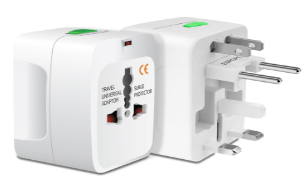
Conceptually it is similar to the way an electrical adapter enables an electrical plug to plug into sockets it was not designed to fit originally, as depicted in the following figure:
The SSP enables Foretify to communicate with simulators and the DSP enables Foretify to communicate with SUTs. This integration process enables Foretify to test the SUT in the realm of the simulator.
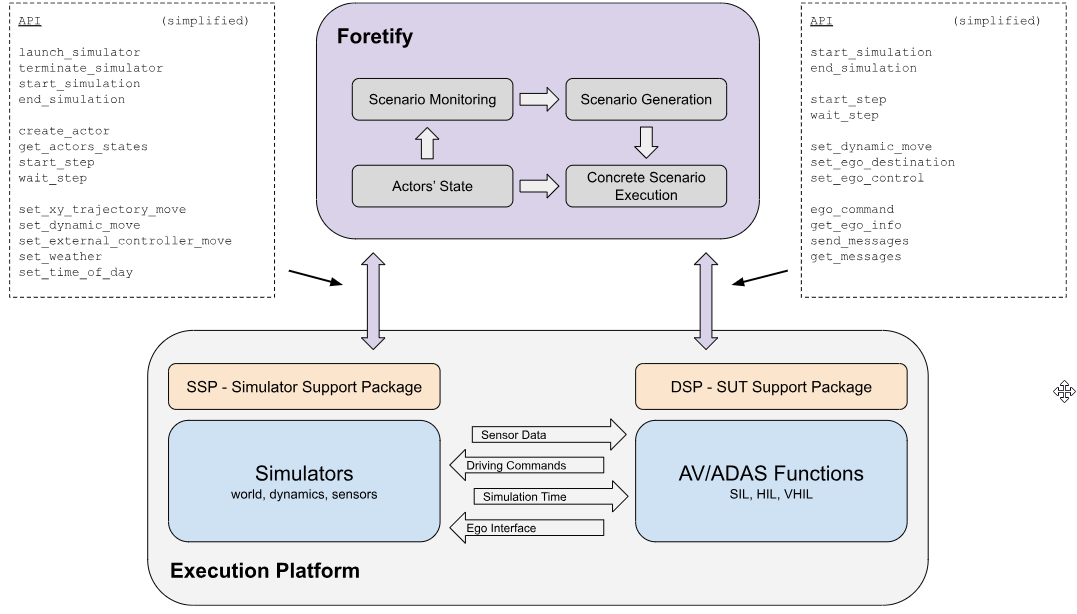
During simulation execution, Foretify invokes a set of Remote Procedure Calls (RPCs). Each call includes either an execution command, such as create actor, a request for data, such as query actor state, or simulation flow control, such as starting and ending simulation or advancing a simulation step.
Figure 2 presents the Foretify execution platform architecture and shows how it interacts with a simulator and SUT. It also depicts the support packages and their basic RPC API.
195.1 Communication
195.1.1 Protobuf and fRPC
Foretify's communication with the SSP and DSP is based on Google's Protobuf serialization mechanism. Messages are transmitted using the fRPC library provided by Foretellix.
Protobuf is a library for serializing structured data and is useful for communicating between multiple applications and programming languages. The Protobuf compiler can generate files written in various programming languages and include functions for serializing and deserializing a set of predefined messages. However, Protobuf does not define the method for transmitting the messages between the applications.
Foretellix provides a thin library, fRPC, responsible for transmitting the Protobuf messages and wrapping them as a set of RPCs. Currently, fRPC supports C++ and Python.
195.1.2 Communication bridge
Foretify interacts with the simulator and SUT over a communication bridge in an API agnostic manner. The following figure depicts the architecture:

Foretify is the client and the SSP and DSP act as servers that wait for a connection from Foretify. The connection is based on TCP or Unix sockets, depending on the configuration. Once connected, Foretify sends commands to the execution platform and waits for responses.
The OSC2-to-C++ adapter and fRPC Client components are transparent from an execution platform point of view; still, they can be enhanced with new APIs, if necessary. The fRPC client and fRPC server each include a single header file and a group of auto-generated source files to support the defined protocol.
195.2 Types of APIs
Note
This section describes the implementation options of the SSP and DSP. To improve readability, only SSP is mentioned; however, the content of this section applies to the DSP as well.
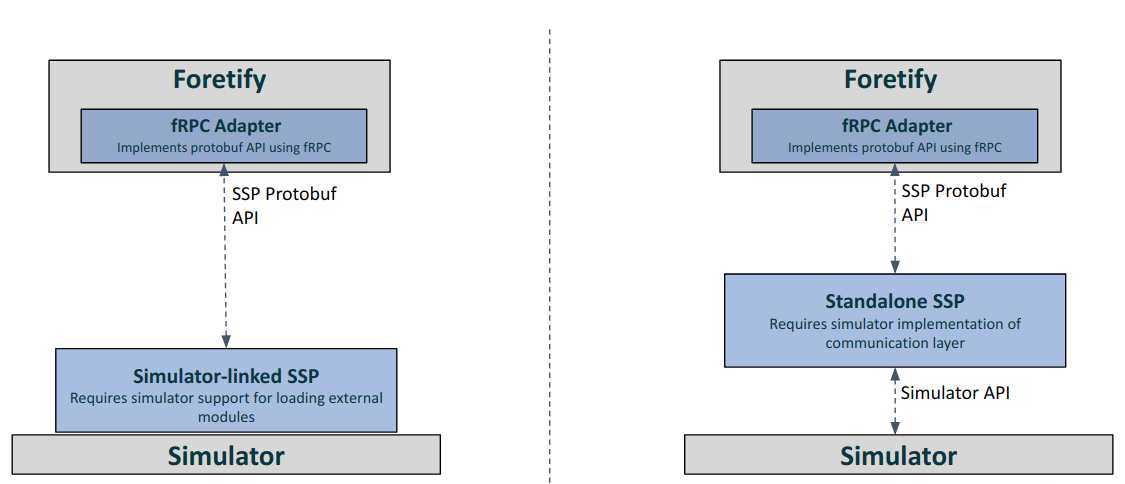
The SSP uses Protobuf and fRPC to communicate with Foretify. However, communicating with the simulator depends on the API the simulator exposes. There are two main types of APIs provided by simulators:
-
Remote API - The simulator provides an API and a library that enables communication with the simulator through a network socket or other communication methods. The provided library supports single or multiple programming languages.
-
Dynamically loaded library - The simulator allows external components to be linked together with the simulator and to directly access its functionality from the same process. This method is often faster than a remote API as it allows direct access to simulator data.
To support the two types mentioned above, the following SSP types are defined:
- Standalone SSP - The SSP is executed as a third process, in addition to Foretify and the simulator. The SSP opens two communication channels, one for communicating with Foretify using fRPC and the other to communicate with the simulator using the library it provides. Foretify executes the SSP process at the start of each test, and closes it at the end of the test.
- Simulator-linked SSP - The SSP is executed as part of the simulator process, either by a dynamic load (shared object or DLL) or by compiling it together with the simulator executable.
195.3 Sequence diagrams
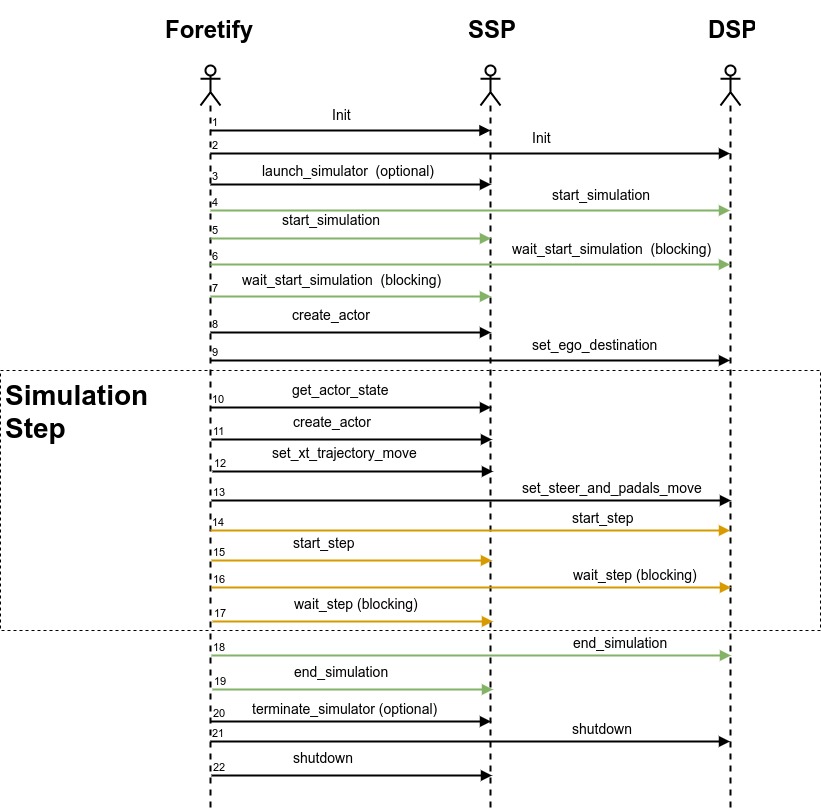
Foretify communicates with the SSP and DSP via fRPC in a client-server mode. The SSP and DSP act as the server and Foretify as the client. This means that Foretify calls both the DSP and the SSP at the start of simulation and also at the start of every simulation step.
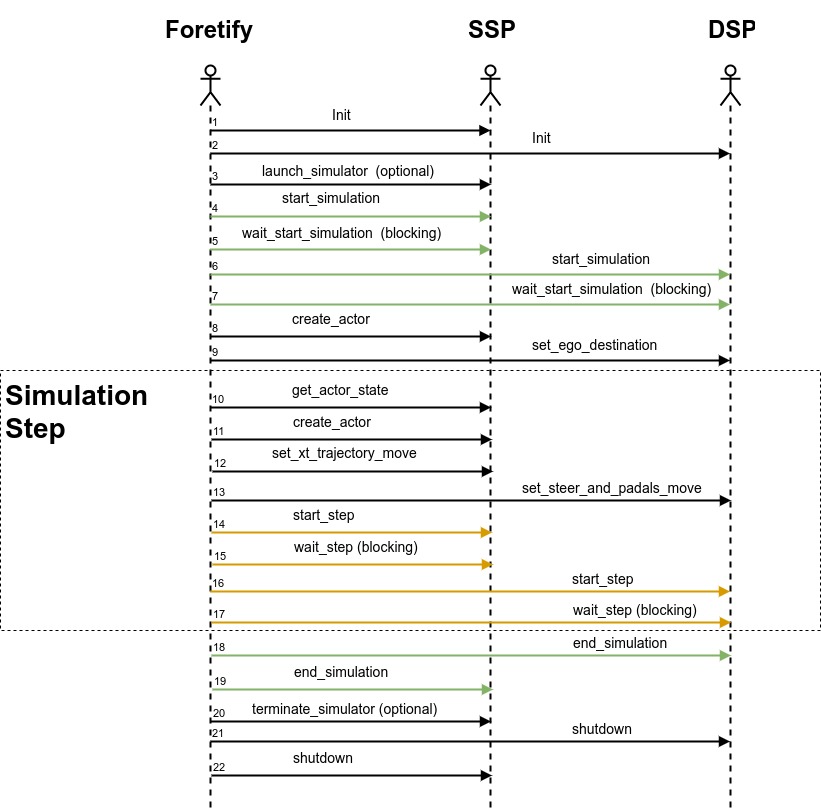
To allow flexibility in the integration of the SUT and the simulator, you can control the fRPC call order of the {start simulation, wait_start_simulation, end_simulation} method trio and the {start_step, wait_step} method pair.
These two method groups can be configured independently from each other and set to one of three possible configuration modes:
- together
- ssp_first
- dsp_first
The diagrams below illustrate the effect of the configuration mode value on the fRPC calling order.
In some cases, you might need to change this call order. For example, if the SUT needs to fetch updated data from the simulator before starting its step, the SSP needs to complete its step first. The call order for ssp_first is shown in the following figure:
Similarly, if the simulator needs to fetch updated information from the SUT before starting its step, the SUT needs to complete its step first. The call order for dsp_first is shown in Figure 6.
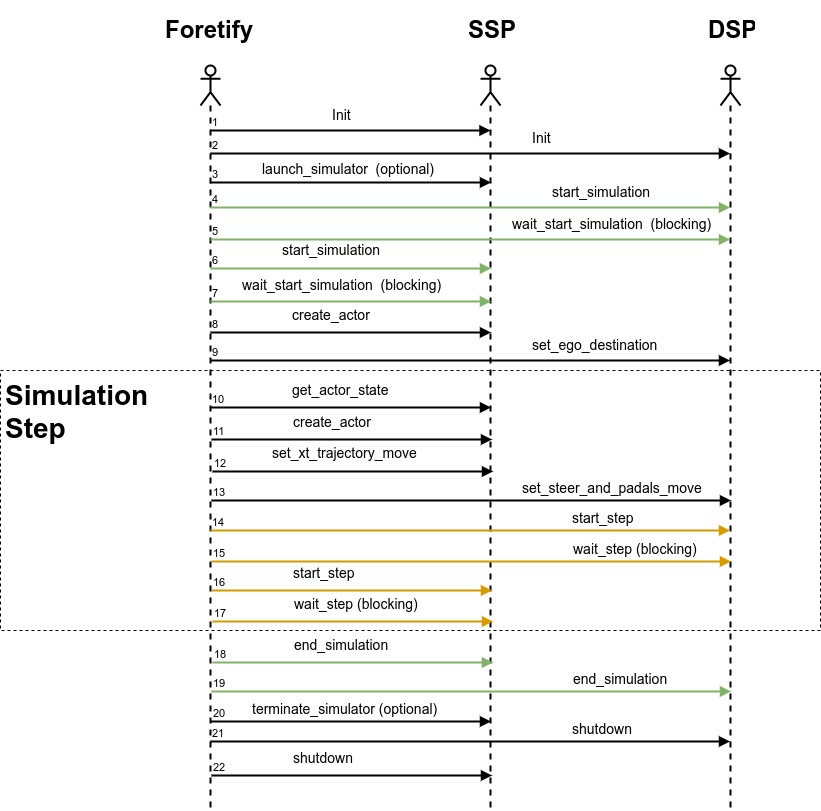
The sequence diagrams above show the more common configuration modes where both method groups are set to the same configuration mode. It is possible to set each method group in a different configuration mode (nine possible combinations), but typically both method groups should be set to the same configuration mode.
By default, the fRPC calling order is set to together for both method groups. To change the fRPC calling order, add the following to the test:
extend test_config:
    set ssp_dsp_init_order=<config_val>
    ssp_dsp_step_order=<config_val>
Below is an example of a specific configuration option setting:
extend test_config:
set ssp_dsp_init_order=ssp_first
set ssp_dsp_step_order=dsp_first
Additionally, you can specify the fRPC calling order by adding the following options when invoking Foretify:
foretify --set config.test.ssp_dsp_init_order=together \
    --set config.test.ssp_dsp_step_order=together \
    --load smoke_test.osc