79. Foretify Manager Assistant
The Foretify Manager Assistant provides insightful analysis and automation of tasks. The Assistant leverages advanced AI capabilities to enhance user productivity and efficiency. With the Assistant, users can easily interpret OpenSCENARIO 2.0 code, analyze runs and logs, and access Foretellix's extensive knowledge base. The Assistant streamlines workflows, allowing users to focus on more critical aspects of their projects.
Note
The Assistant is in an "Early Access" stage and may provide inaccurate answers.
79.1 Using the Assistant
The Assistant icon can be found in multiple locations throughout the application, offering contextual help tailored to the user's workflows. Additionally, the Assistant icon is available in the application's top panel, allowing users to open a context-aware conversational interface at any stage.

79.2 Features
79.2.1 Access Foretellix knowledge base
Foretellix's knowledge base encompasses extensive information about Foretellix products, the OpenSCENARIO 2.0 language, Safety-Driven Verification (SDV), and V&V in general. The Assistant offers an efficient way to query this knowledge base and receive context-specific insights.
Example queries include: - "How should I use workspaces?" - "What are the different ways to calculate v-grade?"
Using the Assistant, users can quickly access detailed explanations and best practices, enhancing their understanding and application of Foretellix's technologies and methodologies.
79.2.2 Explain OpenSCENARIO 2.0 code and scenarios
The Assistant provides detailed guidance on using OpenSCENARIO 2.0 code, enhancing user understanding of its structure and syntax. This capability is designed to help both new and experienced developers by simplifying complex code into manageable explanations.
Example queries include: - "Explain the scenario code" - "How is the 'position' modifier used in the scenario?"
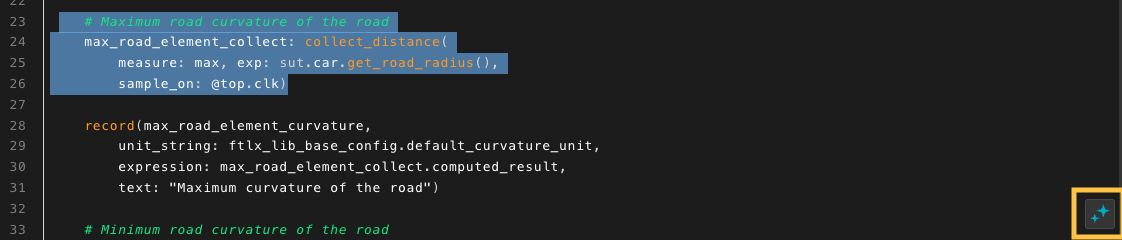
In addition, users can select specific OSC code lines in the source viewer, and then click on the embedded Assistant icon to receive an explanation of the chosen code:
79.2.3 Analyze runs and logs
The Assistant enhances the analysis of runs by providing detailed answers to the user queries about issues encountered during the run. This capability enables users to identify and understand problems, facilitating faster debugging and refinement of their scenarios. For now, the Assistant is exposed to information such as the log, the source code, and the the main issue.
Example queries include: - "Explain the reason for the incomplete scenario" - "Which errors and warnings were printed to log?"
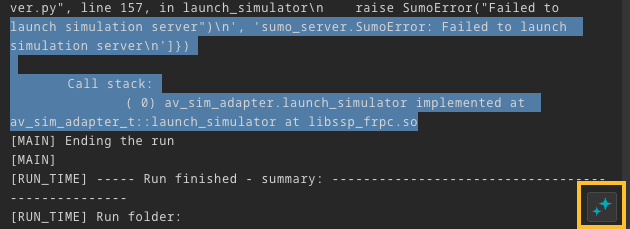
In addition, users can select specific log entries to receive directed explanations:
79.3 Setting up the Foretify Manager Assistant
To use the Assistant, set up an environment variable holding the access token. The environment variable needs to be set on the server from which Foretify Manager is deployed. It's recommended to save it in the user's .bashrc file. For example, the following line should be added to the file: export FTX_ASSISTANT_KEY="token string"
To receive the token, contact Foretellix sales or support representatives.