448. LCA Lead vehicle introduction
The Lane Centering Assist (LCA) Lead vehicle library components are located in $FTX_PACKAGES/adas/lca/scenarios/lead_vehicle as shown in Figure 1.
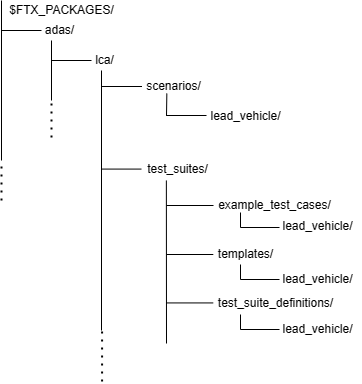
| Directory/File | Description |
|---|---|
| test_suites | A directory that contains the following folders to execute multiple tests:
|
| scenarios | A directory containing the OSC2 source files for each scenario |
448.1 Running a regression
To run a set of tests with FRun:
-
Invoke FRun in batch mode with all the CSV files required for the set of tests that you chose.
For example:
frun --csv $FTX_PACKAGES/adas/lca/test_suites/test_suite_definitions/lead_vehicle/lca_lead_vehicle_driving_between_lanes.csv --csv $FTX_PACKAGES/adas/lca/test_suites/test_suite_definitions/lead_vehicle/lca_lead_vehicle_driving_between_lanes_main.csv --csv $FTX_PACKAGES/common/csv/sim_manually_driven_kinematic_config.csv --csv $FTX_PACKAGES/common/csv/new_map_config.csv --batch -
Review the regression results in the default work directory.
~/foretify/sessions/<timestamp>/<timestamp>/