88. Input Coverage Optimizer
The Input Coverage Optimizer (ICO) is an optimization tool that helps validation engineers increase coverage of the input parameter space. Due to the fact that the input space is large, heuristics are required to efficiently cover it. The purpose of the ICO is to efficiently cover the input space by imposing constraints on the solver, thereby avoiding duplicate inputs and identifying unreachable regions in the input space.
88.1 Key terms for the Input Coverage Optimizer
Following are key concepts introduced with the Input Coverage Optimizer.
- Test suite
- A group of tests run together in Foretify Manager, previously termed regression.
- Test Suite Manager (TSM)
- A high-level configurable management component that enables easily defining, scheduling, and running test suites in various ways. Any specific implementation of a TSM implements a specific behavior out of a wide range of possibilities. There is no definite list of options, but some examples are optimizers and TSMs that execute other TSMs by some fixed order or logic.
- OSC Template and Sub-Template configs
- A representation method of scenarios used to impose constraints on the scenarios automatically. This stands at the base of the ability to perform any sort of optimization. Further information can be found in the Test Suite Manager Python Library documentation.
- Bucket
- The smallest Verification and Validation (V&V) goal element representing a value or a range of values that are to be covered. The intersection of multiple buckets of different input and/or output parameters can create a cross bucket. For every bucket, the number of hits is recorded and if it matches or exceeds the target, it is considered covered. A bucket can be discarded from the V&V goals by excluding it.
- Cover items
- Cover items are a construct that defines the V&V goals. Cover items can either be regular buckets or cross buckets. The progress in the process of filling the buckets is accumulated into a coverage grade.
- Workspace
- A Foretify Manager construct that aggregates results from multiple test suites, including the coverage grade.
88.2 Methodology
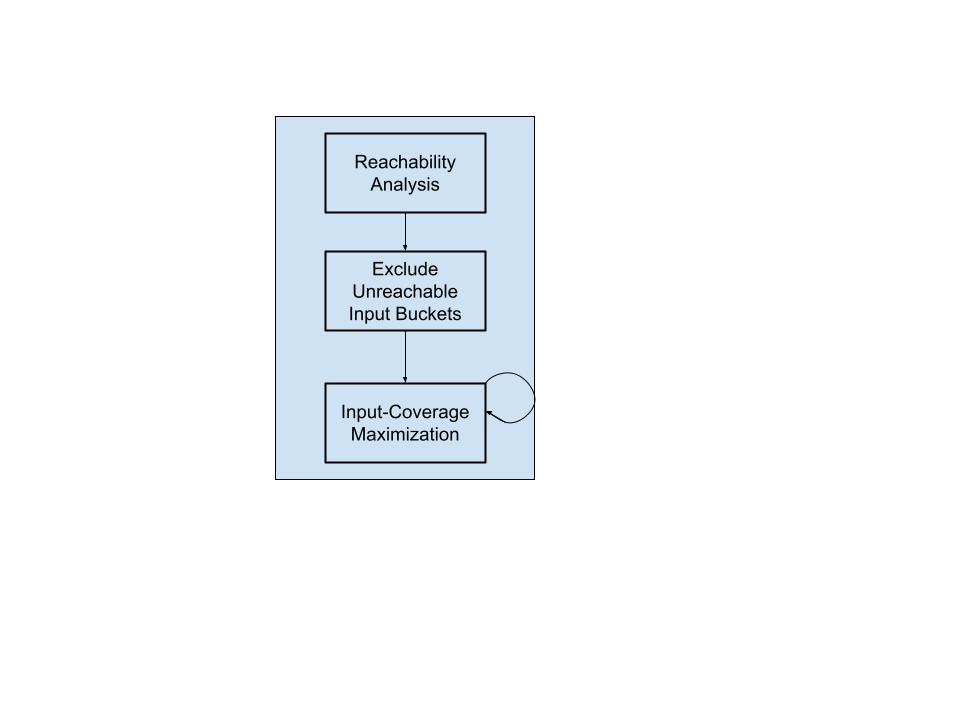
The accompanying diagram provides a concise overview of the prescribed flow and methodology. Each constituent building block is comprehensively elucidated in the subsequent sections.
88.2.1 Reachability Analysis
As a preliminary step towards coverage maximization, we recommend starting with a Reachability Analysis, executed by the Input-Coverage Optimizer (ICO).
In the Reachability Analysis phase, in terms of buckets related to input parameters, the ICO aims to eliminate unreachable buckets within the VPlan. This proactive step is critical, given that the ICO inherently targets what it perceives in the VPlan, which may inadvertently include impractical or unattainable buckets. Behind the scenes, the ICO allocates a predefined number of runs (say M runs) to target each basic bucket individually. (Crosses are not included. Only the “atomic” buckets are considered). This ensures a comprehensive assessment of the VPlan by inspecting the hits and identifying any unreached buckets. This approach is inherently statistical, and its reliability is likely to increase with repeated trials. The higher the M is, the more accurate the statistical conclusions become.
Example: Consider an example where the VPlan specifies a coverage goal for the lead vehicle speed, in a range of [60..300] kph, with increments every 20 kph.
cover(lead_vehicle_speed, expression: lead_vehicle_speed,
      unit: kph, range:  [60..300], every: 20,
      text: "Actual speed of the lead vehicle (in kilometer_per_hour)")
The ignore file serves as a structured record of ignored buckets, facilitating user review and further refinement. Use it in your project. This information is crucial, so we recommend validating the relevance of each suggested ignore in the file, ensuring that it aligns with the specific needs. The ignore file includes explicit OSC code to be imported into your project, allowing customization and alignment with project-specific requirements. Upon reviewing the ignore file, you can distinguish between genuinely unreachable buckets and potential issues within the OSC code. For instance, a bucket may be flagged as unreachable due to a typo in its name (for example, a car category labeled 'sEdan'). This meticulous process effectively streamlines coverage targets, enabling subsequent phases of the optimizer to concentrate resources on viable and practical targets.
88.2.2 Input Coverage Maximization
88.2.2.1 Motivation
Activating the Input Coverage Optimizer is strategic to achieving comprehensive coverage of the input space, encompassing both basic items and cross items uniformly. Even after the elimination of unreachable buckets in the previous section, the input space may still be vast, necessitating efficient strategies for thorough coverage.
88.2.2.2 How it operates
The ICO is an optimization tool designed to assist validation engineers in expanding coverage across the extensive input parameter space. Given the substantial size of the input space, heuristics become essential for efficient coverage. The primary objective of the ICO is to streamline input space coverage by imposing solver constraints, which helps avoid duplicate inputs.
88.3 Pipeline and Dependencies
The ICO is a Python-based command-line tool that uses the Foretellix Python SDK and the Test Suite Manager Python Library. The tool can be executed on both Windows and Linux operating systems.
Invoking the optimizer starts with a configuration file (see the example for an optimizer config file). This configuration file serves as the entry point, providing information about where to launch the test suite, the number of tests, where to store the data, and more. The optimizer interacts with FManager via the TSM (see Test Suite Manager Python Library), which wraps the Python SDK and allows user-friendly interaction along with easy-to-read messages in case errors occur. Consequently, the optimizer can synthesize test suites, collect the results, and then dump the files locally.
88.4 Execute Input Coverage Optimizer
Given existing results in a workspace, the ICO generates sets of test runs for execution, according to the flags and arguments described in the following section.
Note
Currently you can only execute the ICO using the command line and not yet using Foretify Manager.
The Input Coverage Optimizer execution command for Linux users is:
$ optimizer_main input
The Input Coverage Optimizer execution command for Windows users is:
$ optimizer_main.exe input
To learn about all flags and arguments of the Input Coverage Optimizer, you can use the 'help' of the Input Coverage Optimizer execution command:
$ ./optimizer_main input -h
The following flags and arguments can be set in an optimizer_config.json file that appears in the Positional arguments section below, or overridden by a command-line argument (see the example for an optimizer config file). Some arguments can be specified either on the command line or in the config file as noted in the argument lists below.
[optimizer_config]- Optimizer config file (full path). (Command line only)
--host [HOST]- Foretify Manager host, for example, 12.34.56.78. (Command line and config file)
--port [PORT]- Foretify Manager port, for example, 8080. (Command line and config file)
--login [LOGIN]- Foretify Manager login/user. (Command line and config file)
--environment_settings_name [ENVIRONMENT_SETTINGS_NAME]- Name of an existing test suite environment settings, as defined in Foretify Manager. (Command line and config file)
--environment_settings_id [ENVIRONMENT_SETTINGS_ID]- An ID of an existing test-suite environment settings, as defined in Foretify Manager. (Command line and config file)
--template_config_path [TEMPLATE_CONFIG_PATH]- A path or a list of paths to the template config file(s). Either
--template_config_pathor--template_pathshould be provided. (Command line and config file) --template_path [TEMPLATE_PATH]- A path or a list of paths to the template file(s). Only templates from Foretellix standard library are accepted. Either
--template_config_pathor--template_pathshould be provided. (Command line and config file) --simulator_vehicle_dynamics [SIMULATOR_VEHICLE_DYNAMICS]- The name of the simulator vehicle dynamics to be used. Possible values are: 'model', 'dynamic', 'kinematic'. Relevant only when using
--template_path. (Command line and config file) --map_name [MAP_NAME]- The name of the map to be used. The map should be available under $FTX_PACKAGES/maps. Relevant only when using
--template_path. (Command line and config file) --workspace_id [WORKSPACE_ID]- The ID of the workspace. Used for accessing the VPlan structure and the relevant covered/uncovered input parameter buckets. It can be found in the URL of the workspace. (Command line and config file)
--project_id [PROJECT_ID]- The ID of the project to use when creating a new workspace. (Command line and config file)
--local_work_directory [LOCAL_WORK_DIRECTORY]- A path to an existing local directory where data can be stored for running iterations. (Command line and config file)
--https [HTTPS]- Whether to use HTTPS for the connection. Default is false. (Command line and config file)
--mode [MODE]- Defines how the iteration runs are chosen. The default is 'reachability'. The other options are 'random' and 'uniform_fill'. (Command line and config file)
--sub_mode [SUB_MODE]- Defines how physical parameters are chosen. This is only relevant if
--modeis 'uniform_fill' or 'reachability'. Default is 'relaxed'. The other option is 'strict'. (Command line and config file) --avoid_contradictions [AVOID_CONTRADICTIONS]- Enables the 'avoid contradictions' mechanism. This option is only relevant when
--modeis set touniform_fill. Default is false. (Command line and config file) --sampling_strategy [SAMPLING_STRATEGY]- Defines the sampling method of tests. Default is 'random'. Other options are 'weighted', 'threshold', and 'max'. This option is only relevant if
--modeis 'uniform_fill' and--avoid_contradictionsis 'True'. (Command line and config file) --sampling_threshold [SAMPLING_THRESHOLD]- A number between 0 and 1 indicating the threshold for sampling if
--sampling_strategyis 'threshold'. Tests with a predicted success probability lower than the threshold are discarded. This parameter also doubles as the default success probability to be used if the performance of the predictor model is poor. Default is 0.5. (Command line and config file) --dest_workspace_name [DEST_WORKSPACE_NAME]- Defines the name of a new workspace to be created. If not provided, the optimizer will use the existing workspace. This can be provided only if
--modeis 'random'. (Command line and config file) --vplan_targets [VPLAN_TARGETS]- A list of paths in the VPlan to be targeted by the ICO, for example, ['all.sut.lead_vehicle_and_slow.*'] This will target all the items under the 'sut.lead_vehicle_and_slow' struct in the 'all' section. (command line and config file).
--retry_threshold [RETRY_THRESHOLD]- A positive number. If the percentage of grade improvement falls below this value, the ICO terminates. The default threshold is 0.1. The minimum value for
--retry_thresholdis 0 and the maximum value is 1. (Command line and config file) --max_iterations [MAX_ITERATIONS]- A positive integer specifying the maximum number of iterations to be dispatched. This is required if
--modeis 'uniform_fill' or 'random' and is ignored otherwise. (Command line and config file) --tests [TESTS]- A positive integer specifying the number of tests to dispatch at each iteration. Default is 100 tests per iteration. Relevant only if
--modeis 'uniform_fill'. (Command line and config file) --seed [SEED]- A positive integer that specifies the seed for generating the values of the test parameters, or 0 for a random seed. Default is 0. (Command line and config file)
--hits_per_bucket [HITS_PER_BUCKET]- A positive integer specifying the number of runs to dispatch for each targeted bucket (see exact behavior under Modes of Operation). The initial seed is incremented before each subsequent run. The default is 1 hit per bucket. (Available via command line and config file)
--copy_workspace [COPY_WORKSPACE]- An indicator to determine whether to work on the given workspace or on a copy of it. Default is false. (Command line and config file)
--analytics_directory [ANALYTICS_DIRECTORY]- Indicates to the ICO where to dump the analytics files. Example:
<analytics_directory>/ignore_file.osc. Default is ".". (Command line and config file) --test_suite_name [TEST_SUITE_NAME]- The name of the test suite to be used for the optimization. The name will be ICO_test_suite_
. By default, the field will remain empty and the test suite will be named ICO_test_suite . (Command line and config file) --simulator_name [SIMULATOR_NAME]- The name of the simulator to be used. If not provided will be inferred from the workspace if possible. Relevant only when using
--template_path. (Command line and config file) -h, --help- Optimizer's User Interface help.
Notes
- Server - Required arguments are
--hostAND--portAND--login - Test suite execution - Required arguments are: (
--template_config_pathOR--template_path) AND (--environment_settings_nameOR--environment_settings_id) - Template Path Processing - If
--template_pathis set,--map_nameAND--simulator_vehicle_dynamicsare required. - Working directory - Requires:
--local_work_directory - Mode Random - Requires
--sub_modeto be set to 'relaxed' - Modes other than Random - Requires
--workspace_idto be set - Unique fields to mode Random -
--project_idand--dest_workspace_namecan only be provided if--modeis 'random'. If--workspace_idis not set, both--project_idand--dest_workspace_nameneed to be set.
88.4.1 Example
For Linux users:
$ ./optimizer_main input input_coverage_config.json
For Windows users:
$ optimizer_main.exe input input_coverage_config.json
This command executes the ICO with the optimizer config, input_coverage_config.json.
All other arguments are in the input_coverage_config.json file (see below). If a required parameter is not mentioned, an error is raised.
Following is an example of an optimizer config file, input_coverage_config.json:
{
  "host": "12.34.56.78",
  "port" : "8080",
  "login": "my_user",

  "workspace_id": "a1b2c3d4e5f6g7h8i9j0",
  "environment_settings_name": "my_environment_settings_name",
  "template_config_path": "my/template/config/path",

  "local_work_directory": "my/work/dir"
}
Following is a more elaborate example showing more options:
{
  "host": "12.34.56.78",
  "port" : "8080",
  "login": "my_user",

  "workspace_id": "a1b2c3d4e5f6g7h8i9j0",
  "environment_settings_name": "my_environment_settings_name",
  "template_config_path": "my/template/config/path",

  "max_iterations": 4,
  "tests": 100,
  "mode": "uniform_fill",
  "sub_mode": "relaxed",

  "avoid_contradictions": true,
  "sampling_strategy": "threshold",
  "sampling_threshold": 0.8,

  "local_work_directory": "my/work/dir"
}
If a flag is passed using both the command line and the config file, the config file flag is ignored.
For Linux users:
$ ./optimizer_main input input_coverage_config.json –port 9090
For Windows users:
$ ./optimizer_main.exe input input_coverage_config.json –port 9090
In this case, port 9090 is used, ignoring the value 8080 in the config file.
88.5 License
In order to use the ICO, you must have a valid license. The license is provided by Foretellix and is required in order to run the optimizer. Each run dispatched by the optimizer consumes 1 optimizer license and 1 runtime license. With 1 optimizer and 1 runtime license, the user can launch a Foretify test suite with serial executions by using the optimizer.
88.6 Template OSC
This section summarizes critical points about the Test Suite Manager Python Library including:
- The behavior described in the osc file
- The parameters that control the behavior (described in the
$$template()section of a tosc file) - Measurements (cover() and record() constructs, in an osc file).
- Coverage requirements (mentioned in a VPlan, and connected to specific measurements through the
coverage_item_pathsconstruct).
88.6.1 Behavior
OSC2.0 provides functionality to describe and monitor the behavior of the scenario/actor. This functionality can be used for multiple purposes, for example, to define:
- The metrics to scope and track the progress of the verification process (which contributes to VGrade)
- The metrics to evaluate the performance of the SUT
- The success/failure criteria
88.6.2 Parameters
Template parameters are the parameters that can be controlled by the ICO (see also Template config file). The parameters are defined in the $$template() section of tosc files. In the example below, there are six template parameters defined for the lead vehicle and slow scenario. For an example of concrete constraining of the scenario based on the template parameters, see the cover() section.
$$template():
    color: $$param() # color of other car
    lead_vehicle_speed: $$param() # Other car speed in lead phase
    lead_duration: $$param() # Duration of lead phase
    slow_duration: $$param() # Duration of slow phase
    slow_phase_speed: $$param() # Speed decrease during slow phase
    initial_dist: $$param() # Distance between the SUT and the other car at the beginning of the slow phase
88.6.3 Measurements
88.6.3.1 cover() construct
The cover() construct is a behavior monitoring construct used to capture data/metrics at any specific event point of the scenario. The cover() construct records hits in predefined 'buckets'. These contribute to the VGrade.
Following is an example for defining a cover construct for the variable ‘lead_vehicle_speed’:
$$expand():
       extend sut.lead_vehicle_and_slow:

           # lead_vehicle_speed: keep + cover
           keep(label(
              lead_vehicle_and_slow.lead_vehicle).speed ==
                                                      $$(lead_vehicle_speed))

           var lead_vehicle_speed_generated:=sample(
                    label(lead_vehicle_and_slow.lead_vehicle).speed, @start)

           # note that adding this line adds a new cover item,
           # which impacts the VGrade. In general, cover items should not be
           # defined in the tosc file but we do it here for simplicity.
           cover(lead_vehicle_speed_generated,
                 unit: kph,
                 range: [0..100],
                 every: 2,
                 text: "Requested speed of the lead vehicle (in
                                                      kilometer_per_hour)")
88.6.3.2 record() construct
The record() construct is a behavior monitoring construct used to capture data/metrics at any specific point in time/event of the scenario that defines the KPI or any parameter of interest that does not contribute to coverage. The metrics collected with record() do not add to the VGrade. The record() construct allows bucket definitions or recording of the sampled values.
88.7 Template config file
The template config file, written in JSON syntax, describes the tosc file for the optimizer. The config file describes every parameter used by the optimizer (a subset of the parameters defined in the tosc file), and provides the mapping between VPlan paths and template parameters.
Physical (numeric) or String (enum) parameters require different information as described below.
The full configurability of the template config file (e.g., generatedRecordName, actualRecordName, default, and resolution) is defined in the Test Suite Manager Python Library documentation.
88.7.1 Physical parameter
A targeted physical parameter can be configured by setting the following optional properties. If the minimum and maximum values do not align with the VPlan item definition, the intersection of the ranges is used. If these optional parameters are not included in this template configuration file, the values and ranges are taken exclusively from the VPlan item definition.
“<tosc_parameter_name>”: {
    “physicalParameter”: {
        “validRange”: {
            “min”: <MIN_VALUE>,
            “max”: <MAX_VALUE>
        },
        "resolution": <RESOLUTION_MEASURE>,
        “unit”: <UNIT_MEASURE>,
    }
}
88.7.2 Enum parameter
A targeted enum parameter can be configured by setting the following optional properties. If the values do not align with the VPlan item definition, the intersection of the sets is used. If these optional parameters are not included in this template configuration file, the values are taken exclusively from the VPlan item definition. Note that allowing 'any value' (i.e., “values”: [“*“]) is not supported when using the optimizers.
“<tosc_parameter_name>”: {
    “stringParameter”: {
        “values”: [
            <VALUE_1>,
            …
            <VALUE_N>
        ]},
    “default” : <DEFAULT_VALUE>
    }
}
88.7.3 Coverage item paths
The template config file describes the relationship between the VPlan and the template parameters. The coverage_item_paths section tells the ICO which items it should target in the VPlan. It maps the template parameters to a VPlan path and is required for all the template parameters. If a cross item is used, specify all the parameters that participate in the cross in order. A cross item can include output parameters, namely, parameters that cannot be directly controlled. For further information, see Uniform-Fill.
The workspace provided must be compatible with the template config that is provided. This means that all the paths in the coverage item paths must exist in the workspace.
Schematic example:
“coverage_item_paths”: {
    <VPLAN_PATH_1> : {
        “cover_params”: [
            <MATCHING_TEMPLATE_PARAM_1>,
            ...,
            <MATCHING_TEMPLATE_PARAM_M>
        ]
    },
    …,
    <VPLAN_PATH_N>: {
        “cover_params”: [
            <MATCHING_TEMPLATE_PARAM>
            ]
    }
}
Template config example:
{
  "templatePath": "<PATH_TO_TOSC_FOLDER>/lead_vehicle_and_slow.tosc",
  "parameters": {
    "params": {
      "lead_vehicle_speed": {
        "physicalParameter": {
          "validRange": {
            "min": 10.0,
            "max": 101.0
          },
          "unit": "kph",
          "generatedRecordName": "lead_vehicle_speed_generated",
          "actualRecordName": "lead_vehicle_speed_actual"
        }
      },
      "slow_phase_speed": {
        "physicalParameter": {
          "validRange": {
            "min": -50.0,
            "max": -10.0
          },
          "unit": "kph",
          "generatedRecordName": "slow_phase_speed_generated",
          "actualRecordName": "slow_phase_speed_actual"
        }
      },
      "lead_duration": {
        "physicalParameter": {
          "validRange": {
            "min": 1.0,
            "max": 10.0
          },
          "resolution": 0.02,
          "unit": "s",
          "generatedRecordName": "lead_duration_generated"
        }
      },
      "slow_duration": {
        "physicalParameter": {
          "validRange": {
            "min": 3.0,
            "max": 5.0
          },
          "resolution": 0.02,
          "unit": "s",
          "generatedRecordName": "slow_duration_generated",
          "actualRecordName": "slow_duration_actual"
        }
      },
      "color": {
        "stringParameter": {
          "values": [
            "red",
            "blue",
            "green"
          ],
          "default": "red"
        }
      }
    }
  },
  "coverage_item_paths": {
    "all.sut.lead_vehicle_and_slow.start.lead_vehicle_speed_actual":
       {"cover_params":["lead_vehicle_speed"]},
    "all.sut.lead_vehicle_and_slow.start.slow_phase_speed_actual":
       {"cover_params":["slow_phase_speed"]},
    "all.sut.lead_vehicle_and_slow.start.lead_duration_actual":
       {"cover_params":["lead_duration"]},
    "all.sut.lead_vehicle_and_slow.start.slow_duration_actual":
       {"cover_params":["slow_duration"]},
    "all.sut.lead_vehicle_and_slow.start.lead_vehicle_color":
       {"cover_params":["color"]},
    "all.sut.lead_vehicle_and_slow.start.lead_vehicle_speed_x_lead_duration_x_slow_duration":
       {"cover_params": ["lead_vehicle_speed", "lead_duration", "slow_duration"]}
    }
}
The VPlan item path all.sut.lead_vehicle_and_slow.start.lead_vehicle_color is mapped to the template parameter color. The VPlan cross item all.sut.lead_vehicle_and_slow.start.lead_vehicle_speed_x_lead_duration_x_slow_duration is mapped to 3 template parameters lead_vehicle_speed, lead_duration, and slow_duration, in the same order as defined by the VPlan cross item in the OSC.
Minimal template config example:
{
  "templatePath": "<PATH_TO_TOSC_FOLDER>/lead_vehicle_and_slow.tosc",
  "parameters": {
    "params": {
      "lead_vehicle_speed": {
        "physicalParameter": {
          "unit": "kph",
          "actualRecordName": "lead_vehicle_speed_actual"
        }
      },
      "color": {
        "stringParameter": {
      }
    }
  },
  "coverage_item_paths": {
    "all.sut.lead_vehicle_and_slow.start.lead_vehicle_speed_actual":
       {"cover_params":["lead_vehicle_speed"]},
    "all.sut.lead_vehicle_and_slow.start.lead_vehicle_color":
       {"cover_params":["color"]},
    "all.sut.lead_vehicle_and_slow.start.lead_vehicle_speed_x_color":
       {"cover_params": ["lead_vehicle_speed", "color"]}
    }
}
88.8 Modes of Operation
The ICO has three different modes of operation: Random, Reachability, and Uniform-Fill. The following examples demonstrate the different modes:
For these examples, assume the OSC files contain cover definitions for four physical parameters (see the example in the cover() section).
This creates the following buckets in the VPlan:
VPlan definition
-
1) lead_vehicle_speed: [0..2], [2..4], … , [98..100] - a total of 50 buckets.
Each bucket has: hits: 0, target: 2, included: True
-
2) lead_duration: [1..2], … , [9..10] - a total of 9 buckets.
Each bucket has: hits: 0, target: 2, included: True
-
3) slow_duration: [1..2], … , [9..10] - a total of 9 buckets.
Each bucket has: hits: 0, target: 2, included: True
-
4) color: red, green, blue - a total of 3 buckets.
Each bucket has: hits: 0, target: 2, included: True
The modes of operation are explained below using the above description.
Intersection with template configuration definitions
The ICO targets only those buckets that intersect with both the VPlan definition and the template configuration definition. For example, in our scenario, if the 'slow_duration' cover item has buckets ranging from [1..2] to [9..10] in the VPlan, but the user specifies that the valid range for the numeric variable 'slow_duration' is [1, 7], then the ICO exclusively targets the buckets within the range [1..2] to [6..7]. The same is true for Enum variables. If the cover item for ‘color’ in the VPlan contains the values red, green and blue, but the template says that the valid values for ‘color’ are red and blue, then the ICO only targets those.
88.8.1 Random mode
Random mode allows the user to easily run minimally constrained tests of required scenarios.
Note
This mode supplies automation for the user to run random runs. It is not in fact an optimized process.
- Allows for quickly and naively running tests to gain initial insights about the scenario and the VPlan.
- Minimal overhead for running tests.
In this mode, the optimizer terminates if it reached the defined maximum number of iterations (--max_iterations on the command line or in the config file).
There will always be a single test that is executed as defined by the "hits per bucket" field (specified by --hits_per_bucket on the command line or in the config file).
--mode random
| lead_vehicle_speed | lead_vehicle_duration | slow_duration | color |
|---|---|---|---|
88.8.2 Reachability mode
Reachability mode allocates a single test per parameter per bucket. When using this mode, the ICO considers VPlan buckets that have already been covered by previous runs in the workspace (if any) and does not create runs for these. Each bucket is targeted once, even if more than one run is required to reach the bucket’s target.
At the end of the ICO execution using the 'Reachability' mode, an ignore file (ignore_file.osc) will be generated in the analytics directory (specified by --analytics_directory on the command line or in the config file).
The ignore file follows the following template:
# File generated by Foretellix
# Generated on: <date>
# To use this file:
#   1. Review the following and ensure that all important goals are reachable and all ignored buckets are aligned with your needs.
#   2. Store this file in your project directory.
#   3. Import it within your OSC project's OSC code to tune the generic goal #           for specific needs.

extend <scenario>:
    # reasons for ignoring <buckets to ignore 1> (e.g., 'solver failure')
    cover(override: <var_name1>, event: <event1>, ignore: (<item_name1> in [<buckets to ignore 1>]))

    # reasons for ignoring <buckets to ignore 2> (e.g., 'timeout error')
    cover(override: <var_name2>, event: <event2>, ignore: (<item_name2> in [<buckets to ignore 2>]))
Note
The buckets for cross items are not targeted. If this is required, use the Uniform-Fill mode.
- A dedicated run is created for every bucket, increasing coverage chances.
- Resources are saved based on pre-filled buckets.
In this mode, the optimizer terminates after one iteration.
When using the "Reachability" mode, the goal of running a test multiple times is to gain a statistical confidence for its corresponding bucket's ability to be covered.
Consequently, we ignore the "Target" field of the bucket and run each test a number of times as defined by the "hits per bucket" field (specified by --hits_per_bucket on the command line or in the config file).
--mode reachability
--sub_mode <strict/relaxed>
In the example above, there are a total of 50 + 9 + 9 + 3 = 71 buckets. This mode allocates 71 tests—one for each bucket of each parameter. The tests are generated as shown in the table below, where the cells with purple text indicate the bucket targeted by each test. The other parameters are assigned their valid range or default value, as previously described. This example corresponds to the ‘relaxed’ sub-mode.
Note
Currently, if a run doesn’t target a specific numerical parameter, the entire valid range is provided in the request. If a specific enum parameter is not targeted, all the possible values are used.
| lead_vehicle_speed | lead_vehicle_duration | slow_duration | color |
|---|---|---|---|
| [0..2] | [1..10] | [1..10] | [red, green, blue] |
| ... | [1..10] | [1..10] | [red, green, blue] |
| [98..100] | [1..10] | [1..10] | [red, green, blue] |
| [0..100] | [1..2] | [1..10] | [red, green, blue] |
| [0..100] | ... | [1..10] | [red, green, blue] |
| [0..100] | [9..10] | [1..10] | [red, green, blue] |
| [0..100] | [1..10] | [1..2] | [red, green, blue] |
| [0..100] | [1..10] | ... | [red, green, blue] |
| [0..100] | [1..10] | [9..10] | [red, green, blue] |
| [0..100] | [1..10] | [1..10] | red |
| [0..100] | [1..10] | [1..10] | green |
| [0..100] | [1..10] | [1..10] | blue |
88.8.3 Uniform-Fill mode
Uniform-Fill mode fills the VPlan by allocating a run to each item defined in coverage_item_paths. In contrast to the Reachability mode, cross items are considered. In this mode, a bucket continues to be targeted until its target is met.
Each iteration starts by reading the latest coverage results and the targets are updated accordingly.
88.8.3.1 Multiple targets
To use Uniform-Fill mode, you write your coverage targets in coverage_item_paths. The ICO takes each target separately. Assume, for example, you supply three targets:
- A cross item with X buckets (all with target=1, hits=0, and included=True).
- An item that participates in the cross that has Y buckets (all with target=1, hits=0, and included=True).
- An item that does not participate in the cross that has Z buckets (all with target=1, hits=0, and included=True).
The ICO generates a run for each bucket. In total, there will be X + Y + Z runs to execute.
88.8.3.2 Output parameters
Cross items that contain output parameters are still considered but the allocated run naturally does not consider them. Yet, the coverage goals are still determined by the full cross item (i.e., with the output parameters). Given that a concrete assignment for the set of input parameters that compose the cross can be shared by multiple cross items when output parameters are included, the corresponding test can include more runs.
88.8.3.3 Retry mechanism
There is a possibility that not all runs successfully reach their intended buckets, and this can be attributed to two main reasons:
- Contradictions occurred during the execution.
- Actual values could be outside the requested range, even when a plan that conforms with the requests had been created.
Note
In the current release, the ICO partially addresses this case of divergence as described below. This algorithm will be updated in future releases.
Each iteration starts by reading the latest results, calculating the remaining space, and targeting it randomly, assuming that requested and actual are the same. Thus, repetitions of the same input variations between iterations are expected. For example, if the ICO finishes covering the cross item but there is one set of parameters that leads to a contradiction, the optimizer tries to cover it again until max_iterations is reached. In each iteration, the optimizer launches a test suite with a single test each time.
88.8.3.4 Contradiction avoidance
The ICO has a mechanism to avoid contradictions. If the avoid_contradictions flag is set to True, the ICO uses a sampling strategy (defined by sampling_strategy) to avoid contradictions. The sampling relies on a machine learning model (referred to as "the model") that predicts the success of the solver. The model is trained on the results of previous runs, consequently, heavily biased data may lead to poor performance in first iterations. The sampling strategy can be one of the following:
* random - The ICO randomly samples the buckets. This is the default strategy that DOES NOT prioritize any bucket.
* weighted - The ICO samples the buckets based on a predicted success probability returned for each bucket by the model.
* threshold - The ICO discards buckets with a predicted success probability lower than the threshold, defined by the sampling_threshold argument. The remaining buckets are sampled randomly.
* max - The ICO samples the buckets with the highest predicted success probability.
- Chooses sets of parameters to enable the achievement of VPlan targets.
In this mode, the optimizer terminates if one of the following conditions are met:
- All buckets in the combined set of required buckets met their target and are covered.
- The optimizer reached the defined number of max iterations (
--max_iterationson the command line or in the config file).
For every dispatched test, the "Target" and "Hits" fields of the bucket corresponding to the test, as well as the "hits per bucket" field (specified by --hits_per_bucket on the command line or in the config file).
are taken into account. At each iteration, a test will run at most the number of times defined in the "hits per bucket" field, but never more than the number of runs required to reach the target of the bucket.
Namely, if a bucket has a target of 4 and already contains 1 hit, with 'hits per bucket' set to 4, the test will run 3 times. However, if a bucket has 0 hits and a target of 5, with 'hits per bucket' set to 3, the test will also run 3 times.
--mode uniform_fill
--sub_mode <strict/relaxed>- Default is 'relaxed'.
--max_iterations <number>- Default is 1.
88.8.3.5 Uniform-Fill experiment
Scenario: lead_vehicle_and_slow
Parameters in cross coverage experiment:
- lead_vehicle_speed, unit: kph, range: [20..80], every: 5. Total number of buckets: 12
- slow_duration, unit: second, range: [3..5], every: 0.5. Total number of buckets: 4
- lead_duration, unit: second, range: [3..10], every: 0.5. Total number of buckets: 14
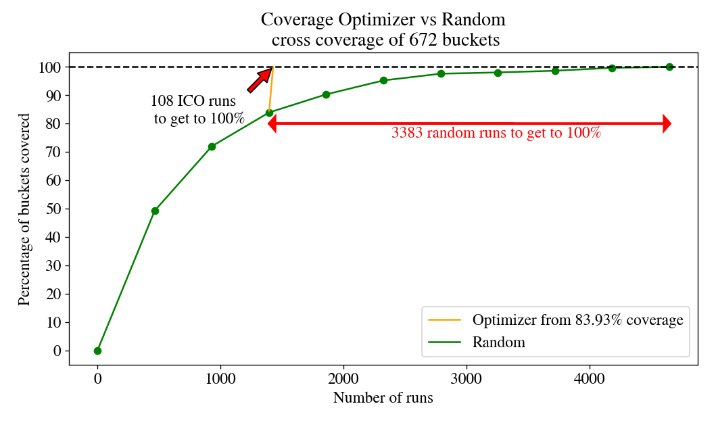
Total cross size: 12 * 4 * 14 = 672.
In the following plot, the green curve indicates the number of random iterations required to achieve a desired percentage of coverage. For instance, to attain 80% coverage among the 672 buckets beneath the cross item, more than 1,000 runs are needed. To reach complete coverage and obtain a 100% coverage grade through random runs, 3,383 random runs are needed. By utilizing the Uniform-Fill mode, a 100% coverage grade can be achieved with just 108 different runs.
88.9 Sub-Modes
88.9.1 Strict
In the strict sub-mode, numerical input parameters in the FRun table are assigned specific values, while string input parameters remain unaffected. For numerical input parameters, the optimizer specifies per bucket a strict value which is the average of the bucket range.
Assume we have the following cover item:
cover(lead_duration, unit: second, range: [1..10], every: 1)
The optimizer specifies the values 1.5s, 2.5s, 3.5s, 4.5s, 5.5s, 6.5s, 7.5s, 8.5s and 9.5s.
88.9.2 Relaxed
In the relaxed sub-mode, the optimizer specifies the whole bucket as an allowed range for each numeric parameter, instead of specifying a concrete value.
Assume we have the following cover item:
cover(lead_duration, unit: second, range: [1..10], every: 1)
The optimizer specifies the ranges corresponding to the following buckets: [1..2)s, [2..3)s, [3..4)s, [4..5)s, [5..6)s, [6..7)s, [7..8)s, [8..9)s, and [9..10)s.
This sub-mode has the benefit of allowing Foretify to assign the concrete value during the constraint-solving phase, increasing the chances of successful assignment (fewer ‘solver failure' errors).
Range rounding
When supplying the solver with a range that represents a bucket from the VPlan, the solver might choose the rightmost value. For example, for the bucket [1..2)s, if we request the range [1..2]s, the solver can choose the value 2. However, this generated value will be assigned to the bucket [2..3) since the buckets in the VPlan are exclusive. To avoid this we restrict the solver from choosing the rightmost value in a range. Therefore if we define the minimal value in the range as min and the maximal value as max we will redefine the range with the following computation:
If we apply this on our example bucket [2..3) we get the range [2..2.99] for the request.