230. Dispatcher Components
230.1 Architecture
The Foretify Manager Dispatcher (the dispatcher) is responsible for managing the orchestration of Foretify tests and other generic jobs. The dispatcher runs as a module within Foretify Manager.
This document describes the system components and infrastructure requirements of a Kubernetes based orchestration solution for executing test suites. For information on Foretify Manager installation requirements, see the Foretify Manager Installation Guide.
Figure 1 shows a high-level view of the system architecture.
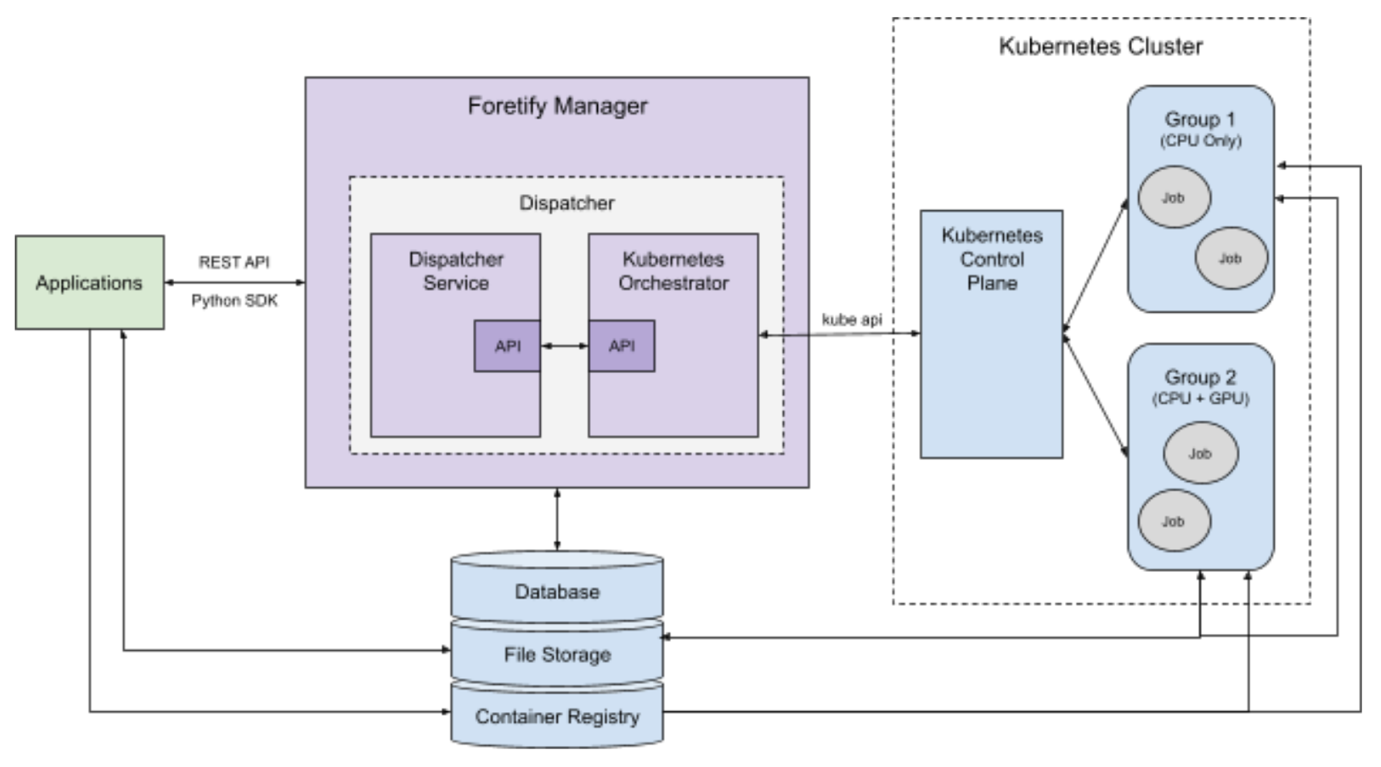
The major components of the system are:
-
The Dispatcher provides a service for creating and monitoring Foretify jobs by working with an orchestrator.
-
The Kubernetes Orchestrator receives job requests from the Dispatcher and interfaces with a Kubernetes cluster to create and monitor them.
-
The Kubernetes Cluster executes the jobs, distributing them based on resource availability.
-
The PostgreSQL Database is used by the Dispatcher to store active and past jobs. This database is shared with Foretify Manager.
-
The File Storage system holds job results and files required to run jobs, such as OSC2 source files, maps and so on. These are shared by the Kubernetes Orchestrator, the nodes in the Kubernetes Cluster, and users of Foretify Manager.
-
The Container Registry holds Docker images that have been created and pushed by the users. Docker images may contain a version of Foretify, a simulator, and/or the SUT. The nodes in the Kubernetes cluster pull images from this registry.
Figure 2 below shows a possible distribution of the system components onto physical or virtual machines (the dashed line boxes).
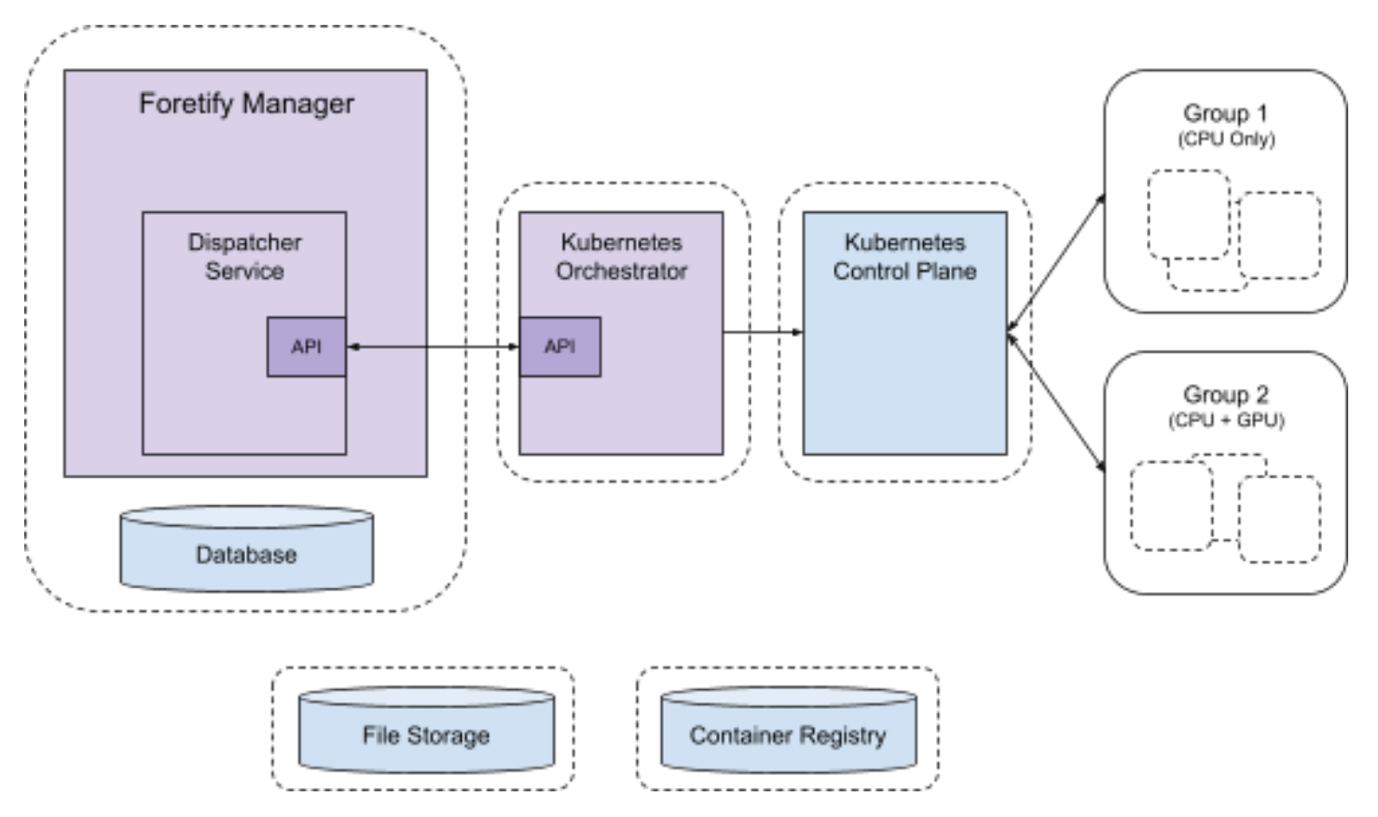
The following sections describe the roles, requirements, and configuration of the major components, including the Dispatcher and Kubernetes Orchestrator.
230.2 Dispatcher
The Dispatcher is a service that runs as a module within Foretify Manager. Users interact with the dispatcher using Foretify Manager’s API. The Dispatcher interfaces with orchestration services via gRPC/HTTP2.
Requirements:
-
Preferred operating system is Ubuntu 22.04.
-
Foretify Manager must be able to connect to the Dispatcher.
-
CPU and memory requirements are modest, depending on the number of simultaneous jobs.
-
Local storage requirements are minimal.
-
Typically runs on the same machine as Foretify Manager, but can be placed on a separate machine or within the Kubernetes cluster.
230.3 Kubernetes Orchestrator
The Kubernetes Orchestrator is an implementation of the Dispatcher’s orchestration interface, interfacing with a Kubernetes cluster to provide job orchestration.
Requirements:
-
Preferred operating system is Ubuntu 22.04.
-
Must be able to connect to the dispatcher and the Kubernetes control plane.
-
CPU and memory requirements are modest, depending on the number of simultaneous jobs.
-
Must be able to mount storage shared with Kubernetes nodes and users.
-
Local storage requirements are minimal.
-
Can run on the same machine as Foretify Manager, be placed on a separate machine, or run within the Kubernetes cluster.
230.4 Kubernetes Cluster
The Kubernetes Orchestrator interfaces with a Kubernetes Cluster. The Kubernetes Cluster consists of two primary components: the Control Plane and the Compute Resources.
230.4.1 Control Plane
The Control Plane is responsible for running and managing the Cluster.
A central component of the Control Plane is the Kubernetes API server. The Kubernetes Orchestrator interacts with the Kubernetes Cluster using the Kubernetes API.
Requirements:
The Kubernetes Orchestrator requires a Kubernetes Cluster running version 1.22 or higher. There may be a preferred mechanism for creating the Cluster depending on the services. Two common tools for creating a Kuberenetes Cluster are kubeadm and Kubespray. Please reference the Kubernetes documentation for minimum requirements.
-
Kubernetes 1.22 or later is preferred.
-
The Kuberenetes Orchestrator must be able to connect to the Kubernetes API.
-
The Control Plane must have enough CPU and memory resources to support the desired number of simultaneous jobs.
-
Additional Modules:
-
Kubernetes dashboard (useful for debugging).
-
Nvidia device plugin (for enabling GPU support).
-
Cluster autoscalar (if supported by the data center).
-
230.4.2 Compute Resources
The Kubernetes Cluster’s Compute Resources are the nodes where jobs are run. There are typically two main categories of nodes: system and worker. The system nodes run Kubernetes system pods and are not used by the Kubernetes Orchestrator. The worker nodes run user jobs. The worker nodes are often grouped by their capabilities. In Figure 1 above, two worker node groups are shown: one consisting of nodes with only CPUs and one with nodes that have both CPUs and GPUs. The system node group is not shown.
230.4.2.1 Group 1
Group 1 is a group of worker nodes used for running tests and jobs that do not require a GPU. Each node can either be permanently added to the Cluster or added on demand by the Kubernetes Cluster autoscaler, if supported by the data center.
Requirements:
-
Each node can be a physical or virtual machine.
-
Each node should have at least 4 CPU cores and 32 GB of memory.
-
Must be able to mount storage shared with the Kubernetes Orchestrator and users.
-
Number of nodes depends on the desired number of simultaneous jobs and the needs of each job.
- The needs of each job depend on the requirements of Foretify, the simulator (e.g. Carla), and the SUT (i.e. the AV software stack).
230.4.2.2 Group 2
A group of worker nodes used for running tests and jobs that require a GPU. Each node can either be permanently added to the cluster or added on demand by the Kubernetes cluster autoscaler, if supported by the data center.
Requirements:
-
Each node can be a physical or virtual machine.
-
Each node should have at least 4 CPU cores, 32 GB of memory, and an Nvidia GPU. The type of GPU required depends on the expected workload:
-
For the Carla simulator, a GPU designed for graphics intensive applications is preferred. However, most Nvidia GPUs meet the needs of Carla.
-
Other GPU requirements depend on the needs of the AV software stack, if any.
-
-
Must be able to mount storage shared with the Kubernetes Orchestrator and users.
-
Number of nodes depends on the desired number of simultaneous jobs and the needs of each job. The needs of each job depend on the requirements of Foretify, the simulator (e.g. Carla), and the SUT (i.e. the AV software stack).
230.5 Database
A PostgreSQL database used by the dispatcher for storing active and past jobs. This database can be shared with Foretify Manager. Database entries consist of a relatively small JSON object per job.
Requirements:
-
PostgreSQL 10 or later.
-
Storage depends on the desired amount of job history to maintain.
-
Modest CPU and memory requirements. (Often runs on the same machine as the Dispatcher.)
230.6 File Storage
A shared file system with common mount point paths is a requirement of the Kubernetes orchestrator. The shared file system is how the Kubernetes orchestrator, the nodes in the Kubernetes cluster, and the Foretify Manager users share and access files. It is important that all users of the file system use mount points with the same paths in order to share a common view of file locations.
There are two shared directories:
-
Jobs
- Holds test results. Each job has its own directory.
-
Shared
-
General shared storage
-
Temporary job directories
-
OSC2 files
-
Requirements:
-
Can be mounted via NFS by the Kubernetes Orchestrator and all Kubernetes nodes.
-
Storage size depends on whether or not this storage is used for long term results storage and the desired results retention policy.
230.7 Container Registry
At least one Docker container registry is required. Users push Docker images to this registry, and Kubernetes nodes pull images from this registry. The Docker registry name plus the image tag to use when running a Foretify job are part of the Foretify job definition.
Requirements:
-
Must be accessible to the Kubernetes nodes for pulling images.
-
Must be accessible to users for pushing images.
230.7.1 Job / Pod / Container Configuration
A single Kubernetes job with one pod is used to run Foretify, the SSP, the simulator, the DSP, and the SUTs. The pod contains one or more containers depending on how the Foretify job is defined.
Example configurations:
All in one:
-
Container: Foretify, SSP, Simulator, DSP, SUTs
-
Foretify launches the SSP and DSP
-
Optional: The SSP, simulator, DSP, and/or SUTs can be accessed external to the container via a mounted volume.
-
Foretify / Simulator / SUT
-
Container 1: Foretify, SSP, and DSP
-
Foretify launches the SSP. The SSP connects to the Simulator in Container 2.
-
Foretify launches the DSP. The DSP communicates with the SUT in Container 3.
-
-
Container 2: Simulator
-
Container 3: SUT
Foretify / SSP / DSP
-
Container 1: Foretify
-
Foretify connects to the SSP in Container 2.
-
Foretify connects to the DSP in Container 3.
-
-
Container 2: SSP, Simulator
-
Container 3: DSP, SUT