196. Concepts
196.1 Actor state
The SSP API and the DSP API define the position and the state of an actor on the map using the global coordinates system. The state of each object is specified by the six degrees of freedom (6DoF): x, y, z, roll, pitch, yaw.
The underlying type of those fields is dependent on the context. For example, when specifying a position, x is measured in meters; whereas, for acceleration, x is measured in meters/sec^2.
196.1.1 Specifying an actor's state
On each step, Foretify queries the SSP for the state of all actors. For each actor, the SSP reports its current position, speed, and acceleration, in each of the 6DoF, as mentioned above. Because not all simulators can provide this information, some of the fields may be omitted. In those cases, Foretify calculates an approximation of them using the other given fields.
The only mandatory fields for specifying an actor's position are x and y. All other fields are optional. However, SSP implementors are encouraged to supply all the fields available in the simulator as it can improve Foretify's accuracy during scenario execution and provide more accurate data for coverage and metrics collection.
196.2 Actor movement
While executing a scenario, Foretify needs to update the traffic vehicles' trajectories to execute the generated scenario. There are three types of RPC that Foretify can send to set an actor trajectory: set_xy_trajectory, set_dynamic_move, and set_external_controller.
Note
If the actor is a vehicle, you must configure it appropriately. See Configuring vehicles.
196.2.1 set_xy_trajectory
The standard method Foretify uses to control an NPC trajectory is an array of x and y coordinates, which is referred to as kinematic movement.
The trajectory is updated every ~200ms and includes a set of coordinates for each of the upcoming simulation steps. The SSP is required to set the actor's position on each step by following the trajectory received from Foretify.
196.2.2 set_dynamic_move
Controlling an actor dynamically through throttle, brake, and steering controls is needed in the following cases:
- Foretify controls an NPC that requires a natural moving profile.
- Foretify's Human Driver Model controls the Ego vehicle during parts of the scenario and setting x and y positions for the Ego vehicle is not allowed.
The message includes an array of throttle/brake and steering values that should be applied to the simulator by the SSP on each step. (For a more detailed description, see the message definition.)
196.2.3 set_external_controller
set_external_controller is used to set a target destination for the NPC and to request that the simulator control it. Also, it contains a list of key-value string parameters that allow configuring of the actor according to the unique capabilities supported by the simulator.
196.3 Controlling the Ego vehicle
The flow for testing an Ego in an execution platform varies according to the characteristics of the features under test. The type of messages supported by the Ego is usually coupled with the level of autonomy implemented. Level 4 usually can only receive a target position, while Levels 2 and 3 often need a driver's simulation to control the vehicle at specific points in the scenario.
The messages below address the need to have several interface types. The actual messages that are sent depend on the loaded configuration of the SUT as defined in the OSC2 files and on the loaded scenario files.
Note
You must also configure the SUT vehicle appropriately. See Configuring vehicles.
196.3.1 set_ego_destination
Sets the requested destination point for the Ego vehicle. Foretify calls this method once at the beginning of the scenario.
196.3.2 set_dynamic_move
Sets a trajectory in the form of throttle/brake pedals and steering wheel commands to the vehicle actuators. Used on Levels 2 and 3 to simulate a driver co-controlling the Ego vehicle. The DSP may choose to override those values before passing them to the simulator.
196.4 Synchronization
Foretify, the simulator, and the SUT are three processes that interact with each other throughout the test execution. To allow a repeatable test environment, all communication between Foretify and the SSP/DSP is synchronized. Foretify blocks on each RPC until a response is received from the SSP and the DSP.
The design can lead to deadlocks as some simulator implementations wait for a command from all connected clients, or specifically as in this case, Foretify and the SUT. This behavior is especially common in two message types: start simulation and simulation step.
To overcome the deadlock, the SSP and DSP APIs include special handling for the following message types: "start_simulation", "step". Each of those messages is split into 2 separate calls:
-
start_simulation
- start_simulation - SSP/DSP should perform tasks required for starting a new simulation but should not wait for confirmation from the simulator.
- wait_start_simulation - SSP/DSP should block until the simulation is ready to start.
-
step
- start_step - SSP/DSP should perform tasks to advance the simulation step. It should not block until the simulator has completed executing the step; instead, it should return immediately.
- wait_step - SSP/DSP should block until simulation has reached the requested time step.
196.5 Foretify steps versus simulation steps
Foretify and simulator steps do not have to be fully aligned. It's possible to run simulation at a higher update rate (although not the other way around). Foretify steps control scenario execution, which includes:
-
Updating actor states based on simulation data
-
Updating running scenarios
-
Collecting coverage
-
Executing checkers
If Foretify is running at a lower frequency than simulation, Foretify will provide to SSP/DSP trajectory points based on simulation frequency (using interpolation). This means that simulation will happen at a higher rate and Foretify will only get partial data.
In the case of a difference in step, it's the responsibility of SSP to perform multiple simulation steps for a single Foretify step, meaning Foretify will call start_step and wait_step only for a Foretify step. If simulation frequency is higher, for example, if Foretify is configured with a step size of 20ms and the simulator runs with a step size of 5ms, for each Foretify step, SSP is expected to perform four simulation steps.
196.6 Passing custom data to simulator
Foretify lets you pass custom data to simulator in various messages. This data can be passed in a generic mechanism using key-value pairs of strings. Hooks that allow passing custom data to simulation include the following:
-
On startup (see [init_req]). You can implement the get_additional_sim_properties() method under av_sim_adapter.
-
On simulation start (see [start_simulation_req]). You can implement the get_additional_start_simulation_properties method under av_sim_adapter.
-
On end simulation (see [end_simulation_req]). You can implement the invoke_get_additional_end_simulation_properties method under av_sim_adapter.
This example shows how to send additional custom data when initializing SSP.
import "$FTX/env/basic/exe_platforms/model_ssp/config/model_dummy_config.osc"
import "$FTX/env/basic/msp/open_drive.osc"

extend test_config:
    set map = "$FTX_PACKAGES/maps/highway.xodr"


extend av_sim_adapter:
    def get_additional_sim_properties()-> list of property is also:
        var my_data : property = new
        my_data.name = "my_data_key"
        my_data.value = "my_data_value"
        result.add(my_data)


extend top.main:
    do sut.car.drive() with:
        duration([3..5]s, run_mode: best_effort)
This example shows how to send additional custom data when starting simulation.
import "$FTX/env/basic/exe_platforms/model_ssp/config/model_dummy_config.osc"
import "$FTX/env/basic/msp/open_drive.osc"

extend test_config:
    set map = "$FTX_PACKAGES/maps/highway.xodr"


extend av_sim_adapter:
    def get_additional_start_simulation_properties()-> list of property is also:
        var my_data : property = new
        my_data.name = "my_data_key"
        my_data.value = "my_data_value"
        result.add(my_data)


extend top.main:
    do sut.car.drive() with:
        duration([3..5]s, run_mode: best_effort)
This example shows how to send additional custom data when ending simulation.
import "$FTX/env/basic/exe_platforms/model_ssp/config/model_dummy_config.osc"
import "$FTX/env/basic/msp/open_drive.osc"

extend test_config:
    set map = "$FTX_PACKAGES/maps/highway.xodr"


extend av_sim_adapter:
    # Send main_issue_category property to the simulation
    def get_additional_end_simulation_properties()-> list of property is also:
        var main_issue_category : property = new
        main_issue_category.name = "main_issue_category"
        main_issue_category.value = "$(top.issues.main_issue.category)"
        result.add(main_issue_category)


extend top.main:
    do sut.car.drive() with:
        duration([3..5]s, run_mode: best_effort)
196.7 Message Bridge
The Foretify Message Bridge builds a Foretify-System bridge, where "System" is a publish-subscribe system such as ROS, ROS2 or DDS. You can use the Bridge to send messages "down" from Foretify to the SUT and "up" from the SUT to Foretify.
The Message Bridge was designed to bridge between Foretify and a System Under Test (SUT) based on a messaging framework ("System"), for seamless message passing between the two.
An SUT may be an autonomous vehicle software stack, Advanced Driver-Assistance System (ADAS) function, such as cruise control or automatic emergency braking, or any other system that needs testing. When an SUT uses a messaging protocol like ROS, ROS2 or DDS, you can use the Message Bridge to send messages "down" from Foretify to the SUT and "up" from the SUT to Foretify. Examples of down messages are sending a mission or destination to an AV stack, or an "on" command to an ADAS module. Examples of up messages are internal status messages of AV modules that you can use in white-box checks or KPIs in OSC2 code.
Currently the message bridge supports the following protocols:
- ROS
- ROS2
- DDS
The Message Bridge contains a build script whose input is a JSON config file that points to message definitions. The script generates and builds code that converts between OSC2 and System types and sends messages via the SUT Support Package (DSP) fRPC API.
On the Foretify side, the Bridge consists of OSC2 files with message struct definitions, and C++ conversion code. The OSC2 code also defines events that can be either:
- Emitted in scenarios to send messages down.
- Acted on when messages arrive up.
On the DSP side, the Bridge script generates a complete skeleton C++ DSP that acts as a node in the System, publishing and subscribing to the specified message topics.
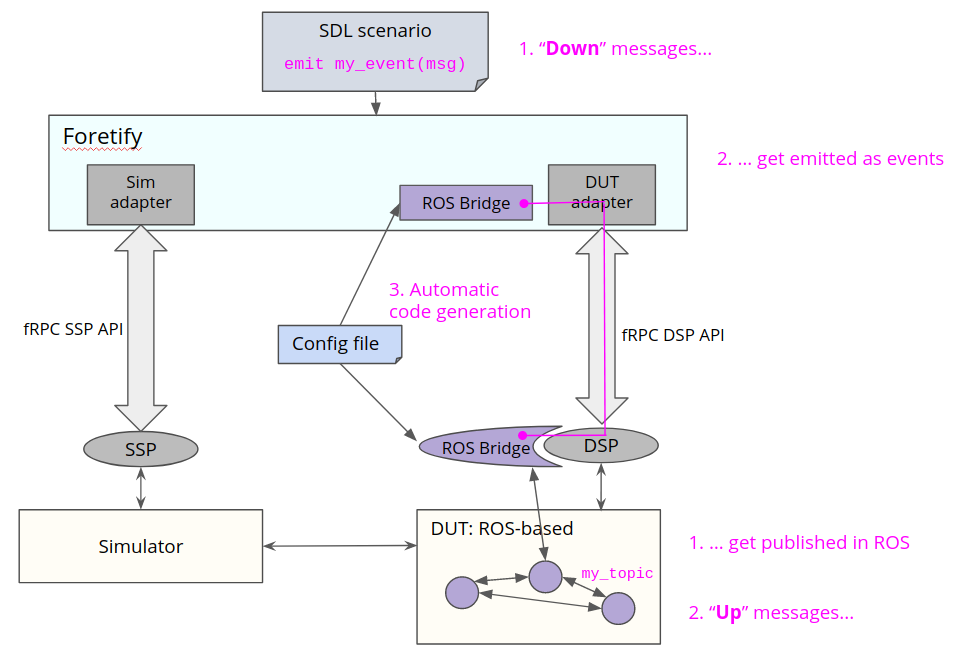
Figure 1 shows the Message Bridge architecture, where
- Down messages are created as manually emitted events in OSC2, and get published in the SUT System.
- Up messages are received from the SUT System and get emitted as events in OSC.
196.7.1 Current release
-
ROS1 (melodic/kinetic), ROS2 (dashing/foxy), and RTI DDS are supported at this time.
-
Only ROS topics are supported. In the future ROS services will be supported.
-
When specifying the kind of vehicle, you must choose sut or traffic. In the future, other_name will be added to support a custom OSC2 actor label.
-
Most basic ROS types are supported:
| ROS/ROS2 type | Corrresponding OSC2 type |
|---|---|
| string | string |
| float32 | real |
| float64 | real |
| int8 (ROS2 only) | int |
| int16 (ROS2 only) | int |
| int32 | int |
| int64 | int |
| uint8 (ROS2 only) | uint |
| uint16 (ROS2 only) | uint |
| uint32 | uint |
| uint64 | uint |
| byte (ROS2 only) | uint |
| bool | bool |
| time | time |
| geometry_msgs/Point (ROS1 only) | msp_coordinates |
| array | list |
- Most basic DDS types are supported:
| DDS type | Corrresponding OSC2 type |
|---|---|
| string | string |
| float | real |
| double | real |
| int8 | int |
| int16 | int |
| int32 | int |
| int64 | int |
| long long | int |
| uint8 | uint |
| uint16 | uint |
| uint32 | uint |
| uint64 | uint |
| octet | uint |
| boolean | bool |
| sequence | list |
196.7.2 Message Bridge components
The Message Bridge build script generates code as 2 separate components, as visualized in Figure 1:
- Foretify component
- OSC2 struct representations of all defined messages
- OSC2 events for each down and up message
- C++ code to serialize OSC messages to send to the DSP
- C++ code to deserialize messages from the DSP into OSC
- The C++ code is built as a .so shared library which is linked to Foretify
- DSP component
- C++ publish/subscribe code for all defined messages
- C++ code to serialize received System messages to send to Foretify
- C++ code to deserialize and publish messages received from Foretify
- Also includes a skeleton full DSP that fulfills the DSP API
- The DSP is built as an executable that is called from a shell script
For more details, see Use the Message Bridge.
196.8 Maps
Foretify currently allows loading only OpenDRIVE maps.
However, it can still integrate with a simulator and an SUT that uses different map formats. For that, the following conditions must be met:
- The other map format supports a representation of road geometry using a global coordinate system.
- There is an external conversion tool that can create matching representations of the same map in both formats.
- After conversion, both map formats remain consistent in their global coordinates representation.
In cases in which the last two conditions are not met, it is possible to implement a component named Map Support Package (MSP). With this interface, Foretify is able to load the new map format. The specification of the MSP is not covered in this document.
196.9 Coordinate System
Foretify's Inertial Coordinate System defines position in relation to an arbitrary point that is defined by the loaded map. Foretify uses this system when communicating with external components such as a simulator or a SUT, so any data stored or calculated externally and returned by an external agent or method is defined in this system. All Simulator Support Package (SSP) and SUT Support Package (DSP) APIs use this system.
The definition of this system is based on the ISO 8855 standard. This system, like most coordinate systems, follows the right-handed rule for curve orientation. This means that motion around any axis is counter-clockwise, as opposed to left-hand systems where that motion is clockwise. Thus, curved motion is defined in this system using the following convention:
-
Positive curvature is a left curve (counter-clockwise motion)
-
Negative curvature is a right curve (clockwise motion)
For more details, see Foretify's coordinate system.
196.9.1 Definition of axes
The X and Y axes are parallel to the ground plane and the Z axis points upward. When used within a geographic reference, the following convention applies:
-
X - East
-
Y - North
-
Z - Up
196.9.2 Origin point
The origin point for the system is arbitrary and defined by the loaded map.
196.9.3 Angles
-
Yaw - around the Z axis, 0.0 = in the direction of the X axis (east, counterclockwise)
-
Pitch - around the Y axis, 0.0 = level (in the X/Y plane)
-
Roll - around X axis, 0.0 = level (parallel to the X/Y plane)
196.9.4 Example usage
Using the three coordinates and the three rotation angles of this system, Foretify specifies the precise position and orientation of an actor. Users can see these global coordinates when tracing, for example, a vehicle’s state.
[INFO] [TRACER] [0.020] trace:
car1.state.msp_pos.global_position.coord.x=-693.678
car1.state.msp_pos.global_position.coord.y=338.14
car1.state.msp_pos.global_position.coord.z=0
car1.state.msp_pos.global_position.rotation.roll=0
car1.state.msp_pos.global_position.rotation.yaw=13.20
car1.state.msp_pos.global_position.rotation.pitch=0
196.10 Model SSP mock simulator
Model SSP is a lightweight mock simulator developed by Foretellix for rapid scenario prototyping and large-scale testing. It is faster and more resource-efficient than a real simulator. You can use Model SSP instead of a target simulator (for example, CARLA) to quickly analyze scenario quality, identify incomplete scenarios or tool errors, perform coverage analysis, and validate checks.
See Model SSP for more details.