484. Euro NCAP LSS introduction
The Euro NCAP LSS documentation presents the test protocols for Lane Support System (LSS), where the Ego effectively reacts to lane departures.
The Euro NCAP LSS library components are located in the $FTX_PACKAGES/adas/NCAP/EuroNCAP_LSS directory, as shown in Figure 1.
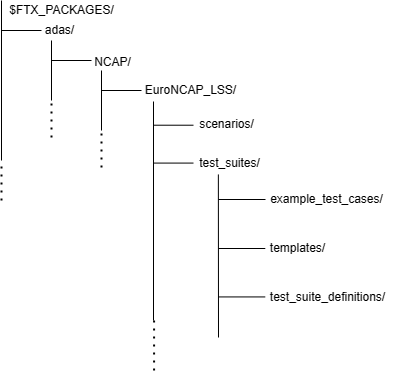
| Directory/File | Description |
|---|---|
| test_suites | A directory that contains the following folders to execute multiple tests:
|
| scenarios | A directory containing the OSC2 source files for each scenario |
To run a single test with Foretify and a specific simulator:
-
Invoke Foretify with a test file from the example_test_cases directory.
For example:
2. Enter quit at the "Foretify>" prompt, after the completion of run.$ foretify --load $FTX/packages/adas/NCAP/EuroNCAP_LSS/test_suites/example_test_cases/t_bsm_motorcycle_overtaking.osc --load $FTX/packages/adas/NCAP/common/ncap_config/aeb_sumo_config.osc --run
To run a test suite with FRun:
-
Invoke FRun in batch mode with all the required CSV files for the set of tests that you chose.
For example:
2. Review the regression results in the default work directory:frun --csv $FTX_PACKAGES/adas/NCAP/EuroNCAP_LSS/test_suites/test_suite_definitions/bsm_motorcycle_overtaking.csv --csv $FTX_PACKAGES/adas/NCAP/EuroNCAP_LSS/test_suites/test_suite_definitions/bsm_motorcycle_overtaking_main.csv --csv $FTX_PACKAGES/common/csv/sumo_manually_driven_dynamic_ADAS_config.csv --csv $FTX_PACKAGES/common/csv/carla_manually_driven_dynamic_ADAS_config.csv --batch~/foretify/sessions/<timestamp>/<timestamp>/