470. New Car Assessment Program (NCAP) introduction
New Car Assessment Program (NCAP) is a set of ADAS functions that help in evaluating and assessing automobile performance against various safety threats.
NCAP Directory Structure
The New Car Assessment Program (NCAP) library components are located in $FTX_PACKAGES/adas/NCAP as shown in Figure 1.
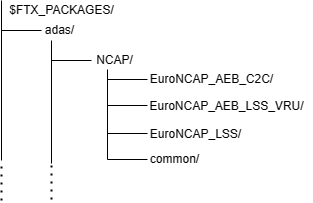
The scenario families covered in NCAP are described in the following table:
| Directory/File | Description |
|---|---|
| EuroNCAP_AEB_C2C | A directory containing the components for Euro NCAP AEB car-to-car scenarios |
| EuroNCAP_AEB_LSS_VRU | A directory containing the components for Euro NCAP AEB/LSS VRU scenarios |
| EuroNCAP_LSS | A directory containing the components for Euro NCAP LSS scenarios |
| common | A directory containing the library components shared by EuroNCAP_AEB_C2C, EuroNCAP_AEB_LSS_VRU, and EuroNCAP_LSS |
The subdirectories within the EuroNCAP_AEB_C2C, EuroNCAP_AEB_LSS_VRU, and EuroNCAP_LSS directories are described in the following table:
| Directory/File | Description |
|---|---|
| test_suite_definitions | A directory containing CSV files for executing the EuroNCAP_AEB_C2C, EuroNCAP_AEB_LSS_VRU, or EuroNCAP_LSS tests with FRun |
| example_test_cases | A directory containing example test files for running a single test with Foretify |
| scenarios | A directory containing the OSC2 source files for each scenario |
| templates | A directory containing the templates used to generate tests to be executed with FRun |
The subdirectories within the common directory are described in the following table:
| Directory/File | Description |
|---|---|
| activation_coverage | A directory containing the metrics that evaluate how well the system's behavior is exercised across various scenarios that trigger its activation |
| ncap_config | A directory containing the OSC configuration files that import ADAS functions |
| utils | A directory containing files required for integrating user-defined C++ functions with Foretify |
To run a single test with Foretify:
-
Invoke Foretify with a test file from the example_test_cases directory.
For example:
In this example, the configured simulator is CARLA.$ foretify --load $FTX/packages/adas/NCAP/EuroNCAP_AEB_C2C/test_suites/example_test_cases/t_aeb_car_to_car_rear_braking.osc --load $FTX/packages/adas/NCAP/common/ncap_config/lss_carla_config.osc --run -
Enter quit at the "Foretify>" prompt, after the completion of run.
To run a set of tests with FRun:
-
Invoke FRun in batch mode with all the CSV files required for the set of tests that you chose.
For example:
2. Review the regression results in the default work directory:frun --csv $FTX_PACKAGES/adas/NCAP/EuroNCAP_LSS/test_suites/test_suite_definitions/bsm_motorcycle_overtaking_main.csv --csv $FTX_PACKAGES/adas/NCAP/EuroNCAP_LSS/test_suites/test_suite_definitions/bsm_motorcycle_overtaking.csv --csv $FTX_PACKAGES/common/csv/uncontrolled_carla_config.csv --batch~/foretify/sessions/<timestamp>/<timestamp>/
To run all the NCAP tests at once:
```bash
frun --file $FTX/packages/adas/NCAP/EuroNCAP_AEB_C2C/test_suites/test_suite_definitions/euroncap_aeb_c2c.txt
     --file $FTX/packages/adas/NCAP/EuroNCAP_AEB_LSS_VRU/test_suites/test_suite_definitions/euroncap_aeb_lss_vru.txt
     --file $FTX/packages/adas/NCAP/EuroNCAP_LSS/test_suites/test_suite_definitions/euroncap_lss.txt
```