114. Running the scenarios in Foretify
During the export process, Foretify Manager generates OpenSCENARIO (OSC) files and a binary file all prefixed with the selected scenario name. These files are bundled into a ZIP archive.
The exported Smart Replay scenario ZIP file is saved to your Downloads folder.
-
Copy the ZIP file from your Downloads folder to your work folder and unzip it.
When unzipped, the files generated by Foretify Manager during the export process are structured to represent the Smart Replay scenario and include the following files:
- scenario.osc – The main scenario file that imports all relevant files required for Smart Replay, sets the replay configuration, and maps trajectory data to vehicle actors.
- scenario.pb – A binary file containing the recorded trajectory data for all actors selected for replay.
- scenario_actor_definitions.osc – Specifies constraints and definitions for each actor included in the export.
- scenario_behavioral.osc – A scenario variant for use in behavioral replay mode, where actors respond dynamically to their surroundings.
- scenario_exact.osc – A scenario variant for use in exact replay mode, that replays the original trajectories without deviations.
- scenario_modifications.osc – Defines the modifications made in the scenario.
- scenario_traffic_lights.osc – Defines the behavior and timing of traffic lights involved in the scenario.
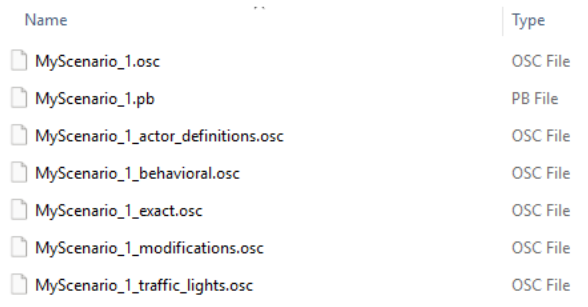
Figure 1: Example exported Smart Replay scenario ZIP file -
Run the scenario in your mode of choice.
-
To run in exact replay mode, run:
foretify --load <path_to_exact_scenario>/<scenario>_exact.osc --runExample:
foretify --load /home/foretify/sessions/20250724/tests/cut_in_scenario/cut_in_scenario_exact.osc --run -
To run in behavioral replay mode, run:
foretify --load <path_to_behavioral_scenario>/<scenario>_behavioral.osc --runExample:
foretify --load /home/foretify/sessions/20250724/tests/cut_in_scenario/cut_in_scenario_behavioral.osc --run -
To run with defined scenario modifiers:
foretify --load <scenario_name>_modifications.osc --runExample:
foretify --load oncoming_with_parked_vehicles_modifications.osc --runForetify will automatically load the scenario and then apply the modifiers on top of it.
-
Note
When loading a Smart Replay scenario, all trajectory errors are consolidated and displayed in a single error message, eliminating the need for multiple reloads to view each error individually.