423. Active Lane Change Assist (ALCA) Introduction
The Active Lane Change Assist (ALCA) is an ADAS function that automatically tries to perform a safe lane change when the driver activates the turn indicator. It works in conjunction with activated Adaptive Cruise Control (ACC) and Lane Centering Assist (LCA). Upon activation ALCA monitors the adjacent lane and automatically performs the lane change as soon as enough free space is available. Thereby cruise speed is automatically maintained and after successful lane change the vehicle continues driving with automatic lane centering using LCA.

ALCA directory structure
The Active Lane Change Assist (ALCA) library components are located in $FTX_PACKAGES/adas/ALCA as shown in Figure 1.
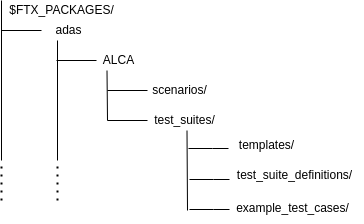
| Directory/File | Description |
|---|---|
| csv | A directory containing CSV files for executing ALCA tests with Frun. |
| examples | Example test files for running a single test with Foretify. |
| osc | A directory containing the OSC2 source files for each scenario. |
| templates | A directory containing the templates used to generate tests to be executed with Frun. |
To run a single test with Foretify:
-
Invoke Foretify with a test file from the examples directory.
For example:
In this example, the configured simulator is SUMO.$ foretify --load $FTX/packages/adas/ALCA/scenarios/common/alca_config/alca_sumo_config.osc --load $FTX/packages/adas/ALCA/test_suites/example_test_cases/lead_vehicle/t_alca_lead_vehicle.osc \ --run -
Enter quit at the Foretify> prompt after the run completes.
To run a set of tests with FRun:
-
Invoke FRun in batch mode with all the CSV files required for the set of tests that you chose.
For example:
2. Review the regression results in the default work directory:frun --csv $FTX/packages/adas/ALCA/test_suites/test_suite_definitions/lead_vehicle/alca_lead_vehicle.csv \ --csv $FTX/packages/adas/ALCA/test_suites/test_suite_definitions/lead_vehicle/alca_lead_vehicle_main.csv \ --csv $FTX_PACKAGES/common/csv/sim_manually_driven_dynamic_config.csv \ --csv $FTX_PACKAGES/common/csv/map_config.csv \ --csv $FTX_PACKAGES/adas/ALCA/test_suites/test_suite_definitions/user_alca_config.csv \ --batch~/foretify/sessions/<timestamp>/<timestamp>/
To run all the ALCA tests at once:
```bash
frun --file $FTX/packages/adas/ALCA/test_suites/test_suite_definitions/all_alca.txt
```
The all_alca.txt file runs the following scenarios:
- alca_free_drive.csv
- alca_free_drive_main.csv
- alca_free_drive_with_neighbors.csv
- alca_free_drive_with_neighbors_main.csv
- alca_lead_vehicle.csv
- alca_lead_vehicle_main.csv
- alca_lead_vehicle_with_neighbors.csv
- alca_lead_vehicle_with_neighbors_main.csv