Vehicle actor
The actor vehicle inherits from physical_object.
See also
- Global checkers for vehicles for more information.
- Predefined enums
vehicle fields
You can extend or constrain the vehicle actor fields shown below to match the allowed types of your simulator. You can also sample these fields and use them in coverage definitions. The table below shows the default values for these fields, if they are set.
| Field name | Type | Description |
|---|---|---|
| vehicle_category | vehicle_category | The vehicle_category type is defined as sedan, van, bus, box_truck, semi_trailer_truck, full_trailer_truck, motorcycle, bicycle. Default: sedan. |
| color | car_color | The car_color type is defined as white, black, red, green, blue, yellow, brown, pink, or gray. |
| current_planned_road | msp_road | Expected road for current step. This field can be set to help solve cases of ambiguity in global to lane conversion. |
| is_dut | bool | Default: false. |
| lane_shifts | int | This field is a counter whose value is incremented when the vehicle shifts into a different lane. See Events related to the lane_shifts counter for more information. Note: do not constrain this field. |
| total_distance_travelled | length | How far the vehicle has travelled. Initialized to 0m. |
| switch_lane_start_threshold | length | The threshold that defines how much a front corner of the vehicle must be inside another lane to be considered the start of a lane switch. The default value is 10 cm. See Events related to the lane_shifts counter for more information. |
| switch_lane_end_threshold | length | The threshold that defines how much a back corner of the vehicle must be inside the original lane to be considered the end of a lane switch. The default value is 10 cm. See Events related to the lane_shifts counter for more information. |
| model | string | Specific vehicle model name, can be extended to match simulator allowed types. |
| model_id | car_model_id | Specify the model ID by choosing from a defined enum. Should be extended by each simulator configuration. |
| physical | car_physical | A struct field. See vehicle.physical field for a full description. |
| physical_drive | car_physics | The car_physics type is one of the following: kinematic (the default): the vehicle is moved in simulation by setting its position and orientation directly at each simulation step. Kinematic movement allows the execution of more exact trajectories and has lower computational costs for the simulator. dynamic: the vehicle is moved by sending pedal and steering commands to the simulator. Dynamic movement produces substantially better physical realism of the vehicle movement. |
| planned_path | list of msp_road | The planned route as list of road elements. |
| policy | car_policy | A struct field. See vehicle.policy field for a full description. |
| prev_state | car_state | Previous state, values received from current state. |
| sp_manager_type | service_package_type | One of SSP (Simulator Support Package) or DSP (SUT Support Package). Specifies the service package handling this vehicle. Default: SSP. Should be set to DSP for the SUT vehicle. |
| state | car_state | A struct field. See vehicle.state field for a full description. |
| trace_data | car_trace_data | A struct field. See vehicle.trace_data field for a full description. |
| vehicle_checker_params | vehicle_checker_params | A struct that allows you to enable various checkers. |
vehicle.state field
The state struct field of a vehicle actor holds data received from the simulator, reflecting the current state of a vehicle actor. The fields in this struct are shown in the following table.
Note
Do not directly constrain these fields because they carry information passed by the simulator.
| Field name | Type | Description |
|---|---|---|
| speed | speed | Current vehicle speed |
| raw_global_jerk | jerk | Momentary global jerk (might have spikes) |
| global_jerk | jerk | Global jerk |
| local_jerk | jerk | Local jerk |
| msp_pos | msp_position | Current position in the coordinates of a map supported by an MSP. For information on this field, see MSP Position definition. |
| route_pos | position_on_route | Current position measured along the entire planned route (planned_path) of the actor |
| road_speed | road_speed | Current speed in road coordinates. For information on this field, see Road-relative attributes. |
| road_acceleration | road_acceleration | Current acceleration in road coordinates. For information on this field, see Road-relative attributes. |
| local_speed | local_speed | Current two-dimensional speed in the local vehicle coordinate system. The local vehicle coordinate system is the moving coordinate system attached to the center of the bounding box of the vehicle. To obtain the speed relative to the reference frame projected onto the car yaw, use state.local_speed.lon. To obtain the speed relative to the reference frame projected onto the perpendicular to the car yaw, use state.local_speed.lat. See also Local System for information about Foretify's local coordinate system. |
| local_acceleration | local_acceleration | Acceleration of local_speed components. To obtain the acceleration relative to the reference frame projected onto the car yaw, use state.local_acceleration.lon. To obtain the acceleration relative to the reference frame projected onto the perpendicular to the car yaw, use state.local_acceleration.lat). |
| raw_global_speed | global_speed | Momentary global speed (might have spikes). |
| global_speed | global_speed | Current speed in three-dimensional coordinates (x, y, z). |
| global_angular_speed | global_angular_speed | Current angular speed in three-dimensional coordinates (roll, pitch, yaw). |
| raw_global_acceleration | global_acceleratioin | Momentary global acceleration (might have spikes). |
| global_acceleration | global_acceleration | Current acceleration in three-dimensional coordinates (x, y, z). |
| avg_lateral_speed | speed | Average traced lateral speed |
| bbox_corners | list of msp_position | [0] Bottom-Front-Left, [1] Bottom-Back-Left, [2] Bottom-Back-Right, [3] Bottom-Front-Right, [4] Top-Front-Left, [5] Top-Back-Left, [6] Top-Back-Right, [7] Top-Front-Right |
| vehicle_indicators | vehicle_indicators_feedback | Feedback received from the vehicle for the human driver. |
For fields related to coordinates, see also Foretify's coordinate system.
collision_data struct
The collision_data struct holds information about an actual collision (at runtime) between two physical objects, including details like the side of impact on the Ego and on the other object. It is also used for predicted collisions returned by TTC/mTTC helper methods (i.e., when a collision is projected but hasn’t occurred yet). If there’s no projected collision, these methods return null.
| Field name | Type | Description |
|---|---|---|
| TTC | time | Time to collision. The distance to collision is the distance between the nearest edge of the bounding box of each vehicle, including trucks and trailers. |
| colliding | bool | |
| this_object | physical_object | |
| other_object | physical_object | |
| x | length | x-coordinate of collision |
| y | length | y-coordinate of collision |
| side | av_car_side | this vehicle's side of collision |
| other_side | av_car_side | other vehicle's side of collision |
| speed | speed | this vehicle's speed |
| other_speed | speed | other vehicle's speed |
| acceleration | acceleration | this vehicle's acceleration |
| other_acceleration | acceleration | other vehicle's acceleration |
For fields that relate to coordinates, see also Foretify's coordinate system.
collision_dynamics_data struct
The collision_dynamics_data structure captures detailed dynamics of collision events, such as delta-v and PDOF.
| Field name | Type | Description |
|---|---|---|
| delta_v1x | speed | x-component of delta-v for this vehicle in the local frame |
| delta_v1y | speed | y-component of delta-v for this vehicle in the local frame |
| delta_v2x | speed | x-component of delta-v for other vehicle in the local frame |
| delta_v2y | speed | y-component of delta-v for other vehicle in the local frame |
| delta_v1 | speed | |Δv1| delta-v for this vehicle in the local frame |
| delta_v2 | speed | |Δv2| delta-v for other vehicle in the local frame |
| pdof1 | angle | PDOF angle for this vehicle in the local frame |
| pdof2 | angle | PDOF angle for other vehicle in the local frame |
For fields that relate to coordinates, see also Foretify's coordinate system.
crash_severity_data struct
The crash_severity_data structure captures crash severity information calculated from collision dynamics data, such as PDOF sides, collision partner types, and crash severity levels.
| Field name | Type | Description |
|---|---|---|
| pdof_side_1 | pdof_side | PDOF side for this vehicle in the local frame (front/rear/left/right) |
| pdof_side_2 | pdof_side | PDOF side for other vehicle in the local frame (front/rear/left/right) |
| collided_partner | collision_partner_type | Type of collision partner (vehicle, VRU, or other) |
| crash_severity_1 | crash_severity | Crash severity for this vehicle in the local frame |
| crash_severity_2 | crash_severity | Crash severity for other vehicle in the local frame |
| crash_severity | crash_severity | Overall crash severity (maximum of crash_severity_1 and crash_severity_2) |
vehicle_checker_params
This struct is instantiated as vehicle.checker_params. It has the following fields.
| Field name | Type | Description |
|---|---|---|
| car_jerk_check_flag | bool | Enable checking for vehicle jerk. Deafult: true. |
vehicle.physical field
The vehicle.physical struct field (type: car_physical) holds a general description of a vehicle's physical limitations. This description is used mainly for checking feasibility and for kinematic controlling. The fields in this struct, as well as the default values, are shown in the following table.
| Field name | Type | Description | Default |
|---|---|---|---|
| has_dynamic_controller | bool | true whenever the controller of the car is dynamic. | (Default: false) |
| model_id | car_model_id | Policy needs to know the model_id for controller calibration. Must be the same as vehicle.policy.model_id. | |
| length | length | Car length. Note: It is recommended to constrain the counterpart bbox.length rather this field. This field is deprecated and will be removed in later releases. | |
| width | length | Car width. Note: It is recommended to constrain the counterpart bbox.width rather this field. This field is deprecated and will be removed in later releases. | |
| height | length | Car height. Note: It is recommended to constrain the counterpart bbox.height rather this field. This field is deprecated and will be removed in later releases. | |
| min_speed | speed | Minimum speed, where negative speed means reverse. Must be not greater than max_speed. | 0kph |
| max_speed | speed | Maximum speed | 200kph |
| min_acceleration | acceleration | Minimum acceleration, where negative acceleration means braking. Must be not greater than max_acceleration. | -10mpsps |
| max_acceleration | acceleration | Maximum acceleration | 3mpsps |
| offset_rotation_center | length | For yaw calculations, this is the offset in lon position of the vehicle's rotation center in relation to its reference position (center of vehicle). | Soft: (length * 30/100) |
| minimal_turning_radius | length | Default: 5m | |
| maximal_steering_angle | angle | Default: [35..40]degree | |
| max_lat_acceleration | acceleration | Maximum lateral acceleration. | Default: 6.0mpsps |
| is_bidirectional | bool | A bidirectional vehicle can be driven either forwards or backwards. A unidirectional vehicle normally moves only forward. | Soft: false |
Constraints on vehicle.physical fields
- keep(min_speed <= max_speed)
- keep(min_acceleration <= max_acceleration)
vehicle.policy field
The vehicle.policy struct field (type: car_policy) holds a general description of a vehicle's behavior in normal circumstances. This description is used mainly for planning scenarios. There is no need to constrain all the fields, but better results are possible if the policy is at least partially described. The fields in this struct are shown in the following table.
By default, a warning is issued if the vehicle does not keep the declared policy limitations. (For example, the vehicle can brake at 10mpsps, but by policy it does not brake at more than 4mpsps.)
| Field name | Type | Description | Default constraint |
|---|---|---|---|
| has_dynamic_controller | bool | true whenever the controller of the car is dynamic | false |
| model_id | car_model_id | policy needs to know the model_id for controller calibration. Must be the same as vehicle.model_id. | |
| min_TTC | time | Minimum time to collision. | 2second |
| min_speed | speed | Minimum speed, where negative speed means reverse. Must be not greater than max_speed. | 0kph |
| max_speed | speed | Maximum speed | 150kph |
| max_legal_speed_ percent |
uint | Maximum speed as percentage of the speed limit | 100 |
| arrival_speed | speed | Speed at goal position | Not less than min_speed and not greater than max_speed |
| min_acceleration | acceleration | Minimum acceleration, where negative acceleration means braking | -4mpsps |
| max_acceleration | acceleration | Maximum acceleration | 1.5mpsps |
| average_acceleration_ to_cruise |
acceleration | Average acceleration until cruise speed for autonomous SUT | max_ acceleration*3/4 |
| max_lat_acceleration | acceleration | The maximum lateral acceleration which is used during Generation to identify the maximum speed possible on certain curvatures. | 2.5 mpsps |
| unplanned_standing_ time |
time | How long may the vehicle stand unplanned in the middle of the road. This parameter is deprecated and will be removed from release 26.06. Instead, use Unplanned Standing Checker | 1second |
| minimum_highway_speed | speed | Minimum speed on a highway. This parameter is deprecated and will be removed from release 26.06. Instead, use Slow driving checker. | 50kph |
| minimum_highway_vru_distance | length | Minimum distance to a Vulnerable Road User (VRU). This parameter is deprecated and will be removed from release 26.06. Instead, use Static Object Too Close | 3.5m |
| too_close_TTC | time | When to emit too_close warning | 0ms |
| max_jerk | jerk | Define for reasons of comfort | 15mpspsps |
| may_jitter | bool | Define for reasons of comfort. This parameter is deprecated and will be removed from release 26.06. | false |
| may_exceed_legal_ speed |
bool | When true, it allows the vehicle to exceed the legal speed limit | true |
| max_road_offset | length | The maximum distance the vehicle is allowed to be off the road. Must be not less than 0. See Vehicle policy: max_road_offset checker | 20m |
| max_does_not_move_time | time | The maximum time a vehicle can stand still without moving before the issue car_does_not_move is raised. This parameter is deprecated and will be removed from release 26.06. Instead, use Unplanned Standing Checker | 30sec |
| allow_no_movement | bool | When true, disables the max_does_not_move_time checker. This parameter is deprecated and will be removed from release 26.06. Instead, use Unplanned Standing Checker | false |
| min_total_distance_to_indicate_movement | length | The minimum total travel distance that indicates movement and avoids the car_does_not_move issue being raised. Instead, use Unplanned Standing Checker | 10centimeter |
vehicle.policy methods
You can retrieve the values for a vehicle's policy fields using the following methods:
- get_min_speed()-> speed
- get_max_speed()-> speed
- get_max_legal_speed_percent()-> uint
- get_arrival_speed()-> speed
- get_min_acceleration()-> acceleration
- get_max_acceleration()-> acceleration
- get_average_acceleration_to_cruise()-> acceleration
- get_unplanned_standing_time()-> int
- get_minimum_highway_speed()-> speed
- get_minimum_highway_vru_distance()-> length
- get_max_jerk()-> jerk
- get_may_jitter()-> bool
- get_may_exceed_legal_speed()-> bool
- get_ca_activation_TTC()-> time
- get_ca_aggressiveness()-> int
- get_ca_safety_distance_lon()-> length
- get_ca_safety_distance_lat()-> length
vehicle.physical and vehicle.policy constraints
The following constraints are defined for a vehicle actor's physical and policy attributes:
- keep(policy.has_dynamic_controller => (physical_drive != kinematic))
- keep((physical_drive != kinematic) => policy.has_dynamic_controller)
- keep(policy.max_speed <= physical.max_speed)
- keep(policy.min_speed >= physical.min_speed)
- keep(policy.max_acceleration <= physical.max_acceleration)
- keep(policy.min_acceleration >= physical.min_acceleration)
pass_by_info struct
The pass_by_info struct holds data calculated about the vehicle that is passing by. The fields in this struct are shown in the following table.
| Field name | Type | Description |
|---|---|---|
| other_car | vehicle | Identifies the other vehicle passing by |
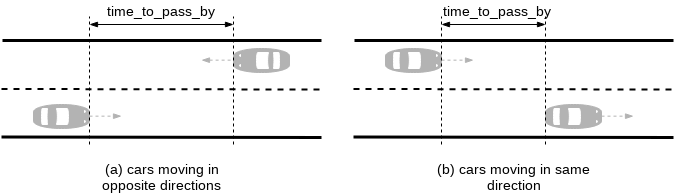
| time_to_passing_by | time | How long until the vehicles pass each other; when 0, the vehicles are passing. |
| lateral_distance | length | Lateral distance between the vehicles. |
vehicle.state.vehicle_indicators_feedback
The vehicle.state.vehicle_indicators_feedback struct of type vehicle_indicators_feedback is used to store the feedback that is received from the vehicle in response to actions by the human driver (Foretify).
| Field name | Type | Description |
|---|---|---|
| throttle_pedal_position | real | Actual position of the throttle pedal in sut.car measured between 0 for not pressed and 1 for fully pressed (initialized at 0). |
| brake_pedal_position | real | Actual position of the brake pedal in sut.car measured between 0 for not pressed and 1 for fully pressed (initialized at 0). |
| steering_wheel_angle | angle | Actual angle of the steering wheel in sut.car (initialized at zero). |
| gear | car_gear | The gear of the vehicle, one of P (Park), R (Reverse), N (Neutral) or D (Drive). Initialized at D. |
| ADAS_override_active | bool | Flag indicating if in the past simulation step an override command was made by any active/engaged adas module. Initialized to false. |
| ADAS_override_kind | string | String to specify the names of currently active and engaged adas modules. (separated by ' '). Initialized to empty string and then set by the ADAS function. |
| adas_brake_override | bool | Indicator for ADAS override interrupt of the brake. Initialized to false. See ADAS override behavior for more information. |
| adas_steering_override | bool | Indicator for ADAS override interrupt of the steering wheel. Initialized to false. See ADAS override behavior for more information. |
| ADAS_additional_collision_info | string | String that "passes" through all adas mocks, and is modified only by the active adas. Initialized to empty string. |
| av_state | av_state | Indicates whether autonomous functions are active, engaged or engaged or off. Initialized to off. |
| allow_lane_change | bool | Indicates whether the vehicle is allowed to change lanes. Initialized to true. |
| hazard_lights | av_state | Set a vehicle's hazard lights to active or off. Initialized to off. |
| turn_signal_state | turn_signal_state | Indiates a vehicle's turn signal state, one of unknown, off, right_on or left_on. The state may be set to unknown by the simulator if the state cannot be determined or if the capability is not supported. Initialized to off. |
| siren | av_state | One of on or *off. Relevant only to emergency_vehicle. |
| emergency_lights | av_state | One of on or *off. Relevant only to emergency_vehicle. |
| avg_throttle_pedal_position | float | The average trace throttle position. |
You can use update_ADAS_additional_collision_info(collision_data: collision_data) to update ADAS_additional_collision_info.
vehicle.trace_data field
The vehicle.trace_data field of type car_trace_data holds current trace values received from simulator. See the "Trace values" table in the trace documentation for fields and descriptions.
vehicle events
Note
The lane_shift(agent: vehicle, from_pos: msp_position, to_pos: msp_position, start_time: time) event is deprecated and will be removed in a future release. Use the switch_lane_end event instead.
car_passing_by
Use this event to retrieve information about a passing vehicle.
Note
Passing by information is calculated only for the Ego vehicle.
car_passing_by(info : <pass_by_info>)
info : <pass_by_info>-
This parameter holds the data collected on the last occurrence of car_passing_by.
If two vehicles are about to pass by one another, the car_passing_by event is emitted as long as time_to_passing_by is less than or equal to traffic.emit_car_passing_by_time. This is a configurable threshold whose default value is 0 seconds. Once time_to_passing_by reaches 0, meaning the vehicles are passing by (overlapping laterally), the event is emitted for the last time.

- At tA, time_to_passing_by is less than or equal to traffic.emit_car_passing_by_time.
- At tB, time_to_passing_by equals 0.
event passing_by is @sut.car.car_passing_by if \
sut.car.get_passing_by_info(neighbor_vehicle) != null and \
sut.car.get_passing_by_info(neighbor_vehicle).time_to_passing_by == 0s
See also
collision
Use this event to retrieve information about a physical object upon collision.
collision(other_object : <physical_object>, data: <collision_data>)
other_object : <physical_object>-
The name of the object involved in the collision. This parameter is deprecated and will be removed from release 25.03.
data : <collision_data>-
Holds information about the collision, such as the side of collision and the other objects' side of collision. See collision_data.
This event collects data about a physical object when a collision occurs.
Events related to the lane_shifts counter
See complete example.
switch_lane_abort
Use the data collected by this event to determine the lanes involved in the lane shift.
switch_lane_abort(data: switch_lane_data)
data: switch_lane_data-
data.from_lane_pos is the lane_position at the center of the vehicle when a corner of the vehicle crosses into a different lane. data.to_lane_pos is the vehicle's current lane_position, in other words, the lane_position at the center of the vehicle.
This event is triggered when the vehicle crosses into a different lane by at least vehicle.switch_lane_start_threshold (default: 10 cm) but then returns to its original lane.
switch_lane_end
Use the data collected by this event to determine the lanes involved in the lane shift.
switch_lane_end(data: switch_lane_data)
data: switch_lane_data-
data.from_lane_pos is taken from the switch_lane_start event. data.to_lane_pos is the vehicle's current lane_position, in other words, the lane_position at the center of the vehicle.
This event is triggered after a switch_lane_start event when the opposite corner is within the vehicle.switch_lane_end_threshold (default: 10 cm) from the margin of the original lane.
extend sut.vehicle_cut_in:
   var actual_cut_in_start := sample(top.time, @cut_in_vehicle.switch_lane_start)
   var actual_cut_in_duration := sample(top.time - actual_cut_in_start, @cut_in_vehicle.switch_lane_end)
See the complete example here.
switch_lane_start
Use the data collected by this event to determine the lanes involved in the lane shift.
switch_lane_start(data: switch_lane_data)
data: switch_lane_data-
data.from_lane_pos is the lane_position at the center of the vehicle when a corner of the vehicle crosses into a different lane. data.to_lane_pos is the vehicle's current lane_position, in other words, the lane_position at the center of the vehicle.
This event is triggered when the vehicle crosses into a different lane by at least vehicle.switch_lane_start_threshold (default: 10 cm). When the switch_lane_start event is triggered, one of the following events will occur consecutively:
- The vehicle corner that initiated the lane switch returns to the original lane within the switch_lane_start_threshold. In this case, the lane switch is considered aborted, and the switch_lane_abort event is triggered.
- The opposite corner is within the switch_lane_end_threshold from the margin of the original lane. In this case, the lane switch is considered complete, the lane_shifts counter is incremented, and the switch_lane_end event is triggered.
extend sut.vehicle_cut_in:
   var actual_cut_in_start := sample(top.time, @cut_in_vehicle.switch_lane_start)
   var actual_cut_in_duration := sample(top.time - actual_cut_in_start, @cut_in_vehicle.switch_lane_end)
See the complete example here.
vehicle scenarios
The vehicle actor has a predefined scenario drive() as well as the scenarios defined in the following table. See vehicle.drive() for more information on this predefined scenario.
vehicle.turn_signal_lights_state()
Use this scenario to set the vehicle's turn signals.
vehicle.turn_signal_lights_state(signal_state: <turn_signal_state>)
signal_state: <turn_signal_state>-
One of unknown, off, right_on or left_on.
This scenario sets a vehicle's turn signal state. The state may be set to unknown by the simulator if the state cannot be determined or if the capability is not supported.
extend top.main:
    car1: vehicle

    do serial():
        car1.turn_signal_lights_state(left_on)
        p0: parallel(duration:[3..5]second, overlap:equal):
            e0: sut.car.drive()
            c0: car1.drive() with:
                position([10..20]m, behind: sut.car, at: start)

        car1.turn_signal_lights_state(right_on)
        p1: parallel(duration:[3..5]second, overlap:equal):
            d0: sut.car.drive()
            car1.drive()
vehicle.turn_hazard_lights_state()
Use this scenario to change the state of a vehicle's hazard lights.
vehicle.turn_hazard_lights_state(hazard_lights_state: <av_state>)
hazard_lights_state: <av_state>-
One of active or off.
This scenario sets the state of a vehicle's hazard lights.
extend top.main:
    car1: vehicle

    do serial():
        car1.turn_hazard_lights_state(active)
        p0: parallel(duration:[3..5]second, overlap:equal):
            e0: sut.car.drive()
            c0: car1.drive() with:
                position([10..20]m, behind: sut.car, at: start)

        car1.turn_hazard_lights_state(off)
        p1: parallel(duration:[3..5]second, overlap:equal):
            d0: sut.car.drive()
            car1.drive()
vehicle methods
vehicle.distance_to_point_along_path()
Use this method to retrieve the distance from this vehicle's current position to a position ahead on the path.
distance_to_point_along_path(pos: msp_lane_position)-> length
pos: msp_lane_position-
The position ahead on the path whose distance you want to calculate.
This method returns the distance from the current position to a position ahead in the path.|
var distance_between_sut_and_child :length = sample(
    sut.car.distance_to_point_along_path(start_position.lane_position),
    @crossing_child_move.start)
cover(distance_between_sut_and_child,
    unit:meter,
    range: [5..100],
    every:5, text: "Distance between the SUT and child when child begins to cross the path")
vehicle.get_additional_properties()
Extend this method to retrieve properties defined by the simulator.
get_additional_properties()-> list of property
None.
This method returns additional properties defined by the simulator and supported by the simulator's adapter.
def get_additional_properties()-> list of property is also
    external cpp("get_additional_car_properties", "add_properties.so")
vehicle.get_passing_by_info()
Use this method to retrieve the pass_by_info struct field of another vehicle.
Note
Passing by information is calculated only for the Ego vehicle.
get_passing_by_info(other_car: vehicle)-> pass_by_info
other_car: vehicle-
The other vehicle whose pass_by_info struct you want to retrieve.
This method returns an instance of pass_by_info struct if other_car is currently passing by this vehicle. If other_car is not passing by, then null will be returned.
The pass-by functionality helps you determine how long until two vehicles pass by one another, whether traveling in the same direction or in different directions:
var lateral_distance_to_oncoming_vehicle_at_passing_by: length = \
sample(sut.car.get_passing_by_info(oncoming_vehicle).lateral_distance, \
@passing_by) with:
    cover(lateral_distance_to_oncoming_vehicle_at_passing_by,
        unit:meter,
        text:"Lateral distance center to center between SUT and Oncoming vehicle in m",
        range:[2..5], every:1)
See also
vehicle.get_road_radius()
Use this method to retrieve the radius of a road.
get_road_radius()-> length
None.
This method returns the radius of the road segment the vehicle is currently on. A negative radius indicates the road is curved to the right. If the segment is straight or road information is unavailable, the function returns math.max_length(). Use math.nearly_max_value() to check.
    event lca_active is (top.sut.car.state.vehicle_indicators.lca_state == active)

    var road_radius: length = sample(
        math.abs(sut.car.get_road_radius()), @top.clk if sut.car.state != null)

    ## Sampling logic for minimum and maximum road radius (while LCA is active)
    min_road_radius_collect: statistics(sample_type: length, measurement: minimum)
    on @lca_active:
        min_road_radius_collect.add_sample(road_radius)

    record(min_road_radius_while_lca_active,
        expression: min_road_radius_collect.compute(),
        unit_string: ftlx_lib_base_config.default_distance_unit,
        range: [0..500],
        every: 50,
        text: "Minimum radius of the road on which SUT drives " + \
            "while LCA is active (m).",
        event : lca_active_occurred)

    max_road_radius_collect: statistics(sample_type: length, measurement: maximum)
    on @lca_active:
        max_road_radius_collect.add_sample(road_radius)

    record(max_road_radius_while_lca_active,
        expression: max_road_radius_collect.compute(),
        unit_string: ftlx_lib_base_config.default_distance_unit,
        range: [0..500],
        every: 50,
        text: "Maximum radius of the road on which SUT drives " + \
            "while LCA is active (m).",
        event: lca_active_occurred)
vehicle.get_road_speed_limit()
Use this method to retrieve the speed limit of a road.
get_road_speed_limit() -> speed
None.
This method returns the speed limit of the road that this vehicle is driving on. If there is no information available about the road, then the maximum speed of the vehicle is returned.
var speed_limit_at_start := sample(sut.car.get_road_speed_limit(),
    @approach_start)
var speed_limit_at_end := sample(sut.car.get_road_speed_limit(),
    @driving_phase.end)
var speed_limit_change_diff := sample(
    speed_limit_at_end - speed_limit_at_start, @end)
cover(speed_limit_change_diff,
    unit: kph, range: [-40..40], every: 10,
    text: "Speed limit change at the end of the scenario, compared to " + \
        "the start of the scenario (kph).")
vehicle.is_standing_still()
Use this method to determine whether a vehicle is moving.
is_standing_still()-> bool
None.
Returns true if vehicle is not moving.
    # Conditional clock to check if SUT stopped completely
    event vut_stand_still is @clock if sut.car.is_standing_still()==true \
        and sut.car.prev_state.speed > 0kph \
        and (map.distance_from_ref_position(sut.car.state.msp_pos.road_position
            ,gvt.state.msp_pos.road_position)
            -(sut.car.get_length()/2)
            -(gvt.get_length()/2)) < vut_to_gvt_dist
    var vut_stand_still_time: time = sample(top.time, @vut_stand_still)
    var vut_stand_still_bool: bool = sample(true, @vut_stand_still)
    set vut_stand_still_bool=false
    event vut_stopped is @clock if (vut_stand_still_bool==true and top.time\
        > (vut_stand_still_time+time_delay))
vehicle.other_vehicle_enters_lane_ahead()
Use this method to check whether another vehicle has entered the lane ahead of a vehicle.
other_vehicle_enters_lane_ahead(other_vehicle: <vehicle>, min_lateral_threshold: <length>, max_longitudinal_search_distance: <length>) -> bool
other_vehicle: <vehicle>-
The name of the other vehicle.
min_lateral_threshold: <length>-
The default is 0meter.
max_longitudinal_search_distance: <length>-
The default is 500meter.
This method returns TRUE when at least one of the corners of the other vehicle is inside the current vehicle's lane or a continuing lane, at a lateral distance from the lane edge greater than or equal to the min_lateral threshold ahead of current vehicle, but the center of the vehicle is still in a neighboring lane. The maximum longitudinal distance between the vehicles at which they are considered to be on the same lane can be configured by the max_longitudinal_search_distance parameter.|
    # Event relevant for checking, it is emitted at the moment when
    # the cut-in vehicle is entering the sut.car's lane and one of its corners has
    # a lateral distance from the sut.car's lane edge greater than or equal to a given
    # threshold
    event lane_intrusion is (
        collision_checker.cut_in_vehicle == null ? false : (
        sut.car.other_vehicle_enters_lane_ahead(
            collision_checker.cut_in_vehicle,
            collision_checker.lane_intrusion_min_lateral_threshold)
        and prev_lane_intrusion == false))
    var prev_lane_intrusion := sample(true, @lane_intrusion)
    set prev_lane_intrusion = false
vehicle.position_on_path()
Use this method to retrieve the position of the vehicle on a path
get_position_on_path(coord: <msp_coordinates>,
    start_search_pos: <msp_lane_position>,
    max_search_distance: <length>)-> msp_lane_position
coord: <msp_coordinates>-
The x, y and z coordinates of an object. See Foretify's coordinate system.
This method returns the projected position of a vehicle on its planned path, given its current global coordinates. It is an approximate measure, and it is more accurate when the given position is close to planned path.
var sut_to_other_vehicle_d_start:= sample(
    map.get_longitudinal_distance_along_route(
             actor.car.state.msp_pos.lane_position,
             actor.get_position_on_path(other_vehicle, other_vehicle_path),
             actor.car.planned_path)
            - (car.get_length() / 2) - (other_vehicle.get_length() / 2),
    @d1_start)

on @d1_start:
    call logger.log_info(
        "[QA] Planned init_long_position: $(init_long_position), actual " + \
        " init_long_position: $(sut_to_other_vehicle_d_start).")
vehicle.relative_yaw_of_global_position_on_path()
Use this method to retrieve the yaw rotation of an object at a position.
relative_yaw_of_global_position_on_path(pos: <global_position>)-> angle
pos: <global_position>-
Defines a position in three-dimensional space. See global_position.
This method returns the yaw rotation of provided global position on the path of the vehicle.
# Relative yaw angle coverage of VRU to ego path
var vru_rel_angle_to_ego:angle = sample(sut.car.\
    relative_yaw_of_global_position_on_path(vru.state.global_position),
        @vru_moves.start)
cover(vru_rel_angle_to_ego,range:[0..360],unit:degree,every:10,
    text:"Relative angle of vru with ego while it moves")
vehicle.time_to_passing_by()
Use this method to wait until another vehicle is a specified time from passing by this vehicle.
time_to_passing_by(time : <time>, other_car: <vehicle>)-> bool
time: <time>-
The amount of time before the other vehicle passes this vehicle.
other_car: <vehicle>-
The name of the vehicle that will pass this vehicle.
This method returns TRUE if the passing_by_info struct of the other_car is not NULL and the passing_by_info.time_to_passing_by field of the other_car is less than or equal to the time parameter passed by this method.
wait car1.time_to_passing_by(encroach_time, sut.car)
See also
vehicle.get_lane_position()
Use this method to get the position of the lane the vehicle drives on, relative to the road.
def get_lane_position() -> lane_relative_side
This method returns the relative lane position of a vehicle within its current road (innermost, middle, outermost). If the current road does not have an opposite road, the side closer to possible opposite direction is innermost and the side which is closer to the curb is outermost. (In other words: In right-hand traffic the right-most lane will be outermost and the leftmost lane will innermost. Vice-versa for left-hand traffic). If the vehicle drives on a single lane road, the method will return 'innermost'.
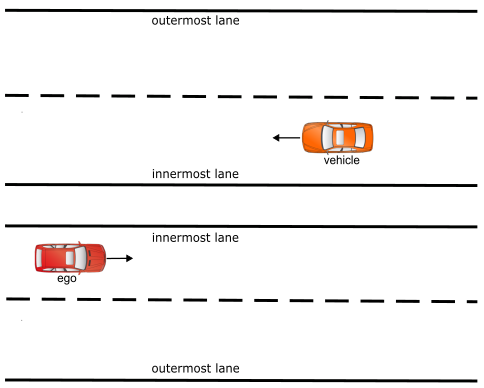
In the above example, the car (ego) drives in the right-hand traffic, on the leftmost lane of the road; hence, the method will return 'innermost'.
    cover(sut_lane, expression: sut.car.get_lane_position(),
        text: "Relative SUT lane within road (innermost/middle/outermost)")
vehicle.get_lane_ahead_distance()
Use this method to measure the bumper-to-bumper longitudinal distance to a physical object ahead in the same lane.
def get_lane_ahead_distance(to_object: physical_object, max_distance: length) -> length
to_object: <physical_object>-
(Required) The target object to measure the distance to.
max_distance: <length>-
(Required) The maximum search distance along the lane ahead. Objects beyond this distance are ignored and the method returns
math.max_length().
Returns the positive edge-to-edge (bumper-to-bumper) longitudinal distance to to_object if it occupies a lane reachable ahead of this vehicle along its planned path.
Returns math.max_length() when:
- The
to_objectis not in the lane ahead (including objects behind the vehicle or on a different lane path) - The
to_objectis beyond themax_distance - Either the
to_objector this vehicle has an invalid state
This method determines whether to_object is in the lane ahead of this vehicle and, if so, returns the edge-to-edge longitudinal distance between them.
Lane reachability is determined by following the lane connectivity graph (lane successors) forward from the vehicle's current lane. This means:
- Same-lane objects are matched directly.
- Objects on successor lanes (e.g., after a junction) are matched if reachable within
max_distance. - Objects that would require a lane change to reach are never matched; this method is strictly in-lane.
- Any physical object type is supported (vehicles, pedestrians, static objects).
The returned distance is edge-to-edge (bumper-to-bumper), accounting for the bounding boxes of both the vehicle and to_object. Distances ≤ 0 are returned as math.max_length().
Notes
- This method requires the vehicle to have a valid map position (
state.msp_pos). - Lane reachability is determined by following the lane successor graph
(lane.next())from the vehicle's current lane, correctly handling junctions, roundabouts, and multi-lane roads without additional path configuration. - The method uses FCL (Free Space Collision) polygon collision to determine which lanes
to_objectphysically occupies, so objects straddling lane boundaries (e.g., a vehicle partially in the shoulder) are correctly detected.
Log the distance from the SUT to a lead vehicle on every simulation tick:
on @top.clk:
    var dist: length = sut.car.get_lane_ahead_distance(lead, 200m)
    logger.log_info("sut -> lead distance: $(dist)")
Trigger an error if the SUT gets closer than 5m to any object in traffic:
on @top.clk:
    for obj in top.traffic.physical_objects:
        var dist: length = sut.car.get_lane_ahead_distance(obj, 100m)
        if dist < 5m:
            other_error(safety, "SUT too close to $(obj): $(dist)")
See also
- vehicle.get_closest_object_in_lane_ahead() to find the nearest object in the lane ahead from a list.
vehicle.get_closest_object_in_lane_ahead()
Use this method to find the closest object ahead of this vehicle in the same lane from a given list of candidates. ```
def get_closest_object_in_lane_ahead(object_list: list of physical_object, max_distance: length) -> physical_object
object_list: <list of physical_object>-
(Required) The list of candidate objects to search. Typically
top.traffic.physical_objects. max_distance: <length>-
(Required) The maximum search distance along the lane ahead. Objects beyond this distance are excluded.
Returns the physical_object from object_list with the smallest get_lane_ahead_distance() to this vehicle.
Returns null when:
- No object in
object_listis ahead in the lane withinmax_distance. - The
object_listis empty or contains only the calling vehicle.
This method iterates over object_list and calls get_lane_ahead_distance() for each candidate, and returns the object with the minimum distance. The calling vehicle is automatically excluded from the search.
This is the standard method for identifying the lead object in a following-vehicle scenario. Use with get_lane_ahead_distance() to obtain the actual bumper-to-bumper distance to the returned object.
Notes
- The method is implemented in pure OSC as an aggregator over
get_lane_ahead_distance(). All constraints and limitations of that method apply to each individual check. - Passing
top.traffic.physical_objectsasobject_listsearches all active actors in the simulation. To narrow the search, pass a filtered sub-list.
Find the closest object in the lane ahead and log its distance:
on @top.clk:
    var lead: physical_object = sut.car.get_closest_object_in_lane_ahead(
        top.traffic.physical_objects, 150m)
    if lead != null:
        var dist: length = sut.car.get_lane_ahead_distance(lead, 150m)
        logger.log_info("closest in lane: $(lead), distance: $(dist)")
Use within a coverage definition to track following distance:
on @top.clk:
    var lead: physical_object = sut.car.get_closest_object_in_lane_ahead(
        top.traffic.physical_objects, 200m)
    if lead != null:
        var gap: length = sut.car.get_lane_ahead_distance(lead, 200m)
        cover(gap, range: [0m..100m], every: 5m,
            text: "Following distance to lead object")
See also
- vehicle.get_lane_ahead_distance() for the per-object primitive used internally.
vehicle.get_drac()
Use this method to compute the Deceleration Rate to Avoid a Crash (DRAC) with respect to a physical object ahead in the same lane. DRAC is measured in the lane's forward direction.
def get_drac(to_object: physical_object, max_distance: length = 50m, max_yaw_deviation: angle = 30degree) -> acceleration
to_object: <physical_object>-
(Required) The target object to compute DRAC against.
max_distance: <length>-
(Optional, default
50m) The maximum search distance along the lane ahead. Objects beyond this distance are not considered. max_yaw_deviation: <angle>-
(Optional, default
30degree) The maximum angular deviation from the lane direction.
Returns the DRAC value (≥ 0) as an acceleration.
Returns math.max_acceleration() when:
- The
to_objectis not in the lane ahead withinmax_distance. - The vehicle's yaw deviation from its lane exceeds
max_yaw_deviation.
Returns 0.0mpsps when the vehicle is not approaching the object (vehicle speed ≤ object speed).
DRAC quantifies how hard the vehicle would need to brake to avoid a collision with to_object:
$$
DRAC = \frac{(vehicle_{speed} - obj_{speed})^2}{2 \times distance}
$$
where distance is the edge-to-edge (bumper-to-bumper) longitudinal distance, and speeds are the longitudinal components projected onto each actor's body yaw.
DRAC is computed exclusively in the lane's forward direction. Both the vehicle and the target object must be roughly aligned with the lane for their speed to be meaningful:
- If the vehicle's yaw deviation from its lane exceeds
max_yaw_deviation, the method returnsmath.max_acceleration()(DRAC is undefined when the vehicle is not travelling along the lane). - If the object's yaw deviation from the matched lane exceeds
max_yaw_deviation(e.g. a vehicle crossing at a junction or travelling in the opposite direction), the object is treated as stationary (speed = 0) in the formula. This correctly models the worst-case braking need for an obstacle that is not moving in the lane's direction.
Notes
- DRAC is a same-direction, in-lane metric. It does not account for lateral offsets or lane changes.
- Objects whose yaw deviation exceeds the threshold are not ignored — they are treated as stationary obstacles. This ensures DRAC is always computed when an object physically occupies the lane ahead.
- The method uses
get_lane_ahead_distance()internally to determine whetherto_objectis in the lane ahead and to obtain the distance.
Log the DRAC to a known lead vehicle on every simulation tick:
on @top.clk:
    var drac: acceleration = sut.car.get_drac(lead)
    logger.log_info("DRAC to lead: $(drac)")
Combine with get_closest_object_in_lane_ahead() to monitor DRAC to the nearest object in traffic:
on @top.clk:
    var lead: physical_object = sut.car.get_closest_object_in_lane_ahead(
        top.traffic.physical_objects, 200m)
    if lead != null:
        var drac: acceleration = sut.car.get_drac(lead)
        logger.log_info("DRAC to lead: $(drac)")
See also
- vehicle.get_lane_ahead_distance() for the underlying distance measurement.
- vehicle.get_closest_object_in_lane_ahead() to find the nearest object in the lane ahead from a list.