Global checkers and metrics
Foretify provides various predefined checkers and metrics to help you determine whether the SUT is behaving as expected.
See also
Global metrics (records)
Global metrics are attributes that are collected for every run in a test suite. They help you analyze the test suite by providing specific global information, such as simulator and map versions. Foretify records the global metrics for each run, and once your runs are uploaded to Foretify Manager, you can access and analyze the global metrics.
These metrics are defined in a global information struct, g_info and collected in the <run-dir>/coverage/runtime_data.json file for each run.
In Foretify Manager, you can see the metrics for a test suite by clicking on the top.info node in the VPlan. For more information, see View global metrics.
You can also define custom global metrics. See Add global metrics for more information.
g_info
The g_info struct is defined as follows:
extend g_info:
    var run: run_info
    var sim: sim_info
    var model: model_info
    var frun: frun_info         # not currently used
model_info
The model_info struct is defined as follows:
struct model_info:
    var dut_name: string        # The name of the SUT used in the run
    set dut_name = "ftx_driver" # The initial value
    var dut_version: string     # The version of the SUT used in the run.
    set dut_version = "1.0"     # The initial value
    var foretify_version: string # The version of Foretify used in the run.
Foretify sets the SUT name and version based on the driver used to control the movements of the SUT:
- The ftx_driver (Foretellix Human Driver Model) controls both lateral and longitudinal movements of the SUT.
- The SUT_driver (the SUT) controls both lateral and longitudinal movements of the SUT.
- With a hybrid_driver, the Foretellix Human Driver Model controls either the lateral or longitudinal movements and the SUT controls the other.
You can override the default setting for the SUT name and version by extending the model_info struct like this:
extend model_info:
    set dut_name = "XYZ"
    set dut_version = "4.1"
sim_info
The sim_info struct is defined as follows:
struct sim_info:
    var connection_string: string   # The actual simulation connection string.

    var simulator_name: string      # The name of the simulator used in the run.
    var simulator_version: string   # The version of the simulator used in the run.
run_info
The run_info struct is defined as follows:
enum debug_mode: [
    none,            # No debug
    debug_record,    # Record mode (run simulation and record data)
    debug_replay     # Replay mode (no actual simulator)
]

struct image_info:
    var foretify_image: string
    var simulator_image: string
    var sut_images: list of string

struct package_info:
    pass

struct run_info:
    # Contains the path of the generated folder for the current run
    # Foretify overrides this field at the beginning of each test
    #
    var run_folder: string

    # Contains the debug mode
    # Foretify overrides this field at the beginning of each test
    #
    var debug_mode: debug_mode

    # If debug_mode == debug_replay, this field contains the replay folder
    # Foretify overrides this field at the beginning of each test
    #
    var replay_folder: string

    # Contain the seed of the current run
    # Foretify overrides this field at the beginning of each test
    #
    var seed: int

    # Contains the name of the test
    #
    var test_name: string

    # Contains the start time of the test
    #
    var start_time: string

    # Contains the path of the generated folder for the current build
    #
    var build_folder: string

    # Contains the names of docker images used in the current run
    #
    var images: image_info

    # Contains the versions of packages used in the current run
    #
    var packages: package_info

    def init() is also:
        images = new
Map checkers
When loading a map, the format of the map is checked. If any problems are detected, the map fails to load and you see a warning message:
"[0.000] [MSP] 56 map anomalies have been detected.
For details reload the map with debug verbosity"
The table below describes a few of the map checkers.
Info
You cannot configure or disable the map checkers. These anomalies make the map unusable for Foretify.
| Check type | Map type | Description |
|---|---|---|
| Maximum distance between connected lanes | All | For any two connected lanes, the distance between the end of the first lane and the start of the connected lane is measured. If the distance is above a predefined threshold, a warning message is issued. |
| Lane connectivity | All | If a road has one lane connected to another road and one lane with no connection, the distance between the disconnected lane to all lanes in the next road is checked. If the distance is close enough, a possible missing connection is reported. |
| Zig-zag | OpenDrive | Check whether the lane geometry creates a improbable change in the angle. |
| Sub-sections sum | OpenDrive | If a road is split into several sub-sections, check that the sum of the lengths of all sub-sections is equal to the length of the entire road. |
- The maps provided by Foretellix should load without error. If you encounter an error, notify Foretellix.
-
If you are loading a proprietary map:
- Run Foretify with --verbosity debug to see the full list of map anomalies.
- Refer to Map format requirements for information on how to fix the map.
Global checkers for physical objects
Foretify checks for faulty behaviors of physical objects, such as a collision with another object.
These checkers are encapsulated into a global modifier called global_checkers:
global modifier physical_object.global_checkers
Global checkers for vehicles
Foretify checks for different faulty behaviors of a vehicle, such as driving off the road or at an unreasonable speed.
You can change the default values of these vehicle checkers and also modify their severity level.
Junction checkers
The junction checkers are a collection of watcher modifiers instantiated under a global modifier that creates intervals for interesting situations, such as traversing a junction or approaching a junction with a stop sign, among others. During these intervals, checks (e.g., did the SUT stop before a stop sign?) are performed, and relevant metrics are collected.
sut_vehicle.junction_checkers
The sut_vehicle.junction_checkers is the top-level global modifier that instantiates junction-related modifiers.
    global modifier sut_vehicle.junction_checkers:
        watcher traverse_junction is traverse_junction(vehicle: actor)
        checker checker_approach_junction is approach_junction(traverse_junction)
Constraining its enabled field to false will disable the entire runtime functionality ('on @some-event' blocks) underneath, including instantiated modifiers such as traverse_junction and approach_junction.
    extend sut_vehicle:
        keep(junction_checkers.enabled == false)
traverse_junction
The traverse_junction is a watcher modifier that emits intervals when a vehicle traverses a junction.
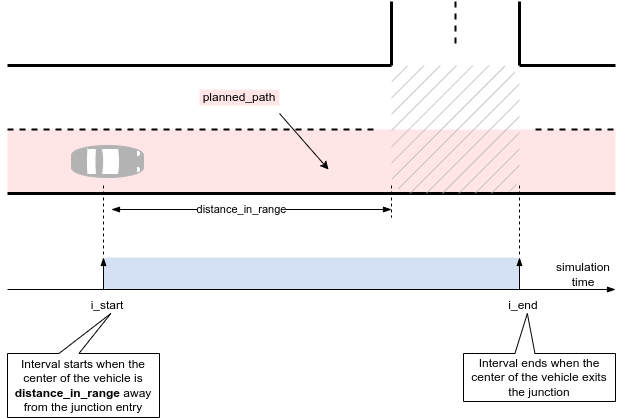
| Checker attribute | Description |
|---|---|
| vehicle | The vehicle to monitor. |
| distance_in_range | Minimum distance at which the junction is considered in range, measured from the center of the vehicle. The default value is 50m. |
An interval will be emitted even when the vehicle is created inside a junction.
The example below depicts configuring the distance_in_range of the sut.car instance to 70m.
extend top.main:
    keep(sut.car.junction_checkers.traverse_junction.distance_in_range == 70m)
approach_junction
The approach_junction watcher modifier emits intervals that start when a vehicle is within a configurable distance from entering a junction and end when
- The center of the vehicle enters the junction, if no signals are present.
- The front of the vehicle passes by a stop sign, yield sign, or traffic light, if any of these signals are present.
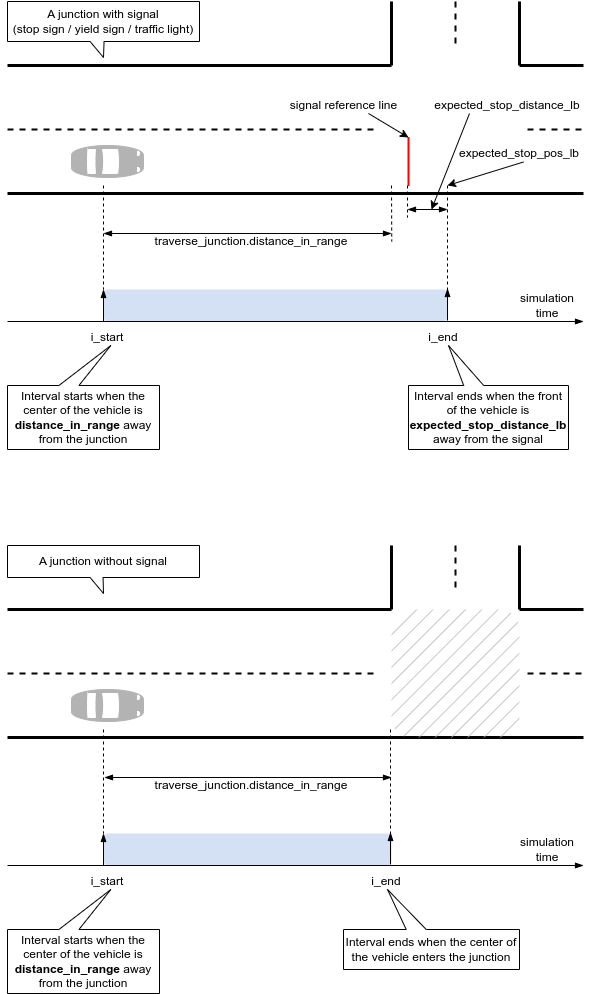
In the diagram above:
- The "signal reference line" corresponds to the relevant signal, whether it is a stop sign, yield sign, or traffic light.
- expected_stop_pos_lb indicates the position relative to the "signal reference line" where the checks are performed. This is configurable via expected_stop_distance_lb (refer to the next table).
| Checker attribute | Description |
|---|---|
| Parent object | approach_junction |
| Issue category | sut or other |
| Issue Kind | stop_at_sign, stop_at_flashing_red, stop_at_turn_on_red, stop_at_tl_not_working, run_yellow_light, run_red_light, about_to_run_red_light, slow_down_at_flashing_yellow, slow_down_at_yield |
| Default severity | error_continue |
| Trigger condition | See the description below. |
| Configuration Parameter | Handle to the traverse_junction watcher. approach_junction will monitor and check the behavior of the vehicle from traverse_junction. |
| Configuration parameter | expected_stop_distance_ub (default 3m) - Upper boundary of expected road distance to stop at a signal (measured from the front of the vehicle). It is relevant for a stop sign, flashing red traffic light, non-functional traffic light, and passing by a red traffic light and the turn-on-red rule applies. |
| Configuration parameter | expected_stop_distance_lb (default -0.3m) - The lower boundary of expected road distance to stop at a signal (measured from the front of the vehicle). A positive value means the front of the vehicle must stop before the signal. A negative value means the front of the vehicle may stop after passing by the signal. It is relevant for all checks. |
| Configuration parameter | expected_stop_min_duration (default 0.5s) - Minimum stopping duration at a signal. It is relevant for a stop sign, flashing red traffic light, non-functional traffic light, and passing by a red traffic light and the turn-on-red rule applies. |
| Configuration parameter | reaction_time (default 0.1s) - The delay after which the vehicle is expected to react to a traffic light changing from green to yellow. |
| Configuration parameter | deceleration_to_stop_at_yellow_start (default 2mpsps) - The minimum deceleration to react to a traffic light changing from green to yellow. It is used to determine whether a vehicle has enough distance to stop (completely). |
| Configuration parameter | deceleration_to_stop_at_red_end (default 4mpsps) - The deceleration threshold is used to check the vehicle has enough distance to stop (completely) when the traffic light changes from red to green. |
| Configuration parameter | slow_down_rate (default 50) - The percentage from the maximum allowed legal speed that a vehicle is expected not to exceed when entering a junction with a yield sign or flashing yellow traffic light. |
| Configuration parameter | min_distance_to_signal (default 20m) - Minimum distance to the signal at which checks will be performed. It is relevant in two situations: (1) The spawning position of the vehicle. (2) A traffic light changing its mode of operation (e.g., turning on/off). |
| Configuration parameter | min_time_gap_to_signal (default 3s) - Minimum time gap to the signal at which checks will be performed. It is relevant in two situations: (1) the spawning position of the vehicle. (2) A traffic light changing its mode of operation (e.g., turning on/off). |
The approach_junction watcher holds the handle to the traverse_junction watcher modifier to determine when to start the intervals. It must be instantiated as a checker and has an approach_junction_data (inheriting any_watcher_data) associated with it.
The watcher modifier will perform checks (whether the vehicle stops, remains stopped, or slows down when it should) if either a stop sign, a yield sign, or a traffic light is present at the junction entry. It does not deal with the right-of-way.
The watcher modifier supports the following modes of operation of a traffic light:
- flashing red
- flashing yellow
- not working (either off or malfunctioning)
- regular red/yellow/green functionality
- Transition between any modes mentioned above, for example, changing from regular red/yellow/green to off, changing from regular red/yellow/green to flashing yellow, and changing from off to flashing red, and other similar changes.
The checks will not be performed if:
- The vehicle is created in the simulation too close to the signal (either the distance is less than min_distance_to_signal or the time gap is less than min_time_gap_to_signal).
- A traffic light changes its mode of operation when the vehicle is too close to it (either the distance is less than min_distance_to_signal or the time gap is less than min_time_gap_to_signal).
When the vehicle approaches one of the following:
- A stop sign
- A flashing red traffic light
- A non-functional traffic light
- A regular red/yellow/green traffic light, where the vehicle intends to turn right, and the light is red.
...and the road distance from the front of the vehicle to the reference stop line (denoted as dist_to_signal in the following figure) is less than expected_stop_distance_lb (i.e., the front of the vehicle passes the expected_stop_pos_lb), the modifier will check whether the front of the vehicle stops for at least expected_stop_min_duration within the range [expected_stop_distance_lb..expected_stop_distance_ub].
Here, "the vehicle has stopped" means the vehicle.is_standing_still() method returns true for consecutive simulation steps equal to expected_stop_min_duration.
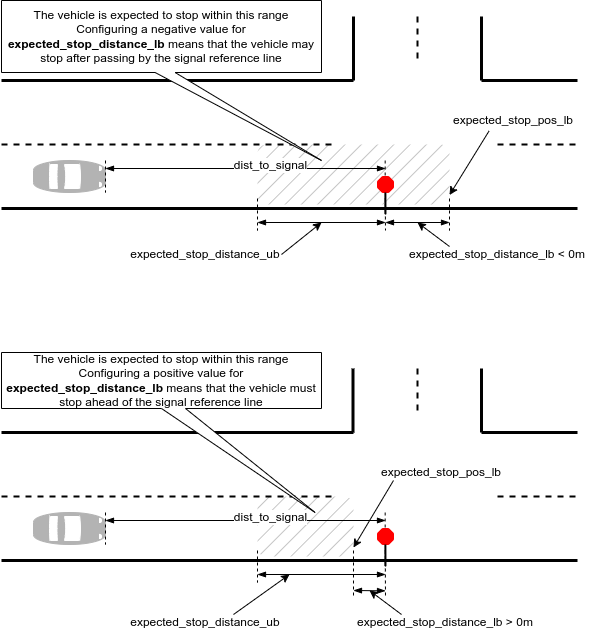
If the check fails, the checker will raise an issue with the kind stop_at_sign, stop_at_flashing_red, stop_at_turn_on_red, or stop_at_tl_not_working:
SUT error (stop_at_flashing_red): <sut_vehicle@3377 (top.sut.car) red uid:10> - SUT - ftx_driver was in control: Vehicle did not stop for 0.50second within [-0.30meter..3meter] from the flashing red traffic light.
As a matter of principle, when approaching a regular red/yellow/green traffic light and the light changes from green to yellow, the checker assumes that the vehicle will start decelerating constantly by some comfortable threshold. When the vehicle passes by the traffic light and the light is either yellow or red, the checker will raise an issue provided that the vehicle could have stopped:
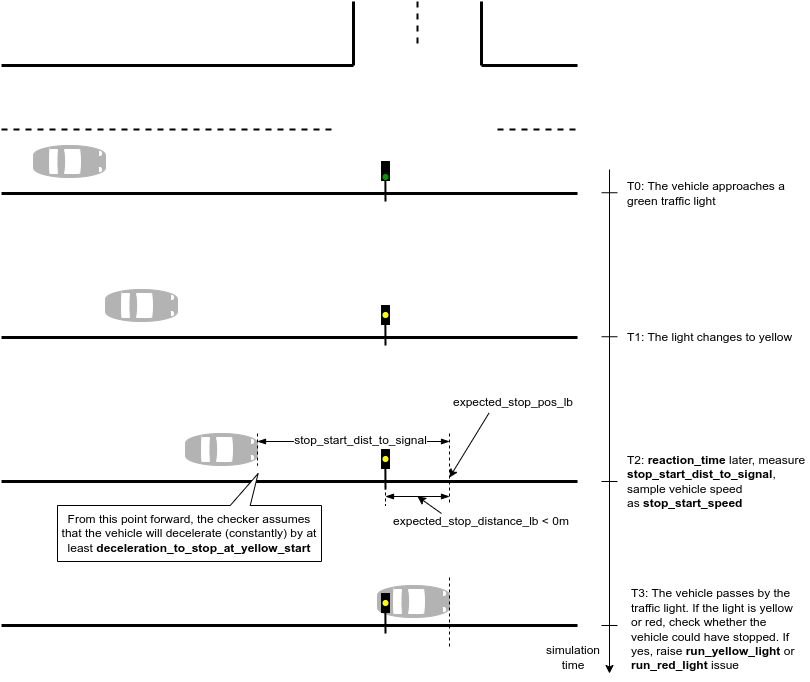
The procedure is as follows:
- The reaction_time after the light changes from green to yellow:
- Measure the distance from the front of the vehicle to the traffic light - stop_start_dist_to_signal.
- Sample the speed of the vehicle - stop_start_speed.
- Compute the distance to full stop assuming a constant deceleration of deceleration_to_stop_at_yellow_start.
    stop_start_dist_to_full_stop = (stop_start_speed * stop_start_speed) /
                                 (2 * deceleration_to_stop_at_yellow_start)
- When the front of the vehicle passes by the expected_stop_pos_lb and the light is either yellow or red, check whether the vehicle could have stopped:
if yes, raise either run_yellow_light or run_red_light issue:
stop_start_dist_to_full_stop < stop_start_dist_to_signalSUT error (run_red_light): <sut_vehicle@4911 (top.sut.car) red uid:17> - SUT - ftx_driver was in control: Vehicle is running a red light although it could have stopped - the light changed from green 9second ago. 0.10second (reaction time) later, the vehicle was 49.40meter away from the traffic light (accounting also for expected_stop_distance_lb of -0.30meter), driving at 6.96mps (S). Assuming a constant deceleration of 2mpsps (D), it would have stopped in 12.11meter ( S^2 / (2 * D) )
There are situations where passing by a green traffic light may not be ideal. For instance, consider a scenario where the vehicle passes a green light that turned from red to green only 0.1 seconds ago (a short time ago) while traveling at a speed of 50 kph. The vehicle was on the verge of running a red light. In such cases, the checker will raise an issue if the vehicle cannot be stopped:
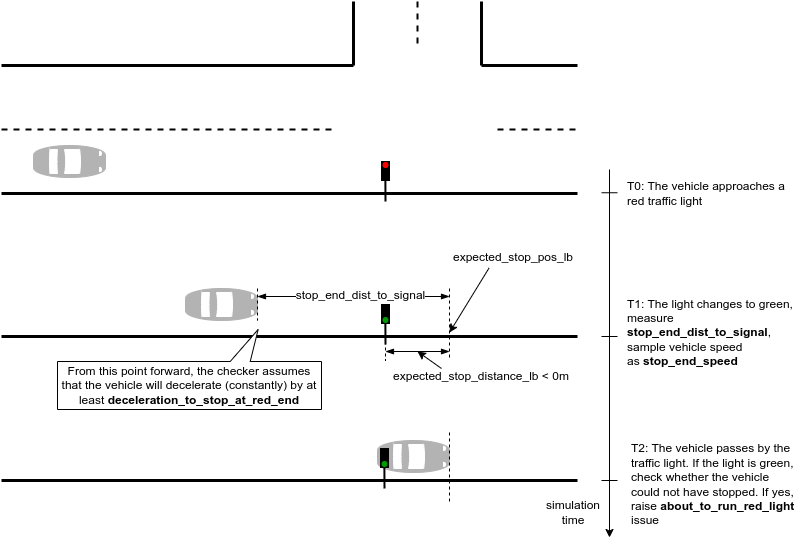
The procedure is as follows:
- When the light changes from red to green:
- Measure the distance from the front of the vehicle to the traffic light - stop_end_dist_to_signal.
- Sample the speed of the vehicle - stop_end_speed.
- Compute the distance to full stop assuming a constant deceleration of deceleration_to_stop_at_red_end.
    stop_end_dist_to_full_stop = (stop_end_speed * stop_end_speed) /
                               (2 * deceleration_to_stop_at_red_end)
- When the front of the vehicle passes by the expected_stop_pos_lb and the light is green, check whether the vehicle could not have stopped:
if yes, raise about_to_run_red_light issue:
stop_end_dist_to_full_stop > stop_end_dist_to_signalSUT error (about_to_run_red_light): <sut_vehicle@1744 (top.sut.car) red uid:10> - SUT - ftx_driver was in control: Vehicle was about to run a red light despite the fact that the light is green - the light changed to green 0.92second ago. The vehicle was 7.29meter away from the traffic light (accounting also for expected_stop_distance_lb of -0.30meter), driving at 7.35mps (S). Assuming a constant deceleration of 2mpsps (D), it would have stopped in 13.50meter ( S^2 / (2 * D) )
When the vehicle approaches a yield sign or a flashing yellow traffic light and the front of the vehicle passes by the expected_stop_pos_lb, if the speed of the vehicle is greater than maximum legal speed multipled by slow_down_rate, then the checker will raise an issue with the kind slow_down_at_yield or slow_down_at_flashing_yellow:
SUT error (slow_down_at_yield): <sut_vehicle@435 (top.sut.car) red uid:14> - SUT - ftx_driver was in control: Vehicle is passing by a yield sign at 9.17mps which is bigger than 50 percent of road's legal speed 17.88mps
Configure the check to expect the vehicle to stop at least 1m ahead of the signal.
extend top.main:
    keep(sut.car.junction_checkers.checker_approach_junction.expected_stop_distance_lb == 1m)
For more information, see Complete example.
Freeze the modifier at runtime:
extend sut_vehicle.junction_checkers:
    on @start:
        override(checker_approach_junction, run_mode: freeze)
For more information, see Complete example.
Change parameters of global checkers
For example, you can change the default value of vehicle.physical.max_speed for all vehicles by adding the following in your configuration file:
extend car.physical:
    keep(max_speed ==250kph)
If you want this value to apply only to sut.car:
extend sut:
    keep(car.physical.max_speed == 250kph)
Change severity of global checkers
To activate/deactivate or change the severity of global checkers, change the severity of the related issue. For example, from error to warning or vice versa.
Note
You can modify all the global checkers in a similar way to the below examples. Also, see Other ways to resolve an issue for further details on how to manage checker behavior.
To change the severity of a global checker you can call issues.curr.modify(), for example:
on @top.new_issue:
    call issues.curr.modify(speed_physical, warning,
        "Moving physical speed check to warning")
If you want to change the severity only for the SUT, you can write in your configuration file:
on @top.new_issue if issues.curr.category == sut:
    call issues.curr.modify(speed_physical, warning,
        "Moving physical speed check to warning")
Vehicle physical: speed
In contrast to speed_policy, which describes the expected behavior of the vehicle, speed_physical checks that the vehicle's speed does not exceed or fall below the physical capability of the vehicle.
| Checker attribute | Description |
|---|---|
| Parent object | vehicle |
| Issue category | sut or other |
| Issue kind | speed_physical |
| Default severity | For both the SUT and NPCs: error. |
| Trigger condition | The minimum speed error is triggered if the vehicle's speed is below physical.min_speed. The maximum speed error is triggered if the speed exceeds physical.max_speed. |
| Configuration parameter | physical.max_speed (default: 200kph) and physical.min_speed (default: 0kph). The physical.min_speed parameter is set to 0 because Foretify does not currently support driving in reverse, |
Note
This checker is deprecated and will be removed from release 26.06. Instead, use Kinematic physical checker.
# speed exceeds physical.max_speed
state.speed > physical.max_speed * (100 + checks_tolerance_percent)/100

# speed is below physical.min_speed
state.speed < physical.min_speed * (100 + checks_tolerance_percent)/100
See also
[<time>] Max. physical speed limit of <max_speed> was exceeded.
<object_id> - <SUT/object type> - <driver_type>
speed : 210kph (configurable as physical.max_speed)
[<time>] Min. physical speed limit of <min_speed> was missed.
<object_id> - <SUT/object type> - <driver_type>
speed : -10kph (configurable as physical.min_speed)
- Constrain physical.max_speed or physical.min_speed.
- Decrease the severity level of the issue.
- Change the values for movement-related modifiers for the vehicle.
Vehicle physical: acceleration
In contrast to acceleration_policy, which describes the expected behavior of the vehicle, acceleration_physical checks that the vehicle's acceleration does not exceed or fall below the physical capability of the vehicle. The minimum acceleration is a negative value that represents the braking capability of the vehicle.
The maximum and minimum acceleration limits differ depending on many factors, such as the current speed, the uphill or downhill slope of the road, the current gear and so on. For this reason, the default severity of this checker is warning both for the SUT and NPCs.
| Checker attribute | Description |
|---|---|
| Parent object | vehicle |
| Issue category | sut or other |
| Issue kind | acceleration_physical |
| Default severity | For both the SUT and NPCs: warning. |
| Trigger condition | The minimum acceleration error is triggered if the vehicle brakes at less than physical.min_acceleration. The maximum acceleration error is triggered if the acceleration exceeds physical.max_acceleration. |
| Configuration parameter | physical.min_acceleration (default: -30mpsps) and physical.max_acceleration (default: 10mpsps) |
Note
This checker is deprecated and will be removed from release 26.06. Instead, use Kinematic physical checker.
## acceleration exceeds physical.max_acceleration
state.acceleration > physical.max_acceleration * (100 + checks_tolerance_percent)/100

## acceleration is below physical.min_acceleration
state.acceleration < physical.min_acceleration * (100 + checks_tolerance_percent)/100
See also
[<time>] Max. physical acceleration limit of 10mpsps was exceeded.
<object_id> - <SUT/object type> - <driver_type>
speed : 12mpsps (configurable as physical.max_acceleration)
[<time>] Min. physical acceleration limit of -30mpsps was missed.
<object_id> - <SUT/object type> - <driver_type>
speed : -32mpsps (configurable as physical.min_acceleration)
- Constrain physical.max_acceleration or physical.min_acceleration.
- Decrease the severity level of the issue.
- Change the values for movement-related modifiers for the vehicle.
Vehicle physical: turning radius
turn_physical determines whether the vehicle's angular and lateral movements are feasible, checking that these two formulas hold:
| Checker attribute | Description |
|---|---|
| Parent object | vehicle |
| Issue category | sut or other |
| Issue kind | turn_physical |
| Default severity | For both the SUT and NPCs: error. |
| Trigger condition | Either the lateral acceleration of the vehicle or its angular speed is too high to make the turn. |
| Configuration parameter | physical.minimal_turning_radius (default: 5m). |
Note
This checker is deprecated and will be removed from release 26.06. Instead, use Kinematic physical checker.
# The vehicle slides sideways
(100 - checks_tolerance_percent)/100) * abs(state.road_acceleration.lat) > pow(max_lon_speed,2)/physical.minimal_turning_radius

# The vehicle slides in a circle
(100 - checks_tolerance_percent)/100 * abs(angular_speed_deg) > abs(v_div_r_deg) + 1*degree_per_second)
- max_lon_speed = max(state.local_speed.lon, prev_state.local_speed.lon)
- angular_speed = state.global_angular_speed.yaw, in nano_degree_per_millisecond unit
- angular_speed_deg (real) = angular_speed/degree_per_second
- v_lon_mps (real) = max_lon_speed/meter_per_second
- r_min_m (real) = physical.minimal_turning_radius/meter
- v_div_r_deg (real) = v_lon_mps/r_min_m*(180/3.14) // natural v/r unit in radian_per_second
See also
[<time>] Improbable move by <object_id> - <SUT/object type> - <driver_type>
expecting |a_lat| <=  |v_lon|^2/R_min:
|a_lat| = <actual-lat-acceleration>mpsps
|v_lon|^2/R_min = <feasible-lat-acceleration>mpsps
[<time>] Improbable move by <object_id> - <SUT/object type> - <driver_type>
expecting |angular_speed| <= |v_lon|/R_min:
|v_lon| = <actual-lon-velocity>mps
|angular_speed_deg| = <actual-angular-speed>degree_per_second
|v_lon|/R_min = <feasible-angular-speed>degree_per_second"
- Configure the vehicle's R_min by constraining physical.minimal_turning_radius.
- Decrease the severity level of the issue.
- Change the values for movement-related modifiers for the vehicle.
Vehicle policy: speed
speed_policy checks that the vehicle did not exceed the declared value vehicle.policy.max_speed or fall below vehicle.policy.min_speed (for driving in reverse).
In contrast to speed_physical, which defines the physical limitations of the vehicle, speed_policy describes the expected behavior of the vehicle. Defining policy attributes improves Foretify's ability to plan appropriate scenarios. If many of your runs fail with an incomplete_scenario error, it might be that the policy fields are set incorrectly, making Foretify plan scenarios that cannot be met.
| Checker attribute | Description |
|---|---|
| Parent object | vehicle |
| Issue category | sut or other |
| Issue kind | speed_policy |
| Default severity | For the SUT: warning. For NPCs: ignore. |
| Trigger condition | The minimum speed policy check is triggered if the vehicle's speed is below policy.min_speed. The maximum speed policy check is triggered if the speed exceeds policy.max_speed. |
| Configuration parameter | policy.max_speed (default: 150kph) and policy.min_speed (default: 0kph). The policy.min_speed parameter is set to 0 because Foretify does not currently support driving in reverse. |
Note
This checker is deprecated and will be removed from release 26.06. Instead, use Kinematic spec checker.
# speed exceeds policy.max_speed
state.speed > policy.max_speed * (100 + checks_tolerance_percent)/100

# speed is below policy.min_speed
state.speed < policy.min_speed * (100 + checks_tolerance_percent)/100 * 200
See also
[<time>] Max. policy speed limit of 150kph was exceeded.
<object_id> - <SUT/object type> - <driver_type>
speed : 165kph (configurable as policy.max_speed)
[<time>] Min. policy speed limit of 0kph was missed.
<object_id> - <SUT/object type> - <driver_type>
speed : -10kph (configurable as policy.min_speed)
- Constrain policy.max_speed or policy.min_speed.
- Decrease the severity level of the issue.
- Change the values for movement-related modifiers for the vehicle.
Vehicle policy: acceleration
acceleration_policy checks that the vehicle did not exceed the declared value of vehicle.policy.max_acceleration or fall below vehicle.policy.min_acceleration (for braking).
In contrast to acceleration_physical, which defines the physical limitations of the vehicle, acceleration_policy describes the expected behavior of the vehicle. Defining policy attributes improves Foretify's ability to plan appropriate scenarios. If many of your runs fail with an incomplete_scenario error, it might be that the policy fields are set incorrectly, making Foretify plan scenarios that cannot be executed.
| Checker attribute | Description |
|---|---|
| Parent object | vehicle |
| Issue category | sut or other |
| Issue kind | acceleration_policy |
| Default severity | For both the SUT: warning. For NPCs: ignore. |
| Trigger condition | The minimum acceleration error is triggered if the vehicle brakes at below policy.min_acceleration. The maximum acceleration error is triggered if the acceleration exceeds policy.max_acceleration. |
| Configuration parameter | policy.min_acceleration (default: -4mpsps) and policy.max_acceleration (default: 2mpsps) |
Note
This checker is deprecated and will be removed from release 26.06. Instead, use Kinematic spec checker.
## acceleration exceeds policy.max_acceleration
state.acceleration > policy.max_acceleration

## acceleration is below policy.min_acceleration
state.acceleration < policy.min_acceleration
See also
[<time>] Max. policy acceleration limit of 2mpsps was exceeded.
<object_id> - <SUT/object type> - <driver_type>
speed : 4mpsps (configurable as policy.max_acceleration)
[<time>] Min. policy acceleration limit of -4mpsps was missed.
<object_id> - <SUT/object type> - <driver_type>
speed : -5mpsps (configurable as physical.min_acceleration)
- Constrain policy.max_acceleration or policy.min_acceleration.
- Decrease the severity level of the issue.
- Change the values for movement-related modifiers for the vehicle.
Vehicle policy: legal speed limit
speed_limit checks that the vehicle does not exceed the legal speed limit indicated on the map.
| Checker attribute | Description |
|---|---|
| Parent object | vehicle |
| Issue category | sut or other |
| Issue kind | speed_limit |
| Default severity | For the SUT: error. For NPCs: info. |
| Trigger condition | The current speed is exceeds the speed limit indicated on the map. |
| Configuration parameter | policy.may_exceed_legal_speed (default: false). |
Note
This checker is deprecated and will be removed from release 26.06. Instead, use Kinematic spec checker or Speed Limit watcher.
!policy.may_exceed_legal_speed and get_legal_speed * (100 + checks_tolerance_percent)/100 < state.speed
See also
[<time>] Speed limit of <legal-speed-limit> broken
<object_id> - <SUT/object type> - <driver_type>
driving at <current-speed>
(behavior configurable as car.policy.may_exceed_legal_speed==true)
- Constrain policy.may_exceed_legal_speed to true.
- Decrease the severity level of the issue.
- Change the values for movement-related modifiers for the vehicle.
Vehicle policy: no teleport
If a vehicle's momentary speed exceeds the speed set in vehicle.policy.max_speed by a factor of two or more, a perceived_teleport error is raised.
| Checker attribute | Description |
|---|---|
| Parent object | vehicle |
| Issue category | sut or other |
| Issue kind | perceived_teleport |
| Default severity | For both the SUT and NPCs: error. |
| Trigger condition | The distance traveled in a single time step implies a speed more than twice policy.max_speed. |
| Configuration parameter | policy.max_speed (default: 150kph) |
Note
This checker is deprecated and will be removed from release 26.06. Instead, use Teleportation.
step_speed.abs > vehicle.policy.max_speed * 2
- dt = top.step_time
- dist = the difference between current global position and the previous global position
- step_speed = dist / dt
See also
<vehicle-id>had a sudden jump of <length> meters
(momentary speed of <speed> kph significantly exceeds
policy max of vehicle.policy.max_speed <speed> kph)
- Report this error to Foretellix.
Vehicle policy: jerk
jerk_policy checks that the vehicle does not experience a sudden and dramatic decrease or increase in acceleration.
Info
This check is currently activated for dynamic drive only.
| Checker attribute | Description |
|---|---|
| Parent object | vehicle |
| Issue category | sut or other |
| Issue kind | jerk_policy |
| Default severity | For the SUT: error. For NPCs: error. |
| Trigger condition | The vehicle.state.local_jerk.lon or vehicle.state.local_jerk.lat parameter exceeds vehicle.policy.max_jerk. |
| Configuration parameter | policy.max_jerk (default: 15mpspsps). |
Note
This checker is deprecated and will be removed from release 26.06. Instead, use Kinematic spec checker.
state.jerk > policy.max_jerk
See also
<object_id> - <SUT/object type> - <driver_type> is in control:
Extreme Jerk <([<lon-jerk>,<lat-jerk>]mpspsps,
more than the maximum [<max-jerk>]degps ,
configurable as [policy.max_jerk])>
- Decrease the severity level of the issue.
- Modify the constraints on the vehicle's behavior.
Vehicle policy: jitter
jitter_policy checks that there are fewer than four noticeable steers at a rate of more than one steer per two seconds. A noticeable steer is defined as 0.7m..
| Checker attribute | Description |
|---|---|
| Parent object | vehicle |
| Issue category | sut or other |
| Issue kind | jitter_policy |
| Default severity | For the SUT: error. For NPCs: info. |
| Trigger condition | There are more than four noticeable steers at a rate of more than one steer per two seconds. |
| Configuration parameter | policy.may_jitter (default: false) |
Note
This checker is deprecated and will be removed from release 26.06. Instead, use Ride Comfort Event.
# steer to this side done
if abs(curr_steer_lateral_delta) < abs(steer_lateral_delta)

# it is a noticeable steer
and if steer_lateral_delta < sdlc__km and abs(steer_lateral_delta) >= noticable_steer

# more than the maximum number of steers per second
and if steers/(driving_time/second) >
    max_steers_per_second and top.time - prev_steer_time <= 1/max_steers_per_second

# more than the maximum number of steers
and if steers >= max_steers_threshold
- steer_delta = map.lateral_distance_between_positions(state.msp_pos, prev_state.msp_pos)
See also
[<time>] Jitter comfort: <number-of-steers> steers from <start-count-time> to <time>
by <object_id> - <SUT/object type> - <driver_type>
does not comply with may_jitter policy (configurable as policy.may_jitter)
- Constrain policy.may_jitter to true.
- Decrease the severity level of the issue.
- Modify the constraints on the vehicle's behavior.
Vehicle policy: minimum highway speed
minimum_highway_speed_policy checks that when the SUT vehicle is on a highway and controlled by an AV/ADAS function, it does not drive slower than vehicle.policy.minimum_highway_speed unless there is a reason, such as a car or junction ahead.
| Checker attribute | Description |
|---|---|
| Parent object | vehicle |
| Issue category | sut or other |
| Issue kind | minimum_highway_speed_policy |
| Default severity | For the SUT: error. For NPCs: info. |
| Trigger condition | The current speed is less than policy.minimum_highway_speed, the planned speed is greater than policy.minimum_highway_speed, and there is no slowly moving object in the path or possible collision. |
| Configuration parameter | policy.minimum_highway_speed (default: 50kph). |
Note
This checker is deprecated and will be removed from release 26.06. Instead, use Slow driving checker.
if is_dut and state.vehicle_indicators.av_state == active
and if map.is_lane_position_in_highway(state.msp_pos.lane_position)
and if state.speed * (100 + checks_tolerance_percent)/100 < policy.minimum_highway_speed
    and get_planned_speed > policy.minimum_highway_speed * (100 + checks_tolerance_percent)/100
    and !is_slow_object_infront(20*kph, 20*meter)
    and (get_min_ttc_to_objects(traffic.physical_objects) > 3*second)
See also
[<time>] Min. policy minimum_highway_speed limit of 50kph was missed.
<object_id> - <SUT/object type> - <driver_type>
speed : 40kph (configurable as policy.minimum_highway_speed)
- Constrain policy.minimum_highway_speed.
- Decrease the severity level of the issue.
- Change the values for movement-related modifiers for the vehicle.
Vehicle policy: distance to VRU on highway
minimum_highway_vru_distance_policy checks that when the SUT vehicle is controlled by an AV/ADAS function it does not drive too close to a vulnerable road user (VRU).
The TTC to a VRU is not used to calculate the distance to an object because it might be quite large when, for example, the vehicle is not driving towards a group of pedestrians but rather next to them. Instead, Foretify keeps a list of seen VRUs and calculates the distance to them, subtracting half of its own length.
| Checker attribute | Description |
|---|---|
| Parent object | vehicle |
| Issue category | sut or other |
| Issue kind | minimum_highway_vru_distance_policy |
| Default severity | For the SUT: error. For NPCs: info. |
| Trigger condition | For each of the seen VRUs, if the vehicle's speed is not less than the minimum_highway_speed, and the distance to the VRU, minus half the vehicle's width, is less than policy.minimum_highway_vru_distance, the check is triggered. |
| Configuration parameter | policy.minimum_highway_vru_distance (default: 3.5m, meaning one lane apart). |
Note
This checker is deprecated and will be removed from release 26.06. Instead, use Static Object Too Close.
if is_dut and state.vehicle_indicators.av_state == active
and if it is a car or plain_object
and if it in seen_vrus
and if state.speed >= policy.minimum_highway_speed and dist - bbox.width/2 <
    policy.minimum_highway_vru_distance
- dist = map.distance_between_global_positions( state.msp_pos.global_position, it_pos) - bbox.length/2
[<time>] Driving too close to VRU <object-id>
(min distance configurable as policy.minimum_highway_vru_distance)
- Constrain policy.minimum_highway_vru_distance.
- Decrease the severity level of the issue.
- Change the values for movement-related modifiers for the vehicle.
Vehicle policy: unplanned standing time
unplanned_standing_time_policy checks that a vehicle does not stand still while moving for more than vehicle.policy.unplanned_standing_time unless there is a reason, such as a car or junction ahead.
| Checker attribute | Description |
|---|---|
| Parent object | vehicle |
| Issue category | sut or other |
| Issue kind | unplanned_standing_time_policy |
| Default severity | For the SUT: warning. For NPCs: info. |
| Trigger condition | The check is triggered if all these conditions are true: the vehicle is traveling less than 1kph the standing is not planned and the planned speed is more than 10kph there is no danger of collision there is no slow-moving object, traffic light or junction ahead |
| Configuration parameter | policy.unplanned_standing_time (default: 1sec). |
Note
This checker is deprecated and will be removed from release 26.06. Instead, use Unplanned Standing Checker.
if (abs(state.speed) <= 1kph
    and !is_standing_planned
    and get_planned_speed > 10*kph
    and !is_in_collision_ahead_threat
    and !is_slow_object_infront( 20*kph, 20*meter)
    and !is_before_stopping_traffic_light( bbox.length )
    and (!is_towards_junction or map.is_lane_position_in_highway(state.msp_pos.lane_position)))
and if last_unplanned_standing_time < top.time and dist > 20 * meter
and if unplanned_standing_steps * top.step_time > policy.get_unplanned_standing_time
- end_pos = get_planned_abs_end_position
- dist = get_longitudinal_distance_along_route(state.msp_pos.lane_position, end_pos, planned_path)
See also
[<time>] Max. policy unplanned standing time limit of 1sec was exceeded.
<object_id> - <SUT/object type> - <driver_type>
time : <current-unplanned-standing-time> (configurable as policy.unplanned_standing_time)
- Constrain policy.unplanned_standing_time.
- Decrease the severity level of the issue.
- Change the values for movement-related modifiers for the vehicle.
Vehicle policy: does not move
car_does_not_move checks that the SUT vehicle moves at least the distance specified by policy.min_total_distance_to_indicate_movement within the time specified by policy.max_does_not_move_time. The distance is measured by the x and y coordinates of the vehicle's global position. See Foretify's coordinate system.
This checker is activated at the start of the scenario and remains active throughout the run.
| Checker attribute | Description |
|---|---|
| Parent object | vehicle |
| Issue category | sut or other |
| Issue kind | car_does_not_move |
| Default severity | For the SUT: warning. For NPCs: info. |
| Trigger condition | The vehicle does not travel the distance specified by policy.min_total_distance_to_indicate_movement within the time specified by policy.max_does_not_move_time, or the test ends before the specified time and the SUT did not travel the minimum distance. |
| Configuration parameter | policy.max_does_not_move_time (default: 30sec). |
| Configuration parameter | policy.min_total_distance_to_indicate_movement (default: 10centimeter). |
| Configuration parameter | policy.allow_no_movement (default false). |
Note
This checker is deprecated and will be removed from release 26.06. Instead, use Unplanned Standing Checker.
if (vehicle.is_dut
    and !vehicle.policy.allow_no_movement
    and !vehicle.state.is_null
    and !vehicle.state.msp_pos.is_null
and if vehicle_has_significantly_moved
else if (top.time.second - vehicle.movement_evidence_time.second) >
    vehicle.policy.max_does_not_move_time.second
if (vehicle.is_dut
    and !vehicle.policy.allow_no_movement
    and !vehicle.state.is_null
    and !vehicle.state.msp_pos.is_null
    and !(vehicle.movement_evidence_time > top.step_time)
See also
<object_id> - <SUT/object type> - <driver_type>
did not move <length> for <time>
(threshold configurable as vehicle.policy.min_total_distance_to_indicate_movement and
vehicle.policy.max_does_not_move_time)

<object_id> - <SUT/object type> - <driver_type>
did not move through the whole scenario, which lasted <time> seconds
(override this check by setting vehicle.policy.allow_no_movement=true)
- Disable the check by setting policy.allow_no_movement to true.
- Constrain policy.max_does_not_move_time to a different value.
- Decrease the severity level of the issue.
- Change the values for movement-related modifiers for the vehicle.
Vehicle policy: warn if too close to collision
ttc_policy is triggered if the time to collision is less than policy.too_close_TTC.
Note
This checker is disabled by default.
| Checker attribute | Description |
|---|---|
| Defined in | vehicle |
| Category | sut or other |
| Kind | ttc_policy |
| Default severity | For the SUT: error. For NPCs: info. |
| Trigger condition | Minimum TTC to any other physical object in the simulation is less than policy.too_close_TTC and both policy.too_close_TTC and TTC are non-zero. |
| Configuration parameter | policy.too_close_TTC (default: 0ms). |
if get_min_ttc_to_objects(traffic.physical_objects) < policy.too_close_TTC
    and policy.too_close_TTC != 0  and get_min_ttc_to_objects(traffic.physical_objects) != 0
See also
[<time>] Min. policy too_close_TTC limit of <value> missed by
<object_id> - <SUT/object type> - <driver_type>
too_close_TTC : <value>
(min too_close_TTC configurable as policy.too_close_TTC)
- Constrain policy.too_close_TTC.
- Decrease the severity level of the issue.
- Modify the constraints on the vehicle's behavior.
Vehicle policy: max_road_offset checker
Checks if the center of the vehicle goes off the road by more than the distance specified by vehicle.policy.max_road_offset.
The text of the error is in the following format:
<vehicle details>: Vehicle position is too far off planned path. Position: [<lane position>], Global coordinates: [<global position>]
This check may disabled by setting policy.enable_off_planned_path_check to false.
| Checker attribute | Description |
|---|---|
| Parent object | vehicle |
| Issue category | other |
| Issue Kind | off_planned_path |
| Default severity | error |
| Trigger condition | The vehicle goes off the road by more than the distance specified by (lane_width/2 + policy.max_road_offset). |
| Configuration parameter | policy.enable_off_planned_path_check (default: true). |
| Configuration parameter | policy.max_road_offset (default: 20m). |
Vehicle policy: off_lane
off_lane checks that the vehicle does not drive in a lane not intended for its usage, such as a cycling lane. Deviations of up to 25% of the vehicle's width are allowed when a vehicle is dynamically controlled by Foretify or such control has ended without enough time for the AV/ADAS function to react.
This check is not run if the vehicle is in a junction.
| Checker attribute | Description |
|---|---|
| Parent object | vehicle |
| Issue category | sut or other |
| Issue kind | off_lane |
| Default severity | For the SUT: error. For NPCs: warn. |
| Trigger condition | The vehicle enters a non-driving lane. |
| Configuration parameter | None. |
Note
This checker is deprecated and will be removed from release 26.06. Instead, use Lane Departure.
if not state.msp_pos.lane_position.lane.is_car_lane
    and current_move != NULL
    and current_move.move_path.start_abs_wp.msp_lane_pos.lane.is_car_lane
    and current_move.move_path.end_abs_wp.msp_lane_pos.lane.is_car_lane
if front_left_pos_num > current_road_max_lane_num + edge_tolerance
- front_left_pos = state.bbox_corners[0]
- front_left_pos_num = map.lateral_lane_position_from_msp_lane_position(front_left_pos.lane_position)
- current_road_max_lane = state.msp_pos.road_position.road.lanes.last(it.lane_uses.has(it == driving))
- current_road_max_lane_num = current_road_max_lane.index_in_road.as_a(real)
- edge_tolerance = 0.25*bbox.width
if front_right_pos_num < current_road_min_lane_num - edge_tolerance
- front_right_pos = state.bbox_corners[0]
- front_right_pos_num = map.lateral_lane_position_from_msp_lane_position(front_right_pos.lane_position)
- current_road_min_lane = state.msp_pos.road_position.road.lanes.first(it.lane_uses.has(it==driving))
- current_road_min_lane_num = current_road_min_lane.index_in_road.as_a(real) - 1
- edge_tolerance = 0.25*bbox.width
See also
[<time>] On lane not intended for this type of vehicle - (usage: <lane_uses_str>)
[<time>] Off road on left side by <dist> in centimeters
[<time>] Off road on right side by <dist> in centimeters
- Decrease the severity level of the issue.
- Modify the constraints on the vehicle's behavior.