Foretify commands
TAB-completion feature
If you enter the first few letters of a Foretify command at the Foretify prompt and press TAB, Foretify completes the command for you. If the string is not unique, Foretify displays the commands that match the string. You can then press TAB repeatedly to select the command you want.
For example, if you enter c at the Foretify prompt and press TAB, Foretify adds "run " to form crun.
If you press TAB again after the full command name is displayed, a list of options for that command is displayed. You can then press TAB repeatedly to select the option you want.
crun
Make consecutive runs with the same test and different seeds.
crun <number>
<number>- A positive integer specifying the number of runs to make. The initial seed is incremented before each subsequent run.
Foretify> crun 3
Starting new run.
...
Starting new run.
...
Starting new run.
...
help
Display a list of possible commands
help
Displays a list of possible commands.
Note
You can also use --help with any command to display more details about the usage of that command.
Foretify> help
Possible commands:
  help                Show list of all possible commands
  load                Load and compile an OSC2 file
  reload              Reload a previously loaded OSC2 file
  run                 Execute a single run
  crun                Execute multiple runs with the consecutive seeds
  lrun                Load or reload an OSC2 file and execute a run
  print               Print the value of an OSC2 expression
...

Foretify> trace --help
Usage:  trace [--off] [--target=<traceTarget>] [<tracePattern>|<category>]
Add a named trace to one or more targets or turn off a trace
    [<tracePattern>]   The name of a single trace or a pattern in the form
    <actor>.<trace-name> or <actor>.<scenario>.<trace-name>.
    If no pattern is given, the command applies to all traces defined in both actors
    and scenarios. An error is issued if a <pattern> does not match any named
    expression in a loaded scenario or actor.
    [<category>]   The name of the category to activate or deactivate

    --off      Turns off a previously defined trace. When used with --target,
        only the traces for that targe are turned off and the trace list
        for that target is cleared. If no target is specified, all traces to all
        targets are turned off and all their lists are cleared.
    --target=<traceTarget>    Trace target (timeline (default), log, csv)

Foretify>
load
Load and compile an OSC2 file
load <filename>
<filename>- The pathname of a single OSC2 file to load.
These are the search rules for load:
-
If a full path is specified (for example, /x/y/my_file), then use that full path. The file name as specified is looked up first, and if not found, the name with the extension .osc is attempted.
-
Else look in the directory where the loading file resides.
-
Else look in the current directory.
-
Else look in directories specified by the OSC_PATH environment variable.
-
Else this is an error.
Foretify> load cut_in
[INFO] Compilation done, 0 errors and 0 warnings reported

Foretify> load cut_in_cover
[INFO] Compilation done, 0 errors and 0 warnings reported

Initializing Foretify runtime...

Foretify>
load_run
Load previous run
load_run <path to run folder>
<path to run folder>- The path to the run folder.
Use the load_run command to load a previous run so that you can investigate or re-run it. This command only loads the data, but doesn't run it. Use the run command after using load_run to re-run the test using the same settings. If the original run was performed with limited ROI, re-running will use the same ROI.
Foretify> load_run /data/runs/20230824_094600_1164690_DUFK
Foretify>
lrun
Load or reload an OSC2 file and execute a run
lrun <filename>
<filename>- The pathname of the OSC2 file to load. See the load command for a description of the search rules.
This command compiles the specified file, loads the intermediate prepare file, and then executes the run with seed=1.
Foretify> lrun example_top
[INFO] Compilation done, 0 errors and 0 warnings reported


Initializing Foretify runtime...

[0.000] [MAIN] Using map $FTX_PACKAGES/maps/M78_FTX_suburban_hooder.xodr
read...parse...Prepare file loaded
[0.000] [PLANNER] Running topology analysis
update...patch...h code...code...clean...

Checking license...
License check succeeded
Checking license...
License check succeeded
Starting new run.
...
Foretify>
Print the value of an OSC2 expression
print <expression>
<expression>- Any legal OSC2 expression using object pathnames or instance references.
You can use the print command during debug to show an expression's value or an object's attributes.
You can execute the print command either during a run or after it completes. To execute the print command during a run, step execution mode must be on.
When running the print command on a path that leads to a struct, it will display the following:
- Type of expression name
- Type name + the instance id
- The path from the top
- All fields of the struct. The fields are clustered by declaring type. The declaring type separates the clusters. Every cluster is presented in load order by default but you can order fields alphabetically by running
foretifywith the--print_order_lexicographyoption.
Each field is presented with its name in the left column. The right column displays the value in the following format:
- Boolean, Int, Uint, Enum, String, Double: Displays the value.
- Physical: Value is converted to the appropriate display unit.
- List: Number of items in the list + "items".
- Struct: Type name +
=+ type name + instance id + path from top.
print top                   # prints the top struct.
print sut                   # prints the sut object inside the top struct.
print sut.car               # prints the object of the described path.
print sut.car.get_length()  # calculates the length of that vehicle and print it.
Each object in Foretify is associated with a unique instance reference in the format: <type>@<number> that allows access to it as an expression. For example:
vehicle@2           # represents an instance of a vehicle.
vehicle.drive@10    # represents an instance of a drive scenario.
print vehicle@2                          # prints the vehicle details.
print vehicle.drive@10.duration          # prints the duration field of the drive of that vehicle.
print sut.car.get_passing_by_info(car@6) # computes and prints the passing information of car@6
                                         # in relation to the sut car
Foretify> show status
  seed: 5
  status: "COMPLETED"
  simulation_time: 33280
  test_file: "ts2_cut_in_and_slow.osc"
  dut_errors:

Foretify> show scenarios
  Start     End       Start (p) End (p)
  17.86     33.28     17.86     33.28      top.main@242 (main) [id: 3]
  17.86     33.28     17.86     33.28       serial@225 (main.label(serial)) [id: 2]
  17.86     33.28     17.86     33.28        sut.vehicle_cut_in_and_slow@241 (main.vehicle_cut_in_and_slow) [id: 1]
  17.86     33.28     17.86     33.28         serial@226 (main.vehicle_cut_in_and_slow.vehicle_cut_in_and_slow) [id: 9]
  17.86     24.92     17.86     24.92          parallel@228 (main.vehicle_cut_in_and_slow.start_behind_sut) [id: 17]
  17.86     24.92     17.86     24.92           vehicle.drive@227 (main.vehicle_cut_in_and_slow.label(start_behind_sut.sut)) [id: 18]
  17.86     24.92     17.86     24.92           vehicle.drive@239 (main.vehicle_cut_in_and_slow.label(start_behind_sut.cut_in_vehicle)) [id: 20]
  24.92     30.84     24.92     30.84          sut.vehicle_cut_in@236 (main.vehicle_cut_in_and_slow.vehicle_cut_in) [id: 8]
  24.92     30.84     24.92     30.84           serial@229 (main.vehicle_cut_in_and_slow.vehicle_cut_in.vehicle_cut_in) [id: 29]
  25.6      30.84     25.6      30.84            parallel@233 (main.vehicle_cut_in_and_slow.vehicle_cut_in.change_lane) [id: 28]
  25.6      30.84     25.6      30.84             vehicle.drive@232 (main.vehicle_cut_in_and_slow.vehicle_cut_in.change_lane_sut) [id: 30]
  25.6      30.84     25.6      30.84             vehicle.drive@235 (main.vehicle_cut_in_and_slow.vehicle_cut_in.label(change_lane.cut_in_vehicle)) [id: 31]
  24.92     25.6      24.92     25.6             parallel@231 (main.vehicle_cut_in_and_slow.vehicle_cut_in.init_drive) [id: 32]
  24.92     25.6      24.92     25.6              vehicle.drive@230 (main.vehicle_cut_in_and_slow.vehicle_cut_in.label(init_drive.sut)) [id: 33]
  24.92     25.6      24.92     25.6              vehicle.drive@234 (main.vehicle_cut_in_and_slow.vehicle_cut_in.label(init_drive.cut_in_vehicle)) [id: 35]
  30.84     33.28     30.84     33.28          parallel@238 (main.vehicle_cut_in_and_slow.slow) [id: 14]
  30.84     33.28     30.84     33.28           vehicle.drive@237 (main.vehicle_cut_in_and_slow.label(slow.sut)) [id: 13]
  30.84     33.28     30.84     33.28           vehicle.drive@240 (main.vehicle_cut_in_and_slow.label(slow.cut_in_vehicle)) [id: 15]

Foretify> print sut.vehicle_cut_in_and_slow@241
sut.vehicle_cut_in_and_slow = sut.vehicle_cut_in_and_slow@241 (main.vehicle_cut_in_and_slow)
------------------------------------------------------------------- any_scenario
    sdlc_invocation_unique_id:                                          539
    var run_mode:                                                       best_effort
------------------------------------------------------------------- any_normal_scenario
    duration:                                                           15.42second
------------------------------------------------------------------- sut.vehicle_cut_in_and_slow
    cut_in_vehicle:                                                     npc_vehicle@254 (main.vehicle_cut_in_and_slow.cut_in_vehicle)
    cut_in_side:                                                        right
    kind:                                                               cut_in_and_slow
    has_stationary_object:                                              false
    cut_in_vehicle_behind_of_sut_tolerance:                             5meter
    road:                                                               one_way_road@341 (main.vehicle_cut_in_and_slow.road)
    var sut_distance_to_cut_in_vehicle_at_slow_start:                   36.99meter
    var sut_distance_to_cut_in_vehicle_at_slow_end:                     33.78meter
    var sut_speed_at_slow_end:                                          14.66mps
    var cut_in_vehicle_rel_speed_to_sut_at_slow_start:                  -3.10mps
    var cut_in_vehicle_rel_speed_to_sut_at_slow_end:                    -0.50mps
    ...

Foretify> print one_way_road@341
one_way_road = one_way_road@341 (main.vehicle_cut_in_and_slow.road)
----------------------- road_element
    id:                     80
    part_id:                80
    length:                 50.67meter
    var registered:         false
----------------------- one_way_road
    min_lanes:              3
    max_lanes:              3
    in_junction_id:         2
    in_junction_yaw:        238.96degree
    in_junction_order:      0
    out_junction_id:        3
    out_junction_yaw:       244.35degree
    out_junction_order:     0
    lane_sections:          1
    num_in_roads:           1
    num_out_roads:          1
The following example includes a number of structs.
| OSC2 code: Example containing structs | |
|---|---|
1 2 3 4 5 6 7 8 9 10 11 12 13 14 15 16 17 18 19 20 21 22 23 24 25 26 27 28 29 30 31 32 33 34 35 36 37 38 39 40 41 42 43 44 | |
Following is the output for the example above.
> print top.my_item
my_item_type = my_item_sub_type2@17 (top.my_item)
--------------------------- my_item_type
    k1:                         true
    k2:                         true
    var empty_struct_field:     null
    var empty_string_field:     ""
--------------------------- my_item_sub_type
    struct_field:               another_type@18 (top.my_item.struct_field)
    list_field:                 3 items
    empty_list_field:           0 items
--------------------------- my_item_sub_type2
    string_field:               "hello"
    physical_field:             1second
    enum_field:                 enum_val1
    range_field:                [1..5]
    physical_range_field:       [0.56mps..1.67mps]
    ...
> print top.main
top.main = top.main@2 (main)
---------- any_normal_scenario
    duration:  10874281.66second
> print top.main.duration
time = 10874281.66second
To display fields alphabetically, use foretify with the --print_order_lexicography option. The following example shows print results after setting the --print_order_lexicography option:
> print top
top = top@9
    adas_info:                    top.adas_info@10 (top.adas_info)
    builtin:                      builtin@11 (top.builtin)
    environment:                  environment@12 (top.environment)
    info:                         top.info@13 (top.info)
    math:                         math@14 (top.math)
    my_item:                      my_item_sub_type2@15 (top.my_item)
    os:                           os@16 (top.os)
    random:                       random@17 (top.random)
    step_time:                    0.02second
    strings:                      strings@18 (top.strings)
    sut:                          sut@19 (top.sut)
    traffic:                      traffic@20 (top.traffic)
    video_capture:                video_capture@21 (top.video_capture)
    var av_dut_adapter:           av_dut_adapter@22
    ...
quit
Exit Foretify
quit | exit
Foretify> quit
     Foretify log can be found at:
reload
Reload a previously loaded OSC2 file
reload
Foretify> load test1
[ERROR] org.antlr.v4.runtime.misc.ParseCancellationException: line 6:-1 missing ':'
[INFO] Compilation failed, 1 errors and 0 warnings reported

Foretify> reload
[INFO] Compilation done, 0 errors and 0 warnings reported

Foretify>
run
Launch a single run
run [ --seed=<num> | --seed=random]
--seed- The word random or a positive integer that specifies the seed for generating the values of the test parameters. The equal sign (=) is required in both cases. The default is the last seed used. If there is no previous seed, the default is 1.
When a run command is executed, a new run folder is created under <work_dir>/runs. The folder name template is [date]_[time]_[pid]. The log and coverage files are saved in the new run folder.
If step execution mode is off (the default), the run executes until either it completes or a fatal error occurs. If step execution mode is on, the run starts, but simulation time does not advance until you execute the step command.
Foretify> load lrm_top.osc
[INFO] Compilation done, 0 errors and 0 warnings reported

Foretify> run --seed=14
Starting new run...
search
Find all instances of a string in the currently loaded files
search <string>
<string>- A sequence of alphanumeric characters. The wildcard * is allowed.
Foretify> search policy.max_speed
keep(policy.max_speed <= physical.max_speed)
    at line 33 in car.osc
keep(soft policy.max_speed == physical.max_speed)
    at line 34 in car.osc
keep(soft policy.max_speed == 120kph)
    at line 52 in car.osc

Foretify> search duration
#    change_lane.duration (how long should this phase take (within [10..15] seconds)
    at line 12 in cut_in_lab_1.osc
change_lane: parallel(duration: [2..7]second):
    at line 26 in cut_in_lab_1.osc

Foretify>
set step
Prepare to execute a run step by step
set step <mode>
<mode>- Either on or off.
When <mode> is on, the run command initializes the run but stops at simulation time 0. You have to use the step command to continue execution.
By default, step execution is off. If you want to step through a run, you must set the step mode to on before executing the run command. You cannot change the step mode during the execution of a run.
In order to step through a run, execute the following sequence of commands:
- load or reload.
- set step on.
- run.
- step <delta-time>.
Foretify> reload
[INFO] Compilation done, 0 errors and 0 warnings reported

Initializing Foretify runtime...

Foretify> set step on
Foretify> run
Starting new run...

Starting the test ...
Running the test ...
Use step [<delta-time>] command to advance the time

Foretify> step 1000
[0] [MAIN] Starting the run (2 agents) ...

Foretify> step 1000
[1400] [RUN_TIME] car-@6 #0 shifting from segment-@9(-0)+3071.59:3(+0.00293152) lon: 3071589004307 to segment-@9(-0)+3071.91:2(+0.995292) lon: 3071914470130

Foretify> set step off
Can't update step mode during test run
set verbosity
Set the level of user-defined messages
set verbosity <level>
<level>-
One of the following.
Name Description error Major events and messages, including user-defined warnings and errors. info Detailed reporting on execution process. (default) debug Verbose information that may be useful for debug trace Most detailed information you can use to trace execution.
You can use the set verbosity command to show or hide user-defined messages:
- The error level displays messages defined with log().
- The info level displays messages defined with log() and log_info().
- The debug level displays messages defined with log(), log_info() and log_debug().
- The trace level displays messages defined with log(), log_info(), log_debug(), and log_trace().
This is a simple test to show the effect of set verbosity.
extend top.main:
    do serial:
        log("++error: This is a user-defined error.")
        log_info("++info: This is an informational message.")
        log_debug("++debug: This is a debug message.")
        log_trace("++trace: This is a trace message.")
Foretify> load messages.osc
[INFO] Compilation done, 0 errors and 0 warnings reported

Foretify> run
Starting new run ...

Starting the test ...
Running the test ...
[0] [MAIN] Starting the run (2 agents)
...
[0] [MAIN] ++error: This is a user-defined error.
[0] [MAIN] ++info: This is an informational message.
...
Normal stop - stop_run() is completed
...

Foretify> reload
[INFO] Compilation done, 0 errors and 0 warnings reported

Initializing Foretify runtime...

Foretify> set verbosity trace

Foretify> run
Starting new run ...

Starting the test ...
Running the test ...
[0] [MAIN] Starting the run (2 agents)
...
[0] [MAIN] ++error: This is a user-defined error.
[0] [MAIN] ++info: This is an informational message.
[0] [MAIN] ++debug: This is a debug message.
[0] [MAIN] ++trace: This is a trace message.
...
Normal stop - stop_run() is completed
...
Foretify>
show config
Display runtime configuration flags
show config
This command displays the runtime configuration flags set in a Foretify configuration file or at invocation. See Foretify configuration for more information.
Foretify> show config
step: OFF
run_timeout: 0
generation_timeout: 0
keepalive_timeout: 60
debug_record: false
verbosity: INFO
physical_type_display_precision: 2
set:
    []
display_units:
Foretify>
show files
Show a list of loaded OSC2 files
show files [<string>]
<string>- Any portion of the pathname or filename of the files you want to show. Wildcards are allowed but not required. (Default: show all loaded files).
Foretify> show files cut_in
/home/me/examples/cut_in.osc
show lint_rules
Show the currently defined set of rules
show lint_rules
Foretify's linter flags sub-optimal use of the OSC2 language. You can use the linter to enforce best practices for Foretellix scenarios and libraries.
The sub-optimal uses of OSC2 are defined as a list of named rules. You can load a configuration file that defines the severity level of each rule violation. You can also specify in your OSC2 source files if there are lines you want the linter to ignore.
Foretify> show lint_rules
Rule                                    Description                                                                     Level
 mix_position_and_speed_modifiers        Avoid mixing 'speed' and 'position' modifiers in the same drive scenario        IGNORE
 absolute_speed                          Avoid having a drive with a relative move followed by an absolute move on the
                                         same actor                                                                      IGNORE
 relational_ego_drive                    When using relative modifiers (speed, position) with npc and ego, prefer the
                                         ego to be the reference                                                         IGNORE
 actor_field_name                        Enforce actor field names to be <name>_<type>[_number].                         IGNORE
 snake_case                              Require all our identifiers to be lower-case names separated by underscores.    IGNORE
show scenarios
Show the hierarchy of planned scenario instances
show scenarios
This command displays the hierarchy of planned scenario instances. You can execute the show scenarios command either during a run in step execution mode or after a run has completed.
This example shows that you can execute show scenarios after the run has completed.
Foretify> show status
seed: 1
status: "COMPLETED"
simulation_time: 30120
test_file: "test_cut_in_and_slow.osc"
dut_errors:

Foretify> show scenarios
    Start     | End       |
    10.64     | 25.12     |  top.main@18 (main) [id: 4]
    10.64     | 25.12     |    sut.cut_in_and_slow@17 (main.c) [id: 3]
    10.64     | 25.12     |      serial@5 (main.c.label(serial)) [id: 2]
    21.08     | 22.68     |        sut.cut_in@13 (main.c.cut_in) [id: 1]
    21.08     | 22.68     |          serial@9 (main.c.cut_in.label(serial)) [id: 25]
    21.08     | 22.68     |            parallel@12 (main.c.cut_in.change_lane) [id: 24]
    21.08     | 22.68     |              vehicle.drive@10 (main.c.cut_in.change_lane_dut) [id: 27]
    21.08     | 22.68     |              vehicle.drive@11 (main.c.cut_in.label(change_lane.car1)) [id: 29]
    10.64     | 21.08     |        parallel@8 (main.c.start_behind_dut) [id: 17]
    10.64     | 21.08     |          vehicle.drive@6 (main.c.label(start_behind_dut.sut)) [id: 18]
    10.64     | 21.08     |          vehicle.drive@7 (main.c.label(start_behind_dut.car1)) [id: 20]
    22.68     | 25.12     |        parallel@16 (main.c.slow) [id: 14]
    22.68     | 25.12     |          vehicle.drive@15 (main.c.label(slow.car1)) [id: 15]
    22.68     | 25.12     |          vehicle.drive@14 (main.c.label(slow.sut)) [id: 37]

Foretify>
show status
Show various parameters of the current run
show status
Shows the seed, run status, simulation time, test filename, seed, and dut_errors, if any. You can execute this command at any time.
Foretify> show status
seed: 1
status: "TEST_ERROR"
simulation_time: 0
test_file: "ts_lab_1.osc"
dut_errors:

Foretify> reload

Foretify> show status
seed: 1
status: "LOAD_SUCCEED"
simulation_time: 0
test_file: "ts_lab_1.osc"
dut_errors:

Foretify> run
Starting new run ...

Foretify> show status
seed: 1
status: "COMPLETED"
simulation_time: 7740
test_file: "ts_lab_1.osc"
dut_errors:
    ""
Foretify>
show trace
Display a list of traces
show trace --all
--all- Show all traces, including the inactive ones.
Foretify> show trace
No trace connected to any target

Foretify> show trace --all
Not connected to any target:
   1. vehicle.planned_global_x
   2. vehicle.global_x
   3. vehicle.planned_global_y
   4. vehicle.global_y
   5. vehicle.planned_global_yaw
   6. vehicle.global_yaw
   7. vehicle.planned_dist_from_start
   8. vehicle.dist_from_start
   9. vehicle.planned_lateral_position
   10. vehicle.lateral_position
   11. vehicle.planned_lateral_lane_position
   12. vehicle.lateral_lane_position
   13. vehicle.planned_speed
   14. vehicle.speed
   15. vehicle.planned_acceleration
   16. vehicle.acceleration
   17. vehicle.planned_lon_rel_to_ego
   18. vehicle.lon_rel_to_ego
   19. vehicle.planned_lat_rel_to_ego
   20. vehicle.lat_rel_to_ego
   21. vehicle.planned_global_x_rel_to_ego
   22. vehicle.global_x_rel_to_ego
   23. vehicle.planned_global_y_rel_to_ego
   24. vehicle.global_y_rel_to_ego
   25. vehicle.dynamic_command_throttle
   26. vehicle.dynamic_command_brake
   27. vehicle.dynamic_command_steer
   28. vehicle.dynamic_pid_lon_speed_p_error
   29. vehicle.dynamic_pid_lon_speed_i_error
   30. vehicle.dynamic_pid_lon_speed_d_error
   31. vehicle.dynamic_pid_lat_position_p_error
   32. vehicle.dynamic_pid_lat_position_i_error
   33. vehicle.dynamic_pid_lat_position_d_error
   34. sut.cut_in_and_slow.car1_speed
   35. sut.cut_in_and_slow.sut_speed
   36. sut.cut_in_and_slow.speed_diff
   37. sut.cut_in_and_slow.side

Foretify>
source
Display the source file where an object is defined
source <type-name>
<type-name>- The name of the type to be searched, possibly including multiple path steps or labels, separated by the period character (.).
You can use the source command to display the line and filename where an actor, scenario, struct, or enumerated type is defined. You can also display the source for fields, methods and events defined within that type.
Foretify> source av_side
type av_side: [left = -1, right = 1]
    at line 5 in av_movement_types.osc
Foretify> source top.clk
event clk
    at line 19 in top.osc
Foretify>
step
Stop the run after a specified time interval
step <delta-time>
<delta-time>- Positive integer expressing time in milliseconds. (1000 is one second.)
The <delta-time> set is rounded up to next simulation step. In other words, Foretify checks after each callback from the simulator and stops when (time >= step_start_time + <delta-time>).
In order to execute a step command, you must first set the step execution mode. The proper sequence of commands is as follows:
- load or reload.
- set step on.
- run.
- step <delta-time>.
Foretify> reload
[INFO] Compilation done, 0 errors and 0 warnings reported

Initializing Foretify runtime...

Foretify> set step on
Foretify> run
Starting new run...

Starting the test ...
Running the test ...
Use step [<delta-time>] command to advance the time

Foretify> step 1000
[0] [MAIN] Starting the run (2 agents) ...

Foretify> step 1000
[1400] [RUN_TIME] car-@6 #0 shifting from segment-@9(-0)+3071.59:3(+0.00293152) lon: 3071589004307 to segment-@9(-0)+3071.91:2(+0.995292) lon: 3071914470130

Foretify> set step off
Can't update step mode during test run
stop run
Abort test execution
stop run
When executing a test in step mode, use this command to stop execution.
Foretify> set step on
Foretify> run
Checking license...
License check succeeded
Starting new run. Output files will be written to /users/priscilla/foretify/runs/20221210_165157_25901_EFPP
    Closed log file '/users/priscilla/foretify/logs/.20221210_165111_25901_628U.dat'
Doing setup ...
Generating the test with IntelliGen using seed 1...

Starting the test ...
Running the test ...
Loading configuration ... done.
Use step [<delta-time>] command to advance the time
Foretify> step 1000
[0.000] [MAIN] Executing plan for top.all@1846 (top__all)
[0.000] [PLANNER] Planned scenario time: 13.64 seconds
Foretify> stop run
[1.020] [MAIN] Test was aborted by user
[1.020] [MAIN] Ending the run
trace
Add a named trace to one or more targets or turn off a trace
trace [--off] [--target <target>] [<pattern>|<category>]
--off- Turns off a previously defined trace. When used with --target, only the traces for that target are turned off and the trace list for that target is cleared. If no target is specified, all traces to all targets are turned off and all their lists are cleared.
<target>-
One of the following:
- timeline (default) sends the trace to the timeline sub-window of the Foretify UI, and records the data for the post-processing debug view. (timeline data is also saved to public data. See Viewing run data for details about extracting this data.)
- log sends the trace to the screen and log file.
- csv sends the trace to <run-dir>/trace.csv (a comma-separated value file that you can open with a spreadsheet tool.)
<pattern>- The name of a single trace or a pattern in the form <actor>.<trace-name> or <actor>.<scenario>.<trace-name>. If no pattern is given, the command applies to all traces defined in both actors and scenarios. An error is issued if a <pattern> does not match any named expression in a loaded scenario or actor. Wildcards are allowed. The expression *.* applies to all traces defined in actors. The expression *.*.* applies to all traces defined in scenarios.
<category>- The name of the category of trace signals to activate or deactivate. The default categories are sut, npc and npc_ego_relation, so trace sut displays all the predefined trace signals for the SUT as well as others that you have added to that category. See trace() for explanation and examples of defining category.
By default, this command applies to all traces, whether defined in actors or scenarios.
Foretify has a predefined trace of vehicle attributes which are automatically recorded for the SUT and NPCs. Also, a subset of those signals are recorded for NPCs which are derived from plain_object. To disable these traces you can use the trace --off command. (Without additional parameters, this will disable all traces.)
Trace values
| Name | Expression | Type/Unit | Description |
|---|---|---|---|
| global_position_x | vehicle.trace_data.global_x, plain_object.trace_data.global_x | length / meter | Current x value in global coordinates. Foretify uses the bottom center of the bounding box as the reference point. |
| global_position_y | vehicle.trace_data.global_y, plain_object.trace_data.global_y | length / meter | Current y value in global coordinates. Foretify uses the bottom center of the bounding box as the reference point. |
| global_position_z | vehicle.trace_data.global_z, plain_object.trace_data.global_z | length / meter | Current z value in global coordinates. Foretify uses the bottom center of the bounding box as the reference point. |
| global_orientation_yaw | vehicle.trace_data.global_yaw, plain_object.trace_data.global_yaw | angle / radian | Current yaw angle in global coordinates. Foretify uses the bottom center of the bounding box as the reference point. |
| global_orientation_pitch | vehicle.trace_data.global_pitch, plain_object.trace_data.global_pitch | angle / radian | Current pitch angle in global coordinates. Foretify uses the bottom center of the bounding box as the reference point. |
| global_orientation_roll | vehicle.trace_data.global_roll, plain_object.trace_data.global_roll | angle / radian | Current roll angle in global coordinates. Foretify uses the bottom center of the bounding box as the reference point. |
| lat_road_position | vehicle.trace_data.lat_road_position | length / meter | Current car lateral position in meters, relative to road curb. Note that this measurement will have jumps when new lanes are added. Foretify uses the bottom center of the bounding box as the reference point. See the lat_lane_position description for a comparison of lat_road_position and lat_lane_position. |
| lat_lane_position | vehicle.trace_data.lat_lane_position | float / lane | Current car lateral position in lanes (e.g., for lane 2, values will be [1..2]). Foretify uses the bottom center of the bounding box as the reference point. The difference between lat_lane_position and lat_road_position is that lat_road_position measures the distance from the road's curb to the reference point (in meters). lat_lane_position normalizes the value to the lane width. For example, assume the vehicle is on the third lane exactly in the middle of the lane. The width of first lane is 2m, and the width of second and third lanes is 4m. In this case, lat_road_position will be 2m + 4m + 2m = 8m and lat_lane_position will be 2.5. |
| travel_distance | vehicle.trace_data.travel_distance, plain_object.trace_data.travel_distance | length / meter | Distance the vehicle / plain_object has traveled throughout the test. This is calculated as a sum of global changes in global_coordinates (which is the coordinate of the bottom center). |
| speed | vehicle.trace_data.speed, plain_object.trace_data.speed | speed / kph | Current vehicle / plain_object longitude speed (local coordinates). Note that speed can be negative if the vehicle advances in the opposite direction to its heading. |
| lat_speed | vehicle.trace_data.lat_speed, plain_object.trace_data.lat_speed | speed / kph | Lateral speed (local coordinates). Indicates sideways motion; for vehicles in which the geometric center is located ahead of the vehicle center of rotation, positive lat_speed indicates motion to the left; negative lat_speed indicates motion to the right (and opposite in the other case). |
| acceleration | vehicle.trace_data.acceleration, plain_object.trace_data.acceleration | acceleration / meter_per_sec_sqr | Current vehicle / plain_object longitude acceleration (local coordinates). |
| lat_acceleration | vehicle.trace_data.lat_acceleration, plain_object.trace_data.lat_acceleration | acceleration / meter_per_sec_sqr | Current vehicle / plain_object lateral acceleration (local coordinates). |
| dynamic_command_throttle | vehicle.trace_data.command_throttle | float / N or % | Current throttle command (force in Newton units or percentage depending on the simulator you are using and the SSP configuration) sent by Foretify to the vehicle. Note that force data returned from the simulator is measured in percent. |
| dynamic_command_brake | vehicle.trace_data.command_brake | float / N or % | Current brake command (force in Newton units or percentage depending on the simulator you are using and the SSP configuration) sent by Foretify to the vehicle. Note that force data returned from the simulator is measured in percent. |
| dynamic_command_steer | vehicle.trace_data.command_steer | float / Nm or % | Current steer command (torque in Newton*meter units or percentage depending on the simulator you are using and the SSP configuration) sent by Foretify to the vehicle. Note that torque data returned from the simulator is measured in degrees. |
| lon_rel_to_ego | vehicle.trace_data.lon_rel_to_ego | length / meter | Current vehicle's longitudinal distance relative to the Ego. lon_rel_to_ego is measured in the road coordinate system if both the vehicles are on the shared road. The reference points for a calculation are the planned paths of both vehicles. |
| lat_rel_to_ego | vehicle.trace_data.lat_rel_to_ego | length / meter | Current vehicle's lateral distance relative to Ego. lat_rel_to_ego is calculated as the difference between the SUT's lat_road_position and the vehicle's lat_road_position. The lat_road_position measurement will have jumps when new lanes are added, thus the lat_rel_to_ego measurement will also have jumps when new lanes are added. |
| global_x_rel_to_ego | vehicle.trace_data.global_x_rel_to_ego, plain_object.trace_data.global_x_rel_to_ego | length / meter | Current x value in global coordinates of vehicle / plain_object relative to Ego. The bottom center is used for both the Ego and the other object. |
| global_y_rel_to_ego | vehicle.trace_data.global_y_rel_to_ego, plain_object.trace_data.global_y_rel_to_ego | length / meter | Current y value in global coordinates of vehicle / plain_object relative to Ego. The bottom center is used for both the Ego and the other object. |
For trace values related to coordinates, see also Foretify's coordinate system.
If you want to trace other attributes of vehicle or other actors, you must define traces in one of the active scenarios or actors using the trace() scenario or actor member.
If you issue multiple trace commands before starting the run, expressions sent to a particular target are added only once, even if they match multiple trace patterns.
This example assumes that the following traces are defined in the OSC2 test file:
extend sut.cut_in_and_slow:  # Add some tracing to this scenario
    trace(<vehicle_1>_speed, expression: <vehicle_1>.state.speed, unit: kph)
    trace(<vehicle_2>_speed, expression: <vehicle_2>.car.state.speed, unit:  kph)
    trace(speed_diff, expression: <vehicle_1>.state.speed - <vehicle_2>.car.state.speed,
        unit: kph, text: "Speed diff <vehicle_1> to <vehicle_2>")
    trace(cutin_side, expression: side, enabled: true)
In the above example, the .car field is valid exclusively for the Ego; it should not be used for other actors.
# Add all predefined and user-defined traces
Foretify> trace
Timeline
   1. sut.global_position_x
   2. sut.global_position_y
   3. sut.global_position_z
   4. sut.global_orientation_yaw
   5. sut.global_orientation_pitch
   6. sut.global_orientation_roll
   7. sut.lat_road_position
   8. sut.lat_lane_position
   9. sut.travel_distance
   10. sut.speed
   11. sut.lat_speed
   12. sut.acceleration
   13. sut.lat_acceleration
   14. sut.dynamic_command_throttle
   15. sut.dynamic_command_brake
   16. sut.dynamic_command_steer
   17. vehicle.global_position_x
   18. vehicle.global_position_y
   19. vehicle.global_position_z
   20. vehicle.global_orientation_yaw
   21. vehicle.global_orientation_pitch
   22. vehicle.global_orientation_roll
   23. vehicle.lat_road_position
   24. vehicle.lat_lane_position
   25. vehicle.travel_distance
   26. vehicle.speed
   27. vehicle.lat_speed
   28. vehicle.acceleration
   29. vehicle.lat_acceleration
   30. vehicle.dynamic_command_throttle
   31. vehicle.dynamic_command_brake
   32. vehicle.dynamic_command_steer
   33. vehicle.lon_rel_to_ego
   34. vehicle.lat_rel_to_ego
   35. vehicle.global_x_rel_to_ego
   36. vehicle.global_y_rel_to_ego
   37. sut.cut_in_and_slow.car1_speed
   38. sut.cut_in_and_slow.sut_speed
   39. sut.cut_in_and_slow.speed_diff
   40. sut.cut_in_and_slow.side


# Remove traces defined in actors
Foretify> trace *.* --off
Timeline
1. sut.cut_in_and_slow.car1_speed
2. sut.cut_in_and_slow.sut_speed
3. sut.cut_in_and_slow.speed_diff
4. sut.cut_in_and_slow.side

# Add traces defined in the vehicle actor with 'speed' in the name
Foretify> trace vehicle.*speed
Timeline
   1. vehicle.speed
   2. vehicle.lat_speed
   3. sut.cut_in_and_slow.car1_speed
   4. sut.cut_in_and_slow.sut_speed
   5. sut.cut_in_and_slow.speed_diff
   6. sut.cut_in_and_slow.side

# Remove traces defined in scenarios
Foretify> trace *.*.* --off
Log:
   1. vehicle.lat_speed
   2. vehicle.speed

# Remove all traces
Foretify> trace --off
No trace connected to any target

# Remove all NPC traces
Foretify> trace npc --off
Foretify> trace npc_ego_relation --off

# Add traces for SUT category
Foretify> trace sut
Timeline
   1. sut.global_position_x
   2. sut.global_position_y
   3. sut.global_position_z
   4. sut.global_orientation_yaw
   5. sut.global_orientation_pitch
   6. sut.global_orientation_roll
   7. sut.lat_road_position
   8. sut.lat_lane_position
   9. sut.travel_distance
   10. sut.speed
   11. sut.lat_speed
   12. sut.acceleration
   13. sut.lat_acceleration
   14. sut.dynamic_command_throttle
   15. sut.dynamic_command_brake
   16. sut.dynamic_command_steer

Foretify>
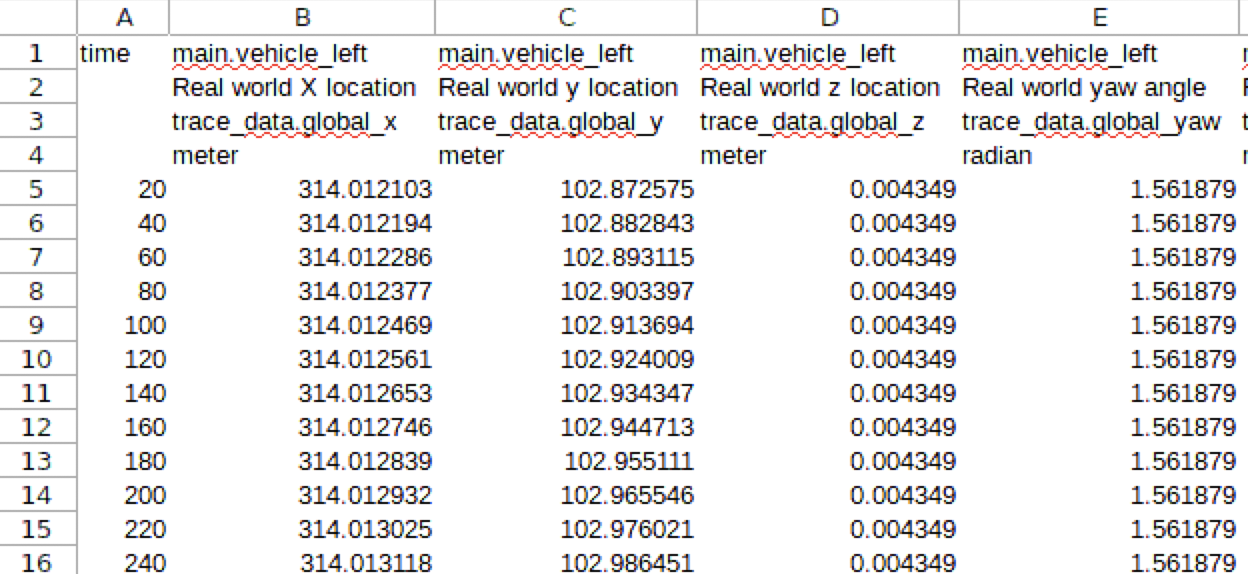
By default, the output of the trace command is sent to the Timeline (--target Timeline). You can also send the output to the log file (--target log) or dump it to a CSV file (--target csv).
Below is a partial screen capture of a CSV file created by the predefined traces. This trace captures the changing values of the attributes of all vehicles in the active scenario. For more information on predefined traces, see trace.
unset
Cancel an OSC2 configuration setting
unset config.<struct>.<field>
When an OSC2 configuration setting is canceled, the new value of the field is derived from the configuration as specified by the loaded OSC2 files.
In this example, the loaded OSC2 files specify the hooder.xodr map.
Foretify> set config.test.map="M73_FTX_highway.xodr"
Set map requires runtime environment restart
[INFO] Compilation done, 0 errors and 0 warnings reported


Initializing Foretify runtime...

Foretify> run
Starting new run...

[the run completes normally]

Foretify> unset config.test.map
   *** Error: No such variable 'test1_prepare____default_config_test_map'

Set map requires runtime environment restart
[INFO] Compilation done, 0 errors and 0 warnings reported


Initializing Foretify runtime...

Foretify> run
...
Starting the test ...
Running the test ...
[0] [MAIN] Starting the run (2 agents)
[0] [MAIN] -- Using map M78_FTX_suburban_hooder.xodr
...