Map-related constructs
Road-relative attributes
The road_speed and road_acceleration structs describe the speed, and acceleration of an actor relative to the start of the current frame of reference, such as an OpenDrive segment or a road.
road_speed
| Field name | Type | Description |
|---|---|---|
| lon | speed | The speed relative to the frame of reference in a direction parallel to the road center line in meters/second. |
| lat | speed | The speed relative to the frame of reference in a direction perpendicular to the road center line in meters/second. |
| lat_lane | float | The speed relative to the frame of reference in a direction perpendicular to the road center line in lanes/second. |
| ang | angular_speed | The angular speed relative to the frame of reference in radians/second. |
road_acceleration
| Field name | Type | Description |
|---|---|---|
| lon | acceleration | The acceleration relative to the frame of reference in a direction parallel to the road center line in meters/second^2. |
| lat | acceleration | The acceleration relative to the frame of reference in a direction perpendicular to the road center line in meters/second^2. |
| lat_lane | float | The acceleration relative to the frame of reference in a direction perpendicular to the road center line in lanes/second^2. |
| ang | angular_acceleration | The angular acceleration relative to the frame of reference in radians/second^2. |
Traffic-related API methods
| Signature | Description |
|---|---|
| map.center_side() -> av_side | Returns the side nearest the road center (left for right-hand traffic, right for left-hand traffic) |
| map.center_direction() -> direction | Returns the direction towards the road center (left for right-hand traffic, right for left-hand traffic) |
| map.curb_side() -> av_side | Returns the side towards the road shoulder (curb) (left for right-hand traffic, right for left-hand traffic) |
| map.curb_direction() -> direction | Returns the direction towards the road shoulder (curb) (left for right-hand traffic, right for left-hand traffic) |
| map.traffic_side() -> av_side | Returns right for right-hand traffic (default) or left for left-hand traffic |
Map-related modifiers
vehicle.along()
Specify on which road element a movement scenario such as vehicle.drive() should occur.
Modifier
along([element:] <road-element>
    [, at: <event>]
    [, start_offset: <length>]
    [, end_offset: <length>]
    [, exactly: <bool>]
    [, tolerance: <length>])
[element:] <road-element>- (Required) Is an instance of a
road_elementtype or its subtype, specifying the road element on the map where the drive occurs. <road-element> is a positional parameter. Using the element label is optional. at: <event>- (Optional) A parameter of type event. Here, the values can be
start,end, orall. The default isall, meaning that the specified road element is used throughout the current period. start_offset: <length>- (Optional) A parameter of type length that specifies a distance from the start of the road element. The default is -1m which is interpreted as no offset. The
start_offsetmust be positive and cannot exceed the length of the road element. Note that thestart_offset,end_offset, andexactlyparameters are exclusive. end_offset: <length>- (Optional) A parameter of type length that specifies a distance to the end of the road element. The default is -1m which is interpreted as no offset. The
end_offsetmust be positive and cannot exceed the length of the road element. Note that thestart_offset,end_offset, andexactlyparameters are exclusive. exactly: <bool>- (Optional) A parameter of type bool. When true, requires the actor to travel the road element from start to end during the movement. Valid only with
at: all. Note that thestart_offset,end_offset, andexactlyparameters are exclusive. <tolerance>: <length>- (Optional) A parameter of type length specifies the maximum allowed deviation from the expected offset on a road element. This parameter is active only if there is no flag obstructing the required offset. The default value is 1m.
The along() modifier describes the road element where the drive() should occur. The drive() can:
- Start and end on the specified road element if
at: allis specified or if theatparameter is omitted. - Start on the specified road element if
at: startis specified. - End on the specified road element if
at: endis specified. - Travel the full length of the specified element if
exactly: trueandat: allare specified.
A drive() without an along() modifier attached to it occurs on a completely arbitrary road segment on the specified map, subject to constraints posed by other drive scenarios that may affect it. For example, if the previous drive() of the same actor is set to end on a junction road element, the next drive() starts from the same junction even if not specified explicitly.
For the along() modifier, in addition to defining the relevant instance of a road element, you can also require a specific offset within the given road element. Set this offset by using one of the following parameters:
-
start_offset- Configure the required offset on the road element by specifying the distance from the start of the road element. -
end_offset- Configure the required offset on the road element by specifying the distance from the end of the road element. -
exactly- Require the vehicle to drive from the start to the end of the road element.
Notes
- along(r, exactly: true) is equivalent to
- along(r, start_offset: 0, at: start)
- along(r, end_offset: 0, at: end)
- along(r, start_offset: 0, at: start) is equivalent to along(r, end_offset: r.length, at: start)
- along(r, end_offset: 0, at: end) is equivalent to along(r, start_offset: r.length, at: end)
This example causes the car1.drive() to occur on an arbitrary place on the map:
scenario sut.drive_on_any_path:
   car1: vehicle

   do car1.drive() #no along modifier attached to the drive
See complete example.
This example requires the car1.drive() to occur on a highway at the start:
scenario sut.drive_on_highway:
    car1: vehicle
    hj: highway

    do car1.drive() with:
        along(hj, at: start)
See complete example.
Multiple along() modifiers can be attached to the same movement. The movement must occur on a place on the map that satisfies all specified along() modifiers. This example requires the car1.drive() to occur on a road with more than two lanes that is also an entry to a highway:
scenario sut.drive_to_junction:
    car1: vehicle
    he: highway_entry
    h: highway with: keep(it.lanes > 2)

    do car1.drive() with:
        along(he)
        along(h)
See complete example.
This example requires the car1.drive() to occur on a road element of type road starting 10 to 20 meters from the beginning of the road. If there is no road whose length is longer than or equal to 10m, this modifier causes a contradiction.
scenario sut.drive_on_road:
    r: one_way_road

    do sut.car.drive() with:
        along(r, start_offset: [10..20]m, at: start)
See complete example.
top.get_crossing_position()
Provides the roadside position reached when crossing a road with a given heading.
Modifier of the top actor
top.get_crossing_position(
    [in_position:] <msp_position>,
    [heading: <angle>,]
    [out_lat_offset: <length>,]
    [out_lon_offset: <length>,]
    [max_no_road_prefix: <length>,]
    [max_no_roadside_distance: <length>,]
    [max_allowed_gap: <length>,]
    out_position: <msp_position> )
[in_position:] <msp_position>- (Required) A parameter of type
msp_positionthat specifies a position on a road or roadside (not further thanmax_no_road_prefixfrom the road). Here, using the in_position label is optional. heading: <angle>- (Optional) A parameter of type angle that specifies a heading angle relative to the road at the given position. Negative values indicate the clockwise direction. Positive values indicate the counter-clockwise direction. The default is 90deg.
out_lat_offset: <length>- (Optional) A parameter of type length that specifies the lateral offset from the calculated roadside position. The
out_lat_offsetdirection is relative to the direction of the output lane (sidewalk, shoulder, or other). Negative values shift to the right, and positive values shift to the left. Alternatively, if the direction of the output lane is not known, you can useout_lon_offset. The default is 0m. out_lon_offset: <length>- (Optional) A parameter of type length that specifies the longitudinal offset from the calculated roadside position. The output position is the point at a distance
out_lon_offsetat the given heading from the calculated roadside position. Theout_lon_offsetis an alternative to usingout_lat_offset. The default is 0m. max_no_road_prefix: <length>- (Optional) A parameter of type length that limits the distance of the given
in_positionfrom the road. The default is 2m. Keep the default value in normal circumstances. max_no_roadside_distance: <length>- (Optional) A parameter of type length that specifies the max distance on the road before the roadside is reached. The default is 50m. Keep the default value in normal circumstances.
max_allowed_gap: <length>- (Optional) A parameter of type length that specifies the max continuous gap on the road that is not considered a roadside. The default is 1m. Keep the default value in normal circumstances.
out_position: <msp_position>- (Required) A parameter of type
msp_positionthat specifies anmsp_positionobject representing the roadside position arrived at when advancing from the input position in the given heading. The roadside is the first position on a shoulder, sidewalk, or no-lane.
Given a position expected to be on or near a road and a heading that is relative to the road position at the given position, the top.get_crossing_position modifier returns the roadside position reached when crossing the road with the given heading.
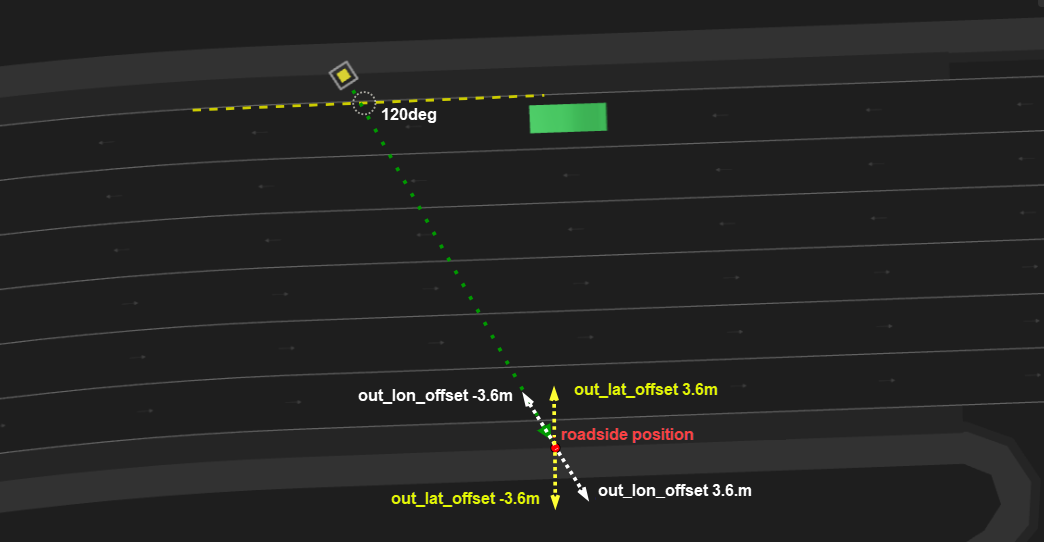
The roadside position is defined by the following:
-
If the road has a sidewalk then the roadside position is the border of the sidewalk with the driving lanes or shoulder.
-
Otherwise, if the road has a shoulder then the roadside position is the border of the shoulder with the driving lanes.
-
Otherwise, the roadside position is the border of the road.

The following image illustrates the out_lat_offset and out_lon_offset parameters. out_lat_offset is an optional parameter specifying the lateral offset from the calculated roadside position. If the direction of the output lane is not known, you can use out_lon_offset instead, which specifies the longitudinal offset from the calculated roadside position.
extend top.main:
    p: person
    start_cross: msp_position
    end_cross: msp_position
    two_way_road: road_with_opposite
    lon_offset: length with:
        keep(lon_offset >= 10m and lon_offset <= two_way_road.length-10m)

    # Generate 'start_cross'
    top.position_along_road(position: start_cross,
                            road: two_way_road,
                            lon_offset: lon_offset,
                            rightmost_lane: true, # rightmost driving lane
                            lat_offset: -200cm,    # negative sign == right direction
                            lat_reference: right) # lat_offset is from right side of rightmost_lane

    # Generate 'end_cross'
    top.get_crossing_position(in_position: start_cross, heading: 130deg, out_lon_offset: 1m, out_position: end_cross)

    do parallel(overlap: equal, duration: [10..15]s):
        m: p.move(end_cross, start_position: start_cross)
        a: sut.car.drive() with:
            a1: along(two_way_road, start_offset: lon_offset-10m, at: end)
See complete example.
top.path_along_drive() modifier
Place a pattern on a road along a planned drive. When placing a pattern, its anchor point is placed at a calculated position and then the rest of the pattern is placed relative to the anchor point. See crossing_path for more details.
Modifier of the top actor
path_along_drive(
    [cross_path:] <crossing-path>,
    [drive:] <any-scenario>,
    [lon_offset:] <length>
    [, lat_offset: <length>]
    [, rel_angle: <angle> ]
    [, force_on_road: <bool>]
    [, flexiline_lateral_offset_kind: <flexiline_lateral_offset_kind>])
[cross_path:] <crossing-path>- (Required) A parameter of type crossing-path that specifies the instance of the crossing path to place. Using the cross_path label is optional.
[drive:] <any-scenario>- (Required) A parameter of type any-scenario that specifies the instance of the drive along which the pattern should be placed. Here, using the drive label is optional.
lon_offset: <length>- (Required) A parameter of type length that specifies the offset on the drive at which the anchor point will be placed.
lat_offset: <length>- (Optional) A parameter of type length that specifies the lateral offset relative to the planned position on the drive. The default is 0m.
rel_angle: <angle>- (Optional) A parameter of type angle that specifies at which angle to rotate the pattern. The rotation occurs around the anchor point. The default is 0deg.
force_on_road: <bool>- (Optional) A parameter of type bool that ensures that the whole pattern is placed on some road (to prevent placing the pattern outside any road). The default is false.
flexiline_lateral_offset_kind- (Optional) Controls the way flexibleLine is placed when a lateral offset is used. If the lateral offset is 0m, then flexibleLine follows the original road exactly. The default value (
follow_by_lateral_offset) uses the following algorithm: For each point on the original road, add the lateral offset. This ensures that flexibleLine remains the same lateral offset. Another possible value ismove_by_lateral_offset. Using this value, the flexibleLine is first placed following the original road and then is moved laterally (which might result in different lateral offsets at different points if the followed road is curved). The default isfollow_by_lateral_offset.
scenario vehicle.car_crossing_path:
    ref_drive: any_scenario
    other_car: vehicle

    road_pattern: road_pattern_id with: keep(it in [oncoming, traverse])
    crossing_path: crossing_path with(kind: road_pattern)

    top.path_along_drive(crossing_path, drive: ref_drive,
                     lon_offset: [50..100]m,
                     lat_offset: [-2.5..2.5]m,
                     rel_angle: [-30..30]deg,
                     force_on_road: true)
See complete example.
top.path_along_route() modifier
Place a pattern along a road element. When placing a pattern, its anchor point is placed at a calculated position and then the rest of the pattern is placed relative to the anchor point. See crossing_path for more details.
Modifier of the top actor
path_along_route(
    [cross_path:] <crossing-path>,
    [road:] <road-element>
    [, lon_offset: <length>]
    [, lane_index: <int>]
    [, lat_offset: <length>]
    [, lat_reference: <line>]
    [, rel_angle:  <angle>]
    [, force_on_road: <bool>]
    [, flexiline_lateral_offset_kind: <flexiline_lateral_offset_kind>])
[cross_path:] <crossing-path>- (Required) Specifies an instance of the crossing path to place. Using the cross_path label is optional.
[road:] <road-element>- (Required) Specifies an instance of the road element where the pattern should be placed. Using the road label is optional.
lon_offset: <length>- (Optional) A parameter of type length that specifies the offset from the start of the road element to the anchor point.
lon_offsetmust be within the range [0m..road.length]. If not specified, it will be randomized. lane_index: <int>- (Optional) A parameter of type int that specifies the lane index, where to place the anchor point. The index 1 is the rightmost lane in the road_element at the relevant lon_offset. The default is 1.
lat_offset: <length>- (Optional) A parameter of type length that specifies the lateral offset from the chosen lane (its interpretation depends on the value of
lat_reference). The default is 0m. lat_reference: <line>- (Optional) A parameter of type line that defines how
lat_offsetis used. Possible values includecenter(default) which measures the offset from the lane center,rightwhich measures the offset from the right border of the lane, andleftwhich measures the offset from the left border of the lane. The default iscenter. rel_angle: <angle>- (Optional) A parameter of type angle that specifies the rotation relative to the original road. The default is 0deg.
force_on_road: <bool>- (Optional) A parameter of type bool that ensures that the whole pattern is placed on some road (to prevent placing the pattern outside any road). The default is false.
flexiline_lateral_offset_kind- (Optional) Controls the placement of flexibleLine when a lateral offset is used. If the lateral offset is 0m, then flexibleLine follows the original road exactly. The default value,
follow_by_lateral_offset, uses the following algorithm: for each point on the original road, add the lateral offset to ensure that flexibleLine maintains a consistent lateral offset. Another possible value ismove_by_lateral_offset; with this option, flexibleLine is initially placed to follow the original road and is then moved laterally, which may result in varying lateral offsets at different points if the road is curved. The default isfollow_by_lateral_offset.
top.position_along_drive()
Constrain an instance of type msp_position to have the specified input properties and to be on the path where a drive() occurs.
Modifier of the top actor
position_along_drive(
    [position:] <msp-position>,
    [drive:] <any-scenario>
    [, path_fraction: <int>]
    [, lon_offset: <length>]
    [, relative_lane_offset: <int>]
    [, lane_offset: <int>]
    [, lat_offset: <length>]
    [, lat_reference: <line>]
    [, force_on_road: <bool>])
[position:] <msp-position>- (Required) Specifies an instance in the current scenario of type
msp_position. This is the position that is constrained to be on the referenceddrive(). Using the position label is optional. [drive:] <any-scenario>- (Required) Specifies an instance in the current scenario of type any-scenario. This instance can be constrained to be the scenario containing the referenced drive. Using the drive label is optional.
path_fraction: <int>- (Optional) A parameter of type int not less than 0 or greater than 100, that specifies a longitudinal reference point by defining a fraction of the total drive route. The default is 0.
lon_offset: <length>- (Optional) A parameter of type length that specifies a longitudinal offset from the reference point on the route. The default is 0m.
relative_lane_offset: <int>- (Optional) A parameter of type int that specifies the lateral offset at the target position (after moving
lon_offsetorpath_fractionfrom drive start without lane changes), where each unit equals one lane width of the reference route lane. The default is 0. This parameter cannot be used withlane_offset. lane_offset: <int>- (Optional) A parameter of type int that specifies the number of lane changes from the start of the drive. The default is 0. This parameter cannot be used with
relative_lane_offset. lat_offset: <length>- (Optional) A parameter of type length that specifies the lateral offset from the chosen lane, which is the route’s lane after applying
relative_lane_offsetorlane_offset. The offset is calculated according to thelat_referenceline. The default is 0m. lat_reference: <line>- (Optional) A parameter of type line that specifies the reference line from which
lat_offsetis calculated. The default iscenterwhich measureslat_offsetfrom the lane center line. Options includerightto measurelat_offsetfrom the lane's right border, orleftto measure thelat_offsetfrom the lane's left border. The default iscenter. force_on_road: <bool>- (Optional) A parameter of type bool that determines whether to constrain the position within the lateral boundaries of the referenced road. When enabled, this ensures the position remains on the road surface, even if lateral offsets would otherwise place it off-road. The default is false.
    top.position_along_drive(start_pos, ref_drive, path_fraction: fraction,
        lat_offset: start_lat_offset, lon_offset: lon_offset)
    top.position_along_drive(end_pos, ref_drive, path_fraction: fraction,
        lat_offset: end_lat_offset, lon_offset: lon_offset)
See complete example.
top.position_along_road()
Constrain an instance of type msp_position to have the specified input properties and to be on the referenced road.
Modifier of the top actor
position_along_road(
    [position:] <msp-position>,
    [road:] <road-element>
    [, lon_offset: <length>]
    [, lane_index: <int>]
    [, at_lane_end: <bool>]
    [, innermost_lane: <bool>]
    [, outermost_lane: <bool>]
    [, leftmost_lane: (deprecated) <bool>]
    [, rightmost_lane: (deprecated) <bool>]
    [, lat_offset: <length>]
    [, lat_reference: <line>]
    [, force_on_road: <bool>]
    [, use_road_element_lane_indexing: <bool>])
Important Notes
-
You can only specify one of
innermost_lane,outermost_lane,lane_index, andat_lane_end. -
leftmost_laneandrightmost_laneare deprecated! Use the traffic-side agnostic parametersinnermost_laneandoutermost_laneinstead.
innermost_lane
- The lane closest to the lanes in the opposite direction.
- In right-hand traffic this corresponds to the leftmost lane.
- In left-hand traffic this corresponds to the rightmost lane.
outermost_lane
- The lane closest to the road shoulder or curb.
- In right-hand traffic this corresponds to the rightmost lane.
- In left-hand traffic this corresponds to the leftmost lane.
[position:] <msp-position>- (Required) Specifies an instance in the current scenario of type
msp_position. This is the position that is constrained to be on the referenced road. Using the position label is optional. [road:] <road-element>- (Required) Specifies an instance in the current scenario of type
road_element. This instance can be constrained to be the referenced road. Using the road label is optional. lon_offset: <length>- (Optional) A parameter of type length that sets a longitudinal offset from the reference point on the route. The default value is not less than 0m and not greater than road.length.
lane_index: <int>- (Optional) A parameter of type int that specifies the required lane index. The default value is 1.
at_lane_end: <bool>- (Optional) A parameter of type bool that specifies whether the lane has any outgoing connections. The default is false.
innermost_lane: <bool>- (Optional) A parameter of type bool that specifies whether the lane is an innermost lane, i.e., closest to the lanes in the opposite direction. In right-hand traffic this corresponds to the leftmost lane; in left-hand traffic this corresponds to the rightmost lane. The default is false.
outermost_lane: <bool>- (Optional) A parameter of type bool that specifies whether the lane is the outermost lane i.e., closest to the road shoulder or curb. In right-hand traffic this corresponds to the rightmost lane; in left-hand traffic this corresponds to the leftmost lane. The default is false.
leftmost_lane: <bool>(DEPRECATED)- (Optional) A boolean parameter that previously specified whether the lane is the leftmost lane. The default is false.
Deprecated: This parameter has been removed as of version 26.02. Use the traffic-side-agnostic parametersinnermost_laneoroutermost_laneinstead, which work correctly in both left-hand and right-hand traffic environments. rightmost_lane: <bool>(DEPRECATED)- (Optional) A boolean parameter that previously specified whether the lane is the rightmost lane. The default is false.
Deprecated: This parameter has been removed as of version 26.02. Use the traffic-side-agnostic parametersinnermost_laneoroutermost_laneinstead, which work correctly in both left-hand and right-hand traffic environments. lat_offset: <length>- (Optional) A parameter of type length that specifies the lateral offset from the chosen lane. The offset is calculated according to the specified
lat_reference. The default is 0m. lat_reference: <line>- (Optional) A parameter of type line that specifies the reference line from which
lat_offsetis calculated. The default iscenterwhich measureslat_offsetfrom the lane center line. Options includerightto measurelat_offsetfrom the lane's right border, orleftto measure thelat_offsetfrom the lane's left border. The default iscenter. force_on_road: <bool>- (Optional) A parameter of type bool that determines whether to constrain the position within the lateral boundaries of the referenced road. When enabled, this ensures the position remains on the road surface, even if lateral offsets would otherwise place it off-road. The default is false.
use_road_element_lane_indexing: <bool>- (Optional) A parameter of type bool, relevant only when
lane_indexis used, controls how thelane_indexis interpreted. When set to true,lane_indexis considered the index of the lane within the road element. When set to false,lane_indexis considered the index of the lane withinmsp_road. The default value is false.
Notes
- You can only specify one of
leftmost_lane,rightmost_lane,innermost_lane,outermost_lane,lane_index, andat_lane_end. - Regarding
use_road_element_lane_indexing: Consider a 4-lane road where the road element covers only the two leftmost lanes, and lane_index is set to 1. Ifuse_road_element_lane_indexingis set to true, lane 3 will be used (as the road element contains lanes 3 and 4). Ifuse_road_element_lane_indexingis set to false, lane 1 will be used.
top.position_along_road(position, road, lon_offset: [10..20]m)
See complete example.
top.roads_enter_junction_relation()
Constrain two instances of type one_way_road entering the same junction to have the relation specified by the input parameters.
Modifier of the top actor
roads_enter_junction_relation(
    [in_road1:] <one-way-road>,
    [in_road2:] <one-way-road>
    [, relative_direction: <dir> |
    max_angle_diff: <angle>, min_angle_diff: <angle>]
    [, clockwise_count: <int>])
)
[in_road1:] <one-way-road>- (Required) Specifies a road element of type
one_way_roadthat connects to a junction. Using the in_road1 label is optional. [in_road2:] <one-way-road>- (Required) Specifies a road element of type
one_way_roadthat connects to a junction. Using the in_road2 label is optional. relative_direction: <dir>- (Optional) Constrains in_road2 to be at the specified direction relative to in_road1. One of
undefined,slight_right,mid_right,sharp_right,any_right,opposite,sharp_left,mid_left,slight_left,any_left. For example, to constrain in_road2 to be on the right side of in_road1, useany_rightor any of the more specific right values. The default isundefined. For more details seerelative_directionin the Predefined enumerated types table.

max_angle_diff: <angle>- (Optional) A parameter of type angle that defines the angle relation between the two roads. The angle is the global angle of the end of the road. The default is 360degree. Use this parameter together with
min_angle_diffifrelative_directiondoes not give the required constraint granularity. min_angle_diff: <angle>- (Optional) A parameter of type angle that defines the angle relation between the two roads. The angle is the global angle of the end of the road. The default is 0degree. Use this parameter together with max_angle_diff if
relative_directiondoes not give the required constraint granularity. clockwise_count: <int>- (Optional) A parameter of type int that defines the number of entry roads between in_road1 and in_road2 (if they are adjacent). The default is 0 which means it does not constrain anything (in_road1 and in_road2 must be different). If
clockwise_countis specified in conjunction withmin_angle_diff,max_angle_difforrelative_directionand values that specify all constraints cannot be found, a solver error is issued.
Use roads_enter_junction_relation() to label the roads of a junction that you want to use as entries, constrain their relationship to the in_road of a roads_follow_junction instance, and use the along() modifier of a vehicle's drive() scenario to constrain the vehicle to enter on one of the labeled roads.
Used with a four-way junction such as one found on the OpenDrive map Town04.xodr, the Complete example shown below does the following:
-
Creates three vehicles:
- vehicle_left
- vehicle_right
- vehicle_opposite
-
Creates an instance of roads_follow_in_junction.
OSC2 code: create instance of roads_follow_in_junctionpath_over_junction: roads_follow_in_junctionSee roads_follow_in_junction for a description of this road element.
-
Identifies each of three of the roads connected to the junction with an enter_ and exit_ label, for example:
OSC2 code: create labels for one_way_road elementsenter_from_left_road: one_way_road exit_to_right_road: one_way_roadThe fourth road uses the in_road and out_road labels defined in path_over_junction.
-
Uses top.roads_enter_junction_relation() to constrain each of the roads with an enter_ label relative to path_over_junction.in_road, for example:
OSC2 code: roads_enter_junction_relation()top.roads_enter_junction_relation(path_over_junction.in_road, enter_from_left_road, relative_direction: mid_left, clockwise_count: 1) -
Uses top.roads_exit_junction_relation() to constrain each of the roads with an exit_ label relative to path_over_junction.out_road.
OSC2 code: roads_exit_junction_relation()top.roads_exit_junction_relation(path_over_junction.out_road, exit_to_right_road, relative_direction: mid_right, clockwise_count: 1) -
Uses along() to constrain the drive() of each vehicle so that:
- The sut.car enters on path_over_junction.in_road and exits on path_over_junction.out_road.
- vehicle_left enters on enter_from_right_road and exits on exit_to_left_road.
- vehicle_right enters on enter_from_left_road and exits on exit_to_right_road.
- vehicle_opposite enters on enter_from_opposite_road and exits on exit_to_opposite_road.
For example:
OSC2 code: constrain vehicle path with along()vehicle_left.drive() with: along(enter_from_right_road, end_offset: [10..20]m, at: start) along(exit_to_left_road, start_offset: [10..30]m, at: end)
extend top.main:
vehicle_left: vehicle
vehicle_right: vehicle
vehicle_opposite: vehicle
path_over_junction: roads_follow_in_junction
enter_from_left_road: one_way_road
exit_to_right_road: one_way_road
enter_from_opposite_road: one_way_road
exit_to_opposite_road: one_way_road
enter_from_right_road: one_way_road
exit_to_left_road: one_way_road
# 'enter_from_left_road' enters the junction from left of 'path_over_junction.in_road' and
# 'enter_from_left_road' is the first junction entry counting clockwise from 'path_over_junction.in_road'
top.roads_enter_junction_relation(path_over_junction.in_road,
    enter_from_left_road,
    relative_direction: mid_left,
    clockwise_count: 1)
# 'enter_from_opposite_road' enters the junction from opposite direction of 'path_over_junction.in_road' and
# 'enter_from_opposite_road' is the second junction entry counting clockwise from 'path_over_junction.in_road'
top.roads_enter_junction_relation(path_over_junction.in_road,
enter_from_opposite_road,
relative_direction: opposite,
clockwise_count: 2)
# 'enter_from_right_road' enters the junction from right of 'path_over_junction.in_road' and
# 'enter_from_right_road' is the third junction entry counting clockwise from 'path_over_junction.in_road'
top.roads_enter_junction_relation(path_over_junction.in_road,
enter_from_right_road,
relative_direction: mid_right,
clockwise_count: 3)
# 'exit_to_right_road' exits the junction to right of 'path_over_junction.out_road' and
# 'exit_to_right_road' is the first junction exit counting clockwise from 'path_over_junction.out_road'
top.roads_exit_junction_relation(path_over_junction.out_road,
    exit_to_right_road,
    relative_direction: mid_right,
    clockwise_count: 1)
# 'exit_to_opposite_road' exits the junction to opposite direction of 'path_over_junction.out_road' and
# 'exit_to_opposite_road' is the second junction exit counting clockwise from 'path_over_junction.out_road'
top.roads_exit_junction_relation(path_over_junction.out_road,
exit_to_opposite_road,
relative_direction: opposite,
clockwise_count: 2)
# 'exit_to_left_road' exits the junction to left of 'path_over_junction.out_road' and
# 'exit_to_left_road' is the third junction exit counting clockwise from 'path_over_junction.out_road'
top.roads_exit_junction_relation(path_over_junction.out_road,
exit_to_left_road,
relative_direction: mid_left,
clockwise_count: 3)
do serial():
parallel(duration: [4..20]s, overlap: equal):
sut.car.drive() with:
along(path_over_junction.in_road, end_offset: [10..30]m, at: start)
along(path_over_junction.out_road, start_offset: [10..30]m, at: end)
vehicle_left.drive() with:
    along(enter_from_right_road, end_offset: [10..20]m, at: start)
    along(exit_to_left_road, start_offset: [10..30]m, at: end)
vehicle_right.drive() with:
along(enter_from_left_road, end_offset: [10..20]m, at: start)
along(exit_to_right_road, start_offset: [10..30]m, at: end)
vehicle_opposite.drive() with:
along(enter_from_opposite_road, end_offset: [10..20]m, at: start)
along(exit_to_opposite_road, start_offset: [10..30]m, at: end)
See complete example.
top.roads_exit_junction_relation()
Constrain two instances of type one_way_road exiting the same junction to have the relation specified by the input parameters.
Modifier of the top actor
roads_exit_junction_relation(
    [out_road1:] <one-way-road>,
    [out_road2:] <one-way-road>
    [, relative_direction: <dir> |
    max_angle_diff: <angle>, min_angle_diff: <angle>]
    [, clockwise_count: <int>])
)
[out_road1:] <one-way-road>- (Required) Specifies a road element of type
one_way_roadthat connects to a junction. Using the in_road1 label is optional. [out_road2:] <one-way-road>- (Required) Specifies a road element of type
one_way_roadthat connects to a junction. Using the in_road2 label is optional. relative_direction <dir>- (Optional) Constrains out_road2 to be at the specified direction relative to out_road1. One of
undefined,slight_right,mid_right,sharp_right,any_right,opposite,sharp_left,mid_left,slight_left,any_left. For example, to constrain out_road2 to be on the right side of out_road1, useany_rightor any of the more specific right values. The default isundefined. For more details seerelative_directionin the Predefined enumerated types table.

max_angle_diff: <angle>- (Optional) A parameter of type angle that defines the angle relation between the two roads. The angle is the global angle of the end of the road. The default is 360degree. Use this parameter together with
min_angle_diffifrelative_directiondoes not give the required constraint granularity. min_angle_diff: <angle>- (Optional) A parameter of type angle that defines the angle relation between the two roads. The angle is the global angle of the end of the road. The default is 0degree. Use this parameter together with
max_angle_diffifrelative_directiondoes not give the required constraint granularity. clockwise_count: <int>- (Optional) A parameter of type int that defines the number of exit roads between out_road1 and out_road2 (if they are adjacent). The default is 0 which means it does not constrain anything (out_road1 and out_road2 must be different). If
clockwise_countis specified in conjunction with min_angle_diff,max_angle_difforrelative_directionand values that specify all constraints cannot be found, a solver error is issued.
Use roads_exit_junction_relation() to label the roads of a junction that you want to use as exits, constrain their relationship to the out_road of a roads_follow_junction instance, and use the along() modifier of a vehicle's drive() scenario to constrain the vehicle to exit on one of the labeled roads.
See example for top.roads_enter_junction_relation().
Road Data coverage
To collect road element data, do the following:
- Activate road data collection with track_road_element().
- Collect data with cover, record, and so on.
Notes
- This construct collects data for the fields that are defined for a specific road element type. For example, for the road element highway, you can collect length, legal_speed, and lanes. This construct does not collect any map-specific information.
- In Foretify's Map view you can highlight elements of a chosen type, so you can see exactly where these elements are. In Foretify's Visualizer View you can see when the car passed through a specific road element.
track_road_element()
Activate road data collection
Special modifier
[<label>:] <object-instance>.track_road_element(<road-element-type>,
        [, event: <event-name>]
        [, data: <data-name>]
        trigger: <trigger>)
Note
This modifier can only appear as a scenario member (not inside a do block).
<label>- (Optional) Is used to create the name of the event and the data variable if the <event-name> and <data-name> parameters are not passed.
<object-instance>- (Required) Is an instance of a moving object, such as a vehicle or person.
<road-element-type>- (Required) Is the name of a
road_elementtype or its subtype, specifying the road element on the map where the specified object moves. <road-element-type> is a positional parameter. <event-name>- (Optional) Is the name of the event that is emitted when the physical object passes through a road element of the specified type. The default name is <label>_event.
<data-name>- (Optional) Is the name of variable containing the data collected when the event occurs. The default name is <label>_data.
<trigger>- (Required) Is start or all, specifying whether data collection should occur only in the single cycle when the physical object starts to pass through the road element or on every clock cycle while the object is in the road element.
The purpose of this construct is to determine whether a movement was executed on an appropriate road element, and to collect data on the attributes of the road element.
This construct collects data for the fields that are defined for that road element type. For example, for the road element highway, you can collect length, legal_speed, and lanes. This construct does not collect any map-specific information.
When this modifier is declared in a scenario:
- At the start of that scenario instance, Foretify starts tracking that road type.
- At the end of that scenario instance, Foretify stops tracking that road type.
- When the object passes through that road type, an event is emitted with a variable containing the road element data at that event.
- The event is emitted either at the start of the road element or every clock cycle according to the trigger parameter.
If the simulation ends while the object is on a road element of the specified type, that element is also recorded (if possible).
You can cover the road data using cover or record. You must use the event and data names as specified in track_road_element().
In the following example, because car1 drives on two road elements of type town_junction and the trigger is start, the expected number of coverage hits is two. However, the results depend in part on the number of elements of type town_junction on the map, the duration of the scenario as well as other constraints.
import "$FTX_PACKAGES/common/osc/utils/av_utility_scenarios.osc"
import "$FTX/env/basic/exe_platforms/model_ssp/config/model_sumo_config"

extend test_config:
    set map = "$FTX_PACKAGES/maps/Town04.xodr"

scenario sut.track_junction_start:
    elem_1: internal_road
    elem_2: internal_road

    junction_dir: sut.car.track_road_element(internal_road, trigger:start)
    cover(junction_direction, expression:junction_dir_data.direction, event: junction_dir_event)

    do s1: serial():
        d2: sut.car.drive() with:
            speed(speed: 40kph, run_mode: best_effort)
            along(elem_1)
        d3: sut.car.drive() with:
            keep_speed()
            along(elem_2)

extend top.main:

    do sut.track_junction_start()
In the following example, because the trigger is all, a coverage hit is expected for every simulation step that car1 traverses a road_with_sign element.
import "$FTX_PACKAGES/common/osc/utils/av_utility_scenarios.osc"
import "$FTX_BASIC/exe_platforms/sumo_ssp/config/sumo_config.osc"

extend test_config:
    set map = "$FTX_PACKAGES/maps/M36_FTX_suburban_4way_stops.xodr"

scenario top.track:
    car1: vehicle
    rws: road_with_sign

    rws_all: car1.track_road_element(road_with_sign, trigger: all)
    cover(sign_type, expression: rws_all_data.sign_type, event: rws_all_event)

    do s1: serial(duration: [9..30]s):
        d1: car1.drive() with:
            speed(speed: 40kph, run_mode: best_effort)
        d2: car1.drive() with:
            keep_speed()
            along(rws)

extend top.main:
    do t1: top.track()
Coordinate systems
Foretify handles data related to the position of an object using one of three different coordinate systems, depending on the context: the Inertial System, the Road/Lane System, and the Local System. See Foretify's coordinate system for details.
Writing scenarios with map specifications
cut_in
Below is an example of the cut_in() scenario that takes place at an arbitrary place on the map. Note that no road element is specified in this example:
scenario sut.cut_in:
    car1: vehicle # The "cut-in" car
    side: av_side # The side of which car1 cuts in, left or right

    do serial():
        change_lane: parallel(duration:[1.5..3]second, overlap:equal):
            sut.car.drive()
            car1.drive() with:
                l1: lane(side_of: sut.car, side: side, at: start)
                p1: position(time: [0.5..1]second, ahead_of: sut.car, at: start)
                l2: lane(same_as: sut.car, at: end)
                p2: position(time: [1.5..2]second, ahead_of: sut.car, at: end)
See complete example.
The following example specifies that the cut_in() scenario occur on a highway with a minimum of three driving lanes:
scenario sut.cut_in_on_highway:
    car1: vehicle # The "cut-in" car
    side: av_side # The side of which car1 cuts in, left or right
    h: highway with: keep(it.lanes >= 3)

    do serial():
        change_lane: parallel(duration:[1.5..3]second, overlap:equal):
            sut.car.drive()
            car1.drive() with:
                lane(side_of: sut.car, side: side, at: start)
                position(time: [0.5..1]second, ahead_of: sut.car, at: start)
                lane(same_as: sut.car, at: end)
                position(time: [1.5..2]second, ahead_of: sut.car, at: end)
                along(h)
See complete example.
Note that there is no along() modifier on the path of sut.car. This is because car1 and sut.car are connected by lane() and position() modifiers that implicitly require them to be on the same road element. However, adding an along() modifier on sut.car for better readability is allowed.
traverse_junction
scenario vehicle.traverse_junction:
    car: vehicle
    path: roads_follow_in_junction # Junction to traverse

    do serial(duration: [1..10]second):
        enter: car.drive() with:
            along(path.in_road)
        inside: car.drive() with:
            along(path.internal_road)
        exit: car.drive() with:
            along(path.out_road)
See complete example.
Calculating road curvature
The following example shows how to calculate the curvature of the road at a trailer's center. This calculation can later be used for other calculations.
extend truck:
   def get_road_curvature_at_trailer() -> float is:
      var lane_pos_candidates := map.global_to_lane_coordinates_on_route(trailer_1.state.global_position.coord, planned_path)
      if not lane_pos_candidates.is_empty():
         var trailer_lane_pos := lane_pos_candidates[0]
         var curv_interval := trailer_lane_pos.lane.curvature_intervals.longitudinal_values.last(it.start_lon_offset < trailer_lane_pos.lon_offset)
         return curv_interval.curvature
      else:
         # Failed to find lane position of trailer
         return 0
See complete example.
You can use the following code to convert curvature to radius:
var road_radius = 1meter * (1 / get_road_curvature_at_trailer())
Note
In the case of a straight road, get_road_curvature_at_trailer() returns 0. Be careful when calculating the radius, since it will fail for a straight road (division by 0).
If the road is straight, the returned value is 0. In addition, the returned value can be 0 if the trailer goes off the road.
map.global_to_lane_coordinates_on_route
Convert provided global coordinates to lane coordinates.
method
var lane_pos_candidates := map.global_to_lane_coordinates_on_route(trailer_1.state.global_position.coord, planned_path)
See Example of calculating road radius for a trailer's position for a complete code example that uses map.global_to_lane_coordinates_on_route.
The map.global_to_lane_coordinates_on_route method tries to convert provided global coordinates to lane coordinates with search limited to a provided list of roads. Typically this method is used with vehicle.planned_path. The method returns a list of potential coordinates. It returns a list because it's possible that several roads pass through the same global position.
The search is completed as follows:
-
Find any position on one of the reference lines of all candidate lanes, such that there is a perpendicular to the reference line from that point that goes through the global coordinates.
-
If the distance of the perpendicular line is greater than the lane width, consider this candidate only if no other candidates are found.
-
If the distance of the perpendecular line is less then the lane width (meaning the global position is within the lane boundaries), add this position to the result.
lane.curvature_intervals
Provides a list of curvatures along a given lane.
list
var curv_interval := trailer_lane_pos.lane.curvature_intervals.longitudinal_values.last(it.start_lon_offset < trailer_lane_pos.lon_offset)
See Example of calculating road radius for a trailer's position for a complete code example that uses lane.curvature_intervals.
lane.curvature_intervals is a list of curvatures along the lane ordered by longitudinal offset. The lane_longitudinal_curvature struct includes the following fields:
-
lane: The lane for which these curvatures are calculated.
-
longitudinal_values: List of curvature_interval instances (ordered by start_lon_offset) which include:
-
start_lon_offset: Starting longitudinal offset of the start of the curvature
-
curvature: The calculated curvature (average between min_curvature and max_curvature)
-
min_curvature: Minimum calculated curvature (from start_lon_offset until the next instance of curvature_interval)
-
max_curvature: Maximum calculated curvature (from start_lon_offset until the next instance of curvature_interval)
-
The curvature calculation builds instances of the curvature_interval that cover the longest interval possible. A new instance of curvature_interval is created only if the change in curvature is more than three times the curvature_interval (or the curvature changes direction).