Physical object actors
physical_object
The physical_object has the following fields:
| Name | Type | Description |
|---|---|---|
| internal_collision_detection | bool | If true (the default), Foretify performs collision detection for this object using its bounding box. |
| simulator_collision_detection | bool | If true, the simulator performs collision detection for this object. By default, this is true on for the SUT. |
| bbox | bounding_box | The square or rectangular box formed by the boundaries of the object. |
| mass | mass | The weight of the object, constrained to be not less than 0kg. |
| compound_object | compound_physical_object | Pointer to the wrapping compound object. |
| physical_filters | physical_filters | Defines the filter applied to calculated fields in physical_object_state. Filtering may be necessary because calculations are performed using a numerical approach, not an analytical approach, so noise may be introduced. See physical_filters for field descriptions. |
| initial_bm | behavioral_model | For objects that are controlled by the simulator, set the model_kind field to one of the models supported by that simulator. Default: none. See Configuring NPC vehicles. |
Notes
Regarding collision_detection:
- If there are two objects with colliding bounding boxes, but for one of the objects Foretify collision detection is disabled, the collision is not reported by Foretify. For the simulator, the behavior might be different, depending on the simulator.
- Normally you should not disable collision detection by Foretify. Disable it only for specific use cases such as when higher precision is required and you know the simulator can provide it.
The fields of the physical_object have the following constraints:
- keep(soft compound_object.bbox.length == bbox.length)
- keep(soft compound_object.bbox.width == bbox.width)
- keep(soft compound_object.bbox.height == bbox.height)
- keep(soft compound_object.mass == mass)
- keep(default internal_collision_detection == true)
- keep(default simulator_collision_detection == false)
physical_object_state
The physical_object_state type has the following fields:
| Name | Type | Description |
|---|---|---|
| global_position | global_position | Current position of the object. |
| speed | speed | Current speed of the object. |
| raw_global_speed | global_speed | Momentary global speed (might have spikes). |
| global_speed | global_speed | Current speed in global coordinates. |
| local_speed | local_speed | Current speed projected on yaw and yaw perpendicular. |
| raw_global_acceleration | global_acceleration | Momentary global acceleration (might have spikes). |
| global_acceleration | global_acceleration | The current acceleration in global coordinates. |
| local_acceleration | local_acceleration | Acceleration of local_speed components. |
| raw_global_jerk | global_jerk | Momentary global jerk (might have spikes). |
| global_jerk | global_jerk | Global jerk. |
| local_jerk | local_jerk | Local jerk components. |
| global_angular_speed | global_angular_speed | Global angular speed. |
| raw_global_angular_speed | global_angular_speed | Momentary global angular speed. |
For fields that relate to coordinates, see Foretify's coordinate system.
bounding_box
The bounding_box type has the following fields:
| Name | Type | Description |
|---|---|---|
| length | length | Length of the bounding box. |
| width | length | Width of the bounding box. |
| height | length | Height of the bounding box. |
physical_filters
The fields of physical_filters are as follows:
| field | default |
|---|---|
| global_speed_filter | moving_average, default window_size of 4 |
| global_acceleration_filter | moving_average, default window_size of 4 |
| global_jerk_filter | moving_average, default window_size of 24 |
| global_angular_speed_filter | moving_average, default window_size of 4 |
| throttle_filter | moving_average, default window_size of 4 |
The following example shows how to replace the filter, for example, to return to the previous value instead of the current one. The example uses global_speed_filter, but this works for the other physical_filter fields as well.
extend filter_type : [return_previous]
# new speed filter to return last value.
struct global_speed_filter_previous inherits global_speed_filter (filter_type==return_previous):
    var last_value : global_speed = new # so, first result wouldn't be null
    var steps := 0
    def update_value(sampled_value: global_speed) -> global_speed is only:
        result = last_value # set result to last value
        last_value = sampled_value

# in this example, we change sut_vehicle speed filter to the newly introduced filter
extend sut_vehicle:
    keep(physical_filters.global_speed_filter.filter_type == return_previous)
Foretify provides two default filters for each type of physical_filter. The following shows the default filters for global_speed_filter:
-
unfiltered_global_speed_filter: a simple pass-through filter with no parameters
-
moving_average_global_speed_filter: a filter with a single parameter, window_size
The following example overrides all speed_filters of type moving_average to set the window size to 10 rather than the default of 4. The example uses global_speed_filter but this works for other physical_filter fields, as well.
extend vehicle:
    keep(physical_filters.global_speed_filter.as(moving_average_global_speed_filter)\
    .window_size == 10)
You can access raw values for global speed, global acceleration, global jerk (the derivative of acceleration), global angular speed, and throttle level by using the raw variant, as shown in the following example (for global speed).
struct physical_object_state:
    ...
    # Momentary global speed (might have spikes)
    #
    var raw_global_speed: global_speed

    # Current speed in global coordinates
    #
    var global_speed: global_speed
physical_object methods
Usage example
In this example, the user-defined get_object_attributes() method prints the width and length of each physical object in the simulation.
import "$FTX_BASIC/exe_platforms/sumo_ssp/config/sumo_config.osc"

extend test_config:
    set map = "$FTX_PACKAGES/maps/straight_long_road.xodr"

extend top.main:
    group: common_plain_object_group
    group_position_params: plain_object_group_position_params with:
        keep(it.min_lat_offset == -2.1m)
        keep(it.max_lat_offset == -1.8m)
        keep(it.min_distance_between_objects == 5meter)
        keep(it.max_distance_between_objects == 10meter)

    top.plain_object_group_position_along_drive(group_position_params, group, sut_drive)

    def get_object_attributes() is:
        for obj in traffic.physical_objects:
            logger.log_info("The object is $(obj.get_width()) wide and $(obj.get_length()) long")

    do serial:
        parallel(overlap:equal):
            group_exists: group.group_exists(group_position_params)
            sut_drive: sut.car.drive() with:
                speed(speed: [40..80]kph)
                duration([3..7]s)
        call get_object_attributes()
physical_object.get_acceleration()
Use this method to retrieve the object's updated acceleration.
get_acceleration()-> acceleration
physical_object.get_bounding_box()
Use this method to retrieve a list of corners of the rotated bounding box.
get_bounding_box()-> list of msp_coordinates
physical_object.get_global_acceleration()
Use this method to retrieve the object's updated acceleration in global coordinates.
get_global_acceleration()-> global_acceleration
physical_object.get_global_position()
Use this method to retrieve the object's updated position in global coordinates.
get_global_position()-> global_position
physical_object.get_global_speed()
Use this method to retrieve the object's updated speed in global coordinates.
get_global_speed()-> global_speed
physical_object.get_height()
Use this method to retrieve the object's height.
get_height()-> length
physical_object.get_length()
Use this method to retrieve the object's length.
get_length()-> length
physical_object.get_local_acceleration()
get_local_acceleration() -> local_acceleration
physical_object.get_local_speed()
Use this method to retrieve the object's speed in local coordinates.
get_local_speed() -> local_speed
physical_object.get_mass()
Use this method to retrieve the object's mass.
get_mass()-> mass
physical_object.get_occupied_driving_lanes()
Use this method to retrieve all driving lanes that the object occupies at its current position. A driving lane is considered occupied if any part of the object's bounding box intersects it.
get_occupied_driving_lanes()-> list of msp_lane
physical_object.get_occupied_lanes()
Use this method to retrieve all lanes (driving and non-driving) that the object occupies at its current position. A lane is considered occupied if any part of the object's bounding box intersects it.
get_occupied_lanes()-> list of msp_lane
physical_object.get_prev_speed()
Use this method to retrieve the object's speed in the previous step.
get_prev_speed()-> speed
physical_object.get_speed()
Use this method to retrieve the object's updated speed.
get_speed()-> speed
physical_object.get_width()
Use this method to retrieve the object's width.
get_width()-> length
physical_object.is_passable()
Use this method to check if object can be passed through. Pass-through objects are ignored when calculating TTC or collision.
is_passable()-> bool
physical_object.is_vru()
Use this method to check if the object is a Vulnerable Road User (VRU).
is_vru()->bool
get_ttc_to_object()
Use this method to calculate the time to collision (TTC) between the current physical_object and the other physical_object.
def get_ttc_to_object(to_object: <physical_object>) -> time
to_object: <physical_object>- (Required) The other object.
The TTC is calculated using the objects' initial global position and constant speed. This projection follows a straight line, evaluating movements in steps (config.test.ttc_calculation_step_size) up to a maximum limit (config.test.ttc_calculation_limit) or until a collision is identified.
The diagram below illustrates the steps through which the method iterates until finding a collision.
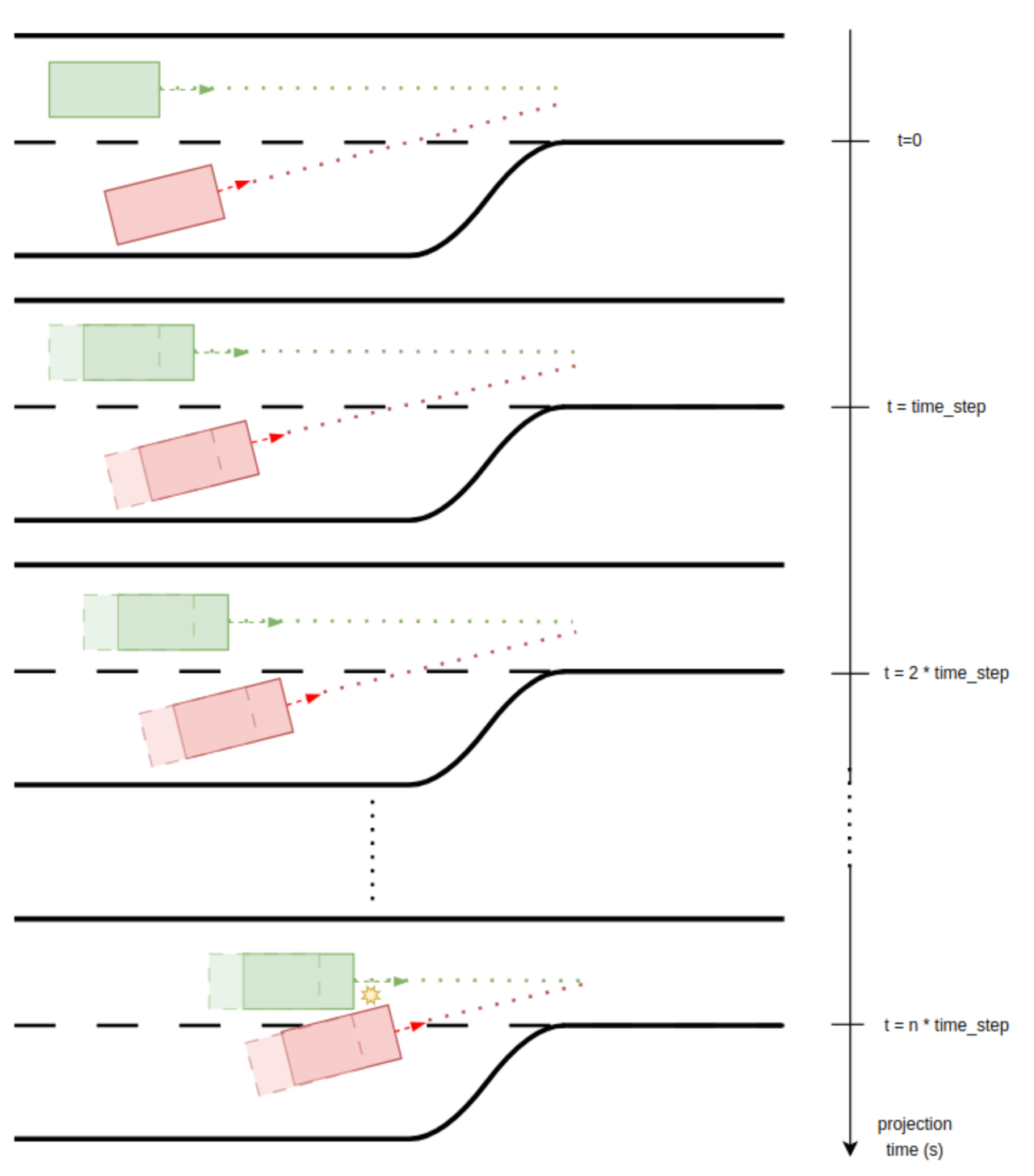
In the image above, based on the initial global speed and positions of two vehicles at time t=0, projections are made in iterations of time_step. A potential collision is detected at n * time_step, so the returned value is n * time_step.
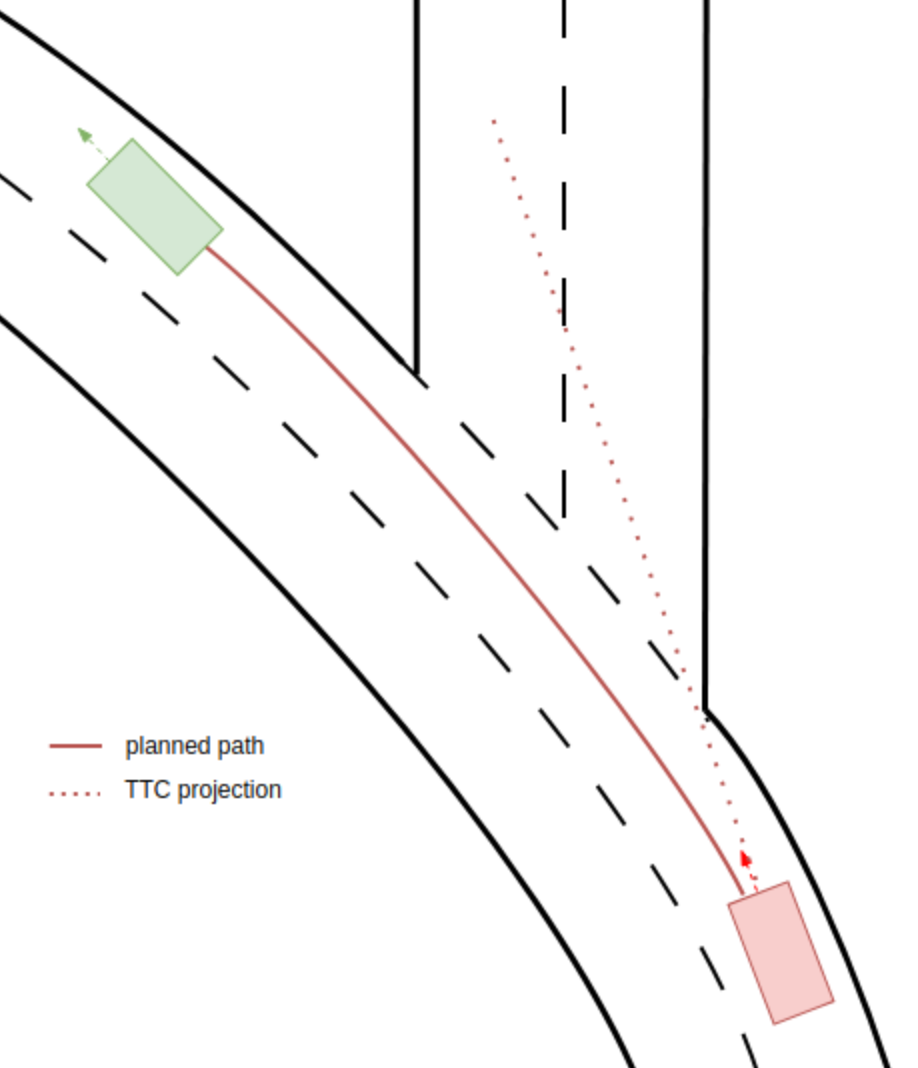
The projections made by the method are based only on the global speed and position of the object at the time_step when the method is called, without taking into consideration the topology of the road or geometry of the planned path.
Sometimes the projection does not follow the planned path, and the get_ttc_to_object() method will return an infinite value, even though the object might be on a collision path with another object if it is driving in a planned path. The image below presents such a case:
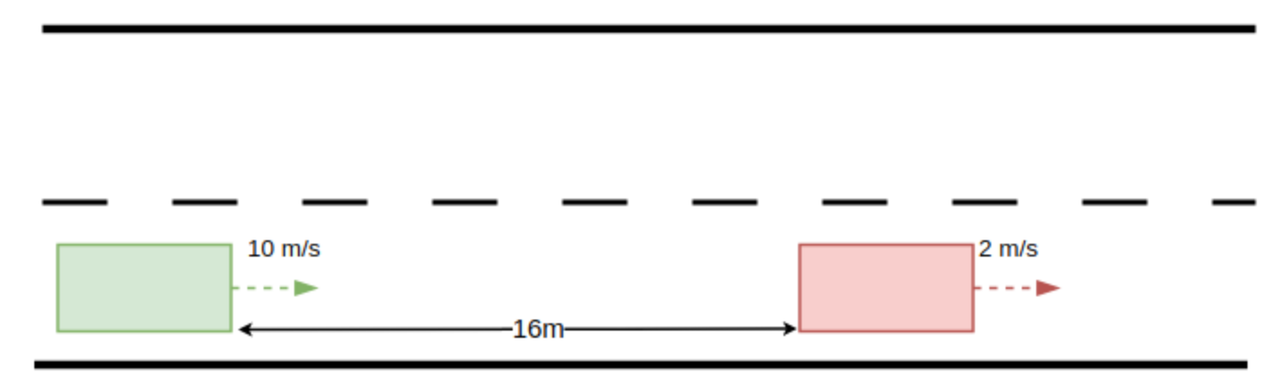
In the image below, the green object moves at 10 meters per second, and the red object moves at 2 meters per second, with an initial distance of 16 meters between them on a straight road. In this case, the get_ttc_to_object() method returns a TTC of 2 seconds because a collision is detected after 20 iterations of projected states, using a step size of 100 milliseconds.
    var ttc_sut_npc1_at_start: time = sample(
        sut.car.get_ttc_to_object(npc1_ahead_vehicle),@start)

    record (ttc_sut_npc1_at_start, unit: s, event: start,
        text: "Time to Collision (TTC) between SUT and npc1 at start")

    min_ttc_stat: statistics(sample_type: time, measurement: minimum)
    on @top.clk:
        min_ttc_stat.add_sample(sut.car.get_ttc_to_object(npc1_ahead_vehicle))

    record(min_sut_npc1_ttc, expression: min_ttc_stat.compute(), range: [0.5..6], every: 0.5, unit: s, text: "Minimum TTC between SUT and npc1")
See the complete example here.
The get_ttc_to_object() method returns infinite time (inf) in the following cases:
- If the enclosing object and to_object have a TTC greater than expected. The maximum time considered in the projection is defined by
config.test.ttc_calculation_limit, which has a default value of 10 seconds. - If the straight projections of the two objects do not intersect (for example, the vehicle driving in a curved road).
- If the method is called between two vehicles driving on opposite roads. Even if their projections overlap, the TTC will be infinite because they are driving on opposite roads.
get_mttc_to_object()
Use this method to calculate the modified time to collision (mTTC) between the current physical_object and the other physical_object.
def get_mttc_to_object(to_object: <physical_object>) -> time
to_object: <physical_object>-
(Required) The other object.
The mTTC is calculated using a projection based on the objects' initial global position, speed, and acceleration, assuming constant acceleration throughout the projection. This straight-line projection uses a step size (config.test.ttc_calculation_step_size) to evaluate each movement up to a maximum limit (config.test.ttc_calculation_limit) or until a collision is identified.
The diagram below illustrates the intermideatory steps through which the method iterates until finding a collision.
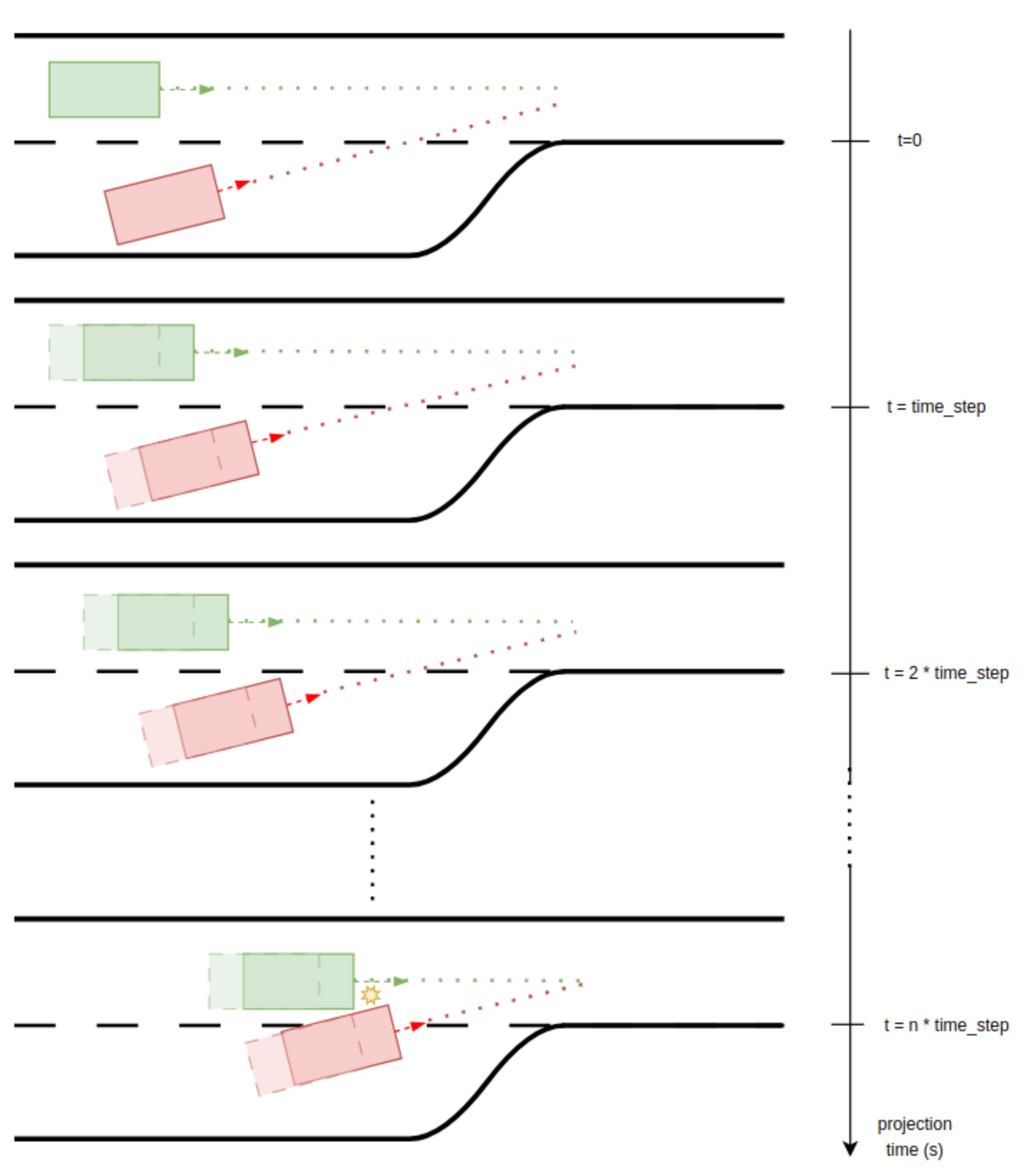
In the image above, based on the initial global speed, positions, and acceleration of two vehicles at time t=0, projections are made in iterations of time_step. A potential collision is detected at n * time_step, hence the returned value is n * time_step.
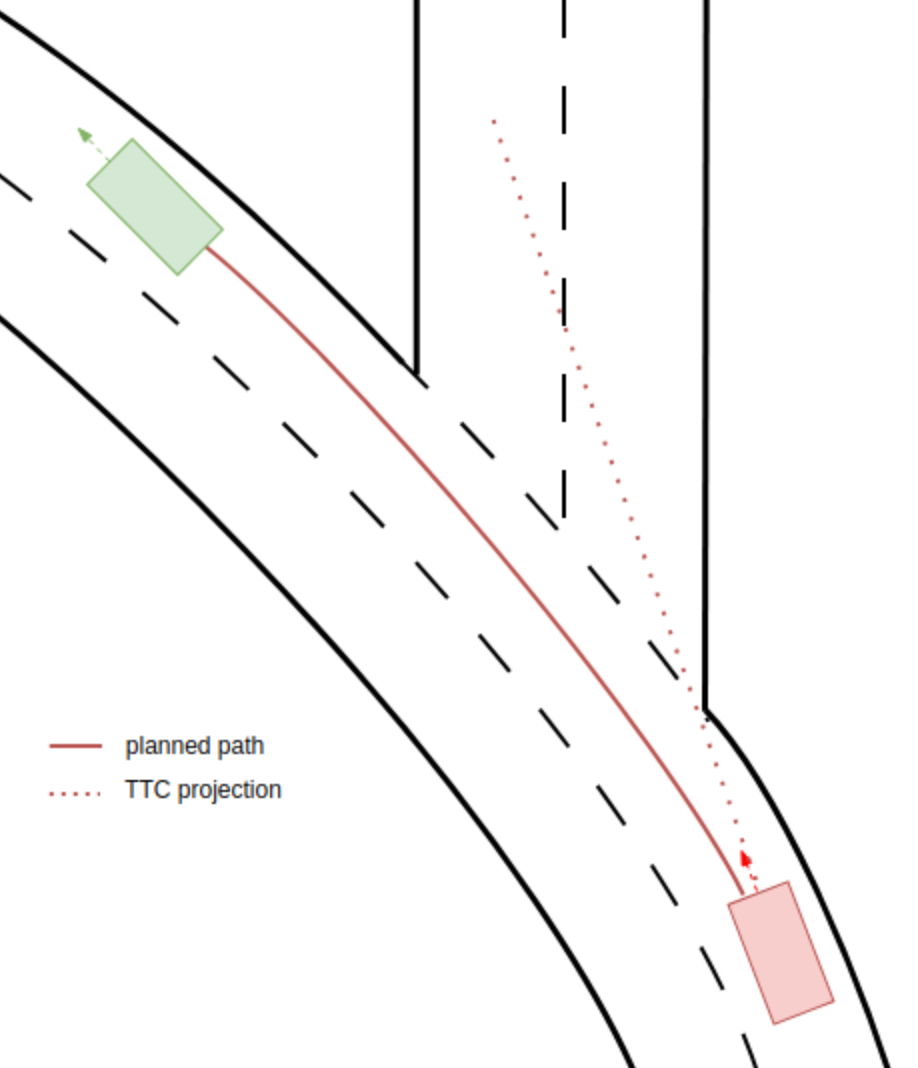
The projections made by the method are based only on the global speed and position of the object at the time_step when the method is called, without taking into consideration the topology of the road or geometry of the planned path.
Sometimes the projection does not follow the planned path, and the get_mttc_to_object() method will return an infinite value, even though the object might be on a collision path with another object if it is driving in a planned path. The image below presents such a case:
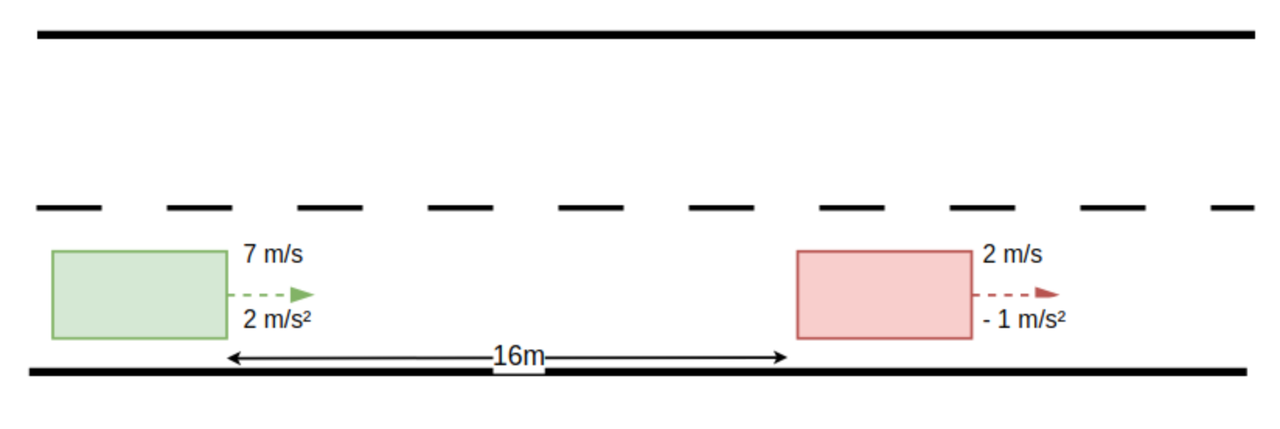
In the image below, the green object moves at 7 meters per second with an acceleration of 2 meters per second, and the red object moves at 2 meters per second with an acceleration of -1 meter per second. The initial distance between the two objects is 16 meters on a straight road. In this case, the get_mttc_to_object() method returns an mTTC of 2 seconds because a collision is detected after 20 iterations of projected states, using a step size of 100 milliseconds.
    var mttc_sut_npc1_at_end: time = sample(
        sut.car.get_mttc_to_object(npc1_ahead_vehicle),@end)

    record (mttc_sut_npc1_at_end, unit: s, event: end,
        text: "Modified Time to Collision (TTC) between SUT and npc1 at end")

    min_mttc_stat: statistics(sample_type: time, measurement: minimum)
    on @top.clk:
        min_mttc_stat.add_sample(sut.car.get_mttc_to_object(npc1_ahead_vehicle))
    record(min_sut_npc1_mttc, expression: min_mttc_stat.compute(), range: [0.5..6], every: 0.5, unit: s, text: "Minimum mTTC between SUT and npc1")
See the complete example here.
The get_mttc_to_object() method returns infinite time (inf) in the following cases:
- If the enclosing object and the to_object have an mTTC greater than expected, the maximum time considered in the projection is defined by
config.test.ttc_calculation_limit, which has a default value of 10 seconds. - If the straight projections of the two objects do not intersect (for example, the vehicle is driving on a curved path as shown above).
- If the method is called between two vehicles driving on opposite roads, even if their projections overlap, the mTTC will be infinite because they are on opposite roads.
get_min_ttc_to_objects()
Use this method to calculate the minimum time to collision (TTC) between the current physical_object and any of the physical objects provided. The method calls the get_ttc_to_object() method internally for computing the TTC between current physical_object and an object from the provided list.
def get_min_ttc_to_objects(object_list: <list of physical_object>) -> time
object_list: <list of physical_object>- (Required) List of physical_object instances that will be used to compute minimum TTC
    # Sample minimum TTC between SUT and any other physical_object in the simulation,
    # at the end of the scenario
    var sut_min_ttc_at_end: time = sample(
        sut.car.get_min_ttc_to_objects(traffic.physical_objects), @end)

    record (sut_min_ttc_at_end, unit: s, event: end,
        text: "Minimum Time to Collision (TTC) between SUT and any other actor")
get_min_mttc_to_objects()
Use this method to calculate the minimum Modified time to collision (MTTC) between the current physical_object and any of the physical objects provided. The method calls the get_mttc_to_object() method internally for computing the MTTC between current physical_object and an object from the provided list.
def get_min_mttc_to_objects(object_list: <list of physical_object>) -> time
object_list: <list of physical_object>- (Required) List of physical_object instances that will be used to compute minimum MTTC
    # Sample minimum TTC between SUT and any other physical_object in the simulation,
    # at the end of the scenario
    var sut_min_mttc_at_end: time = sample(
        sut.car.get_min_mttc_to_objects(traffic.physical_objects), @end)

    record (sut_min_mttc_at_end, unit: s, event: end,
        text: "Minimum Modified Time to Collision (MTTC) between SUT and any other actor")
get_ttc_info_to_object()
This method returns an instance of the collision_data struct, with information about the predicted collision between the current physical_object and another physical object. The collision prediction is based on the Time To Collision (TTC) method. If the two objects are not on a collision course, it returns null.
def get_ttc_info_to_object(to_object: physical_object) -> collision_data
to_object: <physical_object>- (Required) The other object.
    # Check that at the end, SUT is on a collision course with npc1

    on @end:
        var sut_to_npc1_ttc_info := sut.car.get_ttc_info_to_object(npc1)
        if (sut_to_npc1_ttc_info == null):
            sut_warning(sut_not_on_collision_course, "SUT not on collision course with npc1")
get_mttc_info_to_object()
This method returns an instance of the collision_data struct, with information about the predicted collision between the current physical_object and another physical object. The collision prediction is based on the Modified Time To Collision (mTTC) method. If the two objects are not on a collision course, it returns null.
def get_mttc_info_to_object(to_object: physical_object) -> collision_data
to_object: <physical_object>- (Required) The other object.
    # Check that at the end, SUT is on a collision course with npc1 and the mTTC
    # is greater than 3s

    on @end:
        var sut_to_npc1_mttc_info := sut.car.get_mttc_info_to_object(npc1)
        if (sut_to_npc1_mttc_info == null):
            sut_warning(sut_not_on_collision_course, "SUT not on collision course with npc1")
        if (sut_to_npc1_mttc_info.TTC < 3s):
            sut_warning(mttc_too_small, "SUT mTTC at end: $(sut_to_npc1_mttc_info.TTC)")
get_min_ttc_info_to_objects()
This method returns an instance of the collision_data struct, with information about the predicted collision between the current physical_object and the object from the provided list with the minimum TTC. The collision prediction is based on the Time To Collision (TTC) method. If the current physical_object is not on a collision course with any object in the provided list, it returns null.
def get_min_ttc_info_to_objects(object_list: list of physical_object)-> collision_data
object_list: <list of physical_object>- (Required) List of candidate physical_object instances.
    # Sample the speed of the vehicle that SUT is on a collision course with
    # at the end of the scenario (the vehicle to which SUT has the minimum TTC)
    var sut_min_ttc_info_at_end := sample(
        sut.car.get_min_ttc_info_to_objects(traffic.physical_objects), @end)

    var speed_of_min_ttc_vehicle_at_end: speed = sample(
        sut_min_ttc_info_at_end.other_speed, @end)

    record (speed_of_min_ttc_vehicle_at_end, unit: kph, event: end,
        text: "Speed of vehicle that the SUT is on a collision course with at end")
get_min_mttc_info_to_objects()
This method returns an instance of the collision_data struct, with information about the predicted collision between the current physical_object and the object from the provided list with the minimum TTC. The collision prediction is based on the Modified Time To Collision (mTTC) method. If the current physical_object is not on a collision course with any object in the provided list, it returns null.
def get_min_mttc_info_to_objects(object_list: list of physical_object)-> collision_data
object_list: <list of physical_object>- (Required) List of candidate physical_object instances.
    # Check that SUT is not on a collision course with any vehicle at the end
    # of the scenario
    on @end:
        var sut_min_mttc_info := sut.car.get_min_mttc_info_to_objects(traffic.physical_objects)
        if (sut_min_mttc_info != null):
            sut_warning(sut_on_collision_course,
                "SUT not expected to be on a collision course with any object")
get_object_category()
Used for metrics in global evaluators. It returns the object category, based on the object_category enumeration.
Vehicle mapping
For vehicles, the returned object category depends on the vehicle category, and are mapped as follows:
- For
sedanandvan, the method returnscar - For
bus, the method returnsbus - For
box_truck,semi_trailer_truck,full_trailer_truck, the method returnstruck - For
motorcycle, the method returnsmotorcycle - For
bicycle, the method returnsbicycle
Non-vehicle mapping
For objects that inherit plain_object and are not vehicles, the returned category is:
- For
person, the method returnsperson - For
animal, the method returnsanimal - For any trailer type, the method returns
trailer - For
cyclist, the method returnsbicycle - For any other type of object or custom types, the method returns
other
def get_object_category()-> object_category
extend top.main:
    npc: vehicle with:
        keep(it.vehicle_category == box_truck)
    vru: person

    on @start:
        # Call get_object_category() for different objects
        var vru_type := vru.get_object_category()
        logger.log_info("vru.get_object_category() : $(vru_type)")
        var npc_type := npc.get_object_category()
        logger.log_info("npc.get_object_category() : $(npc_type)")
get_delta_v_and_pdof()
The Delta-V parameter is used to predict the severity of a crash outcome when analyzing a collision between two objects. Delta-V refers to the change in velocity experienced by a road user during a crash; it quantifies how much a vehicle’s speed and direction change as a result of the impact. Because it directly relates to the forces experienced by occupants, Delta-V is widely used as a key measure of crash severity.
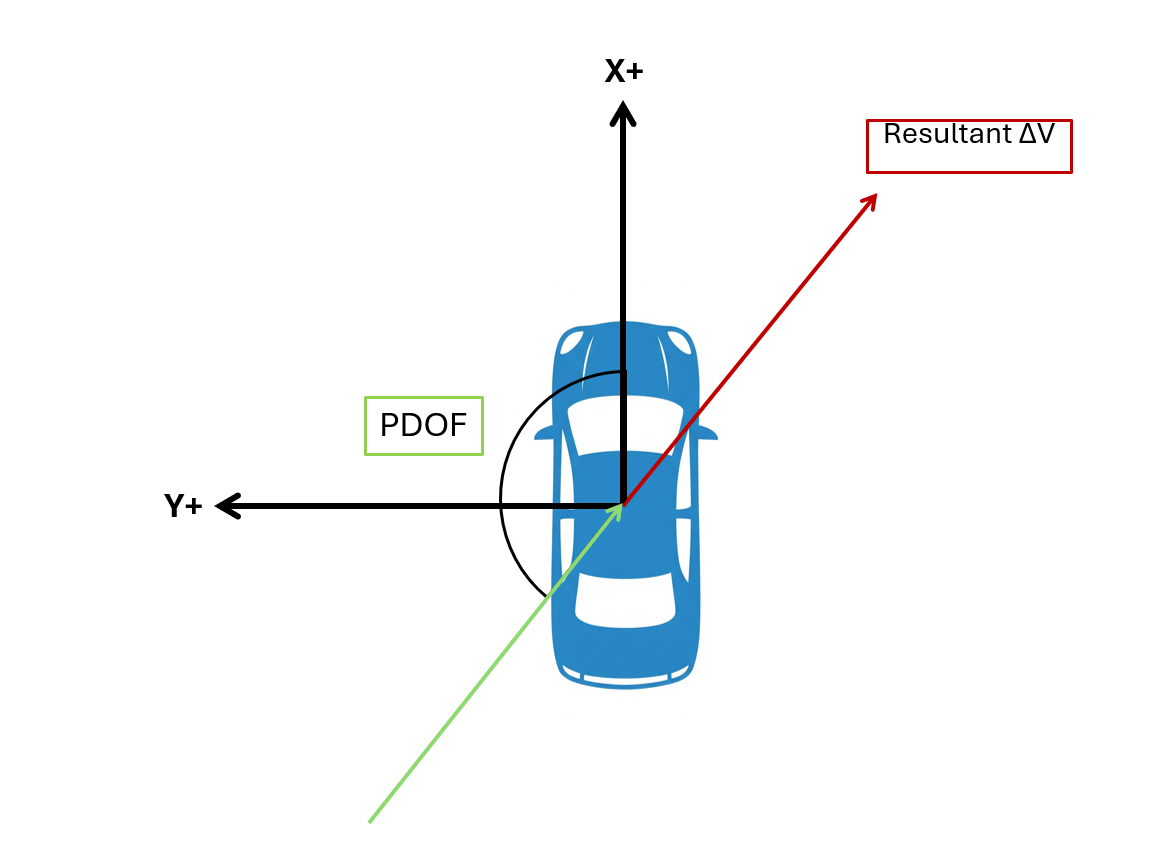
The Principal Direction of Force (PDOF) represents the direction of the highest impact force acting on the subject vehicle during a collision. PDOF is calculated from the Delta-V components using the formula:
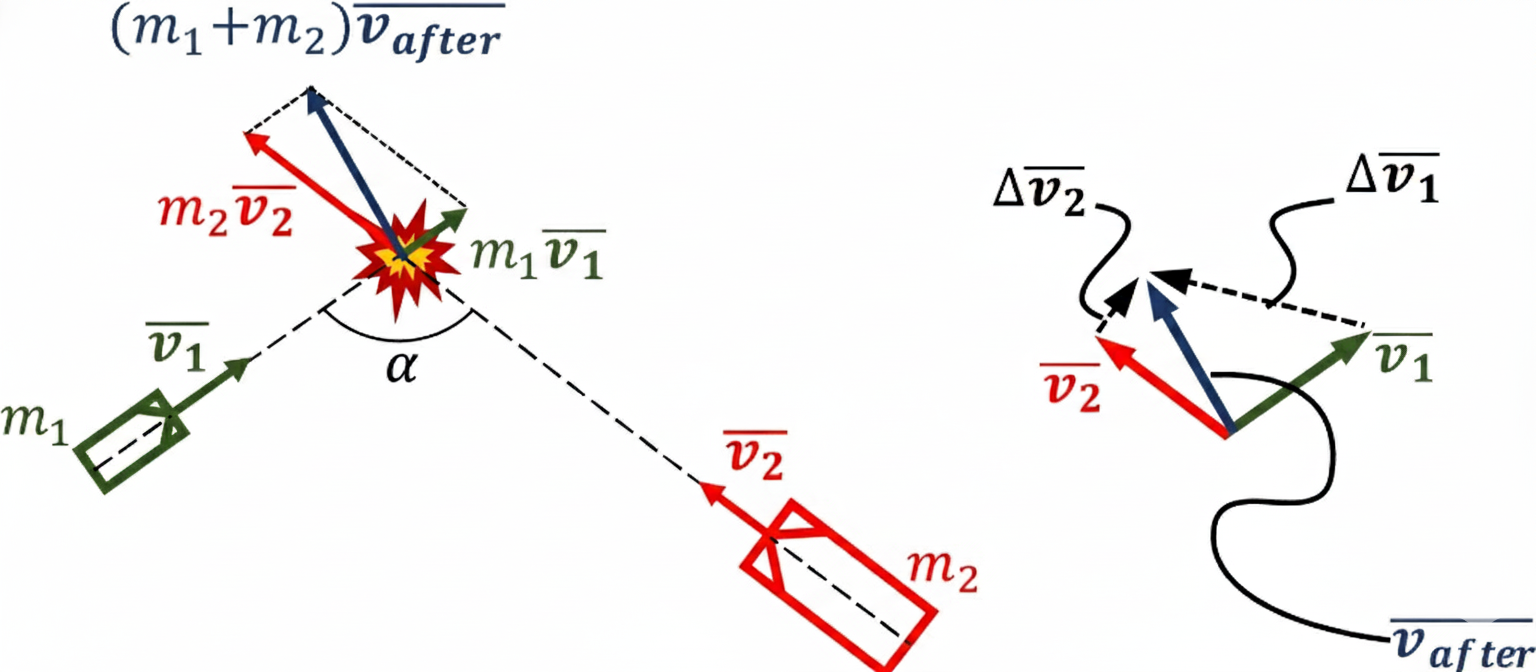
If two objects collide, each with an associated mass m and velocity (Vx, Vy), we can calculate the Delta-V of each object as presented below. This is a proxy for the energy transferred to the vehicle and its occupants during a crash and is therefore an excellent predictor of damage and injury.
We assume that the mass of each object is known and that the collision is completely inelastic, which is an accepted approximation in the industry. The coefficient of restitution for vehicle crashes typically ranges from 0.1 to 0.4, where 0 indicates an inelastic collision.
Delta-V (absolute values) for two road users involved in an inelastic collision can be calculated as follows:
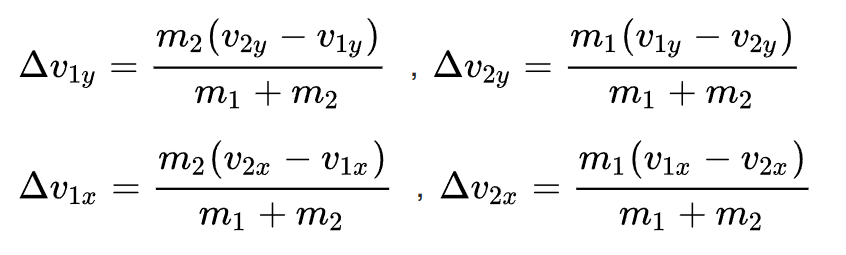
Where, - m1, m2 are the masses of the road users 1 and 2, respectively. - v1x, v2x are their longitudinal speeds. - v1y, v2y are their lateral speeds.
PDOF for two road users involved in an inelastic collision can be calculated as follows:
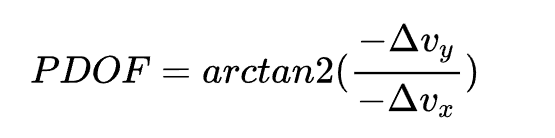
Where, - Δvy is the Y-component of delta_v i.e., the change in velocity in lateral direction of the subject vehicle due to a collision with another object. - Δvx is the X-component of delta_v i.e., the change in velocity in longitudinal direction of the subject vehicle due to a collision with another object.
The implementation of the Delta-V and PDOF in the Foretify Domain Model follows the aspects presented as per the paper : Automated Crash Notification Algorithms: Evaluation of In-Vehicle Principal Direction of Force Estimation Algorithms
Use this method to calculate the Delta-V and PDOF value between the current object and another physical_object.
The Delta-V and PDOF computation is relevant only for a vehicle colliding with another vehicle. Therefore, it is recommended to call the method only when two vehicles collide.
The range of the returned value is 0kph to 200kph. Any higher value is truncated to 200 kph. For accurate results, set the mass fields of the two objects involved in the collision (physical_object.mass) correctly.
For the instant speeds of the objects, the longitudinal and lateral components of their global speeds will be used.
If the mass of an object is not specifically set by the user, a default value for the mass will be used, depending on the vehicle_category. The default masses are shown in the table below.
| Vehicle Category | Default mass |
|---|---|
| sedan | 1850kg |
| van | 4000kg |
| bus | 15000kg |
| box_truck | 10000kg |
| semi_trailer_truck | 10000kg (+26000kg trailer) |
| full_trailer_truck | 10000kg (+26000kg trailer) |
| motorcycle | 300kg |
| bicycle | 100kg |
If one of the objects on which the method is called is part of a compound object, such as the trailer or tractor of a truck, the total mass of the compound object is used when computing Delta-V.
As mentioned above, the Delta-V and PDOF computations are only relevant for evaluating crash severity between two vehicles. If either of the objects on which the method is called (the current object or other_object) is not a vehicle, the method returns:
-1 kphfor Delta-V-999 degreefor PDOF
This method returns an instance of the collision_dynamics_data struct, containing the component-wise Δv values and PDOF angles for both vehicles involved in the collision.
struct collision_dynamics_data:
    # x, y-components of delta-v for this vehicle in the local frame
    #
    var delta_v1x: speed
    var delta_v1y: speed
    # x, y-components of delta-v for other vehicle in the local frame
    #
    var delta_v2x: speed
    var delta_v2y: speed
    # |Δv1| delta-v for this vehicle in the local frame
    #
    var delta_v1: speed
    # |Δv2| delta-v for other vehicle in the local frame
    #
    var delta_v2: speed
    # PDOF angle for this vehicle in the local frame
    #
    var pdof1: angle
    # PDOF angle for other vehicle in the local frame
    #
    var pdof2: angle
def get_delta_v_and_pdof(other_object: physical_object) -> collision_dynamics_data
other_object: <physical_object>- (Required) The other object involved in the collision.
import "$FTX/env/basic/exe_platforms/model_ssp/config/model_sumo_config.osc"

extend test_config:
    set implicits_kind = none
    set test_drain_time = 0s
    set map = "$FTX_PACKAGES/maps/M77_FTX_highway_straight_long_road.xodr"
    set min_test_time = 0s

extend vehicle:
    keep(ftx_driver.collision_avoidance_behavior.enabling_policy == always_disabled)
    keep(ftx_driver.bypass_behavior.enable == false)

extend top.main:
    on @top.new_issue:
        call issues.curr.modify(collision_in_manual_control, info, "")


extend top.main:
    npc1: vehicle with:
        keep(it.vehicle_category == box_truck)

    on @sut.car.collision as c:
        # Compute Delta-V and PDOF of SUT car with the other object (npc1)
        var collision_dynamics_data := sut.car.get_delta_v_and_pdof(c.other_object)
        call logger.log_info("SUT Delta-V is: $(collision_dynamics_data.delta_v1) and PDOF is: $(collision_dynamics_data.pdof1)")


    do parallel(overlap: equal):
        sut_behavior: sut.car.drive() with:
            speed(100kph)
            duration(5second)
            avoid_collisions(false)
        npc1_behavior: npc1.drive() with:
            speed(10mps)
            position(time: 2second, ahead_of: sut.car, measure_by: nearest, at: start)
            avoid_collisions(false)
            lane(same_as: sut.car, at: start)
get_crash_severity_data()
This method creates and updates the crash severity fields in the crash_severity_data structure using the Delta-V and PDOF data from the collision_dynamics_data structure produced by the get_delta_v_and_pdof() method.
Important Notes
- Delta-V is only applicable as a crash metric for vehicle-to-vehicle collisions.
get_crash_severity_data()is therefore recommended primarily for collisions involving two vehicles.motorcycleis considered a vehicle. - Motorcycles are treated as vehicles (not VRUs).
- Crash severity for VRUs is solely based on the vehicle speed on impact.
- In case of vehicle_to_vru collisions the
collision_dynamic_datastructure will contain PDOF asINVALID_PDOF, delta_v asINVALID_DELTA_V
get_crash_severity_data() identifies the collision partner type, determines the Principal Direction of Force (PDOF) side, computes individual crash severities, and calculates the overall crash severity based on Delta-V and PDOF.
The method handles different collision scenarios:
- Vehicle-to-Vehicle collisions: Both objects are vehicles. Crash severity is calculated using Delta-V values and PDOF sides (front, rear, left, or right) for both vehicles.
- Vehicle-to-VRU collisions: One object is a vehicle and the other object is a VRU ( such as a pedestrian or cyclist). Crash severity is calculated using the vehicle's speed at impact (not Delta-V), and PDOF is set to
not_applicable. - Other collision types: For collisions involving other object types, the crash severity is set to
not_applicable.
The following parameters are used to calculate crash severity:
- PDOF side: The side of the vehicle impacted during the collision (front, rear, left, or right), determined from the PDOF angle. Only applicable for vehicle-to-vehicle collisions.
- Collision partner type: The category of the other object involved in the collision.
- Individual crash severity: The severity level calculated (
crash_severity_1andcrash_severity_2) based on Delta-V (for vehicle-to-vehicle) or vehicle speed (for vehicle-to-VRU collisions). - Overall crash severity: The higher of the two vehicles' individual crash severities, representing the most severe impact in the collision.
Severity Threshold Values
The crash severity threshold values used to determine severity levels (S0, S1, S2, S3) are based on the SAE J2980 standard.
The thresholds vary based on collision type:
For vehicle-to-vehicle collisions:
Front or Rear crashes:
| Crash severity level | Delta-V [kph] |
|---|---|
| S0 | <8 |
| S1 | [8–32) |
| S2 | [32–48) |
| S3 | 48+ |
Side crashes (Left or Right):
| Crash severity level | Delta-V [kph] |
|---|---|
| S0 | <6 |
| S1 | [6–15) |
| S2 | [15–24) |
| S3 | 24+ |
For vehicle-to-VRU collisions:
Crash severity is solely based on the vehicle's speed at impact:
| Crash severity level | Vehicle's speed at impact [kph] |
|---|---|
| S0 | <6 |
| S1 | [6–25) |
| S2 | [25–40) |
| S3 | 40+ |
The crash severity metric provides a standardized assessment of collision outcome that can be used for:
- Safety Analysis: Categorize collisions by potential injury severity for safety assessment
- Risk Evaluation: Identify high-risk scenarios that require additional safety measures
- Regulatory Compliance: Align with ISO 26262 severity classification requirements
- Benchmarking: Compare collision outcomes across different test scenarios or systems
This method is typically called after get_delta_v_and_pdof() to create a crash_severity_data structure from the collision dynamics data.
The workflow is as follows:
- Call
get_delta_v_and_pdof()to compute the Delta-V and PDOF values. - Pass the resulting
collision_dynamics_datastructure toget_crash_severity_data()to create a newcrash_severity_datastructure. - Retrieve the crash severity fields from the returned
crash_severity_datastructure.
If the input collision_dynamics_data structure is empty or invalid (for example, contains -999 degree for PDOF), all crash severity fields in the returned structure are set to not_applicable.
For VRU collisions, the method uses the vehicle's current speed magnitude (calculated from its global velocity components) instead of Delta-V values, as Delta-V is not meaningful for collisions between vehicles and VRUs.
This method returns a new instance of the crash_severity_data struct with the following fields populated:
struct crash_severity_data:
    # PDOF side for this object (front/rear/left/right)
    #
    var pdof_side_1: pdof_side
    # PDOF side for other object (front/rear/left/right)
    #
    var pdof_side_2: pdof_side
    # Collision partner type
    #
    var collided_partner: collision_partner_type
    # Crash severity for this object
    #
    var crash_severity_1: crash_severity
    # Crash severity for other object
    #
    var crash_severity_2: crash_severity
    # Overall crash severity (maximum of crash_severity_1 and crash_severity_2)
    #
    var crash_severity: crash_severity
def get_crash_severity_data(other_object: physical_object, dynamics_data: collision_dynamics_data) -> crash_severity_data
other_object: <physical_object>- (Required) The other object involved in the collision.
dynamics_data: <collision_dynamics_data>- (Required) The
collision_dynamics_datastructure containing Delta-V and PDOF values, typically obtained fromget_delta_v_and_pdof(). This structure is used as input to create thecrash_severity_datastructure, but is not modified.
import "$FTX/env/basic/exe_platforms/model_ssp/config/model_sumo_config.osc"

extend test_config:
    set implicits_kind = none
    set test_drain_time = 0s
    set map = "$FTX_PACKAGES/maps/M77_FTX_highway_straight_long_road.xodr"
    set min_test_time = 0s

extend vehicle:
    keep(ftx_driver.collision_avoidance_behavior.enabling_policy == always_disabled)
    keep(ftx_driver.bypass_behavior.enable == false)

extend top.main:
    on @top.new_issue:
        call issues.curr.modify(collision_in_manual_control, info, "")


extend top.main:
    npc1: vehicle with:
        keep(it.vehicle_category == box_truck)

    on @sut.car.collision as c:
        # First, get Delta-V and PDOF data
        var collision_dynamics_data := sut.car.get_delta_v_and_pdof(c.other_object)

        # Get crash severity data using the unified function
        var crash_severity_data := sut.car.get_crash_severity_data(c.other_object, collision_dynamics_data)
        call logger.log_info("Overall crash severity: $(crash_severity_data.crash_severity)")


    do parallel(overlap: equal):
        sut_behavior: sut.car.drive() with:
            speed(100kph)
            duration(5second)
            avoid_collisions(false)
        npc1_behavior: npc1.drive() with:
            speed(10mps)
            position(time: 2second, ahead_of: sut.car, measure_by: nearest, at: start)
            avoid_collisions(false)
            lane(same_as: sut.car, at: start)
Reference points for distance measurement methods
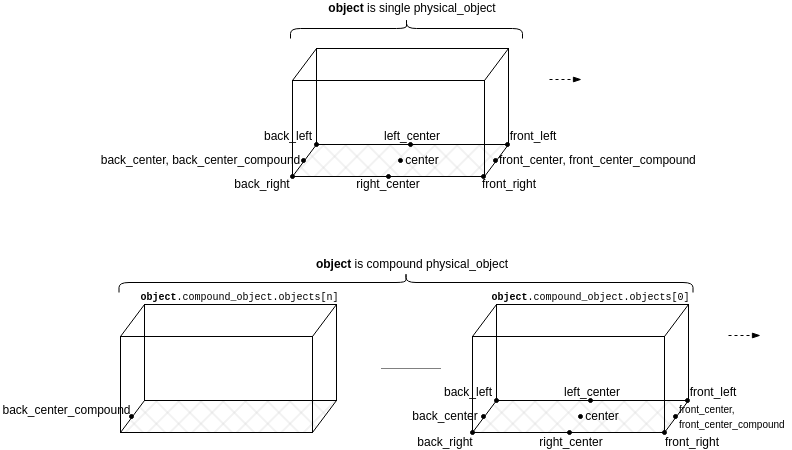
A physical_object instance (denoted object in the following diagram) may model either a "single" object or a "compound" object:

For example, a sedan is a "single" object while a truck composed of a tractor and a trailer is a "compound" object.
The distance measurement methods that are introduced in the upcoming sections (global_distance(), local_distance() and road_distance()) refer to various points of a physical_object via an enumeration called distance_reference:
- front_left, back_left, back_right, front_right (the corners)
- front_center, left_center, back_center, right_center, front_center_compound, back_center_compound (the middle edges)
- center
- closest and closest_compound (as in: the closest points, whatever they may be)
Given a method call such as:
var global_distance := object.global_distance(other_object, reference, other_reference)
the following diagram shows the relation between object and reference (similarly between other_object and other_reference), namely the positions of the points relative to the object's bounding box:
physical_object.global_distance()
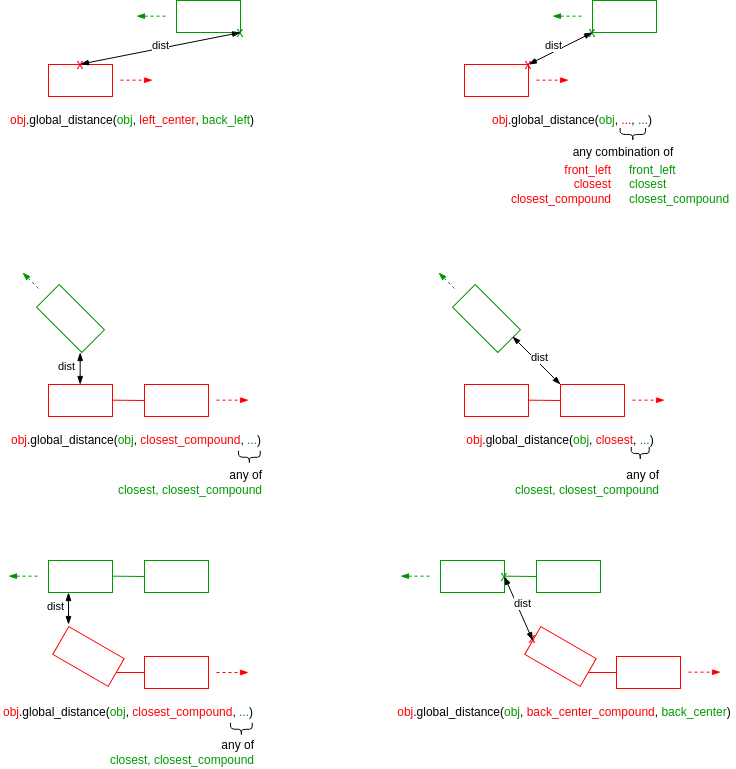
This method returns the 3D Euclidian distance between various reference points of the enclosing physical_object (self) and some other physical_object.
global_distance(to_object: <physical_object>,
                reference: <distance_reference>,
                to_reference: <distance_reference>)-> length
to_object: <physical_object>-
The other object.
reference: <distance_reference>-
Reference point with respect to the enclosing physical_object (self). See also Reference points for distance measurement methods.
to_reference: <distance_reference>-
Reference point with respect to the other object. See also Reference points for distance measurement methods.
Note that, because the measurement is done in 3D space, for a given physical_object instance, closest and closest_compound may mean any point on the object's bounding box.
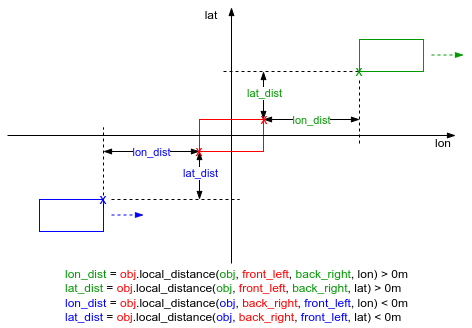
physical_object.local_distance()
This method returns either the longitudinal or lateral distance between various reference points of the enclosing physical_object and some other physical_object, in the local coordinate system of the enclosing physical_object.
local_distance(to_object: <physical_object>,
               reference: <distance_reference>,
               to_reference: <distance_reference>,
               direction: <distance_direction>)-> length
to_object: <physical_object>-
The other object.
reference: <distance_reference>-
Reference point with respect to the enclosing physical_object (self). See also Reference points for distance measurement methods.
to_reference: <distance_reference>-
Reference point with respect to the other object. See also Reference points for distance measurement methods.
direction: <distance_direction>-
lon(longitudinal) or lat(lateral).
The return value is signed, depending on the relative position of to_object:
- For longitudinal measurement, the value is negative if to_object is behind and positive otherwise.
- For lateral measurement, the value is negative if to_object is on the right side and positive otherwise.
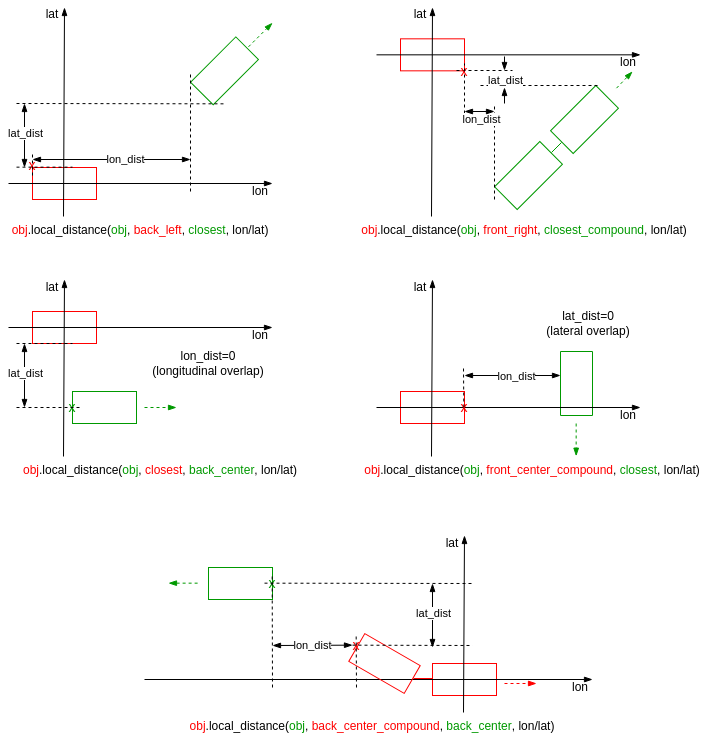
For closest and closest_compound references, there may be situations of overlap, in which case the distance is 0.
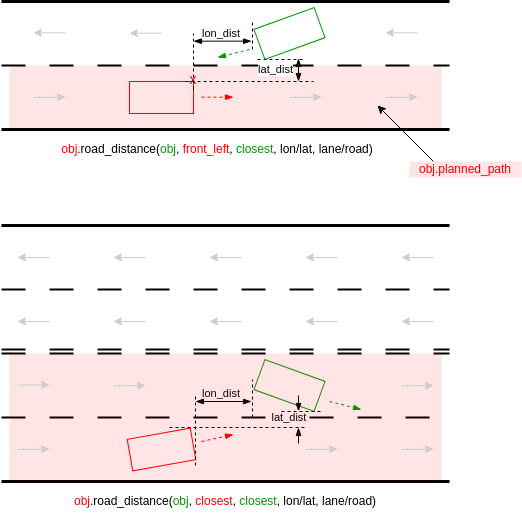
physical_object.road_distance()
This method returns either the longitudinal or lateral distance between various reference points of the enclosing physical_object and some other physical_object, along the planned path of the enclosing physical_object.
road_distance(to_object: <physical_object>,
              reference: <distance_reference>,
              to_reference: <distance_reference>,
              direction: <distance_direction>,
              route_type: <distance_route_type>)-> length
to_object: <physical_object>-
The other object.
reference: <distance_reference>-
Reference point with respect to the enclosing physical_object (self). See also Reference points for distance measurement methods.
to_reference: <distance_reference>-
Reference point with respect to the other object. See also Reference points for distance measurement methods.
direction: <distance_direction>-
lon(longitudinal) or lat(lateral).
route_type: <distance_route_type>-
Whether to measure along the roads or along the lanes.
The enclosing physical_object (self) must be of type vehicle (or a subtype of it). Trying to call the method on other types results in a runtime error.
The measurement is done by projecting the reference points on the planned_path of the enclosing physical_object:
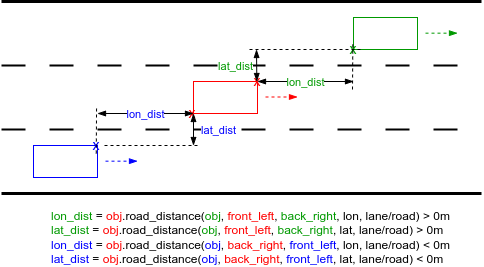
The return value is signed, depending on the relative position of to_object:
- For longitudinal measurement, the value is negative if to_object is behind and positive otherwise.
- For lateral measurement, the value is negative if to_object is on the right side and positive otherwise.
For closest and closest_compound references, there may be situations of overlap, in which case the distance is 0:
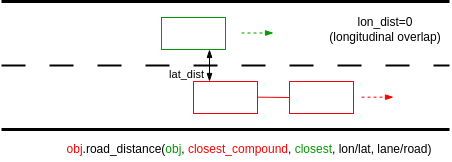
Lateral distance and MSP lane connectivity
Regarding lateral distance, when the reference points are on different lanes, a projection of the to_reference point is created at the same longitudinal offset on the reference lane by following the MSP lane connectivity:
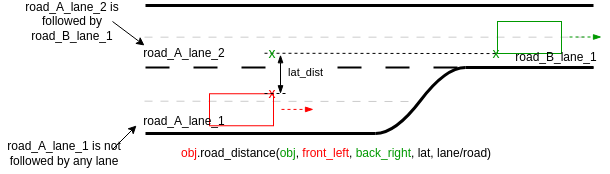
If there are merging lanes on the way, then the to_reference is projected on the closest available driving lane - closest to its original location:
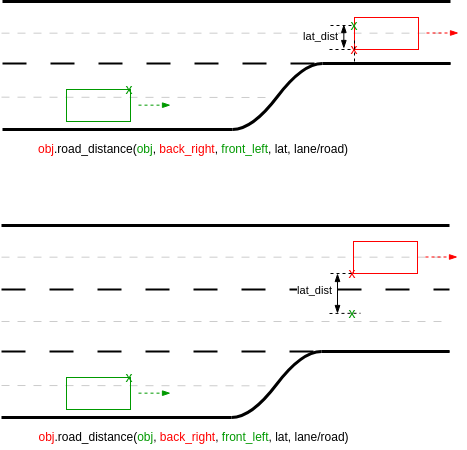
Different map implementations may yield different results:
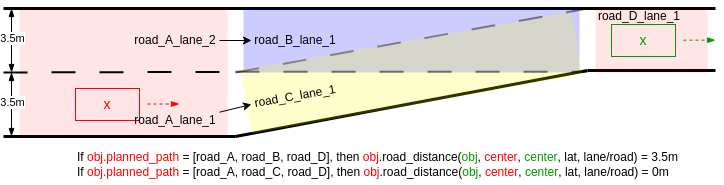
The same procedure applies when following lane connectivity in junctions.
For lateral distance, route_type parameter does not make a difference, i.e. obj1.road_distance(obj2, ..., lat, road) will always give the same result as obj1.road_distance(obj2, ..., lat, lane).
Measuring along road or lane connectivity
The route_type parameter influences how the longitudinal distance is measured: along lane centerline or along road centerline:
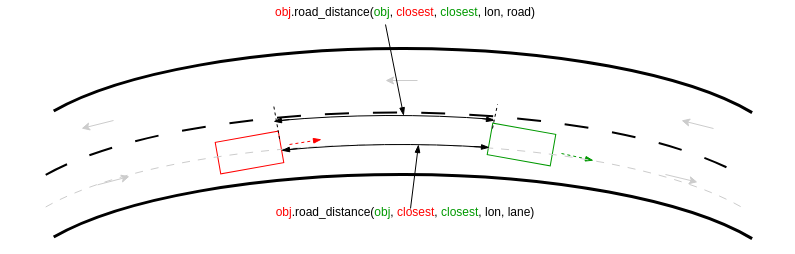
In the above example, the distance measured along lane centerline is shorter than the one measured along road.
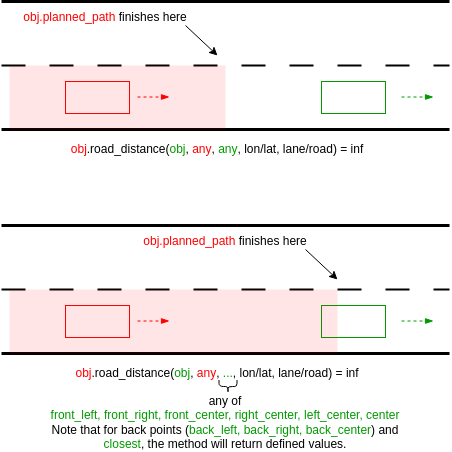
Undefined cases
There may be situations when reference points do not have a projection of planned_path. In such cases, road_distance() returns math.max_length() (use math.nearly_max_value() to check):
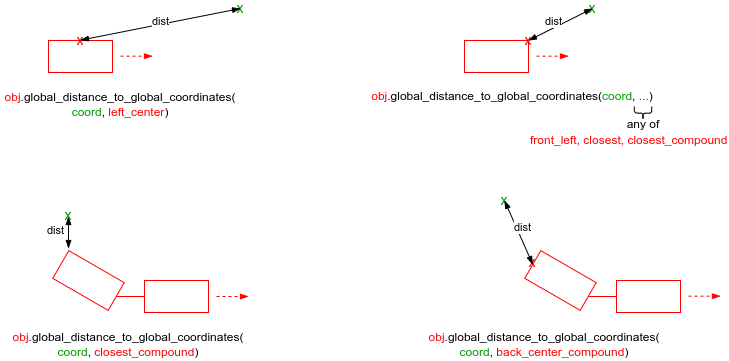
physical_object.global_distance_to_global_coordinates()
This method returns the 3D Euclidian distance between various reference points of the enclosing physical_object (self) and a global coordinate.
global_distance_to_global_coordinates(coord: <msp_coordinates>,
                                      reference: <distance_reference>)-> length
coord: <msp_coordinates>-
The global coordinate.
reference: <distance_reference>-
Reference point with respect to the enclosing physical_object (self). See also Reference points for distance measurement methods.
Note: The measurement is done in 3D space for a given physical_object instance, closest and closest_compound may mean any point on the object's bounding box.
See complete example.
physical_object.local_distance_to_global_coordinates()
This method returns either the longitudinal or lateral distance between various reference points of the enclosing physical_object and a global coordinate, in the local coordinate system of the enclosing physical_object.
local_distance_to_global_coordinates(coord: <msp_coordinates>,
                                     reference: <distance_reference>,
                                     direction: <distance_direction>)-> length
coord: <msp_coordinates>-
The global coordinate.
reference: <distance_reference>-
Reference point with respect to the enclosing physical_object (self). See also Reference points for distance measurement methods.
direction: <distance_direction>-
lon(longitudinal) or lat(lateral).
The return value is signed, depending on the relative position of coord:
- For longitudinal measurement, the value is negative if coord is behind; otherwise, it is positive.
- For lateral measurement, the value is negative if coord is on the right side; otherwise, it is positive.
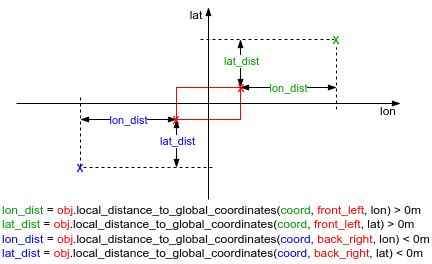
For closest and closest_compound references, there may be situations of overlap, in which case the distance is 0.
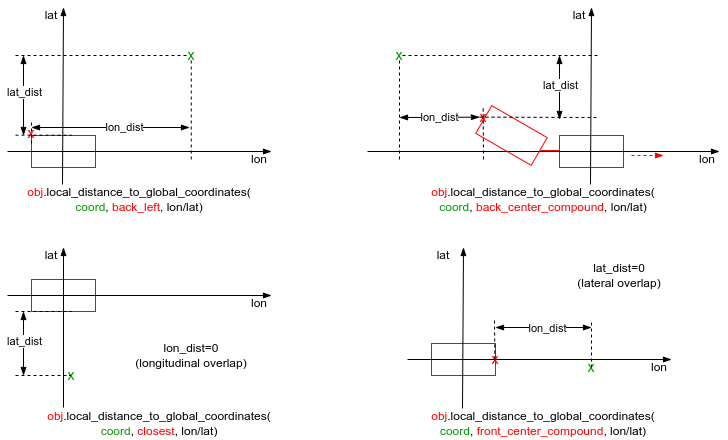
See complete example.
physical_object.road_distance_to_global_coordinates()
This method returns either the longitudinal or lateral distance between various reference points of the enclosing physical_object and a global coordinate, along the planned path of the enclosing physical_object.
road_distance_to_global_coordinates(coord: <msp_coordinates>,
                                    reference: <distance_reference>,
                                    direction: <distance_direction>,
                                    route_type: <distance_route_type>)-> length
coord: <msp_coordinates>-
The global coordinate.
reference: <distance_reference>-
Reference point with respect to the enclosing physical_object (self). See also Reference points for distance measurement methods.
direction: <distance_direction>-
lon(longitudinal) or lat(lateral).
route_type: <distance_route_type>-
Whether to measure along the roads or along the lanes.
The enclosing physical_object (self) must be of type vehicle (or a subtype of it). Trying to call the method on other types results in a runtime error.
The measurement is done by projecting the reference points on the planned_path of the enclosing physical_object:
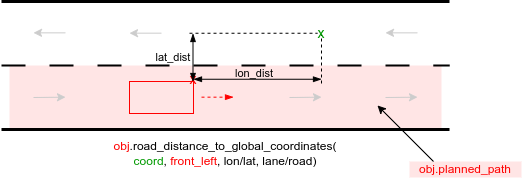
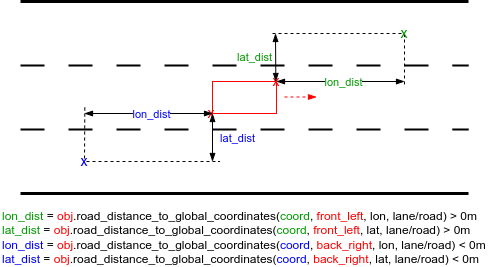
The return value is signed, depending on the relative position of coord:
- For longitudinal measurement, the value is negative if coord is behind; otherwise, it is positive.
- For lateral measurement, the value is negative if coord is on the right side; otherwise, it is positive.
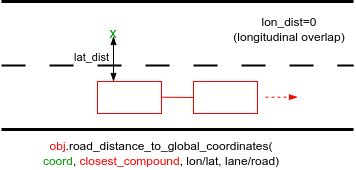
For closest and closest_compound references, there may be situations of overlap, in which case the distance is 0:
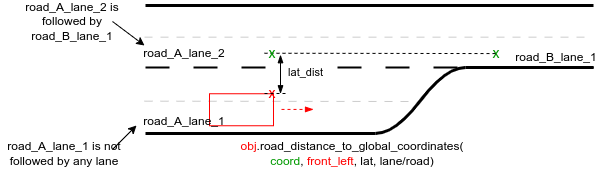
Lateral distance and MSP lane connectivity
Regarding lateral distance, when the reference points are on different lanes, a projection of the coord is created at the same longitudinal offset on the reference lane by following the MSP lane connectivity:
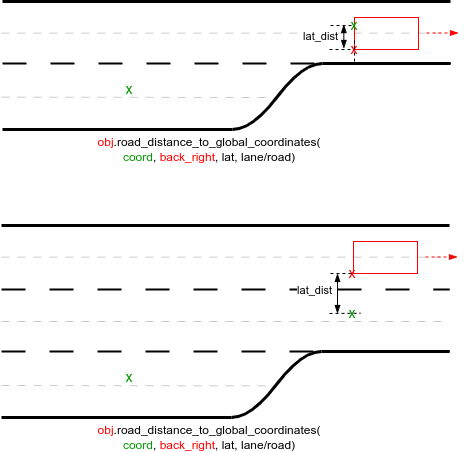
If there are merging lanes on the way, then the coord is projected on the closest available driving lane, closest to its original location:
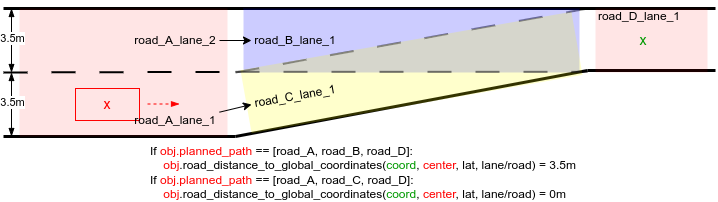
Different map implementations may yield different results:
The same procedure applies when following lane connectivity in junctions.
For lateral distance, route_type parameter does not make a difference, i.e. obj.road_distance_to_global_coordinates(coord, ..., lat, road) will always give the same result as obj.road_distance_to_global_coordinates(coord, ..., lat, lane).
Measuring along road or lane connectivity
The route_type parameter influences how the longitudinal distance is measured: along lane centerline or along road centerline:
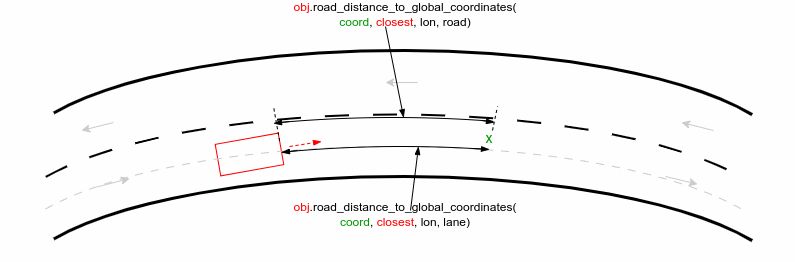
In the above example, the distance measured along the lane centerline is shorter than the one measured along the road.
Undefined cases
In some cases, a global coordinate may not have a corresponding projection on the planned_path. In these situations, road_distance_to_global_coordinates() returns math.max_length(). Use math.nearly_max_value() to check for this condition.
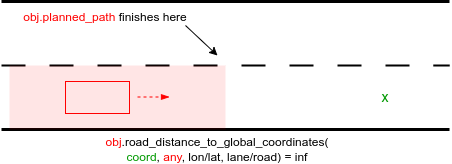
See complete example.
physical_object.get_time_gap()
Use this method to calculate the time gap between the enclosing physical_object and some other physical_object.
get_time_gap(to_object: <physical_object>) -> time
to_object: <physical_object>-
The other object.
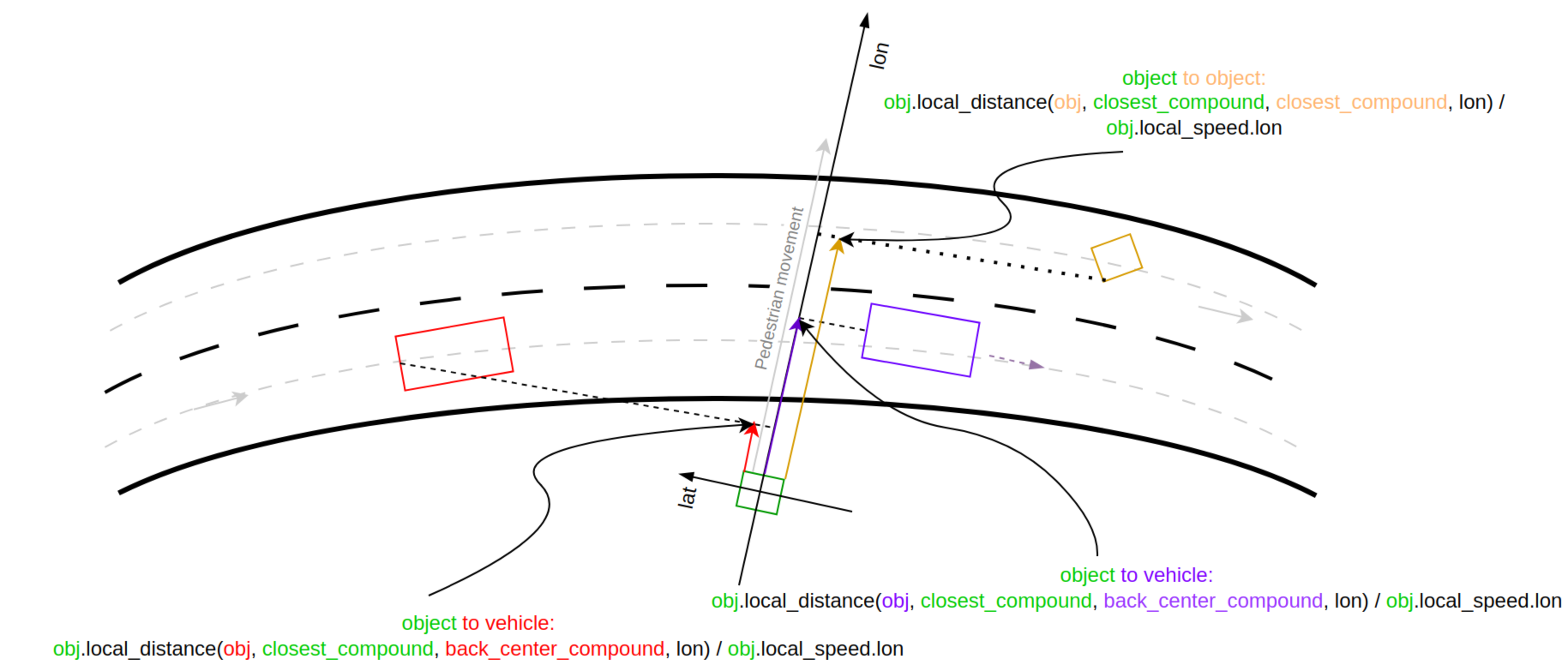
The get_time_gap() method handles these different types of objects in different ways. The main differences lie in the method of distance measurement (road distance versus local distance) and the reference points on the object for this measurement. A comparison table is presented below to illustrate these differences:
| object | to_object | distance_method | object_reference | to_object_reference |
|---|---|---|---|---|
| Vehicle | Vehicle | road_distance | front_center_compound | back_center_compound |
| Vehicle | Object | road_distance | front_center_compound | closest_compound |
| Object | Vehicle | local_distance | closest_compound | back_center_compound |
| Object | Object | local_distance | closest_compound | closest_compound |
The following diagram depicts the case when the enclosing object is a vehicle:
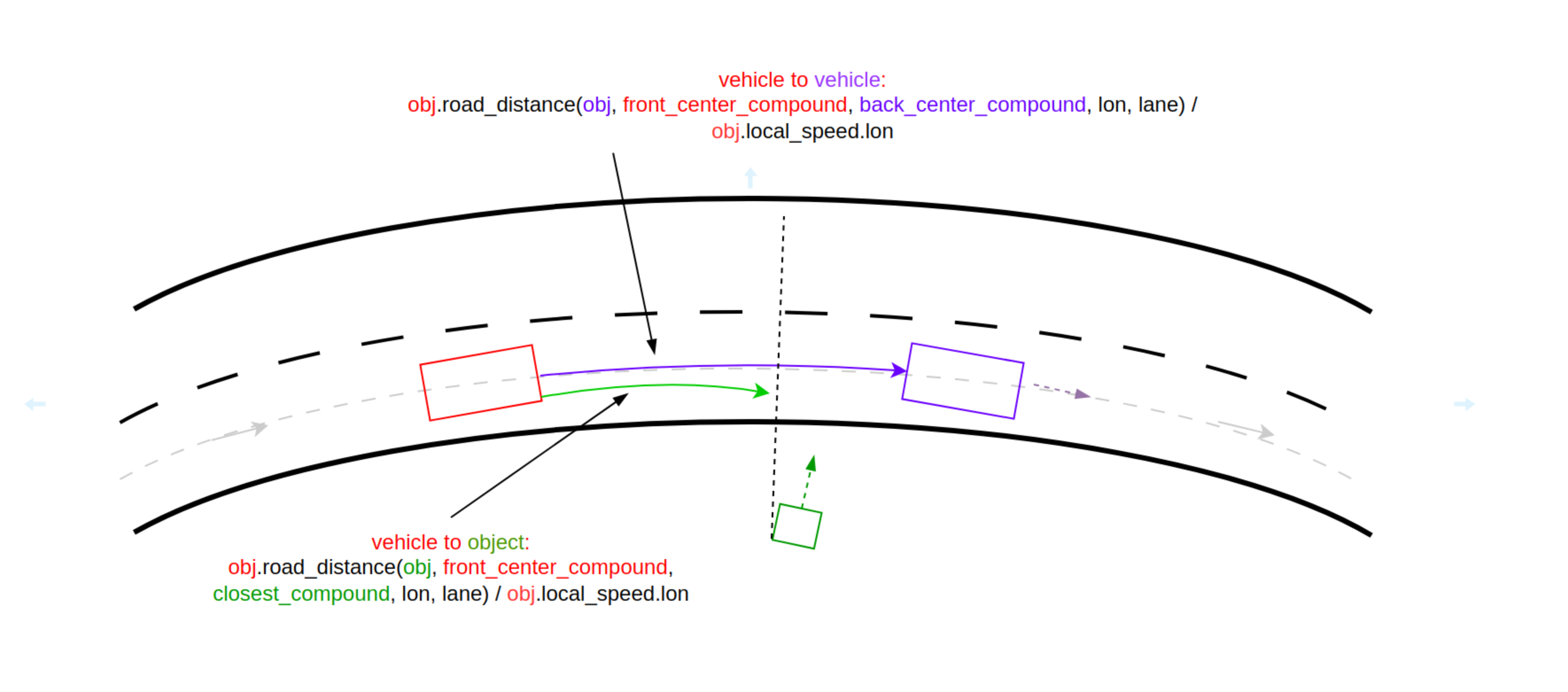
The following diagram depicts the case when the enclosing object is not a vehicle and the reference point is closest:
The return value is signed depending on the relative position of the to_object:
- The value is negative if to_object is behind and positive otherwise.
Undefined cases
The get_time_gap() method returns math.max_time() (use math.nearly_max_value() to check) in the following cases:
-
If the the enclosing object method physical_object.is_standing_still() returns true, the method checks internally if the vehicle speed is < 0.003mps.
-
If the enclosing object is a vehicle and to_object is placed too far laterally from the lane segments that compose the enclosing object's planned path. The maximum radius at which a projection of to_object's bounding box is taken into consideration is test_config.physical_object_road_distance_search_radius, which has a default value of 10 meters.
-
If the enclosing object is a vehicle and the road_distance method returns inf, the to_object does not have a projection on the path of the enclosing object.
Reverse case
In the reverse scenario, the get_time_gap() method attempts to align with the movement direction of the enclosing object. The following diagram and table depict the reverse scenario:
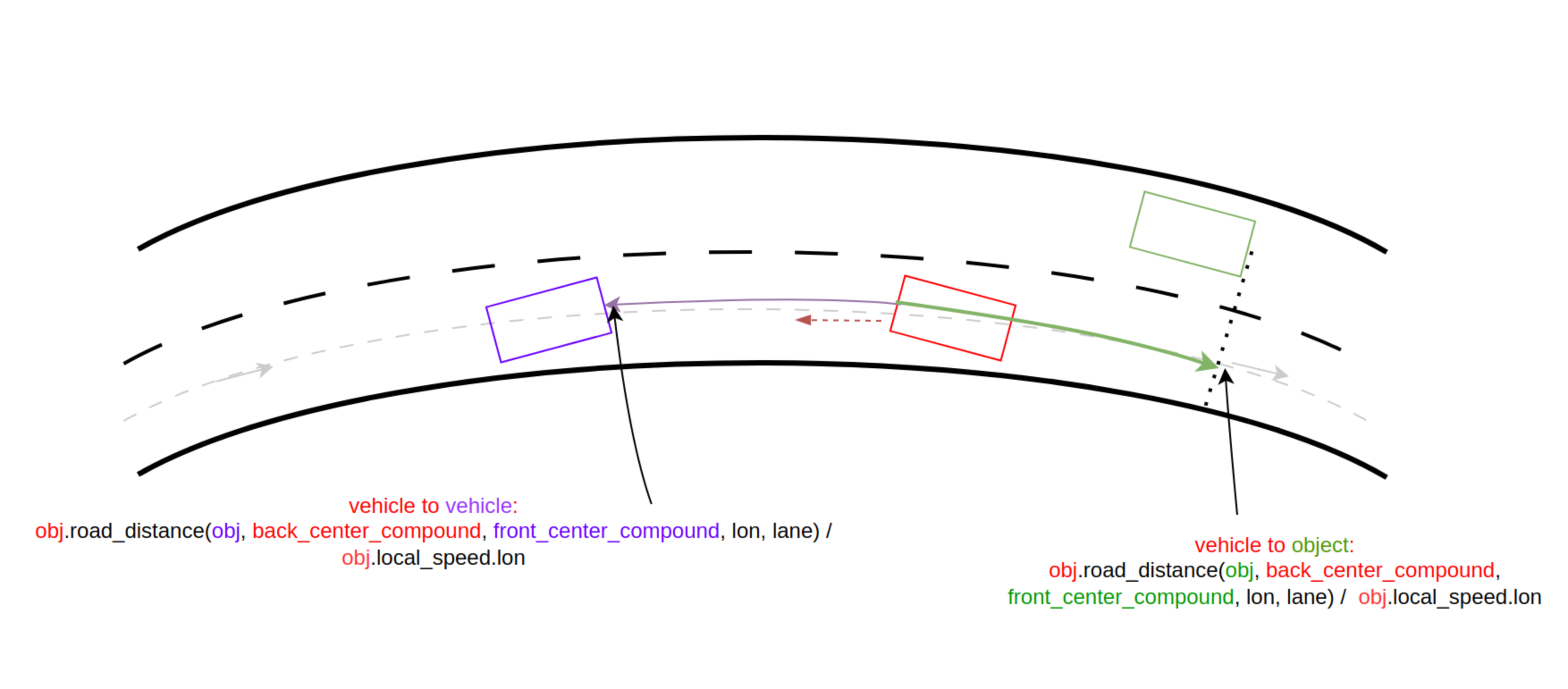
| to_object color | object_point | to_object_point | road_distance sign | local_speed_lon sign | time_gap sign |
|---|---|---|---|---|---|
| purple | back_center_compound | front_center_compound | negative | negative | positive |
| green | back_center_compound | front_center_compound | positive | negative | negative |
Example The following example shows the use of the get_time_gap method as called by a vehicle and a person, and how it is recorded.
    var time_gap_car1_sutv_at_end: time = sample(
        car1.get_time_gap(sutv),@start)

    record (time_gap_car1_sutv_at_end, unit: s, event: end,
        text: "Time gap between car1 and sutv at end")

    var time_gap_person1_sut_at_end: time = sample(
        person1.get_time_gap(sutv),@start)

    record (time_gap_person1_sut_at_end, unit: s, event: end,
        text: "Time gap between person1 and sutv at end")
See complete example.
physical_object.get_time_headway()
Use this method to calculate the time headway between the enclosing physical_object and some other physical_object.
get_time_headway(to_object: <physical_object>) -> time
to_object: <physical_object>-
The other object.
The get_time_headway() method handles these different types of objects in different ways. The main differences lie in the method of distance measurement (road distance versus local distance) and the reference points on the object for this measurement. A comparison table is presented below to illustrate these differences:
| object | to_object | distance_method | object_point | to_object_point |
|---|---|---|---|---|
| Vehicle | Vehicle | road_distance | front_center_compound | front_center_compound |
| Vehicle | Object | road_distance | front_center_compound | center |
| Object | Vehicle | local_distance | center | front_center_compound |
| Object | Object | local_distance | center | center |
The following diagram depicts the case when the enclosing object is a vehicle:
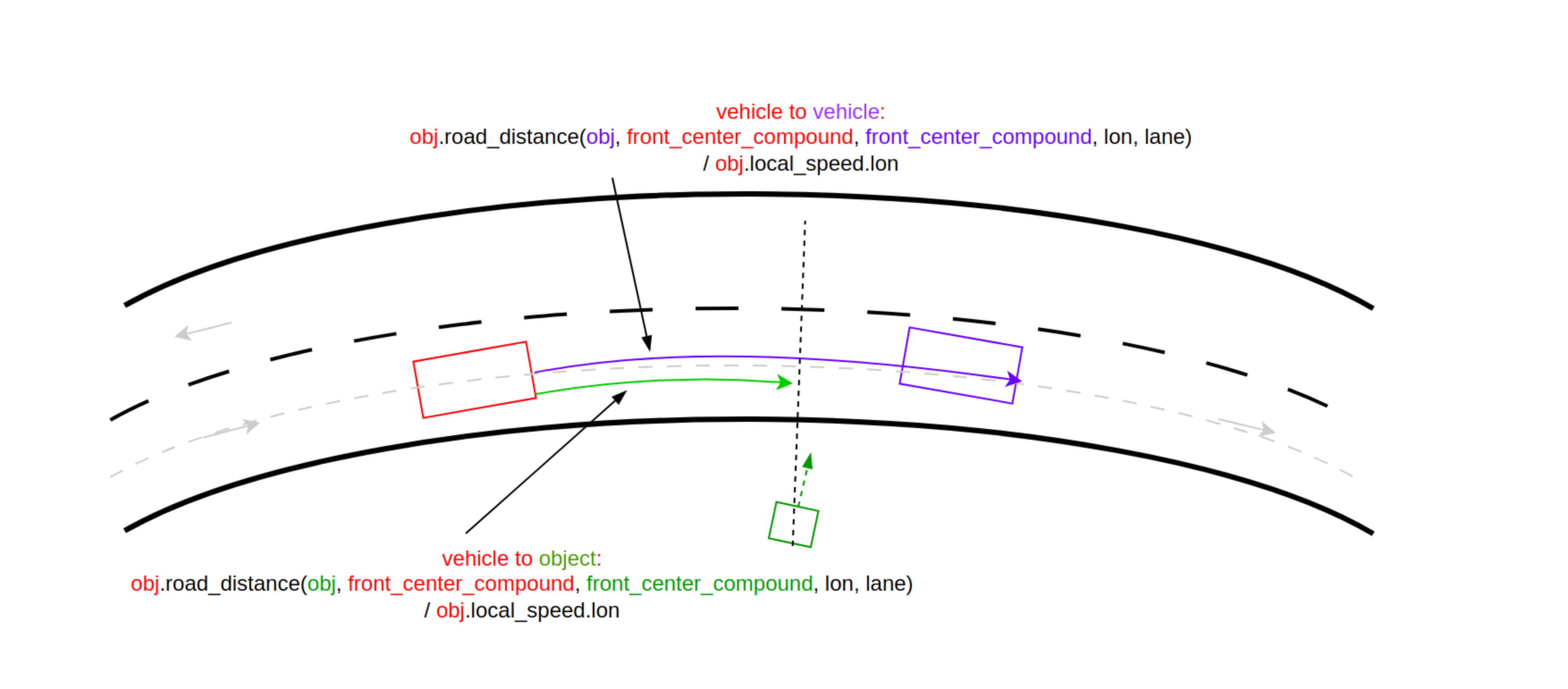
The following diagram depicts the case when the enclosing object is not a vehicle and the reference point is the center:
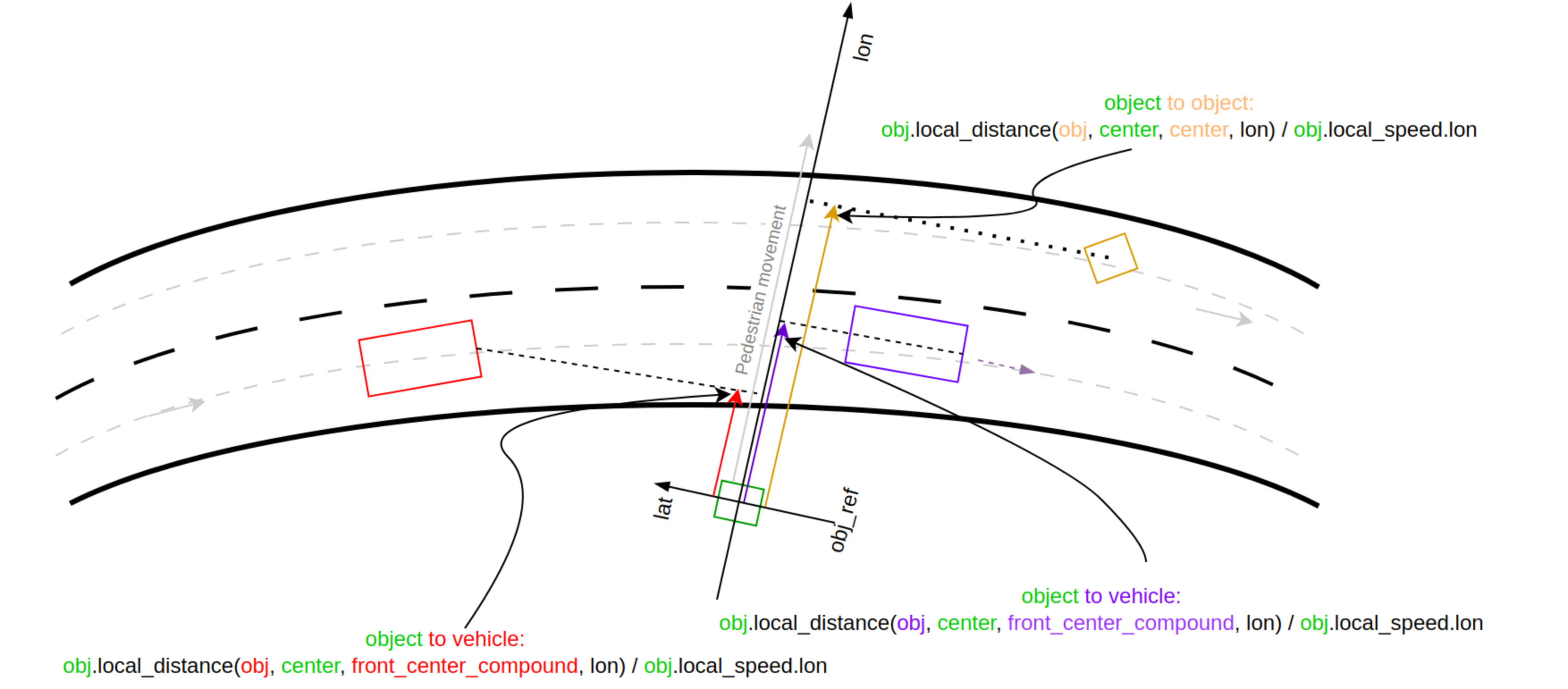
The return value is signed depending on the relative position of the to_object:
- The value is negative if to_object is behind and positive otherwise.
Undefined cases
The get_time_headway() method returns math.max_time(). Use math.nearly_max_value() to check in the following cases:
-
If the enclosing object method physical_object.is_standing_still() returns true, the method checks internally if the vehicle speed is < 0.003mps.
-
If the enclosing object is a vehicle and to_object is placed too far laterally from the lane segments that compose the enclosing object's planned path. The maximum radius at which a projection of to_object's bounding box is taken into consideration is test_config.physical_object_road_distance_search_radius, which has a default value of 10 meters.
-
If the enclosing object is a vehicle and the road_distance method returns inf, the to_object does not have a projection on the path of the enclosing object.
Reverse case
In the reverse scenario, the get_time_headway() method attempts to align with the movement direction of the enclosing object. The following diagram and table depict the reverse scenario:
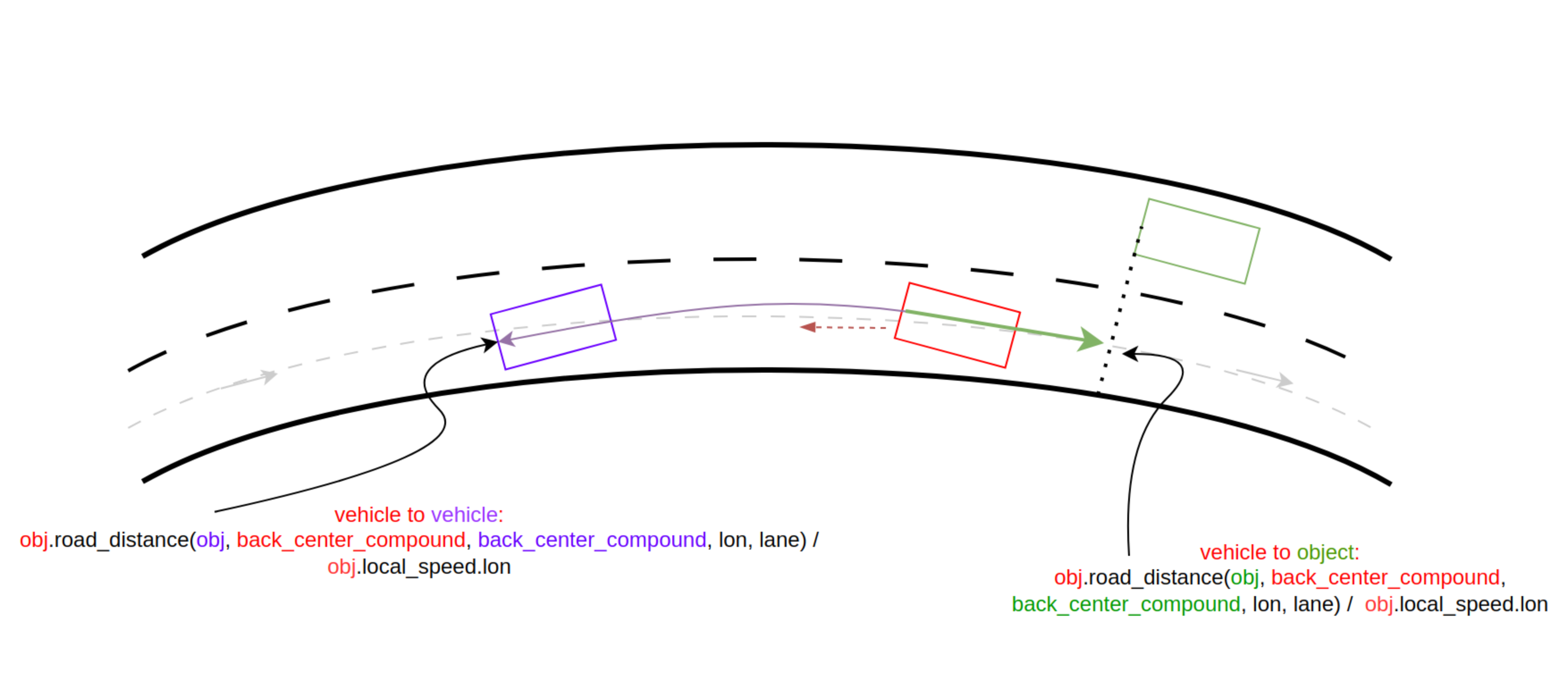
| to_object color | object_point | to_object_point | road_distance sign | local_speed_lon sign | time_gap sign |
|---|---|---|---|---|---|
| purple | back_center_compound | back_center_compound | negative | negative | positive |
| green | back_center_compound | back_center_compound | positive | negative | negative |
Example The following example shows the use of the get_time_headway method as called by a vehicle and a person, and how it is recorded.
    var time_headway_car1_sutv_at_end: time = sample(
        car1.get_time_headway(sutv),@end)

    record (time_headway_car1_sutv_at_end, unit: s, event: end,
        text: "Time headway between car1 and sutv at end")

    var time_headway_person1_sutv_at_end: time = sample(
        person1.get_time_headway(sutv),@end)

    record (time_headway_person1_sutv_at_end, unit: s, event: end,
        text: "Time headway between person1 and sutv at end")
See complete example.
compound_physical_object
The compound_physical_object has the following fields:
| Name | Type | Description |
|---|---|---|
| bbox | bounding_box | The square or rectangular box formed by the boundaries of the object. |
| mass | mass | The weight of the object, constrained to be not less than 0kg. |
| position | msp_position | |
| objects | list of physical_object | List of contained physical objects. |
The compound_physical_object has the following methods:
- get_length()-> length
- get_width()-> length
- get_height()-> length
- get_mass()-> mass
plain_object actor
This actor inherits from physical_object and may remain stationary or perform simple movement maneuvers. Foretify supports additional fields for the plain_object actor.
| Name | Type | Description |
|---|---|---|
| kind | object_kind | Defines the type of object, including cyclist, person, puddle, stationary_vehicle, traffic_cone and trailer. This type can be extended based on the types supported by the simulator. |
| model | string | Specifies the name of the simulator model corresponding to this object. |
| enable_sim_physics | bool | Enable physics simulation for actor (for supporting simulators). Constrained to true (soft constraint). |
| physical | plain_object_physical | Is a struct with the fields described in the table below. |
| allow_scaling | bool | Allow simulator to scale model to requested dimensions. (soft: false) |
| state | plain_object_state | Is a struct with the fields described in the table below. |
| behavioral_model | behavioral_model | Specifies the behavioral model of the object. Soft constraint of null. |
| trace_data | plain_object_trace_data | Data structure holding current trace values received from simulator. See its description below. |
| is_supported_by_sim | bool | Specifies if a particular kind of plain_object is supported by the simulator. Should be constrained to true for every supported type in the simulator configuration files. Constrained to false (default constraint). |
plain_object_physical
The plain_object_physical type has the following fields.
| Name | Type | Description |
|---|---|---|
| passable_defined | bool | If false, the object is not defined as either passable or not passable. |
| passable | bool | If true, a vehicle can pass through it. |
| min_acceleration | acceleration | The minimum acceleration. Negative acceleration means braking. Soft constraint of -30mpsps. |
| max_acceleration | acceleration | The maximum acceleration. Soft constraint of 10mpsps. |
| max_yaw_rate | angular_rate | The maximum angular rate. Set to 0degps for no limit. Default is 0degps. |
Note
All plain objects are shown in Foretify Visualizer as bounding boxes.
plain_object_state
The plain_object_state type inherits physical_object_state (without adding other fields).
plain_object_trace_data
The plain_object_trace_data holds current trace values received from the simulator. See the "Trace values" table in the trace documentation for fields and descriptions.
plain_object scenarios, methods and modifiers
plain_object.appear()
Add an object to simulation at a position.
Method of plain_object
appear(pos: <msp_position>
    [, initial_speed: <global_speed>]
    [, initial_acceleration: <global_acceleration>])
pos: <msp_position>-
(Required) The location where you want the object to appear.
initial_speed: <global_speed>-
(Optional) Initial speed.
initial_acceleration: <global_acceleration>-
(Optional) Initial acceleration.
This external method adds the object to simulation at a given position. You can specify an initial speed and acceleration if desired. The default is null, meaning the object will be created without initial speed or acceleration.
plain_object.disappear()
Remove an object from simulation.
Scenario of plain_object
disappear()
This scenario makes an object disappear from the simulation.
plain_object.exists_at()
Create a plain_object at a position.
Scenario of plain_object
exists_at(position: <msp-position>)
position: <msp-position>- (Required) The position where the object should appear.
This scenario creates a stationary object. The object can be moved subsequently with plain_object.move().
See Example: plain_object.exists_at().
plain_object.fall_behind()
Simulate an object falling from a vehicle.
Movement scenario of the plain_object actor
fall_behind(
    attach_to: <vehicle>
    [, lon_offset: <length>]
    [, lat_offset: <length>]
    [, height: <length>]
    [, air_drag: <acceleration>]
    [, rel_angle: <angle>]
    [, ground_drag_time: <time>]
    [, ground_drag: <acceleration>])
attach_to: <vehicle>- (Required) The vehicle from which to fall.
lon_offset: <length>- (Optional) A parameter of type length that specifies how far behind the vehicle the object should appear, relative to the vehicle's center. The default is 10cm.
lat_offset: <length>- (Optional) A parameter of type length that specifies the lateral offset relative to the vehicle's center. The default is 0m, meaning the object appears exactly at the center rear of the vehicle.
height: <length>- (Optional) A parameter of type length that specifies the height between the bottom of the object relative to the ground. The height must be greater than 0m.
air_drag: <acceleration>-
(Optional) A parameter of type acceleration that specifies the constant deceleration applied in the direction opposite to object's speed. The following constraints are applied:
keep(default it == 0mpsps)
keep(it >= 0mpsps)
keep(it < 9.8mpsps)
rel_angle: <angle>- (Optional) A parameter of type angle that specifies the relative angle between the direction of motion of the vehicle and the direction of motion of the object. Setting the relative angle lets you simulate an object falling to the side, instead of directly behind the vehicle. The default value is 0degree, meaning the object falls behind the vehicle in the direction of the vehicle's motion.
ground_drag_time: <time>- (Optional) A parameter of type time that specifies the maximum time the object continues to move after hitting the ground. Moving with a constant deceleration, the object might reach a full stop before this time passes. In that case, the scenario is still considered to be running, but the object stays in place. This value must be not less than 0sec. The default is 0sec.
ground_drag: <acceleration>-
(Optional) A parameter of type acceleration that specifies the deceleration of the object after hitting the ground. This value is used only if you set ground_drag_time to a value greater than 0s. The origin point of the vehicle at the start of the fall is used to determine the ground level. The following constraints are applied:
keep(default it == 5mpsps)
keep(it >= 0mpsps)
keep(it < 9.8mpsps)
The following diagram depicts the lon_offset, lat_offset, and rel_angle parameters.
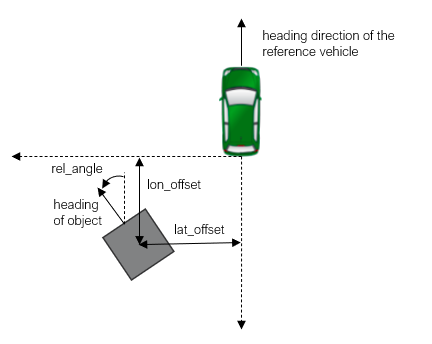
import "$FTX_BASIC/exe_platforms/model_ssp/config/model_carla_0_9_13_config.osc"

extend test_config:
    set map = "$FTX_PACKAGES/maps/straight_long_road.xodr"

extend object_kind: [cargo]

actor cargo inherits plain_object(kind == cargo):
    keep(is_supported_by_sim == true)
    keep(default bbox.length in [0.1..5]m)
    keep(default bbox.width in [0.1..5]m)
    keep(default bbox.height in [0.1..5]m)
    keep(default physical.passable == false)


extend top.main:
    falling_cargo: cargo
    lead_vehicle: vehicle

    do parallel(overlap: any, start_to_start: 0s):
        vehicles_drive: serial:
            start_up_drive: parallel(overlap: equal):
                sut.car.drive() with:
                    ss: speed([40..60]kph)
                    override(ss, run_mode: best_effort)
                    keep_lane()
                lead_vehicle.drive() with:
                    position(time: [2..10]s, ahead_of: sut.car, at: start)
                    lane(same_as: sut.car, at: start)
                    keep_lane()
            cargo_falls_drive: parallel(overlap: equal):
                sut.car.drive() with:
                    sks: keep_speed()
                    override(sks, run_mode: best_effort)
                    keep_lane()
                lvs: lead_vehicle.drive() with:
                    acceleration([-4..-2]mpsps)
                    ls: speed(speed: [0..2]kph, at: end)
                    override(ls, run_mode: best_effort)
            with:
                dur: duration([5..10]s)
                override(dur, run_mode: best_effort)

        # cargo waits for lead_vehicle to start slowing down
        # phase to start and falls from the lead vehicle
        cargo_falling: serial:
            wait @lvs.start
            falling_cargo.fall_behind(attach_to: lead_vehicle,
                height: [0.1..2.5]m,
                air_drag: [0.1..1]mpsps,
                lon_offset: [1..1.5]m,
                lat_offset: [-1.5..1.5]m,
                rel_angle: [-20..20]degree,
                ground_drag_time: [2..4]s,
                ground_drag: [2..5]mpsps)
plain_object.get_properties
Retrieve simulator-specific properties
Method of plain_object
get_properties()-> list of property
This external should be implemented per simulator to return relevant description for an object.
plain_object.move()
Move a plain_object to a position.
Movement scenario of plain_object
move(destination: <msp_position>
    [, start_position: <msp_position> ]
    [, start_at_speed: <bool> ])
destination: <msp_position>- (Required) The end location of the object for this move().
start_position: <msp_position>- (Optional) A parameter of type msp_position that specifies the starting position of the object. This parameter is required if this move() is not preceded by a previous move() or exists_at(). The default is null.
start_at_speed: <bool>- (Optional) A parameter of type bool that specifies whether the object should start moving at a speed. The default is true.
This scenario moves an object to the specified location. If the current location is not known because there is no previous move() or exists_at() of this object, the start_position parameter is required. The object will move on a straight line from initial position to destination, unless along() modifier is used, in which case the movement will follow the curvature of the relevant road/drive. If the object needs to rotate to move in the required direction, the move will first include a rotation phase limited by physical.max_yaw_rate. If physical.max_yaw_rate is set to 0degps, the object will instantly rotate in the movement direction.
plain_object.rotation()
Specify the rotation of the object relative to the road.
Modifier of plain_object
rotation(roll: <angle>, yaw: <angle>, pitch: <angle>)
roll: <angle>-
(Required) A parameter of type angle that specifies the rotation around the X axis.
yaw: <angle>-
(Required) A parameter of type angle that specifies the rotation around the Z axis.
pitch: <angle>-
(Required) A parameter of type angle that specifies the rotation around the Y axis.
See Local system for more information about these coordinates.
This modifier specifies the rotation of the object relative to the road. You can use this modifier with exists_at().
stationary_object.exists_at(stationary_object_position) with:
    rotation(roll: [0..90]deg, yaw: [0..120]deg, pitch: 0deg)
plain_object.along() of move
Move a plain_object along the path of a referenced drive
Modifier of plain_object.move
along(
    [ref_drive: <any_scenario>]
    [, road: <road_element> ] )
ref_drive: <any_scenario>- (Optional) When specified, the object moves along the path of this drive.
road: <road_element>- (Optional) When specified, the object moves along this road element.
This scenario moves an object to the specified location. If the current location is not known, because there is no previous move() or exists_at() of this object, the start_position parameter is required.
See Adding a moving object or person.
cyclist and person actors
The cyclist and person actors inherit from the plain_object actor. You can add pedestrians or cyclists to OSC2 scenarios, depending on supported functionality in the simulator/SSP.
There are two main limitations in the existing implementation:
- The capability is implemented using micro-ADA, meaning, only simple constant speed/acceleration movement is available.
- Cyclists are moved using kinematic control, so during their movement the cyclists will not be animated (e.g. pedals will remain constant).
To add a cyclist or pedestrian to a scenario:
- Extend the cyclist_model_id or person_model_id type to include the types supported by the simulator.
- Constrain the model_id field of the cyclist or person actor to an appropriate ID.
- For person, set the gender and age_group fields.
- Use exists_at() to position the cyclist or pedestrian.
- [Optional] use move() to move the person or cyclist to a new location.
See Adding a stationary object and Adding a moving object or person
Here are the default constraints for the person actor:
- keep(default bbox.length == 68centimeter)
- keep(default bbox.width == 68centimeter)
- keep(default bbox.height == 180centimeter)
- keep(soft physical.max_acceleration == 1.5mpsps)
- keep(soft physical.min_acceleration == -2mpsps)
Here are the default constraints for the cyclist actor:
- keep(default bbox.length == 160centimeter)
- keep(default bbox.width == 65centimeter)
- keep(default bbox.height == 170centimeter)
- keep(soft physical.max_acceleration == 2mpsps)
- keep(soft physical.min_acceleration == -4mpsps)
plain_object_group actor
The plain_object_group actor has the following fields:
| Name | Type | Description |
|---|---|---|
| objects | list of plain_object | The list size is constrained to contain at least 1 item. |
| objects_type | group_objects_type | Either common (all objects in the group are the same type) or random (all objects are of random type). The default is common. |
For examples, see Adding a group of moving or stationary objects.
common_plain_object_group actor
This actor inherits from plain_object_group with objects_type constrained to common.
| Name | Type | Description |
|---|---|---|
| objects_kind | object_kind | One of cyclist, person, puddle, stationary_vehicle, traffic_cone and trailer. |
See Position a group of stationary vehicles along a drive().
person_group actor
This actor inherits from common_plain_object_group with objects_kind constrained to person.
| Name | Type | Description | Default |
|---|---|---|---|
| group_age | person_group_age | One of children, adults or mixed. | mixed |
| group_gender | person_group_gender | One of male, female or mixed. | mixed |
plain_object_group_position_params struct
This struct contains parameters that control the position of the objects in the group. This struct must be bound using one of the following:
- plain_object_group_position_along_drive()
- plain_object_group_position_along_ref_position()
- plain_object_group_position_along_road()
The objects are placed relatively to binding position in the following way:
- The first object is placed at the binding position with a random lateral offset within the provided range.
- The next objects are placed with a longitudinal distance in the range and a random lateral offset.
The longitudinal/lateral offset might be treated differently based on the binding:
- If the group position is bound with plain_object_group_position_along_drive(), then the longitudinal/lateral offset is calculated relative to that drive.
- If group position is bound with plain_object_group_position_along_ref_position(), the longitudinal/lateral offset is calculated by the global offset.
- If the group position is bound with plain_object_group_position_along_road(), then the longitudinal/lateral offset is calculated relative to that road.
| Name | Type | Description | Default |
|---|---|---|---|
| min_distance_between_objects | length | Minimum shortest distance between two consecutive objects in the group, constrained to be more than 0meter | 1meter |
| max_distance_between_objects | length | Maximum distance between two consecutive objects in the group, constrained to be at least as much as min_distance_between_objects. | 5meter |
| min_lat_offset | length | Minimum lateral shift of each object in the group. | -3meter |
| max_lat_offset | length | Maximum lateral shift of each object in the group, constrained to be at least as much as min_lat_offset. Note: The max_lat_offset must be greater than min_lat_offset |
3meter |
plain_object_group scenarios and modifiers
top.plain_object_group_position_along_drive
Bind the position of a group of objects along a referenced drive
Modifier of plain_object_group_position_params
plain_object_group_position_along_drive(
    [position_params:] <plain_object_group_position_params>,
    [group:] <plain_object_group>,
    [ref_drive:] <any_scenario>
    [, fraction: <uint>]
    [, lon_offset: <length>]
    [, force_on_road: <bool>])
[position_params:] <plain_object_group_position_params>- (Required) An instance of the plain_object_group_position_params whose parameters will be bound by this modifier.
[group:] <plain_object_group>- (Required) An instance of the plain_object_group that defines the group of objects you want to place on the drive.
[ref_drive:] <any_scenario>- (Required) The scenario, usually a drive() of a vehicle, along which you want to place the group of objects.
fraction: <uint>- (Optional) A parameter of type uint. The point where the first object in the group is placed, expressed as a percentage of the total distance the car travels during the drive. The valid range is [0..100]. Default is 0.
lon_offset: <length>- (Optional) A parameter of type length. A longitudinal offset from the reference point on the route for the first object in group. Default is 0m.
force_on_road: <bool>- (Optional) A parameter of type bool. Force the resulting position within the road's lateral boundaries. Default is false.
This scenario positions a group of objects along a referenced drive.
See Adding a group of moving or stationary objects().
top.plain_object_group_position_along_ref_position
Bind the position of a group of objects to a referenced position
Modifier of plain_object_group_position_params
plain_object_group_position_along_ref_position(
    position_params: <plain_object_group_position_params>,
    group: <plain_object_group>,
    ref_position: <msp_position>)
position_params: <plain_object_group_position_params>- (Required) An instance of the plain_object_group_position_params whose parameters will be bound by this modifier.
group: <plain_object_group>- (Required) An instance of the plain_object_group that defines the group of objects you want to place at the referenced position.
ref_position: <msp_position>- (Required) The position where you want to place the group of objects.
This scenario places the first object in the group at the referenced position.
top.plain_object_group_position_along_road
Bind the position of a group of objects along a referenced road.
Modifier of plain_object_group_position_params.
plain_object_group_position_along_road(
    position_params: <plain_object_group_position_params>,
    group: <plain_object_group>,
    road: <road_element>
    [, lon_offset: <length>]
    [, lane_index: <int>]
    [, at_lane_end: <bool>]
    [, innermost_lane: <bool>]
    [, outermost_lane: <bool>]
    [, leftmost_lane: (deprecated) <bool>]
    [, rightmost_lane: (deprecated) <bool>]
    [, lat_reference: <line>]
    [, force_on_road: <bool>]
    [, use_road_element_lane_indexing: <bool>])
Important Notes
-
You can only specify one of
innermost_lane,outermost_lane,lane_index, andat_lane_end. -
leftmost_laneandrightmost_laneare deprecated! Use the traffic-side agnostic parametersinnermost_laneandoutermost_laneinstead.
innermost_lane
- The lane closest to the lanes in the opposite direction.
- In right-hand traffic this corresponds to the leftmost lane.
- In left-hand traffic this corresponds to the rightmost lane.
outermost_lane
- The lane closest to the road shoulder or curb.
- In right-hand traffic this corresponds to the rightmost lane.
- In left-hand traffic this corresponds to the leftmost lane.
position_params: <plain_object_group_position_params>- (Required) An instance of the plain_object_group_position_params whose parameters will be bound by this modifier.
group: <plain_object_group>- (Required) An instance of the plain_object_group that defines the group of objects you want to place on the road.
road: <road_element>- (Required) Specifies an instance in the current scenario of type road_element. This instance can be constrained to be the referenced road.
lon_offset: <length>- (Optional) A parameter of type length that specifies longitudinal offset from the reference point on the road for the first object in the group. The default is not less than 0m and not greater than road.length.
lane_index: <int>- (Optional) A parameter of type int that specifies the required lane index. The default is 1.
at_lane_end: <bool>- (Optional) A parameter of type bool that specifies whether the lane has any outgoing connections. The default is false.
innermost_lane: <bool>- (Optional) A parameter of type bool that specifies whether the lane is an innermost lane, i.e., closest to the lanes in the opposite direction. In right-hand traffic this corresponds to the leftmost lane; in left-hand traffic this corresponds to the rightmost lane. The default is false.
outermost_lane: <bool>- (Optional) A parameter of type bool that specifies whether the lane is the outermost lane i.e., closest to the road shoulder or curb. In right-hand traffic this corresponds to the rightmost lane; in left-hand traffic this corresponds to the leftmost lane. The default is false.
leftmost_lane: <bool>(DEPRECATED)- (Optional) A boolean parameter that previously specified whether the lane is the leftmost lane. The default is false.
Deprecated: This parameter has been removed as of version 26.02. Use the traffic-side-agnostic parametersinnermost_laneoroutermost_laneinstead, which work correctly in both left-hand and right-hand traffic environments. rightmost_lane: <bool>(DEPRECATED)- (Optional) A boolean parameter that previously specified whether the lane is the rightmost lane. The default is false.
Deprecated: This parameter has been removed as of version 26.02. Use the traffic-side-agnostic parametersinnermost_laneoroutermost_laneinstead, which work correctly in both left-hand and right-hand traffic environments. lat_offset: <length>- (Optional) A parameter of type length that defines base lateral offset used for all objects. lat_offset is measured based on the value of lat_reference. The default is 0m.
lat_reference: <line>- (Optional) A parameter of type line that defines the reference line from which lateral offset is calculated. The default is center.
force_on_road: <bool>- (Optional) A parameter of type bool that force the resulting position within the road's lateral boundaries. The default is false.
use_road_element_lane_indexing: <bool>- (Optional) A parameter of type bool, relevant only when lane_index is used, controls how lane_index is interpreted. When set to true, lane_index is considered the index of the lane within the road element. When set to false, lane_index is considered the index of the lane within msp_road. The default is false.
Note
Regarding use_road_element_lane_indexing: Consider a 4-lane road where the road element covers only the two leftmost lanes, and lane_index is set to 1. If use_road_element_lane_indexing is set to true, lane 3 will be used (as the road element contains lanes 3 and 4). If use_road_element_lane_indexing is set to false, lane 1 will be used.
This modifier positions a group of objects along a referenced road.
Adding a group of stationary objects along the right side of a road (i.e., on the rightmost lane from the centerline marking):
extend top.main:
    a_road: one_way_road
    around_offset: length with: keep(it in [20..30]m)

    group: plain_object_group with:
        keep(it.objects.size() in [4..5])
    group_params: plain_object_group_position_params with:
        keep(it.min_distance_between_objects == 2m)
        keep(it.max_distance_between_objects == 3m)
        keep(it.min_lat_offset == -3m)
        keep(it.max_lat_offset == -2.5m)
    plain_object_group_position_along_road(position_params: group_params, group: group, road: a_road, lon_offset: around_offset, rightmost_lane: true)

    do parallel(duration: [5..6]s, start_to_start: 0s):
        sut.car.drive() with:
            along(a_road, start_offset: around_offset, at: start)
            lane(rightmost: true)
        group.group_exists(group_params)
See complete example.
plain_object_group.appear()
Make a group of plain objects appear
Scenario of plain_object_group
plain_object_group.appear(position_params: <plain_object_group_position_params>)
position_params: <plain_object_group_position_params>-
(Required) An instance of the plain_object_group_position_params whose parameters will be bound by this scenario.
Add all objects in the group to simulation at given position.
This example causes a group of people to appear 1second after the start of d1.
import "$FTX_BASIC/exe_platforms/sumo_ssp/config/sumo_config.osc"

extend test_config:
    set map = "$FTX_PACKAGES/maps/straight_long_road.xodr"

scenario sut.test_group_appear:
    ped_group: person_group with:
        keep(it.objects.size() in [3..5])

    pg_start_pos: plain_object_group_position_params

    top.plain_object_group_position_along_drive(pg_start_pos, ped_group, d2)

    do parallel(overlap: any, start_to_start: 0s):
        serial:
            d1: sut.car.drive() with:
                    duration([2..5]sec)
            d2: sut.car.drive() with:
                    duration([5..10]sec)
        pg_behavior: serial:
            wait elapsed(1s)
            call ped_group.appear(pg_start_pos)

extend top.main:

    do serial:
        sut.test_group_appear()
plain_object_group.group_exists()
Create a plain_object_group at a location.
Scenario of plain_object_group
plain_object_group.group_exists(
    position_params: <plain_object_group_position_params>)
position_params: <plain_object_group_position_params>- (Required) An instance of the plain_object_group_position_params struct that defines the position of the objects in the group.
This scenario creates a stationary group of objects. The object group can be moved subsequently with plain_object_group.move().
The objects are placed relative to binding position in the following way:
-
The first object is placed at the binding position with a random lateral offset within provided range.
-
The following objects are placed with a longitudinal distance in the range and a random lateral offset. The longitudinal/lateral offset might be treated differently based on the binding. If the group position is bound based on a reference drive, then the longitudinal/lateral offset is relative to that drive. If the group position is bound based on position, the longitudinal/lateral offset is calculated by global offset.
This scenario can be used with plain_object_group.group_rotation() to specify initial rotation for the group objects.
plain_object_group.group_rotation of group_exists
Control the rotation of stationary objects
Modifier of plain_object_group.group_exists
group_rotation(
    [min_yaw: <angle> ]
    [, max_yaw: <angle> ]
    [, min_pitch: <angle> ]
    [, max_pitch: <angle> ]
    [, min_roll: <angle> ]
    [, max_roll: <angle> ])
min_yaw: <angle>- (Optional) The default is 0degree.
max_yaw: <angle>- (Optional) The default is min_yaw.
min_pitch: <angle>- (Optional) The default is 0degree.
max_pitch: <angle>- (Optional) The default is min_pitch.
min_roll: <angle>- (Optional) The default is 0degree.
max_roll: <angle>- (Optional) The default is min_roll.
This scenario controls the rotation of stationary objects.
plain_object_group.group_move
Move a group of objects
Scenario of plain_object_group
group_move(
    destination_params: <plain_object_group_position_params>
    [, start_position_params: <plain_object_group_position_params>]
    [, start_at_speed: <bool>])
destination_params: <plain_object_group_position_params>- (Required) An instance of the plain_object_group_position_params struct that defines the destination of the objects in the group.
start_position_params: <plain_object_group_position_params>- (Optional) An instance of the plain_object_group_position_params struct that defines the starting position of the objects in the group. This parameter is optional and can be skipped if this scenario is used within serial() after group_exists() or another instance of group_move(). If this parameter is not used, the movement starts from last position.
start_at_speed: <bool>- (Optional) A parameter of type bool that controls whether the objects move with a constant speed or accelerate. The default is true, meaning that objects do not accelerate but move with constant speed.
This scenario moves a group of objects from a starting position to a destination. All objects move simultaneously. The objects move on a direct line from the initial position to the destination position.
The initial position can be set by a preceding group_exists() or by start_position_params. In addition, if multiple calls to group_move() are made, the start position should be set only for the first invocation.
See Adding a group of moving or stationary objects().
puddle actor
The puddle actor inherits from plain_object. It has an additional field named model_id of puddle_model_id type. The puddle_model_id type should be extended to match the types available in the simulator, and the model_id field set accordingly.
The following constraints are applied to the fields of puddle actor:
keep(default bbox.length == 2meter)
keep(default bbox.width == 2meter)
keep(default bbox.height == 10centimeter)
keep(default physical.passable == true)
stationary_vehicle actor
The stationary_vehicle actor inherits from plain_object. It has an additional field named model_id of car_model_id type. The car_model_id type should be extended to match the types available in the simulator, and the model_id field set accordingly.
In addition, this actor has vehicle_category and car_color fields.
stationary_truck_actor
The stationary_truck actor is a subtype of stationary_vehicle. It conditionally inherits stationary_vehicle when the category is truck.
stationary_truck_actor contains a boolean field, has_mounted_attenuator, which is used for defining the stationary_truck_with_mounted_attenuator actor using conditional inheritance.
stationary_truck_with_mounted_attenuator actor
The stationary_truck_with_mounted_attenuator actor is a subtype of stationary_truck. Use the stationary_truck_with_mounted_attenuator actor to create stationary vehicles that are common in a construction site.
Note
Currently, the only supported attenuators are left and right arrow boards.
stationary_truck_with_mounted_attenuator has the following field:
| Name | Type | Description |
|---|---|---|
| attenuator_kind | truck_attenuator_kind | Type of attenuator that is mounted on the truck. The current options are left_arrow_board and right_arrow_board. |
This example shows how a stationary_truck_with_mounted_attenuator actor is positioned on the road based on the direction of its attenuator board (left arrow or right arrow):
scenario sut.stationary_truck_with_mounted_attenuator_ahead:
    stationary_truck: stationary_truck_with_mounted_attenuator
    road: one_way_road with:
        keep(it.min_lanes >= 3)
    arrow_type: truck_attenuator_kind with:
        keep(it == stationary_truck.attenuator_kind)
    truck_position: msp_position
    truck_position_modifier: top.position_along_road(truck_position,
        road: road,
        lon_offset: [50..100]m)

    do parallel(overlap: any, start_to_start: 0s):
        sut_drive: sut.car.drive() with:
            along(road, at: start, start_offset: [10..15]m)
            speed([30..]kph, at: start)
            lane(middle:true, at: start)
            keep_lane(run_mode: best_effort)
        truck_exists: stationary_truck.exists_at(truck_position)

    on @start:
        call logger.log_info("Started $(self). Truck arrow direction: $(stationary_truck.attenuator_kind)")

# Use conditional inheritance to ensure that in both cases (right or left arrow board)
# the truck is positioned along the corresponding lane
scenario sut.stationary_truck_with_right_arrow_ahead inherits \
        stationary_truck_with_mounted_attenuator_ahead(arrow_type == right_arrow_board):
    keep(truck_position_modifier.innermost_lane == true)

scenario sut.stationary_truck_with_left_arrow_ahead inherits \
        stationary_truck_with_mounted_attenuator_ahead(arrow_type == left_arrow_board):
    keep(truck_position_modifier.outermost_lane == true)
See complete example.
traffic_cone actor
The traffic_cone actor inherits from plain_object. It has an additional field named model_id of traffic_cone_model_id type. The traffic_cone_model_id type should be extended to match the types available in the simulator, and the model_id field set accordingly.
The following constraints are applied to the fields of traffic_cone actor:
keep(default bbox.length == 91centimeter)
keep(default bbox.width == 91centimeter)
keep(default bbox.height == 1meter)
traffic_light actor
This actor has scenarios that set the state of either a logical traffic light or a bulb of a physical traffic light.
The types of traffic light available depend on the simulator and the map you are using.
| Signature | Description |
|---|---|
| set_light_state(traffic_light_id: <uint>, logical_state: <logical-traffic-light-state>) | Set the state of the bulbs of a logical traffic_light. logical_traffic_light_state is one of red, green, or yellow. (No default). |
| set_light_bulb(traffic_light_id: <uint>, bulb_color: <bulb_color_kind>, bulb_state: <bulb_state_kind>, bulb_kind: <bulb_icon_kind>) | Set the state of the bulb of a physical light. bulb_color_kind is one of unknown (default), red, yellow, green, blue, white, bulb_state_kind is one of unknown (default), is_off, is_on, flashing. bulb_icon_kind is one of unknown, none (default), arrow_straight, arrow_left, arrow_right, pedestrian, walk, dont_walk, bicycle, countdown. |
| bulb_number | In case there are multiple bulbs of the same color and icon, the bulb_number can be used to specify which bulb to set. Numbering starts from 0 (the first bulb of the same color and icon) |
Example
This example sets a light on the path of the SUT to green, sets the light on the path of crossing traffic to green, and defines the bulb of the crossing traffic's light as a green left arrow.
This example assumes that the map and the simulator support both types of traffic lights.
serial():
    green_on_1: tl.set_light_state(sut_path.internal_road.traffic_light_id, green)
    green_on_2: tl.set_light_state(crossing_path.internal_road.traffic_light_id, green)
    tl.set_light_bulb(crossing_path.internal_road.traffic_light_id, green, is_on, arrow_left)
For more information, see Action traffic_light.set_light_bulb.
See also
trailer actor
The trailer actor is a sub-type of plain_object with the following fields:
| Name | Type | Description |
|---|---|---|
| model_id | trailer_model_id | |
| trailer_kind | trailer_kind | One of semi_trailer, full_trailer, none. |
| front_hitch_point_offset | length | For semi trailer, constrained to be not less than 0meter, with soft constraint of bbox.length >= it * 2. |
| dolly_trailer | bool | For semi trailer, indicates whether a trailer has a dolly. |
| dolly_drawbar_length | length | Constrained to not less than 0meter. |
| drawbar_length | length | For full trailer, constrained to not less than 0meter. |
There are three conditional subtypes of trailer depending on the value of trailer_kind.
The no_trailer actor constrains the model_id == none.
The semi_trailer actor constrains the following fields:
    keep(model_id != none)
    keep(drawbar_length == 0meter) # semi trailer does not use the regular drawbar(uses dolly_drawbar)
    keep(soft dolly_trailer == true) # by default each semi trailer has a dolly
    keep(dolly_trailer == true => front_hitch_point_offset == 0meter) # in case of using a dolly, there is no hitch point offset
    keep(dolly_trailer == false => dolly_drawbar_length == 0meter) # if no dolly, set dolly_drawbar_length to 0
    keep(visualizer_model == semi_trailer)
The full_trailer actor constrains the following fields:
keep(model_id != none)
keep(dolly_trailer == false and front_hitch_point_offset == 0meter ) # full trailer uses a regular drawbar
keep(visualizer_model == trailer)