Adding other objects to a scenario
Adding a stationary object
Foretify comes with a predefined set of actors such as stationary_vehicle, traffic_cone, puddle and person that may be used as stationary objects in various scenarios. They inherit from plain_object and may be placed at any location on the map. To place an object in a location, use the object's exists_at() scenario.
Example: plain_object.exists_at()
This example shows how to invoke a random object at a random position along the drive() of another actor. It does the following:
-
Defines an object of type plain_object that is randomized as a stationary_vehicle, traffic_cone, puddle or person.
-
Defines a stationary_object_position field of type msp_position. This struct hold the attributes of the object's position.
-
Defines the lead vehicle ahead of the SUT that performs the cut out.
-
Uses position_along_drive() to bind the object to the drive of the cut_out_vehicle, together with other attributes of its position.
-
Invokes object.exists_at() in parallel with vehicle_cut_out().
import "$FTX/env/basic/exe_platforms/sumo_ssp/config/sumo_config.osc"
import "$FTX_PACKAGES/base_scenarios/scenarios/vehicle_cut_out_family/vehicle_cut_out/vehicle_cut_out_top.osc"

extend test_config:
    set map = "$FTX_QA/odr_maps/highway.xodr"

extend top.main:
    do sut.vehicle_cut_out_with_stationary_object()

scenario sut.vehicle_cut_out_with_stationary_object:
    # A stationary object; by default, it will randomize
    # as a stationary_vehicle, traffic_cone, puddle or person
    stationary_object: plain_object

    # Position of stationary object
    stationary_object_position: msp_position

    # The lead vehicle ahead of the SUT
    cut_out_vehicle: vehicle

    # Position of stationary object is defined along the drive of the cut_out_vehicle
    top.position_along_drive(stationary_object_position,
        label(parallel.serial.vehicle_cut_out_main).phase_essence.drive_cut_out_vehicle,
        path_fraction: [0..100],
        lat_offset: [-2..2]meter)

    do parallel(overlap:equal):
        stationary_object.exists_at(stationary_object_position) with:
            rotation(roll: 0deg, yaw: 0deg, pitch: 0deg)
        serial:
            vehicle_cut_out_main(cut_out_vehicle: cut_out_vehicle)
            parallel(overlap:equal):
                sut.car.drive()
                cut_out_vehicle.drive()
            with: duration([1..2]second)
If you need to calculate several points in order to place additional objects, for example, either:
- All points can be calculated relative to the specified drive() or road element
-
Additional points can be created relative to a known point using one of the following methods of msp_position:
- at_offset_local(dx, dy, dz) gets a position with an offset of dx, dy, dz relative to current position using the current position's yaw.
- at_rotated_offset(offset, yaw) gets position at the specified offset with the relative rotation of yaw.
- at_rotated_around(rotation_center, yaw) calculates a new position, based on current position + rotation center and relative yaw.
Example: define new objects based on plain_object
Depending on the simulator, other objects may be defined by inheriting plain_object. This is an example for the Carla simulator:
import "$FTX_BASIC/exe_platforms/carla_ssp/config/0_9_13/carla_config.osc"

extend object_kind: [box]

actor box inherits plain_object(kind == box):
    keep(bbox.width == 90centimeter)
    keep(bbox.length == 90centimeter)
    keep(physical.passable == false)
    # Signal that box actor is supported by the simulator
    keep(is_supported_by_sim == true)

extend test_config:
    set map = "$FTX_PACKAGES/maps/Town04.xodr"

extend top.main:
    a_box: box
    box_pos: msp_position

    pad: position_along_drive(box_pos, a, force_on_road: true)

    do serial():
        a: sut.car.drive()
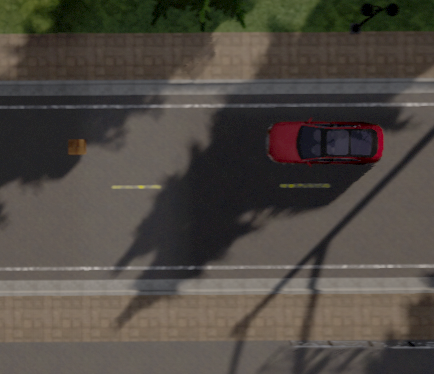
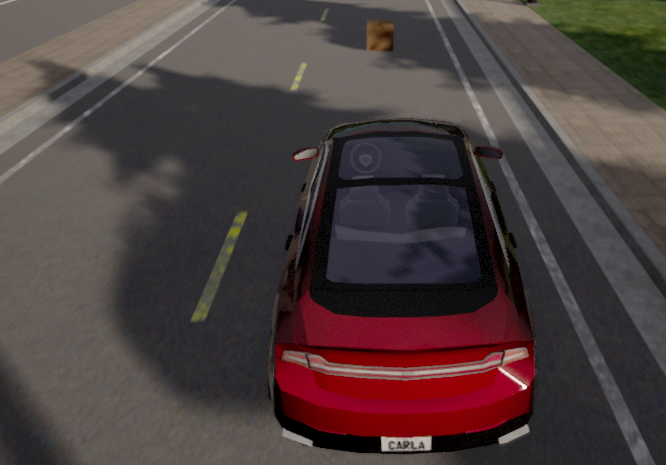
In the example above, the is_supported_by_sim field of the plain_object actor is constrained to true. This is done to instruct Foretify to generate only objects that are supported by the simulator. This constraint should be added in the simulator configuration file for each object type (that inherits plain_object) supported by the simulator.
Adding a moving object or person
Foretify comes with a predefined set of actors that can be placed at any location on the map. These actors can be moved using the object's move() scenario. The movement differs depending on the type of object:
-
Objects such as
stationary_vehicle,traffic_cone,puddle, andtrailerare moved in a simple way from one position to another. -
Objects such as
personandcyclistare equipped with thevru_driver, which is a more sophisticated mechanism that imitates the movements of vulnerable road users (VRU). These objects can avoid collisions and move according to physical properties.
Note
To move a plain_object without using the vru_driver you must disable the vru_driver.vru_behavior in the scenario. For example:
keep(person.vru_driver.vru_behavior.enable == false)
Note
The start_position parameter of plain_object.move() is required unless this move() is preceded by a previous move() or exists_at().
Move a person across a vehicle's drive()
This example shows how to use several predefined scenarios to move a person across the drive of a vehicle:
-
person.move() has these parameters:
- end_position is the position of the person at the end of the move.
- duration is the time duration of the move.
- start_position is the position of the person at the start of the move.
-
top.position_along_drive() has these parameters:
- start_position is the starting position of the object that you want to move.
- ref_drive is the drive() of a vehicle where you want to place the object.
- path_fraction is the fraction of the vehicle's drive(), expressed as a percent, where you want to place the object. The generated value for this parameter is the reference point for the drive().
- lat_offset is a lateral offset from the lane of vehicle's drive().
- lon_offset is a longitudinal offset from the reference point of the drive.
-
vehicle.distance_to_point_along_path() has this parameter:
- pos is the lane position ahead on the path whose distance you want to calculate.
| OSC2 code: move a person | |
|---|---|
1 2 3 4 5 6 7 8 9 10 11 12 13 14 15 16 17 18 19 20 21 22 23 24 25 26 27 28 29 30 31 32 33 34 35 36 37 38 39 40 41 42 43 44 45 46 47 48 49 50 51 52 53 54 55 56 57 58 59 60 61 62 63 64 65 66 67 68 69 70 71 72 73 74 75 76 77 78 79 80 81 82 83 84 85 86 87 88 89 90 91 92 93 94 95 96 97 98 99 100 101 102 103 | |
- Line 8 declares the crossing_person() scenario. Any scenario defined under the agent top is a global scenario, visible from anywhere.
- Line 16 declares a parameter that references a vehicle's drive(). The referenced drive in this scenario is any vehicle.drive() or any scenario containing a single vehicle.drive().
- Lines 25 - 55 place constraints and make calculations so that the trajectory of the person's move will intersect the trajectory of the vehicle's drive.
- Lines 78 - 85 sample the longitudinal distance between the vehicle and the person at every return from the simulator and store the result in a variable time_to_meet.
- Line 88 declares an event that will trigger the move() of the person.
- Lines 92 - 95 define the start and end position of the person's move() as positions on the referenced drive.
- Lines 98 - 102 wait for the trigger event and then start person.move().
Adding a group of moving or stationary objects
In addition to single actors, you can add groups of actors that can perform the same actions as single actors, but as a group. See the following examples:
- Constrain the kind of objects in a plain_object_group
- Position a group of stationary vehicles along a drive
- Add a group of pedestrians crossing the road
Constrain the kind of objects in a plain_object_group
You can constrain the kind of objects in a group to create, for example:
-
A random group of one of two specified types.
For example, this code creates either a group of cyclist or a group of person because, by default, the object_types field of a plain_object_group is set to common, meaning the objects in a group are of the same type.
OSC2 code: create a group of cyclist or a group of personcyclist_group_or_person_group: plain_object_group for obj in cyclist_group_or_person_group.objects: keep(obj.kind in [cyclist, person]) # select the objects to be either cyclist or person -
A mixed group of two types.
For example, this code creates a mixed group of cyclist and person.
OSC2 code: create a mixed group of cyclist and personcyclist_and_person_group: plain_object_group with: keep(it.objects_type == random) # select the objects in the group randomly for obj in cyclist_and_person_group.objects: keep(obj.kind in [cyclist, person]) # select the objects to be either cyclist or person
The following example adds a mixed group of cyclist and person.
import "$FTX_BASIC/exe_platforms/sumo_ssp/config/sumo_config.osc"

extend test_config:
    set map = "$FTX_PACKAGES/maps/straight_long_road.xodr"

extend top.main:
    do sut.test_group_appear()

scenario sut.test_group_appear:
    mixed_objects: plain_object_group with:
        keep(it.objects.size() in [3..5])   # constrains the number of objects in the group
        keep(it.objects_type == random)     # constrains the objects to be randomly selected

    for obj in mixed_objects.objects:
        keep(obj.kind in [cyclist,person])   # constrains the objects to be either cyclist or person


    mixed_objects_start_pos: plain_object_group_position_params

    top.plain_object_group_position_along_drive(mixed_objects_start_pos, mixed_objects, d2)

    do parallel(overlap: any, start_to_start: 0s):
        serial:
            d1: sut.car.drive() with:
                    duration([2..5]sec)
            d2: sut.car.drive() with:
                    duration([5..10]sec)
        mixed_objects_behavior: serial:
            wait elapsed(1s)
            call mixed_objects.appear(mixed_objects_start_pos)
Position a group of stationary vehicles along a drive
The following example adds a plain object group and constrains it to be of object_kind stationary_vehicle. The position of the group along the drive is constrained by setting offsets and distances between objects.
import "$FTX_BASIC/exe_platforms/sumo_ssp/config/sumo_config.osc"

extend test_config:
    set map = "$FTX_PACKAGES/maps/straight_long_road.xodr"

extend top.main:
    group: common_plain_object_group with:
        keep(it.objects_kind == stationary_vehicle)
    group_position_params: plain_object_group_position_params with:
        keep(it.min_lat_offset == -2.1m)
        keep(it.max_lat_offset == -1.8m)
        keep(it.min_distance_between_objects == 5meter)
        keep(it.max_distance_between_objects == 10meter)

    top.plain_object_group_position_along_drive(group_position_params, group, sut_drive)

    do parallel(overlap:equal):
        group_exists: group.group_exists(group_position_params)
        sut_drive: sut.car.drive() with:
            speed(speed: [40..80]kph)
Add a group of pedestrians crossing the road
The following example uses plain_object_group_position_along_drive to position the pedestrians on the second drive of the sut.car.
import "$FTX_BASIC/exe_platforms/sumo_ssp/config/sumo_config.osc"

extend test_config:
    set map = "$FTX_PACKAGES/maps/straight_long_road.xodr"

extend top.main:
    do sut.test_pedestrians_cross()

scenario sut.test_pedestrians_cross:
    ped_group: person_group with:
        keep(it.objects.size() in [3..5])

    pg_start_pos: plain_object_group_position_params
    pg_end_pos: plain_object_group_position_params with:
        keep(it.min_lat_offset == -15m)
        keep(it.max_lat_offset == -10m)

    top.plain_object_group_position_along_drive(pg_start_pos, ped_group, d2)
    top.plain_object_group_position_along_drive(pg_end_pos, ped_group, d2)

    do parallel(overlap: any, start_to_start: 0s):
        serial:
            d1: actor.car.drive() with:
                    duration([2..5]sec)
            d2: actor.car.drive() with:
                    duration([5..10]sec)
        pg_behavior: serial:
            ped_group.group_move(pg_end_pos, start_position_params: pg_start_pos)