Teleportation
The Teleportation checker monitors an object's traveled distance to detect physically impossible movements. It triggers when the reported distance is unrealistically relative to the recorded speed.
By default, the Teleportation checker is enabled for the Ego. You can disable this checker and configure it to monitor any other physical_object in the scenario. For more information, see Creating an instance of the teleportation checker for other physical objects.
Start condition
The checker samples the object's position at a constant rate of once per sample_clk_rate seconds and measures the distance to the position previously sampled. When no interval is currently open, it sets a distance threshold based on the EMA:
An interval starts when the distance traveled during one sampling period exceeds this threshold. If the distance does not exceed the threshold, it is added to the EMA as a valid sample:
When an interval is triggered, the checker pauses EMA updates to keep the pre-event baseline fixed. This prevents anomalous values from distorting the baseline or increasing the trigger thresholds during the event.
Notes
-
The Teleportation checker needs a short initialization period to compare the object's current position to its previous one. This period is defined by
sample_clk_rateand is set to 0.1 seconds by default. As a result, any teleportation that occurs beforesample_clk_rateseconds from the start of the run is not detected. This parameter is used to establish a consistent sampling rate, avoiding false positives while maintaining a high performance in detecting real cases. -
Since the
sample_clk_ratedetermines the time between two position samples, it directly affects the EMA calculations and, by definition, the distance threshold. Shorter values lead to shorter thresholds, meaning the checker might be more prone to false positives when the object is moving at a high speed (since it travels a longer distance over time). Higher values lead to higher thresholds, meaning the checker might be more prone to false negatives. The default value of 0.1 seconds proved effective in avoiding both issues.
Exponential Moving Average (EMA)
The Exponential Moving Average (EMA) is a statistical time-series filter used to analyze data over time, like a vehicle's motion data. Unlike a simple moving average, which assigns equal weights to all past observations, the EMA applies a weighting factor (alpha), causing the influence of older data points to decrease exponentially. As a result, the derived average is more responsive to recent changes while still smoothing out high-frequency noise and momentary simulation fluctuations. The EMA's formula is calculated as follows:
The Teleportation checker uses the EMA to establish a dynamic baseline of the expected behavior of the monitored object. The EMA continuously calculates the rolling average of the distance traveled, providing a real-time reference model of the object’s trajectory.
End condition
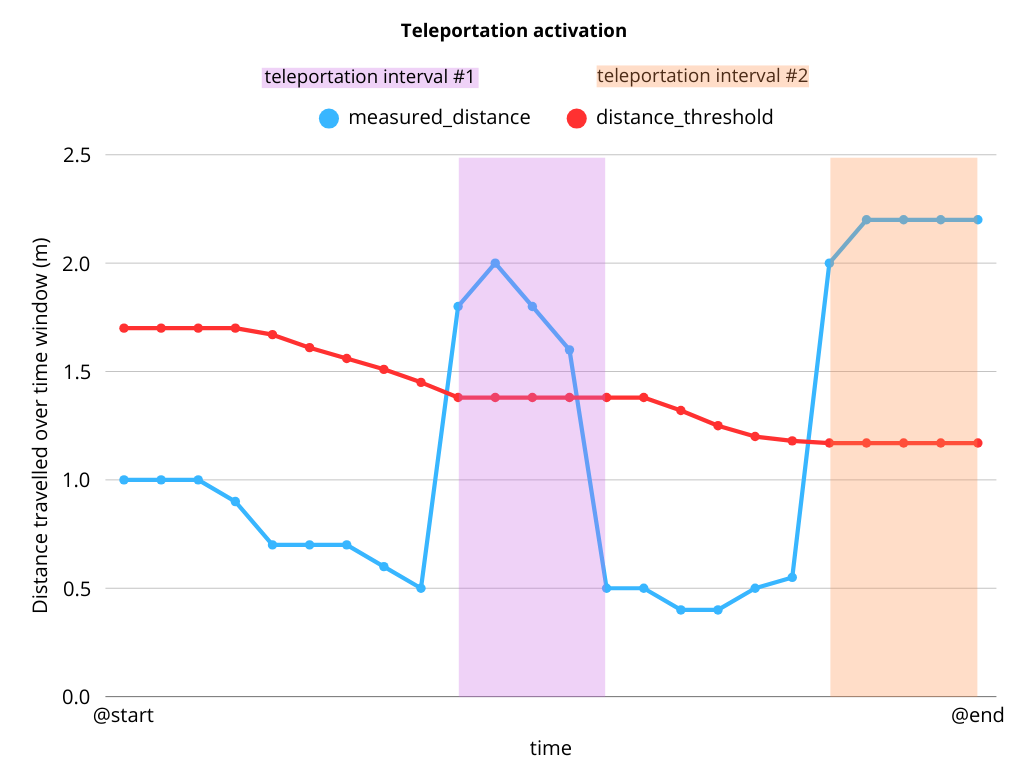
The interval ends when the object's traveled distance returns to its threshold or lower.
Plot
The following diagram illustrates how the Teleportation checker is triggered when the object's traveled distance exceeds its expected threshold, i.e., the object travels farther than expected. The interval ends only when the distance falls below the threshold.
Teleportation parameters
The Teleportation checker is configured using the following parameters.
| Parameter | Type | Description | Default value |
|---|---|---|---|
distance_factor_threshold |
float | Multiplier applied to the aggregated EMA distance to set the activation threshold; if the measured distance between consecutive samples exceeds the resulting value (plus a tolerance), an interval is triggered | 1.2 |
distance_threshold_tolerance |
length | The tolerance of the distance threshold that determines whether an interval starts or ends | 0.5m |
issue_severity |
issue_severity | Severity of issue | warning |
sample_clk_rate |
time | Checker sampling rate | 0.1s |
smoothing_time |
time | Smoothing time constant in seconds for distance calculations. Larger values result in more smoothing, but slower response. Internally, this is converted to EMA’s alpha coefficient using the formula: |
0.4s |
| $$ | |||
| \alpha = \frac{\text{sample_clk_rate}}{\text{smoothing_time} + \text{sample_clk_rate}} | |||
| $$ | |||
enabled |
bool | Sets whether the checker is enabled in all scenarios by default | true |
log_level |
enum | Level of information displayed on the console which can be: info_level, debug_level, or trace_level | info_level |
Setting Teleportation checker parameters
Default parameter values for the Teleportation checker are defined in $FTX/tool/user_interface/domain_model/checks/ftlx_global_eval_config_top.osc. To modify default values in any instance, extend the ftlx_global_eval_config struct and set the required values using the set keyword.
The following example shows how to configure the parameters in the ego_teleportation_checker_config.
extend ftlx_global_eval_config:
    set ego_teleportation_checker_config.distance_factor_threshold = 1.2
    set ego_teleportation_checker_config.distance_threshold_tolerance = 0.5m
    set ego_teleportation_checker_config.issue_severity = warning
    set ego_teleportation_checker_config.sample_clk_rate = 100ms
    set ego_teleportation_checker_config.smoothing_time = 0.4s
    set ego_teleportation_checker_config.enabled = true
    set ego_teleportation_checker_config.log_level = info_level
Creating an instance of the Teleportation checker for other physical objects
In addition to the default Ego, you can enable the Teleportation checker for any actors of type physical_object using the following steps.
- Create a new
teleportation_checker_configfor the new object and set its parameters. - Create a new global modifier for the monitored object.
- Create a checker instance named
npc_vehicle_teleportation_checkerand assign thephysical_objectargument. - Assign the new
teleportation_checker_configto the new checker instance usingkeep().
The following example shows how to create a Teleportation checker for NPC vehicles.
extend ftlx_global_eval_config:
    const npc_vehicle_teleportation_checker_config: teleportation_checker_config = new
    set npc_vehicle_teleportation_checker_config.distance_factor_threshold = 1.5
    set npc_vehicle_teleportation_checker_config.distance_threshold_tolerance = 0.2m
    set npc_vehicle_teleportation_checker_config.issue_severity = warning
    set npc_vehicle_teleportation_checker_config.sample_clk_rate = 40ms
    set npc_vehicle_teleportation_checker_config.smoothing_time = 0.4s
    set npc_vehicle_teleportation_checker_config.enabled = true
    set npc_vehicle_teleportation_checker_config.log_level = info_level


global modifier npc_vehicle.teleportation:

    checker npc_vehicle_teleportation_checker is teleportation(physical_object: actor) with:
        it.sut_issue(severity: ftlx_global_eval_config.npc_vehicle_teleportation_checker_config.issue_severity,
            kind: teleportation,
            details: "Teleportation detected: $(npc_vehicle_teleportation_checker.data.trigger_reason.as(string).replace("_", " ")) threshold(s).")

    keep(npc_vehicle_teleportation_checker.teleportation_checker_config == ftlx_global_eval_config.npc_vehicle_teleportation_checker_config)
Metrics
The following metrics are recorded and tracked by the Teleportation checker.
| Metric item | Unit / Type | Description |
|---|---|---|
measured_speed |
speed | Object's speed at the moment the interval is triggered |
measured_distance |
length | Distance traveled by the object between the current and the previous samples |
trigger_reason |
activation_reason |
Indicates which condition triggered the checker: distance_exceeded |
interval_duration |
time | Indicates for how long the interval was open |
Log and Error messages
The following error message is generated with the severity determined by the ftlx_global_eval_config.
| Output Condition | Description | Default Severity |
|---|---|---|
| Distance threshold is exceeded | "Teleportation detected: Distance exceeded threshold." | warning |