Understanding generation
Generation flow
The generation flow consists of three major stages:
| Stage | Description |
|---|---|
| 1. Modeling | Building a solving problem out of the input code and the map (also called “static analysis”). This step happens during the load of the run in Foretify. |
| 2. Generation: Solving | Finding a solution using solving techniques. |
| 3. Generation: Post-generation | Post-processing of the solution to perform procedural calculations based on the found solution, for example:
|
Sometimes, when the calculation in stage (3) fails due to incompatibility of the found solution with some other assumptions, stages (2) and (3) are called again. This process is called “generation retry.” The maximal number of retries is controlled by the config.gen.retries config variable:
set config.gen.retries = <num>
The default number of retries is 50.
The following output shows that generation performed two retries (in this case, the config.gen.retries config parameter is set to 2). Both retries failed due to an error in the top.position_along_drive modifier. The reason for the error is that the offset from the start of the drive is too large. The typical solution to this problem is either to increase the number of retries to give the generation engine more chances to find an appropriate solution, or to go back to the code in order to fix the problem.
[0.000] [INFINIGEN] Generating the test using seed 1...
[0.000] [INFINIGEN] Generating 'top', retry 1
[0.000] [INFINIGEN] Generating 'top__all', retry 1
[0.000] [INFINIGEN] Retry 1 failed due to the following reason: offset from start cannot fit to drive
[0.000] [INFINIGEN] Generating 'top__all', retry 2
[0.000] [INFINIGEN] Retry 2 failed due to the fogeneration flow

When the generation fails during the second stage (solving), it is often due to a contradiction in the code, or in the combination between the code and the map. In this case, the run will look differently in batch and interactive modes.

Following shows an example in batch mode:

```bash
>> foretify --load use_case_1.osc --batch --run
[0.000] [INFINIGEN] Generating the test using seed 1...
[0.000] [INFINIGEN] Generating 'top', retry 1
[0.000] [INFINIGEN] Generating 'top__all', retry 1
[ERROR] [0.000] [MAIN] InfiniGen failed to create a plan for the test. For contradiction check, run foretify with '--set config.gen.contradiction_check=true'.
This output suggests running Foretify with the flag --set config.gen.contradiction_check=true for contradiction detection. Applying Foretify in this way will usually reveal a contradiction:
>> foretify --load use_case_1.osc --batch --run --set config.gen.contradiction_check=true
[0.000] [INFINIGEN] Generating the test using seed 1...
[0.000] [INFINIGEN] Generating 'top', retry 1
[0.000] [INFINIGEN] Generating 'top__all', retry 1
[ERROR] [0.000] [MAIN] Contradiction was found in the following set of constraints:
User Constraints:
along(r, end_offset: [50..100]m, at: end) at line 14 in use_case_1.osc
along(r, start_offset: [10..20]m, at: start) at line 13 in use_case_1.osc
In interactive mode, the contradiction check is applied automatically when stage (2) fails to find a solution. In batch mode, this automatic check is disabled for performance reasons, and should be enabled manually.
Following shows the example in interactive mode where the contradiction check is applied automatically:
>> foretify --load use_case_1.osc --run
[0.000] [INFINIGEN] Generating the test using seed 1...
[0.000] [INFINIGEN] Generating 'top', retry 1
[0.000] [INFINIGEN] Generating 'top__all', retry 1
[ERROR] [0.000] [MAIN] Contradiction was found in the following set of constraints:
User Constraints:
along(r, end_offset: [50..100]m, at: end) at line 14 in use_case_1.osc
along(r, start_offset: [10..20]m, at: start) at line 13 in use_case_1.osc
InfiniGen outputs
InfiniGen can be run in two modes:
-
Regular mode: InfiniGen attempts to solve a test and generates a plan if successful. Foretify then proceeds with the regular run.
-
Contradiction check mode: InfiniGen checks the input test for contradictions. If a contradiction is found, it is reported.
You can manually choose in which mode to run InfiniGen by setting the value of the config.gen.contradiction_check configuration setting.
-
config.gen.contradiction_check=falseis the default and configures InfiniGen to run in regular mode. -
config.gen.contradiction_check=trueconfigures InfiniGen to run in contradiction check mode.
Foretify batch and interactive modes apply different default procedures for running InfiniGen to create a plan.
-
Batch mode
InfiniGen runs in regular mode, trying to find a solution for the test. If successful, Foretify continues the regular run. Otherwise, a
solver_failureerror is reported. -
Interactive mode
- InfiniGen performs an initial attempt to solve the test in the regular mode.
- In case of success, Foretify continues a regular run.
- Otherwise, InfiniGen switches to contradiction check mode and performs a contradiction check.
- In case of success, a contradiction error is reported.
- Otherwise, InfiniGen switches back to a regular mode and tries to solve a test.
- In case of success, Foretify continues a regular run.
- Otherwise,
solver_failureerror is reported.
- InfiniGen performs an initial attempt to solve the test in the regular mode.
The following sections provide the output of InfiniGen for each mode, indicating different solving results and test diagnosis.
contradiction_check=false
This is the default configuration that runs InfiniGen in regular mode.
--set config.gen.contradiction_check=false
[batch] represents running Foretify with --batch
[interactive] represents running Foretify without --batch
Diagnosis: InfiniGen succeeded to generate a test
[0.000] [INFINIGEN] Generating the test using seed 1...
[0.000] [INFINIGEN] Generating 'top', retry 1
[0.000] [INFINIGEN] Generating 'top__all', retry 1
[0.000] [INFINIGEN] Generation succeeded to create a test, using strategies [s1]
[0.000] [MAIN] Executing plan for top.all@536
[0.000] [INFINIGEN] Planned scenario time: 3.340 seconds
[3.340] [MAIN] Ending the run
[3.340] [MAIN]
[3.340] [RUN_TIME] ----- Run finished - summary: --------------------------------------------------
[3.340] [RUN_TIME] Run folder: <run directory>
[3.340] [RUN_TIME] Seed: 1
[3.340] [RUN_TIME] Simulation duration: 3340.0 milliseconds
[3.340] [RUN_TIME] Test passed.
[3.340] [RUN_TIME] Main issue: none

Run completed
Diagnosis: [batch] Contradiction is suspected
[0.000] [INFINIGEN] Generating the test using seed 1...
[0.000] [INFINIGEN] Generating 'top', retry 1
[0.000] [INFINIGEN] Generating 'top__all', retry 1
[ERROR] [0.000] [MAIN] InfiniGen failed to create a plan for the test. For contradiction check, run foretify with '--set config.gen.contradiction_check=true'.
[0.000] [MAIN] Ending the run
[0.000] [MAIN]
[0.000] [RUN_TIME] ----- Run finished - summary: --------------------------------------------------
[0.000] [RUN_TIME] Run folder: <run directory>
[0.000] [RUN_TIME] Seed: 1
[0.000] [RUN_TIME] Simulation duration: 0.0 milliseconds
[0.000] [RUN_TIME] Test failed.
[0.000] [RUN_TIME] Main issue:
Other error (solver_failure): InfiniGen failed to create a plan for the test. For contradiction check, run foretify with '--set config.gen.contradiction_check=true'.
Diagnosis: [interactive] There is a contradiction
[0.000] [INFINIGEN] Generating the test using seed 1...
[0.000] [INFINIGEN] Generating 'top', retry 1
[0.000] [INFINIGEN] Generating 'top__all', retry 1
[ERROR] [0.000] [MAIN] Contradiction was found in the following set of constraints:
----------------
User Constraints:
...

-----------------------------
Internal Modeling Constraints:
...


[0.000] [MAIN] Ending the run
[0.000] [MAIN]
[0.000] [RUN_TIME] ----- Run finished - summary: --------------------------------------------------
[0.000] [RUN_TIME] Run folder: <run directory>
[0.000] [RUN_TIME] Seed: 1
[0.000] [RUN_TIME] Simulation duration: 0.0 milliseconds
[0.000] [RUN_TIME] Test failed.
[0.000] [RUN_TIME] Main issue:
Other error (contradiction): Contradiction was found in the following set of constraints:
----------------
User Constraints:
...

-----------------------------
Internal Modeling Constraints:
...
Diagnosis: Exception in a method call in the constraint
Starting new run. Output files will be written to <run directory>
[0.000] [INFINIGEN] Generating the test using seed 1...
[0.000] [INFINIGEN] Generating 'top', retry 1
[0.000] [INFINIGEN] Generating 'top__all', retry 1
[ERROR] [0.000] [MAIN] Exception during method evaluation: Unhandled exception caught

    Call stack:
        ( 0) foo.get_int

[0.000] [MAIN] Ending the run
Diagnosis: Generation did not succeed
In this case, generation did not succeed, an occurrence of some method call used in the constraints that probably caused it was identified.
Starting new run. Output files will be written to <run directory>
[0.000] [INFINIGEN] Generating the test using seed 1...
[0.000] [INFINIGEN] Generating 'top', retry 1
[0.000] [INFINIGEN] Generating 'top__all', retry 1
[ERROR] [0.000] [MAIN] InfiniGen failed to create a plan for the test, possibly due to an error in the method call within one of the constraints.
[0.000] [MAIN] Ending the run
Diagnosis: Exception during post-plan
Starting new run. Output files will be written to <run directory>
[0.000] [INFINIGEN] Generating the test using seed 1...
[0.000] [INFINIGEN] Generating 'top', retry 1
[0.000] [INFINIGEN] Generating 'top__all', retry 1
[ERROR] [0.000] [MAIN] Exception in the post plan of object sut_vehicle@212 (top.sut.car): List index [1] is out of range. The list size is 0

    Call stack:
        ( 0) sut_vehicle.post_plan

[0.000] [MAIN] Ending the run
[0.000] [MAIN]
[0.000] [RUN_TIME] ----- Run finished - summary: --------------------------------------------------
[0.000] [RUN_TIME] Run folder: <run directory>
[0.000] [RUN_TIME] Seed: 1
[0.000] [RUN_TIME] Simulation duration: 0.0 milliseconds
[0.000] [RUN_TIME] Test failed.
[0.000] [RUN_TIME] Main issue:
Other error (exception): Exception in the post plan of object sut_vehicle@212 (top.sut.car): List index [1] is out of range. The list size is 0

    Call stack:
        ( 0) sut_vehicle.post_plan
Diagnosis: Generation failed, due to exception in the post_plan method
Starting new run. Output files will be written to <run directory>
[0.000] [INFINIGEN] Generating the test using seed 1...
[0.000] [INFINIGEN] Generating 'top', retry 1
[0.000] [INFINIGEN] Generating 'top__all', retry 1
[0.000] [INFINIGEN] Retry 1 failed due to the following reason: Error - retry
[0.000] [INFINIGEN] Generating 'top__all', retry 2
[0.000] [INFINIGEN] Retry 2 failed due to the following reason: Error - retry
[ERROR] [0.000] [MAIN] InfiniGen failed to create a plan for the test using seed 1 after 2 retries, due to post-generation failures. Try using another seed, or increasing the number of retries by '--set config.gen.retries=<num>'.
[0.000] [MAIN] Ending the run
[0.000] [MAIN]
[0.000] [RUN_TIME] ----- Run finished - summary: --------------------------------------------------
[0.000] [RUN_TIME] Run folder: <run directory>
[0.000] [RUN_TIME] Seed: 1
[0.000] [RUN_TIME] Simulation duration: 0.0 milliseconds
[0.000] [RUN_TIME] Test failed.
contradiction_check=true
This option sets InifiGen to run contradiction checks only. No actual test generation is performed.
--set config.gen.contradiction_check=true
Diagnosis: There is a contradiction
Starting contradiction check.
[ERROR] [0.000] [MAIN] Contradiction was found in the following set of constraints:
----------------
User Constraints:
[constraints]
-----------------------------
Internal Modeling Constraints:
[constraints]
[0.000] [MAIN]
[0.000] [RUN_TIME] ----- Run finished - summary: --------------------------------------------------
[0.000] [RUN_TIME] Foretify performed a contradiction check. The scenario was not executed.
Diagnosis: No contradiction was found
Note
This is not a guarantee for that contradictions do not exist.
Starting contradiction check.
[0.000] [MAIN] No contradiction was found
[0.000] [MAIN]
[0.000] [RUN_TIME] ----- Run finished - summary: --------------------------------------------------
[0.000] [RUN_TIME] Foretify performed a contradiction check. No contradiction was found. The scenario was not executed.
Diagnosis: Contradiction check cannot be performed
This error occurs when a scenario contains method calls in the constraints, and contradiction checks cannot be performed
Starting contradiction check.
[ERROR] [0.000] [MAIN] Contradiction check is unsupported for scenarios with constraints that depend on method calls.
[0.000] [MAIN]
[0.000] [RUN_TIME] ----- Run finished - summary: --------------------------------------------------
[0.000] [RUN_TIME] Foretify performed a contradiction check. The scenario was not executed.
Other errors
These errors are for both contradiction_check=true and contradiction_check=false.
Max_test_time too large
[ERROR] [0.000] [MAIN] Supported values for config.test.max_test_time are up to 1193 hours
Vehicle plan
As a result of the generation process, a plan for each vehicle is produced. In this context, a plan is a sequence of planned objectives for the vehicle. Each planned_objective describes a state that a vehicle is supposed to reach at a defined point in time. Executing this plan ensures the execution of the scenario intent.
Planned_objectives is a field under the vehicle struct. This is a list of planned_objective structs where each struct is comprised of the following fields:
- time (in seconds) - The time at which this planned objective is supposed to be reached by the vehicle
- speed (in meters per second) - The planned speed of the vehicle at this point in time
- road - The MSP ID of the road on which the vehicle should be located at this point in time
-
lon - The planned longitudinal position of the vehicle on the road at this point in time
- offset (in meters) - The planned offset of the vehicle location from the start of the road
-
lat - The planned lateral position of the vehicle on the road at this point in time
- lane - The planned ID of the lane on which the vehicle is located
- line - The reference line for measuring vehicle lateral offset (center of the lane / left edge / right edge)
- offset (in meters) - The planned offset of the vehicle from the reference line
The plan of each vehicle is visualized in Foretify GUI. See View planned objectives to understand how the information is visualized and how to use this information.
Note
A plan is a guide for the Foretify Human Driver Model that defines the states that a vehicle is supposed to reach over time. For different reasons (e.g. collision avoidance, interaction with unplanned actors, etc.) the vehicle may deviate from the plan during runtime, and Foretify compensation mechanisms are applied to get back in sync with the plan.
Planned objectives
The planned objectives of each vehicle can be accessed directly from the vehicle, for example, in $FTX/smoke/smoke_1.osc:
Foretify> print top.main.s.car1.planned_objectives
list of vehicle.planned_objective = 2 items:
0.  vehicle.planned_objective@501
1.  vehicle.planned_objective@502
After generation, the planned objectives are stored in a list, so its size can be determined by calling the list's size method.
Foretify> print top.main.s.car1.planned_objectives.size()
uint = 2
IMPORTANT
Planned_objectives should be used only in the post-plan methods, and not directly in the constraints.
Any field of planned objectives can be accessed as a field in the list entry, for example:
Foretify> print top.main.s.car1.planned_objectives[0].speed
speed = 5.56mps
The first planned objective (index == 0) corresponds to the start of the scenario, while the last planned objective (index == planned_objectives.size()-1) corresponds to the end of the scenario. An exception occurs when pre- or post-implicits are used (see later).
To find indexes of planned objectives corresponding to a particular sub-scenario invocation under top.main, a “plan_context” field of this invocation can be used. For example, in $FTX/smoke/smoke_1.osc, plan_context of the sub-scenario “smoke” invocation “s” is:
Foretify> print top.main.s.plan_context
context = context@559
---------- context
    start:     0
    end:       1
That is, index 0 corresponds to the start of the sub-scenario “s”, while index 1 corresponds to it’s end. The planned objectives of all vehicles are aligned in time - every vehicle has the same number of planned objectives, and entry at the same index for every vehicle corresponds to the same phase in the scenario.
Planned position of a vehicle
The position of a vehicle in a planned objective is described in road coordinates which comprise of:
-
Road index (
planned_objectives[i].road): The generation-related index of the road. Note that this is not an index of themsp_road. -
Offset from the start of the road (
planned_objectives[i].lon.offset): A distance between the start of the road (zero-position) and the planned objective. -
Lane in which the vehicle is positioned (
planned_objectives[i].lat.lane): Lane count -
Reference line for lateral offset (
planned_objectives[i].lat.line): A reference line of the lane (left/right/center) from which lateral offset should be counted. -
Lateral offset (
planned_objectives[i].lat.offset):
An msp_lane_position corresponding to the planned objective position can be accessed by the field absolute_waypoint:
Foretify> print top.main.s.car1.planned_objectives[0].absolute_waypoint
msp_lane_position = msp_lane_position@589
--------------------- msp_lane_position
    var lane:             msp_lane@119
    var lon_offset:       32.53meter
    var lat_offset:       -0.10meter
    var relative_yaw:     0degree
Planned objectives of implicit moves
InfiniGen creates planned objectives that are not part of the top.main scenario in two cases:
- All vehicles are required to start at speed 0 (
config.test.implicits_kind= speed_based, see implicits_kind).
This feature is required by some simulators, e.g. Carla. In this case, additional planned objectives will be created for each vehicle before the start of the top.main, to accommodate for acceleration of each vehicle from speed 0 to the starting speed of the top.main
- All vehicles must continue driving for some time after the end of top.main (config.test.test_drain_time = some time value other than zero, see test_config).
In this case, planned objectives are added after the end of top.main to accommodate the additional movements of each vehicle.
If we run $FTX/smoke/smoke_1.osc with the configuration parameters provided above, we get the following list of planned objectives:
Foretify> print top.main.s.car1.planned_objectives
list of vehicle.planned_objective = 4 items:
0.  vehicle.planned_objective@503
1.  vehicle.planned_objective@504
2.  vehicle.planned_objective@505
3.  vehicle.planned_objective@506
We now have 4 planned objectives, where indices 1 and 2 correspond to top.main.start and top.main.end respectively, index 0 contains planned objective for starting with speed 0:
Foretify> print top.main.s.car1.planned_objectives[0].speed
speed = 0mps
And the last index (3) corresponds to the actual end of the test after the post main driving.
Internal generation model
In addition to a scenario's description of vehicle maneuvers, Foretify adds several constraints on the movements performed by vehicles. The purpose of those constraints are to:
-
Keep vehicle behavior physically possible.
In addition to the constraints on vehicle parameters derived directly from the scenario, Foretify applies internal model constraints to keep it within what is possible from the physical point of view.
Example
Distance passed by the vehicle should be proportional to its speed within a given period of time.
-
Keep vehicle positioning valid.
Use only driveable areas on the map.
Example
If a vehicle is supposed to drive from point A to point B, the two points have to have a connection between them on the map.
-
Keep vehicle behavior realistic.
Foretify strives to keep vehicle movements within the scope of what is native from the average human driver point of view.
Example
The vehicle does not change lanes without a good reason for doing so.
-
Keep interactions between vehicles physically possible.
Example
Vehicles are not placed on the map such that their bodies overlap each other.
These constraints have to be taken into account when writing scenarios. Once the scenario code violates any of these constraints (except for soft constraints as described in the Realistic behavior constraints section), the result of the run will be a contradiction error.
Each constraint in the internal generation model can be disabled for a particular scenario. However, note that disabling these constraints is dangerous and can lead to unrealistic values being produced for the test. These constraints should be disabled only if at least one of the following is true:
-
The corresponding values are constrained in a different way.
-
There is an explicit requirement not to obey these constraints (e.g., the scenario requires the vehicles to collide).
To disable a particular constraint, update the configuration setting in the gen_config.controls structure, for example:
extend gen_config:
  set controls.speed_policy_disabled = true
By default, all internal generation model constraints are enabled.
The following table maps the labels of internal generation model constraints to the sections in this document that describe the constraints:
| Label | Section |
|---|---|
| SPEED_POLICY | Speed of the vehicle |
| ACCELERATION_POLICY | Acceleration of the vehicle |
| PHYSICAL_RELATION | Physical speed/time/distance relation |
| MAX_LAT_ACCELERATION | Maximal lateral acceleration |
| LON_LAT_MOVEMENT_RATIO | Longitudinal/Lateral movement ratio |
| VALID_ROUTE | Having a valid route for the movement |
| LANE_BOUNDARIES | Placement within the lane boundary |
| END_OF_MERGE_LANE | Placement close to the end of the merging lane |
| CURVED_ROAD_PLACEMENT | Placement on the curved road |
| MAX_LEGAL_SPEED | Keeping maximal legal speed |
| NO_LANE_CHANGE | No lane change |
| NO_LATERAL_CHANGE | No lateral change |
| NO_COLLISION | No collision |
| NO_OVERTAKE | No overtake |
| LANE_MODIFIER | Keeping lane for satisfying lane modifier |
| STEP_TIME | Duration as number of cycles |
| MAX_TEST_TIME | Avoiding tests that are too long |
Vehicle physical behavior constraints
Speed of the vehicle (SPEED_POLICY)
During the movement, the vehicle's speed does not exceed its policy.max_speed.
Example
The following code will result in a contradiction error because the required speed exceeds policy.max_speed.
   car1: vehicle with:
      keep(it.policy.max_speed == 100kph)
   do car1.drive() with:
      speed([110..120]kph, at: end)
To disable this constraint, set the following configuration parameter to true:
extend gen_config:
  set controls.speed_policy_disabled = true
Acceleration of the vehicle (ACCELERATION_POLICY)
During the movement, the vehicle's accleration:
- Never exceeds policy.max_acceleration.
- Never decreases below policy.min_acceleration (when braking).
Example
The following code will result in a contradiction error because in order to accelerate from 40kph to 80kph with acceleration not greater than 2mpsps, at least 5.6 seconds are required.
   car1: vehicle with:
      keep(it.policy.max_acceleration == 2mpsps)
   do car1.drive(duration: 5s) with:
      speed([30..40]kph, at: start)
      speed([80..90]kph, at: end)
To disable this constraint, set the following configuration parameter to true:
extend gen_config:
  set controls.acceleration_policy_disabled = true
Physical speed/time/distance relation (PHYSICAL_RELATION)
For each movement, the distance passed by a vehicle is equal (+/- tolerance) to its average speed multiplied by the movement duration, according to the following formula:
where:
- \(v_s\) is a vehicle speed at the start of the movement
- \(v_e\) is a vehicle speed at the end of the movement
- \(t\) is a duration of the movement
- \(d\) is a distance passed by the vehicle during the movement
- \(\epsilon\) is a tolerance value, usually equal to the duration of the simulation cycle
Example
The following code will result in the distance passed by the car during this drive to be within [152.47 .. 180.92] meter which might lead to a contradiction due to contradictions with topology requirements (not mentioned in the example).
   do car1.drive(duration: 10s) with:
      speed([30..40]kph, at: start)
      speed([80..90]kph, at: end)
To disable this constraint, set the following configuration parameter to true:
extend gen_config:
  set controls.physical_relation_disabled = true
Maximal lateral acceleration (MAX_LAT_ACCELERATION)
When the vehicle moves laterally (e.g., changing the lane or moving within the lane from one edge to another), the lateral distance passed by the vehicle during the movement is bounded according to the following formulas.
When the start lane and the end lane of the movement are different:
where:
- \(l\) is a difference in lanes between start and end point of the movement
- \(a_l\) is a maximal lateral acceleration of the vehicle, set by vehicle.policy.max_lat_acceleration
- \(t\) is a duration of the movement
- \(w\) is a width of the lane (set by default to 3.5 meter)
Example
Given the value of maximal lateral acceleration equal to 2mpsps, the vehicle needs at least 2.65 seconds to move to a neighboring lane.
When the vehicle moves laterally within the lane boundaries:
where:
- \(d_l\) is a lateral distance passed by the vehicle during the movement (where the lateral distance is measured as a difference in lateral offset of the vehicle relativel to the center of the lane)
- \(a_l\) is a maximal lateral acceleration, set by vehicle.policy.max_lat_acceleration
- \(t\) is a duration of the movement
There is an assumption that lateral movement starts and ends with the zero lateral speed. Thus, the acceleration time that is taken in account in formula is \(\frac {t}{2}\).
Example
The following code will result in a contradiction error. The lateral distance that the vehicle is required to pass is 4 meters. With maximal lateral acceleration of 2mpsps, the minimal time required for the vehicle to perform a maneuver is 2.83 seconds.
   car1: vehicle with:
     keep(it.policy.max_lat_acceleration == 2mpsps)
   do car1.drive(duration: 2.8s) with:
     lateral(distance: -2m, line: center, at: start)
     lateral(distance: 2m, line: center, at: end)
To disable this constraint, set the following configuration parameter to true:
extend gen_config:
  set controls.max_lat_acceleration_disabled = true
Longitudinal/Lateral movement ratio (LON_LAT_MOVEMENT_RATIO)
When the vehicle moves laterally, it has to move longitudinally as well. The distance passed longitudinally has to be proportional to the distance passed laterally, where the ratio between two distances depends on a vehicle.physical.minimal_turning_radius value—the minimal radius of the curvature that can be achieved by the vehicle, according to the following formulas.
where:
- \(R\) is a value of vehicle.physical.minimal_turning_radius
- \(d_{lon}\) is a longitudinal distance passed by a vehicle
- \(d_{lat}\) is a lateral distance passed by a vehicle
Example
In the following code, the maximal lateral distance that can be passed by a vehicle is 2.6 meter (according to the second formula).
   car1: vehicle with:
     keep(it.physical.minimal_turning_radius == 5m)
   do car1.drive() with:
     distance(4m)
To disable this constraint, set the following configuration parameter to true:
extend gen_config:
  set controls.lon_lat_movement_ratio_disabled = true
Placement constraints
Having a valid route for the movement (VALID_ROUTE)
In each movement, the start and end position of the vehicle have to be connected by a valid route, as defined by the MSP representation of the map.
To disable this constraint, set the following configuration parameter to true:
extend gen_config:
  set controls.valid_route_disabled = true
Placement within the lane boundary (LANE_BOUNDARIES)
The vehicle is always placed on the map such that its bounding box is entirely within the lane boundary.
Example
Under the assumption that all lanes on the map roads are not wider than 3.5 meters, the following code will result in a contradiction error since the vehicle is wider than any lane on the map.
   car1: vehicle with:
     keep(it.bbox.width == 4m)
   do car1.drive()
To disable this constraint, set the following configuration parameter to true:
extend gen_config:
  set controls.lane_boundaries_disabled = true
Placement close to the end of the merging lane (END_OF_MERGE_LANE)
If the vehicle is placed close to the end of the merging lane (i.e., at the end of the move the vehicle is required to change lanes), the following constraint is applied to allow enough space for the lane change.
where:
- \(D\) is a distance between the vehicle and the end of the lane
- \(s\) is a vehicle speed
- \(a_{d}\) is a maximal deceleration of the vehicle, defined by vehicle.policy.min_acceleration
- \(l\) is a length of the vehicle, defined by vehicle.bbox.length
To disable this constraint, set the following configuration parameter to true:
extend gen_config:
  set controls.end_of_merge_lane_disabled = true
Placement on the curved road (CURVED_ROAD_PLACEMENT)
When the vehicle is placed on a road with a curvature, the speed of the vehicle is bounded by the following formula.
where:
- \(s\) is a speed of the vehicle
- \(a\) is a maximal lateral acceleration of the vehicle, as defined by vehicle.policy.max_lat_acceleration
- \(R\) is a radius of the curvature. This is a property of the road that is identified from the map by the MSP.
To disable this constraint, set the following configuration parameter to true:
extend gen_config:
  set controls.curved_road_placement_disabled = true
Placement before a curved road (CURVED_ROAD_DYNAMIC_PLACEMENT)
When the vehicle is placed on a road with a curved segment, such that this segment is ahead of its position, the speed of the vehicle is constrained by the following formula:
where:
- \(s\) is the speed of the vehicle
- \(a_{\text{max-lat}}\) is the maximal lateral acceleration of the vehicle, as defined by vehicle.policy.max_lat_acceleration
- \(a_{\text{min-lon}}\) is the minimal longitudinal acceleration of the vehicle (the maximal deceleration, with a negative sign). This is given by vehicle.policy.min_acceleration
- \(R\) is the radius of the curvature in the curved interval. This is a property of the road identified from the map by the MSP
- \(d\) is the distance from the vehicle's position to the start of the curved interval
What this constraint means physically is that the speed is kept low enough so that if the vehicle decelerated at a \(a_{\text{min-lon}}\) rate, it would reach the start of the curved interval at a speed that satisfies the requirements of the CURVED_ROAD_PLACEMENT constraint. This accounts for curvature not directly at the placed position but also ahead of it.
To disable this constraint, set the following configuration parameter to true:
extend gen_config:
  set controls.curved_road_dynamic_placement_disabled = true
Placement close to the end of a lane (PLAN_FOR_ENDING_LANE_BEHAVIOR)
The plan_for_ending_lane_behavior internal constraint is applied whenever the ending_lane driver behavior is enabled, as indicated by the ftx_driver.ending_lane_behavior.enable field for the vehicle. The purpose is to prevent planning planned objectives where the ending_lane behavior will be activated.
When enabled, it constrains the placement of each planned objective to a distance of at least D (defined below) from the end of a lane with no successors in the actor's planned path.
In the image below, assuming the actor's planned path is [road_A and road_B], the actor's planned objectives cannot be located on lane_1 within less than distance D from the end of the lane.
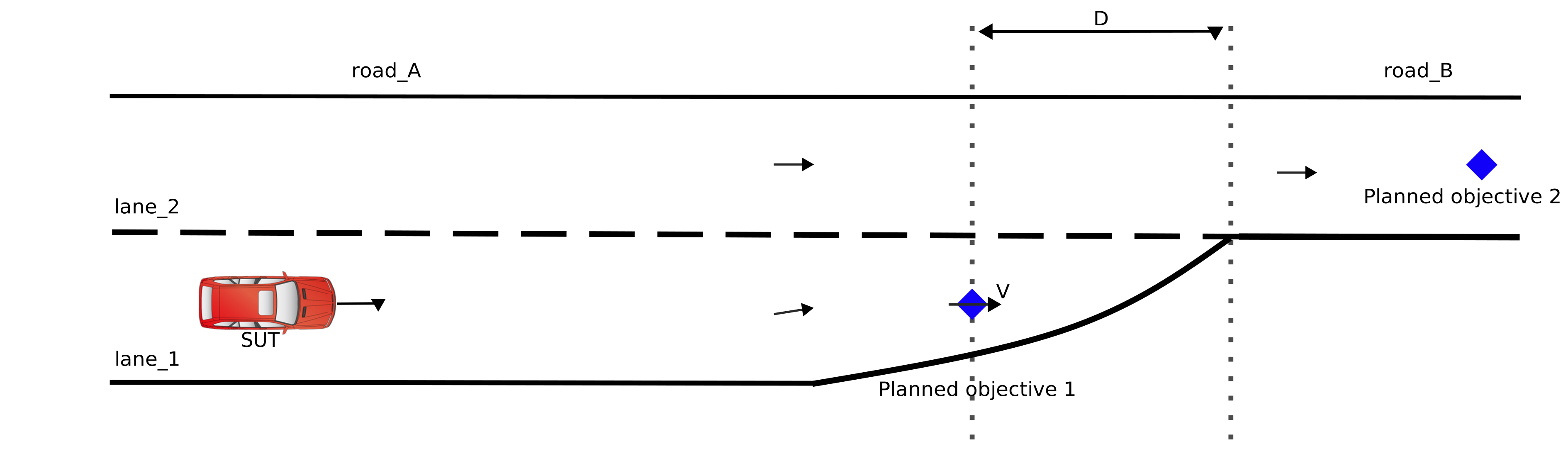
The vehicle's planned objective is constrained using the following formula:
Where:
- \(V\) is the speed of the vehicle.
- \(t\) is the time needed to perform the lane change.
- \(d_{le}\) is the configuration parameter
ftx_driver.ending_lane_behavior.dist_to_lane_end. - \(t\) is calculated by the formula (\(t=2 \cdot \sqrt{\frac{d_{\text{lat}}}{a_{\text{lat}}}}\)\), where:
- \(d_{\text{lat}}\) is the lateral distance, which is calculated using the formula: \(d_{\text{lat}} = \min\left(\frac{V_{\text{lon}}^2}{R_{\text{min}}}, a_{\text{max}}\right)\).
- \(a_{\text{max}}\) is policy.max_lat_accelration.
- \(R_{\text{min}}\) is physical.minimal_turning_radius.
To disable this constraint, set the `controls.plan_for_ending_lane_disabled' to true:
extend gen_config:
  set controls.plan_for_ending_lane_behavior_disabled = true
Placement close to a junction entry (PLAN_FOR_JUNCTION_ENTRY_LANE_BEHAVIOR)
The plan_for_junction_entry_lane_behavior internal constraint is applied whenever the junction_entry_lane driver behavior is enabled, as indicated by the ftx_driver.junction_entry_lane_behavior.enable field for the vehicle. The purpose is to prevent planning planned objectives where the junction_entry_lane behavior will be activated.
When enabled, it constrains the placement of the vehicle's initial position and subsequent planned objectives to a distance of at least D to the end of a lane with no successors in the actor's planned path.
where, dist_to_junction and max_lane_change_distance are parameters of ftx_driver.junction_entry_lane_behavior.
In the image below, assuming the actor's planned path is [road_A and road_C], the actor's initial position, or any of its planned objectives, cannot be located on lane_1 within less than distance D from the end of the lane.

To disable this constraint, set the `controls.plan_for_junction_entry_lane_behavior_disabled' to true:
extend gen_config:
   set controls.plan_for_junction_entry_lane_behavior_disabled = true
Placement close to a dead end (END_OF_ROAD_DISTANCE)
For the purpose of this constraint, a dead end road is a road that has no successor.
The end_of_road_distance internal constraint has two versions, applied depending on whether the end_of_road driver behavior is enabled. This is controlled by the ftx_driver.end_of_road_behavior.enable field for the vehicle.
- When
end_of_roadbehavior is enabled, the vehicle placement on a dead end road is constrained by:
$$ D \le \frac{v^{2}}{2 \cdot a} + \text{length} + \text{dist_to_road_end} $$
where:
- \(D\) is the distance of the vehicle's position from the end of the road
- \(v\) is a vehicle speed
- \(a\) is a maximal deceleration of the vehicle, defined by
vehicle.policy.min_acceleration - \(length\) is the length of the vehicle
- \({dist\_to\_road\_end}\) is a parameter of
ftx_driver.end_of_road_behavior
To disable this constraint, set the controls.end_of_road_distance_disabled to true:
extend gen_config:
  set controls.end_of_road_distance_disabled = true
- When
end_of_roadbehavior is disabled, the vehicle is constrained so that the front end does not extend beyond the road boundary when placed on a dead end road.
!!! note "Warning"
Disabling this constraint is **strongly discouraged**. It removes **all** constraints in the `VALID_ROUTE` category, which can result in invalid or dangerous vehicle placements. Use only if you fully understand the implications.
To disable this constraint, set controls.valid_route_disabled to true:
extend gen_config:
  set controls.valid_route_disabled = true
Stay-on-road behavior (STAY_ON_ROAD)
The stay_on_road constraint ensures that when a vehicle is in the outermost lane (rightmost or leftmost), its lateral position must keep its entire body within the road boundaries, so no part of the vehicle extends past the edge of the road.
The lateral offset of the vehicle is bounded by the following formula:
\(l \geq 0.5 * w\)
Where, l denotes the vehicle's lateral offset (measured from its center to the road's edge), and w represents the vehicle’s width.
Note: The STAY_ON_ROAD constraint can be disabled by setting the variable vehicle.ftx_driver.stay_on_road_behavior.enable to false.
extend test_config:
    set map = "$FTX_QA/odr_maps/straight_long_road.xodr"
    set implicits_kind = none
    set test_drain_time = 0second

# All tests assume vehicle width 1.8m and lane width 3.5m
extend vehicle:
    keep(bbox.width == 1.8m)

extend top.main:
    var lane_width := 3.5m

extend top.main:
  v1: vehicle
  lat_distance: length with:
    keep(it < -1.75m)
  do v1.drive() with:
        lane(rightmost: true)
        lateral(lat_distance, center)
        duration([0..5]sec)
The vehicle is placed in the rightmost lane at a lateral distance of -1.75m, causing it to extend partially off-road.
See complete example here.
extend test_config:
    set map = "$FTX_QA/odr_maps/straight_long_road.xodr"
    set implicits_kind = none
    set test_drain_time = 0second

# All tests assume vehicle width 1.8m and lane width 3.5m
extend vehicle:
    keep(bbox.width == 1.8m)

extend top.main:
    var lane_width := 3.5m

extend top.main:
  v1: vehicle
  lat_distance: length with:
    keep(it > 1.75m)
  do v1.drive() with:
        lane(leftmost: true)
        lateral(lat_distance, center)
        duration([0..5]sec)
The vehicle is placed in the leftmost lane at a lateral distance of 1.75m, causing it to extend partially off-road.
See complete example here.
Realistic behavior constraints
The following constraints are soft, meaning that the generator may choose not to keep them, or to keep them only on part of the test. This can occur if the generator determines that it is too difficult to satisfy all or some of these constraints, along with other constraints of the scenario.
Keeping maximal legal speed (MAX_LEGAL_SPEED)
By default, vehicle speed is constrained from above by the maximal legal speed of the road that the vehicle is placed on.
This constraint can be disabled by setting the variable policy.may_exceed_legal_speed to false.
Example
The following code will result in a contradiction error. Since the road speed limit is not higher than 100kph due to line 2, the requirement in line 5 cannot be satisfied.
   road: speed_limit_section
   keep(road.speed_limit in [40..100]kph)
   car1: vehicle
   do car1.drive() with:
     speed([110..120]kph)
     along(road)
To disable this constraint, set the following configuration parameter to true:
extend gen_config:
  set controls.max_legal_speed_disabled = true
No lane change (NO_LANE_CHANGE)
The vehicle keeps its lane throughout the entire scenario unless this behavior contradicts other scenario requirements:
Example 1
The vehicle is explicitly required to change lane.
Example 2
Lane conditions at some two phases of the scenario cannot be satisfied provided the vehicle will keep driving on the same lane.
To disable this constraint, set the following configuration parameter to true:
extend gen_config:
  set controls.no_lane_change_disabled = true
No lateral change (NO_LATERAL_CHANGE)
The vehicle keeps its distance from the reference line in the lane (center, by default) during the entire scenario, unless this behavior contradicts other scenario requirements.
Example
A lateral modifier is used—with a requirement for the vehicle to be in a particular offset from the reference line.
To disable this constraint, set the following configuration parameter to true:
extend gen_config:
  set controls.no_lateral_change_disabled = true
Vehicle interaction constraints
No collision (NO_COLLISION)
Two vehicles are placed on the map such that there is enough distance between their centers to avoid overlapping between their bounding box. The distance between vehicle centers is calculated using the following formula.
where:
- \(d\) is a distance between vehicles
- \(d_A, d_B\) are the lengths of the diagonal of the bounding boxes of the vehicles. Explicitly: \(\sqrt{l^2 + w^2}\) where \(l\) and \(w\) are the values of vehicle.bbox.length and vehicle.bbox.width, respectively.
Example
The following code will result in a contradiction error since the center of car2 is required to be placed at a distance of at most 7 meters ahead of the center of car1, which contradicts the above formula (the minimal distance is 9.375 meter).
   car1: vehicle with:
     keep(it.bbox.length == 5m)
   car2: vehicle with:
     keep(it.bbox.length == 20m)
   do car1.drive() with:
     position([5..7]m, ahead_of: car2, at: start)
To disable this constraint, set the following configuration parameter to true:
extend gen_config:
  set controls.no_collision_disabled = true
No overtake (NO_OVERTAKE)
If two vehicles are placed at the same lane both at the start and the end of the movement, the order between them is kept during the movement, i.e., if car1 starts the movement behind car2, at the end of the movement this order will be preserved.
Example
The following code will result in a contradiction error due to a violation of the above rule.
   car1: vehicle
   car2: vehicle
   do parallel():
     car1.drive() with:
       keep_lane()
     car2.drive() with:
       lane(same_as: car1)
       position(10m, behind: car1, at: start)
       position(20m, ahead_of: car1, at: end)
To disable this constraint, set the following configuration parameter to true:
extend gen_config:
  set controls.no_overtake_disabled = true
Keeping lane for satisfying lane modifier (LANE_MODIFIER)
When "lane" modifier is used with a reference to another vehicle, and there's a requirement to hold this for the entire movement (as shown in the example below), the reference vehicle (car2 in the example) is required to keep its lane since it is impossible to perform the lane change fully by both vehicles simultaneously.
Example
   car1: vehicle
   car2: vehicle
   do car1.drive() with:
     lane(left_of: car2, at: all) // same holds for right_of and same_as
If the code above is changed to the following, the run will result in a contradiction, due to the violation of the above rule.
Example
   car1: vehicle
   car2: vehicle
   do parallel():
     car1.drive() with:
       lane(left_of: car2, at: all)
     car2.drive with:
       change_lane()
To disable this constraint, set the following configuration parameter to true:
extend gen_config:
  set controls.lane_modifier_disabled = true
Configuration constraints
Duration as number of cycles (STEP_TIME)
Since the test is executed using cycles, the duration of each movement has to be an exact multiplication of Foretify cycle duration, which is defined by the field config.test.step_time.
Example
The following code will result in a contradiction error since with the cycle of 0.05 seconds, the duration can be either 2.3 seconds or 2.35 seconds.
   extend test_config:
     set step_time = 50ms
   extend top.main:
     car1: vehicle
     do car1.drive with:
       duration(2.33s)
To disable a particular constraint, update the configuration setting in the gen_config.controls structure, for example:
extend gen_config:
  set controls.step_time_disabled = true
Avoiding tests that are too long (MAX_TEST_TIME)
The field config.test.max_test_time defines the maximal time the generated test can take. The entire duration of the scenario cannot exceed that value.
Example
The following code will result in a contradiction error since the total duration of the scenario is 35 seconds, which exceeds the value of config.test.max_test_time.
   extend test_config:
     set max_test_time = 30s
   extend top.main:
     car1: vehicle
     do serial():
       car1.drive() with:
         duration(10s)
       car1.drive() with:
         duration(25s)
To disable a particular constraint, update the configuration setting in the gen_config.controls structure, for example:
extend gen_config:
  set controls.max_test_time_disabled = true
Choosing the best solving strategy
Introduction to solving strategies
Generating a test such that all the constraints are satisfied is a computationally complex task. Due to this complexity, there is no single holistic method that is effective for each and every scenario, and it's necessary to apply heuristic algorithms to solve the scenario. These heuristic algorithms are called generation strategies. Currently, the generation engine has six different strategies, labeled s1 .. s6. Once the scenario is solved, the following message is printed to standard output, indicating which strategy or strategies succeeded in solving the scenario:
[INFO] [INFINIGEN] [0.000] Generation succeeded to create a test, using strategies [s1, s2]
Generation strategies are applied one by one until the problem is solved. This process can sometimes be time consuming, with most of the time spent applying strategies that do not succeed to find a solution. You can optimize this process by choosing a subset of strategies to be applied. To so, change the following configuration setting:
extend gen_config:
  set strategies = <strategies list> // e.g. [s2,s5]
By default, strategies [s1,s2,s3] are applied. These strategies were found to solve the most cases experimentally.
How to choose the best strategy (or strategies)
For cases where generation becomes time consuming, it's worth optimizing by choosing the subset of solving strategies to be applied. The best way to do this is to follow the process below:
-
Run the scenario with several seeds, applying all strategies for every seed.
-
For each strategy, count how many times it succeeded to solve the scenario (from the information message shown above).
-
Apply strategies that were mostly successful by setting the
config.gen.strategiesconfiguration parameter.
To run all strategies, a special value “all” is provided as one of the options for setting the config.gen.strategies value:
extend gen_config:
  set strategies = [all]
Restrictions of physical types
Due to the need to discretize physical types while keeping the correct proportions between the connected types (e.g., time, speed and distance), the test generation engine poses several restrictions on the supported ranges and precision of the physical types. The table below summarizes those restrictions.
| Type | Supported range | Supported precision (number of digits after the decimal point) |
|---|---|---|
| Time | [ -21474836.47 .. 21474836.47 ] second | 2 |
| Temperature | [ -21474836.47 .. 21474836.47 ] celsius | 2 |
| Length | [ -21474.83647 .. 21474.83647 ] meter | 5 |
| Mass | [ -2147483.647 .. 2147483.647 ] kilogram | 3 |
| Angle | [ -2147483.647 .. 2147483.647 ] degree | 3 |
Given the precision values in the above table and the definition of physical types, you can calculate the precision. For example, to calculate the precision of speed, you subtract the precision of time from the precision of distance and get 3 digits after the decimal point.
The supported ranges apply to both explicitly defined and implicitly calculated values. For example, given two values of speed and time that are both within the supported range, their multiplication, which is a distance, can fall out of this supported range.
-
If you provide a physical value that is beyond the supported precision, the value is rounded to the supported precision and the following warning is issued:
[INFINIGEN] Physical value 20.333333mps is rounded to 20.333mps -
If you provide a physical value that is beyond the supported range, this value is reduced/increased to the maximal supported value, and the following warning is issued:
[INFINIGEN] Value 99999km is out of bounds supported by InfiniGen and is reduced to 21474.83647m
There is a special precision mode that supports values of length type that are up to 214.7483647km. In this case, the table above changes in the following way:
| Type | Supported range | Supported precision (number of digits after the decimal point) |
|---|---|---|
| Time | [ -214748364.7 .. 214748364.7 ] second | 1 |
| Length | [ -214748.3647 .. 214748.3647 ] meter | 4 |
The test generation engine automatically detects the need to switch into this precision mode based on the values of the length type extracted from either the scenario or the map. The mode is enabled when it detects at least one value of length type in the specified range [ 21474.83647 .. 214748.3647 ] meter.
Contradiction detection
A contradiction occurs when there is no assignment to the variables used in constraints such that all constraints are satisfied. In other words, for any evaluation of the variables, there will be at least one constraint that is not satisfied.
The following is an example of a contradiction of constraints:
| OSC2 code: contradiction of constraints | |
|---|---|
1 2 3 4 5 6 | |
In this example, the value assigned to x must be greater than 10 (11 or greater) in order to satisfy the constraint at line 4. Then, y has to be greater than x (12 or greater) to satisfy the constraint at line 6. But this value will not satisfy the constraint at line 7 and this is a contradiction.
Consequently, an error will be reported by Foretify indicating that there is a contradiction in the scenario:
[ERROR] [0.000] [MAIN] Contradiction was found in the following set of constraints:
keep(it > 10) at line 4 in /home/user/contradiction1.osc
keep(it > x) at line 6 in /home/user/contradiction1.osc
keep(y < 11) at line 7 in /home/user/contradiction1.osc
The default behavior of Foretify in the case of a contradiction is a "Failed to create a plan" generation error message. To enable contradiction checking, you must run Foretify with the flag --set config.gen.contradiction_check=true.
Contradictions between constraints, modifiers and operators
Contradictions can be caused by inconsistencies between different constraints in the scenario (keep statements), but they can also be caused by inconsistencies between different modifiers or between different constraints and different modifiers. The operators working on sub-scenarios can also have an effect on the contradiction. For example, refer to the following case:
| OSC2 code: inconsistency between constraints, modifiers and operators | |
|---|---|
1 2 3 4 5 6 7 8 9 10 11 12 | |
Running this example with the flag --set config.gen.contradiction_check=true results in the following error message:
[ERROR] [0.000] [MAIN] Contradiction was found in the following set of constraints:
User Constraints:
keep(it in [20..30]kph) at line 5 in /home/user/contradiction2.osc
keep(it in [40..50]kph) at line 7 in /home/user/contradiction2.osc
parallel(overlap: inside) at line 8 in /home/user/contradiction2.osc
speed([s1..s1]) at line 10 in /home/user/contradiction2.osc
speed([s_diff..s_diff], slower_than: v1, at: end) at line 12 in /home/user/contradiction2.osc
The combination of modifiers at lines 10 and 12 together with ranges from the constraints at lines 5 and 7 result in the maximal speed for vehicle v2 to be -10kph, which is impossible.
However, the parallel operator at lane 8 is also essential for the contradiction, since overlap: inside is a condition that requires the modifier at line 12 to stay within the interval of the modifier at line 10. This is what actually produces the contradiction in the speed value explained above. Changing the overlap parameter to any makes the scenario feasible, since in this case, the time point at which the modifier at line 12 must stay can be outside of the interval of the modifier at line 10.
The above example demonstrates that the overlapping between different sub-scenarios is an integral part of the constraints system and can influence whether the scenario can be satisfied.
Contradictions involving the internal generation model
The contradiction examples in the previous sections are the simple cases where all elements that combine to produce a contradiction appear explicitly in your OSC2 code and thus are fully visible. A more complex kind of contradiction is one that involves constraints from the internal generation model. These are cases where the constraints in your OSC2 code are valid while being considered standalone, but they produce a violation of one or more constraints in the internal generation model and thus lead to a contradiction.
The internal generation model is a system of constraints whose purpose is to keep the scenario feasible and realistic. See Internal generation model for a full list of constraints comprising the internal generation model.
Consider the following example:
| OSC2 code: contradictions involving internal generation model | |
|---|---|
1 2 3 4 5 6 | |
Running this example with the flag --set config.gen.contradiction_check=true results in the following error message:
[ERROR] [0.000] [MAIN] Contradiction was found in the following set of constraints:
User Constraints:
speed([10..20]mps) at line 4 in /home/user/contradiction3.osc
distance([100..150]m) at line 5 in /home/user/contradiction3.osc
duration([3..4]s) at line 6 in /home/user/contradiction3.osc
-----------------------------
Internal Generation Model Constraints:
PHYSICAL_RELATION(top.main.v1)
SPEED_POLICY(top.main.v1)
The contradiction report is divided into two separate blocks:
-
User Constraints - A block that lists constraints that appear explicitly in your OSC2 code.
-
Internal Generation Model Constraints - A block that lists constraints from the internal generation model. Each constraint provides a label of the constraint that failed. In the case above, the internal constraints that are mentioned in the contradiction message are as follows:
-
PHYSICAL_RELATION: See Physical speed/time/distance relation.
-
SPEED_POLICY: See Speed of the vehicle.
-
In this case, the contradiction results from a combination of conditions. The PHYSICAL_RELATION internal constraint requires distance to be a multiplication of average speed and duration. If we take the maximal speed from the speed modifier at line 3 (20mps) with the maximal duration from the duration modifier at line 5 (4s), we get the maximal distance of 80meter to be traveled by the vehicle — out of the range required by the distance modifier at line 4.
Note
The SPEED_POLICY internal constraint (speed must not exceed maximal vehicle speed, as set by vehicle.policy.speed) is redundant in the contradiction message. This is an inefficiency of the contradiction detection mechanism—the reported set of constraints is not necessarily minimal, and while it contains all constraints that are mandatory for getting a contradiction, it may in addition contain some other constraints.
When the internal constraint is applied to one or more vehicles, the list of the vehicles is attached to the constraint label. In the following example, a SPEED_POLICY constraint is applied to the vehicle ‘v1’ under top.main:
SPEED_POLICY(top.main.v1)
In the following example, the NO_OVERTAKE constraint indicates that top.sut.car, while driving behind the top.main.vehicle, cannot overtake it without changing lane.
NO_OVERTAKE(top.sut.car, top.main.vehicle)
Because the relation is reciprocal, the order of the vehicles in the list is meaningful.
Affected variables
For certain constraints, the contradiction messages may include additional information regarding the variables affected by them.
For example, for a VALID_ROUTE constraint, the message includes the value of the max_lat_acceleration variable, a variable that affects the constraint:
VALID_ROUTE(top.sut.car):
        Affected variables: top.sut.car.policy.max_lat_acceleration (2.500000 mpsps);
Also, this additional information can sometimes be a part of the user constraint in the message, in case the variable cannot be directly deduced from the constraint itself:
keep(default it == 150kph) at line 440 in /domain_model/actors/ftlx_vehicle.osc
        Affected variables: main.vehicle.policy.max_speed (41.666666 mps);
Affected planned objectives
Often times, contradictions can be localized to one or multiple drives. In these cases, the contradiction message contains information about the planned objectives that are participating in the contradiction, in terms of a drive start/end to which the affected planned objectives belong.
In the following code, there’s no overlap between speed1 and speed2:
    keep(speed1 < speed2)
    do serial:
        FIRST: sut.car.drive() with:
            speed([0kph..speed1])
        SECOND: sut.car.drive() with:
            speed([30kph..speed1])
        UNSAT: sut.car.drive() with:
            speed([speed2..100kph])
        LAST: sut.car.drive() with:
            speed([speed2..150kph])
The generation engine is able to deduce the exact drive where the speed cannot be enforced with respect to the previous drive (in this case, the UNSAT drive) and report this in the contradiction message:
Internal Generation Model Constraints:
SPEED_POLICY(top.sut.car):
        Affected planned_objectives at: main.UNSAT@start(2)
The "Affected planned_objectives" section of the message indicates that the problem occurs at the start of the main.UNSAT drive, the connection point between the SECOND and UNSAT drives.
Note
When the affected planned_objective message refers to the @start of the drive, the constraint is applicable to the @end of the previous drive as well.