Description of OSC2 configuration options
The top.config struct contains the following four struct instances that are used to configure the environment: - ego_config - map_config - sim_config - test_config
ego_config
The following table describes the fields in the top.config.ego struct.
| Field | Type | Description | Default value |
|---|---|---|---|
| dsp_launch_policy | av_launch_policy | Specify how the SUT Support Package (DSP) should be launched. | foretify |
| dsp_connection_string | string | Define DSP connection string (format is custom). Should be set only if dsp_launch_policy = off | |
| max_dsp_connect_time | time | Maximum time allowed to connect to DSP. | |
| allow_create_in_junction | boolean | Whether the ego is allowed to be placed in a junction at start of test. | true |
gen_config
The following table describes the fields in the top.config.gen struct.
| Field | Type | Description | Default value |
|---|---|---|---|
| contradiction_check | boolean | Run Foretify in contradiction_check mode which only checks the test for contradictions, without actually generating and running it. | false |
| controls | struct | Structure of boolean variables to control internal generation model constraints. For details, see Internal generation model. For a quick description of the parameters, see the table below. | false |
| retries | int | Number of attempts applied by InfiniGen to generate the test. | 50 |
| strategies | list of infinigen_strategy | Set a list of solving strategies to be used when generating a scenario. For details, see Choosing the best solving strategy. | [s1,s2,s3] |
| use_threads | boolean |
|
True |
The following table describes the parameters of the controls struct.
| Parameter | Description | Default value |
|---|---|---|
| speed_policy_disabled | Controls the speed constraint. | false |
| acceleration_policy_disabled | Controls the accleration constraint. | false |
| physical_relation_disabled | Controls the physical speed/time/distance relation constraint. | false |
| max_lat_acceleration_disabled | Controls the maximal lateral acceleration constraint. | false |
| lon_lat_movement_ratio_disabled | Controls the longitudinal/lateral movement ratio constraint. | false |
| valid_route_disabled | Controls the valid route constraint. | false |
| lane_boundaries_disabled | Controls the placement within the lane boundary constraint. | false |
| end_of_merge_lane_disabled | Controls the placement close to the end of the merging lane constraint. | false |
| curved_road_placement_disabled | Controls the placement on the curved road constraint. | false |
| max_legal_speed_disabled | Controls the keeping maximal legal speed constraint. | false |
| no_lane_change_disabled | Controls the no lane change constraint. | false |
| no_lateral_change_disabled | Controls the no lateral change constraint. | false |
| no_collision_disabled | Controls the no collision constraint. | false |
| no_overtake_disabled | Controls the no overtake constraint. | false |
| lane_modifier_disabled | Controls the keeping lane for satisfying lane modifier constraint. | false |
| step_time_disabled | Controls the duration as number of cycles constraint. | false |
| max_test_time_disabled | Controls the avoiding tests that are too long constraint. | false |
map_config
The following table describes the fields in the top.config.map struct.
| Field | Type | Description | Default value |
|---|---|---|---|
| default_generation_speed_limit | speed | The speed limit associated by generation with roads that have no (or undefined) speed-limit in the map. | 300kph |
| force_merge_width_threshold | length | Sets the threshold for calculating the force_merge_offset_from_end field for highway_acceleration_lane. Defines the minimum width, below which the acceleration lane is considered to require a force-merge. | 2.7m |
| highway_acceleration_lane_max_length | length | The max length for highway acceleration lane. Only merging lanes with length up-to this setting will be marked as acceleration lane. | 500m |
| ignore_elevation | boolean | Specify whether to ignore map elevation, disregarding the z-axis values of points in the map (setting them to 0) to ensure that the map remains at ground level. This parameter lets you create scenarios from existing maps while ensuring that the map remains flat if elevation is unnecessary or if it interferes with actors' movements. This field is meant to be used with simulators that also ignore map elevation. | false |
| lane_outlier_angle_factor | float | Together with 'lane_outlier_max_dist' determines outlier lane polyline points that are removed during map load. Successive points at distance D less than 'lane_outlier_max_dist' that generate angle diff greater than max('max_lane_angle_change', [D.m() * 'lane_outlier_angle_factor']-degrees) are considered outliers and the first of them (according to polyline direction) is removed. | 9.0 |
| lane_outlier_max_dist | distance | See 'lane_outlier_angle_factor'. | 10m |
| longitudinal_slopes_sample_step | length | Controls the interval for sampling changes in the slope of a lane. It should not be necessary to change this value. | 150cm |
| max_drive_distance | distance | The maximum distance that the drive is supposed to travel. This is an optimization setting. | 120m |
| max_lane_angle_change | angle | The maximal angle change between successive lane polyline segments. Greater angle changes are automatically smoothed during map load. | 15deg |
| maximal_longitudinal_slope_change | angle | The maximal difference inside one slope segment. | 5deg |
| min_highway_radius | length | The minimal radius to consider road as highway in highway-junction detection | 50m |
| min_highway_speed_limit | speed | The minimum speed limit required to consider a road as a highway in highway-junction detection. | 60kph |
| minimal_slope_angle | angle | The minimal angle to count as a slope. Segments with values below this are neither (not considered to be a slope). | 0.5deg |
| oncoming_threshold | length | For scenarios that require oncoming actors approaching from opposite directions on road elements that are close enough for them to engage, this is the threshold of what is considered "close". | 20cm |
| road_with_sign_max_length | length | The max length for the route associated with 'road_with_sign' route_elements. The element stretches back from the sign until first of either 'road_with_sign_max_length' meters or the first junction | 100m |
| usable_map_area_configuration_id | string | Specify a specific configuration from the configurations available in usable_map_area_json_file. Given usable_map_area_json_file, a usable_map_area_configuration_id must be provided. | |
| usable_map_area_json_file | string | Specify the path for a JSON file that defines areas on the map where scenarios can be generated. By default entire map is used. Setting this flag requires setting usable_map_area_configuration_id as well. | |
| traffic_side_request | traffic_side_request | A map might specify the traffic side. If so, this option must not contradict. not_set means the traffic side is defined by the loaded map. right_hand requests right-hand traffic left_hand requests left-hand traffic |
right_hand |
sim_config
The following table describes the fields in the top.config.sim struct.
| Field | Type | Description | Default value |
|---|---|---|---|
| sim_launch_policy | av_launch_policy | Specify how the simulator should be launched | foretify |
| ssp_launch_policy | av_launch_policy | Specify how the Simulator Support Package (SSP) should be launched | foretify |
| ssp_connection_string | string | Define SSP connection string (format is custom). Should be set only if ssp_launch_policy is set to off. | |
| step_time_us | uint | Set simulation step size (in microseconds) | 20000 (20ms) |
| use_microseconds_for_time | boolean | Flag that controls if the SSP/DSP will get the time in microseconds or milliseconds. | false |
| enable_gui | boolean | Specify if simulator will run with GUI or headless | true |
| pause_at_start | boolean | Specify whether the simulation pauses at the start of the run | false |
| pause_at_end | boolean | Specify whether the simulation pauses at the end of the run | false |
| speed_factor | real | Specify the simulation speed, where 0 is as fast as possible, 0.5 is double the speed of real time (if possible), 1 is real time, 2 is half the speed of real time, and so on | 0 |
| resolution | string | Defines the resolution of the current simulator display. The string format varies according to the simulator | |
| connection_string | string | Defines the simulator connection string. It should be set only if sim_launch_policy is set to off. | |
| max_wait_start_ simulation_time |
time | Defines the maximum time to wait till simulation is started. Set to 0 for unlimited wait time. | 60second |
| max_wait_step_time | time | Defines the maximum time allowed to wait till simulation step is complete. Set to 0 for unlimited wait time. | 0second |
| max_ssp_connect_time | time | Maximum time allowed to connect to SSP. Set to 0 for unlimited wait time. | 60second |
| use_collision_detection | boolean | Indicates if simulator's collision detection should be used | true |
| video_width | int | Desired video width | 1280 |
| video_height | int | Desired video height | 720 |
| video_frame_rate | int | Desired frame rate | 5 |
| tl_api_level | traffic_lights_api_level | The type of traffic light supported by the simulator, one of none (the default), physical or logical. | |
| default_tl_color | traffic_lights_default_color | Specifies the initial state of the traffic lights, one of red (the default), green, or none (the initial state is determined by the simulator.) | |
| requires_speed_and_ acceleration_for_kinematic_move |
boolean | Defines if SSP requires speed and acceleration to be sent to the simulator. When true, the set_xy_trajectory_move_req. sends a trajectory that specifies rotational velocity (the yaw angle rate in terms of rad/sec). This is appropriate for kinematically controlled vehicles. After setting this parameter to true, run Foretify with the --dlog_frpc trace option in order to see the angular speed parameter printed in the log. | false |
| enable_state_validation | boolean | Defines if SSP reported state should be validated. | false |
| allow_different_rotation_for_trailer | boolean | A flag that indicates if the simulator supports providing a different rotation for truck and trailer. | true |
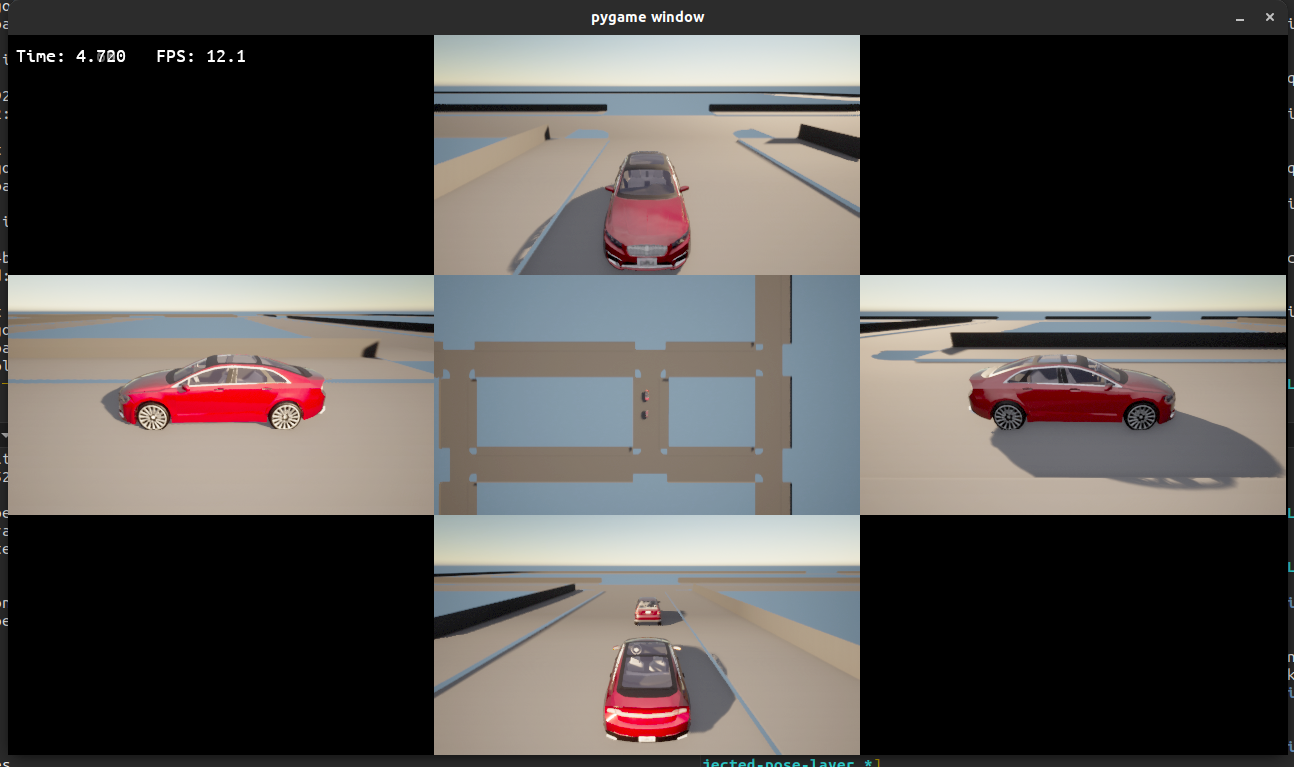
| camera_view | carla_default_view | Supported by the Carla simulator only, the option lets you choose one of various camera views. One of ego, all, rear, front, side_left, side_right, composite, blank | all is a top-down view showing all the actors. |
| composite_camera_layout | list of carla_default_view | Controls the layout of cameras in Carla's composite view. You can switch between views using Ctrl+V. This list must contain nine elements representing a 3x3 grid in row-major order. Set unwanted grid squares to blank. | [blank, front, blank, side_left, ego, side_right, blank, rear, blank] |
The predefined av_launch_policy type used in this struct has the following possible values:
- off: The component is not executed by Foretify.
- foretify: The component is executed by Foretify after the initial plan phase.
test_config
The following table describes the fields in the top.config.test struct.
| Field | Type | Description | Default value |
|---|---|---|---|
| activate_rss | boolean | Activate RSS feed. | |
| detailed_object_reporting | boolean | When set, the object ID in error messages includes more info, thus facilitating debugging. | true |
| enable_avoid_collisions | boolean | When set, NPCs try to avoid collisions with other NPCs and ego | true |
| enable_record_video | boolean | Enables simulation record video mode | false |
| excluded_areas_path | string | The path to an excluded areas definition file. This file can be used for checking spawn positions on the map. If it's not set, no check is done. | |
| implicits_kind | implicit_calc_kind | speed_based specifies that all vehicles in the test have 0 speed at time 0. Foretify generates actions (implicit moves) to reach the scenario's initial conditions. These actions are not part of top.main. The actual user-defined scenario starts after the vehicles reach the initial starting conditions defined in the scenario. none specifies that each vehicle has some (possibly non-zero) speed at time 0. The user-defined scenario starts immediately. This mode can be used only if the simulation environment supports creating actors with initial non-zero speed or if the scenario requires all cars to start at 0 speed. |
none |
| map | string | Specifies the map to use for the test | |
| map_memory_threshold_MB | int | The upper bound for memory allowed to be allocated to hold a map information in the generation engine (in MB). | 4096 |
| max_test_time | time | The maximum allowed time for single test run. This value must not contradict the specified duration of the loaded scenario. For example, if a scenario specifies a duration of 5 seconds, you must not request the total test time to be 3 seconds or less. | 100second |
| max_time_headway | time | Set the maximum time headway. | 3second |
| min_road_search_radius | distance | Limit the search distance from the previous position. This field is used when converting global position (as received from simulation) to road position. | 5m |
| min_test_time | time | The minimum allowed simulation time for single test run. The run will error if it ends earlier. The defined time does not affect the planning phase. | 3second |
| no_simulation | boolean | When true, stops the run immediately after the generation stage (for frun) | false |
| planned_path_extra_length | length | Add length to a vehicle's planned path beyond the original plan, at least as long as this value. This provides robustness in case at runtime a vehicle drives a longer distance than originally planned. | 100meter |
| recorded_trace_path | string | Path for a recorded trace file used during monitor-from-recording. | |
| ssp_dsp_init_order | ssp_dsp_call_order | Specifies the call order at initiation. One of ssp_first, dsp_first, or together (the default). See Sequence diagrams for more information. | |
| ssp_dsp_step_order | ssp_dsp_call_order | Specifies the call order for each execution step. One of ssp_first, dsp_first, or together (the default). See Sequence diagrams for more information. | |
| step_time | time | Set Foretify step size. Ideally Foretify step size should be a multiple of simulation step time (but this is not required). If this value is not a multiple of config.sim.step_time_us, there might be some discrepancy between the Foretify state and the simulation state. | 20 ms. |
| terrain_definition | string | The path to terrain definition file. It can be used for checking spawn positions on the map. If it's not set, no check is done | |
| test_drain_time | time | Test drain time is additional time allocated for the run after the explicit scenario execution has finished. | 0second |
| test_name | string | It represents the name of the high-level test that runs an OSC2 scenario. | |
| ttc_calculation_limit | time | Limit the time for TTC calculation. The default is 10s. | |
| ttc_calculation_step_size | time | Set the TTC calculation step size (affects TTC precision). The default is 100ms. | |
| continue_simulation_after_sut_collision | bool | Whether to continue simulation after a SUT collision (provided that the respective collision issue has severity of or is downgraded to error_continue or less). The default is false. |