OSC2 basics
Lexical structure
OSC2 syntax is similar to Python. An OSC2 program is composed of statements that declare or extend types such as structs, actors, scenarios, or import other files composed of statements. Each statement includes an optional list of members, each indented a consistent number of spaces from the statement itself. Each member in the block, depending on its type, may have its own member block, indented consistently from the member itself. Thus, the hierarchy of an OSC2 program and the place of each member in that hierarchy is indicated strictly by indentation. (In contrast, in C++, the beginning and end of a block is marked by curly braces {}.)
In the following figure, the code blocks are indicated with a blue box.
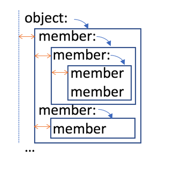
A colon indicates the beginning of a member code block. Common indentation indicates members at the same level of hierarchy. It is recommended to use multiples of four spaces (blanks) to indicate successive hierarchical levels, but multiples of other units (two, three and so forth) are allowed, as long as usage is consistent. Inconsistent indentation within a block is an error. If you use tabs, you must set the editor to translate tabs to spaces.
Empty lines and single-line comments do not require a specific indentation.
Members (other than strings) that are too long to fit in a single physical line can be continued to the next line after placing a backslash character (\) before the newline character.
object:
    member ... \
        next line of same member \
        end of member
    member
You can concatenate strings with the plus character (+):
"a string" + " with continuation"
"a string" + \
" with continuation"
/*
This is the first line of a block comment.
/* This is a nested comment. */
# This is also a nested comment.
This is the last line of the block comment.
*/

extend top.main:
    do sut.cut_in() with: # This is an inline comment
        keep(it.get_ahead.duration == 3s)
        keep(it.change_lane.duration == 4s)
Single-line code blocks
Some code blocks by definition are on a single line. For example, declarations of undefined methods, expression methods and external methods are single-line code blocks.
 def is_even(i: int) -> bool is undefined
 def is_even(i: int) -> bool is expression (i % 2 == 0)
 def is_even(i: int) -> bool is external cpp("basics.so")
Also a behavior specification with a scenario invocation or method call is a single-line block.
do scenario3()
do call compare_ints()
To improve readability, you can choose to write any code block on a single line. For example, native methods often contain multiple member blocks of procedural code. However, a simple native method with a single line of procedural code can be written on a single line.
def increment(cnt: int) -> int is:
    return (cnt + 1)
# can be written as
def increment(cnt: int) -> int is: return (cnt + 1)
You cannot write two code blocks on a single line. Looking at the example below, you can see that the invalid code actually has two code blocks. The beginning of each block is marked with a colon ':'.
def x_is_smaller(x: int, y:int) -> bool is:
    if(x < y):
        return true
# CANNOT be written as
def x_is_smaller(x: int, y:int) -> bool is: if(x < y): return true
The following native method declaration has two single-line code blocks:
def get_smaller(x: int, y:int) -> int is:
    if(x < y): return x             # single-line code block
    elif(x != y): return y          # single-line code block
Note
Although a semi-colon ';' is used as a separator in valid with block syntax, you cannot write two single-line code blocks on a single line separated with a semi-colon ';'.
def get_smaller(x: int, y:int) -> int is:
    # CANNOT be written as
    if(x < y): return x; elif(x != y): return y
with block syntax
Field declarations and scenario invocations can have with blocks that define attributes for that field or scenario, for example:
extend top.main:
    car1: vehicle with:
        keep(category == truck)
        keep(color == black)
    car2: vehicle with:
        keep(category == bus)
        keep(color == blue)

    do parallel(duration:3s):
        car1.drive()
        car2.drive() with:
            speed(speed: [1..5]kph, slower_than: car1)
            position(time: 3second, behind: car1, at: end)
These with blocks can also be written on a single line. Note that there are two variations for field declarations.
extend top.main:
    car1: vehicle with: keep(category == truck); keep( color == black)
    car2: vehicle with(category: bus, color: blue)

    do parallel(duration:3s):
        car1.drive()
        car2.drive() with: speed(speed: [1..5]kph, slower_than: car1); position(time: 3second, behind: car1, at: end)
OSC2 file structure
The default extension for OSC2 files is .osc. You can define the search path for OSC2 files by specifying a list of directories to be searched in the OSC_PATH environment variable.
OSC2 is designed to facilitate the composition of scenarios. To that end, it lets you separate the following components into separate files:
- Higher-level scenarios describing complex behavior.
- Lower-level scenarios that you invoke from multiple, higher level scenarios.
- Coverage definitions.
- Extensions of any of the above for the purposes of a particular test.
- The definition of a test.
- The configuration of an execution platform.
The test file defines the test by:
- Importing the components of the test.
- Specifying the test configuration, including the execution platform (the simulator and SUT, for example) and the map.
- Extending the built-in, top-level scenario top.main to invoke a high-level user scenario.
Here is a simple example of a test file. The my_scenario_top.osc file imports the top-level user scenario, any lower-level scenarios, and the coverage definitions. The scenario invocation constrains the weather attribute of my_scenario to be rain, illustrating how you can constrain the attributes or behavior of a scenario for the purposes of a particular test.
import "$FTX_BASIC/exe_platforms/sumo_ssp/config/sumo_config.osc"
import "common_utils.osc"
import "my_scenario_top.osc"

extend test_config:
    set map = "$FTX_PACKAGES/maps/hooder.xodr"

extend top.main:
    do sut.my_scenario(weather: rain)
Basic types
All OSC2 expressions have a statically defined type. Foretify type-checks OSC2 source code before runtime, ensuring that only well-formed scenarios can be executed.
OSC2 has the following classes of types:
-
Primitive types (built-in):
- Boolean
- Integer
- Floating point
- String
-
Enumeration types (predefined or user-defined)
- Physical types (predefined)
- List types (predefined or user-defined)
-
Compound types (predefined or user-defined):
- Structs
- Actors
- Actions
- Scenarios
For more information on these types, including the predefined types, how to declare new types and how to use them in expressions, see the following:
- Vehicle actor
- Physical object actors
- Other actors
- Predefined enumerated types
- Type declarations
- OSC2 expressions
Overview of language constructs
OSC2 constructs can be divided into the following categories, based in part on the context in which they can appear and in part on their function:
- Statements - top-level constructs
- Type declarations - top-level constructs
- Structured type members - general purpose members that appear within type declarations
- Behavior specification - structured type members that specify an actor's behavior
- Behavior modification - structured type members that modify an actor's behavior
- Behavior monitoring - structured type members that monitor an actor's behavior
- Expressions appear within statements, type declarations and structured type members.
The following sections describe each category and its members briefly.
Statements
If you have built a scenario hierarchically, with a higher level scenario calling a lower-level one, and placed the coverage definitions and test configuration in separate files, you can use import statements to import all these files into a test file.
OSC2 Type declarations
Type declarations are statements that define or extend a scalar or a structured type. These structured types may inherit attributes or behaviors from a parent type.
Physical type declarations and unit declarations define physical quantities and the units used to measure them. Physical types are defined based on the SI system (the International System of Units). One example is the physical type time and its units ms, s, and so on.
Enumerated type declarations define a set of explicitly named values. For example, an enumerated type driving_style might define a set of two values: normal and aggressive.
Struct declarations define compound data structures that store various types of related data. For example, a struct called car_collision might store data about the vehicles involved in a collision.
Actor declarations are compound data structures that model entities like cars, pedestrians, environment objects like traffic lights and so on. In contrast to structs, they are also associated with scenario declarations or extensions. Thus, an actor is a collection of both related data and declared activity. Example actor declarations are vehicle, person and environment.
Action declarations and scenario declarations define compound data structures that describe the behavior or activity of one or more actors. You control the behavior of scenarios and collect data about their execution by declaring data fields and other members in the scenario itself or in its related actor or structs. Example actions are vehicle.drive() and person.move(). Example scenarios are sut.cut_in(), sut.cut_in_with_crossing_pedestrian(), and so on.
Modifier declarations declare entities that do not define scenario behavior, but modify it by constraining attributes such as speed, location and so on. Example modifiers are change_lane() and keep_speed(). Because modifier declarations, unlike other type declarations, do not define a type that can be used to declare the type of an entity, they are not considered to be a proper structured type.
Extensions to an existing type or subtype of an enumerated type or structured type scenario add to the original declaration without modifying it. This capability allows you to extend a type for the purposes of a particular test or set of tests.
Structured type members
The constructs described in this section can appear only within a type declaration or extension. The constructs described in the following sections (Specifying behavior, Modifying behavior, and Monitoring behavior) are also structured type members.
Field declarations define a named data field of any scalar, struct or actor type or a list of any of these types. The data type of the field must be specified unless the type can be determined from a value assigned to it. For example, the declaration defines a field named legal_speed of type speed. For the second declaration, Foretify determines that too_fast is of type bool (Boolean).
scenario vehicle.my_scenario1:
    legal_speed: speed
    var too_fast:= true
Field constraints defined with keep() restrict the values that can be assigned to or generated for data fields. For example, because of the following keep() constraint, randomized values for legal_speed are held below 120 kph.
scenario vehicle.my_scenario1:
    legal_speed: speed
    keep(legal_speed < 120kph)
Events define a particular point in time. An event is raised by an explicit emit action in a scenario, by the occurrence of another event to which it is bound or by a Boolean expression that evaluates to true. The events start, end and fail are defined for every scenario type and emitted whenever a scenario instance starts, ends or fails.
Method declarations describe and implement the behavior of an object. The method can be written in other programming languages, such as C++, Python and the e verification language. You can call a method from an OSC2 program. For example, you might want to call a method to calculate and return a value based on a scenario’s parameters.
Specifying behavior
The do scenario member defines the behavior of a scenario when it is invoked. Typically do invokes either a user-defined scenario or a composition operator such as serial(), parallel() or first_of(), but can also execute a single action, such as sut.car.drive().
In addition, various scenario members fine tune the timing of scenarios:
- The on directive executes actions or calls methods with the call directive when an event occurs.
- The synchronize directive synchronizes events within sub-scenario invocations.
- The until directive ends a scenario invocation when an event occurs.
- The emit directive triggers an event, while the wait directive delays a specified amount of time or until an event occurs.
scenario vehicle.simple_drive:
    do serial(duration: 10sec):
        actor.drive()
Modifying behavior
Modifiers are scenario members that do not define a scenario’s primary behavior but constrain various attributes of it. The most commonly used modifiers, such as speed() and position(), constrain the movement of an actor. The along() modifier constrains the type of road where the movement takes place.
Typically these modifiers are placed within a scenario as a scenario member or within a with block for a movement scenario such as vehicle.drive(). You can also use the in directive to apply a modifier to a nested scenario.
    do parallel(overlap:equal):
        car2.drive()
        car1.drive() with:
            speed([1..5]kph, faster_than: car2)
Monitoring behavior
The following scenario members monitor behavior:
cover() defines a coverage data collection point, such as speed_at_phase1_end. Coverage is a mechanism for sampling key parameters related to scenario execution. Analyzing aggregate coverage helps determine how safely the AV behaved and what level of confidence you can assign to the results.
record() defines a performance metric, such as maximum_speed, or other data collection points that are not part of the coverage model, such as SUT_name.
trace() defines expressions whose values you want to collect when a scenario is running. Tracing an expression is useful during debugging because you can see exactly when its value changes during the scenario execution.
collect() defines a performance metric and checker that collects the values of an expression during a run, compares them to a threshold, and emits failure events if they cross a threshold.
The match() composition operator also monitors behavior. It attempts to match an evaluation scenario (not executing) with a generation scenario (executing) and ends on first success or failure.
Expressions
Expressions are composed of identifiers (object names), literals, and various kinds of operators including Boolean, relational and arithmetic operators. They produce a value of a defined type. The most common expressions include:
- Constraint expressions
- Event expressions
- Path expressions
- Expressions whose value is calculated by a user-defined method
Overview of the domain model
The OSC2 AV domain model is a set of ready-made actors and scenarios that are required to verify the safety of autonomous vehicles, including:
- The System Under Test (the SUT or Ego)
- Non-Player Characters (NPCs) such as other vehicles, objects. environmental conditions
- The attributes of of these actors, such as their physical characteristics and current state
- The basic movement scenarios of these actors, such as drive(), move(), weather()
- Constraints on these basic movements including the path, speed, acceleration
The predefined domain model is generic and intended to meet the basic requirements of most users. Using the OSC2 extension and inheritance constructs, you can extend and refine the predefined domain model to support the specific needs of your project.
Actors and enumerated types
The domain model defines various actors, including:
- The top actor defines a main() scenario that is executed automatically. You can extend this scenario to invoke your top-level scenario. Also, any actor instances defined in top are available globally.
- The sut actor represents the AV or ADAS system under test. Under sut there is field car of type sut_vehicle that represents the actual SUT vehicle (also called the Ego). You can extend sut to include other actors corresponding to various supervisory functions and so on.
- The vehicle actor has an extensive set of attributes, including policy and physical requirements as well as attributes capturing its current state, such as speed, acceleration and so on.
- Other traffic participants, both moving and stationary, such as car_group, person, cyclist, traffic_cone and traffic_light.
- Several dozen enumerated types such as vehicle_category, time_of_day, and so on.
For more information, see vehicle actor, physical object actors, and other predefined actors.
Movement scenarios
The domain model defines basic movement scenarios for some actors:
- The vehicle actor and its subtypes have a drive() scenario.
- The plain_object actor and its subtypes person and cyclist have a move() scenario as well as other scenarios and modifiers to set its location, rotation and so on.
- The car_group actor has two subtypes: random_traffic_car_group and common_route_car_group. The subtypes each have a group_drive() scenario. The random_traffic_car_group also has a light_highway_traffic() and heavy_highway_traffic() scenario.
Movement-related modifiers introduction
These modifiers control key attributes of the movement of an actor, including:
- speed
- lane
- position
These attributes can be specified in absolute terms or relative to another actor.
Other modifiers control acceleration, the shape of the movement, whether the movement is controlled by Foretify (playing the part of a human driver) or the SUV.
Map constructs
You can describe the kind of path you want actors to take using road elements and the along() modifier.
Road elements are structs that represent segments of a road. They can have various attributes, such as length, number of lanes, speed limit and so on. The domain model has many basic constructs such as town_junction, highway_junction, and road_with_sign.
Map Support Package (MSP)
Proprietary or custom maps require the support of a Map Support Package (MSP). You can implement the MSP using a set of provided API methods for adding roads, lanes, signals and so on. For details see the MSP implementation guide.
Document conventions
This document uses the following conventions to display syntax:
- Items that you can specify are shown within angle brackets:
<item>. - Optional items are shown within square brackets:
[ <item> ]. - Items that you must choose between are shown separated by a bar:
<item> | <item>. - Items that you can specify in a list are indicated by
<item>\*, meaning zero or more items of that type in the list, or by<item>+, meaning one or more items in the list. - Parameter lists require commas between the items. Lists that require a separator other than a comma are shown with the separator and an ellipsis to show you can keep adding more items separated by that same symbol: `
; ; ;...
For example, given the syntax:
<field-name> [, <field-name>]* : <type> | [type] = <default-value> [with: <member>+]
- At least one
<field-name>is required. Multiple field names are separated by commas. - Either a
<type>or a<default-value>with an optional<type>is required. - If
withis specified, it must have at least one member. No separator between members is required.
The following field declarations are valid:
scenario vehicle.my_scenario1:
    var current_speed: speed
    start_speed: speed with:
        keep(it < 100kph)
    cars: list of vehicle with:
        keep(soft it.size() <= 10)
    var too_fast:= true
Notes about these examples
- In the second example, the start_speed field holds a value of type speed. Within the with block, it is an implicit variable that refers to the current item, in this case, start_speed. A keep constraint is added to require the speed to be less than 100 km per hour.
- In the third example, the list is constrained to have no more than 10 items. The constraint is a soft constraint meaning it is ignored if it contradicts with a hard constraint or a later-applied soft constraint.
- In the fourth example, a Boolean variable named too_fast is created and assigned a default value of true.