Other predefined actors
A Foretify verification environment contains several predefined actors.
The actor top contains instances of the following actors:
-
builtin represents Foretify's built-in scenarios, for example, the operator scenarios.
-
av_dut_adapter represents Foretify's DUT interface.
-
av_sim_adapter represents Foretify's simulator interface.
-
map includes loaded map data
-
environment represents environmental systems and has scenarios such as weather and time of day.
-
sut represents the AV or ADAS system under test.
Under sut there is:
-
A field car of type sut_vehicle that represents the actual SUT (System Under Test) vehicle.
-
Possibly other actors, corresponding to various supervisory functions and so on.
You can extend any actor in this hierarchy to add actors. Foretify can create actors before or during a run. Upon creation, an actor's fields are randomized according to the constraints you have specified and its built-in start scenario starts running in active mode. A start scenario can execute other scenarios, and these also run in active mode.
The scenario top.main() is called indirectly from top.start(). This scenario is initially empty and defines what the test does. Thus, to make your test run the sut_free_drive_and_rain scenario, you can extend top.main:
extend top.main:
    do c: sut_free_drive_and_rain()
See complete example.
Predefined top actor
top actor members
Following are commonly used members of the top actor:
-
clk: Event that is raised at the end of each Foretify step.
-
time (type: time): Field that holds the current simulation time.
-
def get_actor_by_uid(uid: int)-> any_agent: Method to get actor by uid.
-
def get_actor_by_sim_id(sim_id: string)-> any_agent: Method to get actor by simulation id.
-
top.info: Global modifier used to collect the following coverage groups:
-
main_issue: Includes details of main issue.
-
issue: Includes details of each issue encountered during a run.
-
model: Includes EGO/simulator/Foretify versions.
-
run: Includes run info (map name, ROI, map version).
-
Foretify top configuration
In addition to containing instances of other actors, the top actor contains a configuration struct instance, top.config. This struct in turn contains four more struct instances; ego_config, map_config, sim_config, test_config; that let you configure various aspects of the environment.
top.config and the struct instances it contains exist before, during, and after generation. The fields in these struct instances are non-generatable. They can be assigned a new value by extending the struct in a test file using the set struct member to make the assignment. For example:
extend sim_config:
    set speed_factor = 1
See complete example.
For a detailed description of the OSC2 configuration options, see Description of OSC2 configuration options.
av_dut_adapter struct
The av_dut_adapter struct is a global struct that handles the communication between Foretify and the SUT through the SUT service package (DSP). It has the following fields:
| Name | Type | Description |
|---|---|---|
| kind | dut_adapter_kind | Enum describing the type of SUT. |
Note
- dut_adapter_kind enum should be extended to represent the type of SUT.
The av_dut_adapter struct has the following methods, which can be extended:
| Name | Description |
|---|---|
| get_additional_sim_properties()-> list of property | This method can be extended to provide additional properties to the DSP. It is called during a call to setup() |
| get_additional_start_simulation_properties()-> list of property | This method can be extended to provide additional properties to the DSP. It is called during a call to start_simulation() |
| get_additional_end_simulation_properties()-> list of property | This method can be extended to provide additional properties to the DSP. It is called during a call to end_simulation() |
| get_dsp_launch_args(connection_string: string)-> list of string | This method can be extended to provide a command line for launching the DSP process. It is called if config.ego.dsp_launch_policy == foretify |
In addition, the av_dut_adapter struct has the following public methods:
| Name | Description |
|---|---|
| setup() | Perform all required setup functions, which include: - Launch DSP process (if config.ego.dsp_launch_policy == foretify) - Connect to DSP - Send init request to DSP |
| shutdown() | Stop adapter |
| start_simulation(connection_string: string, additional_properties: list of property) | Start the simulation asynchronously |
| wait_start_simulation(max_wait_time: time) | Wait for the simulation to start |
| end_simulation(additional_properties: list of property) | End the simulation |
| start_step(requested_time: time) | Start step asynchronously |
| wait_step(max_wait_time: time)-> wait_step_response | Wait for the step to complete |
| get_ego_info(ego: vehicle)-> list of property | Get the Ego information |
| set_ego_control(ego: vehicle, is_controlled: bool) | Set the Ego control |
| ego_command(ego: vehicle, command: string, additional_properties: list of property)-> string | Send command to the Ego |
| set_ego_destination(ego: vehicle, destination_target: global_position) | Set the Ego destination |
| set_dynamic_move(actor_to_move: any_agent, start_time_us: uint, end_time_us: uint, throttle_list : list of float, throttle_unit: av_throttle_brake_units, brake_list : list of float, brake_unit: av_throttle_brake_units, steer_list : list of float, steer_unit: av_steer_units) | Set the dynamic move |
| set_actor_command(actor_to_cmd: any_agent, sim_time: time, command: actor_command) | Set the actor command |
Note
- These public methods are called by Foretify automatically. User should not call them directly.
- It is possible to extend these methods to provide additional functionality at specific points in the test.
av_sim_adapter struct
The av_sim_adapter struct is a global struct that handles the communication between Foretify and the simulator through the simulator support package (SSP). It has the following fields:
| Name | Type | Description |
|---|---|---|
| kind | sim_adapter_kind | Enum describing the type of simulator. |
| video_capture_mode | video_capture_mode | Enum describing the type of video capture mode. The options are: - unsupported : SSP/Simulator does not support video capture - video_file : SSP/Simulator writes video to a file - image_files : SSP/Simulator writes images to files - image_data : SSP/Simulator returns images using SSP API |
| media_format | string | The media format of images or videos captured by the simulator. This applies only to simulators that use a video file or image files capture mode. |
| video_filename | string | The name of the file in the run directory that the simulator will write video to. Applicable only for simulators that use video file capture mode. |
Note
- sim_adapter_kind enum should be extended to represent the type of simulator.
The av_sim_adapter struct has the following methods which can be extended:
| Name | Description |
|---|---|
| get_additional_sim_properties()-> list of property | This method can be extended to provide additional properties to the simulator. It is called during a call to setup() |
| get_additional_start_simulation_properties()-> list of property | This method can be extended to provide additional properties to the simulator. It is called during a call to start_simulation() |
| get_additional_end_simulation_properties()-> list of property | This method can be extended to provide additional properties to the simulator. It is called during a call to end_simulation() |
| get_ssp_launch_args(connection_string: string)-> list of string | This method can be extended to provide a command line for launching SSP process. It is called if config.sim.ssp_launch_policy == foretify |
In addition, the av_sim_adapter struct has the following public methods:
| Name | Description |
|---|---|
| setup() | Perform all required setup functions. This should include: - Launch SSP process (if config.sim.ssp_launch_policy == foretify) - Connect to SSP - Send init request to SSP |
| shutdown() | Stop adapter |
| launch_simulator(connection_string: string)-> string | Launch the simulator process (only if config.sim.sim_launch_policy == foretify) |
| terminate_simulator() | Terminate the simulator process (only if config.sim.sim_launch_policy == foretify) |
| start_simulation(connection_string: string, additional_properties: list of property) | Start the simulation asynchronously |
| wait_start_simulation(max_wait_time: time) | Wait for the simulation to start |
| end_simulation(additional_properties: list of property) | End simulation |
| start_step(requested_time: time) | Start the step asynchronously |
| wait_step(max_wait_time: time)-> wait_step_response | Wait for the step to complete |
| get_actors_states()-> list of av_sim_actor_state | Get current state of all actors in the simulation |
| create_actor(actor_to_create: any_agent, create_data: create_actor_data) | Create a new simulation actor |
| set_actor_params(actor_to_update: any_agent, actor_params: actor_params) | Update actor parameters |
| destroy_actor(sim_id: string) | Destroy an actor in the simulation |
| set_weather(weather : string, additional_properties: list of property)-> string | Set weather in the simulation |
| set_time_of_day(time_of_day : string, additional_properties: list of property) | Set time of day in the simulation |
| sim_command(command: string, additional_properties: list of property)-> string | Perform a custom command on the simulator |
| set_kinematic_move(actor_to_move: any_agent, start_time_us: uint, end_time_us: uint, polyline: list of global_position, speed: list of velocity_6d, acceleration: list of global_acceleration) | Move an actor kinematically using a given trajectory |
| set_dynamic_move(actor_to_move: any_agent, start_time_us: uint, end_time_us: uint, throttle_list : list of float, throttle_unit: av_throttle_brake_units, brake_list : list of float, brake_unit: av_throttle_brake_units, steer_list : list of float, steer_unit: av_steer_units) | Move an actor dynamically using steer and pedals |
| set_actor_command(actor_to_cmd: any_agent, sim_time: time, command: actor_command) | Set the actor command |
Note
- These public methods are called by Foretify automatically. User should not call them directly.
- It is possible to extend these methods to provide additional functionality at specific points in the test.
map struct
The map struct has the fields described in the following table:
| Name | Type | Description |
|---|---|---|
| lanes | list of msp_lane | List of all lanes in the map. For each lane, the id field of the lane is the index in this list. |
| roads | list of msp_road | List of all roads in the map. For each road, the id field of the road is the index in this list. |
| traffic_lights | list of msp_traffic_light | List of all traffic lights in the map. For each traffic light, the id field of the traffic light is the index in this list. |
| signs | list of msp_traffic_sign | List of all signs in the map. For each sign, the id field of the sign is the index in this list. |
Note
- If ROI is used, lanes and roads can include null values for lanes and roads that were loaded but are not part of the configured ROI.
The map struct has the following external methods:
| Name | Description |
|---|---|
| get_signals_on_route(from_pos: msp_road_position, route: list of msp_road, distance_on_route: length)-> list of msp_traffic_signal_lane_ref | Returns all signals ahead on route. Signals include traffic lights and traffic signs. from_pos is the starting position, route is a list of roads on which to search (which must include from_pos), and distance_on_route is the distance from from_pos to search for signals. |
| lane_to_global_coordinates(lane_coord: msp_lane_position)-> msp_coordinates | Convert lane coordinates to global coordinates. |
| global_to_lane_coordinates_on_route(global_coord: msp_coordinates, roads: list of msp_road) -> list of msp_lane_position | Convert global coordinates to lane coordinates. Limits the search to a given list of roads. The result might include multiple results. |
| global_to_lane_coordinates_within_lanes(global_coord: msp_coordinates, lanes: list of msp_lane)-> list of msp_lane_position | Convert global coordinates to lane coordinates. Similar to global_to_lane_coordinates_on_route, but limit the search to specific lanes. |
| global_to_lane_coordinates(global_coord: msp_coordinates, search_radius: length)-> list of msp_lane_position | Convert global coordinates to lane coordinates. Similar to global_to_lane_coordinates_on_route, there is no limit to specific roads, but only based on the maximum distance from the lane center. |
| get_lane_width(lane: msp_lane, lon_offset: length)-> length | Returns the lane width at a specific offset. |
| get_lane_angle(lane: msp_lane, lon_offset: length)-> angle | Returns the angle on the lane centerline at a specific offset. |
| get_speed_limit(lane: msp_lane, lon_offset: length)-> speed | Returns the speed limit on the lane at a specific offset. Note: If no speed limit was provided, it will return max_value. |
sut actor
The sut actor has the fields described in the following table.
| Name | Type | Description |
|---|---|---|
| car | sut_vehicle | Pointer to the actual SUT car. |
| collision_severity | issue_severity | The default severity for SUT collision issue is constrained by soft constraint to error. |
The sut actor has the following external methods:
| Name | Description |
|---|---|
| set_command(command: string) | Use this method to send a command from the SUT to the simulator. |
| activate_av_drive() | Can be extended to activate AV drive functions. |
| get_dut_to_npc_crosspath_distance(other_car: vehicle)-> length | Returns the distance to an NPC's approach path. |
sut_vehicle
The sut_vehicle type inherits from vehicle with the is_dut field constrained to true. The car.color is red by default and simulator_collision_detection is by default true.
The sut_vehicle actor has the following external method:
| Name | Description |
|---|---|
| parse_ego_info(key: string, value: string)-> bool | Use this method to parse info from the SUT. |
npc_vehicle actor
Actor npc_vehicle conditionally inherits actor vehicle, conditioned on the is_dut property being false.
actor npc_vehicle inherits vehicle(is_dut == false)
environment actor
The environment actor is a global actor, and contains all environment-related activity. It has scenarios that change the environment like weather and time_of_day, for example:
        environment.weather(kind: rain, temperature: 12.5c)
        environment.timing(time_of_day: evening)
See complete example.
scenario sut.cut_in_and_rain:
    do parallel(overlap:any):
        top.cut_in()
        environment.weather(rain)
        environment.timing(afternoon)
See complete example.
vehicle categories actors
There is an associated actor conditionally-inheriting from vehicle based on the vehicle_category field: sedan, van, bus, box_truck, semi_trailer_truck, full_trailer_truck, motorcycle and bicycle.
The following fields are related to the semi_trailer_truck and full_trailer_truck categories.
| Name | Type | Description |
|---|---|---|
| box_truck | bool | Defines whether truck carries box cargo area. Hard constraint to true for the box_truck actor and false otherwise. Mainly used for showing the correct model in Visualizer. |
| trailer_1 | trailer | Soft constraint of it.trailer_kind == none. |
| back_hitch_point_offset | length | Constrained to [0m..bbox.length], with soft constraint of [0.5m..10.5m]. |
The following constraints calculate the dimensions of a truck with a trailer:
keep((trailer_1.trailer_kind != none) =>
    compound_object.mass == mass + trailer_1.mass)
keep(trailer_1.trailer_kind == full_trailer =>
    compound_object.bbox.length == bbox.length + trailer_1.drawbar_length +
    trailer_1.bbox.length)
keep((trailer_1.trailer_kind == semi_trailer and trailer_1.dolly_trailer) =>
    compound_object.bbox.length == bbox.length + trailer_1.dolly_drawbar_length +
    trailer_1.bbox.length)
keep((trailer_1.trailer_kind == semi_trailer and !trailer_1.dolly_trailer) =>
    compound_object.bbox.length == bbox.length -trailer_1.front_hitch_point_offset -
    back_hitch_point_offset + trailer_1.bbox.length)
keep((trailer_1.trailer_kind != none) => (trailer_1.bbox.height > bbox.height =>
    compound_object.bbox.height == trailer_1.bbox.height))
keep((trailer_1.trailer_kind != none) => (trailer_1.bbox.width > bbox.width =>
    compound_object.bbox.width == trailer_1.bbox.width))
The following constraints select an appropriate model for the Visualizer.
actor sedan inherits vehicle(vehicle_category == sedan):
    keep(default visualizer_model == car)

actor box_truck inherits vehicle(vehicle_category == box_truck):
    keep(default visualizer_model == truck)

actor semi_trailer_truck inherits vehicle(vehicle_category == semi_trailer_truck):
    keep(default visualizer_model == truck_tractor)
truck_with_mounted_attenuator actor
The truck_with_mounted_attenuator actor is a subtype of box_truck. It can be used for modeling construction site vehicles. Use the truck_with_mounted_attenuator actor to create vehicles that are common in a construction site.
| Name | Type | Description |
|---|---|---|
| attenuator_kind | truck_attenuator_kind | The type of attenuator that is mounted on the truck. The current options are left_arrow_board and right_arrow_board. |
The following example shows how the positioning of a truck_with_mounted_attenuator actor on the road is done based on the direction of its attenuator board (left arrow or right arrow).
scenario sut.truck_with_mounted_attenuator_ahead:
    other_truck: truck_with_mounted_attenuator
    road: one_way_road with:
        keep(it.min_lanes >= 2)
    truck_side: av_road_side with:
        # Decide on which side of the road the truck will be placed,
        # depending on the sign of the arrow attenuator:
        # - when arrow is pointing left, it means that truck must be on
        #    the rightmost lane (1 from curb)
        # - when arrow is pointing right, it means that the truck must
        #    be on the leftmost lane (1 from center)
        keep(other_truck.attenuator_kind == left_arrow_board => it == curb)
        keep(other_truck.attenuator_kind == right_arrow_board => it == center)

    do parallel(overlap: equal):
        sut_drive: sut.car.drive() with:
            along(road, at: start)
            speed([30..]kph, at: start)
        truck_drive: other_truck.drive() with:
            along(road, at: start)
            position(time: [5..10]s, ahead_of: sut.car, at: start)
            lane(1, from: truck_side)
            speed(0kph)
    on @start:
        call logger.log_info("Started $(self). Truck arrow direction: $(other_truck.attenuator_kind)")
See complete example.
emergency_vehicle actor
The vehicle actor has a Boolean field is_emergency. The emergency_vehicle actor inherits from vehicle when is_emergency is true.
The emergency_vehicle actor has two scenarios that turn the siren and lights on and off:
- emergency_vehicle.turn_emergency_lights_state(emergency_lights_state: av_state)
- emergency_vehicle.turn_siren_state(siren_state: av_state)
av_state is active or off.
The emergency_vehicle actor has two methods that return the state of the siren and lights:
- get_siren_state() -> av_state
- get_emergency_lights_state() -> av_state
do emergency_vehicle_approaching_from_behind_and_overtaking: serial():
     emergency_vehicle.turn_siren_state(active)
     emergency_vehicle.turn_emergency_lights_state(active)
     parallel(overlap:equal):
         ego_initial_drive: sut.car.drive()  with:
             lane(middle: true, run_mode: best_effort)
             speed(speed: ego_speed, tolerance: ego_speed_tolerance, at: start)
             ego_keep_speed: keep_speed(run_mode:best_effort)
         ev_initial_drive: emergency_vehicle.drive() with:
             position(time: emergency_vehicle_to_ego_time_gap_at_start,behind: sut.car, measure_by: nearest, at: start)
             speed(speed: emergency_vehicle_speed, at: start, tolerance: emergency_vehicle_speed_tolerance)
             keep_speed(tolerance:emergency_vehicle_speed_tolerance,run_mode:best_effort)
car_group actor
The car_group actor is a base type from which random_traffic_car_group and common_route_car_group inherit. The latter has two subtypes: single_lane_car_group and all_lanes_car_group.
For examples of how to use car_group actors in a scenario see Adding vehicular traffic.
car_group fields
| Name | Type | Description |
|---|---|---|
| route_behavior | group_route_behavior | Either random, meaning that the generated vehicles can follow different routes or common_route, meaning that they share the same route. |
| cars | list of vehicle | The list of vehicles to be generated. For a car_group of type random_traffic_car_group, the list size is the maximum number of vehicles to be placed. The actual number depends on the amount of space around the reference actor. The soft constraint is 30. For a car_group of type common_route_car_group, the list size is mandatory, meaning that the specified number of vehicles must be generated and placed or the scenario fails. |
| members_params | list of group_member_initial_params | This list contains a struct holding initialization parameters for each member of the group. This list is the same size as the list of cars. |
The following constraints are also placed on each car in the cars list:
keep(car.physical_drive == kinematic)
keep(car.policy.has_dynamic_controller == false)
keep(car.physical.has_dynamic_controller == false)
keep(not car.is_dut)
group_member_initial_params struct
This struct contains the initial values of the parameters for a single vehicle. These parameters are described in the following table.
| Name | Type | Description |
|---|---|---|
| lon_distance | length | Defines the longitudinal distance from a vehicle to another vehicle at creation. If the vehicle is located in front of the reference vehicle, this is the distance to the vehicle in back. If the vehicle is located in back of the reference vehicle, this is the distance to the vehicle in front. With all_lanes, the vehicles are on par with the reference car, and this value has no meaning. Must be not less than 10 meters. The default is [20..40] meters. |
| min_initial_time_headway | time | Defines the minimal distance between the car group member to any other cars in the simulation when the simulation starts. This parameter allows you to control how packed the group is. By adjusting the parameter, you can force the group to be more sparse so that each car has more space ahead. Note that this parameter is used only in the last phase of positioning—if other parameters do not meet this minimal time criteria, the generation fails without a specific contradiction. For example, in the case where car_group::lon_distance is set to 9meters and min_initial_time_headway is 3seconds, if the cars are faster than 3m/s, this scenario cannot be generated. The following is a known limitation: The headway is enforced only when the car group members are positioned and given that the car group members are positioned in order, after the first group is positioned, it is possible that a new car group member might be positioned in front of the first car member, in which case, it will not honor the min_initial_time_headway parameter. |
| min_initial_ttc | time | Defines the minimum allowed Time To Collision at creation. If it contradicts lon_distance, the higher value is taken. This value must be not less than 0 seconds. The soft constraint is 2second. |
| lateral_offset | length | Defines the lateral offset from lane center. The soft constraint is [-50..50] centimeters. |
| use_reference_car_speed | bool | When set to true, the vehicle starts at the same speed as the reference vehicle. This field is set to false for random_traffic_car_group and to true for common_route_car_group. |
| initial_speed_percentage | int | Defines the initial speed percentage of the road's speed limit for each vehicle. This value is used only when use_reference_car_speed is set to false. The value must be not less than 0 and not greater than 200. A value of 100 means the vehicle's speed is equal to the road's speed limit. The default is [80..120]. |
The following example sets the minimum initial time headway for the group's members in lines 20-21. In this example, each car in the group has a headway of between 0.5 - 1.5 seconds.
import "$FTX_BASIC/exe_platforms/sumo_ssp/config/sumo_config.osc"
import "$FTX_BASIC/exe_platforms/sumo_ssp/config/sumo_config.osc"
import "$FTX/env/basic/behavioral_models/sumo/builtin/sumo_builtin_bme.osc"
import "$FTX/env/basic/behavioral_models/sumo/common/sumo_demo_profiles.osc"

extend test_config:
    set test_drain_time = 0second
    set implicits_kind = none
    set map = "$FTX/qa/odr_maps/M75_FTX_highway_long_single_road.xodr"

extend top.main:
    p: one_way_road
    car_group: all_lanes_car_group with(reference_car: sut.car):
        keep(it.cars.size() == 10)

    dm: sumo_idm_normal_driver
    for car in car_group.cars:
        keep(car.initial_bm == dm)

    for params in car_group.members_params:
            keep(params.min_initial_time_headway in [0.5..1.5]second)

    do parallel(duration:[5..30]second, overlap:equal):
        sut.car.drive() with:
            speed(40kph, at:start)
            along(p, run_mode: best_effort)
        car_group_start: car_group.group_drive()
ftx_group_driver_model struct
The ftx_group_driver_model struct lets you use the FTX driver in car groups to control vehicles. Use ftx_group_driver_model as an alternative to a SUMO Behavioral Engine Model. The benefit of using FTX driver is that it supports all NPC behaviors, including avoiding collisions, reacting to traffic signals, and so on.
The ftx_group_driver_model struct contains the following fields:
| Name | Type | Description |
|---|---|---|
| use_target_speed | bool | Controls whether cars in the group should try to reach a specific cruise speed or use the road's legal speed. The default is false, meaning the cars will try to reach the road's legal speed. |
| target_speed | speed | Sets the target cruise speed if use_target_speed is set to true. |
| std_lateral_distance | length | In-lane standard deviation from lane's reference line (default is 0.3m). |
| change_lane_eagerness | percentage | Chance that cars will switch lanes (allowed range is [0..100]). 0 prevents lane changes completely with the exception of required changes, a merge, for example. 100 causes the cars to switch lanes once in some predefined time (10s). |
| maintain_distance_to_reference | bool | Flag controlling whether the vehicle should try to maintain the initial relative distance from a reference vehicle. If set to True, the cruise speed will be ignored. |
To use ftx_group_driver_model inside a scenario, do the following:
-
Add
import "$FTX/env/basic/behavioral_models/ftx/ftx_group_driver_model.osc"to import the definition of ftx_group_driver_model. -
Define an instance of ftx_group_driver_model with constraints and assign it to the initial_bm field of each vehicle in the car group.
import "$FTX/env/basic/behavioral_models/ftx/ftx_group_driver_model.osc"
import "$FTX/config/sim/sumo_default.osc"

extend test_config:
    set map = "$FTX_QA/odr_maps/straight_long_road.xodr"

extend top.main:
    ref_car: vehicle
    p: one_way_road
    car_group: all_lanes_car_group with(reference_car: ref_car):
        keep(it.cars.size() in [8..12])

    dm: ftx_group_driver_model with:
        # Prevent cars from switching lanes
        keep(it.change_lane_eagerness == 0)

    for car in car_group.cars:
        keep(car.initial_bm == dm)

    do parallel(duration:[5..30]second, overlap:equal):
        ref_car.drive() with:
            speed(40kph, at:start)
            along(p, run_mode: best_effort)
        sut.car.drive() with:
            along(p, run_mode: best_effort)
        car_group_start: car_group.group_drive()
random_traffic_car_group
This type inherits from the car_group type with the route_behavior field set to random.
| Name | Type | Description |
|---|---|---|
| origin_actor | vehicle | All vehicles are created around the initial position of this vehicle, usually the SUT. |
common_route_car_group
This type inherits from the car_group type with the route_behavior field set to common_route.
| Name | Type | Description |
|---|---|---|
| reference_car | vehicle | All vehicles are created around the initial position of this vehicle and follow the same route as this vehicle. For the common_route_car_group the reference car is usually the SUT. |
| initial_formation | car_group_formation | Either single_lane, meaning that all vehicles start in the same lane as the reference car, or all_lanes, meaning that they can be generated in all lanes. |
| reference_car_index | int | Specifies where the reference_car should be inserted into the list. The value can be any integer value between (and including) 0 and cars.size(). |
Note
- The size of the list you specify does not include the reference car. For example, setting cars.size() to 6 creates 6 cars in addition to the reference car.
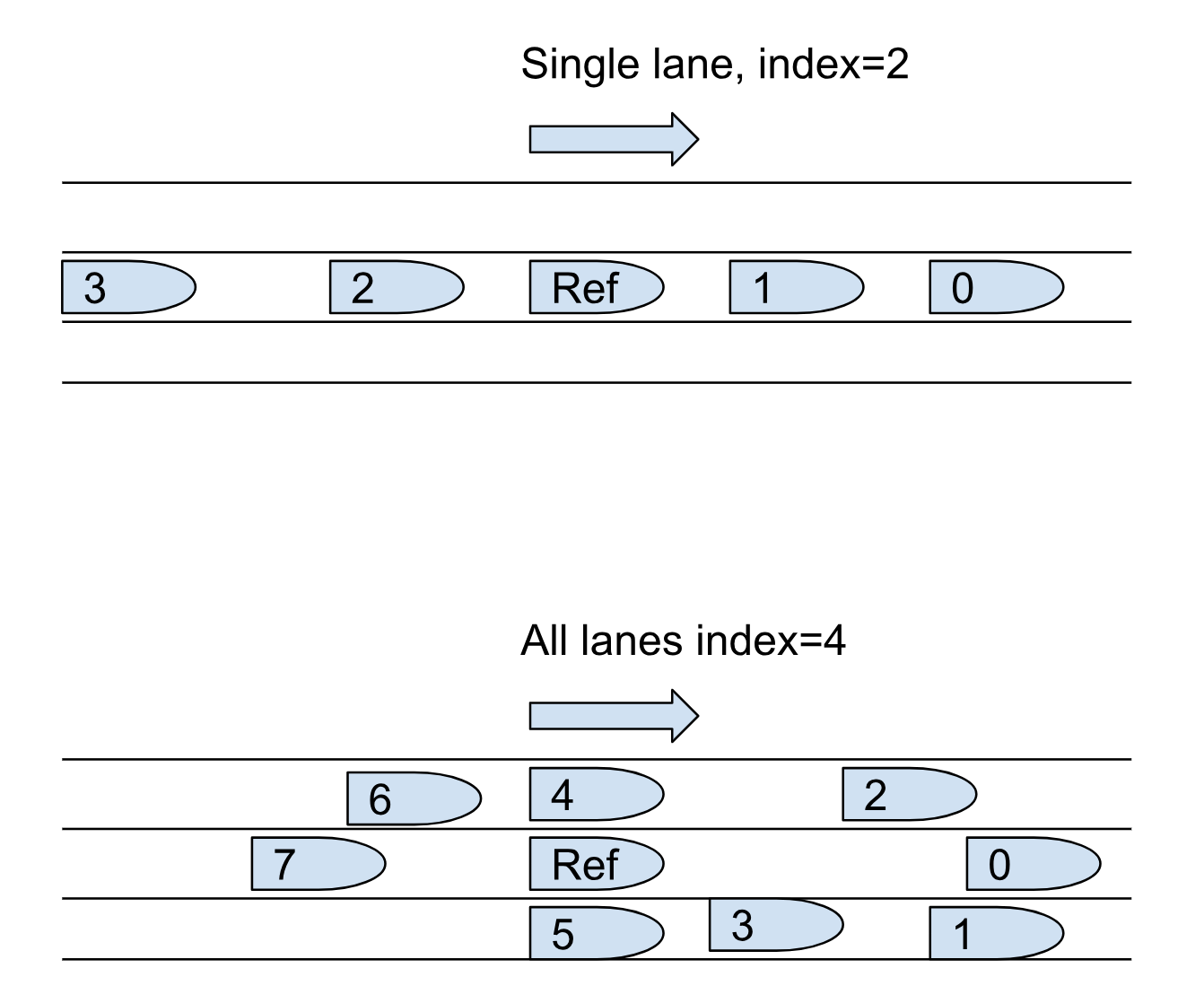
- If the reference_car_index is 0, no cars are placed ahead of the reference vehicle. If the index is cars.size(), no cars are placed behind the reference vehicle. If the index is 2, for example, two vehicles (index [0] and index[1]) are placed ahead of the reference vehicle.
- For the all_lanes_car_group, cars can be placed in any lane that is not excluded. If no lanes are excluded and the reference_car_index is 2, for example, two vehicles are placed ahead of the reference vehicle in any lane and the others either next to it in adjacent lanes or behind it in any lane.
- It is a known limitation in this release that the car group disappears after the planned route is completed.
Figure 1 shows that in contrast to the single_lane_car_group, where all vehicles are placed in the same lane as the reference car, the all_lanes_car_group places vehicles in the adjacent lanes as well as the same lane, unless you explicitly exclude lanes.
The following constraints are placed on reference_car_index:
keep (reference_car_index >= 0)
keep (reference_car_index <= cars.size())
keep(default reference_car_index == 0)
single_lane_car_group
This type inherits from common_route_car_group with the initial_formation field set to single_lane.
all_lanes_car_group
This type inherits from common_route_car_group with the initial_formation field set to all_lanes. The fields shown below allow you to prevent placing vehicles in one or more lanes.
| Name | Type | Description |
|---|---|---|
| leftmost_excluded_lanes | uint | Number of leftmost lanes where cars should not be placed. |
| rightmost_excluded_lanes | uint | Number of rightmost lanes where cars should not be placed. |
| left_lanes_span | int | How many lanes (at most) should be occupied to the left of the reference_car. |
| right_lanes_span | int | How many lanes (at most) should be occupied to the right of the reference_car. |
| occupy_reference_car_lane | bool | Whether to occupy reference_car lane. |
The following constraints are placed on lanes exclusion fields:
keep(leftmost_excluded_lanes >=0)
keep(default leftmost_excluded_lanes == 0)  # all leftmost lanes are included by default
keep(rightmost_excluded_lanes >=0)
keep(default rightmost_excluded_lanes == 0) # all rightmost lanes are included by default
keep(left_lanes_span >= -1)
keep(default left_lanes_span == -1) # span over all left lanes by default
keep(right_lanes_span >= -1)
keep(default right_lanes_span == -1) # span over all right lanes by default
keep(default occupy_reference_car_lane == true) # occupy reference_car lane by default
car_group movement scenarios
random_traffic_car_group.group_drive(generation_radius: length)
This scenario creates and moves the generated vehicles when called in a scenario. The generation_radius parameter defines the maximum distance from the reference vehicle where the vehicles can be generated. The distance must be greater than 0 meters and not more than 1000 meters. The default is 50 meters.
common_route_car_group.group_drive()
This scenario creates and moves the generated vehicles when called in a scenario.
Additional movement scenarios for random traffic
random_traffic_car_group.light_highway_traffic()
This scenario calls random_traffic_car_group.group_drive with a generation_radius of 500 meters and constrains the longitudinal distance between the vehicles to [80..120] meters.
random_traffic_car_group.heavy_highway_traffic()
This scenario calls random_traffic_car_group.group_drive with a generation_radius of 500 meters and constrains the longitudinal distance between the vehicles to [20..50] meters.
background_traffic actor
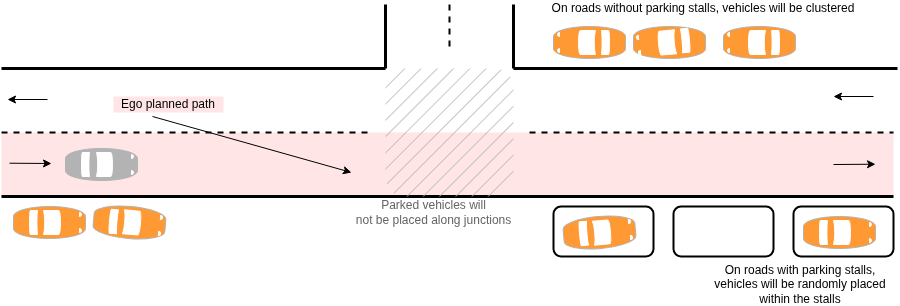
The background_traffic actor enhances a scenario by adding parked vehicles to the environment. These vehicles are positioned on roads along the Ego's planned path and on the opposite-side roads, but not on roads that are part of junctions. When a road has designated parking stalls, vehicles are parked in those stalls. Otherwise, they are parked along the road edge, outside the outermost driving lane. Parked vehicles are grouped into clusters, and both the cluster size and gaps between vehicles are configurable. The longitudinal, lateral, and yaw offsets of parked vehicles are configurable and follow normal distributions. Separate parameters are used for vehicles parked in stalls and for those parked along the road edge.
background_traffic fields
The background_traffic actor has the fields described in the following table.
| Name | Type | Description |
|---|---|---|
config |
background_traffic_config | Configuration struct that controls the parked vehicle's placement. |
parked_vehicles |
list of vehicle | List of parked vehicles that will be placed. The size of this list is constrained by config.max_nof_parked_vehicles when parked vehicles are enabled. |
background_traffic scenarios
The background_traffic.exists() scenario call activates the placement of background traffic, such as parked vehicles, oncoming, or same-direction traffic (currently, only parked vehicles are supported).
This scenario must be called for parked vehicles to be generated. It should be called in parallel with the other phases defined by the user in the main scenario.
For example:
scenario sut.drive_with_parked_vehicles:
    bt: background_traffic with:
        keep(it.config.enable_parked_vehicles == true)
        keep(it.config.parked_vehicles_density == 4.0)

    do parallel(overlap: any, start_to_start: 0second):
        sut_drive: sut.car.drive()
        bt.exists()
background_traffic_config struct
The background_traffic_config struct has the fields described in the following tables:
Core controls
| Name | Type | Default | Description |
|---|---|---|---|
enable_parked_vehicles |
bool | false | When true, parked vehicles are placed along roads on the Ego's planned path and on the opposite-side roads, excluding roads that are part of junctions. |
parked_vehicles_density |
float | 3.0 | Target average number of parked vehicles per 100 m of eligible road. The actual number is also constrained by max_nof_parked_vehicles and by the total length of eligible roads. |
max_nof_parked_vehicles |
int | 20 | Maximum number of parked vehicles that may be placed in the scenario. |
Parameters for vehicles parked along the road
These parameters apply when vehicles are parked at the road edge, outside the outermost driving lane, on a road without usable parking stalls.
| Name | Type | Default | Description |
|---|---|---|---|
parked_vehicles_road_yaw_mean |
angle | 0degree | Mean yaw of roadside-parked vehicles, relative to the road direction at the placement longitudinal offset. Together with parked_vehicles_road_yaw_standard_deviation defines a normal distribution for yaw. |
parked_vehicles_road_yaw_standard_deviation |
angle | [2..4]degree | Standard deviation of the normal distribution used to randomize the yaw angle of vehicles parked along the road. Must be greater than 0degree. |
parked_vehicles_road_lat_offset_mean |
length | [40..60]cm | Mean lateral offset for vehicles parked along the road. Offset is measured from the vehicle center to the road edge and adjusted for half the vehicle width. Combined with parked_vehicles_road_lat_offset_standard_deviation defines a normal distribution. |
parked_vehicles_road_lat_offset_standard_deviation |
length | [10..25]cm | Standard deviation of lateral offset for roadside-parked vehicles. Must be greater than 0cm. |
Parameters for vehicles parked in parking stalls
These parameters apply when vehicles are parked in parking stalls on the selected road.
| Name | Type | Default | Description |
|---|---|---|---|
parked_vehicles_stall_yaw_mean |
angle | 0degree | Mean yaw of vehicles parked in stalls, relative to the parking stall heaidng. Together with parked_vehicles_stall_yaw_standard_deviation, defines a normal distribution. |
parked_vehicles_stall_yaw_standard_deviation |
angle | [2..4]degree | Standard deviation of the yaw angle for vehicles parked in stalls, used in the normal distribution. Must be greater than 0degree. |
parked_vehicles_stall_lat_offset_mean |
length | [0..10]cm | Mean lateral offset for vehicles parked in stalls, measured relative to the stall center. Together with parked_vehicles_stall_lat_offset_standard_deviation, defines the normal distribution. |
parked_vehicles_stall_lat_offset_standard_deviation |
length | [30..40]cm | Standard deviation of the lateral offset for vehicles parked in stalls. Must be greater than 0cm. |
parked_vehicles_stall_lon_offset_mean |
length | [0..10]cm | Mean longitudinal offset from the stall center for vehicles parked in stalls. This parameters does not affect vehicles placed along the road edge. |
parked_vehicles_stall_lon_offset_standard_deviation |
length | [20..30]cm | Standard deviation of the longitudinal offset for vehicles parked in stalls. Must be greater than 0cm. |
Parameters for clusters or parked vehicles
These parameters control how parked vehicles are grouped into clusters and how far apart they are along the road.
| Name | Type | Default | Description |
|---|---|---|---|
parked_vehicles_cluster_gap_mean |
length | [0.8..1.4]m | Mean longitudinal gap between consecutive vehicles in a cluster. Measured in lane coordinates along the outermost driving lane, center-to-center but adjusted for half the length of each vehicle (approximating bumper-to-bumper distance). Must be greater than 0cm. |
parked_vehicles_cluster_gap_standard_deviation |
length | [20..40]cm | Standard deviation of the longitudinal gap between consecutive vehicles in a cluster. Must be greater than 0cm. |
parked_vehicles_min_cluster_size |
uint | [2..3] | Minimum number of vehicles per cluster. Must be at least 1. If the algorithm cannot reach this count for a cluster (and cannot place more vehicles), it treats this as a generation failure and triggers a generation retry error. |
parked_vehicles_max_cluster_size |
uint | [4..6] | Maximum number of vehicles per cluster. Must be at least parked_vehicles_min_cluster_size and at most max_nof_parked_vehicles. Actual cluster size for a given cluster is drawn uniformly between parked_vehicles_min_cluster_size and this value. |
Usage
To use background_traffic, instantiate it, configure it and call the exists() scenario, as shown in the example below.
scenario sut.drive_with_parked_vehicles:
    # Instantiate the background_traffic actor and configure the parked vehicles
    bt: background_traffic with:
        keep(it.config.enable_parked_vehicles == true)
        keep(it.config.parked_vehicles_density == 5.0)
        keep(it.config.parked_vehicles_min_cluster_size == 4)
        keep(it.config.parked_vehicles_max_cluster_size == 6)
        keep(it.config.parked_vehicles_cluster_gap_mean == 50cm)
        keep(it.config.parked_vehicles_cluster_gap_standard_deviation == 5cm)

    do parallel(overlap: any, start_to_start: 0second):
        sut_drive: sut.car.drive()
        # Call the exists() scenario of the background_traffic actor
        bt.exists()
    with:
        duration([1..2]second)
See complete example.
The following example shows how to constrain the vehicle category distribution for the parked vehicles.
scenario sut.drive_with_parked_vehicles:
    bt: background_traffic with:
        keep(it.config.enable_parked_vehicles == true)
        keep(it.config.parked_vehicles_density == 7.0)
        keep(it.config.max_nof_parked_vehicles == 20)

    # Constrain parked vehicles to be either vans or sedans with equal distribution
    for v in bt.parked_vehicles:
        keep(soft v.vehicle_category == weighted(
            10: sedan,
            10: van))
See complete example.
Note
- By default, all background vehicles are soft-constrained to be of
sedancategory. This can be overridden by users in test files, as shown by the example above. - Parked vehicles are placed during the planning phase, after all other actors'
on_post_plan()callbacks have been called, including vehicle groups. This ensures parked vehicle placement accounts for VRUs, stationary objects, and other vehicles placed by scenarios. - The number of vehicles to place is determined from the density and total length of all eligible roads, and then capped by
max_nof_parked_vehicles. - The
global_checkersglobal modifier is disabled for all parked vehicles, because vehicles are static and placed outside the road. - In some cases, one of the clusters of parked vehicles may have a size smaller than
parked_vehicles_min_cluster_size. This is a known limitation.
static_road_object actor
Static road objects are actor objects that are placed on the road network during the planning phase. They exist throughout the global scenario execution and are not expected to move.
The shape of a static road object is defined as a polygon on the lane coordinate system. This means that the lines connecting the polygon vertices are bent according to the geometry of the lanes.
The following figure shows an example of a construction_zone defined by three points on a curved road:

Static road objects are implemented by actors that conditionally inherit the actor static_road_object (see $FTX/tool/user_interface/domain_model/actors/ftlx_static_road_object.osc), with a static_road_object_kind value, for example:
extend static_road_object_kind: [construction_zone]
actor construction_zone inherits static_road_object(kind == construction_zone)
Vehicles may or may not be able to drive over the static road object depending on the static_road_object.physical.passable boolean flag.
Static road objects are placed on the map using the modifier static_road_object.place, which takes a polygon in terms of a list of msp_position elements.
static_road_object actor
enum static_road_object_kind: [other]
# An object actor with polygonal shape
#

extend static_road_object:
    # Kind of the static road object
    #
    kind: static_road_object_kind

    # Description of object physical limitations
    #
    physical: static_road_object_physical

    # top.traffic.static_road_objects[id].internal_id == id
    #
    var internal_id: uint
| Name | Type | Description |
|---|---|---|
| kind | enum static_road_object_kind | A unique enum value per static_road_object actor type. For example, construction_zone. |
| physical | static_road_object_physical | Physical properties of the actor. |
| internal_id | uint | A unique ID over all static_road_object actor instances. Also the instance index in top.traffic.static_road_objects. |
static_road_object_physical
# A lane_route is a list of connected lanes with start_offset on the first lane and end_offset on the last lane
#
struct lane_route:
    var start_offset: length
    var end_offset: length
    var lane_route: list of msp_lane

struct static_road_object_physical:
    # Flag specifying if cars can go through
    #
    passable: bool

    # distance between the outline points
    #
    outline_resolution: length = 1m

    # Edge points of the polygonal shape. Lines connecting the edge points may be straight on either global coordinate
    # system or on lanes' coordinate system.
    #
    var anchors: list of msp_position
| Name | Type | Description |
|---|---|---|
| passable | bool | If 'true', vehicles can drive over the object; else, they cannot. |
| outline_resolution | length | The resolution in which the static_road_object.place modifier adds points between the polygon nodes provided to it. |
| anchors | list of msp_position | A var - The polygon nodes provided to the static_road_object.place modifier with this static_road_object instance. |
static_road_object.place modifier
modifier static_road_object.place:
    anchors: list of msp_position with:
        properties(it, required: true)
| Name | Type | Description |
|---|---|---|
| anchors | list of msp_position | Anchor nodes for the polygon. The modifier adds points between the anchors on the lane geometry in the resolution specified by the physical.outline_resolution field. |
construction_zone actor
extend static_road_object_kind: [construction_zone]

actor construction_zone inherits static_road_object(kind == construction_zone)
Except for kind, the construction_zone actor does not add additional properties to static_road_object.
The following example defines a construction_zone static road object with polygon vertices:
import "$FTX/env/basic/exe_platforms/model_ssp/config/model_sumo_config.osc"


extend test_config:
    set min_test_time = 0sec # This silences the "Scenario completed too early" error
    set map = "$FTX_PACKAGES/maps/Town04.xodr"
    set implicits_kind = none
    set test_drain_time = 0s

extend top.main:
    # lane section with more than two lanes and length greater than seven meters
    lane_section: lane_section with:
        keep(it.lanes > 2 and it.length > 7m)

    # generate polygon vertices positions along the lane_section
    pg1: msp_position
    position_along_road(pg1, road: lane_section, lon_offset: 0m, lane_index: 1)
    pg2: msp_position
    position_along_road(pg2, road: lane_section, lon_offset: 5m, lane_index: 2)
    pg3: msp_position
    position_along_road(pg3, road: lane_section, lon_offset: 7m, lane_index: 1)

    # define a non-passable construction_zone static road object with the polygon vertices
    cz: construction_zone with:
        keep(it.physical.passable == false)
    cz.place(anchors: [pg1, pg2, pg3])

    # drive through the lanes_section with the construction_zone
    do serial(duration: [2..6]s):
        before_cz: sut.car.drive(duration: [1..2]s)
        along_cz: sut.car.drive() with:
            along(lane_section, start_offset: 0m, at: start)
            along(lane_section, start_offset: 7m, at: end)
        after_cz: sut.car.drive(duration: [1..2]s)