Defining watchers and checkers
Watchers are a powerful construct that provides users a unified way of monitoring, checking and covering situations of interest from a test suite. The main purpose of a watcher is to emit data structures called intervals.
The following chapter presents a brief introduction to intervals, and the subsequent chapters present the steps involved in defining, implementing, using, and debugging watchers and checkers.
Prerequisite: Intervals
Intervals can be considered interesting slices of time in your tests, during which a particular behavior was active. There are multiple interval sources within Foretify, for example each scenario from a run will automatically be associated with an interval. Depending on the use case, a particular behavior such as “braking hard” or “crossing a merge line” might be of interest. Watchers are the tool that helps user build their custom intervals.
Intervals can be multi-cycle or single-cycle (zero time), and they can have associated attributes.
Intervals can be used for visual debugging, creating checkers, or collecting metrics about situations or maneuvers of interest.
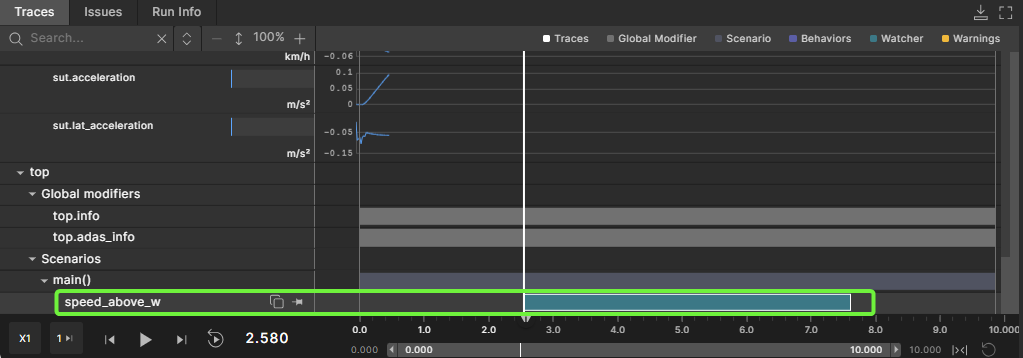
Following is a visualization of intervals displayed in the Foretify debugger, which is also accessible from Foretify Manager. The image shows an interval emitted by a watcher, speed_above_30kph_w, defined under top.main scenario. The emitted interval starts at simulation time 2.620. In the debugger Traces tab, watcher intervals are shown in the color teal (blue), error intervals are shown in red, and warning intervals are shown in yellow.
Defining a watcher type
The watcher modifier construct is used when defining a watcher type (see watcher type). In the following example, we define the watcher modifier speed_above, that starts an interval when the vehicle's speed goes above the provided limit, and ends the interval when the vehicle's speed decreases to the specified limit or less:
# define a watcher type that create intervals
# when the speed of a vehicle exceeds some speed limit
watcher modifier speed_above:
    v: vehicle
    limit: speed
    on @top.w_clk:
        if(data == null):
            if(v.state.speed > limit):
                start_interval()
        else:
            if(v.state.speed <= limit):
                end_interval()
Some more detailed explanations on the example above:
-
The predefined methods start_interval() and end_interval() are used for creating the intervals.
-
The check for
data == nullmakes sure that we call the methods of starting/ending intervals only when necessary. data is null if the watcher does not have an active interval, so checking if data is null before calling the start_interval() method ensures that the method is called only once for each interval. The same principle applies to the end_interval() method, which can be called only when data is not null (there is an active interval that needs to be ended). -
Note the usage of the top.w_clk event for defining the watcher logic. The top.w_clk event is emitted on each simulation cycle, the same as top.clk, but it is emitted after top.clk within a simulation step, in order to ensure that the synchronization between different watchers is done correctly. It is recommended to use top.w_clk when defining watcher types, and to call start_interval() and end_interval() on the top.w_clk event
The list of predefined watchers fields and API is presented in section Predefined watcher fields & API below.
Declaring a watcher
A prerequisite for declaring a watcher is to have a previously defined watcher type or to use watcher operators.
Let's assume there is a previously defined watcher type speed_above, that emits intervals whenever the speed of the monitored actor is above the requested threshold (defined above in section Defining a watcher type).
Once you have a watcher type, you can instantiate the watcher in a scenario, in a modifier, or in a global modifier. Note that you can create multiple instances of the same watcher type.
To instantiate a watcher, you must declare it, as shown in the following example:
extend top.main:
    watcher speed_above_w is speed_above(v: sut.car, limit: 30kph)
In the example above, a watcher speed_above_w, of type speed_above, is declared under the scenario top.main with a threshold of 30 kph. The watcher will emit an interval for each slice of time during which the speed of the SUT vehicle is above 30kph, as shown in the image below.

Note that a watcher invocation resembles a modifier invocation, and you can provide arguments to each watcher instantiation. For more details, see watcher and checker declarations.
Where to declare a watcher
A watcher can be declared in 3 contexts: scenario, modifier, and global modifier.
Declaring inside a global modifier
The lifetime of a watcher is the same as the lifetime of the scope in which it is declared, so a watcher declared under a global modifier will be active throughout the whole run. The recommended way of declaring a watcher is in the context of a global modifier of an actor. By declaring it in this way, Foretify creates an instance of the watcher for all actors of that type, for example for all vehicles in a simulation, if the global modifier is declared for the vehicle actor. Another benefit of declaring watchers under a global modifier is that the watcher is scenario-agnostic and can be used on top of any scenario in a test suite. This provides a unified way of viewing a test suite of scenarios that are run.
global modifier vehicle.state_watchers:
    watcher speed_above_w is speed_above(v: actor, limit: 30kph)
Declaring inside a scenario
A watcher can also be declared inside a scenario, but this is recommended only if the data captured by the watcher makes sense solely in the context of a particular scenario in a test suite, for example, a watcher that monitors the distance between the SUT and the cut-in vehicle during a cut-in. This way of declaring is also suitable when the parameters used by the watcher for emitting intervals are only available at the scenario level, for example, they are not vehicle state fields that can be accessed globally.
scenario sut.free_drive_with_rain:
    watcher speed_above_w is speed_above(v: sut.car, limit: 30kph)
Declaring inside a wrapper modifier
In the case of multiple related watchers (and/or checkers), that use common support logic, it is recommended that they are encapsulated in a "context object", for example, a normal modifier. This enables the reuse of the watchers without the need for a duplication of code, for example, the wrapper modifier can be instantiated both under a global modifier and under a particular scenario, with different parameter configurations. One example of this pattern is presented in the LSS checker example below.
modifier vehicle.speed_watchers:
    limit: speed  # Used by watchers below

    watcher above_speed_limit_w is speed_above(v: actor, limit: limit)
    watcher close_to_speed_limit_w is speed_between(v: actor, lower_limit: limit - 10kph, upper_limit: limit)

global modifier vehicle.global_watchers:
    sw: speed_watchers(limit: 20kph)
Predefined watcher fields & API
Any watcher contains predefined fields, events and methods.
The predefined fields of a watcher are:
-
data:data stores all relevant information associated with an interval.
It holds a pointer to an object of type any_watcher_data (or a type that inherits any_watcher_data). The data object is created internally when an interval is started, and destroyed when the interval is ended. This means that data will be null whenever the watcher doesn't have an active interval, and each data instance is associated with an interval. If a watcher emits more than one interval during a run, then each interval will have an object associated with it, which can be accessed using the data field.
The data field can be customized to store specific information about the interval, as shown in section Defining custom watcher data below, but also containts predefined fields, generic to all intervals.
The predefined fields of data are:- start_time: holds the time at which interval started
- end_time: holds the time at which interval started
-
end_status: updated at the end of the interval, has one of the two following values:
- normal: a normal end of an interval
- context_ended: the interval did not end, but its encapsulating scenario/modifier has ended.
The predefined events of a watcher are:
- i_start:This event is emitted at the start of an interval.
- i_clock: This event is emitted at each simulation step while an interval is active
- i_end:This event is emitted when an interval ends
The predefined methods of a watcher are:
- start_interval(): Calling this method starts a new interval
- end_interval(): Calling this method will end an interval
- new_data(): This method returns a new instance of the watcher's data struct
For more details, see watcher API.
global modifier sut_vehicle.state_watchers:
    watcher speed_above_w is speed_above(v: actor, limit: 30kph)

    on @speed_above_w.i_start:
        call logger.log_info(
            "speed_above_w started interval. Start time: $(speed_above_w.data.start_time)")

    on @speed_above_w.i_end:
        call logger.log_info(
            "speed_above_w ended interval. End time: $(speed_above_w.data.end_time)")

    on @speed_above_w.i_clock:
        call logger.log_info("speed_above_w has an active interval")

    on @speed_above_w.i_end if speed_above_w.data.end_status == context_ended:
        call logger.log_info(
            "speed_above_w ended interval because the containing modifier ended.")
Defining custom watcher data
The previous section Predefined watcher fields & API presents the predefined data field that any watcher will have.
The object stored by the data field has some predefined parameters, for example start_time, but in some cases, a user needs to store other relevant data related to an interval, such as the maximum speed of a vehicle during an interval.
This additional data might be needed for visual debug, coverage metrics, or raising a checker issue.
In order to have custom data attributes associated with an interval of a watcher, you must define the following:
- A custom watcher data type that contains the required attributes.
- A watcher type with the custom data type, or provide the custom data type to a watcher declaration.
Defining a custom watcher data type
As presented in Predefined watcher fields & API above, the base type of the data predefined field is any_watcher_data.
In order to define custom attributes, you can extend any_watcher_data and add any relevant data.
The following code snippet shows the definition of a custom watcher data type, speed_above_data, with the attribute max_speed, which will store the maximum speed observed during an interval.
# Define custom watcher data that records the maximum speed during
# an interval
struct speed_above_data inherits any_watcher_data:
    max_speed: speed
Defining a watcher type with custom data
A custom data type can be specified when defining a watcher modifier.
In the following example, the speed_above watcher modifier is defined to use speed_above_data data type (defined above).
watcher modifier speed_above(speed_above_data):
    v: vehicle
    limit: speed

    on @top.w_clk:
        if(data == null):
            if(v.state.speed > limit):
                start_interval()
        else:
            if(v.state.speed <= limit):
                end_interval()

    on @i_clock:
        if (data.max_speed < v.state.speed):
            data.max_speed = v.state.speed

global modifier vehicle.speed_watchers:
    watcher speed_above_w is speed_above(v: actor, limit: 30kph)
Notice that the code inside the watcher modifier uses the custom data field max_speed defined in the speed_above_data type.
Provide custom data type to watcher declaration
In some cases, you might want to reuse a previously defined watcher type (or watcher operator) that cannot be modified, but still need to add extra attributes to the data field. To do this, you can provide a custom data type in the watcher declaration.
In the following example, we assume the watcher type speed_above, with no custom data type defined, is being used by the user to declare speed_above_w watcher. The user, however, needs to sample the maximum speed during each interval for logging purposes.
The user can define a custom data type (in this case, speed_above_data), and provide it to the watcher declaration.
# Watcher type that uses default data type (any_watcher_data)
watcher modifier speed_above:
    v: vehicle
    limit: speed

    on @top.w_clk:
        if(data == null):
            if(v.state.speed > limit):
                start_interval()
        else:
            if(v.state.speed <= limit):
                end_interval()

# Define custom watcher data
struct speed_above_data inherits any_watcher_data:
    max_speed: speed

global modifier vehicle.speed_watchers:
    # Assign custom data type at declaration
    watcher speed_above_w(speed_above_data) is speed_above(v: actor, limit: 30kph)

    # Add additional sampling logic for the custom data attributes
    on @speed_above_w.i_clock:
        if (speed_above_w.data.max_speed < actor.state.speed):
            speed_above_w.data.max_speed = actor.state.speed
Note that in the example above the sampling of the max_speed attribute in the custom data is handled externally, after the watcher declaration. Since the watcher type (speed_above) does not come by default with the custom data tpye (speed_above_data) and the custom data type is provided at declaration, the sampling logic for the custom data attributes also have to be handled separately.
Defining coverage
The custom data attributes can also be used for defining relevant coverage for each interval that the watcher emits. This is helpful when certain values need to be preserved for later analysis.
For more details, see any_watcher_data.
In the following example, the speed_above_data type is defined with a record() statement added for the max_speed custom attribute.
# Define custom watcher data with coverage
struct speed_above_data inherits any_watcher_data:
    max_speed: speed
    record(max_speed, unit: kph)
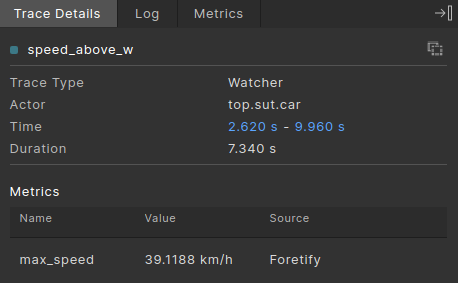
The recorded value will be visible in the Trace Details tab in Foretify Developer for each interval.
Watcher operators in Foretify
Whatcher operators are predefined watcher types, based on common watcher definition patterns.
Watcher operators let you declare new watchers by either combining the behavior of other watchers or by monitoring other data.
They can be regarded as building blocks, that help users model a complex watcher behavior from multiple simple behaviors, by the use of composition.
The definitions and syntax of the watcher operators can be seen here: Watcher operators.
An example of a complex watcher behavor composed from simple behaviors using watcher operators can be seen in the LSS checker example below.
There are currently 8 predefined watcher operators. Based on the input required by each operator, there are three categories of watcher operators:
- operators with no input required: passive_w operator, that is useful for declaring procedurally the creation of intervals
- operators that monitor data: while_w that creates interval by sampling a boolean expression and above_w, below_w that create intervals by monitoring a physical attribute (for example, a speed).
- operators based on other watchers: the intervals they create are based on the intervals of other watchers, for example, not_w, and_w, and more.
- operators based on events: the intervals they create are based on events, for example, upon_w and between_w.
passive_w
passive_w is useful for declaring a custom watcher, with procedurally defined logic for creating intervals, without needing to define a watcher type.
It requires explicit activation by procedurally calling the start_interval() and end_interval() methods.
In the following example, an interval is created every time there is a longitudinal overlap between sut.car and npc, sampling also the minimum lateral distance between the two:
    watcher lon_overlap(lon_overlap_data) is passive_w()

    on @top.w_clk:
        var lon_dist := sut.car.road_distance(npc, closest, closest, lon, lane)

        if lon_dist == 0m and lon_overlap.data == null:
            lon_overlap.start_interval()
        if lon_overlap.data != null:
            var abs_lat_dist := math.abs(sut.car.road_distance(npc, closest, closest, lat, lane))

            if abs_lat_dist < lon_overlap.data.min_lat_dist:
                lon_overlap.data.min_lat_dist = abs_lat_dist
            if lon_dist != 0m:
                lon_overlap.end_interval()
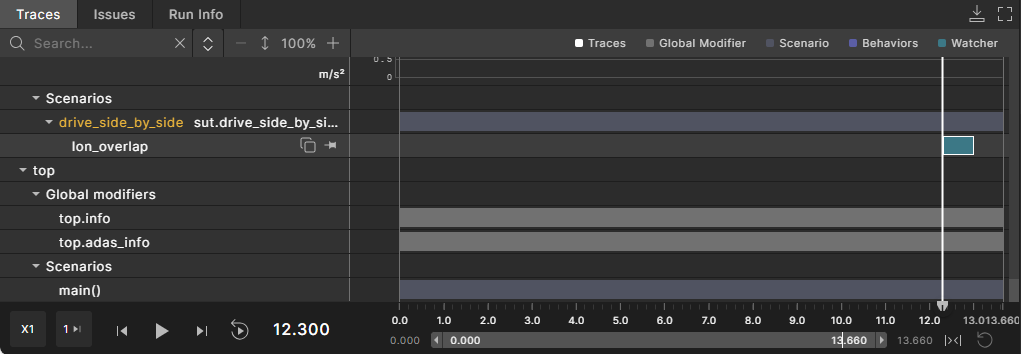
See complete example.
while_w
while_w creates a new interval when the provided boolean expression evaluates to true.
In the following example, the speed_above_w watcher presented above is reimplemented using the while_w operator.
global modifier vehicle.state_watchers:
    watcher speed_above_w is while_w(actor.state.speed > 30kph)
The following image shows an interval of the speed_above_w watcher together with the speed of the SUT vehicle.

not_w
not_w receives a watcher as an input, and creates an interval when the input watcher doesn’t have any active interval.
In the following example, the speed_below_w watcher is defined using the not_w operator.
global modifier vehicle.state_watchers:
    watcher speed_above_w is while_w(actor.state.speed > 30kph)
    watcher speed_below_w is not_w(speed_above_w)
The not_w operator receives the speed_above_w as input watcher defined above, and emits intervals whenever speed_above_w does not have an interval (whenever the speed of the SUT vehicle is less than or equal to 30kph).
and_w
and_w receives two watchers as input, and creates intervals when both input watchers have an active interval.
In the following example, and_w is used to define a watcher that will emit intervals when the SUT vehicle is driving with a speed above 30kph and close to the left lane boundary.
global modifier vehicle.state_watchers:
    watcher speed_above_w is while_w(actor.state.speed > 30kph)
    watcher driving_close_to_left_lane_boundary_w is while_w(actor.state.msp_pos.lane_position.lat_offset > 20cm)
    watcher speed_above_and_close_to_left_w is and_w(speed_above_w, driving_close_to_left_lane_boundary_w)
See complete example.
The following image shows the behavior of the speed_above_and_close_to_left_w watcher and the input watchers (driving_close_to_left_lane_boundary_w and speed_above_w).
or_w
or_w receives two watchers as input, and creates intervals when any of the input watchers have an active interval.
In the following example, the two watchers vehicle_moving_left and vehicle_moving_right, emit intervals when the vehicle moves to the left or right, respectively, based on the lane coordinate system. The or_w operator is used to create a watcher that emits intervals whenever the vehicle moves sideways (either to the left or to the right).
global modifier vehicle.state_watchers:
    watcher driving_close_to_left_lane_boundary_w is while_w(actor.state.msp_pos.lane_position.lat_offset > 20cm)
    watcher driving_close_to_right_lane_boundary_w is while_w(actor.state.msp_pos.lane_position.lat_offset < -20cm)
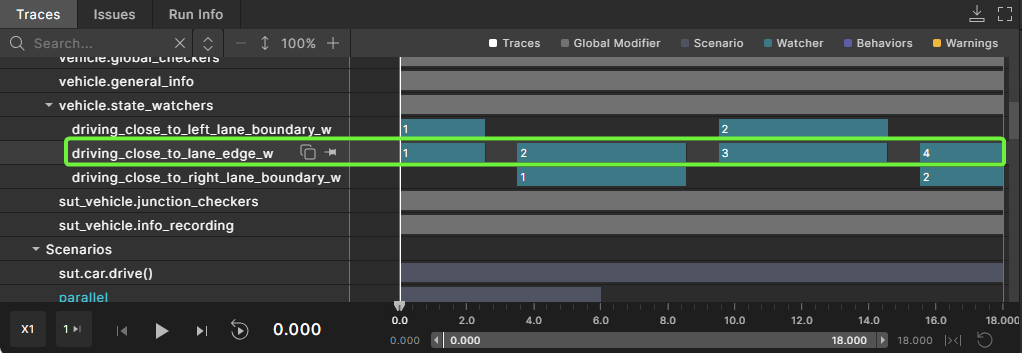
    watcher driving_close_to_lane_edge_w is or_w(driving_close_to_left_lane_boundary_w, driving_close_to_right_lane_boundary_w)
The following image shows the behavior of the driving_close_to_lane_edge_w watcher and the input watchers (driving_close_to_left_lane_boundary_w and driving_close_to_right_lane_boundary_w).
above_w
above_w creates an interval representing the timeframe when a sampled value exceeds a threshold. See above_w operator definition for all the configuration parameters. In the following example, above_w watcher operator is used to declare the speed_above_w watcher from chapter Declaring a watcher, without the need of defining a watcher type.
global modifier vehicle.state_watchers:
    watcher speed_above_w is above_w(sample_type: speed, sample_expression: actor.state.speed, threshold: 30kph, tolerance: 2kph)
See complete example.
Note that the tolerance parameter of above_w is set to 2kph, so the speed_above_w watcher will end its intervals when the monitored speed is lower than 28kph (30kph - 2kph tolerance), as shown in the image below.
below_w
below_w creates an interval representing the timeframe when a sampled value drops below a threshold. See below_w operator definition for all the configuration parameters.
In the example below, the below_w operator is used to define the speed_below_w watcher, that emits intervals when the speed of the vehicle is below 30kph.
global modifier vehicle.state_watchers:
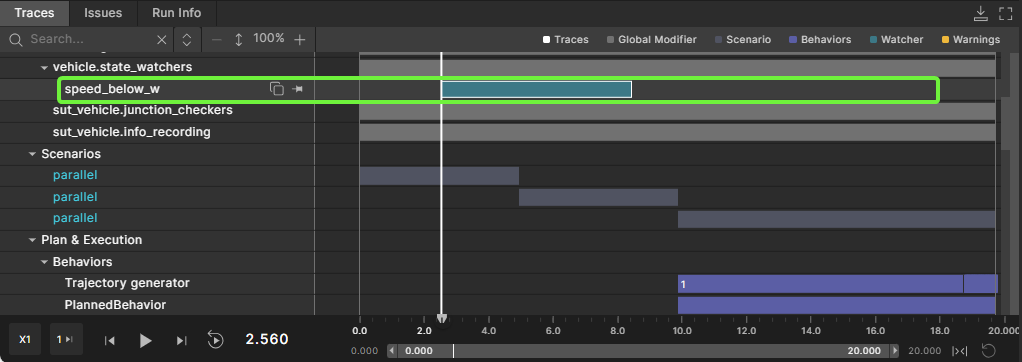
    watcher speed_below_w is below_w(sample_type: speed, sample_expression: actor.state.speed, threshold: 30kph, tolerance: 3kph)
See complete example.
Note that the tolerance parameter of the below_w operator is set to 3kph, so the speed_below_w will end its intervals when the monitored speed is greater than 33kph (30kph + 3kph tolerance), as shown in the image below.
upon_w
The upon_w operator creates a zero-time interval when an event is emitted or each time an event expression is true. See upon_w operator definition and Event expressions.
In the following example, the upon_w operator creates an interval each time when a vehicle starts switching lanes (using the switch_lane_start event).
global modifier vehicle.vehicle_watchers:
    watcher switch_lane_start_w is upon_w(ev: @actor.switch_lane_start)
See complete example.
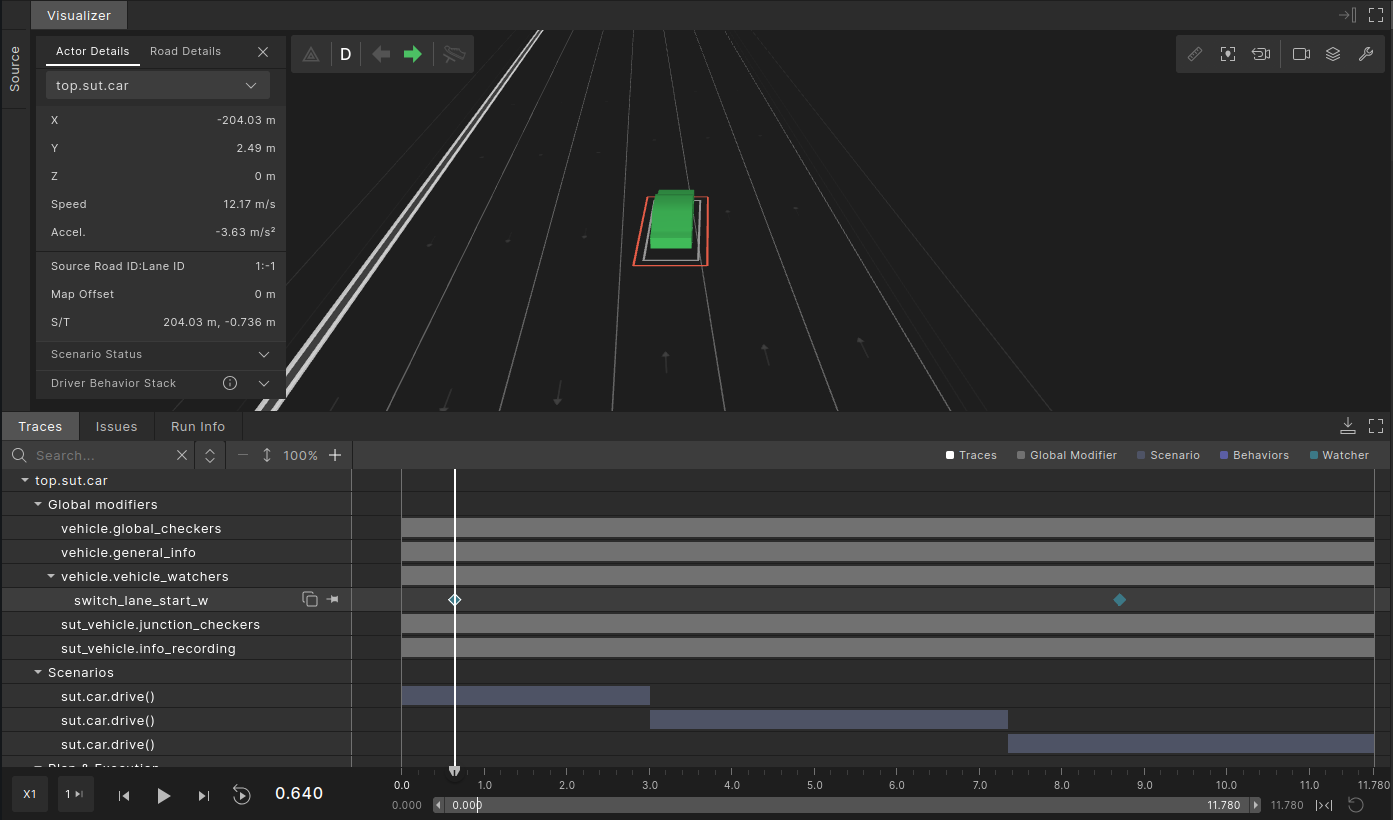
If the monitored event has event data associated with it, the upon_w operator can be declared with a custom data type. The following example depicts how the data from the switch_lane_start event is passed as interval data.
struct switch_lane_watcher_data inherits any_watcher_data:
    event_data: switch_lane_data

global modifier vehicle.vehicle_watchers:
    watcher switch_lane_start_w(switch_lane_watcher_data) is upon_w(ev: @actor.switch_lane_start) with:
        it.data.event_data = actor.switch_lane_start.event_data().data

    on @switch_lane_start_w.i_end:
        logger.log_info("$(actor) started switching to lane: " + \
            "$(switch_lane_start_w.data.event_data.to_lane_pos.lane)")
See complete example.
In the example above, data from the event is stored as interval data using a with block, which is equivalent to using the i_end event. As a result, the sampled data becomes available on the watcher's i_end event.
Only one zero-time interval can be emitted per simulation step (see Limitations, suggested workarounds, pitfalls to avoid), hence upon_w emits only one interval, even if the associated event is emitted multiple times during that simulation step.
between_w
The between_w operator creates intervals between the two input events, x and y. The operator starts an interval when x is emitted, and ends an interval when y is emitted.
In the following example, the between_w operator creates intervals that start when the vehicle begins switching lanes (using the switch_lane_start, and end when the vehicle ends the lane switch (using the switch_lane_end event).
global modifier vehicle.vehicle_watchers:
    # Emit an interval between switch lane start and switch lane end
    watcher switch_lane_w is between_w(
            x: @actor.switch_lane_start, y: @actor.switch_lane_end)

    # Emit zero-time intervals for switch lane start & end
    watcher upon_switch_lane_start is upon_w(ev: @actor.switch_lane_start)
    watcher upon_switch_lane_end is upon_w(ev: @actor.switch_lane_end)
See complete example.
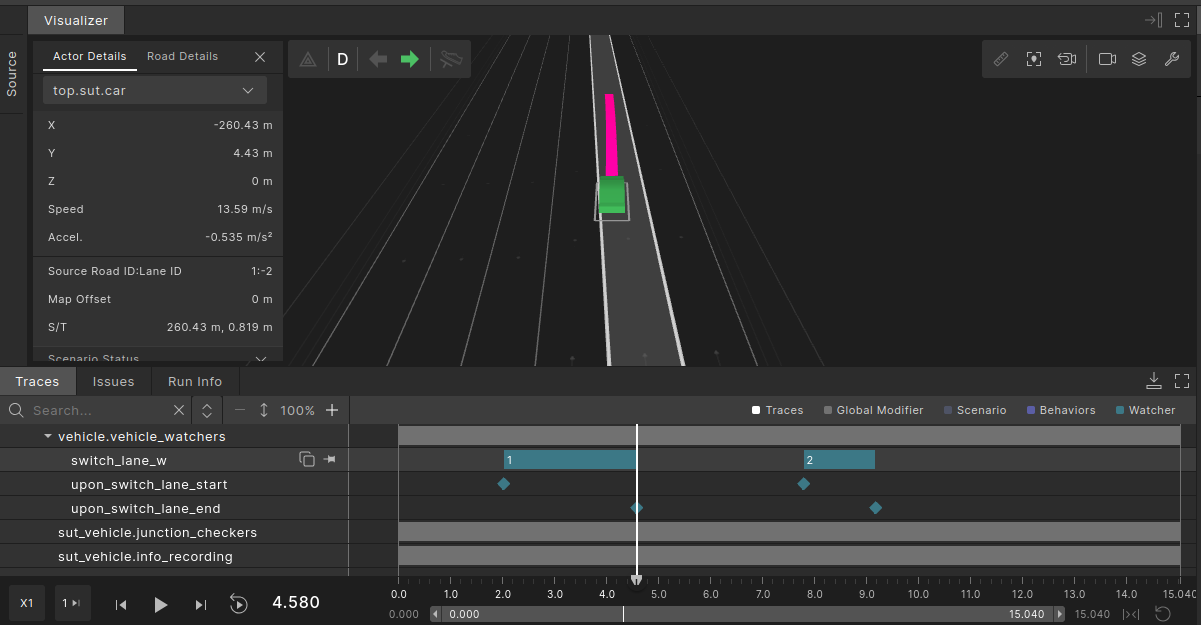
The following example depicts a more complex behavior. In the Foretify Domain Model, a lane switch can be either complete emitting the switch_lane_end event, or aborted emitting the switch_lane_abort event. The auxiliary event switch_lane_end_or_abort is used for modeling intervals that end on either of two events. Additionally, the switch_lane_ending enumeration is used to distinguish between the two cases.
enum switch_lane_ending: [ended, aborted]

struct switch_lane_watcher_data inherits any_watcher_data:
    ending_type: switch_lane_ending
    record(ending_type)

global modifier vehicle.vehicle_watchers:
    # Emit the same event, but with different data, for switch lane end
    # and switch lane abort
    event switch_lane_end_or_abort(ending_type: switch_lane_ending)

    on @actor.switch_lane_end:
        emit switch_lane_end_or_abort(ended)

    on @actor.switch_lane_abort:
        emit switch_lane_end_or_abort(aborted)

    # Emit an interval between switch lane start and switch lane end or abort
    watcher switch_lane_w(switch_lane_watcher_data) is between_w(
            x: @actor.switch_lane_start, y: @switch_lane_end_or_abort) with:
        it.data.ending_type = switch_lane_end_or_abort.event_data().ending_type

    on @switch_lane_w.i_end:
        call logger.log_info("Switch lane interval ended. Ending type: $(switch_lane_w.data.ending_type)")
See complete example.
The following example showcases the behavior of the between_w operator when the two monitored events are emitted in the same simulation step. The example assumes an abstract behavior of an ADAS function that is affected when the driver activates the turn signal. The turn_signal_on event is emitted when the turn signal is activated by the driver, and the function_engaged event is emitted when the ADAS function enters the 'engaged' state. The function_w watcher is defined using the between_w operator on the two events.
global modifier vehicle.function_watchers:
    # Emitted in the simulation step when the turn signal is turned on
    event turn_signal_on
    # Emitted in the simulation step when the ADAS function enters 'engaged' state
    event function_engaged

    watcher function_w is between_w(
            x: @turn_signal_on, y: @function_engaged)

    watcher upon_turn_signal_on is upon_w(ev: @turn_signal_on)
    watcher upon_function_engaged is upon_w(ev: @function_engaged)
See complete example.
The following image depicts the potential behavior of the two events mentioned above, and how they impact the intervals created by the between_w operator.
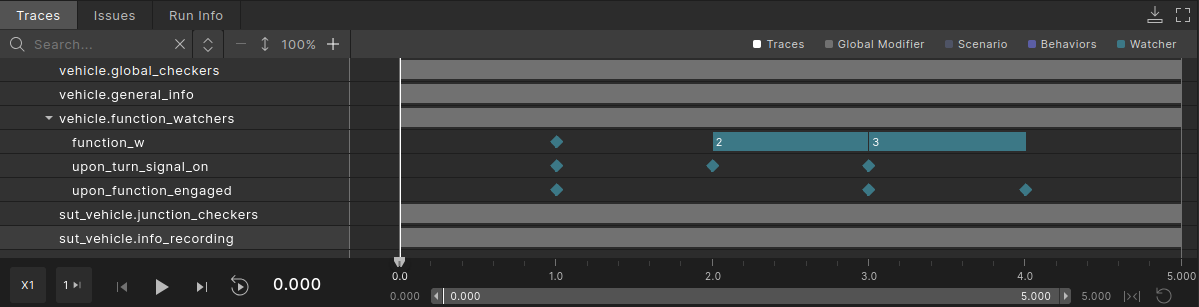
At simulation time 1.0, both events turn_signal_on and function_engaged are emitted simultaneously. As a result, function_w creates a zero-duration interval. At simulation time 2.0, turn_signal_on is emitted, and function_w starts an interval. At simulation time 3.0, both events turn_signal_on and function_engaged are emitted simultaneously. function_w ends the active interval and starts a new one, which then ends at simulation time 4.0 when function_engaged is emitted again. Notice the difference in behavior, resulted from the interval state (wether the function_w had an active interval or not).
Passing data to start_interval() using new_data()
In some use cases, one might need to initialize some interval data fields in the same context where start_interval() is called. This can be obtained by defining a new instance of a watcher's data by calling new_data() (see Predefined watcher fields & API) and providing the instance as an argument when calling start_interval().
In the following example, the passive_w() watcher operator is used for defining a watcher, change_lane_w, that emits intervals for the times during which the vehicle is switching lanes. In the example, we create the intermediary data instance d, update the value of the speed_at_start field, and provide d as input when calling start_interval(). Note that in this case, start_interval() is called on the switch_lane_start event of the actor. Internally, start_interval() will schedule the start of the interval and creation of the watcher's data field on the top.w_clk event. The switch_lane_start event is emitted before top.w_clk, which means that the data field of change_lane_w is still null in the context of the on block. Thus, using new_data() is the most handy way to initialize the interval data in this case.
struct change_lane_data inherits any_watcher_data:
    speed_at_start: speed

global modifier sut_vehicle.sut_watchers:
    watcher change_lane_w(change_lane_data) is passive_w()

    on @actor.switch_lane_start:
        if (change_lane_w.data == null):
            var d := change_lane_w.new_data()
            d.as(change_lane_data).speed_at_start = actor.state.speed
            change_lane_w.start_interval(d)

    on @actor.switch_lane_end:
        if (change_lane_w.data != null):
            change_lane_w.end_interval()

    on @change_lane_w.i_start:
        call logger.log_info(
            "Lane switch started, speed at start: $(change_lane_w.data.speed_at_start)")
Defining the watcher logic in C++
The logic for handling the start and end of intervals can be defined in C++. This might be suitable when heavy computations are used for deciding when to start/end an interval, or when the logic needs external libraries which don't have an OSC2.0 API.
The following code snippets show a potential implementation of a watcher type, collision_watcher, which delegates the logic for creating intervals to an external C++ method, update(), called on every w_clk event.
watcher modifier collision_watcher:
    v: vehicle
    def update() is external cpp("update", "libcollision_watcher_cpp.so")

    on @top.w_clk:
        call update()
namespace foretify {
    void builtin_modifiers::collision_watcher_t::update() {
        // Start interval when 'start_condition' is true
        if (start_condition && data().is_null()) {
            invoke_start_interval(foretify::any_watcher_data_t::null());
        }
        // Update data during an interval (when 'data' is not null)
        if (!data().is_null()) {
            // ... data updates ...
        }
        // End interval when 'end_condition' is true
        if (end_condition && !data().is_null()) {
            invoke_end_interval();
        }
    }
}
For more details about C++ interface, see Using the C++ Interface.
Defining a checker
Checkers are language constructs that can be used to declare a watcher for which an interval is associated with an issue (error).
The checkers follow the same predefined API as watchers (see Predefined watcher fields & API), with an additional checker API that defines methods to create and manipulate issues associated with an interval (see checker declaration and checker API).
You can define checkers that emit violation intervals by instantiating watcher types, and adding code that handles the creation of issues.
In the following example, a checker, check_speed_above, of watcher type speed_above is declared. The checker is declared under speed_checkers global modifier of the sut_vehicle actor, hence it will be active only for SUT vehicles. The checker raises issues (by the use of the sut_error() method) at the end of an interval during which the speed of the vehicle exceeds the defined speed limit.
extend issue_kind: [too_fast] #define a new issue kind

# Define a watcher type that create intervals
# when the speed of a vehicle exceeds some speed limit
watcher modifier speed_above:
    v: vehicle
    limit: speed
    var max_speed: speed

    on @top.w_clk:
        if(data == null):
            if(v.state.speed > limit):
                start_interval()
        else:
            if(v.state.speed <= limit):
                end_interval()
    on @i_clock:
        if(max_speed < v.state.speed):
            max_speed = v.state.speed

global modifier sut_vehicle.speed_checkers:
    checker check_speed_above is speed_above(actor, 30kph) with:
        it.sut_error(kind: too_fast,
            details: "Vehicle $(it.v) exceeded maximal speed $(it.limit) reaching up to $(it.max_speed)")
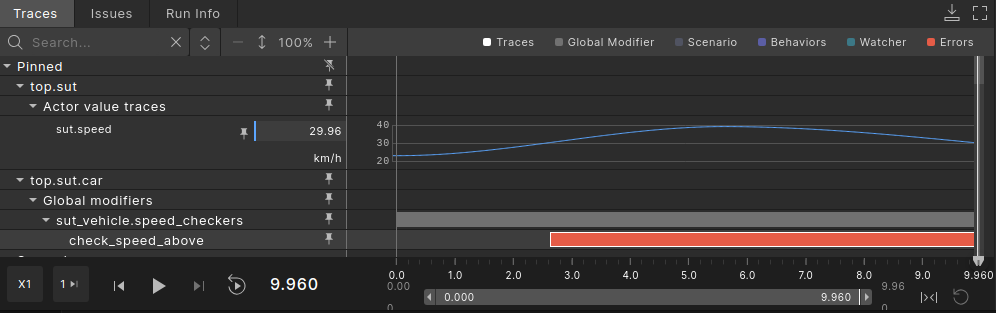
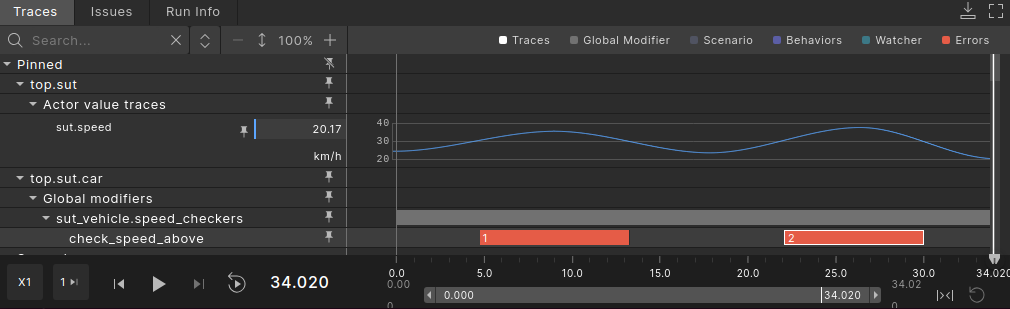
The image below depicts the interval created by check_speed_above and the speed of SUT vehicle.
Firstly, we see that the checker starts an interval when the speed goes above 30kph, and will end the interval when the speed decreases and reaches a value below 30kph (this is the behavior defined by the watcher type used for declaring the checker, speed_above).
At the end of the interval, the checker raises an issue of severity error, and category sut (by calling sut_error() inside the with block).
The behavior of issues raised by checkers is the same as any Foretify issue (see Understanding and resolving issues).
Because the severity of the issue is error, the run will end in the same cycle with the end of the first interval emitted by the check_speed_above checker.
If the requirement for a checker is only to raise errors, but not to stop the execution of a run, then the issue can be declared with the error_continue severity.
global modifier sut_vehicle.speed_checkers:
    checker check_speed_above is speed_above(actor, 30kph) with:
        it.sut_issue(severity: error_continue, kind: too_fast,
            details: "Vehicle $(it.v) exceeded maximal speed $(it.limit) reaching up to $(it.max_speed)")
In the above examples, the issue creation is declared by the use of a with block. This is equivalent to calling the issue creation on the i_end event of the checker. The following code snippet is equivalent to declaring the issue creation inside a with block:
global modifier sut_vehicle.speed_checkers:
    checker check_speed_above is speed_above(actor, 30kph)

    on @check_speed_above.i_end:
        check_speed_above.sut_error(kind: too_fast,
            details: "Vehicle $(check_speed_above.v) exceeded maximal speed $(check_speed_above.limit) " + \
                "reaching up to $(check_speed_above.data.max_speed)")
It is recommended to call the methods that create issues (for example, sut_error()) on the @i_end event of a checker. Note that Foretify will raise the issue only at the end of an interval (for example, on @i_end).
Note
Even if a watcher type (modifier) is defined with the sole purpose of using it as a checker, calling the issue methods is not allowed within the body of the watcher type. This will result in a runtime error.
As presented in the examples above, the issue raised by a checker will be raised at the end of an interval. If you need to signal the start of an interval, you can add a message or raise an issue by using the checker's i_start event, as shown in the example below. Note that the issue on @i_start is not the issue associated with the checker (it will not show up in the Trace Details for the interval), but it can be helpful for verdict analysis or logging.
global modifier sut_vehicle.speed_checkers:
    checker check_speed_above is speed_above(actor, 30kph) with:
        it.sut_error(kind: too_fast,
            details: "Vehicle $(it.v) exceeded maximal speed $(it.limit) reaching up to $(it.max_speed)")

    on @check_speed_above.i_start:
        top.sut_issue(kind: too_fast, severity: warning,
            details: "Vehicle $(check_speed_above.v) started exceeded maximal speed $(check_speed_above.limit)")
Using set_issue()
You can modify issues emitted by checkers using the set_issue() modifier. The modifier allows you to change the category, severity, kind, and message fields associated with an issue. In the following example, the severity of a checker's issue is changed from error to info:
extend top.main:
    set_issue(target_checker: sut.car.speed_checkers.check_speed_above, severity: info)
See complete example.
In the following example, the speed_above watcher type defined above is used to define the check_speed_above checker for all vehicles in the simulation (the checker is defined in a global modifier of vehicle actor). The checker will raise an error_continue issue, of category other whenever an interval ends. The set_issue() modifier is used to change the issue category and severity for the SUT vehicles (changing severity to error, and category to sut). Note that the change is done by extending the speed_checkers modifier for the sut_vehicle actor (which inherits vehicle), so the set_issue() modifier will only apply to sut_vehicle actors while any other actors that inherit vehicle (npc_vehicle for example) will not be affected.
global modifier vehicle.speed_checkers:
    checker check_speed_above is speed_above(actor, 30kph) with:
        it.issue(kind: too_fast, severity: error_continue,
            category: other,
            details: "Vehicle $(it.v) exceeded maximal speed $(it.limit) " + \
                "reaching up to $(it.data.max_speed)")

extend sut_vehicle.speed_checkers:
    set_issue(target_checker: speed_checkers.check_speed_above, severity: error, category: sut)
See complete example
In the following example, the condition attribute of set_issue() is used to turn a checker's issue into a warning only when the checker is assigned to an SUT vehicle. In this example, the is_dut field of the vehicle actor is used to determine whether the vehicle is an SUT vehicle or not.
extend issue_kind: [speed_above]

global modifier vehicle.state_checkers:
    checker check_speed_above is above_w(
        sample_type: speed, sample_expression: actor.state.speed, threshold: 30kph, tolerance: 2kph)

    on @check_speed_above.i_end:
        check_speed_above.other_error(kind: speed_above,
            details: "Speed of actor $(actor) was above 30kph")

    set_issue(target_checker: check_speed_above, condition: actor.is_dut, severity: warning)
See complete example
Analyzing watcher and checker intervals in the debugger
Intervals help you analyze and debug tests. After defining a watcher, you can use the Foretify Debugger, available in both Foretify and Foretify Manager, to visualize the intervals emitted by the watcher.
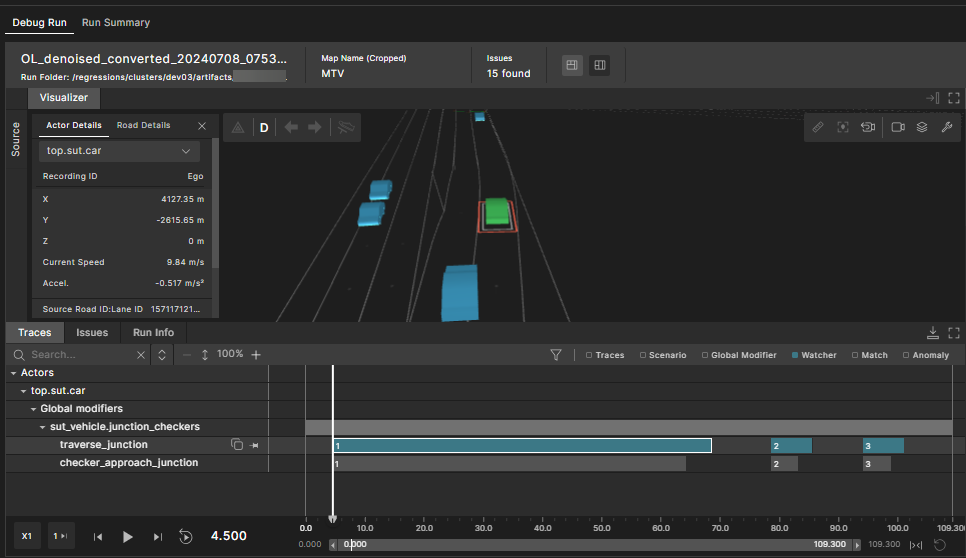
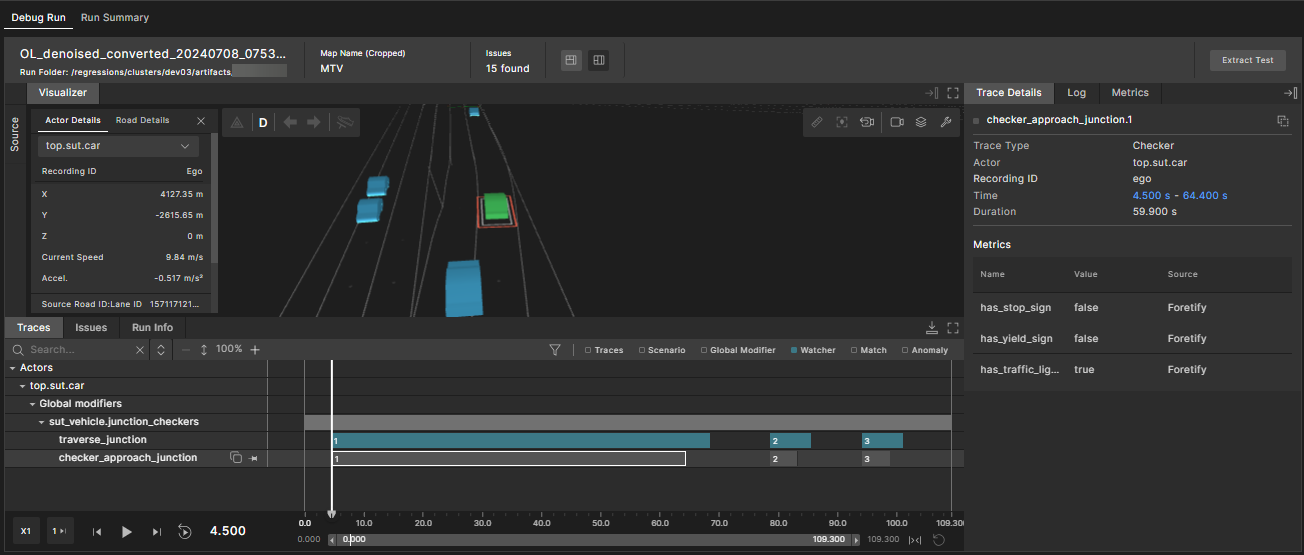
In the following example, the traverse_junction watcher emits an interval when the Ego traverses a junction. This interval appears as a teal-colored block in the Traces tab.
The time and duration of the watcher interval are displayed in the Trace Details tab on the right. For more information about watcher intervals, see Defining a watcher type and Declaring a watcher.
In the following example, the checker_approach_junction checker emits an interval when the Ego approaches a junction. This interval appears as a grey-colored block in the Traces tab.
For more information on checkers and visualizing intervals, see Defining a checker and Debugging in Traces view.
Limitations, suggested workarounds, pitfalls to avoid
Watcher data coverage is always sampled at the end of an interval
When defining coverage in a watcher data type (see Defining custom watcher data), the coverage will always be sampled, and it will be always sampled at the end of an interval.
If the coverage needs to be sampled on other interval event (for example, on the start of an interval), or if it needs to be sampled based on a condition, the suggested workaround is to use a wrapper modifier for the watcher and define the coverage in the wrapper modifier (see Declaring watcher inside a wrapper modifier).
The following example reuses the speed_above watcher defined above (see Provide custom data type to watcher declaration), and adds a conditional coverage in a wrapper modifier, speed_above_wrapper, item that is sampled at the start of an interval, only when SUT driver on the outermost lane. By defining the lat_offset_at_start_on_outermost_lane item in the wrapper modifier, we can provide a custom event for recording the event, sample_lat_offset_at_start.
struct speed_above_data inherits any_watcher_data:
    max_speed: speed
    cover(max_speed, unit: kph)
    lateral_offset_at_start: length

modifier vehicle.speed_above_wrapper:
    watcher speed_above_w(speed_above_data) is speed_above(v: actor, limit: 30kph)

    on @speed_above_w.i_clock:
        if (speed_above_w.data.max_speed < speed_above_w.v.state.speed):
            speed_above_w.data.max_speed = speed_above_w.v.state.speed

    on @speed_above_w.i_start:
        speed_above_w.data.lateral_offset_at_start = \
            speed_above_w.v.state.msp_pos.lane_position.lat_offset

    # Conditional coverage for lateral offset at start
    event sample_lat_offset_at_start is @speed_above_w.i_start \
        if (speed_above_w.v.get_lane_position() == outermost)
    record(lat_offset_at_start_on_outermost_lane,
        expression: speed_above_w.data.lateral_offset_at_start,
        event: sample_lat_offset_at_start, unit: m,
        text: "Lateral offset at the start of the interval, when vehicle " + \
            "is driving on outermost lane (m).")

global modifier vehicle.speed_watchers:
    speed_above: speed_above_wrapper()
Use top.clk or top.w_clk correctly
One common pitfall users may encounter is mixing the @top.clk and @top.w_clk events when defining the logic for starting and ending an interval. While both can be used in defining a watcher's logic, it is recommended to be consistent and not to mix them. For example, if you use @top.w_clk for defining the logic for starting an interval, then you should use @top.w_clk as well for ending an interval. In the same simulation step, top.w_clk will always be emitted after top.clk. By mixing the two events, you might run into side effects which can be hard to debug in a complex watcher logic.
In the following example, start_interval() is called on top.w_clk, while end_interval() is called on top.clk. At first glance, this code might appear to emit zero-time intervals, but it will result in an error. Since top.w_clk is emitted after top.clk, the end_interval() method will be called before start_interval(), causing Foretify to signal an end_interval() was called without an active interval.
global modifier sut_vehicle.sut_watchers:
    watcher w is passive_w()

    on @top.w_clk:
        w.start_interval()

    on @top.clk:
        w.end_interval()
While the example above is simple, in complex watcher logic, it is easy to miss that start_interval() and end_interval() are not being called on the same clock event.
Calling checker issues in watcher modifiers can result in runtime errors
The checker API provides checker methods used for raising issues, for example sut_error().
It can be easily misunderstood, but these methods are exclusive to checkers, and they should not be called by watchers.
The logic that raises checker issues should not be defined inside a watcher type, because there is no way of ensuring that the watcher type is only used to declare checkers.
In the following example, the speed_above watcher type calls sut_error(). The type is used to declare speed_above_w watcher. This will end up in a runtime error, at the first time when i_end is issued.
extend issue_kind: [too_fast] #define a new issue kind
watcher modifier speed_above:
    v: vehicle
    limit: speed

    on @top.w_clk:
        if(data == null):
            if(v.state.speed > limit):
                start_interval()
        else:
            if(v.state.speed <= limit):
                end_interval()

    # Calling a checker issue when watcher type is used to declare
    # a watcher (not checker) will result in runtime error
    on @i_end:
        sut_error(kind: too_fast,
            details: "Vehicle $(v) exceeded maximal speed $(limit)")

global modifier sut_vehicle.speed_watcher:
    # Because 'speed_above' uses 'sut_error', declaring a watcher
    # of type 'speed_above' will end up with a runtime error
    watcher speed_above_w is speed_above(actor, 30kph)
The recommended way of defining a checker issue is presented in the chapter Defining a checker.
Only one zero-time interval is allowed per simulation step
Watchers have the following constraints regarding a single simulation step:
- A watcher can start and stop an interval in the same step (a zero-time interval).
- An interval can be ended and a new one can be started (but a new one can't be zero-time).
- More than 1 zero-time interval per step is not allowed.
The following example attempts to create two zero-time intervals in the same time step. This will result in an exception error.
global modifier sut_vehicle.sut_watchers:
    watcher w is passive_w()

    on @top.w_clk:
        w.start_interval()
        w.end_interval()
        w.start_interval()
        w.end_interval()
Example: writing a checker suite for the LSS function
More details on how to use watchers and checkers to verify a specific function of a vehicle are provided in this section. For this purpose, we will use the requirements for a suite of LSS checkers presented below.
LSS (Lane Support Systems) is a suite of ADAS lane functions that respond to the lateral movement of a vehicle. The main functionalities of LSS are to prevent the vehicle drifting away from its original lane, or to warn the driver about an unintentional drift. One example of an LSS implementation is the Foretellix Lane Support System (LSS) Model.
LSS checkers requirement
-
The following checkers are required to be scenario-agnostic. They are supposed to verify that the LSS function only operates within its ODD.
-
Checker 1: Check when LSS is engaged or there is a LSS warning, the longitudinal acceleration of the SUT vehicle is not higher than a predefined threshold (named LSS_MAX_LON_ACC).
-
Checker 2: Check when LSS is engaged or there is a LSS warning, the width of the lane in which the SUT vehicle is driving is not lower than a predefined threshold (named LSS_MIN_LANE_WIDTH).
-
Checker 3: Check when LSS is engaged or there is an LSS warning, [...]
We will only focus on the full implementation of Checker 1 (defined above), but all checks are taken into consideration when designing the code.
Defining common watchers
We can notice that the requirement for each checker states that the checker should only be active "when LSS is engaged or there is an LSS warning". For this purpose, we define a common watcher, lss_is_engaged_or_warning, which will issue intervals while any of the two conditions is met (the LSS function is either engaged or issuing a warning).
The implementation can be seen in the code snippet below:
    watcher lss_is_engaged is while_w(actor.lss_is_engaged())
    watcher lss_is_warning is while_w(actor.lss_is_warning())
    watcher lss_is_engaged_or_warning is or_w(lss_is_engaged, lss_is_warning)
Detailed explanations on the above example is as follows:
- We defined two intermediary watchers, lss_is_engaged and lss_is_warning, and used the or_w watcher operator for emitting intervals whenever any of them has an active interval.
- Note the usage of the API
actor.lss_is_engaged()andactor.lss_is_warning(). This is a mock API, defined for the purpose of showcasing the checker behavior. In a real world application, this can be replaced with the proper API for LSS function implementation.
Defining each checker
As mentioned above, this section will only focus on the implementation of the longitudinal acceleration checker (Checker 1 from the Requirement).
The implementation of the checker is in the code snippet below:
extend issue_kind: [lss_lon_acceleration]

struct inhibition_on_longitudinal_acceleration_data inherits any_watcher_data:
    max_acceleration: acceleration

modifier sut_vehicle.lss_lon_acceleration:
    LSS_MAX_LON_ACC: acceleration with: keep(default it == 2mpsps)

    @required
    lss_is_engaged_or_warning: any_watcher_behaviour

    issue_severity: issue_severity with:
        keep(default it == error)

    watcher lon_acceleration_above_threshold is while_w(
        actor.state != null and actor.state.local_acceleration.lon > LSS_MAX_LON_ACC)

    checker check_lss_lon_acceleration(inhibition_on_longitudinal_acceleration_data) is and_w(
            lss_is_engaged_or_warning, lon_acceleration_above_threshold) with:
        it.sut_issue(
            kind: lss_lon_acceleration, severity: issue_severity,
            details: "Longitudinal acceleration of SUT vehicle ($(actor)) was higher than maximum " + \
                "allowed value while LSS is engaged ($(LSS_MAX_LON_ACC)). Maximum recorded " + \
                "value of longitudinal acceleration: $(it.data.max_acceleration)")

    # Sample maximum acceleration during the interval
    on @check_lss_lon_acceleration.i_clock:
        if (check_lss_lon_acceleration.data.max_acceleration < actor.state.local_acceleration.lon):
            check_lss_lon_acceleration.data.max_acceleration = actor.state.local_acceleration.lon
The checker was defined using the and_w watcher operator. One of the inputs is the lss_is_engaged_or_warning watcher defined in the previous sub-section, and the other input is an intermediary watcher, lon_acceleration_above_threshold, which emits intervals when the longitudinal acceleration is above the predefined threshold. The use of the and_w operator makes sense because, in normal operating conditions of the function, the two inputs are mutually exclusive. Whenever SUT drives with a higher longitudinal acceleration, the LSS function should not be active. Hence, whenever the two inputs are active at the same time, it is an error interval.
The choice to use a wrapper modifier for each checker (see declaring watcher inside a wrapper modifier) was made in order to encapsulate all the "supporting" logic (lon_acceleration_above_threshold watcher, sampling logic for maximum acceleration) together with the checker, this enables easier reuse of the checker. An example (This is not part of the current requirements but would be a plausible addition) for such a reuse would be, that there should be a warning if longitudinal acceleration is above 1mpsps and an error only when acceleration goes above 2mpsps. In that case, the wrapper modifier could be instantiated twice, with different parameter configuration, to achieve the required intervals for both thresholds.
Note that some of the parameters of the modifier are defined with default values (LSS_MAX_LON_ACC, issue_severity) since they are generatable. The lss_is_engaged_or_warning is required to be provided from above (for example, where the modifier is instantiated), and that's why it is declared with the property required: true.
Define a global modifier
Both checks and the ‘common’ watchers were wrapped under a global modifier of the actor sut_vehicle which means they are independent of a particular scenario.
global modifier sut_vehicle.lss_checks:
    watcher lss_is_engaged is while_w(actor.lss_is_engaged())
    watcher lss_is_warning is while_w(actor.lss_is_warning())
    watcher lss_is_engaged_or_warning is or_w(lss_is_engaged, lss_is_warning)

    lss_lon_acceleration: lss_lon_acceleration(lss_is_engaged_or_warning: lss_is_engaged_or_warning)
The following image shows the behavior of the check_lss_lon_acceleration checker, along with the watchers used to build the checker.

See complete example.
Example: writing a checker for the BSM function
This example presents the implementation of a checker for a BSM (Blind Spot Monitoring) ADAS function, using watcher operators, custom watcher types (modifiers), and a layered approach.
Blind Spot Monitoring (BSM) is an Advanced Driver Assistance System (ADAS) function that issues a warning to the driver when a vehicle is detected in their blind spot or alongside their vehicle. The warning can be delivered through visual indicators, audible alerts, or steering wheel vibrations
BSM checkers requirement
-
The following checker is required to be scenario-agnostic. It is supposed to verify that the BSM function operates correctly within its ODD.
-
A BSM alert should be issued in the following conditions:
-
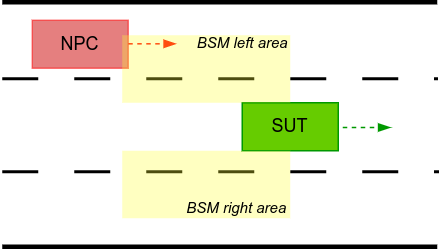
A vehicle is overlapping the BSM zone (an area defined by measuring 10 meters behind the left-center or right-center point of the SUT vehicle and 2.5m laterally from the left or right side of the SUT, in local coordinates).
-
The SUT has the turn signal on towards the side in which the NPC vehicle is placed.
-
-
The checker should issue an error interval during any time window when the above conditions are met but the SUT does not issue a BSM alert.
In this example, we will use the [Foretellix Blind Spot Monitoring (BSM) Model for Sumo][blind-spot-monitoring-bsm-introduction].
The following image presents a visual representation of the areas where the presence of an NPC should result in a BSM alert.
The following subsections describe each step taken to define the BSM checker:
Defining a BSM zone monitor
First, it is essential to determine whether any vehicle overlaps with the BSM zones of the SUT at any point during the simulation. This is obtained by implementing a watcher type that will emit intervals whenever a vehicle is in a BSM zone of the SUT. Due to the symmetrical nature of the BSM function, the BSM zone monitor watcher type was implemented to monitor only one side of the SUT. Two instances of watchers of the same type are then declared, one for the left zone and one for the right zone.
watcher modifier bsm_zone_monitor:
    sut_veh: sut_vehicle
    side: av_side
    len: length
    wdth: length

    # Return true whenever there is an object in the left / right BSM zone
    def is_obj_in_zone()-> bool is:
        var ref_point: distance_reference = side == left ? left_center : right_center
        var sign := side == left ? 1 : -1

        result = false
        for obj in traffic.physical_objects:
            if obj != sut_veh:
                var lon_dist := sut_veh.local_distance(obj, ref_point, closest_compound, lon)
                var lat_dist := sut_veh.local_distance(obj, ref_point, closest_compound, lat)

                if lon_dist in [-len..0m] and lat_dist * sign in [0m..wdth]:
                    result = true

    on @top.w_clk:
        var obj_in_zone := is_obj_in_zone()
        if data == null and obj_in_zone:
            start_interval()
        elif data != null and not obj_in_zone:
            end_interval()
Note that the watcher type uses a couple of parameters to configure the BSM zone (len, wdth) and the monitored side (side).
Defining a wrapper modifier for a BSM zone check
At this point, we have a watcher type that tells us when a vehicle is present in one of the BSM zones of the SUT, but based on the checker requirement, there are some other behaviors that we need to monitor and use in the checker logic: turn signal state and BSM alert state.
Because there are multiple behaviors needed to monitor for the check, we defined a wrapper modifier for all the logic needed, as suggested above in Declaring watcher inside a wrapper modifier.
Following the same principle as for the BSM zone monitor watcher type, all the logic handles one side of the SUT (left/right), and we will later use two instances of the wrapper modifier, one for each side.
extend issue_kind: [bsm_check]

# Wrapper modifier for all the checking logic related to a BSM zone (left or right)
modifier sut_vehicle.bsm_zone_checks:
    side: av_side with:
        keep(default it == left)
    len: length with:
        keep(default it == 10m)
    wdth: length with:
        keep(default it == 2.5m)

    # Returns true if the turn signal towards 'side' is active
    def is_turn_signal_active() -> bool is:
        var m_turn_side: turn_signal_state = (side == left) ? left_on : right_on
        return actor.state.vehicle_indicators.turn_signal_state == m_turn_side

    # Returns true if the BSM alert that corresponds to 'side' is active
    def is_bsm_alert_active() -> bool is expression \
        (side == left) ? (actor.state.vehicle_indicators.bsm_left_side_alert == true) : \
            (actor.state.vehicle_indicators.bsm_right_side_alert == true)


    watcher zone_monitor is bsm_zone_monitor(sut_veh: actor, side: side, len: len, wdth: wdth)

    var turn_signal_active := sample(is_turn_signal_active(), @top.clk)
    watcher turn_indication is while_w(turn_signal_active)

    watcher should_issue_bsm_alert is and_w(zone_monitor, turn_indication)

    var bsm_alert_active := sample(is_bsm_alert_active(), @top.clk)
    watcher bsm_alert_off is while_w(not bsm_alert_active)

    checker check_bsm_alert is and_w(should_issue_bsm_alert, bsm_alert_off)

    on @check_bsm_alert.i_end:
        check_bsm_alert.sut_warning(bsm_check,
            "BSM alert is off when turn signal is on while there are objects in the $(side) BSM zone")
In the example above, we defined the bsm_zone_checks modifier, which contains all the logic required to perform the BSM check. The zone_monitor watcher is an instance of the bsm_zone_monitor watcher type defined previously. The turn_signal_active watcher will issue an interval for each time when the turn signal towards the monitored side (left/right) is on. The should_issue_bsm_alert watcher composes both conditions in which the SUT should be issuing a BSM alert, by the use of the and_w() watcher operator.
For the checker definition, we used two watchers that should never have overlapping intervals: should_issue_bsm_alert and bsm_alert_off. Since these two should be mutually exclusive, any interval emitted by the checker indicates that the SUT did not issue a BSM alert when all conditions to issue one were met.
Declaring checks for both BSM zones in a global modifier
As mentioned throughout the section, we declared two instances of the bsm_zone_checks, one for each side of the SUT (left/right).
global modifier sut_vehicle.bsm_checks:
    left_bsm_checks: bsm_zone_checks(side: left, len: 10m, wdth: 2.5m)
    right_bsm_checks: bsm_zone_checks(side: right, len: 10m, wdth: 2.5m)
Visual inspection of intervals, handling zero-time intervals
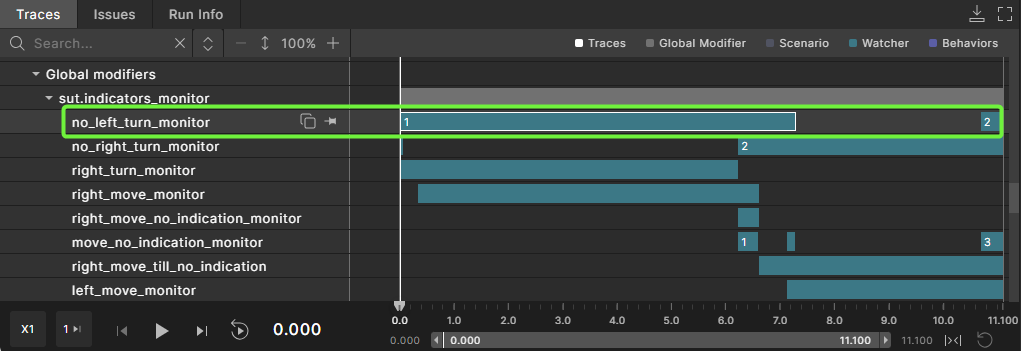
The image below depicts the Traces View in Foretify Developer, observed for one run of the example above.
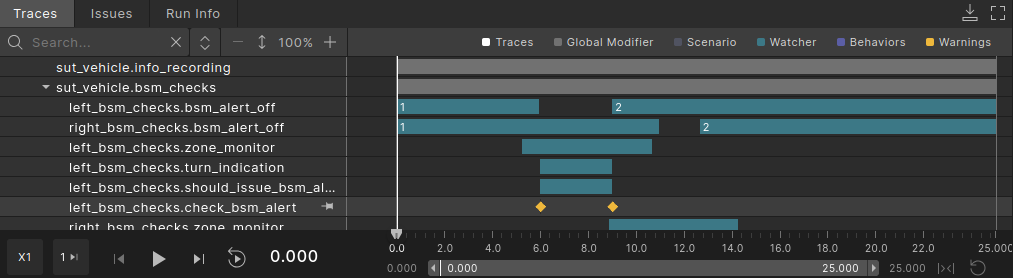
Note: For the check_bsm_alert, checker part of left_bsm_checks, two zero-time intervals are obtained.
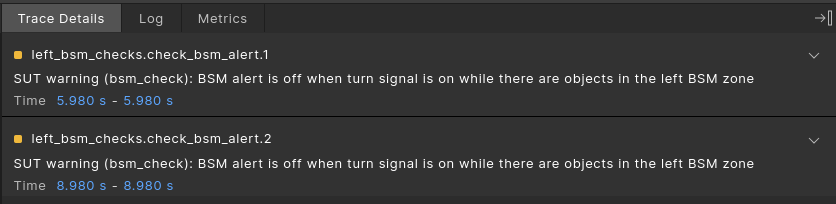
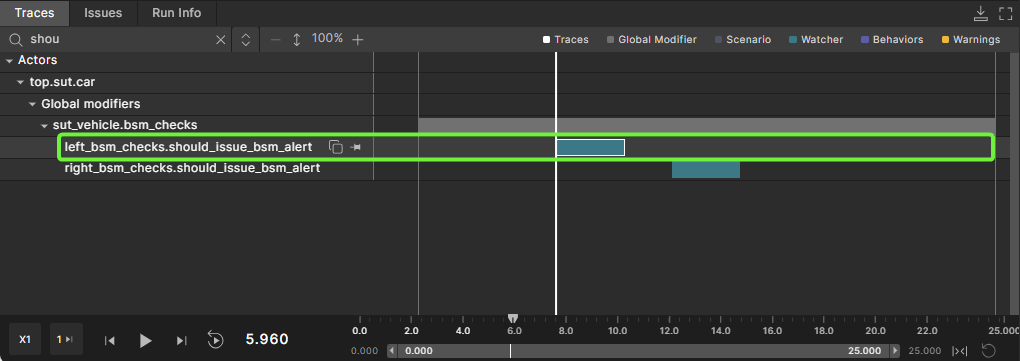
This happens at times of 5.98s and 8.98s, when the BSM alarm becomes active and inactive, respectively. The explanation for these zero-time intervals is that the two watchers used for defining check_bsm_alert are actively switching states at those times. For example, at 5.98s, should_issue_bsm_alert starts an interval, while bsm_alert_off ends an interval. In these situations, and_w() (used in the definition of check_bsm_alert) will issue a zero-time interval.
However, these are not situations of interest. These situations are expected and they do not signal an error in the BSM behavior. Only an interval that lasts for more sim ulation steps signals an issue in the BSM behavior. To filter out issues from zero-time intervals, we revisited the definition of the checker issue and added an extra condition, as shown below.
    checker check_bsm_alert is and_w(should_issue_bsm_alert, bsm_alert_off)

    on @check_bsm_alert.i_end if (check_bsm_alert.data.start_time != check_bsm_alert.data.end_time):
        check_bsm_alert.sut_warning(bsm_check,
            "BSM alert is off when turn signal is on while there are objects in the $(side) BSM zone")
By running the code example (linked below) we notice that the zero-time intervals will not raise an issue (signaled also by the color of the intervals in Traces View).

See complete example.