hlm_driver behaviors
Foretellix currently provides several High-Level Models (HLMs) that are simulator-agnostic:
- Foretellix Adaptive Cruise Control (ACC) Model
- Foretellix Autonomous Emergency Braking (AEB) Model (forward motion)
- Foretellix Emergency Steering Assist (ESA) Model
- Foretellix Lane Centering Assist (LCA) Model
- Foretellix Lane Support System (LSS) Model
- Foretellix Speed Assist System (SAS) Model
Foretellix also supports several simulator-specific SUT models:
- Foretellix Active Lane Change Assist (ALCA) Model for SUMO
- Foretellix Blind Spot Monitoring (BSM) Model for SUMO
- Foretellix Rear Autonomous Emergency Braking (AEB) Model for Carla (reverse motion)
For information on how to integrate a Foretellix SUT Model, see Using a Foretellix SUT Model.
Foretellix Adaptive Cruise Control (ACC) Model
The Foretellix ACC Model controls the vehicle's speed in order to achieve the target speed given by either the human driver or road signs (when in intelligent Adaptive Cruise Control (iACC) mode). The Foretellix ACC Model controls the throttle and brake pedals while the human driver (modeled by Foretify) controls the steering wheel.
ACC states
The ACC state is captured in sut.car.state.vehicle_indicators.acc_state_v2. There are five ACC states as defined by the acc_state_v2 enum:
- OFF: ACC is turned off.
- STANDBY: ACC is waiting for a SET command. It does not control the speed.
- ACTIVE_CC: ACC controls the speed, with the target speed coming either from the driver or from road signs.
- ACTIVE_FOLLOWING: ACC controls the vehicle's speed, with the target speed determined by the lead vehicle. ACC also keeps the
safety_time_gapset by the human driver. - ACTIVE_STOPPED: ACC is standing still after the lead vehicle has stopped for more than
active_stopped_timeoutor the longitudinal speed of the lead vehicle is belowactive_stopped_speed_threshold.
The table below shows the state machine transitions. The left column is the from state; the top row is the to state.
| OFF | STANDBY | ACTIVE_CC | ACTIVE FOLLOWING | ACTIVE STOPPED | |
|---|---|---|---|---|---|
| OFF | - | main button | N/A | N/A | N/A |
| STANDBY | main button | - | set button | set button and lead vehicle is slower than target cruise speed | N/A |
| ACTIVE_CC | main button | cancel button or brake command | - | lead vehicle is slower than target cruise speed | N/A |
| ACTIVE FOLLOWING | main button | cancel button or brake command | lead vehicle disappeared and some predefined time has passed | - | lead vehicle has stopped for predefined amount of time |
| ACTIVE STOPPED | main button | cancel button or brake command | resume button or throttle command | (resume button or throttle command) and lead vehicle is slower than target cruise speed |
ACC interface
The ACC button press actions are modeled as scenarios:
press_ACC_main_button()switches ACC from OFF to STANDBY mode or from STANDBY or an ACTIVE mode to OFF.press_ACC_resume_button()switches ACC from ACTIVE_STOPPED to ACTIVE_CC or ACTIVE_FOLLOWING.press_ACC_cancel_button()switches ACC from an ACTIVE state to STANDBY.press_ACC_set_button(cruise_speed: <speed\>, safety_time_gap: <acc_safety_time_gap\>, use_road_speed_limit: <bool\>)sets the cruise speed.
| Parameter name | Dype | Description | Default value |
|---|---|---|---|
| cruise_speed | speed | The desired cruise speed. Should not be set if the current speed is the desired target cruise speed. | current speed |
| safety_time_gap | enum | The time gap (short, medium, long, or extra_long) between the ACC HLM and the position of the lead-vehicle if the lead vehicle traveling below the cruise_speed. |
medium |
| use_road_speed_limit | bool | A flag to activate iACC mode | false |
Note
In iACC mode, the ACC uses the road's speed limit to set the target cruise speed. If iACC is turned on with a specified cruise_speed, the ACC takes the minimum of the two as the final target cruise speed.
These buttons are defined in $FTX/env/basic/adas_hlm_imps/ACC/acc_hlm_imp.osc. To use this interface, you must import this file into the test.
ACC configuration parameters
You can configure the ACC parameters by constraining the fields of the vehicle's hlm_driver.acc_behavior.acc_behavior_params.
extend top.main:
    def post_plan() is also:
        sut.car.hlm_driver.acc_behavior.acc_behavior_params.max_deceleration = 5mpsps
| Parameter name | Type | Description | Default value |
|---|---|---|---|
| short_safety_time | time | The time required to reach the lead-vehicle's current position that ACC keeps when safety_time_gap is set to short. |
1.3s |
| medium_safety_time | time | The time required to reach the lead-vehicle's current position that ACC keeps when safety_time_gap is set to medium. |
1.8s |
| long_safety_time | time | The time required to reach lead-vehicle's current position that ACC keeps when safety_time_gap is set to long |
2.3s |
| extra_long_safety_time | time | The time required to reach lead-vehicle's current position that ACC keeps when safety_time_gap is set to extra_long |
3s |
| safety_distance | length | The minimum distance that the ACC keeps from the current position of the lead vehicle regardless of the speed of the ACC or the lead_vehicle. | 10meter |
| pedal_command_tolerance | float | The minimum pedal command value for the throttle or brake that is required in order to be considered a real command and not just noise. | 0.01Nm |
| trajectory_duration | time | The duration of the trajectories that ACC generates. | 1.0second |
| max_deceleration | acceleration | The maximum deceleration value that ACC can apply without causing discomfort. Currently ACC uses vehicle.physical.min_acceleration. For the ACC HLM, this is a positive value, although in other contexts it is negative. |
4mpsps |
| max_acceleration | acceleration | The maximum asceleration value that ACC can apply without causing discomfort. Currently ACC uses vehicle.physical.max_acceleration. |
2mpsps |
| look_ahead_distance | length | How far ahead ACC looks for objects. | 70meter |
| width_inflation_ratio | float | The width factor for front ROI, specifying how much the ROI is inflated in relation to the car's width. | 1.2 |
| collision_detection_time_resolution | time | How far ahead in time the ACC looks into the future of objects inside the front ROI. | 0.1second |
| active_stopped_timeout | time | ACC enters ACTIVE_STOPPED state if the lead vehicle is at standstill for longer than this value. | 3second |
| active_stopped_speed_threshold | speed | Longitudinal speed lower than this value is considered standstill. | 0.01mpsps |
Foretellix Autonomous Emergency Braking (AEB) Model
The Foretellix AEB Model performs emergency braking if a possible collision is detected.
AEB states
There are three states for AEB as defined by the aeb_state enum:
- off: The AEB function is not activated.
- active: The AEB function is on standby.
- engaged: The AEB function is performing emergency braking.
The state is captured in top.sut.car.state.vehicle_indicators.aeb_state.
AEB interface
The AEB button press action is modeled as a scenario:
request_AEB_mode(state: <aeb_state\>)
The aeb_state parameter is required and is one of off or active.
This button is defined in $FTX/env/basic/adas_hlm_imps/AEB/aeb_hlm_imp.osc. To use this interface, you must import this file into the test.
AEB configuration parameters
You can configure the AEB parameters by constraining the fields of the vehicle's hlm_driver.aeb_behavior.aeb_behavior_params.
extend top.main:
    def post_plan() is also:
        sut.car.hlm_driver.aeb_behavior.aeb_behavior_params.roi_length_increase = 2.1m
| Parameter name | Type | Description | Default value |
|---|---|---|---|
| minimum_standstill_trajectory_duration | time | The minimal duration (horizon time) of the trajectory generated by AEB when engaged, preventing a zero-time duration when the speed is zero. | 0.5second |
| roi_length_increase | length | How much the frontal ROI is inflated in relation to the braking distance. | 2.0m |
| width_inflation_ratio | float | How much the frontal ROI width is inflated in relation to the car's width. | 1.2 |
| collision_detection_time_resolution | time | The time steps that AEB looks into the future of objects inside the front ROI. | 0.1second |
Foretellix Rear Autonomous Emergency Braking (AEB) Model for Carla
The Foretellix rear AEB Model performs emergency braking if driving in reverse and an obstacle is detected. When using the Foretellix Rear AEB Model, use a line_shape defined with direction=backwards.
Rear AEB states
There are three states for the AEB defined under top.sut.car.state.vehicle_indicators.rear_aeb_state as a rear_aeb state enum:
- OFF - rear AEB module is not activated.
- ACTIVE - rear AEB is activate, and no possible collision is detected.
- ENGAGED - rear AEB is braking due to detection of a possible collision.
Rear AEB alert
The state of the AEB rear alarm is captured in sut.car.state.vehicle_indicators.aeb_rear_alarm. When true, the alarm is active; when false, inactive.
Rear AEB interface
To activate the Rear AEB function, call sut.car.request_rear_AEB_mode(state: active).
To de-activate the Rear AEB function, call sut.car.request_rear_AEB_mode(state: off).
These buttons are defined in $FTX/env/basic/driver_dut_imps/rear_AEB/rear_aeb_drive_imp.osc. To use this interface, you must import this file into the test.
Foretellix Active Lane Change Assist (ALCA) Model for SUMO
ALCA states
- OFF
- STANDBY
- ACTIVE
- PREPARE
- ALCA_RETURN
ALCA interface
To activate the ALCA function, call sut.car.request_ALCA_on().
To de-activate the ALCA function, call sut.car.request_ALCA_off().
This button is defined in $FTX/env/basic/driver_dut_imps/ALCA/alca_drive_imp.osc. To use this interface, you must import this file into the test.
Foretellix Blind Spot Monitoring (BSM) Model for SUMO
BSM states
- OFF
- ACTIVE
- ENGAGED
BSM interface
To activate the BSM function, call sut.car.request_BSM_mode(active).
To de-activate the ALCA function, call sut.car.request_BSM_mode(off).
This button is defined in $FTX/env/basic/driver_dut_imps/BSM/BSM_drive_imp.osc. To use this interface, you must import this file into the test.
Foretellix Emergency Steering Assist (ESA) Model
The Foretellix ESA Model helps the human driver (the Foretellix Human Driver Model) to perform an evasive steering maneuver in order to prevent a longitudinal collision.
There are three conditions that need to be met for ESA to engage:
- A longitudinal collision is about to happen.
- The Foretellix Human Driver Model has initiated an evasive steering maneuver.
- ESA is active.
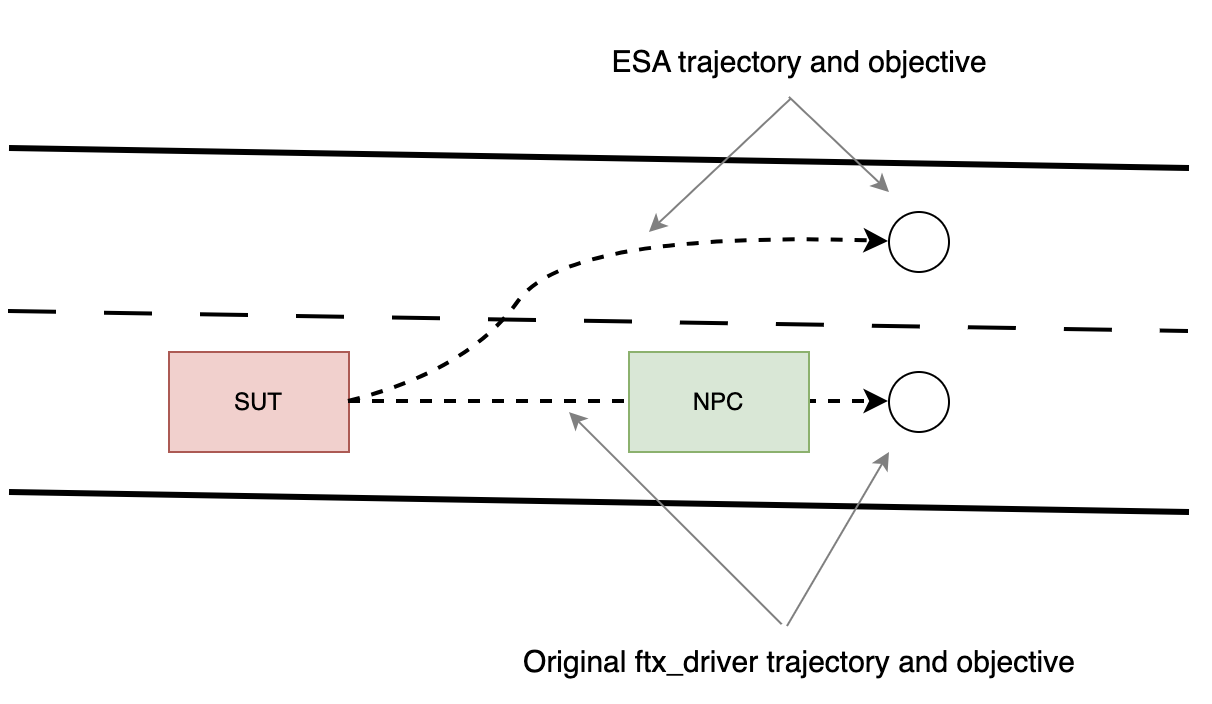
If all the above conditions are met, ESA generates a new trajectory for the vehicle with the following properties:
lon_posis the current_speed * config.trajectory_durationlon_speedis the current longitudinal speed.lat_posis the adjacent lane's center line on the SUT's route.lat_speedis 0.
Current limitations
-
The ESA Model does not anticipate lateral collisions, so it might steer the vehicle into an object in the adjacent lane. Similarly, the ESA Model does not verify that the adjacent lane is a driving lane.
-
If you use a shape to describe the evasive maneuver of the human driver,
adas_override behavioris not active. As a result, steering control is not disabled. The Foretellix Human Driver Model continues to send steering commands, but they are discarded by the ESA Model. -
Using either a shape or just a simple lane change in order to describe a steering command by the human driver may or may not work. Steering commands that apply torque, when supported in a future Foretify release, will provide a more reliable way to represent a human driver's steering command.
ESA state machine
The ESA state machine has the following states:
- OFF - ESA is turned off.
- ACTIVE - ESA is turned on but not actively engaged in steering the vehicle.
- ENGAGED - ESA is actively controlling the steering wheel.
- COOL_DOWN - ESA has given up control of the steering wheel because of the human driver's resistance.

ESA state machine transition table
| OFF | ACTIVE | ENGAGED | COOL_DOWN | |
|---|---|---|---|---|
| OFF | - | request_ESA_mode(active) | - | - |
| ACTIVE | request_ESA_mode(off) | - | A possible collision was detected and the human driver initiated an evasive steering maneuver. | - |
| ENGAGED | request_ESA_mode(off) | ESA finished the evasive steering maneuver. | - | The human driver applied enough torque on the steering wheel for a duration long enough. Both values are configurable. |
| COOL_DOWN | request_ESA_mode(off) | Cool down duration has completed. | - | - |
ESA interface
The ESA button press action is modeled as a scenario. You can use this scenario to activate or deactivate the ESA Model or a customer SUT.
sut.car.request_ESA_mode(state: active)activates the ESA function.sut.car.request_ESA_mode(state: off)deactivates the ESA function.
This button is defined in $FTX/env/basic/adas_hlm_imps/ESA/esa_hlm_imp.osc. To use this interface, you must import this file into the test.
ESA configuration parameters
| Parameter name | Type | Description | Default value |
|---|---|---|---|
| trajectory_duration | time | The duration of the trajectories that LSS will create. | 1[s] |
| engaged_duration | time | The duration of time the vehicle must drive safely on the adjacent lane before changing state back to ACTIVE. | 2[s] |
| cool_down_duration | time | The duration of time that ESA must remain in COOL_DOWN state before changing state back to ACTIVE. | 5[s] |
| evasive_torque_threshold | float | The magnitude of torque that the human driver must apply in order to initiate the evasive maneuver by ESA. | 2[Nm] |
| evasive_torque_duration | time | The duration of continuous torque at higher than evasive_torque_threshold that the human driver must apply in order to initiate the evasive maneuver by ESA. | 0.1[s] |
| override_torque_threshold | float | The magnitude of torque that the human driver must apply in order to overcome the ESA's steering control, thus forcing ESA to change state to COOL_DOWN. (Not yet supported) | 8[Nm] |
| override_torque_duration | time | The duration of continuous torque at higher than override_torque_threshold that the human driver must apply in order to overcome the ESA's steering control, thus forcing ESA to change state to COOL_DOWN. (Not yet supported) | 1[s] |
| horizon_time | time | The duration into the future starting from now that objects will be looked for when checking for longitudinal collision. | 5[s] |
| time_resolution | time | Time resolution when searching for an object in the time range of [now, now + horizon_time]. | 0.5[s] |
Foretellix Lane Centering Assistant (LCA) Model
The Foretellix LCA Model steers the vehicle to stay on the middle of the lane.
LCA states
There are three states for LCA as defined by the lca_state enum:
- off: The LCA function is turned off.
- active: The LCA function is actively steering the car.
- engaged: This value is not used in this release.
The state is captured in top.sut.car.state.vehicle_indicators.lca_state.
LCA interface
The LCA button press action is modeled as two scenarios:
request_LCA_on()request_LCA_off()
These buttons are defined in $FTX/env/basic/adas_hlm_imps/LCA/lca_hlm_imp.osc. To use this interface, you must import this file into the test.
LCA configuration parameters
You can configure the LCA parameters by constraining the fields of the vehicle's hlm_driver.lca_behavior.lca_behavior_params.
extend top.main:
    def post_plan() is also:
        sut.car.hlm_driver.lca_behavior.lca_behavior_params.max_trajectory_duration = 1.1s
| Parameter name | Type | Description | Default value |
|---|---|---|---|
| max_trajectory_duration | time | The duration (horizon time) of trajectory that LCA will generate. | 1.0second |
| min_trajectory_duration | time | LCA updates previously set objective if the time to the objective's end time is less than this value | 1.0second |
Foretellix Lane Support Systems (LSS) Model
The Foretellix LSS Model is a collection of lane functions that respond to the lateral movement, or lane drift, of a vehicle. A lane drift occurs when the lane position of one of the front corners of the vehicle enters a different lane from the center of the vehicle, as shown in the figure below.

The Foretellix LSS Model includes three separate lane functions:
-
Lane Departure Warning (LDW)
LDW issues an alert when an unintentional lane drift is detected. A lane drift is considered unintentional if the turn signal is not activated in the direction of the drift. This function is a passive function, meaning that the function applies no torque on the steering wheel.
-
Lane Keeping Assist (LKA)
LKA acts to prevent an unintentional lane drift by applying a relatively small torque on the steering wheel, just enough to keep the vehicle in the original lane.
-
Emergency Lane Keeping (ELK)
ELK acts to prevent an intentional lane change if a possible collision is detected. ELK acts within a configurable Region Of Interest (ROI). The diagram below shows the left ROI of a vehicle.
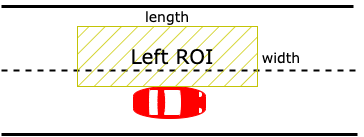
Figure 6: ELK Region Of Interest (ROI)
Note
Unlike some ADAS functions that fully control the pedals or steering wheel, LSS shares control of the steering wheel with the human driver. When engaged, LSS gives up control of the steering wheel if the driver applies enough torque for enough time. There are separate configuration parameters for LKA and ELK modes for torque threshold and duration.
LSS state machine
The following diagram shows the state machine transitions for the LSS HLM.

The states of the LSS state machine are:
- OFF: LSS is turned off.
- ACTIVE: LSS is turned on, but no warning is issued, and no steering command is applied.
- ENGAGED: LSS is controlling the steering wheel.
- COOL_DOWN: When the
ftx_driver, playing the role of a human driver, claims back control of the steering wheel by applying a large enough torque while LSS is engaged. LSS transitions to a cool-down state for a configurable amount of time.
The state transitions are described in the following table.
| OFF | ACTIVE | ENGAGED | COOL_DOWN | |
|---|---|---|---|---|
| OFF | - | request_LSS_mode(active) | - | - |
| ACTIVE | request_LSS_mode(off) | - | Unintentional drifting was detected (LDW, LKA) or Dangerous intentional lane change was detected. (ELK) |
- |
| ENGAGED | request_LSS_mode(off) | LSS finished steering the vehicle back to the original lane. | - | The driver applied enough torque on the steering wheel for a long enough time. Both values (torque and duration) are configurable. |
| COOL_DOWN | request_LSS_mode(off) | Cool down duration has ended. | - | - |
LSS interface
The human driver's button press action is modeled as the sut.car.request_LSS_mode() scenario. You can use this scenario to interact with an LSS function, either the LSS HLM or an SUT.
This button is defined in $FTX/env/basic/adas_hlm_imps/LSS/lss_hlm_imp.osc. To use this interface, you must import this file into the test.
The request_LSS_mode() parameters are shown in the following table.
| Name | Type | Description | Required | Default |
|---|---|---|---|---|
| lss_state | enum | Set the desired state (OFF / ACTIVE) | Yes | - |
| use_elk | bool | Flag to turn on ELK mode | No | false |
# Turn on LSS:
sut.car.request_LSS_mode(state: active)

# Turn on LSS with ELK:
sut.car.request_LSS_mode(state: active, use_elk: true)

# Turn off LSS:
sut.car.request_LSS_mode(state: off)
Additional coding requirements for ELK
In order to test the ELK function properly, there are some additional coding requirements:
-
In order to allow the ELK function, once engaged, to completely control the steering, you must disable steering control for the ftx_driver:
OSC2 code: disable steering for ELKextend top.main: def post_plan() is also: # Disabling the steering once ELK engages. sut.car.ftx_driver.adas_override_behavior.adas_steering_override_reaction.steering_control = disable -
You must use the
avoid_collisions(false)modifier for the drive when the lane change attempt occurs. Doing so prevents the ftx_driver from trying to avoid a possible collision. -
The
lane()modifier must be tagged withoverride(run_mode: best_effort)or the scenario may fail if ELK succeeds in preventing the lane change.OSC2 code: disable CA during lane changelane_change_attempt: sut.car.drive(duration: 10second) with: position(0meter, ahead_of: car1, at: start) speed(speed: 0mps, faster_than: car1, at: start) speed(speed: 20mps, at: end) lane(1, at: start) l: lane(3, at: end) avoid_collisions(false) override(l, run_mode: best_effort)
LSS configuration parameters
You can configure the LSS parameters by constraining the fields of the vehicle's hlm_driver.lss_behavior.lss_behavior_params.
extend top.main:
    def post_plan() is also:
        sut.car.hlm_driver.lss_behavior.lss_behavior_params.cool_down_duration = 4s
| Parameter name | Type | Description | Default |
|---|---|---|---|
| trajectory_duration | time | The duration of the trajectories that LSS creates. | 2second |
| engaged_duration | time | The duration of time the vehicle has to drive in the original lane before the state changes back to ACTIVE. | 2second |
| cool_down_duration | time | The duration that LSS stays in COOL_DOWN state before the state changes back to ACTIVE. | 5second |
| lka_torque_threshold | float | The magnitude of torque that the driver needs to apply in order to change the state to COOL_DOWN. | 3Nm |
| lka_torque_duration | time | The duration of continuous torque at higher than lka_torque_threshold required to change the state to COOL_DOWN. | 1.0s |
| elk_torque_threshold | float | The magnitude of torque that the driver needs to apply in order to change the state to COOL_DOWN. | 5Nm |
| elk_torque_duration | time | The duration of continuous torque at higher than elk_torque_threshold required to change the state to COOL_DOWN. | 2s |
| side_roi_length_extension | length | The longitudinal length that is added to the vehicle’s length in front and in back when creating the side Region of Interest (ROI) for object detection (ELK). See Figure 6 above. | 3m |
| side_roi_width | length | The width of the side ROI for object detection (ELK). See Figure 6 above. | 3m |
| horizon_time | time | The duration into the future starting from now that objects are looked for (ELK). | 5s |
| time_resolution | time | Time resolution when searching for an object in the time range of [now, now + horizon_time] (ELK). | 0.5s |
| dist_from_lane_edge | float | The distance in lane units that LSS keeps when engaged. | 0.1 |
LSS-ELK example
import "$FTX/env/basic/adas_hlm_imps/LSS/lss_hlm_imp.osc"

extend test_config:
    set map = "$FTX/qa/odr_maps/straight_long_road.xodr"
    set implicits_kind = none
    set test_drain_time = 0second

extend sut_vehicle:
    # Disabling the steering once ELK engages.
    # Preventing the ftx_driver from trying to make the lane change at the second time.
    def post_plan() is also:
        ftx_driver.adas_override_behavior.adas_steering_override_reaction.steering_control = disable
        hlm_driver.lss_behavior.lss_behavior_params.engaged_duration = 8second

scenario sut.lss_hlm_elk_with_obstacle:
    LSS_speed: speed with:
        keep(it==15mps)

    car1: vehicle

    do serial():

        sut.car.request_LSS_mode(state: active, use_elk: true)

        sut.car.turn_signal(turn_signal_state: right_on)

        parallel(overlap:equal):
            car1.drive(duration: 7second) with:
                position(distance: 100m, at: start)
                speed(speed: LSS_speed, at: start)
                speed(speed: LSS_speed, at: end)
                lane(2)

            lane_change_attempt: sut.car.drive() with:
                position(0meter, ahead_of: car1, at: start)
                speed(speed: 0mps, faster_than: car1, at: start)
                speed(speed: LSS_speed, at: end)
                lane(1, at: start)
                lane(3, at: end, run_mode: best_effort)
                avoid_collisions(false)
LSS-LKA example
import "$FTX/env/basic/adas_hlm_imps/LSS/lss_hlm_imp.osc"

extend test_config:
    set map = "$FTX/qa/odr_maps/M85_FTX_highway_figure8_R200m.xodr"
    set test_drain_time = 0second

scenario sut.lss_hlm_without_turn_signal:

    start_point: odr_road with:
        keep(start_point.odr_id == 2 and start_point.sub_id == -1)

    LSS_speed: speed with:
        keep(it in [50..60]kph)

    do serial():

        pre_lss_request: sut.car.drive(duration: [1..2]second) with:
            s1: speed(speed: LSS_speed)
            override(s1, run_mode: best_effort)
            along(start_point, at: start, start_offset: 15m)
            lane(2)

        sut.car.request_LSS_mode(state: active)

        pre_lss_drive: sut.car.drive(duration: [1..2]second) with:
            s2: speed(speed:  LSS_speed)
            override(s2, run_mode: best_effort)

        lss_drive: sut.car.drive(duration: [5..15]second) with:
            driver_controls(steering: disabled)
            s3: speed(speed:  LSS_speed)
            override(s3, run_mode: best_effort)
Foretellix Speed Assist System (SAS) Model
Speed Assist System (SAS) has two modes to help the driver control the speed of the car:
- SLF raises an alert when the car is driving faster than driver-defined speed (
v_adj). - SLIF raises an alert when the car is driving faster than the speed limit given by the map.
SAS states
There are three states for SAS as defined by the sas_state enum:
- off: SAS is deactivated.
- active: SAS is on standby.
- engaged: SAS is raising an alert.
The state is captured in top.sut.car.state.vehicle_indicators.sas_state.
SAS interface
The SAS button press action is modeled as a scenario:
request_SAS_mode(state: <sas_state\>, v_adj: <speed\>, slif_mode: <bool\>)
- The
sas_stateparameter is required and is either off or active. - The
v_adjparameter is required to set SLF mode. - The
slif_modeparameter is required to set SLIF mode. - You can set both
v_adjandslif_modeto activate both functions.
This button is defined in $FTX/env/basic/adas_hlm_imps/SAS/sas_hlm_imp.osc. To use this interface, you must import this file into the test.
Optimal Control trajectory generator
Note
This capability is delivered as Early Access and should be used with caution; it is not yet suitable for production cases.
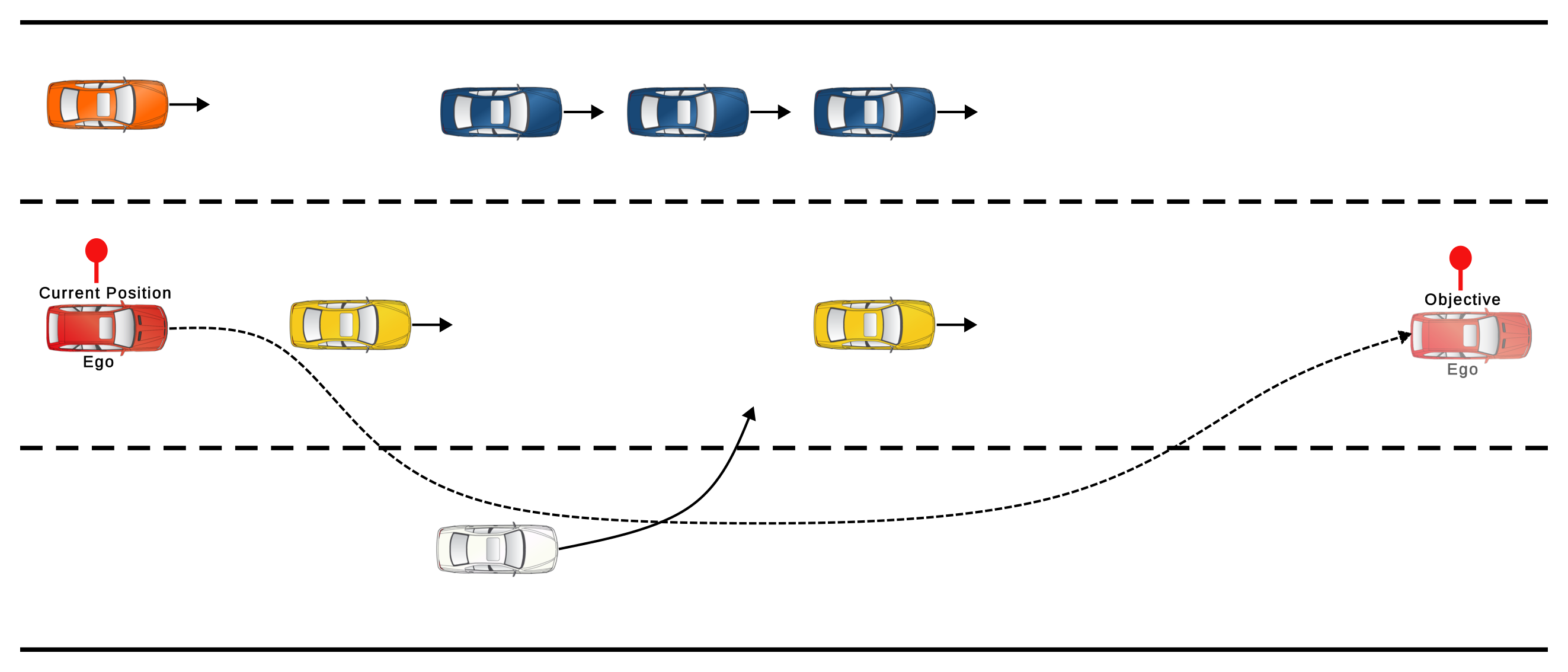
The Optimal Control (OC) trajectory generator creates a continuous and smooth longitudinal-lateral trajectory from the actor's current position (on the existing trajectory) to the objective, while considering constraints such as kinematic bounds (min/max speed, acceleration, etc.), road limits, and other vehicles on the road.
Other trajectory generators (Poly, Trapz) only consider the kinematic limits of the actor and, to a limited extent, the road width. As a result, they rely on the plan and driver behaviors to handle interactions with other actors (e.g., collision avoidance, bypassing) and changes in the road (e.g., lane endings). The OC generator can account for these factors during trajectory generation.
Implications for Scenario Writing
For an actor using optimal control, only the desired starting and ending positions need to be considered, without the need to create multiple phases to reach the end position.
Enable the OC generator
keep(car.ftx_driver.trajectory_manager_params.oc_trajectory_generator_params.enable == true)
Parameters
The OC generator is controlled by the oc_generator_params struct, which includes the following parameters:
| Parameter name | Type | Description | Default |
|---|---|---|---|
| enable | bool | A flag to enable OC generator | false |
scenario sut.oc_example:
    oc_vehicle: vehicle
    keep(oc_vehicle.ftx_driver.trajectory_manager_params.oc_trajectory_generator_params.enable == true)
    d_behind: length with:
        keep(it == 100meter)
    d_oc_ahead_min: length with:
        keep(it == 10meter)
    d_oc_ahead_max: length with:
        keep(it == 20meter)

    do oc_example: serial():
            init_drive: parallel(overlap: equal):
                sut.car.drive() with:
                    avoid_collisions(false)
                oc_vehicle.drive() with:
                    avoid_collisions(false)
                    position(distance: d_behind, behind: sut.car, at: start)
                    position(distance: [d_oc_ahead_min..d_oc_ahead_max], ahead_of: sut.car, at: end)
                    speed(speed: [-5..5]kph, faster_than: sut.car, at: end)
                    lane(same_as: sut.car, at: end)
            with:
                duration([15..25]s, run_mode: best_effort)
For complete example, see OC Trajectory.
Performance
Using the optimal control trajectory generator imposes a significant CPU performance cost. Therefore, it should be used only for specific actors when necessary, and never as the default trajectory generator.
Known Limitations
- The OC generator does not handle junctions. If
junction_behavioris engaged, the OC generator will be disabled until the behavior is deactivated. - Currently, changes in lane width or added/ending lanes are not accounted for by the generator.