Adding locations
Adding an intersection with a traffic sign
The following example shows how to drive a vehicle through an intersection with a stop sign.
| OSC2 code: intersection with stop sign | |
|---|---|
1 2 3 4 5 6 7 8 9 10 11 12 13 14 15 16 17 18 19 20 21 22 23 24 25 26 27 28 | |
- Line 4 sets M36_FTX_suburban_4way_stops.xodr as the map. This map has an intersection with a stop sign at each approaching road.
- Line 7 requires all vehicles that use ftx_driver the (Foretellix Human Driver Model) to obey traffic lights. In this test, sut.car uses the ftx_driver.
- Line 10 defines a road with a traffic sign using the road_with_sign road element.
- Line 11 defines an intersection using the roads_follow_in_junction road element.
- Line 13 requires that the sign be a stop sign.
- Lines 19 and 20 cause the sut.car to approach the intersection.
- Line 21 and 22 cause the sut.car to exit the intersection. However, the sut.car should stop because there is a stop sign.
- Line 23 prevents the scenario from failing when the sut.car fails to exit the intersection.
- Lines 24 and 25 cause the sut.car to exit the intersection.
- Lines 27 and 28 cause the sut_path.in_road referenced in line 20 to be the road_with_sign defined in line 10.
Adding an intersection with a traffic light
In order to control traffic lights, you must must have access to:
- A simulator that supports either physical traffic lights or logical traffic lights.
- A map whose traffic lights have been added to the simulator's xodr_<simulator-name>_tl_dict file.
You can find out the level of simulator support for traffic lights by looking at the sim_config.traffic_lights_api_level option in the simulator's configuration file:
- none indicates that the simulator has no support for traffic lights.
- physical indicates that you can use the set_light_bulb() scenario of the traffic actor to control the state of the traffic light, along with other attributes.
- logical indicates that you can use either the set_light_state() scenario or the set_light_bulb() scenario of the traffic actor to control the state of the traffic light.
If a map's traffic lights have not been added to the simulator's xodr_<simulator-name>_tl_dict file, you see a runtime error like this:
Starting the test ...
Running the test ...
Loading configuration ... done.
[0.000] [MAIN] Other warning (simulation): Missing ODR signalID for netconvert traffic light 12 index 8
[0.000] [MAIN] Other warning (simulation): Missing ODR signalID for netconvert traffic light 12 index 9
[0.000] [MAIN] Other warning (simulation): Missing ODR signalID for netconvert traffic light 12 index 10
[0.000] [MAIN] Other warning (simulation): Missing ODR signalID for netconvert traffic light 12 index 0
[0.000] [MAIN] Other warning (simulation): Missing ODR signalID for netconvert traffic light 12 index 1
[0.000] [MAIN] Further issues of this kind will not be logged
   *** Error: TL signal 94 not found in xodr_sumo_tl_dict
The following example show how to define an intersection with traffic lights:
| OSC2 code: intersection with traffic light | |
|---|---|
1 2 3 4 5 6 7 8 9 10 11 12 13 14 15 16 17 18 19 20 21 22 23 24 25 26 27 28 | |
- Line 1 loads the configuration file for SUMO. This simulator supports logical traffic lights.
- Line 4 sets $FTX_PACKAGES/maps/M510_FTX_TrafficSignals_Simple.xodr as the map. This map's traffic lights have been added to SUMO's xodr_sumo_tl_dict file.
- Line 7 requires all vehicles that use ftx_driver (the Foretellix Human Driver Model) to obey traffic lights. In this test, sut.car uses the ftx_driver.
- Line 10 defines an intersection with a traffic light using the roads_follow_in_junction_with_tl road element.
- Line 11 declares the traffic light whose state is controlled during the drive.
- Line 17 sets the traffic light to red.
- Lines 19 and 20 cause the sut.car to drive on the road approaching the intersection.
- Lines 21 and 22 cause the sut.car to traverse and then exit the intersection. However, the traffic light is red, so sut.car should stop before entering the intersection.
- Line 23 prevents the scenario from failing when the sut.car fails to exit the intersection.
- Line 25 turns off the red bulb of the traffic light.
- Line 26 turns on the green bulb of the traffic light.
- Line 28 causes the sut.car to traverse and exit the intersection.
Picking a specific map location
You can use the Lane ID, as displayed in Foretify Manager's Map Viewer to identify a specific location on a map.
Lane IDs have two components, <road-id> and <lane-id>. An ODR Lane ID of 9:-1, for example, means ODR Road 9, lane -1. In ODR maps, all lanes from the left of the center line have positive ids (1, 2, 3, ...) and all lanes from the right have negative ids (-1, -2, ...). So in this example, the lane closest to the center line on the right side is identified.
Note
A Lane ID corresponds to the map_id of the msp_lane map element, whereas the lane index is an index Foretify assigns to a lane that is not related to the map format. See Lane indexes for more information.
To pick a specific location on a map:
-
Open the map in Foretify Manager's Map Viewer and select the location.
In the image below, the desired location is selected on the map to the right, and the Lane ID is marked in green to the left.
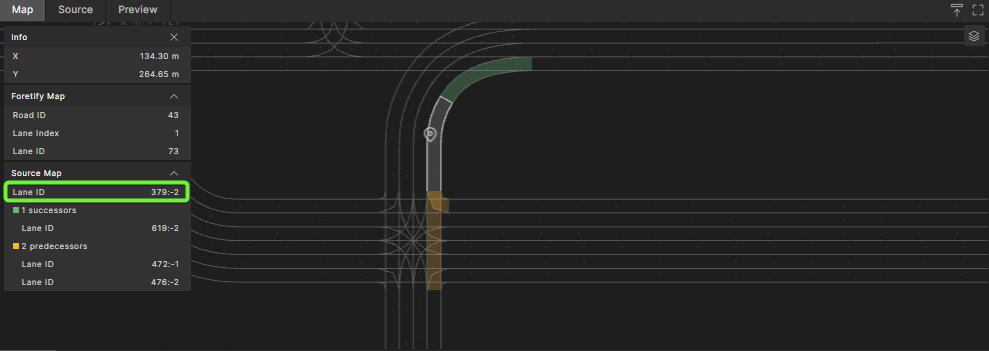
-
Identify the Lane ID of the desired location on the map.
For the following map, the selected location's (Source Map) Lane ID is 379:-2.

-
Create a road of type odr_road and use the Lane ID to specify the odr_id and sub_id fields.
OSC2 code: specify location on ODR roadscenario sut.my_road: my_road: odr_road with: keep(odr_id == 379) keep(sub_id == -2) -
Use the along() modifier of a vehicle's drive to specify the location.
OSC2 code: drive along an ODR roaddo sut.car.drive() with: along(my_road)
import "$FTX/env/basic/exe_platforms/model_ssp/config/model_sumo_config"
extend test_config:
set map = "$FTX_PACKAGES/maps/Town04.xodr"
scenario sut.my_road:
my_road: odr_road with:
keep(it.odr_id == 40)
keep(it.sub_id == -1)
do sut.car.drive() with:
    along(my_road)
extend top.main:
do sut.my_road()
For more information on road elements and the along() modifier, see Map-related constructs.