Signs and traffic light elements
Signs and traffic lights are positioned with a longitudinal offset along the lanes where they apply. For traffic lights or for a stop sign, this position is typically indicated by a stop line, either marked with a white line on the road or inferred from the intersection's topology as the junction entry line. This is referred to as the “logical position” of the sign or traffic light. Foretify does not deduce the logical position from other map properties, it relies on receiving this position from the source map.
The road_with_sign and road_with_traffic_light elements represent static signs, like ‘stop’ and ‘yield’, and traffic lights respectively. The route of these occurrences ends exactly at the logical position of the sign or traffic light.
road_with_sign
A road_with_sign element marks the road position where some road sign takes effect. The element starts at a distance of at most map_config.road_with_sign max_length before the sign, and ends where the sign takes effect. For example, the stop line for a stop sign.
The road_with_sign element has a sign_id: int field that can be used to associate a road_with_sign occurrence with an internal_road occurrence that is controlled by the same sign. It should be noted that there may be different relationships between two such occurrences: the road_with_sign occurrence may end before, after, or exactly at the start of the internal_road.
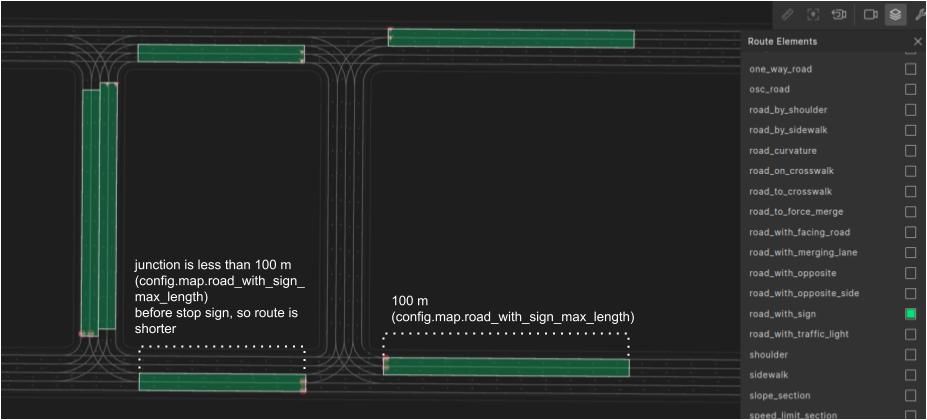
In the image below, road_with_sign occurrences are highlighted in green. The starting point of the route is either at a distance of a maximum of config.map.road_with_sign_max_length (default is 100 meters), or at the exit of the previous junction, if that is closer. In our example, the junction is less than 100m before the stop sign, so the junction route is shorter.
OSC definition of road_with_sign
# Road static sign type declaration
#
enum traffic_sign_kind: [stop, yield, other]


# road_with_sign - a piece of road before a road-sign. The element ends at the logical position of the sign (where the sign takes effect).
# it starts at distance of at most map_config.road_with_sign_max_length before the sign.
#
struct road_with_sign inherits road_element:
    # the type of the road-sign
    #
    sign_type: traffic_sign_kind

    # the id of the road-sign which is also its index in 'map.signs'
    # i.e., 'map.signs[sign_id].id == sign_id'
    #
    sign_id: int
Example using road_with_sign
This example shows how a route can be constructed using road_with_sign with the corresponding internal_road.
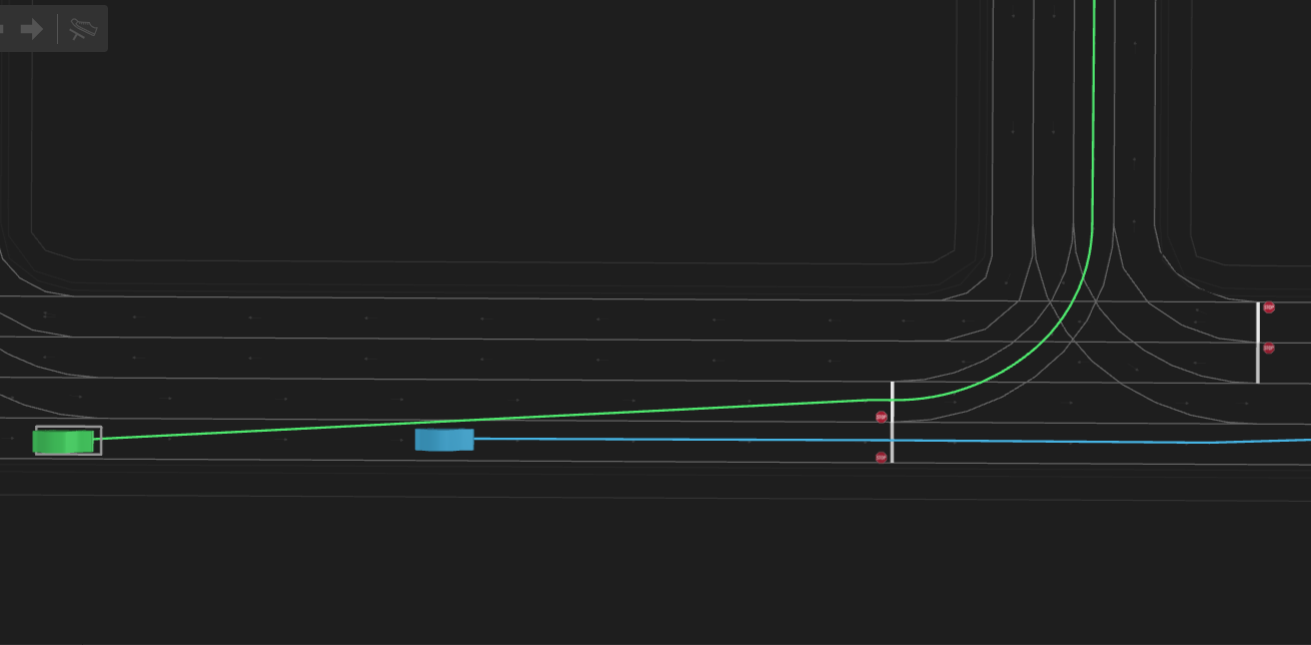
In this example, the SUT turns left and the NPC drives straight from the same junction entry road. Both turns are controlled by the same road sign ('stop' or ‘yield’). A possible result is illustrated in the following image. The SUT and its planned path are green, the NPC and its planned path are blue.
Example scenario using road_with_sign
import "$FTX/env/basic/exe_platforms/model_ssp/config/model_dummy_config.osc"
import "$FTX/env/basic/msp/open_drive.osc"

extend test_config:
    set map = "$FTX/packages/maps/M499_FTX_suburban.xodr"

scenario sut.signed_drive:
    npc: vehicle

    # road_to_sign - a route ending at a 'stop' or 'yield' sign
    #
    road_to_sign: road_with_sign

    # signed_straight - an internal_road going straight controlled by the same sign of 'road_to_sign'.
    #
    signed_straight: internal_road with:
        keep(it.sign_id == road_to_sign.sign_id)
        keep(it.direction == straight)

    # signed_left - an internal_road turning left controlled by the same sign of 'road_to_sign'.
    #
    signed_left: internal_road with:
        keep(it.sign_id == road_to_sign.sign_id)
        keep(it.direction in [slight_left, left, sharp_left])

    do parallel(overlap: equal, duration: [5..30]s):
        serial:
            sut_to: sut.car.drive(duration: [3..10]s) with:
                along(road_to_sign, end_offset: [0 .. 2]m, at: end, run_mode: best_effort)
                speed([0..2]kph, at: end, run_mode: best_effort)
            sut.car.drive() with:
                along(signed_left, at: end)
            sut.car.drive() with:
                speed(30kph, at: end, run_mode: best_effort)
        serial:
            npc_to: npc.drive(duration: [3..10]s) with:
                along(road_to_sign, end_offset: [0 .. 2]m, at: end, run_mode: best_effort)
                speed([0..2]kph, at: end, run_mode: best_effort)
            npc.drive() with:
                along(signed_straight, at: end)
            npc.drive() with:
                speed(30kph, at: end, run_mode: best_effort)

extend top.main:
    do sut.signed_drive()
road_with_traffic_light
The road_with_traffic_light element has a traffic_light_id: int field that can be used to associate a road_with_traffic_light with an internal_road that is controlled by the same traffic light. The relationship between two such occurrences can vary: the road_with_traffic_light may end before, after, or exactly at the start of the internal_road.
In addition, the road_with_traffic_light element has a set of Boolean fields that specify which light bulbs (icon and color) are present in the traffic light. This enables constraining both the desired traffic light for testing, and selecting relevant bulbs for controlling the traffic light at the bulb level. For more details on traffic light modeling and control see Traffic lights modeling and control and Traffic lights examples.
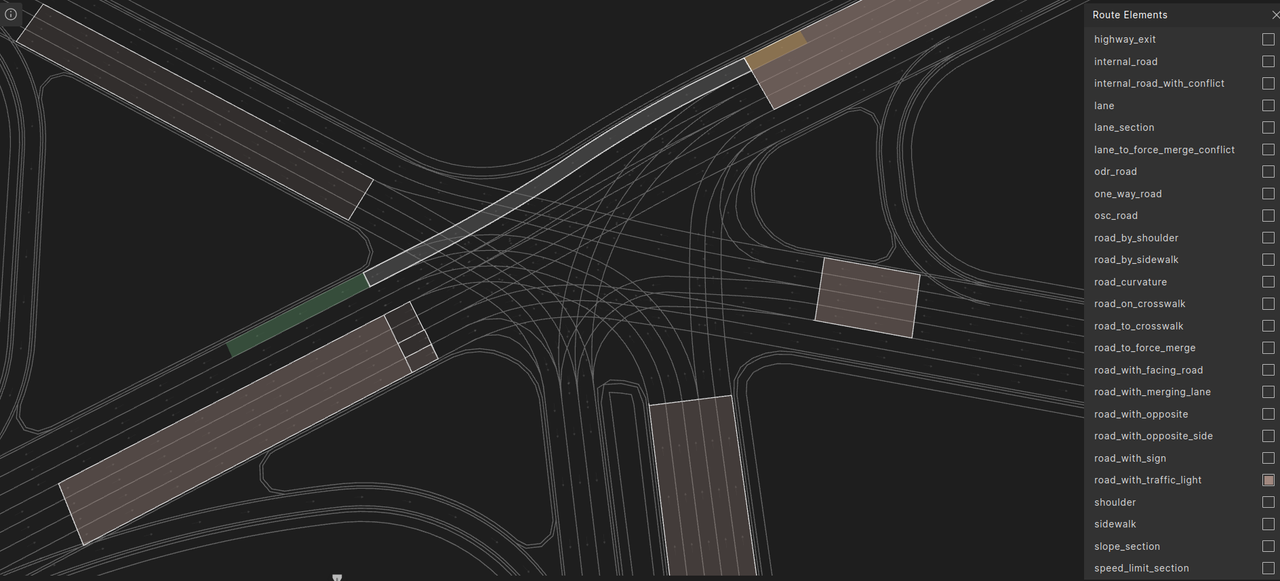
In the image below road_with_traffic_light occurrences are highlighted in brown. Three specific occurrences have been outlined for demonstration purposes. The three occurrences lead to a single traffic light. The reason we have three and not one is that the stop line is located inside the junction, so it crosses three separate msp_roads: one that turns left, one that goes straight, and one that turns right. Correspondingly, we have three overlapping road_with_traffic_light routes that lead to this stop line, all starting on the same one_way_road, but each ending on a different internal_road.
A traffic light may also control vehicle movement outside of a junction. For example, a metering traffic light at a highway on-ramp that regulates the rate at which vehicles enter the highway, or a traffic light that protects a pedestrian crosswalk. The controls_junction_entry property can be used to constrain such instances:
road: road_with_traffic_light with:
    keep(not it.controls_junction_entry)
OSC definition of road_with_traffic_light
# road_with_traffic_light - a piece of road before a traffic-light. The element ends at the logical position of the traffic-light (stop line before the traffic light).
# it starts at distance of at most map_config.road_with_sign_max_length before the traffic-light.
#
struct road_with_traffic_light inherits road_element:
    # the id of the traffic light
    #
    traffic_light_id: int

    # True if the traffic-light controls a junction entry.
    #
    controls_junction_entry: bool

    # If the traffic-light controls some junction entry then this is the id of the one_way_road entering the junction.
    # If the traffic-light does not control a junction entry then this is the id of the one_way_road on which the
    # traffic-light is located.
    #
    controlled_one_way_road_id: int
    controlled_one_way_road: one_way_road with:
        keep((controlled_one_way_road_id == -1 and it == null) or (it.id == controlled_one_way_road_id))

    # has_any_red_bulb - true if TL has any red bulb (i.e. with and/or without arrow)
    #
    has_any_red_bulb: bool
    has_red_iconless_bulb: bool
    has_red_left_arrow_bulb: bool
    has_red_right_arrow_bulb: bool
    has_red_uturn_bulb: bool

    # has_any_yellow_bulb - true if TL has any yellow bulb (i.e. with and/or without arrow)
    #
    has_any_yellow_bulb: bool
    has_yellow_iconless_bulb: bool
    has_yellow_left_arrow_bulb: bool
    has_two_yellow_left_arrow_bulbs: bool
    has_yellow_right_arrow_bulb: bool
    has_yellow_uturn_bulb: bool

    # has_any_green_bulb - true if TL has any green bulb (i.e.,with and/or without arrow)
    #
    has_any_green_bulb: bool
    has_green_iconless_bulb: bool
    has_green_left_arrow_bulb: bool
    has_green_right_arrow_bulb: bool
    has_green_uturn_bulb: bool
Example using road_with_traffic_light
This example shows how a route can be constructed from road_with_traffic_light and a corresponding internal_road. It also demonstrates one of the mechanisms for controlling traffic lights.
In this example, SUT and NPC drive across a junction on conflicting routes. The junction is controlled by traffic lights that are initially red. When the SUT arrives at the stop line the light turns green. A possible result is illustrated in the following image. The SUT and its planned path are green, the NPC and its planned path are blue.

Example scenario using road_with_traffic_light
import "$FTX/env/basic/exe_platforms/model_ssp/config/model_dummy_config.osc"
import "$FTX/env/basic/msp/open_drive.osc"

extend test_config:
    set map = "$FTX/packages/maps/M499_FTX_suburban.xodr"

scenario sut.traffic_light_conflict:
    npc: vehicle

    # road_to_tl_sut, road_to_tl_npc - routes that end at a traffic-light stop-lines
    #
    road_to_tl_sut: road_with_traffic_light
    road_to_tl_npc: road_with_traffic_light

    # conflicting_internal_road - a pair of conflicting internal_road occurrences
    #
    conflicting_internal_road: internal_road_with_conflict

    # sut_internal_road - the primary conflicting internal_road 'conflicting_internal_road',
    # controlled by the same traffic-light associated with 'road_to_tl_sut'
    #
    sut_internal_road: internal_road with:
        keep(it.id == conflicting_internal_road.internal_road_id)
        keep(it.traffic_light_id == road_to_tl_sut.traffic_light_id)

    # npc_internal_road - the secondary/conflicting internal_road of 'conflicting_internal_road',
    # controlled by the same traffic-light associated with 'road_to_tl_npc'
    #
    npc_internal_road: internal_road with:
        keep(it == conflicting_internal_road.conflicting_road)
        keep(it.traffic_light_id == road_to_tl_npc.traffic_light_id)

    # select a semantic traffic-light "go" state that is applicable to 'sut_internal_road' -
    # protected or unprotected
    #
    sut_go_state: semantic_traffic_light_state with:
        keep((sut_internal_road.valid_tl_go_exclusive and it == go_exclusive) or
             (sut_internal_road.valid_tl_go and it == go))

    sut_stop_state: semantic_traffic_light_state with:
        keep((sut_internal_road.valid_tl_stop and it == stop) or
             (sut_internal_road.valid_tl_stop_and_yield and it == stop_and_yield))

    npc_stop_state: semantic_traffic_light_state with:
        keep((npc_internal_road.valid_tl_stop and it == stop) or
             (npc_internal_road.valid_tl_stop_and_yield and it == stop_and_yield))

    do parallel(overlap: equal, duration: [5..40]s):
        serial:
            sut_to: sut.car.drive(duration: [5..10]s) with:
                along(road_to_tl_sut, end_offset: [5 .. 10]m, at: end, run_mode: best_effort)
                speed([0..2]kph, at: end, run_mode: best_effort)

            sut.car.drive() with:
                along(sut_internal_road, at: end)
            sut.car.drive() with:
                speed(30kph, at: end)
        serial:
            npc_to: npc.drive(duration: [5..10]s) with:
                along(road_to_tl_npc, end_offset: [5 .. 10]m, at: end, run_mode: best_effort)
                speed([0..2]kph, at: end, run_mode: best_effort)
            npc.drive() with:
                along(npc_internal_road, at: end, run_mode: best_effort)
            npc.drive() with:
                speed(30kph, at: end, run_mode: best_effort)

    on @sut_to.start:
        var res := map.update_internal_road_tl_state(sut_internal_road, sut_stop_state)
    on @sut_to.end:
        var res := map.update_internal_road_tl_state(sut_internal_road, sut_go_state)
    on @npc_to.start:
        var res := map.update_internal_road_tl_state(npc_internal_road, npc_stop_state)

extend top.main:
    do sut.traffic_light_conflict()
lane_with_lane_mark
A lane_with_lane_mark represents the border of a lane, defined by a continuous lane marking along the longest segment of a singly-connected route (i.e., including one_way_roads and internal_roads).
The lane markings are defined with the following fields:
-
The
line_kindspecifies the type of line, e.g., solid or broken. -
The
line_colorspecifies the line color, e.g. yellow or white. -
The
mark_sidespecifies whether the marking lies on theinner_sideorouter_sideof the lane. In right-hand traffic, theouter_sidecorresponds to the right, and the inner_side to the left; this is reversed in left-hand traffic.
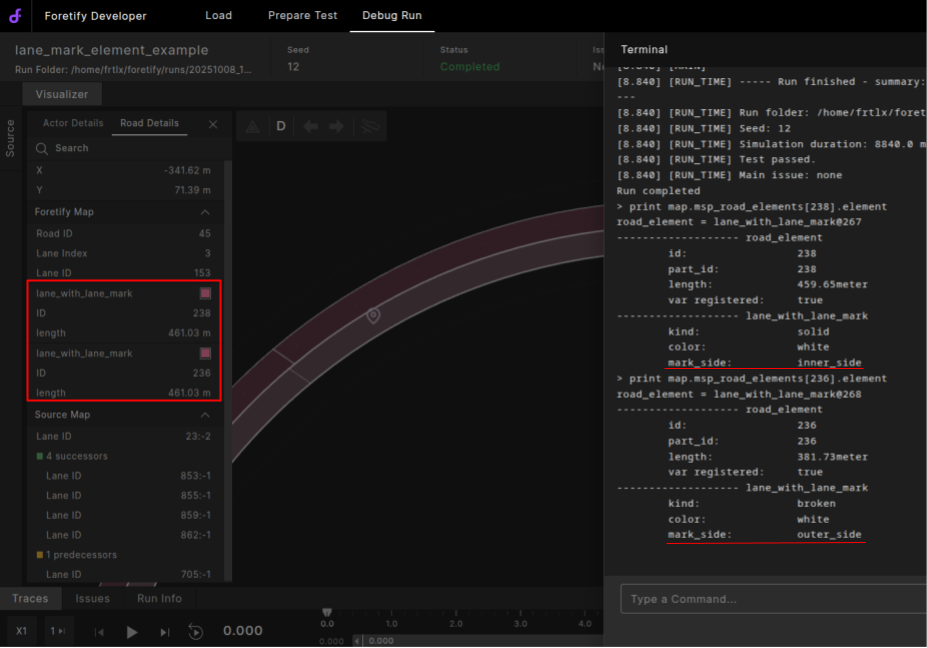
The image below highlights lane_with_lane_mark occurrences in pink. It shows that each lane is associated with two occurrences, one for its outer border and one for its inner border.
OSC definition of lane_with_lane_mark
# enum line_kind - lane border-line types. Double lines (like solid_broken) are
# specified from right to left (relative to associated lane direction)
#
enum line_kind: [
    none,
    solid,
    broken,
    solid_solid,
    solid_broken,
    broken_solid,
    broken_broken,
    botts_dots,
    grass,
    curb,
    edge
]


# enum line_color - lane border-line colors
#
enum line_color: [blue, green, red, white, yellow, orange, black, violet]


# lane_mark - kind and color of a lane mark.
#
struct lane_mark:
    kind: line_kind
    color: line_color


# lane_mark_side - side relative to the lane
# 'outer_side' is right for right-hand traffic and left for left-hand traffic.
# 'inner_side' is left for right-hand traffic and right for left-hand traffic.
#
enum lane_mark_side: [inner_side, outer_side]


# 'lane_with_lane_mark' corresponds to a single-lane route that has a continuous lane mark (kind and color) along one
# of its sides.
#
struct lane_with_lane_mark inherits road_element:
    # the kind of the outer lane mark.
    #
    kind: line_kind

    # the color of the outer lane mark.
    #
    color: line_color

    # The side of the mark relative to the lane.
    #
    mark_side: lane_mark_side
Example using lane_with_lane_mark
This example shows how the vehicle_cut_in_and_slow scenario can be extended to constrain the cut-in to occur across a solid lane border mark. A possible result is illustrated below: The Ego and its planned path are in green, the vehicle and its planned path are blue.

Example scenario using lane_with_lane_mark
import "$FTX/env/basic/exe_platforms/model_ssp/config/model_sumo_config.osc"
import "$FTX_PACKAGES/base_scenarios/scenarios/vehicle_cut_in/vehicle_cut_in_and_slow/vehicle_cut_in_and_slow_top.osc"

extend test_config:
     set map = "$FTX_PACKAGES/maps/Town04.xodr"

# Perform cut_in on a solid lane mark
extend sut.vehicle_cut_in:
    # The SUT drives along a lane with solid lane mark.
    sut_lane_with_lane_mark: lane_with_lane_mark with:
        keep(it.kind == solid)
        # Assuming RHT (default), if NPC cuts from right to left then it comes from the outer side of the SUT's lane.
        keep(gen_cut_in_side == right => it.mark_side == outer_side)
        keep(gen_cut_in_side == left => it.mark_side == inner_side)

    # The cut_in maneuver happens while SUT drives along the lane with solid lane mark.
    in drive_ego_at_essence with:
        lane_mark: along(sut_lane_with_lane_mark)
        override(lane_mark, run_mode: best_effort)


extend top.main:
    do f: sut.vehicle_cut_in_and_slow()