One-way road elements
one_way_road
The one_way_road route element represents either a road where traffic flows in one direction or on side of a two-way road.
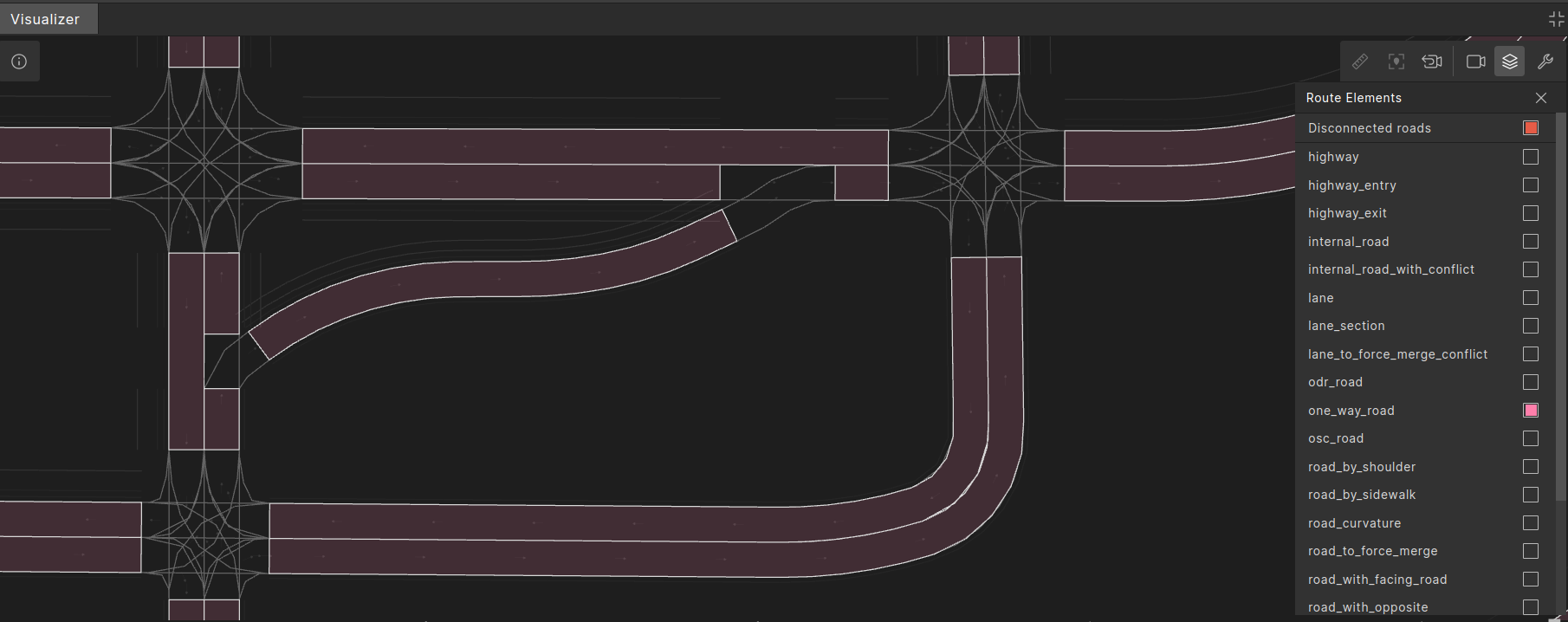
A one_way_road connects two junctions, exiting one junction (or having no predecessor) and entering another (or having no successor) without crossing any other junctions.

OSC definition of one_way_road
# one_way_road - a one-way-road or a single side of a two-way road.</br>
# A one_way_road represents a road between two junctions. It does not contain/include junction-internal roads.</br>
#
struct one_way_road inherits road_element:
    # number of lanes in lane_section with minimal number of lanes along the one_way_road
    #
    min_lanes: uint

    # number of lanes in lane_section with maximal number of lanes along the one_way_road
    #
    max_lanes: uint

    # id of the junction this one_way_road goes into, -1 if the road has no successors.
    #
    in_junction_id: int

    # Global entry direction to junction. 0 degrees represents the west-to-east direction. Value is normalized to [0, 2pi)
    #
    in_junction_yaw: angle

    # A clockwise count of one_way_roads incoming in_junction_id, 0 for inbound one_way_road with max(in_junction_yaw)
    #
    in_junction_order: uint

    # id of the junction this one_way_road comes from, -1 if the road has no predecessors.
    #
    out_junction_id: int

    # Global exit direction from the junction. 0 degrees represents the west-to-east direction. Value is normalized to [0, 2pi)
    #
    out_junction_yaw: angle

    # A clockwise count of one_way_roads outgoing out_junction_id, 0 for outbound one_way_road with max(out_junction_yaw)
    #
    out_junction_order: uint

    # number of lane_section elements in this one_way_road
    #
    lane_sections: uint

    # number of incoming roads to junction in_junction_id
    #
    num_in_roads: uint

    # number of outgoing roads from junction out_junction_id
    #
    num_out_roads: uint
num_in_roads and num_out_roads properties
The two properties num_in_roads and num_out_roads are somewhat unusual because they refer to the junctions related to the one_way_road rather than the road itself.
num_in_roadsis the total number of one_way_roads entering the junction in_junction_id.num_out_roadsis the total number of one_way_roads exiting the junction out_junction_id.
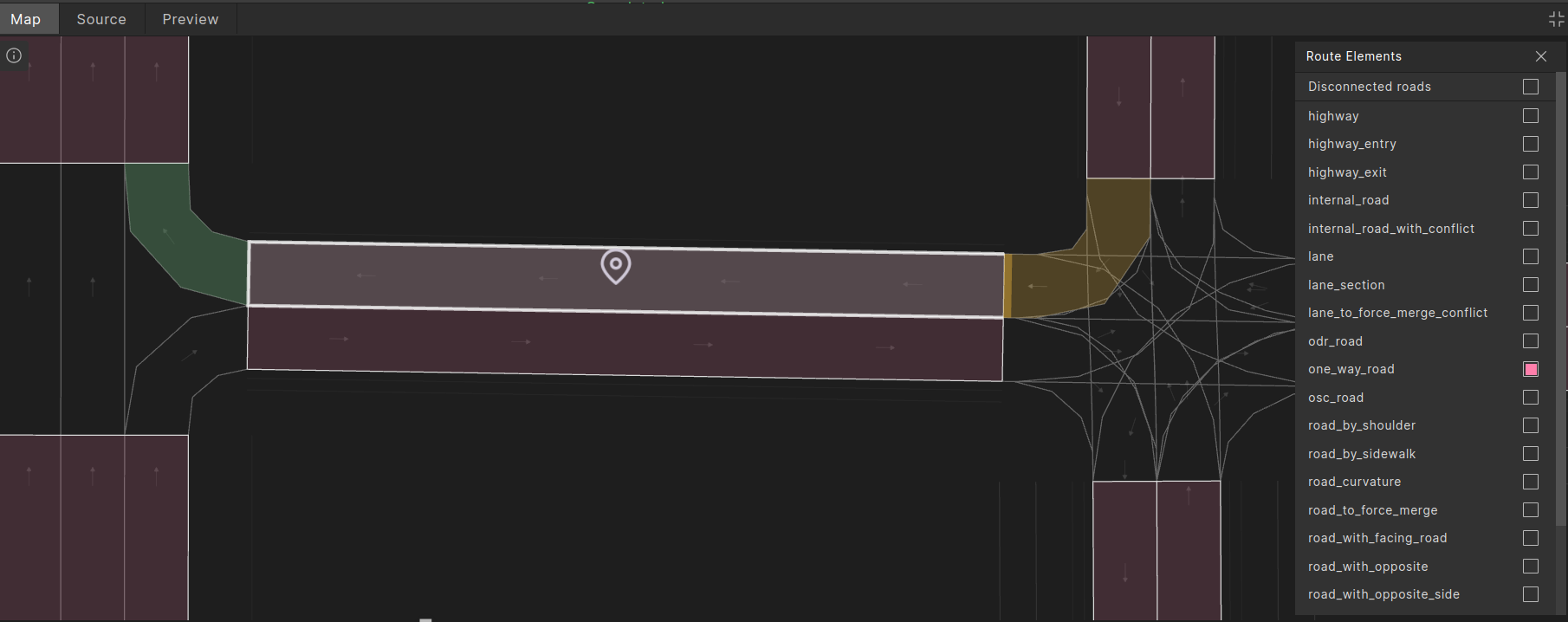
For example, in the image below, the selected one_way_road has "num_in_roads == 2", because there are exactly two one_way_roads that enter the junction on the left; and "num_out_roads == 4", because there are exactly four one_way_roads exiting the junction on the right.
roads_enter_junction_relation and roads_exit_junction_relation modifiers
The top.roads_enter_junction_relation and top.roads_exit_junction_relation modifiers can be used to constrain the relation between two one_way_roads that either enter the same junction or exit the same junction. See top.roads_enter_junction_relation() and top.roads_exit_junction_relation() for details.
one_way_road properties
The route element types in the following sections divide one_way_roads into subsections, each defined by a different property, such as speed, slope, and curvature. Every one_way_road is covered throughout its length by each of these types. Each element includes an index field, representing its position in the one_way_road, and a total_parts field, indicating the total number of such elements in the one_way_road.
lane_section
The lane_section route element represents the longest sub-section of a one_way_road with a constant number of driving lanes.
A division of a one_way_road into the longest segments that have a constant number of driving lanes. A lane_section is a continuous path along a one_way_roadwhere the number of driving lanes remains the same. When the number of driving lanes changes along the road, it marks the beginning of a new lane_section.
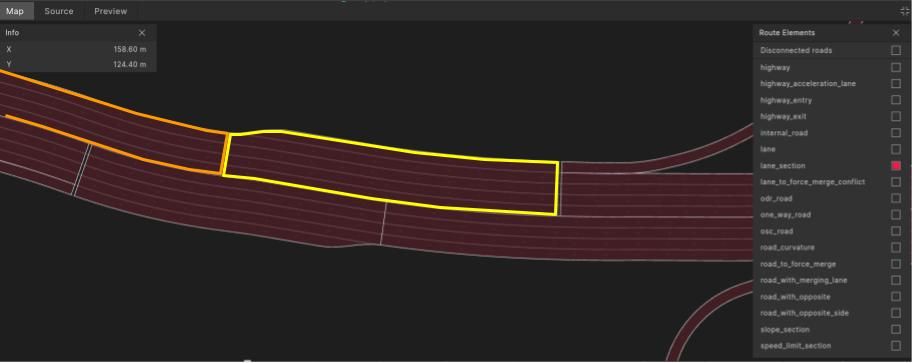
In the illustration below all lane_sections are highlighted in red. Two specific lane_section occurrences have been outlined for demonstration. The two outlined sections are on the same one_way_road. The yellow starts at the beginning of the one_way_road, then where the number of lanes decreases from five to four, the orange outlined lane_section starts.
OSC definition of lane_section
# lane_section - divides a 'one_way_road' into longest sections with a constant number of driving lanes
#
struct lane_section inherits road_element:
    # number of driving lanes
    #
    lanes: int

    # index (zero based) by order in containing one_way_road.
    #
    index: uint

    # total number of sections in the containing one_way_road.
    #
    total_parts: uint

    # the one_way_road this lane_section is on
    #
    one_way_road_id: uint
    one_way_road: one_way_road with:
        keep (it.id == one_way_road_id)
Example using lane_section
In this example two lane_section occurrences, more_lanes and less_lanes are constrained:
- To be successive in the same `one_way_road`, with `less_lanes` following `more_lanes`.
- The number of lanes in `less_lanes` is less than the number of lanes in `more_lanes`.
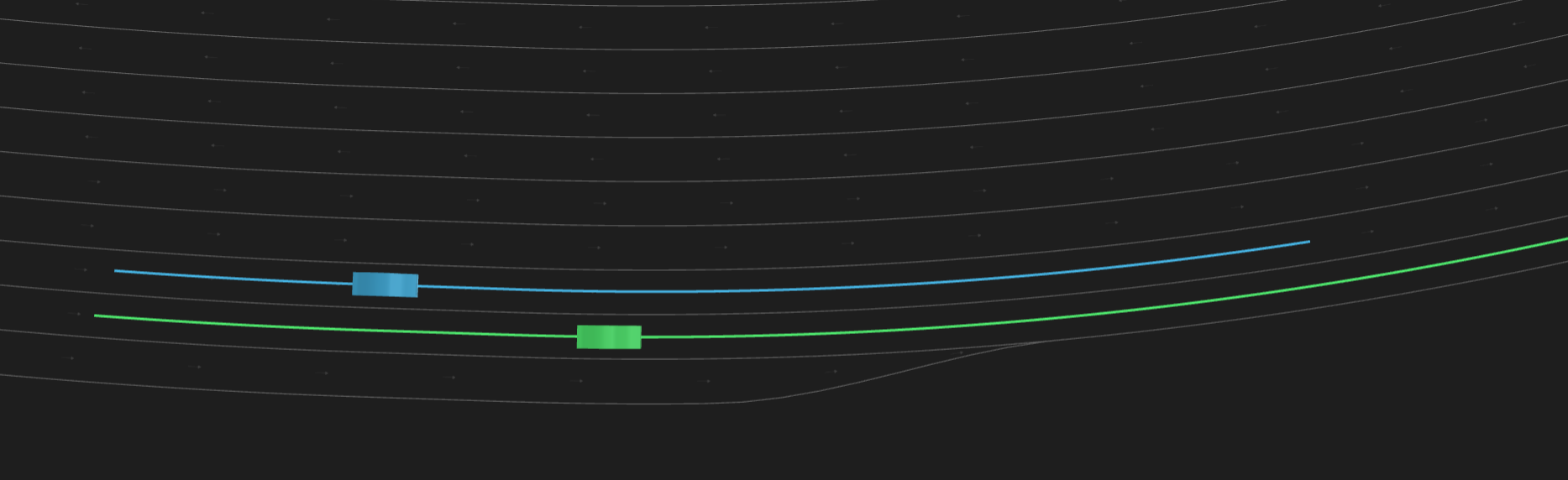
Then the SUT and an NPC are directed to drive from more_lanes to less_lanes with NPC constrained to drive to the left of the SUT and 1 to 2 meters ahead of it.
A possible result is illustrated in the following image. The SUT and its planned path are green, the NPC and its planned path are blue.
Example scenario using lane_section
import "$FTX/env/basic/exe_platforms/model_ssp/config/model_dummy_config.osc"
import "$FTX/env/basic/msp/open_drive.osc"

extend test_config:
    set map = "$FTX_PACKAGES/maps/highway_2.xodr"

scenario sut.from_more_to_less_lanes:
    npc: vehicle
    more_lanes: lane_section
    less_lanes: lane_section with:
        keep(it.one_way_road_id == more_lanes.one_way_road_id)
        keep(it.index == more_lanes.index+1)
        keep(it.lanes < more_lanes.lanes)
    do parallel(overlap: equal, duration: [5..10]s):
        serial:
            sut.car.drive() with:
                along(more_lanes, at: start)
                along(less_lanes, at: end)
        serial:
            npc.drive() with:
                along(more_lanes, at: start)
                along(less_lanes, at: end)
                lane(left_of: sut.car, at: start)
                position(distance: [1..2]meter, ahead_of: sut.car, at: start)

extend top.main:
    do sut.from_more_to_less_lanes()
lane
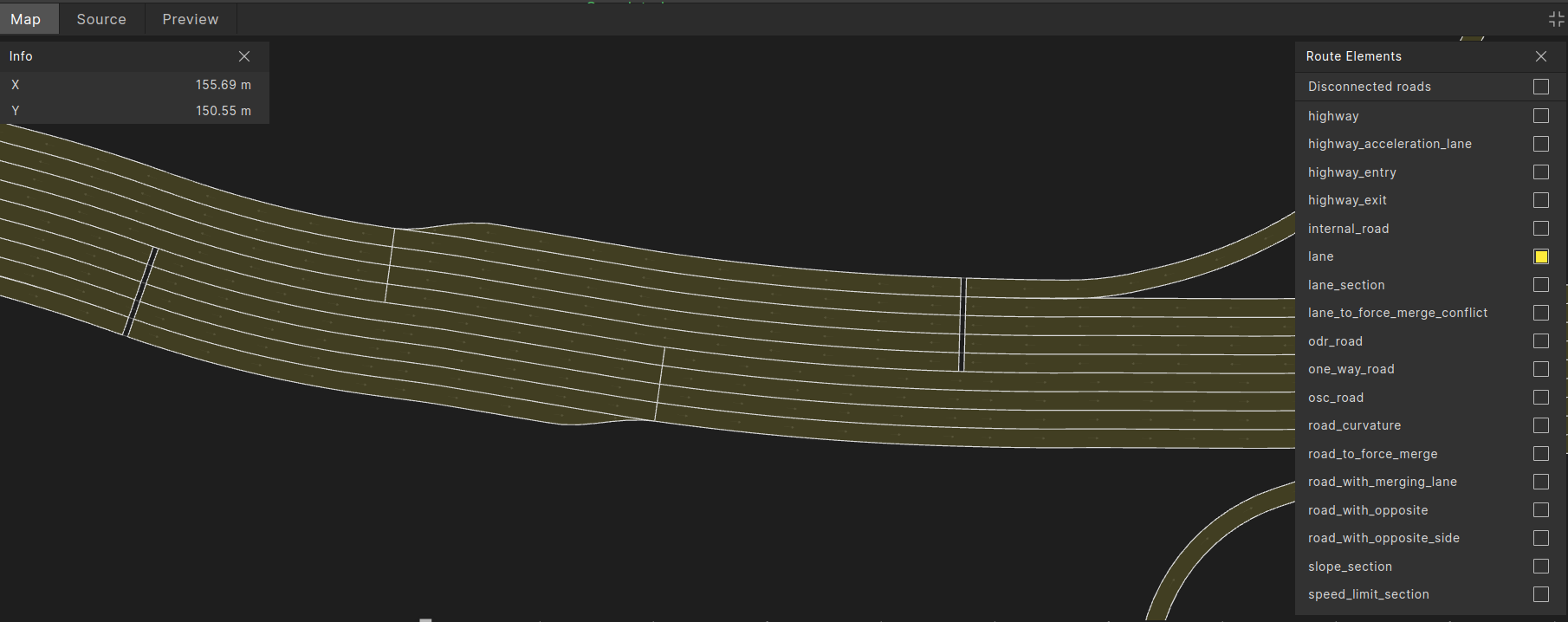
The lane route element represents a single lane within a lane_section. It can be used to specify a particular lane for a vehicle’s route and to define relationships between two different lanes, as shown in the example below. In these contexts it serves as an alternative to the vehicle.lane modifier. Additionally, it can be referenced by other route element, such as in road_with_merging_lane.
OSC definition of lane
# lane - a single lane across a lane_section
#
struct lane inherits road_element:

    # nominal width of the lane
    #
    width: length

    # index of the lane in the lane_section. Starts from 0 for the right-most lane.
    #
    index: uint

    # the containing lane_section
    #
    lane_section_id: uint
    lane_section: lane_section with:
        keep(it.id == lane_section_id)
Example scenario using vehicle_lane modifier
This example uses the vehicle.lane modifier to direct the NPC to start its drive left of the SUT. This scenario uses two lane elements, npc_start_lane and sut_start_lane. It constrains them to be on the same lane_section, and constrains npc_start_lane.index to be greater than sut_start_lane.index, which implies npc_start_lane is left of sut_start_lane because lanes are indexed from right to left. Then SUT is directed to start its drive on sut_start_lane and NPC is directed to start its drive on npc_start_lane.
import "$FTX/env/basic/exe_platforms/model_ssp/config/model_dummy_config.osc"
import "$FTX/env/basic/msp/open_drive.osc"

extend test_config:
    set map = "$FTX_PACKAGES/maps/highway_2.xodr"

scenario sut.from_more_to_less_lanes:
    npc: vehicle
    more_lanes: lane_section
    less_lanes: lane_section with:
        keep(it.one_way_road_id == more_lanes.one_way_road_id)
        keep(it.index == more_lanes.index+1)
        keep(it.lanes < more_lanes.lanes)

    sut_start_lane: lane with:
        keep(it.lane_section_id == more_lanes.id)

    npc_start_lane: lane with:
        keep(it.lane_section_id == more_lanes.id)
        keep(it.index > sut_start_lane.index)

    do parallel(overlap: equal, duration: [5..10]s):
        serial:
            sut.car.drive() with:
                along(sut_start_lane, at: start)
                along(less_lanes, at: end)
        serial:
            npc.drive() with:
                along(npc_start_lane, at: start)
                along(less_lanes, at: end)
                position(distance: [1..2]meter, ahead_of: sut.car, at: start)

extend top.main:
    do sut.from_more_to_less_lanes()
slope_section
The slope_section route element represents a section of the one_way_road on which the pitch-slope angle does not change by more than map_config.maximal_longitudinal_slope_change, defaulting to five degrees, and the direction of the slope remains the same.
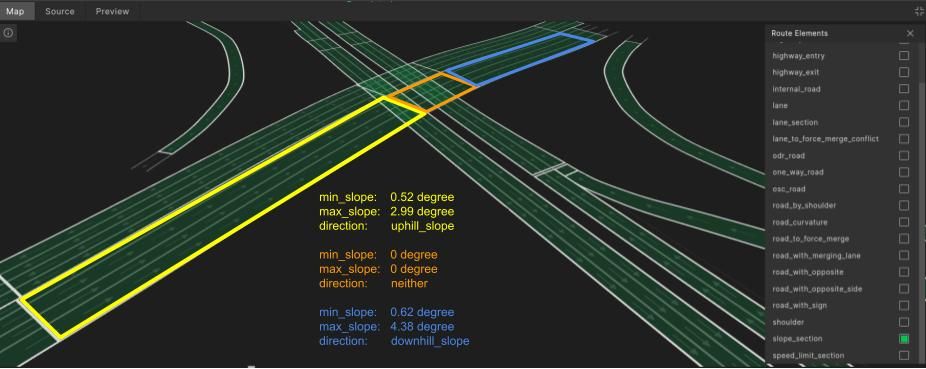
In the image above slope_section occurrences are highlighted in green. Three specific occurrences have been outlined for demonstration:
- The yellow outlined occurrence with uphill-slope ranging between 0.52 to 2.99 degrees.
- The orange outlined occurrence with zero slope.
- The blue outlined occurrence with downhill slope ranging between 0.62 to 4.38 degrees.
The three are separate occurrences because they introduce a change in the direction of the slope ('uphill' to ‘neither’ to ‘downhill’).
OSC definition of slope_section
enum slope_direction: [neither, uphill_slope, downhill_slope]

# slope_section corresponds to a piece of road that does not cross junctions and on which
# slope angle does not change by more than a factor of maximal_longitudinal_slope_change, i.e., max_slope <= min_slope + maximal_longitudinal_slope_change
#
struct slope_section inherits road_element:
    # min/max slope,
    # For a straight road interval min & max slope is zero.
    min_slope: angle
    max_slope: angle
    direction: slope_direction

    # index (zero-based) by order in containing one_way_road.
    #
    index: uint

    # total number of sections in the containing one_way_road.
    #
    total_parts: uint

    one_way_road_id: uint
    one_way_road: one_way_road with:
        keep (it.id == one_way_road_id)
Example using slope_section
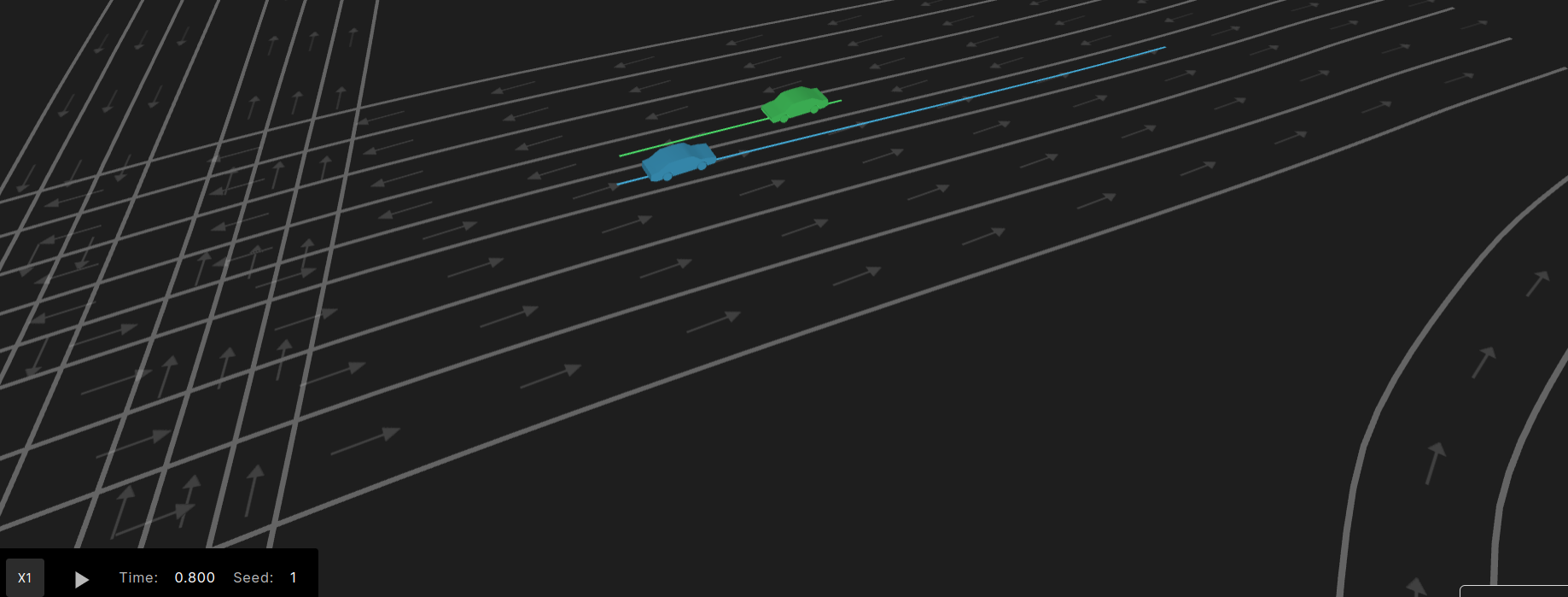
In this example the SUT drives on an uphill slope_section in front of the NPC drives in the opposite direction on a downhill slope_section. Both vehicles are driving on the innermost lane, which is closest to oncoming traffic.
A possible result is illustrated in the following image. The SUT and its planned path are green, the NPC and its planned path are blue.
Example scenario using slope_section
import "$FTX/env/basic/exe_platforms/model_ssp/config/model_dummy_config.osc"
import "$FTX/env/basic/msp/open_drive.osc"

extend test_config:
    set map = "$FTX/qa/odr_maps/KA-Suedtangente-Vires.xodr"

scenario sut.uphill_downhill:
    npc: vehicle

    # opposite_roads - a pair of routes in opposite driving directions
    #
    opposite_roads: road_with_opposite

    # uphill - a route with uphill slope
    #
    uphill: slope_section with:
        keep(it.direction == uphill_slope)
        keep(it.max_slope > 3deg)

    # downhill - a route with downhill slope
    #
    downhill: slope_section with:
        keep(it.direction == downhill_slope)

    sut_start_offset: length with:
        keep(it >= 0m and it < opposite_roads.length - 10m)

    do parallel(overlap: equal, duration: [5..10]s):
        serial:
            # SUT drives along both 'opposite_roads.main' and 'uphill', this implicitly constrains
            # these routes to overlap.
            #
            sut.car.drive() with:
                along(opposite_roads.main, start_offset: sut_start_offset, at: start)
                along(uphill)
                # drive on innermost lane - the lane closest to opposite traffic side
                #
                lane(innermost: true)
        serial:
            # NPC drives along both 'opposite_roads.opposite' and 'downhill', this implicitly
            # constrains these routes to overlap.
            #
            npc.drive() with:
                along(opposite_roads.opposite, end_offset: sut_start_offset + 10m , at: start)
                along(downhill)
                # drive on innermost lane - the lane closest to opposite traffic side
                #
                lane(innermost: true)

extend top.main:
    do sut.uphill_downhill()
speed_limit_section
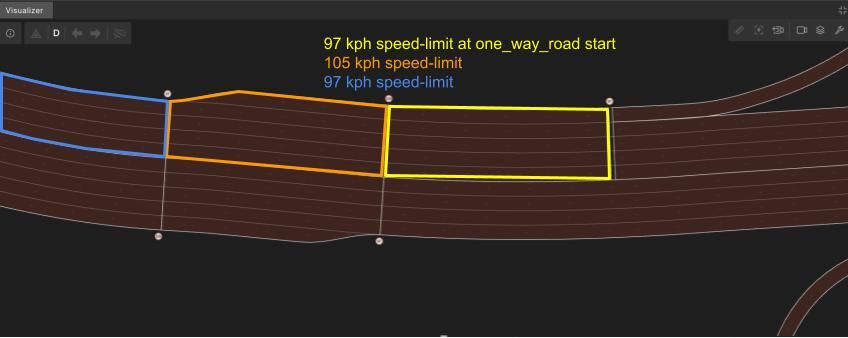
The speed_limit_section route element represents the longest segment of a one_way_road with a constant speed limit. There is always at least one speed_limit_section per one_way_road that begins at the start of the one_way_road. At every point along the one_way_road where the speed limit changes, one speed_limit_section ends and a new speed_limit_section begins.
In the image below, speed_limit_section occurrences are highlighted in brown. Three specific occurrences have been outlined for demonstration:
- The yellow outlined occurrence at the beginning of a `one_way_road` with a speed limit of 97 kph.
- The orange outlined occurrence follows the yellow with a speed limit of 105 kph.
- The blue outlined occurrence follows the orange with a speed limit of 97 kph.
The three are separate occurrences because they represent changes in the speed limit.
OSC definition of speed_limit_section
# speed_limit_section - a longest section of 'one_way_road' with constant speed_limit
#
struct speed_limit_section inherits road_element:
    # speed_limit
    #
    speed_limit: speed

    # index (zero-based) by order in containing one_way_road.
    #
    index: uint

    # total number of sections in the containing one_way_road.
    #
    total_parts: uint

    # the one_way_road this speed_limit_section is on
    #
    one_way_road_id: uint
    one_way_road: one_way_road with:
        keep (it.id == one_way_road_id)
Example using speed_limit_section
In this example the SUT is driving through a speed_limit_section where the speed limit decreases.
A possible result is illustrated in the following image. The SUT and its planned path are green.
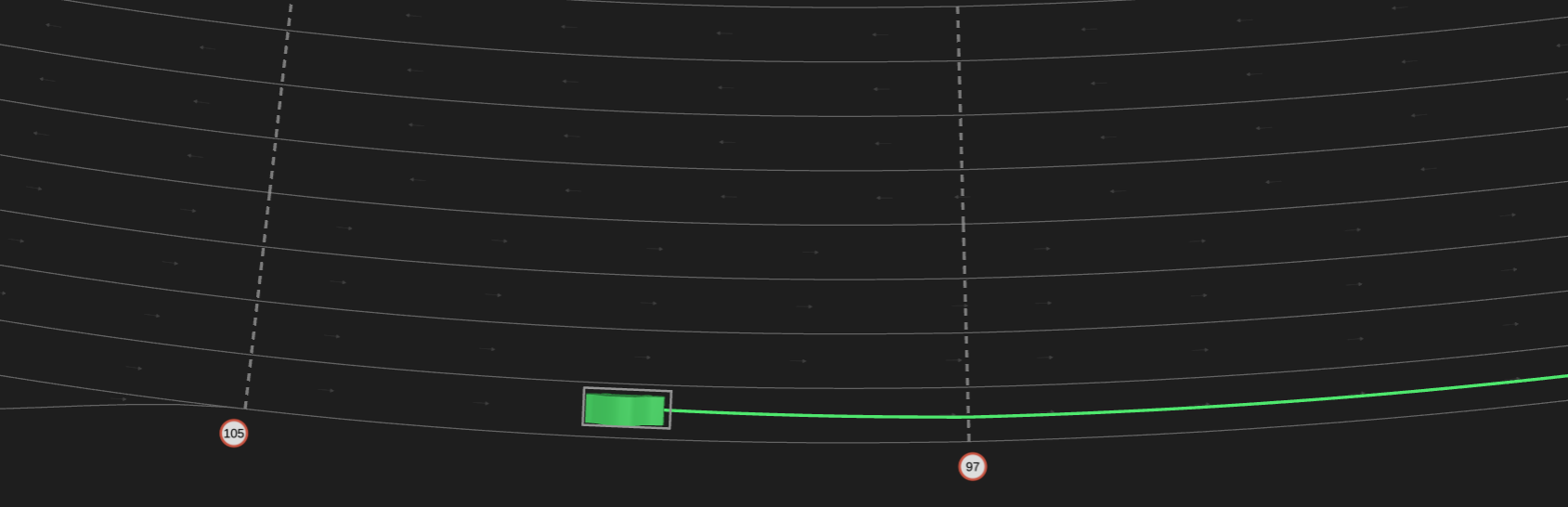
Example scenario using speed_limit_section
import "$FTX/env/basic/exe_platforms/model_ssp/config/model_dummy_config.osc"
import "$FTX/env/basic/msp/open_drive.osc"

extend test_config:
    set map = "$FTX/packages/maps/highway_2.xodr"

scenario sut.from_high_to_low_speed_limit:
    high_speed_section: speed_limit_section
    low_speed_section: speed_limit_section with:
        keep(it.speed_limit < high_speed_section.speed_limit)

    do serial(duration: [5..10]s):
        sut.car.drive() with:
            along(high_speed_section)
        sut.car.drive() with:
            along(low_speed_section)

extend top.main:
    do sut.from_high_to_low_speed_limit()
road_curvature
The road_curvature route element describes the curvature a one_way_road. Each occurrence is defined so that the curvature does not change by more than a factor of T (i.e. max_radius/min_radius <= T), and the curvature does not change direction. The value of T can be configured through config.map.road_curvature_threshold, with a default setting of 2.

OSC definition of road_curvature
enum curve_direction: [left_curve, right_curve, neither]

# road_curvature corresponds to a piece of road that does not cross junctions and on which:
#     (a) curvature does not change by more than a factor of T (T = 'map_config.road_curvature_threshold'), i.e.,
#         max_radius/min_radius <= T
#     (b) curvature does not change direction.
#
struct road_curvature inherits road_element:
    # min/max_radius:
    # - value is always positive, ‘direction’ field is used to specify curve direction.
    # - For a straight road interval min_radius and max_radius are MAX_DISTANCE
    #
    min_radius: length
    max_radius: length

    # direction of the curve ('neither' for zero curvature)
    #
    direction: curve_direction

    # index (zero-based) by order in containing one_way_road.
    #
    index: uint

    # total number of sections in the containing one_way_road.
    #
    total_parts: uint
Example using road_curvature
In this example the SUT and an NPC pass in front of each other while travelling in opposite directions on a curved road.
A possible result is illustrated in the following image. The SUT and its planned path are green, the NPC and its planned path are blue.

Example scenario using road_curvature
import "$FTX/env/basic/exe_platforms/model_ssp/config/model_dummy_config.osc"
import "$FTX/env/basic/msp/open_drive.osc"

extend test_config:
    set map = "$FTX/packages/maps/Town04.xodr"

scenario sut.drive_on_left_curve:
    npc: vehicle

    #  left_curved_road - a road with a left curve wit radius less than 60 meters
    #
    left_curved_road: road_curvature with:
        keep(it.max_radius < 60m and it.direction == left_curve and it.length > 3m)

    # opposite_roads - routes in opposite driving directions
    #
    opposite_roads: road_with_opposite
    sut_start_offset: length with:
        keep(it >= 0m and it < opposite_roads.length - 10m)

    do parallel(overlap: equal, duration: [5..10]s):
        serial:
            # constraining the drive to be along both 'left_curved_road' and 'opposite_roads.main'
            # will implicitly constrain them to overlap
            #
            sut.car.drive() with:
                along(left_curved_road, at: start)
                along(opposite_roads.main, start_offset: sut_start_offset, at: start)
                lane(innermost: true)
        serial:
            npc.drive() with:
                along(opposite_roads.opposite, end_offset: sut_start_offset + 10m , at: start)
                lane(innermost: true)

extend top.main:
    do sut.drive_on_left_curve()
See also the examples in the internal_road scenarios.