Movement-related modifiers
Movement-related scenario modifiers specify or constrain attributes of movement scenarios such as vehicle.drive(). They must appear either as members of other scenario modifiers or as members of a movement scenario after with:. For example:
    do serial:
        car1.drive() with:
            speed([30..70]kph)
See complete example.
Some parameters can be passed by order (without the parameter name). If no arguments are passed, the defaults are applied. For example, the following three lane() invocations are supported and have the same effect.
lane(lane: 1)
lane(1)
lane() # the default is 1
Common movement-related parameters
at
All movement modifiers have an optional at: parameter, with the following possible values:
- all – the modifier is enforced throughout this phase (default)
- start – the modifier is enforced at the start of the phase
- end – the modifier is enforced at the end of the phase
run_mode
Most movement modifiers have an optional run_mode parameter that controls how modifier constraints are enforced during scenario execution. If execution deviates from the original plan due to unexpected SUT behavior, for example, enforcing movement modifier constraints during execution can cause the scenario to exit before completion. Using the run_mode parameter, you can relax enforcement in order to complete execution.
To avoid an incomplete-scenario error, you can specify in the modifier invocation that the behavior is only requested and should not fail the whole scenario if it is not met. To do this, add the following parameter to the invocation: run_mode: best_effort.
In the following example, car1 drives for three seconds at the speed of 50kph. However, the test does not fail even if car1 actually moves at a different speed:
car1.drive(duration: 3sec) with:
     speed(50kph, run_mode: best_effort)
You can also control the enforcement of a modifier -- or a scenario -- from outside of the invocation using the override() modifier.
tolerance
Tolerance is an expression of type speed, length, time or acceleration specifying the maximum allowed deviation from the planned speed, length, time or acceleration. This value is not used for planning or generation but extends the valid range used in monitoring and test execution. Generation always gives a value within the original range and tolerance is used only if execution cannot keep the original range because it is deviating too much from the plan. The default value for tolerance depends on the modifier.
Absolute or relative movement modifiers
The scenario modifiers that set a speed, position, or lane can be either absolute or relative. For example:
    do parallel(duration:[1.5..3]second, overlap:equal):
        sut.car.drive()
        car1.drive() with:
            position([10..20]meter, at: start) # Absolute distance from start of path
            speed([10..15]kph, faster_than: sut.car) # Relative
            lane(same_as: sut.car) # Relative)
See complete example.
The relative versions require two vehicles moving in parallel. They may also have multiple parameters such as faster_than and slower_than, but at most you can specify only one. These two constraints are checked at compile time.
These modifiers have a track parameter that specifies whether the vehicle reacts to the actual behavior of the referenced vehicle or to its expected behavior. By default, the vehicle reacts to the actual behavior of the referenced vehicle, but there may be cases where the referenced vehicle behaves in ways that you want the vehicle to ignore. In those cases, you can require the vehicle to track the projected behavior of the referenced vehicle.
For example, consider the l2: lane() and the p2: position() modifiers in the phase2 phase of the following scenario.
    do serial():
        phase1: parallel(duration:[1.5..3]second, overlap:equal):
            d1: sut.car.drive()
            d2: car1.drive()
        phase2: parallel(duration:[1.5..3]second, overlap:equal):
            d3: sut.car.drive()
            d4: car1.drive() with:
                l1: lane(side_of: sut.car, at: start)
                p1: position(time: [0.5..1]second, ahead_of: sut.car, at: start)
                l2: lane(same_as: sut.car, at: end)
                p2: position(time: [1.5..2]second, ahead_of: sut.car, at: end)
See complete example.
Because of these modifiers, at the end of phase2:
- car1 ends on the same lane as sut.car, even if sut.car has changed lanes.
- car1 ends ahead of sut.car, even if it has accelerated.
This behavior may be exactly what you intended. But perhaps what you intended is:
- car1 ends in the lane where sut.car was at the start of the p2 phase.
- car1 ends [1.5..2]second ahead of where sut.car would have been, if it had continued at the same speed it was at the start of p2.
In this case, change the two lines to:
                l2: lane(same_as: sut.car, at: end, track: projected)
                p2: position(time: [1.5..2]second, ahead_of: sut.car, at: end, track: projected)
See complete example.
vehicle.acceleration() modifier
Note
The acceleration modifier is currently supported only during scenario generation, not at runtime. As a result, the modifier may not be applied correctly during execution. We strongly recommend using the speed modifier instead. For example, rather than defining acceleration for a phase, specify the speed at both the beginning and end of the phase, and calculate the resulting acceleration. The acceleration modifier will be deprecated in the near future.
Specify the rate of acceleration of a vehicle actor.
Modifier
acceleration([acceleration: ] <acceleration-exp> [,
              run_mode: <run_mode>] [,
              tolerance: <tolerance>])
[acceleration: ]<acceleration-exp>-
Is either a single value or a range appended with an acceleration unit. This value or range is used in planning. The unit is kphps (kph per second) or mpsps (meter per second per second).
run_mode: <run-mode>- See Common parameters.
tolerance: <tolerance>- The default is 1mpsps. See Common parameters for more information.
In the following example, car1 accelerates by 5kph every second, for example, from 0 to 100kph in 50 seconds. The value of 5kph is uses during generation. However, because of the default tolerance of 1mpsps, the actual acceleration may be 1mpsps more or less than 5kph.
    do serial:
        car1.drive() with:
            acceleration(5kphps)
See complete example.
vehicle.avoid_collisions()
Allow or disallow a vehicle actor to collide with another object.
Modifier
avoid_collisions([avoid:] <bool> [,
                 run_mode: <run_mode>])
avoid: <bool>- Is either true or false.
run_mode: <run_mode>- See Common parameters.
By default, all actors avoid collisions (avoid_collisions(true)). This means that the runtime mechanism for collision avoidance is on for the drive() scenario specified by the modifier. When set to false, the actor moves regardless of surrounding traffic and may collide.
    do serial:
        car1.drive() with:
            avoid_collisions(false)
See complete example.
vehicle.change_lane()
Specify that a vehicle actor change lane.
Modifier
change_lane([[lane: ]<value>] [,
             [side: ]<av-side>] [,
             run_mode: <run_mode>])
[lane: ]<value>- Is the number of lanes to change from, either a single value or a range. The default is 1.
[side: ]<av-side>- Is left or right. <av-side> is randomized if not specified.
run_mode: <run_mode>- See Common parameters.
    do serial:
        car1.drive() with:
            # Change lane one lane to the left
            change_lane(side: left)


    do serial:
        car1.drive() with:
            # Change the lane 1, 2 or 3 lanes to the right
            change_lane([1..3], right)
See complete example 1 and complete example 2.
vehicle.change_speed()
Change the speed of a vehicle actor for the current context.
Modifier
change_speed([speed: ]<speed-exp> [,
              run_mode: <run_mode>] [,
              tolerance: <tolerance>])
speed: <speed-exp>- Is either a single value or a range. This value or range is used for planning. You must specify a speed unit.
run_mode: <run_mode>- See Common parameters.
tolerance: <tolerance>- The default is 2kph. See Common parameters for more information.
In the following example, the specified range of [-20..20]kph is used to generate the value for the run. However, because of the default tolerance value of 2 kph, the valid range during runtime validation is [-22..22].
    do serial:
        car1.drive() with:
            change_speed([-20..20]kph)
See complete example.
vehicle.distance() modifier
Constrain the distance traveled by a vehicle actor during a movement
Modifier
distance([distance:] <distance> [,
          run_mode: <run_mode> ] [,
          tolerance: <tolerance>])
[distance:] <distance>- Is the distance the actor should travel in the current movement.
run_mode: <run_mode>- See Common parameters.
tolerance: <tolerance>- The default is 1m. See Common parameters for more information.
Constrains the distance traveled by an actor during a movement such as drive().
In the following example, the distance traveled by car1 during the d1 phase should be within 30 to 50 meters.
    do serial():
        d1: car1.drive() with: distance([30..50]m)
See complete example.
vehicle.driver_controls()
Enable or disable throttle, brake and steering commands of a vehicle actor
Modifier
driver_controls(<control>: <av_driver_control_state> [,
                <control>: <av_driver_control_state>, ...])
<control>- Is one of throttle, brake or steer.
<av_driver_control_state>- Is one of enabled or disabled. Initially, all parameters are set to undefined_driver_control_state.
When an Advanced Driver Assistance System (ADAS) function such as Adaptive Cruise Control (ACC) or Emergency Steering Assist (ESA) is engaged, the SUT typically controls either the longitudinal movement (throttle and brake) or the lateral movement (steering) while the human driver (played by Foretify) controls the other.
In a scenario where an ADAS function has been activated, you must use driver_controls() to enable the use of modifiers that effectively change the speed or lateral direction of the drive().
import "$FTX/env/basic/adas_hlm_imps/ACC/acc_hlm_imp.osc"

extend test_config:
    set map = "$FTX_PACKAGES/maps/M81_FTX_highway_straight_5km_3lane_oneway.xodr"
    set implicits_kind = none
    set test_drain_time = 0second

scenario sut.cancel_acc_with_cancel_button_press:

    # How much slower the ftx_driver should drive at after ACC cancellation
    # (verifying that controls have been passed back to ftx_driver properly).
    speed_delta_to_brake: speed with:
        keep(it == 5mps)

    # Desired cruise speed.
    ACC_cruise_speed: speed with:
        keep(default it == 11mps)

    # ACC actual speed should be, at the "steady state" phase, in the range of:
    # ACC_cruise_speed - ACC_tolerance < actual speed < ACC_cruise_speed + ACC_tolerance
    ACC_tolerance: speed with:
        keep(default it == 1mps)

    # "Grace" time for ACC to reach the target cruise speed.
    ACC_transition_drive_duration: time with:
        keep(default it == [2..4]second)

    # The duration of the "steady state" phase.
    ACC_cruise_speed_drive_duration: time with:
        keep(default it == [5..7]second)

    do serial():

        # Turn on ACC.
        sut.car.press_ACC_main_button()

        # Some intermediate drive.
        after_main_button_press: sut.car.drive(duration: [1..5]second) with:
            position(distance: 50meter, at: start)
            speed(speed:  ACC_cruise_speed, run_mode: best_effort)

        # Start ACC.
        sut.car.press_ACC_set_button(cruise_speed: ACC_cruise_speed)

        # Transitioning into ACC's cruise speed.
        transitioning_into_cruise_speed: sut.car.drive(duration: ACC_transition_drive_duration)

        # ACC "steady state" drive.
        acc_drive_with_cruise_speed: sut.car.drive(duration: ACC_cruise_speed_drive_duration)

        # Cancel ACC with cancel button press.
        sut.car.press_ACC_cancel_button()

        # Decelerating.
        decelerating_after_cancel: sut.car.drive(duration: [1..5]second) with:
            s: speed(ACC_cruise_speed - speed_delta_to_brake, at: end, run_mode: best_effort)
See complete example.
vehicle.driver_model()
Override the default simulator model of an NPC vehicle driver for a specific drive()
Modifier
driver_model([driver_model:] any_driver_model)
driver_model: <any_driver_model>- Is any driver model supported by Foretify and the simulator you are using for the test.
The types of driver models supported by simulators vary, but in general you can use these models to define default behavior, such as speed and lane changes, by setting the vehicle.driver_model field. You can then override this default for a specific drive() using the driver_model() modifier. Driver model settings are sticky, meaning that if you set it on a specific drive, all following drives use the same model.
vehicle.duration()
Specify the duration of a movement or a scenario
Modifier
duration([time: ]<time> [,
          run_mode: <run_mode>][,
          tolerance: <tolerance>])
[time: ]<time>- Is a value of type time specifying the expected duration of the movement or the scenario.
run_mode: <run_mode>- See Common parameters.
tolerance: <tolerance>- The default is 0s. See Common parameters for more information.
scenario top.my_drive:
  car1: vehicle

  duration([6..9]sec, tolerance: 1sec)

  do serial:
      car1.drive()
      log("start drive $(top.time)")
      car1.drive()  with:
        speed([50..70]kph)
        duration([3..5]sec, tolerance: 1sec)
      log("end drive $(top.time)")

extend top.main:
  do serial:
    log("start scenario $(top.time)")
    my_drive()
    log("end scenario $(top.time)")
See complete example.
Here are the results of the run.
Starting the test ...
Running the test ...
Loading configuration ... done.
[0.000] [MAIN] Executing plan for top.all@1 (top__all)
[0.000] [PLANNER] Planned scenario time: 14.42 seconds
[7.440] [MAIN] start scenario 7.44second
[9.660] [MAIN] start drive 9.66second
[12.520] [MAIN] end scenario 12.52second
[12.520] [MAIN] end drive 12.52second
[17.520] [MAIN] Run finished
[17.520] [MAIN] Ending the run
[17.520] [SIMULATOR] stop_run()
Run completed
vehicle.keep_lane() modifier
Specify that a vehicle actor stay in the current lane.
Modifier
keep_lane([run_mode: <run_mode>])
run_mode: <run_mode>- See Common parameters.
    do serial:
        car1.drive() with:
            keep_lane()
See complete example.
vehicle.keep_position()
Maintain absolute position of a vehicle actor for the current context.
Modifier
keep_position([run_mode: <run_mode>])
run_mode: <run_mode>- See Common parameters.
    do serial:
        car1.drive() with:
            keep_position()
See complete example.
vehicle.keep_speed()
Maintain absolute speed of a vehicle actor for the current period.
Modifier
keep_speed([run_mode: <run_mode>] [,
            tolerance: <speed>])
run_mode: <run_mode>- See Common parameters.
tolerance: <tolerance>- The default is 2kph. See Common parameters for more information.
In the following example, the valid range during the second drive for car1 is [38..62]kph because of the default tolerance of 2kph.
    do serial:
        car1.drive() with:
            speed([40..60]kph)
        car1.drive() with:
            keep_speed()
See complete example.
Note: The keed_speed() maintains the speed as it was at the beginning of the relevant phase. If for some reason the speed was diverted from the plan (could happen when using best_effort or extreme tolerance), the driver will maintain that diverted runtime speed. If the target speed of the phase is an important factor of the scenario intent, consider using speed() modifier instead with an explicit speed target.
vehicle.lane() modifier
Set the lane in which a vehicle actor moves.
Modifier
lane([[lane: ]<lane>]
    [, right_of | left_of | same_as: <ref-vehicle >] |
    [, side_of: <ref-vehicle > [, side: <av-side>]] |
    [leftmost: <bool> | rightmost: <bool> | innermost: <bool> | outermost: <bool>| middle: <bool>]
    [, from: <road-side>]
    [, at: <event>]
    [, track: <track>]
    [, run_mode: <run_mode>])
[lane: ]<lane>-
Is a single integer or range of integers indicating a required lane or range of lanes for a drive:
- If no lane parameter is specified, the default is 1.
- If no other vehicle is referenced, the parameter values are treated as absolute values referring to specific lanes. In this case a lane parameter of [-1..1] refers to lane 1, by default, the lane closest to the center of the road.
-
If another vehicle is referenced, the parameter values are treated as values relative to the lane of the other vehicle. In this case a lane parameter of [-1..1] refers to these lanes:
- One lane to the left of the referenced vehicle (by default, 1)
- The same lane as the referenced vehicle (0)
- One lane to the right of the referenced vehicle (by default, -1)
right_of, left_of, same_as: <ref-vehicle >- Specify that the vehicle must be in the same or different lane from the referenced vehicle and hard code the position relative to the referenced vehicle. <ref-vehicle> is a named instance of the vehicle actor, for example car2.
side_of: <ref-vehicle >- Specifies that the vehicle must be in a different lane from the referenced vehicle and lets you randomize the position relative to the referenced vehicle.
side: <av-side>- Specifies which side of the vehicle the referenced vehicle is on. <av-side> is right or left.
leftmost, rightmost, innermost, outermost, middle: <bool>- Specify the lane farthest to the left or right, the innermost or the outermost, or any lane except those lanes (middle). <bool> is true or false.
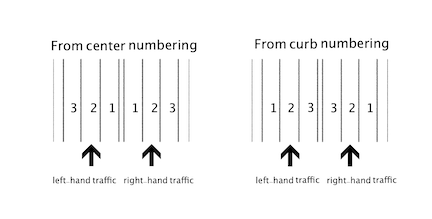
from: <road-side>- Change the default numbering of the lanes in a road. The default <road-side> value, center, specifies that the lanes are numbered starting with the lane closest to the center of the road. curb specifies that the numbering starts with the lane closest to the side of the road. You can use from: curb when, for example, you want a vehicle close to the curb because of the presence of a pedestrian. See also the Description below.
at: <event>- See Common parameters.
<track>: <track>- Is actual or projected. The default is actual, meaning that the vehicle reacts to the behavior of the referenced vehicle.
run_mode: <run_mode>- See Common parameters.
Regardless of whether the traffic_side_request option is set to right_hand or left_hand the lane numbering is the same. The default numbering is from the center of the road. Using from: curb reverses the numbering.
    do serial:
        car1.drive() with:
            # Drive in lane closest to the center of the road
            lane(1)


    do serial:
        car1.drive() with:
            # Drive in lane closest to the curb
            lane(1, from: curb)


    do parallel(overlap:equal):
        car2.drive()
        car1.drive() with:
            # Drive one lane left of car2
            lane(left_of: car2)


    do parallel(overlap:equal):
        car2.drive()
        car1.drive() with:
            # At the end of this phase, be either one or two lanes
            # to the right of car2
            lane([1..2], right_of: car2, at: end)


    do parallel(overlap:equal):
        car2.drive()
        car1.drive() with:
            # Be either one left, one right or the same as car2
            lane([-1..1], right_of: car2)


    do parallel(overlap:equal):
        car2.drive()
        car1.drive() with:
            # Be in the same lane as car2
            lane(same_as: car2)
See complete example 1, complete example 2, complete example 3, complete example 4, complete example 5, and complete example 6.
vehicle.lateral() modifier
Specify the lateral offset of a vehicle actor from a reference line.
Modifier
lateral([distance: <distance>] [,
         line: <line>] [,
         at: <event>] [,
         run_mode: <run_mode>] [,
         tolerance: <tolerance>])
distance: <distance>-
Is the lateral offset of the vehicle from the reference line. This value or range is used for planning purposes. The default is [-10.0..10.0] centimeters.
The distance parameter value cannot be greater than the distance between the reference line and the road boundary, ensuring that the vehicle's center line is always within the road, including the boundary.
Notes
The planned position of the vehicle depends on the reference line, the lane width, and the vehicle width.
If the reference line is center, calculating the position of the vehicle relative to the lane requires knowing the lane width, especially to determine how far the vehicle can shift without leaving the lane.
If the reference line is left or right, you're using a lane boundary as your base, but the lane width (along with the vehicle width) may still be needed to ensure the vehicle stays within the lane or road boundary.
For example:
- If the reference line is left,
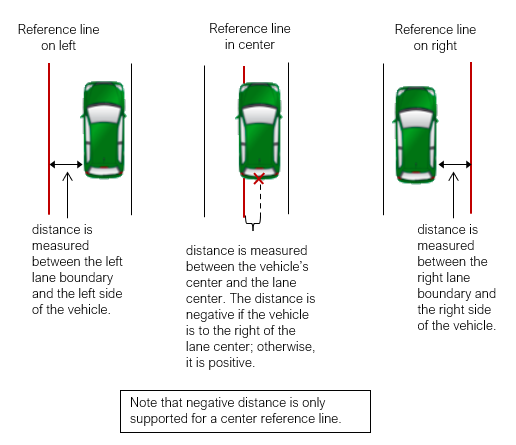
is the distance between the left side of the vehicle and the left boundary of the lane. - If the reference line is center,
is the distance between the center of the vehicle and the center of the lane.
- If the reference line is left,
line: <line>- Is the reference line from which the lateral offset is measured: right (the right lane boundary), left (the left lane boundary) or center (the center of the lane). The default is center.
at: <event>- See Common parameters.
run_mode: <run_mode>- See Common parameters.
tolerance: <tolerance>- The default is 1m. See Common parameters for more information.
The following diagram depicts how distance is measured when line is left, center, or right.
See also Foretify's Coordinate System.
In the following example, the lateral() modifier specifies that car1 should be positioned with its right side 1.5m to the left of the right lane marking. However, because of the default tolerance of 1m, car1 may actually be positioned with its right side [0.5..2.5]m to the left of the right lane marking.
    do serial:
        car1.drive() with:
            speed([40..60]kph)
        car1.drive() with:
            lateral(distance: 1.5meter, line: right, at: start)
See complete example.
vehicle.position() modifier
Set the position of a vehicle actor along the x (longitude) dimension
Modifier
position([distance: ]<distance> | time: <time> [,
    ahead_of: <vehicle > | behind: <vehicle >] [,
    measure_by: av_measure_by] [,
    at: <event>] [,
    track: <track>] [,
    run_mode: <run_mode>] [,
    tolerance: <length> | time_tolerance: <time>])
[distance:] <distance>- Is a single value or a range with a length unit. This value or range is used for planning.
time: <time>- Is a single value or a range with a time unit. This value or range is used for planning. If you specify ahead_of, time is calculated based on the speed of the reference car. If you specify behind, time is calculated based on this vehicle's speed.
ahead_of, behind: <vehicle>- Is a named instance of the vehicle actor, for example car2.
measure_by: <av_measure_by>-
Defines whether distance between cars is measured from the center of their bounding boxes (center_to_center) or from the nearest edge of their bounding boxes (nearest). The default is center_to_center.
When used with ahead_of, nearest is measured from the front bumper of the reference vehicle to the back bumper of this vehicle. A positive value means this vehicle is in front of the reference vehicle, whereas a negative value means this vehicle can actually be behind or overlapping the reference vehicle.
When used with behind, nearest is measured from the back bumper of the reference vehicle to the front bumper of this vehicle. A positive value means this vehicle is behind the reference vehicle, whereas a negative value means this vehicle can actually be in front or overlapping the reference vehicle.
These measurements use road coordinates.
at: <event>- Is start, end or all. The default is all, meaning that the specified position is maintained throughout the current period unless time is specified along with ahead_of or behind_of. In that case, the physical distance between the actors may vary during the time period. See Description below for more details.
track: <track>- Can be actual or projected. The default is
track: actual, meaning that the vehicle reacts to the behavior of the reference vehicle. Usetrack: projectedto predict how the vehicle will react to the reference vehicle's future movements. For more information about the differences, see Position track: projected. run_mode: <run_mode>- See Common parameters.
tolerance: <length>- The default is 1m. This parameter can be used only if the distance parameter is set. See Common parameters for more information.
time_tolerance: <time>- The default is 0.1sec. This parameter can be used only if the time parameter is set. See Common parameters for more information.
The position() modifier lets you specify the position of an actor relative to the start of the path or relative to another actor. You can specify the position by distance or time (but not both).
When ahead_of is specified for a vehicle, it must be ahead of the referenced vehicle by the specified value in the relevant period. Since behind contradicts ahead_of, you cannot use them together.
When time is specified along with ahead_of or behind_of, the physical distance is calculated using the speed of the vehicle that is behind (irrespective of whether it's the scenario's actor or the referenced vehicle ) and the location at that moment of the vehicle that is ahead. The speed of the vehicle that is ahead is not taken into the calculation.
If <event> is all, the physical distance at any point in time refers to the speed of the vehicle that is behind at that moment and the location of the vehicle that is ahead at that same moment (meaning that the physical distance may vary during the time period). The following two examples are equivalent; in both cases the physical distance is calculated according to the speed of car2.
    do parallel(overlap:equal):
        car1.drive() with:
            speed(speed: 30kph, at: end)
        sut.car.drive() with:
            position(time: 3second, behind: car1, at: end)
See complete example.
    do parallel(overlap:equal):
        car1.drive() with:
            position(time: 3second, ahead_of: sut.car, at: end)
        sut.car.drive() with:
            speed(speed: 40kph, at: end)
See complete example.
    do serial:
        car1.drive() with:
            # Absolute from the start of the path
            position([10..20]meter)


    do parallel(overlap:equal):
        car1.drive()
        car2.drive() with:
            # 40 meters ahead of car1 at end
            position(40meter, ahead_of: car1, at: end)


    do parallel(overlap:equal):
        car1.drive()
        car2.drive() with:
            # Behind car1 throughout
            position([20..30]meter, behind: car1)


    do parallel(overlap:equal):
        sut.car.drive()
        car1.drive() with:
            # Behind sut.car, measured by time
            position(time: [2..3]second, behind: sut.car)
See complete example 1, complete example 2, complete example 3, and complete example 4.
In the following scenario, when validating the position() modifier, the relative position is checked according to the distance of the vehicle ahead of sut.car. The distance range excluding tolerance is set to [5..10]m. With tolerance, the checked distance range is [3..12]m.
    do car1.drive(duration: 5s) with:
        position(distance: [5..10]m, ahead_of: sut.car, tolerance: 2m)
See complete example.
vehicle.speed() modifier
Set the speed of a vehicle actor for the current period.
Modifier
speed([speed: ]<speed-exp> [,
    faster_than: <vehicle > | slower_than: <vehicle >] [,
    at: <event>] [,
    track: <track>] [,
    run_mode: <run-mode>] [,
    tolerance:<tolerance>])
[speed: ]<speed-exp>- Is either a single value or a range. This value or range is used for planning. You must specify a speed unit.
faster_than, slower_than: <vehicle>- Is the instance name of the vehicle actor, for example car2.
at: <event>- See Common parameters.
track: <track>- Is actual or projected. The default is actual, meaning that the vehicle reacts to the behavior of the referenced vehicle.
run_mode: run_mode- See Common parameters.
tolerance: <tolerance>- The default value is 2kph. See Common parameters.
When faster_than is specified, the context vehicle must be faster than the referenced vehicle by the specified value in the relevant period. slower_than contradicts faster_than, so you cannot use them together.
    do serial:
        sut.car.drive() with:
            # Absolute speed range
            speed([10..20]kph)


    do parallel(overlap:equal):
        car1.drive()
        car2.drive() with:
            # Faster than car1 by [1..5]kph
            speed([1..5]kph, faster_than: car1)


    do serial:
        car1.drive() with:
            # Have that speed at end of the phase
            speed(5kph, at: end)


    do parallel(overlap:equal):
        car1.drive()
        car2.drive() with:
            # Really either slower or faster than car1
            speed([-20..20]kph, faster_than: car1)
See complete example 1, complete example 2, complete example 3, and complete example 4.
In the following scenario, generation uses [40..60]kph range, but during runtime validation, the valid range is [35..65]kph.
    do car1.drive(duration: 5s) with:
        speed([40..60]kph, tolerance: 5kph)
See complete example.
vehicle.shape()
You can constrain the attributes of a vehicle's movement, such as its position, by defining an arbitrary two-dimensional shape, such as a curve. Then, in a movement scenario such as vehicle.drive(), you can constrain the attributes of the vehicle's position to conform to the curve.
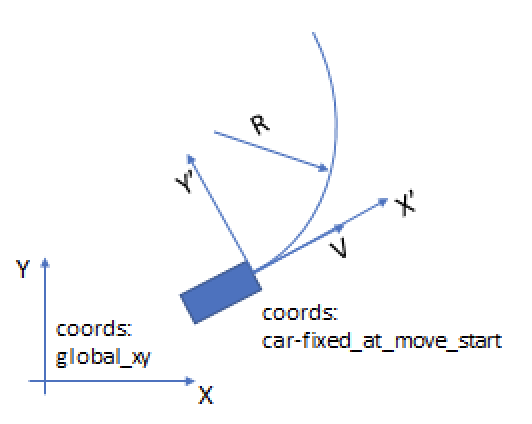
To do this, you implement a compute() function that describes a position along a curve by setting two parameters, a longitude (X) and a latitude (Y), as shown in Figure 1. This function can then be called repeatedly to describe the position of an actor as a function of time.
The tasks required to constrain a movement attribute to a shape are:
- Creating an arbitrary shape.
- Using the shape in a movement scenario such as vehicle.drive().
These steps are described in the sections below. If you are using a shape created by someone else, it is not necessary to understand how to create a shape. It is sufficient to know the type of the required parameters.
Note
vehicle.shape() is not supported for actors other than vehicle.
Using an arbitrary shape
Using a shape has two tasks:
- Declaring an instance of the shape in a scenario.
- Constraining the movement scenario with the shape() modifier.
The shape instance declaration
To use a shape in a scenario, you declare an instance of the shape struct and constrain any generatable parameters required as input to the shape’s compute() function. The compute() function produces the output fields, such as lon and lat for any_position_shape. Every shape also has a duration() function that returns a parameter limiting the maximum time required to move an actor along the entire shape.
The number of parameters required to define a shape varies according to the shape. For example, while a sinusoidal shape can be defined with three parameters, a clothoid shape requires more. In this example, two parameters specify the radius and the angle of an arc shape.
scenario vehicle.drive_with_shape:
    c: arc_shape with (radius: 15m, angle: 10deg)
See complete example.
Depending on how the shape is implemented, you may be able to constrain additional parameters, such as:
-
transform specifies whether the longitudinal and lateral values output by the compute() function must be transformed:
- relative specifies that the values are relative to the actual value of the attribute when the drive starts. This is the default for most shapes.
- lane-relative transforms the values to be relative but takes into account the shape of the lane.
- absolute does not transform the values. Thus any previous or subsequent drive() actions by the same actor must adjust to this drive() action. The previous drive() action cannot specify an exact attribute value (position, speed or so on) at end, and the subsequent drive() action cannot specify an exact attribute at start.
-
direction specifies the orientation of the vehicle to the direction of the shape. For example, reverse specifies that the vehicle face backwards to the direction of the shape.
-
time specifies the maximum time to complete movement along the shape. More typically, this is determined by the duration() function.
If the input parameters to the compute() function are not constrained, the corresponding fields get a generated value during the planning phase and then are fixed throughout the calls to compute().
The shape() modifier
Constrain the position attributes of a vehicle actor's movement to conform to a shape
Modifier
shape([quantity: <shape-quantity>][,
    request: <request>, ]
    shape_object: <shape-instance> [,
    run_mode: <run_mode>])
quantity: <shape-quantity>- Specifies the kind of attribute calculated by the compute() function of the shape. position is the default and specifies shapes inheriting from any_position_shape. position is the only supported value for this release.
request: <request>- Specifies whether the longitudinal parameter, the lateral parameter, or both are constrained in this scenario. both is the default, meaning that both longitudinal and lateral parameters are constrained. both is the only supported value for this release.
shape_object: <shape-instance>- Is the name of the shape instance in the scenario. The type of this instance must match the type of <shape-quantity>.
run_mode: <run-mode>- See Common parameters.
This modifier constrains the attributes of a movement, such as the longitudinal and lateral parameters of a vehicle's position, to a shape defined by a shape instance in the scenario.
By default, shape() does not take into account the time allocated to the drive() movement. The drive() conforms to the specified shape until the result returned by the shape’s duration() function is reached, unless a condition specified by until() is reached first. If you specify, for example, an angle of 30deg for an arc shape but the drive() ends after only 10deg because the maximum duration is reached, it is not considered a scenario failure.
This example declares an instance of arc_shape with the name arc1 and constrains the two parameters of the shape. In phase 1 of the scenario, sut drives for 10 seconds. In phase 2, sut drives along arc1 until the maximum duration is reached.
scenario vehicle.drive_with_shape:
    arc1: arc_shape with (radius: 15m, angle: 10deg)
    hw: highway
    car1: vehicle

    do serial:
        p1: car1.drive(duration: 10s) with: along(hw)
        p2: car1.drive() with: shape(shape_object: arc1)
Creating an arbitrary shape
Creating a shape has two required tasks:
- Declaring a struct in OSC2 with the necessary parameters.
- Implementing the calculations as native (OSC2) or external (not OSC2) methods.
Optionally, you can also implement on_start() to perform parameter checking. You should also document the parameters for the users, specifying, for example, if they use a negative radius, the arc bends to the right rather than to the left of the starting direction of the actor.
any_shape and any_position_shape declaration
The struct any_position_shape inherits from any_shape, as shown below.
struct any_shape:                                         # line 1
    var t: time                                           # line 2
    var direction: direction                              # line 3
    set direction = straight                              # line 4
                                                          # line 5
    def compute() is empty                                # line 6
    def duration(): time is empty                         # line 7
                                                          # line 8
struct any_position_shape inherits any_shape:             # line 9
    var lon: length                                       # line 10
    var lat: length                                       # line 11
    var yaw: angle                                        # line 12
    var has_explicit_yaw: bool = false                    # line 13
    transform: shape_transform with:                      # line 14
        keep(soft it==relative)                           # line 15
    ref_actor: vehicle with:                              # line 16
        keep(default it == null)                          # line 17
Notes
-
line 1 declares the any_shape type.
-
line 2 defines the time required to execute an incremental movement along this shape. This parameter is limited by the duration() function. If you want to allow users to force the duration from the outside, add a constrainable field to the shape object such as expected_duration, and make the duration() method return it.
-
line 3 declares a direction parameter and line 4 sets it to straight. If you prefer, you can specify a default constraint and allow users to constrain it to backward. This parameter specifies the orientation of the vehicle to the direction of the shape. See the direction parameter under Parametric API.
-
line 6 declares a compute() function implemented in a foreign language or OSC2.
-
line 7 declares a duration() function implemented in a foreign language or OSC2.
-
line 9 uses unconditional inheritance to create the any_position_shape subtype.
-
lines 10 and 11 are the relative longitude and latitude of a location on the shape. These values are set and updated by repeated calls to the shape's compute() function.
-
line 12 is the yaw (heading) angle at the current position on the shape. This is useful for Smart Replay scenarios where the original recorded orientation should be preserved.
-
line 13 is a flag indicating whether the shape provides an explicit yaw value. When
has_explicit_yawistrue, the driver uses the yaw value from the shape directly instead of computing it from the trajectory direction using Ackerman correction. This is essential for Smart Replay where the recorded vehicle heading must be preserved exactly. -
Lines 14 and 15 specify that the time, lon, and lat values returned by the compute() function should be transformed relative to the initial values of the position attributes at the start of the drive. The constraint on transform is soft, meaning it can be overridden if needed.
-
Lines 16 and 17 specify the
ref_actorwhen a shape is defined relative to another actor. Ifref_actoris not null, the lon and lat values are interpreted relative to the position of theref_actoron the road (supported only inlane-relativetransform).
Using attribute-specific structs like these, you can declare a new subtype for the shape you want to create. The number of required parameters depends on the specific shape.
For example:
struct arc_shape inherits any_position_shape:                               # line 1
    angle: angle with: keep(soft it == 0deg)                                # line 2
    radius: length with: keep(soft it == 0m)                                # line 3
    var time: time                                                          # line 4
    var request: shape_request                                              # line 5
                                                                            # line 6
    def duration()-> time is also external cpp("duration", "arc_shape.so")  # line 7
    def compute() is also external cpp("compute", "arc_shape.so")           # line 8
Notes
-
line 1 uses unconditional inheritance to create the arc_shape subtype.
-
lines 2 and 3 declare the generatable parameters that the user must specify. It is recommended but not required to set unreasonable constraints and implement an on_start() method to check whether the user has set the parameters appropriately. These fields serve as input to compute().
-
line 4 declares the time parameter that is set by the shape logic to the relative time from the start of this drive.
-
line 5 is the type of shape request (both) as specified in the shape() modifier.
-
lines 7 and 8 redefine the duration() and compute() functions defined in any_shape with logic defined in C++.
External functions
Two C++ functions are required: duration() and compute().
The duration() function returns a parameter that sets the maximum time required to move an actor along the entire shape such that:
0 <= t <= duration()
For example:
time_t duration() {
    time_t total_duration = 10_sec ;
    return total_duration ;
};
struct arc_shape inherits any_position_shape:                               # line 1
    angle: angle with: keep(soft it == 0deg)                                # line 2
    radius: length with: keep(soft it == 0m)                                # line 3
    var time: time                                                          # line 4
    var request: shape_request                                              # line 5
                                                                            # line 6
    def duration()-> time is also external cpp("duration", "arc_shape.so")  # line 7
    def compute() is also external cpp("compute", "arc_shape.so")           # line 8
The shape logic sets time to the relative time from the start of the drive and then calls the compute() function.
The compute() function assigns the longitudinal and lateral parameters. For example, in C++ this should look something like:
void arc_shape_t::compute() {
    this->set_lon(… Some computation using this->time() and other params);
    this->set_lat(… Some computation using this->time() and other params);
}
Notes
-
The compute() function can be called any number of times, not necessarily with sequential times. Thus, it should depend only on its parameters and have no side effects.
-
The shape must be continuous and smooth so that a vehicle is able to move along it. Unnatural shapes are not allowed.
-
The shape must be defined so that at the starting point (at t=0), lon = 0 , lat = 0 and lat_speed = 0. At the starting point, the speed of the shape must equal the speed at the end of the previous drive.
Shape behavior (ShapeBehavior)
This section provides details about trajectory shape behavior. Trajectory shape behavior is used to instruct the driver to execute a predefined trajectory. This behavior receives as input a shape object that holds the trajectory description; the object is passed to the behavior under the active move_op.
Trajectory shape object API
All trajectory shape objects inherit from the any_position_shape struct and are required to implement the functional API described below. This API is used by the trajectory shape behavior to calculate the lon-lat positions dictated by the shape. In addition, any_position_shape also holds a set of parameters that instruct the trajectory shape behavior on how the shape should be executed.
Functional API
Following are the shape object methods that are called by the trajectory shape behavior when it constructs the trajectory. These methods are implemented by the shape object creator.
| Function | Input | Return | Description | Supported | Comments |
|---|---|---|---|---|---|
| duration() | - | time_t | Returns the overall duration of the trajectory. | Yes | Used by the Planner to allocate the relevant drive duration. |
| set_t(T) | time_t | - | Sets the time T for which the lon-lat values will be calculated after calling compute(). | Yes | |
| compute() | - | - | Makes the shape object calculate the lon-lat values for the provided time T. | Yes | |
| lon() | - | distance_t | Returns the longitudinal positon for time T. | Yes | Should adhere to the continuity requirements. |
| lat() | - | distance_t | Returns the lateral positon for time T. | Yes | Should adhere to the continuity requirements. |
duration() and compute() must be implemented for any shape object.
- duration() - Returns the overall duration of the shape trajectory. This value is used to execute the trajectory, as well as for planning the move.
- compute() - Implementation of shape trajectory. This method should assign a value to lon and lat for a given value of t. (See Continuity requirements for an example.)
Parametric API
The following parameters define how to interpret the lon() and lat() computed in the shape object.
| Parameter | Type | Description | Default | Comments |
|---|---|---|---|---|
| shape_transform | enum | [relative] - The lon-lat values are interpreted in the vehicle-relative coordinate frame, with the origin at the vehicle's geometric center, the lon axis pointing forward, and the lat axis pointing left [lane_relative] - The lon-lat values are projected on the lane geometry. The lon axis starts at the vehicle's geometric center and follows the lane geometry. The lat axis is perpendicular to the lon direction at every point. [absolute] - The lon-lat values are interpreted as x-y position on the map. The positions are taken as-is with no additional processing (This mode is intended for use with Smart-Replay tests). |
relative | |
| direction | enum | [straight] - The shape should be interpreted as describing forward driving. [backward] - The shape should be interpreted as describing backward driving (reverse). |
straight | The direction enum defines other options but only straight and backward are supported. |
Behavioral API
The following parameters define the behavior and execution of the shape.
| Parameter | Type | Description | Default | Comments |
|---|---|---|---|---|
| tracking_mode | enum | [exact] - The trajectory defined by the shape is used as is by the ftx_driver (overriding any other behaviors) [behavioral] - The trajectory will be followed while allowing other ftx_driver behavior to override. |
exact | |
| ref_actor_tracking_mode | enum | actual - Uses the current actual state of the ref_actor to position the relative shape. projected - Uses a previously saved state of the ref_actor, assuming it moves at a constant speed, to position the relative shape. |
actual |
By default, the tracking_mode is set to exact. Use the following constraint to change the tracking_mode in a scenario:
keep(lead_vehicle.ftx_driver.shape_behavior.tracking_mode == behavioral)
Note
Using tracking_mode == behavioral may introduce discontinuities in the trajectory. To ensure continuous vehicle motion, use with ftx_driver.kinematic_executor_params.bicycle_tracker.enable == true.
By default, the ref_actor_tracking_mode is set to actual. Use the following constraint to change it in a scenario:
keep(lead_vehicle.ftx_driver.shape_behavior.ref_actor_tracking_mode == projected)
In projected tracking mode, the state of the ref_actor is assumed to remain constant from the shape's start time, based on the assumption of constant speed.
Note
Switching from ref_actor_tracking_mode == projected back to actual is not supported, as it may introduce discontinuities in the trajectory.
Continuity requirements
To ensure a smooth transition from following the regular plan objective to following the shape, the shape should continue the kinematic state from the Preceding Drive End (PDE). This is especially important when the vehicle is controlled kinematically. To achieve this, consider the following constraints when defining the shape object.
These constraints are derived from the forward derivation formulas for speed and acceleration.
The following example demonstrates how this continuity can be implemented in a scenario.
scenario sut.native_lane_change:
    init_lon_speed: speed with:
        keep(it == 20kph)
    init_lat_pos: length with:
        keep(it == 0m)

    lane_change: lane_change_shape with:
        keep(it.speed_lon == init_lon_speed)
        keep(it.total_duration == 10s)
        keep(it.lateral_distance == 3m)
        keep(it.lateral_acceleration == 0.5mpsps)
        keep(it.lane_change_direction == left)
        keep(it.transform == lane_relative)

    do serial:
        pre_shape: sut.car.drive(duration: 2s) with:
            speed(init_lon_speed, at: end)
            lateral(init_lat_pos, line: center, at: all)
        shape_drive: sut.car.drive() with:
            shape(quantity:position, request:both, shape_object: lane_change)

struct lane_change_shape inherits any_position_shape:
    speed_lon: speed with:
      keep (default speed_lon == 5mps)
    total_duration: time with:
      keep (default total_duration == 10s)
    lateral_distance: length with:
        keep(default lateral_distance == 3.5m)
    lateral_acceleration: acceleration with:
        keep(default lateral_acceleration == 0.5mpsps)
    lane_change_direction: av_side with:
        keep(default lane_change_direction == left)

    def duration()-> time is only:
        return total_duration

    def compute() is only:
        lon = speed_lon * t
        lat = 0m

        var acc_rl : float = lateral_acceleration/1millimeter_per_sec_sqr
        var lat_dist_rl :float = lateral_distance/1mm
        var t1 :=  math.sqrt(lat_dist_rl / acc_rl) * 1s

        if t > 0s:
            var tau : time
            if t > t1:
                tau = t1
            else:
                tau = t
            lat = lat + 0.5 * lateral_acceleration * tau * tau

        if t > t1:
            var tau : time
            if t > 2 * t1:
                tau = t1
            else:
                tau = t - t1
            var v_m := lateral_acceleration * t1
            lat = lat + v_m * tau - 0.5 * lateral_acceleration * tau * tau

        if lane_change_direction == right:
            lat = -lat
See complete example.
Note
The lateral movement continuity is assured by keeping a constant lateral position before the shape phase, and in doing so, zeroing the lateral speed and acceleration.
Trajectory shape behavior implementation
The following sections describe implementation details and assumptions for different trajectory shape behavior modes.
Relative shape transform
At the start of the shape drive, the behavior calculates the (X-Y) trajectory starting at T = 0 until T = duration(). The trajectory starts at the current position of the vehicle (X0, Y0, θ0), and steps from there in the vehicle coordinate system directions:
To preserve the lon-lat trajectory continuity, the (traj_X, traj_Y) points are later converted to (traj_lon, traj_lat).

Lane relative shape transform
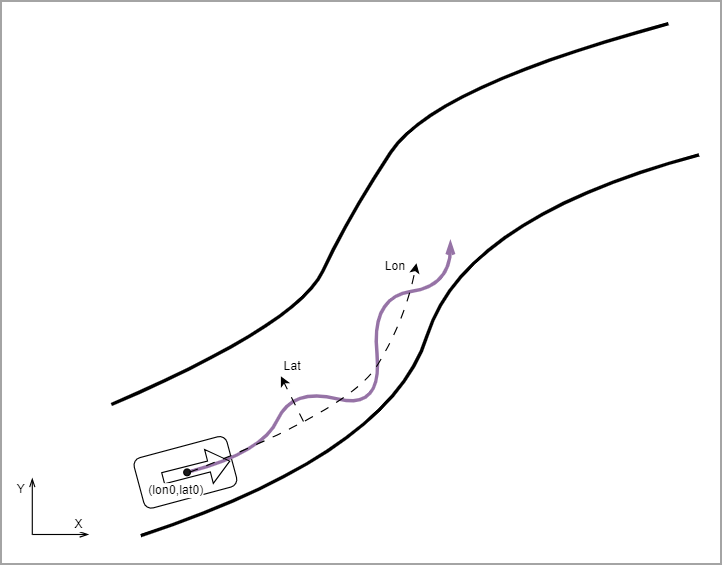
At the start of the shape drive, the behavior calculates the (lon-lat) trajectory starting at T = 0 until T = duration(). The trajectory starts at the current position of the vehicle in route coordinates (lon0, lat0), and steps from there in the lane coordinate system directions:
The (traj_lon, traj_lat) points are later converted to (traj_X, traj_Y), which follows the road.
Note
To ensure the continuity of the vehicle’s yaw angle and the smoothness of the lateral speed, the car's lateral speed in the preceding drive must be zero. This way, the vehicle coordinates are aligned to the direction of the lane coordinates at the start of the shape.
driving relatively to a reference actor
When a ref_actor is specified in a lane_relative shape, the shape's position is interpreted as a relative distance from the reference actor.
Given the future time T, the final absolute shape will be:
$$
absolute_traj_lon(T) = ref_actor_lon(T) + relative_traj_lon(T)
$$
Note
During the entire duration of the relative shape, the ref_actor must be located on the actor’s planned path.
Absolute shape transform
The values set in the lon and lat fields are interpreted as x and y, respectively. They are placed in the trajectory directly as-is with no additional manipulation.
To preserve the lon-lat trajectory continuity, the traj_X and traj_Y points are converted to traj_lon and traj_lat.
Note
Trajectory continuity is not enforced for absolute shape transforms. Writers must ensure that the vehicle's position at the start of the drive matches the x-y coordinates at the beginning of the shape. In Smart Replay, this means the creation point must align with the start of the recording.
Backward shape direction
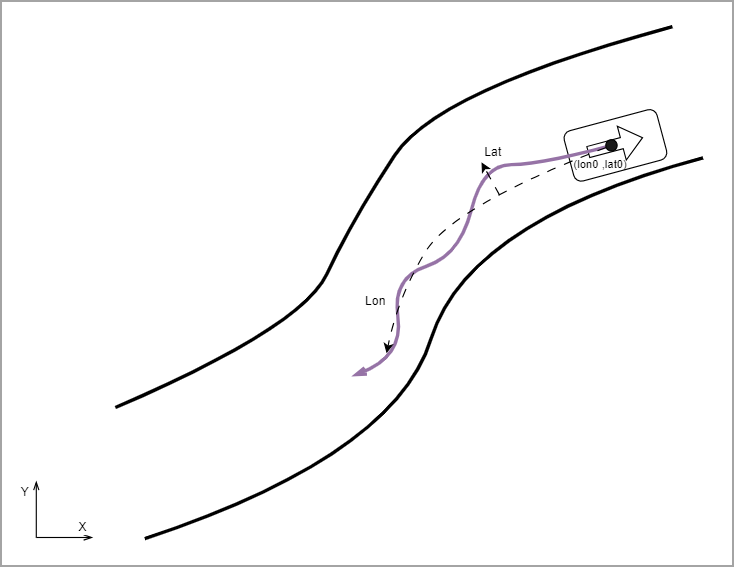
To make the shape go backward, the shape_lon() value is inverted by multiplying it by -1 when calculating the (traj_lon, traj_lat) points.
In addition, the traj_yaw angle is flipped by 180deg to make the backward motion.
Notes
- The traj_lat is not flipped.
- The flip to the backward direction works the same way as for the relative shape transform.
- To maintain continuity of the motion (especially in kinematic drives), backward shapes must start and end with zero speed.
Exact tracking_mode
In exact tracking mode, the behavior sets the calculated trajectory directly into the action.trajectory and sets the action.driver_controls for the trajectory recalculation to false:
action.driver_controls.trajectory_lon = false
action.driver_controls.trajectory_lat = false
In addition, for the purpose of visual debugging, the behavior sets the action.objective based on the last shape trajectory point. Other behaviors need to check the action.driver_controls and not intervene in case the trajectory recalculation is false for both axes.
Behavioral tracking_mode
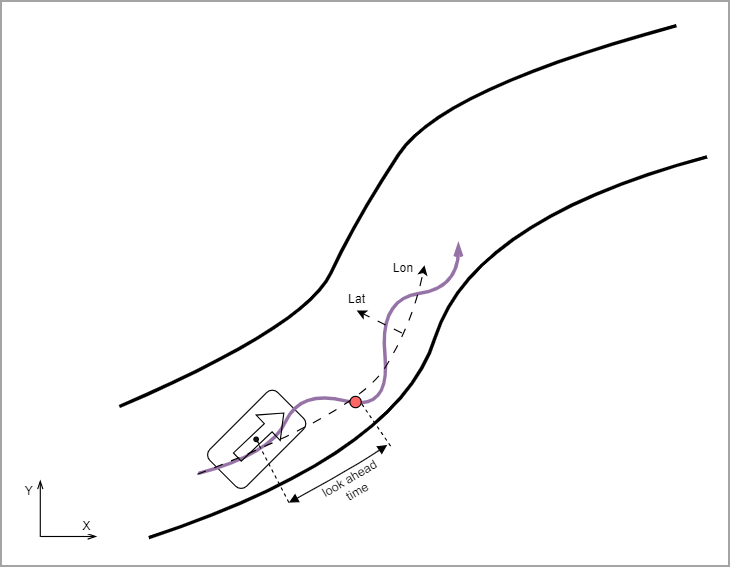
In behavioral tracking mode, the behavior searches on the calculated trajectory for a point that is closest to the current lon position of the vehicle. The objective is created based on a point that is look_ahead_time ahead of the closest point to the vehicle. The objective is updated every update_period or when the vehicle reaches the existing objective.
This objective is evaluated by other behavior in the driver’s behavioral stack (e.g., speed-to-curvature adaptation, collision avoidance, etc.).
When reaching less than look_ahead_time from the end of the shape trajectory, the last point is used as the objective.
Note
This model does not apply to backward-direction shapes.