Position track: projected
In this section, we focus on the position modifier with the track: projected argument. For more information, see position. Specifically, we describe the differences between track: actual and track: projected and provide examples of potential pitfalls.
First, let’s recall how the track: actual positioning of a vehicle is interpreted by Foretify:
In the following example, we use track: actual, however, it can be omitted because it is the default.
do d1: green_vehicle.drive() with:
   position([10..20]m, ahead_of: white_vehicle, track: actual, at: end)

The position modifier with the track: actual argument defines a distance between the actual position of the white reference vehicle and the green ahead vehicle at the end of the drive d1.
Contrary to the track: actual argument, the position modifier with the track: projected argument defines a distance between the ahead vehicle and the projected position of the reference vehicle:
do d1: green_vehicle.drive() with:
   position([10..20]m, ahead_of: white_vehicle, track: projected, at: end)
The projected position of the white vehicle at the end of d1 is calculated using the position of the white vehicle at the start of d1. The projected position of the vehicle is the imaginary point at which the vehicle would be located if it was driving the entire d1 drive at a constant speed. That is, if at the start of \( d_1 \) the white vehicle's position is \( x_0 \), its speed is \( v_0 \), and the duration of the drive \( d_1 \) is \( t \), then the projected position of the white vehicle at the end of \( d_1 \) is:
This imaginary position of the white vehicle is used as a reference point for calculating the position of the green vehicle at the end of \( d_1 \):
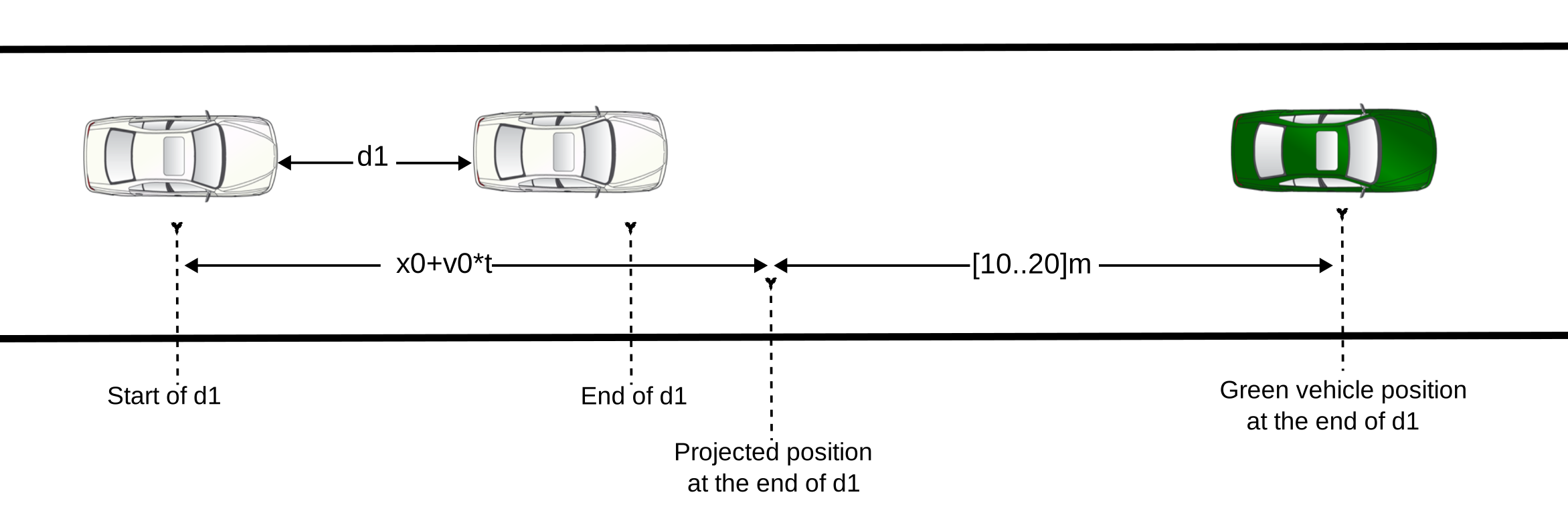
By comparing the vehicle's real position with its imaginary projected position, we can identify three possible scenarios:
-
Acceleration: If the vehicle is accelerating (its speed at the end of the drive is greater than its speed at the start), the projected position will be behind its actual position.
-
Deceleration: If the vehicle is decelerating (its speed at the end of the drive is less than its speed at the start), the projected position will be ahead of its actual position.
-
Constant speed: If the vehicle maintains a constant speed (its speed at the end of the drive is the same as its speed at the start), the projected position will coincide with its actual position.
Using the same example, if the white vehicle accelerates at 2mpsps for 5 seconds during \( d_1 \), the actual distance covered will be:
The following graphic illustrates this scenario.
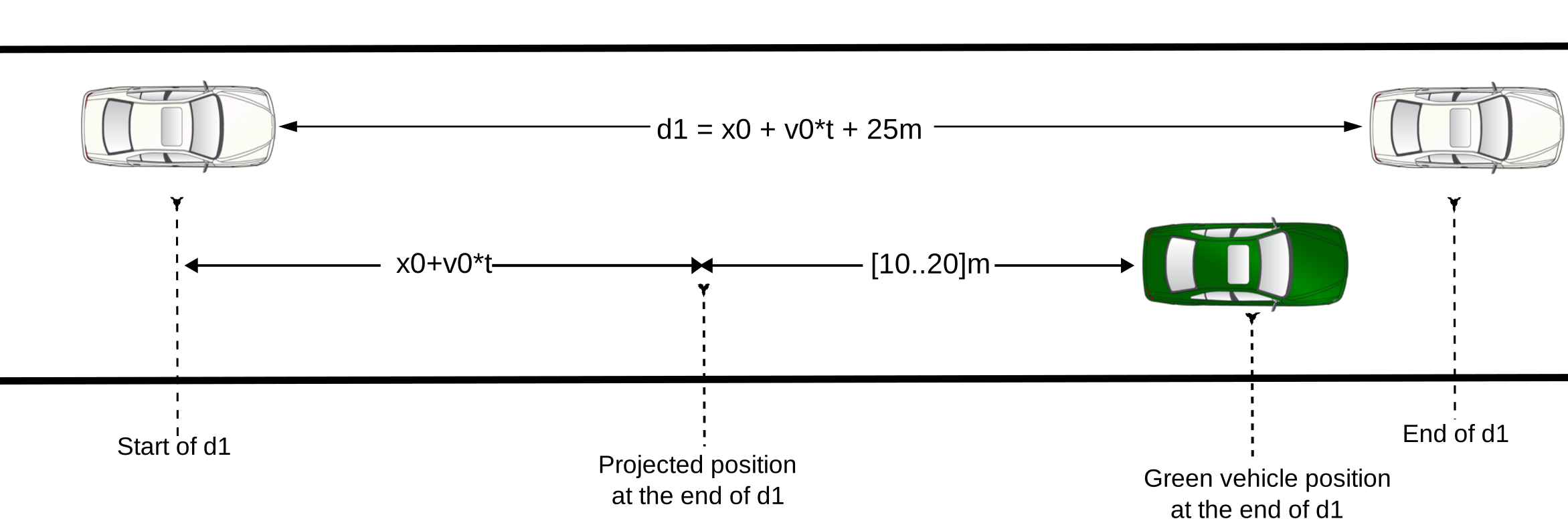
We observe the following phenomenon: even though the position modifier specifies that the green vehicle to be placed ahead of the white vehicle:
do d1: green_vehicle.drive() with:
   position([10..20]m, ahead_of: white_vehicle, track: projected, at: end)
The green vehicle is actually placed behind the white vehicle due to the gap between the actual and projected positions of the white vehicle at the end of \( d_1 \).
If the intent is to keep the green vehicle strictly ahead of the actual position of the white vehicle, add a track: actual position modifier, as shown in the following example.
in d1 with:
   position([0..]m, ahead_of: white_vehicle, track: actual, at: end)
Note, however, that this constraint will indirectly affect either the white vehicle's acceleration or the duration of the drive \( d_1 \). This is because the gap between the actual and the projected positions of the white vehicle should must be less than 20 meters, which is the maximum allowed distance between the projected position of the white vehicle and the position of the green vehicle.