Driver behavior parameters
end_of_road_behavior (EndOfRoadBehavior)
The Driver's end_of_road_behavior handles stopping the vehicle either when a lane ends or when the road reaches the edge of the map. This behavior runs last to allow other behaviors to attempt to continue the drive. If continuation is not possible, it stops the vehicle near the road or lane end.
| Field name | Type | Description | Default |
|---|---|---|---|
| enable | bool | true - active, false - not active | true |
keep(lead_vehicle.ftx_driver.end_of_road_behavior.enable == false)
update_config to update the behavior_param value for the end of road behavior parameters at run time. For more information, see Updating driver behavior parameters at the run time.
ending_lane_behavior (EndingLaneBehavior)
The Driver's ending_lane_behavior handles lane merges when the next lane is occupied. This behavior slows down and stops a Foretify-controlled vehicle before the merging lane ends if the adjacent lane is occupied. Once the adjacent lane is free, the lane change continues.
| Field name | Type | Description | Default |
|---|---|---|---|
| enable | bool | true - active, false - not active | true |
keep(lead_vehicle.ftx_driver.ending_lane_behavior.enable == false)
You can call update_config to update the behavior_param value for the ending lane behavior parameters at run time. For more information, see Updating driver behavior parameters at the run time.
bypass_behavior (BypassBehavior)
The Driver's bypass_behavior detects stationary or slow-moving obstacles blocking the actor's path to its input objective and issues a set of intermediary objectives to bypass the blocking object.
| Field name | Type | Description | Default |
|---|---|---|---|
| enable | bool | Enables bypass behavior | true |
| allow_left_side | bool | Enables bypassing on the left while remaining in the same road direction. To allow left-side bypassing that uses the oncoming lane in the opposite direction, set allow_opposite_road to true |
true |
| allow_right_side | bool | Enables bypassing on the right while remaining in the same road direction. To allow right-side bypassing that uses the oncoming lane in the opposite direction, set allow_opposite_road to true |
true |
| allow_opposite_road | bool | Allows bypass maneuvers that temporarily use the oncoming lane in the opposite direction | false |
| block_detection_roi_max_lon_offset | length | Maximum longitudinal distance ahead of the actor’s front edge used to detect blocking obstacles | [40..60]m |
| bypass_lon_dist | length | Longitudinal edge-to-edge distance between the actor and the blocking obstacle where the block_detection_roi_max_lat_offset condition is first met. Constraint: obstacle_edge_lon_dist - bypass_lon_dist > 6m |
[4..5]m |
| bypass_lat_dist | length | Lateral edge-to-edge distance between the actor and the blocking obstacle during the bypass maneuver | [1..1.2]m |
| obstacle_edge_lon_dist | length | Longitudinal edge-to-edge distance between the actor and the blocking obstacle while waiting for the bypass ROI to clear. Applies only when bypass_mode is set to opposite_road. Constraint: obstacle_edge_lon_dist - bypass_lon_dist > 6m |
[10..15]m |
| obstacle_edge_lat_dist | length | Lateral edge-to-edge distance between the actor and the blocking obstacle | [-0.2..0.2]m |
| road_edge_lat_dist | length | Lateral edge-to-edge distance between the actor and the edge of the road. | [0..0.2]m |
| min_bypass_lon_speed | speed | Minimum longitudinal speed during any bypass maneuver, regardless of the bypass side | [10..15]kph |
| bypass_duration_est_safety_add | time | Additional time buffer added to the estimated duration of a bypass maneuver. Higher values make the maneuver more conservative, while negative values reduce safety margins | [1..2]sec |
| lon_speed_slow_moving_threshold | speed | Maximum longitudinal speed at which an obstacle is considered as “slow moving” for bypassing | [10..15]kph |
| lat_speed_slow_moving_threshold | speed | Maximum lateral speed at which an obstace is considered “slow moving” for bypassing | [0.1..0.2]m/s |
| rel_lon_speed_slow_moving_threshold | speed | The actor should have longitudinal speed that is faster than the slow-moving obstacle by this threshold | [20..25]kph |
By default, the bypass behavior is not enabled. Use the following constraint to enable the behavior in a scenario:
keep(lead_vehicle.ftx_driver.bypass_behavior.enable == true)
You can call update_config to update the behavior_param value for the bypass behavior parameters at run time. For more information, see Updating driver behavior parameters at the run time.
Opposite-lane bypass
The allow_opposite_road parameter is traffic-side agnostic and enables opposite-lane bypassing for both right-hand and left-hand traffic. When enabled, it allows the driver to briefly use the oncoming lane when needed. The driver automatically selects the passing side using its internal side‑priority and real‑time feasibility logic (space, traffic, topology), so no additional RHT or LHT configuration is required. Enabling this parameter simply adds the opposite lane to the candidate options; a maneuver is initiated only if the feasibility checks pass, and the driver returns to the original lane as soon as it is safe.
For optional safety tuning, use bypass_duration_est_safety_add to add a safety buffer (in seconds) to the driver’s estimated time needed to complete an opposite‑lane pass. A larger value makes the driver more conservative by requiring a longer oncoming‑traffic gap; a smaller value makes it more permissive. It only affects opposite‑lane bypass and has no effect if opposite‑lane use isn’t enabled. Typical range is 1–2 s; 1.5 s means the model treats a 4.0 s pass as 5.5 s for gap checking.
extend top.main:
    def post_plan() is also:
        car.ftx_driver.bypass_behavior.allow_opposite_road = true
        car.ftx_driver.bypass_behavior.bypass_duration_est_safety_add = 1.5s
| Field name | Type | Description | Default |
|---|---|---|---|
| enable | bool | true - active, false - not active | false |
curvature_behavior (CurvatureBehavior)
The Driver's curvature_behavior manages vehicle navigation on high-curvature roads. The behavior analyzes road curvature along the actor's planned path and, considering the actor's dimensions, determines whether the vehicle can safely navigate the curve without going off-road.
If safe passage is not possible, the behavior stops the vehicle at the side of the road before entering the curve. If the vehicle can navigate the curve safely, the behavior applies necessary lateral adjustments to maintain proper positioning.
| Field name | Type | Description | Default |
|---|---|---|---|
| enable | bool | true - active, false - not active | true |
keep(lead_vehicle.ftx_driver.curvature_behavior.enable == false)
You can call update_config to update the behavior_param value for the curvature behavior parameters at run time. For more information, see Updating driver behavior parameters at the run time.
stay_on_road_behavior (StayOnRoadBehavior)
The Driver's stay_on_road_behavior handles adjustments of the vehicle's lateral position. If, for any reason, the vehicle is requested by a preceding behavior in the behavioral stack to go off-route, this behavior prevents it. By default, this behavior is not active.
You can call update_config to update the behavior_param value for the stay on road behavior parameters at run time. For more information, see Updating driver behavior parameters at the run time.
shift_behavior (ShiftBehavior)
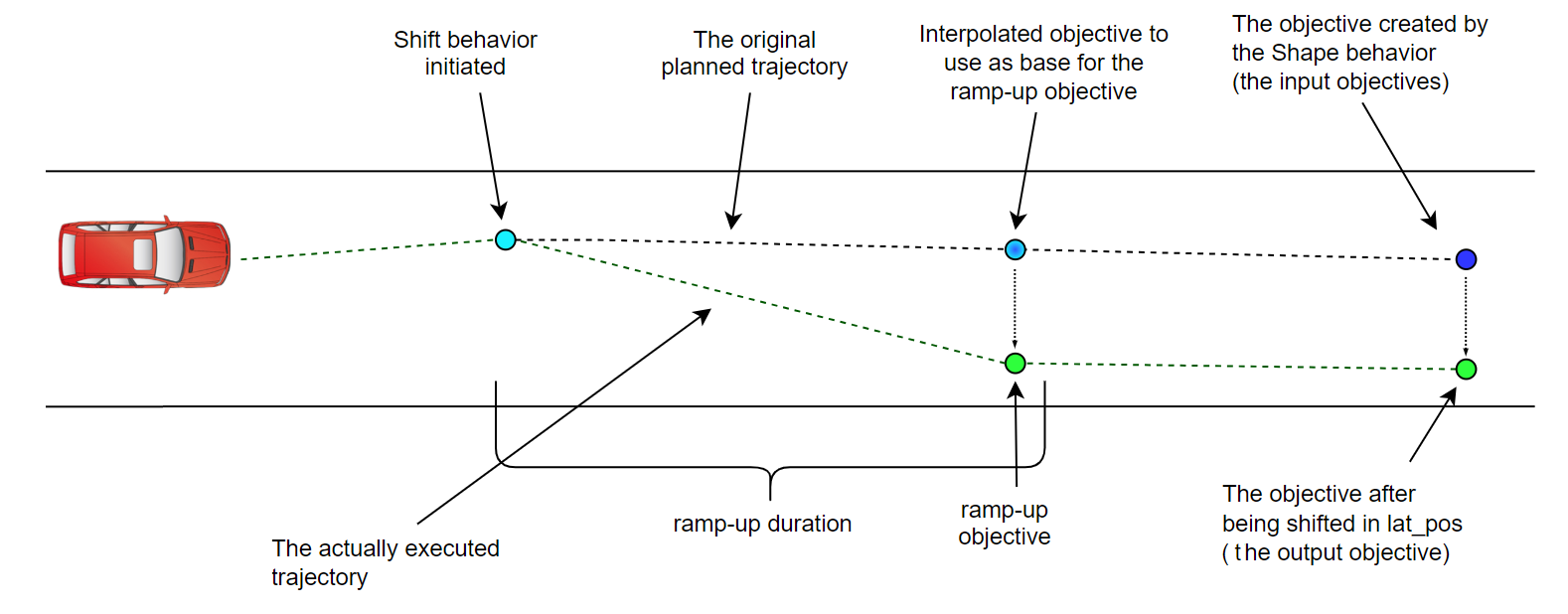
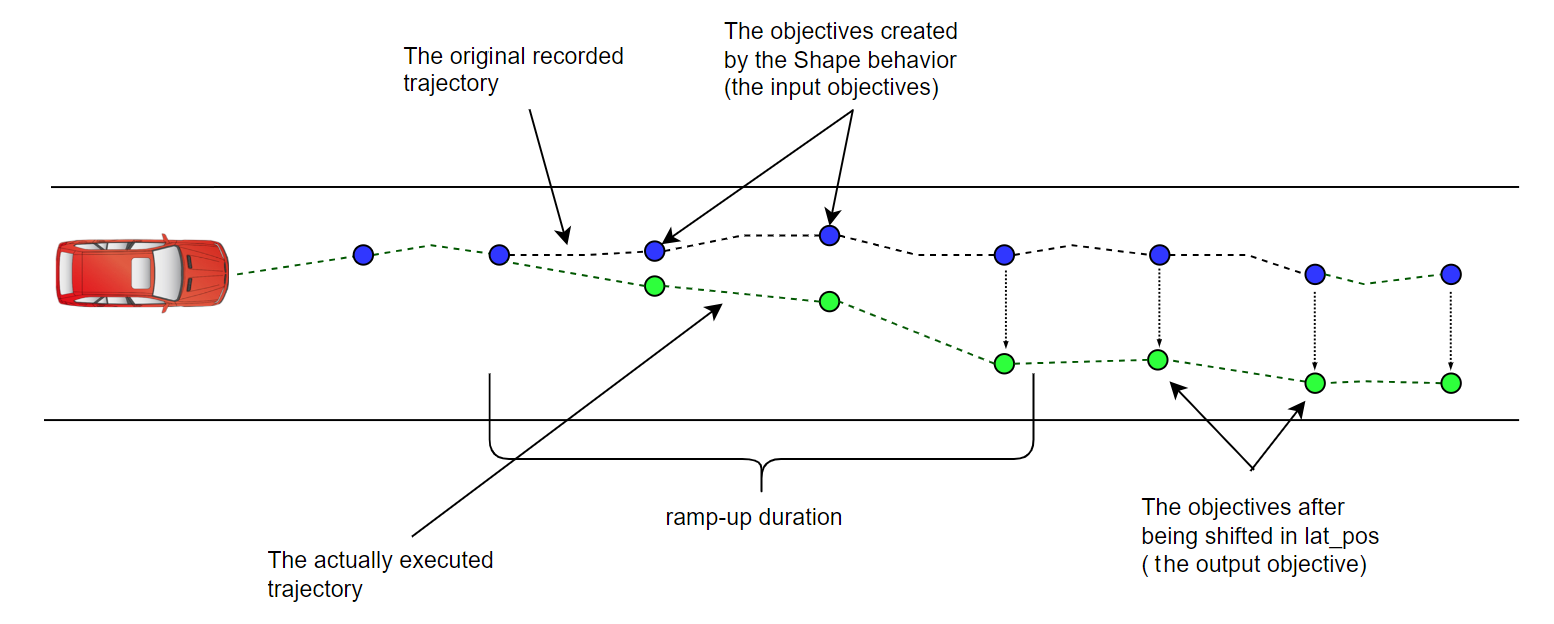
The Driver's shift_behavior allows manipulation of the input objective from the OSC2 scenario level. The manipulation is performed by applying a shift to the input objective or by setting a new absolute value. This behavior is primarily used in Smart Replay, where the Shape behavior generates objectives based on recordings. That objective is passed to the shift behavior, which allows modification of the original recordings.
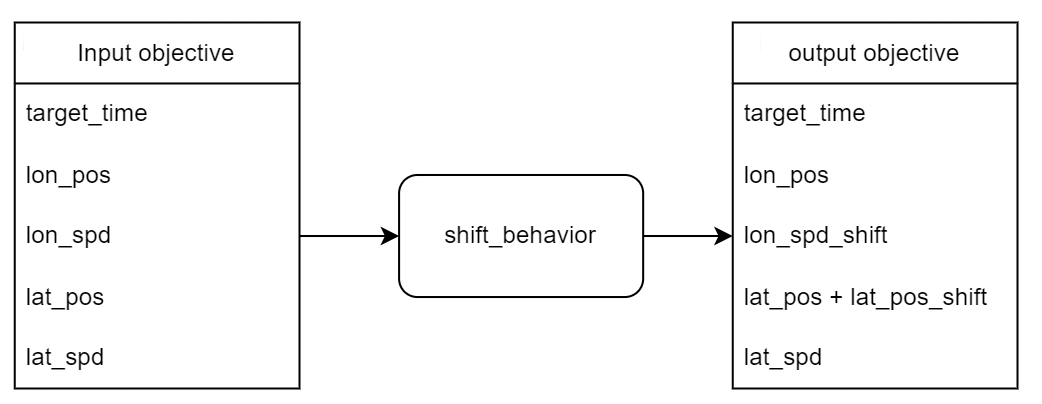
The shift behavior receives an input objective and holds a set of shift commands, additive or absolute:
-
additive shift command: The shift value is added to the input objective component.
-
absolute shift command: The shift value replaces the input objective component.
The shifting is applied gradually along the defined ramp-up duration (or the shortest time close to it) and holds the shift until a new command is received or until the scenario ends. (When moving to the next planned objective, the shift command is transferred automatically.)
Different shift values and ramp-up durations can be defined for each of the objective state components.
The objective components that can be shifted include:
-
longitudinal speed
-
lateral position
In the case of multiple shift commands in a scenario, if the commands are for different components (e.g., one for lon_speed, the other for lat_position), both commands are applied in parallel. However, in the case of multiple shift commands for the same component, only the last shift command is applied.
In the case of an impossible or unfeasible shift, the driver does its best to reach the shifted objective, but it is not guaranteed. In the case of a contradiction between the new position and the speed component, the speed component has priority.
The following image shows shift behavior when applied to a planned objective:
The following image shows shift behavior when applied for a recorded shape trajectory:
In the following image, the lateral position shift is of the additive type; the longitudinal position and speed are kept unchanged:
Shift behavior methods
The shift behavior exposes the following methods to OSC2. These methods belong to the Vehicle actor:
| Method | Description |
|---|---|
set_bm_shift_longitudional_speed(enable: bool, shift: speed, type: shift_type, ramp_up_duration: time) |
Sets the lon_spd shift value and the ramp_up_duration. |
set_bm_shift_lateral_position(enable: bool, shift: length, type: shift_type, ramp_up_duration: time) |
Sets the lat_pos shift value and the ramp_up_duration. |
| Parameter | Type | Default value | Description |
|---|---|---|---|
| enable | bool | true | Enable/Disable a shift command, if disabled, no other parameters needs to be set (e.g. set_bm_shift_longitudional_speed(enable: false)). |
| shift | speed or length | 0 | The shift value, for position shift - length units, for speed shift - speed units. |
| type | shift_type | Additive | Additive - the shift value will be added to the actor's current target. Absolute - the shift value will replace the actor's current target. |
| ramp_up_duration | time | 0[s] | The duration for shift to be applied. If the provided value is zero, the shift is applied immediately on the behavioral layer. However, the trajectory generation layer will constrain the vehicle's motion to stay within the defined physical (or comfortability) boundaries. |
By default, the values represent an empty new shift command that will not affect the actor's behavior.
The following example demonstrates the use of the shift behavior.
Updating driver behavior parameters at run time
You can call the update_config function during runtime to update behavior parameters.
To update behavior parameters at the run time:
- Set a new
behavior_paramvalue. - Call the
update_config. In the log file you can see, "“BEHAVIOR NAME” :update_config is called“.
The following example shows how to set a new distance_from_stop_line value:
extend sut.example:
    # event to trigger update the distance_from_stop_line of the junction_behavior
    # the change happens at time 1 second - so from this simulation time onwards the new parameter value will be active
    on @top.clk if (top.time == 1s):
        #define a new value for distance_from_stop_line
        sut.car.ftx_driver.junction_behavior.distance_from_stop_line = 1.5m
        #call to update_config function to update the config param of junction behavior
        call sut.car.ftx_driver.junction_behavior.update_config()
The following example shows how to call update_config to update the enable value for the junction behavior:
Similarly, you can call update_config for other behaviors.