OpenDRIVE MSP specific elements
Custom routes
You can create a predefined path on a xodr map using ODR points. This is useful when a vehicle needs to follow a GPS path or a route specified by a test protocol.
To create a custom route:
- Specify one or more points using
create_odr_point(). - (Optional) Join the points into a route using
create_route(). - Constrain the drive of the vehicle with
along().
Restrictions
Take note of the following restrictions.
- These methods can be used only for generatable fields. OSC2 code: Example of a restriction:
var x:= map.create_odr_point("10", -1, 2m) # not allowed
x:= map.create_odr_point("10", -1, 2m)
keep(x ....)  # not allowed
odr_point route element and create_odr_point() method
The odr_point route element represents a lane position in terms of the ODR map:
- A road ID (restricted to integer values)
- A lane ID
- A longitudinal offset on the OpenDRIVE road reference line.
struct custom_route_element inherits road_element:
    custom_route_id: int

struct odr_point inherits custom_route_element:
    road_id: int
    lane_id: int
    s: length
Unlike other route elements, occurrences of odr_point (and custom_routes in general) are generated with fixed values by calling the map method create_odr_point(road_id: string, lane_id: int, s: length) -> odr_point.
The create_odr_point() method returns a single ODR point, based on the specified parameters. If the parameters do not point to a valid point on the map, an error message similar to the following is displayed:
odr_point specified by road 8715, lane -5 offset 126.987654321m was not found on loaded map
Parameters
-
road_id: <string>The ODR road ID, which should be a number represented as a string. This parameter is required and must remain constant. -
lane_id: <int>The ODR lane ID. This parameter is required and must remain constant. -
s: <length>A longitudinal offset from the ODR reference. This parameter is required and must be constant.
Example using odr_point route element and create_odr_point() method
This example starts a route on a specific ODR point.
import "$FTX/env/basic/exe_platforms/model_ssp/config/model_sumo_config.osc"

extend test_config:
    set map = "$FTX_PACKAGES/maps/M61_FTX_highway_10km_4lane.xodr"

extend top.main:
    p1 := map.create_odr_point("0", -3, 900m)  # Start on road 0:-3 with offset of 900m

    do sut.car.drive(duration: [1..3]s) with:
        along(p1, at: start)
explicit_odr_route and method create_route()
The explicit_odr_route route element represents the shortest route via an ordered list of odr_point occurrences.
The struct explicit_odr_route inherits custom_route_element.
Unlike other route elements, occurrences of explicit_odr_route (and custom_routes in general) are generated with fixed values by calling the map method create_route(points: list of odr_point) -> explicit_odr_route.
The create_route() method creates a route that passes through a specified ordered list of odr_point occurrences. Each pair of points is connected by the shortest path.
If no path can be found between any two points, an error similar to the following is displayed:
Failed to create explicit_odr_route. No route found from road 3 lane 1 offset 22.123456789m to road 3 lane -1 offset 11.0m
Parameters
points: <list of odr_point>- A list of ODR points
Example: Follow a pre-defined route based on several ODR points
This example directs a vehicle to follow a pre-defined route based on several ODR points.
import "$FTX_BASIC/exe_platforms/sumo_ssp/config/sumo_config.sdl"

extend test_config:
    set map = "$FTX_PACKAGES/maps/highway.xodr"

extend top.main:
    p1 := map.create_odr_point("3", 1, 22m)
    p2 := map.create_odr_point("23", 3, 11m)

    # r1 is a route created by connecting p1, p2 and a new custom point.
    #
    r1 := map.create_route([p1, p2, map.create_odr_point("5", -5, 126m)])

    do sut.car.drive(duration: [1..3]s) with:
        along(r1)
odr_road
The odr_road route element represents the driving lanes on one side of an OpenDrive road.
It has the following attributes:
-
odr_id:int- The OpenDrive road ID as integer. -
min_lane_id: int- The smallest lane ID of a driving lane along the OpenDrive road. -
max_lane_id: int-The largest lane ID of a driving lane along the OpenDrive road. -
sub_id:int- A value indicating the road side: 1 for the left side (positive lane IDs) and -1 for the right side (negative lane IDs) relative to the OpenDrive road reference line. -
is_in_junction: bool- A boolean value indicating whether the OpenDrive road is inside a junction (‘true’) or not inside a junction (‘false’).
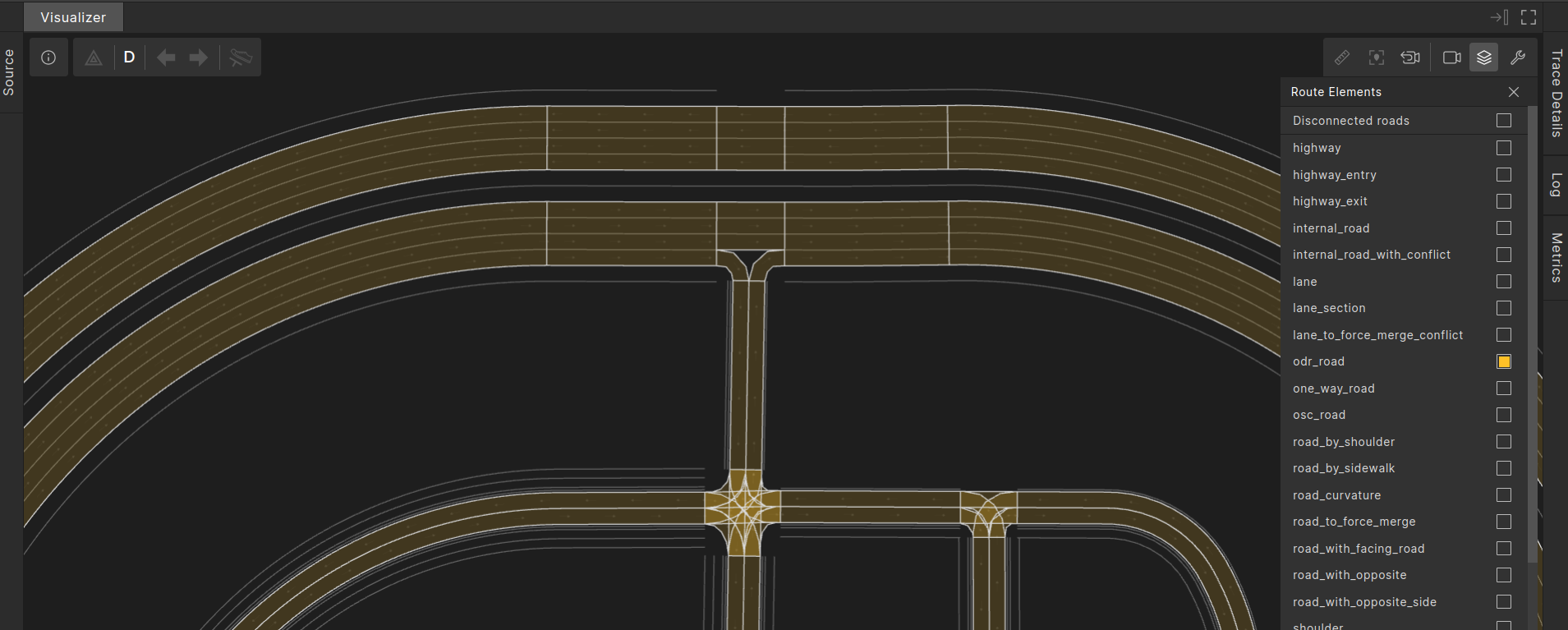
In the image below, odr_road occurrences are highlighted in yellow.
OSC definition
# odr_road - one side of an OpenDrive road. Occurrences of this road_element are only made available by open_drive msp.
#
struct odr_road inherits road_element:
    # ODR id of the road
    #
    odr_id:int

    # min ODR lane-id
    #
    min_lane_id: int

    # max ODR lane-id
    #
    max_lane_id: int

    # sub_id is -1 for the ODR right-side of the road, 1 for the ODR left-side of the road
    #
    sub_id:int

    is_in_junction: bool
Example: Start driving on a specific OpenDRIVE road and road-side
import "$FTX/env/basic/exe_platforms/model_ssp/config/model_dummy_config.osc"
import "$FTX/env/basic/msp/open_drive.osc"

extend test_config:
    set map = "$FTX_PACKAGES/maps/Town04.xodr"

scenario sut.drive_on_odr_road:
    road_277_right: odr_road with:
        # 'it.sub_id == -1' means "ODR road-side with negative lane ids".
        keep(it.odr_id == 277 and it.sub_id == -1)
    do sut.car.drive(duration: [3..5]s)with:
        along(road_277_right, start_offset: 0m, at: start)

extend top.main:
    do sut.drive_on_odr_road()