Non-driving lanes route elements
The identification of a shoulder, sidewalk, and bike_lane is determined by the msp_lane.lane_uses attribute set by the MSP, based on the source map.
shoulder and road_by_shoulder
The shoulder route element represents the longest continuous piece of the shoulder along a one_way_road.
Note
To plan a drive on the shoulder, you must explicitly use the shoulder route element; it is the only way to do so. For example, if you use right_of for a reference vehicle driving on the rightmost lane, it will create a contradiction unless it is combined with along(shoulder_road). Additionally, if you only use along at :start, the object will return to a driving lane at the end of the phase. To keep the object on the shoulder, use at:all.
The road_by_shoulder route element includes the driving lanes along one shoulder element. There is a one-to-one correspondence between occurrences of shoulder and road_by_shoulder.
In the image below occurrences of shoulder are highlighted in purple and road_by_shoulder are highlighted in pink.
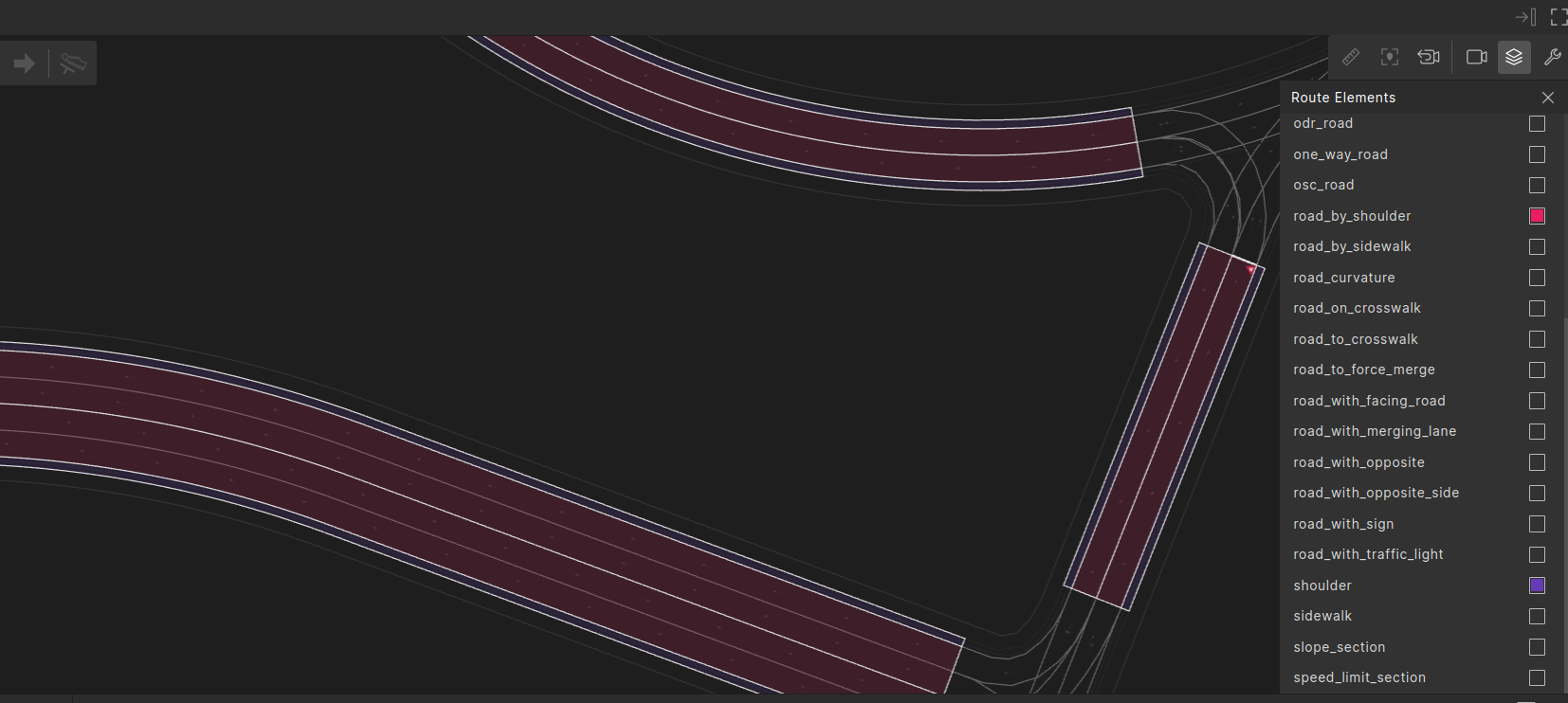
OSC definition of shoulder and road_by_shoulder
# longest continuos piece of shoulder along a one_way_road
#
struct shoulder inherits road_element:
    # road-side of the shoulder: 'center' (innermost) or 'curb' (outermost)
    #
    road_side: av_road_side

    # the 'road_by_shoulder' route element beside this shoulder lane.
    #
    road_by_id: uint
    road_by_shoulder: road_by_shoulder with:
        keep (it.id == road_by_id)

    # the corresponding one_way_road
    #
    one_way_road_id: uint
    one_way_road: one_way_road with:
        keep(it.id == one_way_road_id)


# road_by_shoulder - a piece of road, including only driving lanes, that corresponds to a shoulder
# route element.
# If a road has shoulders on both center and curb sides then it will have multiple road_by_shoulder elements, one for
# each of shoulder.
#
struct road_by_shoulder inherits road_element:
    # road-side of the shoulder: 'center' (innermost) or 'curb' (outermost)
    #
    shoulder_side: av_road_side

    # the corresponding shoulder
    #
    shoulder_id: uint
Example using shoulder and road_by_shoulder
In this scenario, the SUT drives on the curb side. An NPC that starts on the shoulder drives into the SUT’s lane. A possible result is illustrated in the following image. The SUT and its planned path are green, NPC and its planned path are blue.

Example scenario using shoulder and road_by_shoulder
import "$FTX/env/basic/exe_platforms/model_ssp/config/model_dummy_config.osc"
import "$FTX/env/basic/msp/open_drive.osc"

extend test_config:
    set map = "$FTX/packages/maps/M499_FTX_suburban.xodr"

extend gen_config:
    # allow placing vehicles on shoulders if they are wider than 0.5 meters (default is 1m)
    set non_driving_lanes_width_cutoff = 0.5m

scenario sut.cut_in_from_shoulder:
    npc: vehicle

    # shoulder - a shoulder lane.
    #
    shoulder: shoulder

    # road_near_shoulder - the driving lanes next to 'shoulder', 'shoulder' is in the outer-side of
    # the road (far from opposite traffic).
    #
    road_near_shoulder: road_by_shoulder with:
        keep(it.shoulder_side == curb)
        keep(it.shoulder_id == shoulder.id)

    # The npc starts ahead of SUT on shoulder, staying in place and then moves into SUT's lane
    #
    do parallel(overlap:equal, duration: [5..10]s):
        serial:
            sut.car.drive() with:
                lane(1, at: start, from: curb)
                keep_lane(run_mode: best_effort)
                along(road_near_shoulder, at: start)
                speed([20..40]kph)
        serial:
            npc.drive() with:
                position(distance: [20..40]m, ahead_of: sut.car, at: start)
                speed(0kph, at: start)
                along(shoulder, at: start)
                lane(same_as: sut.car, at: end, run_mode: best_effort)
                speed(0kph, faster_than: sut.car, at: end, track: projected, run_mode: best_effort)

extend top.main:
    do sut.cut_in_from_shoulder()

extend top.info:
    on @top.new_issue:
        # Downgrading a collision error to info
        call issues.curr.modify(collision_in_manual_control, info, "Downgrading collision severity to 'info'")
        # Downgrading off-road error to info
        call issues.curr.modify(road_departure, info, "Downgrading collision severity to 'info'")
sidewalk and road_by_sidewalk
The sidewalk route element represents the longest continuous piece of sidewalk along a one_way_road.
Note
To plan a drive on the sidewalk, you must explicitly use the sidewalk route element, as it is the only way to do so. For instance, using right_of for a reference vehicle in the rightmost lane will create a contradiction unless it is paired with along(sidewalk_road). Additionally, if you only use along at :start, the object will return to a driving lane at the end of that phase. To keep the object on the sidewalk throughout, use at:all.
The road_by_sidewalk route element represents the driving lanes along one sidewalk element. There is a one-to-one correspondence between occurrences of sidewalk and road_by_sidewalk.
In the image below occurrences of sidewalk are highlighted in green and occurrences of road_by_sidewalk are highlighted in blue.

OSC definition of sidewalk and road_by_sidewalk
# longest continuous piece of sidewalk along a one_way_road
#
struct sidewalk inherits road_element:
    # road-side of the sidewalk: 'center' (innermost) or 'curb' (outermost)
    #
    road_side: av_road_side

    # the 'road_by_sidewalk' route element beside this sidewalk lane.
    #
    road_by_id: uint
    road_by_sidewalk: road_by_sidewalk with:
        keep (it.id == road_by_id)

    # the corresponding one_way_road
    #
    one_way_road_id: uint
    one_way_road: one_way_road with:
        keep(it.id == one_way_road_id)


# road_by_sidewalk - a piece of road, including only driving lanes, that corresponds to a sidewalk
# route element.
# If a road has sidewalks on both center and curb sides then it will have multiple road_by_sidewalk elements, one for
# each of sidewalk.
#
struct road_by_sidewalk inherits road_element:
    # road-side of the sidewalk: 'center' (innermost) or 'curb' (outermost)
    #
    sidewalk_side: av_road_side

    # the corresponding sidewalk
    #
    sidewalk_id: uint
Example using sidewalk and road_by_sidewalk
In this example, the SUT drives in the lane next to a sidewalk. An NPC that is initially driving in front of the SUT comes to a stop on the sidewalk. A possible result is illustrated in the following image. The SUT and its planned path are green, and the NPC and its planned path are blue.

Example scenario using sidewalk and road_by_sidewalk
import "$FTX/env/basic/exe_platforms/model_ssp/config/model_dummy_config.osc"
import "$FTX/env/basic/msp/open_drive.osc"

extend test_config:
    set map = "$FTX/packages/maps/M499_FTX_suburban.xodr"

extend gen_config:
    # allow placing vehicles on sidewalks if they are wider than 0.5 meters (default is 10m)
    #
    set non_driving_lanes_width_cutoff = 0.5m

scenario sut.cut_in_from_sidewalk:
    npc: vehicle

    # sidewalk - a sidewlk lane.
    sidewalk: sidewalk

    # road_near_sidewalk - the driving lanes next to 'sidewalk', 'sidewalk' is in the outer-side of
    # the road (far from opposite traffic).
    #
    road_near_sidewalk: road_by_sidewalk with:
        keep(it.sidewalk_side == curb)
        keep(it.sidewalk_id == sidewalk.id)

    do parallel(overlap:equal, duration: [5..10]s):
        serial:
            sut.car.drive() with:
                lane(1, at: start, from: curb)
                along(road_near_sidewalk)
                speed([20..40]kph, run_mode: best_effort)
        serial:
            npc.drive() with:
                along(road_near_sidewalk, at: start)
                along(sidewalk, at: end)
                position(distance: [10..20]m, ahead_of: sut.car, at: start)
                speed(0kph, faster_than: sut.car, at: start)
                speed(0kph, at: end, run_mode: best_effort)

extend top.main:
    do sut.cut_in_from_sidewalk()
bike_lane and junction_bike_lane
The bike_lane route element represents bike lanes that run alongside a one_way_road element, meaning it does not cross junctions.
In contrast, the junction_bike_lane route element represents bike lanes within junctions, along an internal_road. This element includes references to the oncoming bike lane occurrence, in_bike_lane, and the outgoing bike lane occurrence, out_bike_lane.
Note
To plan a drive on the bike lane, you must explicitly use the bike_lane route element, as it is the only way to do so. For example, using right_of for a reference vehicle in the rightmost driving lane, which is to the left of the bike lane, will create a contradiction unless it is paired with along(bike_lane). Additionally, if you use along only at :start, the object will return to a driving lane at the end of that phase. To keep the object on the bike lane throughout, use at:all.
Unlike other non-driving lanes, such as shoulder and sidewalk, a bike_lane can be located between two driving lanes, rather than only at the side of the road. Since the bike lane is classified as a lane in lane numbering, a vehicle driving next to a bike lane, for example on the right side, cannot change to the left without explicitly requesting to move onto the bike lane. To reach the driving lane on the other side of the bike lane, the vehicle must change two lanes.
The relation_to_driving_lanes enum field for the bike_lane can take the values [left, right, between] indicating its location relative to the driving lanes: left if the bike_lane is to the left of the driving lanes, right if the bike_lane is to the right of the driving lanes, and between if it is located between driving lanes.
In the image below bike_lane occurrences are highlighted in orange and junction_bike_lane occurrences are highlighted in red.
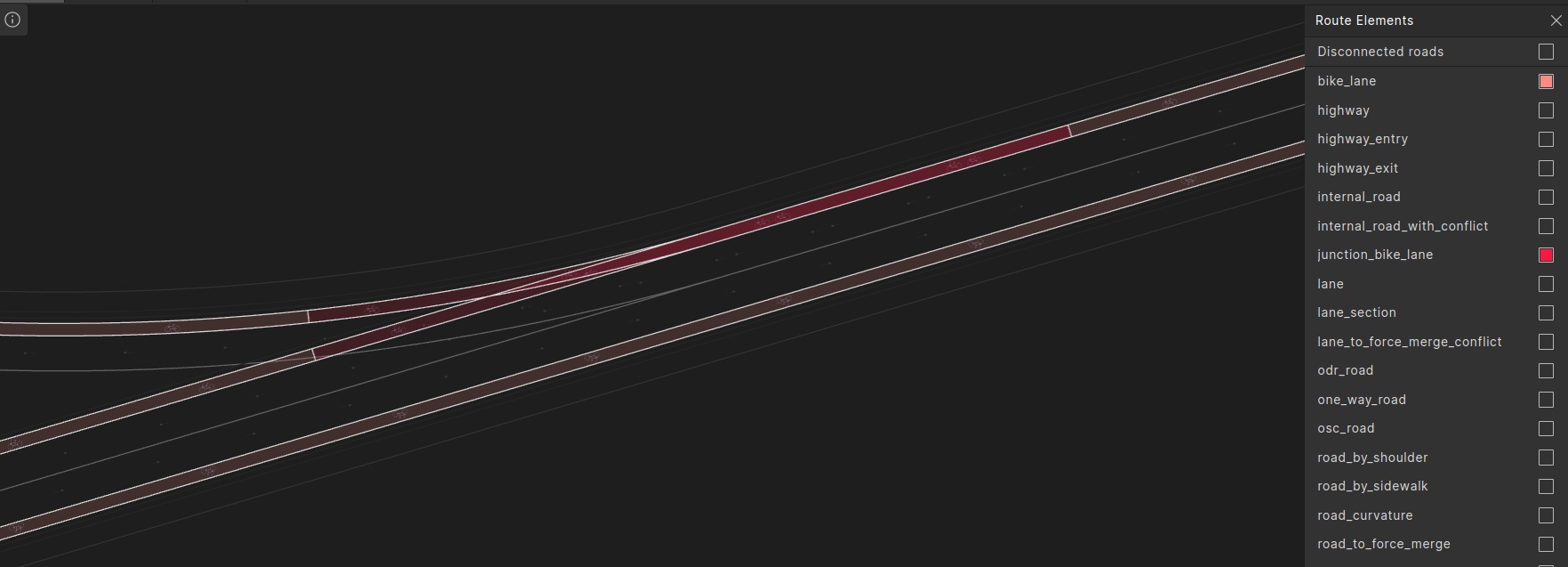
OSC definition of bike_lane and junction_bike_lane
enum relation_to_driving_lanes: [left, right, between]

struct bike_lane inherits road_element:
    # The one_way_road on which this bike_lane is on
    #
    one_way_road_id: uint
    one_way_road: one_way_road with:
        keep(it.id == one_way_road_id)

    # start and end offsets in road coordinates of this bike_lane on the one_way_road
    #
    one_way_road_start_offset: length
    one_way_road_end_offset: length

    # relation to driving lanes - 'left', 'right' or 'between' the driving lanes.
    #
    relation_to_driving_lanes: relation_to_driving_lanes

struct junction_bike_lane inherits road_element:
    # The internal_road along which this junction_bike_lane is on
    #
    internal_road_id: uint
    internal_road: internal_road with:
        keep(it.id == internal_road_id)

    # The bike_lane entering this junction_bike_lane
    #
    in_bike_lane_id: int
    in_bike_lane: bike_lane with:
        keep((in_bike_lane_id == -1 and it == null) or (it.id == in_bike_lane_id))

    # The bike_lane departing from this junction_bike_lane
    #
    out_bike_lane_id: int
    out_bike_lane: bike_lane with:
        keep((out_bike_lane_id == -1 and it == null) or (it.id == out_bike_lane_id))
Example using bike_lane and junction_bike_lane
In this scenario the SUT enters a junction where a cyclist is already present on an internal road, coming from the same direction as the SUT. An NPC is driving in a conflicting route. A possible result is illustrated in the following image. The SUT and its planned path are green, the NPC vehicle and cyclist and their planned paths are blue, and the cyclist is presented as a box.
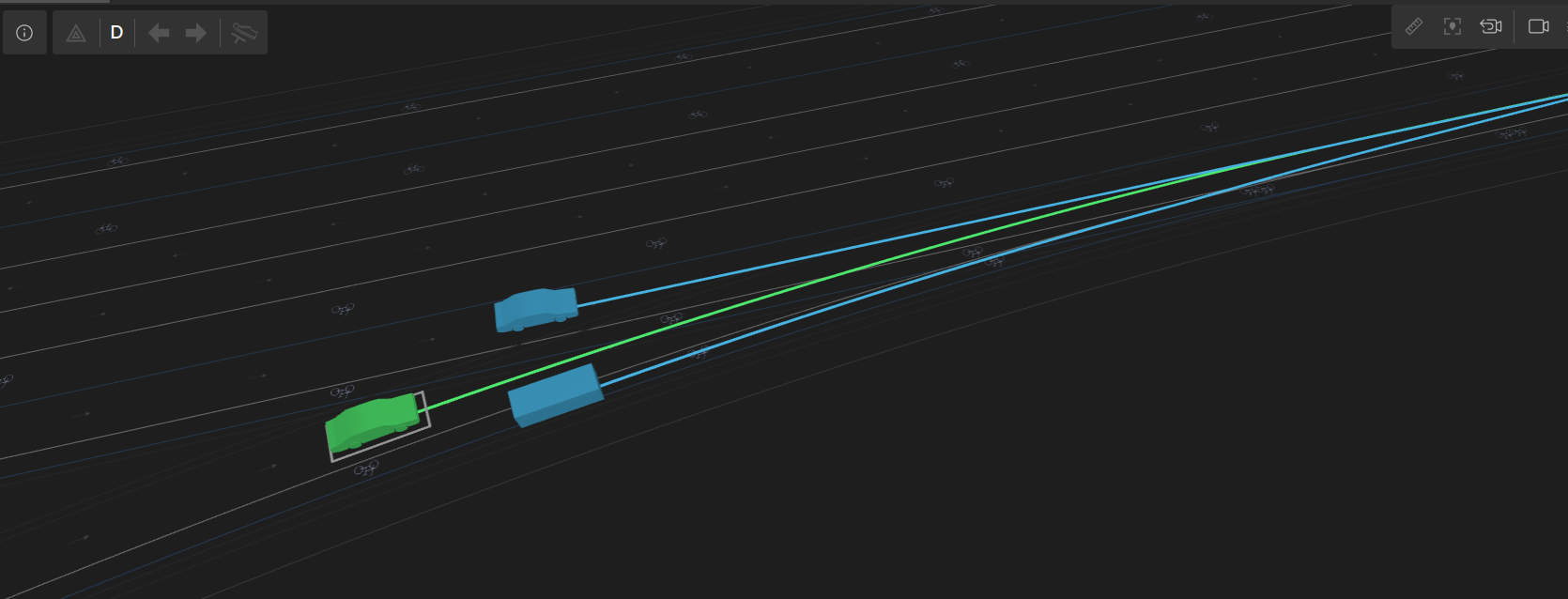
Example scenario using bike_lane and junction_bike_lane
import "$FTX/env/basic/exe_platforms/model_ssp/config/model_dummy_config.osc"
import "$FTX/env/basic/msp/open_drive.osc"

extend test_config:
    set map = "$FTX/packages/maps/M493_FTX_Bike_Lanes.xodr"

scenario sut.bike_lane_conflict:
    npc: vehicle
    bicyclist: bicycle

    # junction_bike_lane - a bike lane inside a junction.
    #
    junction_bike_lane: junction_bike_lane

    # internal_road_with_conflict - a pair of conflicting internal_road occurrences, the primary one
    # containing 'junction_bike_lane'.
    #
    internal_road_with_conflict: internal_road_with_conflict with:
        keep(it.internal_road_id == junction_bike_lane.internal_road_id)

    do parallel(overlap: equal, duration: [3..6]s):
        serial:
            bicyclist.drive() with:
                along(junction_bike_lane, start_offset: 0m, at: start)
                speed(5mps, slower_than: sut.car, run_mode: best_effort)
        serial:
            npc.drive() with:
                along(internal_road_with_conflict.conflicting_road, start_offset: 0m, at: start)
        serial:
            sut.car.drive() with:
                along(junction_bike_lane.in_bike_lane.one_way_road, end_offset: [10..15]m, at: start)
            sut.car.drive()

extend top.main:
    do sut.bike_lane_conflict()