Creating test templates
Once you have created a test, executed it many times, and are satisfied with the results, you can create a test template. Having a test template enables you to generate many variations of the test while constraining the test parameters to combinations that provide significant results.
Understanding test templates
A template file (default extension .tosc) is a text file with a format similar to that of an OSC2 file. It consists of a template header, followed by OSC2 code with embedded parameters. Here is the full format:
$$template():
    <params-block>
$$expand():
    <OSC2-code-block>
The <params-block>
This block is indented four spaces from the previous line. It consists primarily of a list of parameter definitions. The parameters you define should include all explicitly constrained attributes of the scenarios executed in the test.
<param-name>: $$param(["<default>"])
<param-name> is used in the parameter-names line of the run table.
<default> is the default value of this parameter. A parameter without a default value is called an optional parameter, meaning the test can be run without any constraints on this parameter.
sim: $$param("sumo") # The simulator name to be used for this test
map: $$param("hood") # The map to be used for this test
For additional constructs that can be included in a <params-block>, see Template syntax.
The <OSC2-code-block>
The <OSC2-code-block> is OSC2 code with embedded parameters, for example:
import "$FTX/config/sim/$$(sim)_default.osc"

extend test_config:
    set map="$FTX_PACKAGES/maps/$$(map).xodr"
Creating an all-in-one template
Below is a simple, all-in-one template for the base scenario, lead_vehicle().
| OSC2 code: test template for lead_vehicle all in one | |
|---|---|
1 2 3 4 5 6 7 8 9 10 11 12 13 14 15 16 17 18 19 20 21 22 23 24 25 | |
Lines 3 - 8 define the five parameters that can be constrained in a CSV file.
Lines 12 - 23 define how the parameters are used in the test.
Executing an all-in-one test suite
Before you can execute this test with FRun, you need to create a simple CSV file, as shown in Figure 1.
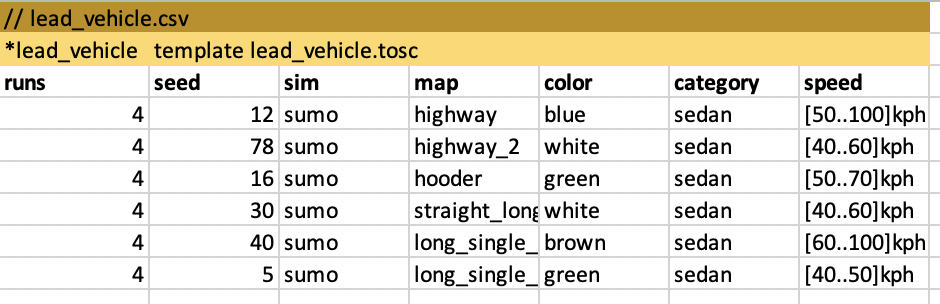
Because the test suite is defined in a single CSV file and template, you can invoke FRun like this:
$ frun --filter --csv lead_vehicle_allinone.csv
Creating a template that uses sub templates
Once your all-in-one template is working well, you might want to modify it to use the simulator and map configurations that are available in V-Suites. To accomplish this, you need to split the lead_vehicle_allinone.tosc template into a main template and a sub template.
The reason for this is that a template cannot expand both sub templates and scenario parameters. Thus, the main template expands sub templates and the scenario sub template expands scenario parameters.
Below is the code for lead_vehicle_sub.tosc.
| OSC2 code: lead vehicle sub template | |
|---|---|
1 2 3 4 5 6 7 8 9 10 11 12 13 14 | |
Line 1 indicates that this file defines a sub template whose role type is lead_vehicle. This role type must match the run group name in a sub run table as well as the role type specified by the corresponding parameter in the main template.
Lines 2 - 4 define the scenario parameters.
Line 8 imports the top file of the scenario definition.
Lines 12 - 14 constrain the scenario parameters with the values specified in the sub run table.
Below is the code for the lead_vehicle.tosc.
| OSC2 code: lead vehicle main template | |
|---|---|
1 2 3 4 5 6 7 8 9 10 11 12 13 14 15 16 | |
Line 1 indicates that this a main template.
Lines 3 - 5 declare the sub run tables using the syntax <role-name>: $$subtable(<role-type>).
Lines 9 - 11 expand the sub templates. Any import statements in these templates are moved to the top of the test file.